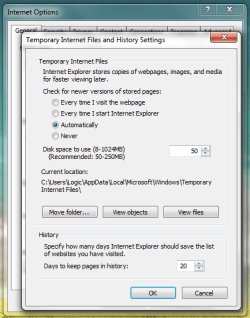
Temporary Internet Files

Unless you changed it, it is were I said it is. See below:
 

Attachments

  • Untitled.png
    Untitled.png
    24.4 KB · Views: 161

My Computer

Computer type
PC/Desktop
Computer Manufacturer/Model Number
Alienware Aurora ALX R4
OS
Windows 10 Pro (x64)
CPU
Intel Core i7-3930K (3.2GHz - 4.5GHz)
Motherboard
Alienware Aurora-R4 x79
Memory
4x Samsung 4GB PC3-12800 DDR3 (16GB 1600MHz)
Graphics Card(s)
Nvidia Geforce GTX 690
Sound Card
SteelSeries Siberia Elite
Monitor(s) Displays
Dell UltraSharp U3011
Screen Resolution
2560x1600
Hard Drives
Samsung 850 Pro 256 GB, Seagate 1TB Desktop Hybrid HDD, 2x Western Digital 4TB Green HDD
PSU
875W Some Dell PSU <.<
Case
Alienware Aurora ALX
Cooling
Custom Liquid Cooling (EK CPU & GPU blocks) dual EK 480RAD
Keyboard
Logitech G710+ Mechanical
Mouse
Logitech G700s
Internet Speed
Verizon Fios (50 mbps average)
Other Info
Server: Intel NUC D54250WYK: i5-4250U, 16GB, 256 GB mSATA, Windows Server 2012 R2
I am so glad to be wrong...at least the issue has been answered.

ZigZag and logicearth are partially correct about the directory for storing of Temp Internet Files:

C:\Users\jollymoon\AppData\Local\Microsoft\Windows\Temporary Internet Files\Low\Content.IE5

My directory of the above name WAS empty...that is because I had forgotten that I had "moved" the Temp Internet Files from inside IE8 !

In my case I had moved the Temps to C:/internet/TempInternetFiles/ but you still have to add the \Low\Content.IE5 (with correct slashes) into the directory window to see the hidden 8 character directories holding the temp files.

Not sure about the "memory" writing them to the HDD though...

Thanx sports fans! Now back to surfing...
 

My Computer

OS
win7
logicearth...didn't see your picture of the location of the Temp Files until after my post.

but you still have to add the \Low\Content.IE5 (with correct slashes) typed into the directory window to see the temps...
 

My Computer

OS
win7
Windows7 New System - no temporary internet file folder

I have followed the exchanges hoping that I might locate the temporary internet files on my new system with Windows 7 installed by Dell. I installed the Office 2007 software. I cannot locate a folder for temporary internet files any where and not in C:\Users\[USERNAME]\AppData\Local\Microsoft\Windows\Temporary Internet Files
However when I go to Inter Explorer Tools - Internet Options - Browsing History - Settings - Display files they appear.
In using explorer I have found some files in C:\Users\[USERNAME]\AppData\LocalLow\content and \meta data. I am not sure what these files are.
I see I have a lot of files under C:\Users\[USERNAME]\AppData\Local\temp. I am not sure what these are but I have been reinstalling a lot of software on this new system.
I would like to separate the TIF data from everything else. I used to use the tools in XP to delete the files on a frequent basis.

Is there any way to put a trace on to find where the files are stored?
 

My Computer

Computer Manufacturer/Model Number
Dell Vostro
OS
Windows 7
CPU
Intel Core Duo CPU
Motherboard
32 bit
Memory
4 GB
Graphics Card(s)
NVIDIA GE Force
Sound Card
IDT High Definition
Monitor(s) Displays
Generic PnP
Hard Drives
500 GB
Temporary Internet Folder defined as system folder

I did some further experimentation to find that the temporary internet folder located in
C:\Users\[USERNAME]\AppData\Local\Microsoft\Windows\Temporary Internet files is defined as a operating system folder with my installation. After opening C:\Users\[USERNAME]\AppData\Local\Microsoft\Windows with explorer I went to organize - folder and search options -view and removed the check from hide protected operating system files. The folder temporary internet appeared along with the files within it.
 

My Computer

Computer Manufacturer/Model Number
Dell Vostro
OS
Windows 7
CPU
Intel Core Duo CPU
Motherboard
32 bit
Memory
4 GB
Graphics Card(s)
NVIDIA GE Force
Sound Card
IDT High Definition
Monitor(s) Displays
Generic PnP
Hard Drives
500 GB
Removing All Temporary Internet files

I used the Internet Options - Browsing history - Delete option to clear the temporary internet files. Before the delete there were just under 700 files. After performing the delete there was 287 files left behind. Any ideas why the Windows 7 option does not remove all temporary internet files?

I used explorer removed the hide operating system files check (above post) and then used explorer to delete them all. It is now clean.
 

My Computer

Computer Manufacturer/Model Number
Dell Vostro
OS
Windows 7
CPU
Intel Core Duo CPU
Motherboard
32 bit
Memory
4 GB
Graphics Card(s)
NVIDIA GE Force
Sound Card
IDT High Definition
Monitor(s) Displays
Generic PnP
Hard Drives
500 GB
Disparity between GUI and Command Prompt

I came across this post in my own search for the mysterious location of the Temporary Internet Files in Windows 7. I found that I can use Windows Explorer and browse to C:\Users\[username]\AppData\Local\Microsoft\Windows\Temporary Internet Files and I can view files (currently looking at 423 files and ZERO directories in that folder). However, the same directory in COMMAND PROMPT, shows me 2 directories (AntiPhising and Content.Outlook) and ZERO files.

I mention the COMMAND PROMPT specifically because I am trying to revise a VBSCRIPT that I have written and that I use to clear all Temporary Internet Files and the Temp Directories from all profiles on a given machine. This proves to be very handy on a terminal server where there may be 30 profiles or so. I have been called in on a terminal server once where poor policies had allowed temporary files to build up and after allowing my script to run (8 hours), I deleted 50 GB of Temporary Internet Files (they had been complaining that they had less then 20 MB of free space...when I was done the drive was 50% free).

I want to revise my script to enumerate profiles in XP, Server 2003, Vista, Windows 7, or Server 2008, but the Temporary Internet Files location is causing a hang up simply because the files do not appear to be in the given location, specifically when outside the GUI. If anyone has any insight into that, I'd sure love to hear it. Scripts that can handle cleanup of Temporary Internet Files automatically for Win7 and Server2008 are basically non-existant right now...I'd like to change that.

 

My Computer

OS
Windows 7 Professional Build 7600
Folders in the Other Directories

With the higher number of users it is even more important to keep the system clean. I feel the same even with lesser users because of the impact of the overhead of extra files. Have you found files in these other two directories? What command do you use to view these additional directories. I would like observe them on my system for a period.
 

My Computer

Computer Manufacturer/Model Number
Dell Vostro
OS
Windows 7
CPU
Intel Core Duo CPU
Motherboard
32 bit
Memory
4 GB
Graphics Card(s)
NVIDIA GE Force
Sound Card
IDT High Definition
Monitor(s) Displays
Generic PnP
Hard Drives
500 GB
TIFs not found

The threads I have read are to remove old TIFs.

I want to find the TIFs so I can move and keep video files, etc. Where are they kept?

They are not in c:\Users\[user-id]\AppData\Temp nor in c:\Users\[user-id]\AppData\Microsoft\Windows\Temporary Internet Files.

I can see the Cookies.

My Win7 is a straight install, with no customization.
 

My Computer

Computer Manufacturer/Model Number
Computer Direct Outlet
OS
Windows 7
CPU
Intel
Memory
4gb
Monitor(s) Displays
1600x900
Hard Drives
500gb
You have to add the : \Low\Content.IE5 into the window at the top of your Windows Explorer manually...then you can see the TIF area with several random folder names.

Until you type it in the TIF remain hidden...

I wish there was a way to put all the TIF into ONE FOLDER instead of a random 4-5 folders as this would make it easier to manage the content for looking at these files.
 

My Computer

OS
win7
I came here looking for this same answer for my fiance who got me Windows 7 64bit and he has it as well. His is different from mine but I helped him with the help of this thread. Thank you. His was the 2nd one listed in the first post but mine was neither of those. Mine is here: C:\Users\\AppData\Local\Temp I found out by dragging an image from the net to an art program and then bringing up the save window but not saving again but looking at where it was temporarily found. Why is it that different Windows 7 users have it in different places? I never told it to be where it is and my fiance never told his to be where his is. Is this random? Wasn't like this in XP. Seems Microsoft really does not want you to find it..
 

My Computer

Computer type
PC/Desktop
Computer Manufacturer/Model Number
HP-Pavilion-a6000-Desktop-PC
OS
Microsoft Windows 7 Professional Edition Service Pack 1 (build 7601), 64-bit
CPU
Intel(R) Core(TM)2 Quad Q9550 @2.83GHz (Xeon) Socket 775 LGA
Motherboard
ASUSTeK Computer INC. Benicia (P35/G33/G31)
Memory
4095 MB (4 x 1024 MBytes DDR2 Dual Symmetric)
Graphics Card(s)
Sapphire HD 7770 GHz Edition (shows Radeon R7 200)
Sound Card
Realtek High Definition Audio Driver Version 6.0.1.6662
Monitor(s) Displays
HP w19b 18.6" 5:3 (SN: CNC703PN1G)
Screen Resolution
1440 x 900
Hard Drives
1080 GB total
C: (320Gb): WDC WD3200AAKS-75L9A0 ATA
D: (Optical Drive): ATAPI DVD A DH16A6S ATA Device
E: (1Tb): WDC WD10EARS-00S8B1 ATA
F: (Backup 2 Tb): Clikfree Backup Drive USB
PSU
GX750
Case
Black/Blue APEVIA X-Hermes
Cooling
2 Top , 1 back, 1 front fan all 180 mm & side 200mm
Keyboard
Logitech G110
Mouse
Logitech G500s
Internet Speed
High speed cable
Antivirus
Avast! Internet Security 2014.9.0.2021
Browser
Firefox 44 (x86 en-US)
Other Info
BIOS American Megatrends
Date:
09/10/09 10:25:18 Ver: 5.43
Find it this way: Tools/Internet Options/Browsing History/Settings/Current Location. It's called "Temporary Internet Files" not "Temp" and the full path is shown under "Current Location". To see it in Windows Explorer you must change the CtrlPanel/Folder/View options to show hidden files AND uncheck "Hide Protected OS files". But you don't have to use Windows Explorer; just use the Internet Options/Browsing History to view or delete the files in groups as listed (cookies, history, temporary files).
 

My Computer

Computer type
PC/Desktop
Computer Manufacturer/Model Number
OQO 2+
OS
Windows 8 Pro w/MC 32-bit
CPU
Intel Atom 1.86 GHz
Motherboard
OQO 2+
Memory
2 GB
Graphics Card(s)
Intel GMA 500
Sound Card
IDT
Monitor(s) Displays
LCD
Screen Resolution
800 x 480 (portable) 1280 x 1024 (docked)
Hard Drives
64 GB SSD
PSU
9 Ah Battery (portable) or OQO Brick (docked)
Case
Shirt Pocket Sized
Cooling
Tiny Fan
Keyboard
Slide out (portable) DiNovo Edge (docked)
Mouse
Eraser head (portable) Logitech Bluetooth (docked)
Internet Speed
WWAN or 802.11G (portable) T1 (docked)
Browser
IE 10
Other Info
DVD-RW OQO Docking Station
Folder Options might not have to be changed if you use Environment Variables from Start Menu, Run...

Code:
%appdata%
Code:
%localappdata%
(in the run box, windows key + r)

ps.
Code:
http://vlaurie.com/computers2/Articles/environment-variables-windows-vista-7.htm
 

My Computer

OS
Windblow$ 7 Pro x64
CPU
Intel i5-2400 @ 3.10GHz
Motherboard
MSI P67S-C43
Memory
DDR3 2x2GB 1600MHz
Graphics Card(s)
GeForce GTS450 Palit
Monitor(s) Displays
ViewSonic VP930 DVI, BenQ E2200HD D-SUB
Hard Drives
WD 1TB 64MB SATA 6.0Gb/s
Back
Top