Disparity between GUI and Command Prompt
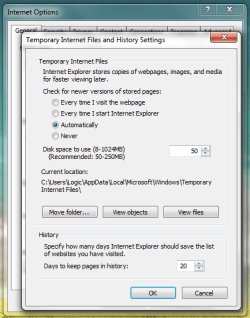
I came across this post in my own search for the mysterious location of the Temporary Internet Files in Windows 7. I found that I can use Windows Explorer and browse to C:\Users\[username]\AppData\Local\Microsoft\Windows\Temporary Internet Files and I can view files (currently looking at 423 files and ZERO directories in that folder). However, the same directory in COMMAND PROMPT, shows me 2 directories (AntiPhising and Content.Outlook) and ZERO files.
I mention the COMMAND PROMPT specifically because I am trying to revise a VBSCRIPT that I have written and that I use to clear all Temporary Internet Files and the Temp Directories from all profiles on a given machine. This proves to be very handy on a terminal server where there may be 30 profiles or so. I have been called in on a terminal server once where poor policies had allowed temporary files to build up and after allowing my script to run (8 hours), I deleted 50 GB of Temporary Internet Files (they had been complaining that they had less then 20 MB of free space...when I was done the drive was 50% free).
I want to revise my script to enumerate profiles in XP, Server 2003, Vista, Windows 7, or Server 2008, but the Temporary Internet Files location is causing a hang up simply because the files do not appear to be in the given location, specifically when outside the GUI. If anyone has any insight into that, I'd sure love to hear it. Scripts that can handle cleanup of Temporary Internet Files automatically for Win7 and Server2008 are basically non-existant right now...I'd like to change that.