Solved Temps problem (Again)

andrew129260

IT Support Pro
Guru
Gold Member
VIP
Local time
4:48 PM
Messages
4,563
Temps....NEED HELP! (again) NEW:

If anyone who reads this would please take the time to read the whole thing I would really appreciate it.


Hi everyone again. Okay, so I was just doing some mega 3 hour plus video (editing), while also converting 5 video files that were about an hour long in the background that I made. Each video about 1.5 GB and 720p.
For the first time in my life of this build, (3 months) I actually saw the processor jump to 100% Highest I ever got it before was 40%
My PC temperature quickly went from 100 F (37c) to 140f!!!! (60c) according to Core Temp and Speccy.

Good news is it never went past the 140 F (60c) mark, it then kinda hovered around 138 F (58c) but man I got scared. Reason is according to what I have seen on the net, 140 F (60c) is the limit for the AMD fx8350 cpu and that its dangerous and unstable at that point.

(Although AMD does not mention anywhere on their site what the limit is. I saw a forum post of someone posting a responce when he sent AMD an email and this is what they said. Yet the spec sheet does not define this.)

I know I am panicking. Reason is this build was expensive ($1,000 in total) and I am very scared that damage could have happened. Even though no sign at all of anything happened.
In fact, it was stable the whole time and not a ounce of stutter or freezing.


Anyways, it was at this temp for 3-8 minutes. Then the temp went down to 120 F (48c) and then went even lower back to 92 F (33c). (The conversions finished.)

My room temp (This is a Guess, its an attic turned into a room) is probably 70 F (21c) --- 85 F (29c)?

I have a box fan on blowing towards me and the tower.
The tower has an intake on the side and that is what the fan is blowing towards. The specs are in my system specs there. Case and everything.

Now, when it was at this temperature, I felt the back of my PC and top fan vents. They felt mildly warm, but not hot. This is what makes me think I am overeating.

Ultimate question:

But this is what gets me confused, if my computer was running that Hot, or hotter then it was supposed to, wouldn't it restart? Also why did the back only feel midly warm? I would think if it was really running this hot, it would have felt hot? So are maybe the programs are reporting the wrong temps? I am so confused.

I had a very stressful day and I just am freaking out here....

Thanks in advance...


OLD:

http://www.sevenforums.com/pc-custom-builds-overclocking/302621-wondering-about-my-temps.html
 

My Computer

Computer type
PC/Desktop
Computer Manufacturer/Model Number
Custom Built
OS
Windows 10 Pro
CPU
AMD Ryzen 5 2400G Processor with Radeon RX Vega 11 Graphics
Motherboard
ASRock X470 Master SLI/AC AM4 AMD Promontory X470 SATA 6Gb/s
Memory
G.SKILL Ripjaws V Series 16GB (2 x 8GB) 288-Pin DDR4 SDRAM D
Graphics Card(s)
2047MB NVIDIA GeForce GTX 1060 6GB (EVGA)
Sound Card
Motherboard Built in
Monitor(s) Displays
Acer R240HY bidx 23.8-Inch IPS HDMI DVI VGA (1920 x 1080) Wi
Screen Resolution
1920 x 1080
Hard Drives
1TB Sandisk SSD PLUS (Main drive)
500 GB Seagate 7200 RPM (Games)
500 GB Western Digital 7200 RPM (Virtual Machines)
PSU
CORSAIR TX Series TX650M 650W 80+ Gold Modular Power Supply
Case
CORSAIR CARBIDE SPEC-02 Mid-Tower Gaming Case, Red LED Fan
Cooling
220mm, two 120mm, and four 60mm fans
Keyboard
Wired Dell keyboard
Mouse
Wireless Logitech mouse
Internet Speed
250mb down, 30mb up
Antivirus
Panda Cloud Antivirus
Browser
Chrome-ish x64
Other Info
Your awesome for reading this.
I'm not really up on AMD's but for now I would lower you OC, and try to shorten the video editing sessions.
 

My Computer

Computer type
PC/Desktop
Computer Manufacturer/Model Number
Dude Build
OS
Windows 10 Pro X64
CPU
Intel(R) Core(TM) i5-3570K CPU OC@ 4.5GHZ Turbo
Motherboard
MSI Z77A-G45 Gaming
Memory
8.00 GB DDR3 1600Mhz
Graphics Card(s)
MSI Gaming X GTX 1070
Sound Card
Realtek High Definition
Monitor(s) Displays
Dell S23O9W, HP L1710
Screen Resolution
DELL-1920 x 1080 HP-1280 x1024
Hard Drives
Crucial m4 256 SSD, WD 7200RPM 500GB WD 1TB
PSU
Seasonic X650 GOLD
Case
Zalman Z12
Cooling
Antec Kuhler 920
Keyboard
Logitech
Mouse
MSI DS100 Interceptor
Internet Speed
50 down and 5 up
Antivirus
MSE
Browser
Chrome, IE 11
Other Info
Logitech X-620 Speakers
Andrew I have a FX8350 and some things you run on it the temps surge high and if you are overclocked even higher

This would be a severe cooling issue and you might need to look into a better solution

the max is 62 because I hit it before and it will freeze that is all

One thing I did notice with the 8350 is when you run certain task it struggles and that is when temps rise

There was a test that I tried to run on my 8350 and it wouldn't even go my temps went out the roof and i was watercooled
 

My Computer

Computer type
PC/Desktop
Computer Manufacturer/Model Number
CoreI7-6700K MrFingerIII Special Builds
OS
Windows 10 Home Premium 64bit sp1
CPU
Intel I7-6700K @ 4.6 Ghz 1.344 volts everyday OC
Motherboard
Asrock Fatality K6 Z170 Socket 1151
Memory
32GB G-Skill TridentZ 3200mhz 16-18-18-38 DDR4
Graphics Card(s)
Sli Gigabyte Windforce GTX 980 G1
Sound Card
AC97 Creative Rage Tactic 3D Headphones Bluetooth
Monitor(s) Displays
27" Asus ROG Swift PG278Q G-Sync 48" Vizio Smart HD TV
Screen Resolution
2560x1440p 27"- 48" Currently Gaming at 2560x1440p Res 2K
Hard Drives
250GB Samsung Evo840SSD Seagate baracuda 500 GB WD Mybook 500Gb 1TB Seagate Barracuda
PSU
HX1050w Corsair Silver 80plus certified crosfire/sli
Case
Enthod Pro Full Tower
Cooling
Corsair H110i GT 280 mm High Performance WaterBlock
Keyboard
Logitech wireless keyboard
Mouse
Logitech wireless mouse
Internet Speed
Cox Cable 100+ mb
Antivirus
WebRoot Spysweeper with Antivirus
Browser
IE-10, Chrome, Opera
Other Info
My Other Rig is a AMD FX8320E @4.6Ghz 16GB Ballistic Sport Ram
Mobo Asrock Fatality 990FX 120GB OCZ SSD 1TB Seagate Barracuda Corsair H75 Cooling PSU Corsair CX750
GPU GTX Gigabyte 970G1
Video editing will sometimes tax the CPU as much as a stress test, even a beast of a CPU. When I'm encoding with Handbrake for example, it will use 100% of all 4 cores. If it had 6 cores, it would use 100% of them......if I had a 12 core Xeon, it would use 100% of them as well. That's the way encoding/rendering works. Are you using the stock AMD CPU cooler? If so, it's time to either put some AC in that room, or get a new CPU cooler.
 

My Computer

Computer type
PC/Desktop
Computer Manufacturer/Model Number
Custom Built
OS
Windows 7 Professional 64bit SP1
CPU
Intel Core i5-3570K @ 4.5GHz
Motherboard
Asus Sabertooth Z77
Memory
Corsair Vengeance 16GB (4x4) @1866MHz CL 9-9-9-24 1T
Graphics Card(s)
EVGA GTX 750 Ti FTW
Sound Card
Onboard Audio
Monitor(s) Displays
Dell S2309W
Screen Resolution
1920x1080
Hard Drives
Samsung 830 128GB SSD - OS
(4) Seagate 5TB HDD
(1) Seagate 2TB HDD
PSU
Seasonic X750 80+ Gold Full Modular
Case
Antec Eleven Hundred Super Mid Tower
Cooling
Intel Liquid Cooler
Keyboard
Max Nighthawk X8 Mechanical keyboard
Mouse
Mionix Naos 7000
Internet Speed
50 Mbps Down / 10 Mbps Up
Antivirus
Microsoft Security Essentials/Malwarebytes Anti-Malware
Browser
Chrome/Firefox
Other Info
Klipsch ProMedia 2.1's
Asus RT-N66R Wireless Router
Thanks guys...

Is it possible though the programs are wrong? Like I said, the pc back didn't feel hot at all. Wouldn't it feel a lot warmer if it was running this hot? And wouldn't if freeze like you said? It was really stable, smooth as butter actually.....


Also I am not overlocking. My Asus sabertooth 990fx gen 3 rev 2 I think automatically does it. Cause the chip is really 4.0 GHZ but I notice windows reports 4.21GHZ.

How would I turn this off? I have looked in the manual for my motherboard and looked around in the advanced tab and cannot find a way. I need help with this if that is the case.....I don't care about overclocking.

Ugh....please do not tell me the chip is possibly bad. Would AMD cover it if so?
Is it possible the case I have is not enough air?
With all the fans it came with I thought my system would run a lot cooler. I used the built on stock cooler and thermal paste that was on it when I built it.

I do plan to move out soon to my own apartment with AC so that might help.

Thanks for more replies...
 

My Computer

Computer type
PC/Desktop
Computer Manufacturer/Model Number
Custom Built
OS
Windows 10 Pro
CPU
AMD Ryzen 5 2400G Processor with Radeon RX Vega 11 Graphics
Motherboard
ASRock X470 Master SLI/AC AM4 AMD Promontory X470 SATA 6Gb/s
Memory
G.SKILL Ripjaws V Series 16GB (2 x 8GB) 288-Pin DDR4 SDRAM D
Graphics Card(s)
2047MB NVIDIA GeForce GTX 1060 6GB (EVGA)
Sound Card
Motherboard Built in
Monitor(s) Displays
Acer R240HY bidx 23.8-Inch IPS HDMI DVI VGA (1920 x 1080) Wi
Screen Resolution
1920 x 1080
Hard Drives
1TB Sandisk SSD PLUS (Main drive)
500 GB Seagate 7200 RPM (Games)
500 GB Western Digital 7200 RPM (Virtual Machines)
PSU
CORSAIR TX Series TX650M 650W 80+ Gold Modular Power Supply
Case
CORSAIR CARBIDE SPEC-02 Mid-Tower Gaming Case, Red LED Fan
Cooling
220mm, two 120mm, and four 60mm fans
Keyboard
Wired Dell keyboard
Mouse
Wireless Logitech mouse
Internet Speed
250mb down, 30mb up
Antivirus
Panda Cloud Antivirus
Browser
Chrome-ish x64
Other Info
Your awesome for reading this.
Thanks guys...

Is it possible though the programs are wrong? Like I said, the pc back didn't feel hot at all. Wouldn't it feel a lot warmer if it was running this hot? And wouldn't if freeze like you said? It was really stable, smooth as butter actually.....

Also I am not overlocking. My Asus sabertooth 990fx gen 3 rev 2 I think automatically does it. Cause the chip is really 4.0 GHZ but I notice windows reports 4.2GHZ.

How would I turn this off? I have looked in the manual for my motherboard and looked around in the advanced tab and cannot find a way. I need help with this if that is the case.....I don't care about overclocking.

Ugh....please do not tell me the chip is possibly bad. Would AMD cover it if so?
Is it possible the case I have is not enough air? With all the fans it came with I thought my system would run a lot cooler. I used the built on stock cooler and thermal paste that was on it when I built it.

Thanks for more replies...
That is the correct speed 4.0 to 4.2 Turbo that is the stock speed

The chip isn't bad if you are using a stock cooler that is why the temps are bad I didn't mean your chip was bad I was referring to the cooler

I would look for Artic Silver 5 Paste and get a Antec 620 no maintenance water cooler
 

My Computer

Computer type
PC/Desktop
Computer Manufacturer/Model Number
CoreI7-6700K MrFingerIII Special Builds
OS
Windows 10 Home Premium 64bit sp1
CPU
Intel I7-6700K @ 4.6 Ghz 1.344 volts everyday OC
Motherboard
Asrock Fatality K6 Z170 Socket 1151
Memory
32GB G-Skill TridentZ 3200mhz 16-18-18-38 DDR4
Graphics Card(s)
Sli Gigabyte Windforce GTX 980 G1
Sound Card
AC97 Creative Rage Tactic 3D Headphones Bluetooth
Monitor(s) Displays
27" Asus ROG Swift PG278Q G-Sync 48" Vizio Smart HD TV
Screen Resolution
2560x1440p 27"- 48" Currently Gaming at 2560x1440p Res 2K
Hard Drives
250GB Samsung Evo840SSD Seagate baracuda 500 GB WD Mybook 500Gb 1TB Seagate Barracuda
PSU
HX1050w Corsair Silver 80plus certified crosfire/sli
Case
Enthod Pro Full Tower
Cooling
Corsair H110i GT 280 mm High Performance WaterBlock
Keyboard
Logitech wireless keyboard
Mouse
Logitech wireless mouse
Internet Speed
Cox Cable 100+ mb
Antivirus
WebRoot Spysweeper with Antivirus
Browser
IE-10, Chrome, Opera
Other Info
My Other Rig is a AMD FX8320E @4.6Ghz 16GB Ballistic Sport Ram
Mobo Asrock Fatality 990FX 120GB OCZ SSD 1TB Seagate Barracuda Corsair H75 Cooling PSU Corsair CX750
GPU GTX Gigabyte 970G1
Another good thermal paste is Arctic MX-4. Best stuff I've ever used hands down. If you want a cheap, but good air cooler, look at the Cooler Master Hyper 212 Evo. If you want a good closed loop water cooler, look at the Antec Kuhler 620 or the Thermaltake 2 or 3.0 120mm cooler. Any of the Corsair units will work well too.
 

My Computer

Computer type
PC/Desktop
Computer Manufacturer/Model Number
Custom Built
OS
Windows 7 Professional 64bit SP1
CPU
Intel Core i5-3570K @ 4.5GHz
Motherboard
Asus Sabertooth Z77
Memory
Corsair Vengeance 16GB (4x4) @1866MHz CL 9-9-9-24 1T
Graphics Card(s)
EVGA GTX 750 Ti FTW
Sound Card
Onboard Audio
Monitor(s) Displays
Dell S2309W
Screen Resolution
1920x1080
Hard Drives
Samsung 830 128GB SSD - OS
(4) Seagate 5TB HDD
(1) Seagate 2TB HDD
PSU
Seasonic X750 80+ Gold Full Modular
Case
Antec Eleven Hundred Super Mid Tower
Cooling
Intel Liquid Cooler
Keyboard
Max Nighthawk X8 Mechanical keyboard
Mouse
Mionix Naos 7000
Internet Speed
50 Mbps Down / 10 Mbps Up
Antivirus
Microsoft Security Essentials/Malwarebytes Anti-Malware
Browser
Chrome/Firefox
Other Info
Klipsch ProMedia 2.1's
Asus RT-N66R Wireless Router
Whew! Thanks for the reply's everyone! Yes its stock cooler.

I have no idea what I am doing with a water cooler. But Antec 620 no maintenance water cooler looks good. Probably a good idea. So how long does it last? I mean, whats the life span of these water coolers? Do I need to pour water in? It says no maintenance but I don't understand how that can be.

I hope it's easy to install. I just have never done anything like that before....Will I need to take my motherboard out and all that? Or does it just clip on like a stock cooler. Reason I am asking is some water coolers I have seen were mounted on the back of the motherboard or something.


Excuse my ignorance and thanks again for everyone's help....

It's running at 65 F right now since the editing is done. No smell of smoke or feeling hot or anything at the case.
Guess it's Okay?

Still cannot get over the fact that with all the fans my case has and how big it is, I thought for sure I would be fine....It still puzzles me that it didn't feel like hot air coming out, just mildly warm.

I'm going to shut it down and leave a fan blowing cold air overnight on it.

I'll keep you posted on what I decide. Feel free for more replies, would always appreciate more input.
 
Last edited:

My Computer

Computer type
PC/Desktop
Computer Manufacturer/Model Number
Custom Built
OS
Windows 10 Pro
CPU
AMD Ryzen 5 2400G Processor with Radeon RX Vega 11 Graphics
Motherboard
ASRock X470 Master SLI/AC AM4 AMD Promontory X470 SATA 6Gb/s
Memory
G.SKILL Ripjaws V Series 16GB (2 x 8GB) 288-Pin DDR4 SDRAM D
Graphics Card(s)
2047MB NVIDIA GeForce GTX 1060 6GB (EVGA)
Sound Card
Motherboard Built in
Monitor(s) Displays
Acer R240HY bidx 23.8-Inch IPS HDMI DVI VGA (1920 x 1080) Wi
Screen Resolution
1920 x 1080
Hard Drives
1TB Sandisk SSD PLUS (Main drive)
500 GB Seagate 7200 RPM (Games)
500 GB Western Digital 7200 RPM (Virtual Machines)
PSU
CORSAIR TX Series TX650M 650W 80+ Gold Modular Power Supply
Case
CORSAIR CARBIDE SPEC-02 Mid-Tower Gaming Case, Red LED Fan
Cooling
220mm, two 120mm, and four 60mm fans
Keyboard
Wired Dell keyboard
Mouse
Wireless Logitech mouse
Internet Speed
250mb down, 30mb up
Antivirus
Panda Cloud Antivirus
Browser
Chrome-ish x64
Other Info
Your awesome for reading this.
Just a note here. I removed my case and grounded myself and started feeling how warm my components were. They were cool to the touch, even though they were supposed to be boiling hot a few minutes ago. Didn't feel the cpu but the heatsink wasn't hot.
Just does not make sense. I don't know, maybe they are running hot like it said they were but for some reason it maybe just cooled down that fast. Idk
 

My Computer

Computer type
PC/Desktop
Computer Manufacturer/Model Number
Custom Built
OS
Windows 10 Pro
CPU
AMD Ryzen 5 2400G Processor with Radeon RX Vega 11 Graphics
Motherboard
ASRock X470 Master SLI/AC AM4 AMD Promontory X470 SATA 6Gb/s
Memory
G.SKILL Ripjaws V Series 16GB (2 x 8GB) 288-Pin DDR4 SDRAM D
Graphics Card(s)
2047MB NVIDIA GeForce GTX 1060 6GB (EVGA)
Sound Card
Motherboard Built in
Monitor(s) Displays
Acer R240HY bidx 23.8-Inch IPS HDMI DVI VGA (1920 x 1080) Wi
Screen Resolution
1920 x 1080
Hard Drives
1TB Sandisk SSD PLUS (Main drive)
500 GB Seagate 7200 RPM (Games)
500 GB Western Digital 7200 RPM (Virtual Machines)
PSU
CORSAIR TX Series TX650M 650W 80+ Gold Modular Power Supply
Case
CORSAIR CARBIDE SPEC-02 Mid-Tower Gaming Case, Red LED Fan
Cooling
220mm, two 120mm, and four 60mm fans
Keyboard
Wired Dell keyboard
Mouse
Wireless Logitech mouse
Internet Speed
250mb down, 30mb up
Antivirus
Panda Cloud Antivirus
Browser
Chrome-ish x64
Other Info
Your awesome for reading this.
I think you are thinking the components are near Chernobyl proportions and they really aren't. You are close to the CPU's operating temps, but it has thermal protection built in so it won't cook it. For instance, my Intel 3570K has a thermal max of 105*C which is 221*F and then it throttles itself automatically so the temps will come down. PC components are made from materials that will hold up under high heat conditions for the most part. If the air inside your case, and the air coming out is just warm, you're OK more than likely. If you were inside the computer and you didn't find anything that was just flesh-melting hot, then I wouldn't worry about it. I would, however, look into a new CPU cooler.
 

My Computer

Computer type
PC/Desktop
Computer Manufacturer/Model Number
Custom Built
OS
Windows 7 Professional 64bit SP1
CPU
Intel Core i5-3570K @ 4.5GHz
Motherboard
Asus Sabertooth Z77
Memory
Corsair Vengeance 16GB (4x4) @1866MHz CL 9-9-9-24 1T
Graphics Card(s)
EVGA GTX 750 Ti FTW
Sound Card
Onboard Audio
Monitor(s) Displays
Dell S2309W
Screen Resolution
1920x1080
Hard Drives
Samsung 830 128GB SSD - OS
(4) Seagate 5TB HDD
(1) Seagate 2TB HDD
PSU
Seasonic X750 80+ Gold Full Modular
Case
Antec Eleven Hundred Super Mid Tower
Cooling
Intel Liquid Cooler
Keyboard
Max Nighthawk X8 Mechanical keyboard
Mouse
Mionix Naos 7000
Internet Speed
50 Mbps Down / 10 Mbps Up
Antivirus
Microsoft Security Essentials/Malwarebytes Anti-Malware
Browser
Chrome/Firefox
Other Info
Klipsch ProMedia 2.1's
Asus RT-N66R Wireless Router
Thank you kbrady1979. Like I always say, learning more everyday :)

#8
I know you guys have posted a lot already, and I feel bad but would anyone mind answering the questions in post 8?
Thanks again, I know I am being a bother ha...
 

My Computer

Computer type
PC/Desktop
Computer Manufacturer/Model Number
Custom Built
OS
Windows 10 Pro
CPU
AMD Ryzen 5 2400G Processor with Radeon RX Vega 11 Graphics
Motherboard
ASRock X470 Master SLI/AC AM4 AMD Promontory X470 SATA 6Gb/s
Memory
G.SKILL Ripjaws V Series 16GB (2 x 8GB) 288-Pin DDR4 SDRAM D
Graphics Card(s)
2047MB NVIDIA GeForce GTX 1060 6GB (EVGA)
Sound Card
Motherboard Built in
Monitor(s) Displays
Acer R240HY bidx 23.8-Inch IPS HDMI DVI VGA (1920 x 1080) Wi
Screen Resolution
1920 x 1080
Hard Drives
1TB Sandisk SSD PLUS (Main drive)
500 GB Seagate 7200 RPM (Games)
500 GB Western Digital 7200 RPM (Virtual Machines)
PSU
CORSAIR TX Series TX650M 650W 80+ Gold Modular Power Supply
Case
CORSAIR CARBIDE SPEC-02 Mid-Tower Gaming Case, Red LED Fan
Cooling
220mm, two 120mm, and four 60mm fans
Keyboard
Wired Dell keyboard
Mouse
Wireless Logitech mouse
Internet Speed
250mb down, 30mb up
Antivirus
Panda Cloud Antivirus
Browser
Chrome-ish x64
Other Info
Your awesome for reading this.
Do I need to pour water in? It says no maintenance but I don't understand how that can be.

No. They are known as 'closed loop' water coolers which basically means that they come with the coolant inside already. You simply install and use.

The no maintenance refers to the fact that you don't have to manually add coolant etc.

As for life span - years.

It has a back plate so you will need to remove the mobo to install it.
 

My Computer

Computer type
PC/Desktop
Computer Manufacturer/Model Number
Systems by SmartEyeball
OS
8 Pro x64
CPU
i7 3770K 4.6GHz
Motherboard
ASUS P8Z77 WS
Memory
16GB G.Skill Trident X 2666mhz
Graphics Card(s)
x2 EVGA 780 Ti Superclocked SLI
Sound Card
SB X-FI Surround 5.1 PRO USB / ATH-AD900 Headphones
Monitor(s) Displays
x3 Dell U2410 / 58" Samsung
Screen Resolution
5760*1200/ 1920*1200
Hard Drives
2x Intel 520 240GB (RAID 0) * 2x WD Caviar Blacks 2TB (RAID 0) * 2TB WD Caviar Black * Sony Optirac DVD
PSU
Silverstone Strider Evolution 1200W
Case
Thermaltake Level 10 GT Snow Edition
Cooling
Noctua NH-D14
Keyboard
Topre Realforce // Ducky Shine MX Black // Filco Ninja TKL
Mouse
Thermaltake Theron (Highly Recommended) + Razer Imperator
Antivirus
MSE
Browser
IE, FF, WaterFox
Other Info
GT Extreme V2 Sim Racing Cockpit + 40" LCD and K/B Mouse stand ▼
Fanatec CSR Elite Wheel + Clubsport V1 Pedals + CSR shifter/7G-H ▼Saitek X52 Pro ▼ TrackIR 5 Pro
Buttkicker v2 Seat Rumbler with Dedicated 5.1 and Sub Woofer attached to frame ▼
=
Bloody Big Grin
Sorry, I totally missed that part. Several manufacturers make what people have called an All In One(AIO) water cooler, closed loop water cooling kit, or a sealed water cooler. If you are familiar with Newegg, go to Computer Hardware > PC Cooling > Water/Liquid Cooling. There, you will find the all in one units we are talking about. It is a really simple system to be honest: There is a Radiator which holds the cooling liquid; the hoses attached directly to the radiator that run to the water block/pump assembly. The water block is usually a bit of machined copper, bolted to an internal pump which is covered by a plastic housing. They can come with one or more fans that plug in to fan headers, and the pump assembly usually plugs up to the main CPU header on the motherboard. You DON'T take the unit apart for cleaning or flushing/refilling. Your best bet is to watch a youtube video on the mounting process because most instructions I've seen are worse than useless.

The basic idea is you install a backplate on the back of the motherboard. This is for stability and for the pump to have something to bolt into. It is usually a piece of square-ish plastic with threaded inserts in the corners. Once that is in place, and you have your thermal paste on a CLEAN CPU, you seat the pump/water block on the CPU and mount it using the supplied mounting hardware which usually consists of a retention ring and 4 screws. The 4 screws will thread into the backplate you installed previously. The radiator is simple to mount.........if you can mount a fan, you can mount a radiator. This is a very generic/generalized set of instructions for a run of the mill unit. There is a little more to it, but I hit the high points. Best bet is to find one you like, and find a video on youtube of it being installed.

You asked if you have to have the motherboard out of the case during installation. Technically, you don't have to if your case has a CPU cutout on the motherboard tray. It is easier if it's out of the case and if you take out the RAM and video card. If you have a buddy that can help, that's even better. It's much easier with another set of hands.

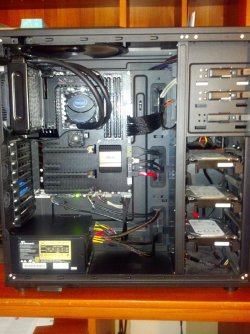
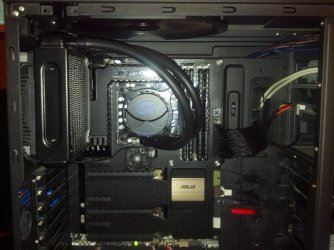
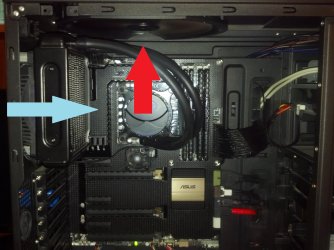
Here is a picture of my Intel water cooler inside my case to give you an idea of how it works and what it looks like.

2013-08-09_12-03-10_47.jpg2013-08-09_12-03-36_330.jpgCase Airflow.jpg
 

My Computer

Computer type
PC/Desktop
Computer Manufacturer/Model Number
Custom Built
OS
Windows 7 Professional 64bit SP1
CPU
Intel Core i5-3570K @ 4.5GHz
Motherboard
Asus Sabertooth Z77
Memory
Corsair Vengeance 16GB (4x4) @1866MHz CL 9-9-9-24 1T
Graphics Card(s)
EVGA GTX 750 Ti FTW
Sound Card
Onboard Audio
Monitor(s) Displays
Dell S2309W
Screen Resolution
1920x1080
Hard Drives
Samsung 830 128GB SSD - OS
(4) Seagate 5TB HDD
(1) Seagate 2TB HDD
PSU
Seasonic X750 80+ Gold Full Modular
Case
Antec Eleven Hundred Super Mid Tower
Cooling
Intel Liquid Cooler
Keyboard
Max Nighthawk X8 Mechanical keyboard
Mouse
Mionix Naos 7000
Internet Speed
50 Mbps Down / 10 Mbps Up
Antivirus
Microsoft Security Essentials/Malwarebytes Anti-Malware
Browser
Chrome/Firefox
Other Info
Klipsch ProMedia 2.1's
Asus RT-N66R Wireless Router
Thank you kbrady1979. Like I always say, learning more everyday :)

#8
I know you guys have posted a lot already, and I feel bad but would anyone mind answering the questions in post 8?
Thanks again, I know I am being a bother ha...


Andrew, they are maintenance free, you do not need to add water. It will last the lifetime of your computer as mentioned above.
 

My Computer

Computer type
PC/Desktop
Computer Manufacturer/Model Number
Dude Build
OS
Windows 10 Pro X64
CPU
Intel(R) Core(TM) i5-3570K CPU OC@ 4.5GHZ Turbo
Motherboard
MSI Z77A-G45 Gaming
Memory
8.00 GB DDR3 1600Mhz
Graphics Card(s)
MSI Gaming X GTX 1070
Sound Card
Realtek High Definition
Monitor(s) Displays
Dell S23O9W, HP L1710
Screen Resolution
DELL-1920 x 1080 HP-1280 x1024
Hard Drives
Crucial m4 256 SSD, WD 7200RPM 500GB WD 1TB
PSU
Seasonic X650 GOLD
Case
Zalman Z12
Cooling
Antec Kuhler 920
Keyboard
Logitech
Mouse
MSI DS100 Interceptor
Internet Speed
50 down and 5 up
Antivirus
MSE
Browser
Chrome, IE 11
Other Info
Logitech X-620 Speakers
While closed water coolers are certainly hassle free and offer great cooling, a decent air cooler will suffice if you're not overclocking. I have a Fenrir Titan triple copper heatpipe on my 4670k (stock clocks) and it works like a dream. The Noctua NH-D14 is supposed to be a fantastic air cooler too. Any of the above will give you much better temperatures than an AMD stock cooler.
 

My Computer

Computer type
PC/Desktop
Computer Manufacturer/Model Number
Custom Build
OS
W7 Pro x64 SP1 | W10 Pro IP x64 | W8.1 Pro x64 VM | Linux Mint VM
CPU
i7-4790k @ 4GHz (4.4GHz Boost)
Motherboard
ASUS Sabertooth Z87 (BIOS Rev 2004)
Memory
16GB DDR3 Kingston HyperX Fury @ 1600MHz CL 9-9-9-27
Graphics Card(s)
EVGA GTX 980 Classified
Sound Card
Realtek Onboard
Monitor(s) Displays
Samsung S27D390
Screen Resolution
1920 x 1080
Hard Drives
240GB Intel 520 Series SSD |
Samsung 850 EVO 120GB SSD |
2TB WD Caviar Black |
2TB WD Caviar Green
PSU
Corsair HX850-80 Gold Modular
Case
Cooler Master Silencio 650
Cooling
Corsair H80i w/2 x Corsair SP120 | 2 x 120mm Noctua NF-S12B
Keyboard
Microsoft Sidewinder X4
Mouse
Gigabyte M6900 optical
Internet Speed
152mb
Antivirus
F-Secure
Browser
Firefox 38.0
Other Info
Backup Rig: Win 7 Pro 64-bit | AMD A10-5800k | ASUS F2A85-V Pro | 8GB Samsung DDR3 @1600MHz | 120GB Toshiba SDD | 2TB Seagate HDD | Cooler Master Silencio 550
Here's a answer from AMD about the max 8350 temps.
The maximum temperature for the FX-8350 CPU is 61.1C at Tcase. This is different from Tjunction (which the BIOS and programs like HWMonitor will report), and can easily be referenced through [COLOR=blue !important][FONT=inherit !important][COLOR=blue ! important][FONT=inherit ! important]AMD [/FONT][COLOR=blue ! important][FONT=inherit ! important]OverDrive[/FONT][/COLOR][/FONT][/COLOR][/COLOR], or closely referenced through programs like CoreTemp/RealTemp. HWMonitor and BIOS software will report the Tjunction temperature which can be as much as 10C different from the Tcase temperature.

If you have any other questions or concerns, please do not hesitate to reply to this e-mail directly and I will try to provide any additional information that you may require. Thank you for contacting AMD!

In order to update this service request, please respond, leaving the service request reference intact.

Best regards,

AMD Global Customer Care

I run a small OC (4.5ghz) on my 8350 with a Corsair H80i H2O cooling system. I can run P95 with all 8 cores at 100% along with Kombuster's GPU torture test and CPU reaches mid 50'sC and GPU reaches mid 70'sC. I can't think of any real world situation that would stress both CPU and GPU to a constant 100% other than intentional stress testing.
 

My Computer

Computer type
PC/Desktop
Computer Manufacturer/Model Number
Custom, Dell and Lenono LT's
OS
Win8/8.1,Win7-U64, Vista U64, uncounted Linux distor's
CPU
AMD and Intell, 9590, 8350, i5 3570k
Motherboard
CFVFZ, GA990FXA, Z77e-itx
Memory
Corsair G Skill
Graphics Card(s)
Crossfired Sapphire HD 7950 Vapor-X, ASUS R9 280X TOP
Sound Card
Realtek ALC889
Monitor(s) Displays
ViewSonic VX2770SMH 27" / ViewSonic VX2433 LCD 24"
Screen Resolution
1080i HD
Hard Drives
Samsung SSD 840 Pro
OCZ Agility 3's
OCZ Vector's
WD's Blue, red, green, Velociraptors
Seagate USB3 & Hybrid's
ASUS Blu-Ray
ASUS DVD
PSU
Corsair AX1200i, Seasonice 850 Gold
Case
Cooler Master HAF 922 & HAF 932, Lian Li Train case.
Cooling
Air, Glacer 240L expanded, custom EK loop with duel D5's
Keyboard
Microsoft SideWinder X4 USB Keyboard / Logitech 250 PS2
Mouse
Logitech G500 / MS wireless 5000
Internet Speed
Best of 5ms / 75+ dn / 12+ up More or less.
Antivirus
MS esentials-MalwareBytes
Browser
Firefox Chromebook
....If the air inside your case, and the air coming out is just warm, you're OK more than likely. If you were inside the computer and you didn't find anything that was just flesh-melting hot, then I wouldn't worry about it. I would, however, look into a new CPU cooler.

Yeah, just warmish. Not even "warm warm"

Thanks for all the help everyone! I really appreciate it!

I think I am going to go with the Antec 620 no maintenance water cooler. I like no maintenance :) I heard it's really easy to install so I should be good. Newegg even has a video on how to do it. Thanks.

My case is this: Rosewill ARMOR-EVO Black Steel E-ATX Mid Tower Computer Case - Newegg.com

I noticed when removing my other side panel that there is a small square cutout where what seems to be the back of the motherboard where the cpu is. So I am guessing I actually do not need to remove the motherboard?
If so that is nice. (I really, really, really did not feel like doing all that.)

$50 seems cheap to me. Plus If i do decide to overclock in the future I would be able to better with this than another air cooler I am assuming. Plus, I would feel a lot better/safer and have my mind at ease with this I think. My only concern is I wonder if it somehow leaks and fries your system if the warranty would cover that. (As long as I installed it right of course.)

I probably will order it next week or after. Can't right now.

Anyways, sorry for the novel, Thanks for everything. I'll keep you guys posted when I order it and how my temps look after should you guys care.
 

My Computer

Computer type
PC/Desktop
Computer Manufacturer/Model Number
Custom Built
OS
Windows 10 Pro
CPU
AMD Ryzen 5 2400G Processor with Radeon RX Vega 11 Graphics
Motherboard
ASRock X470 Master SLI/AC AM4 AMD Promontory X470 SATA 6Gb/s
Memory
G.SKILL Ripjaws V Series 16GB (2 x 8GB) 288-Pin DDR4 SDRAM D
Graphics Card(s)
2047MB NVIDIA GeForce GTX 1060 6GB (EVGA)
Sound Card
Motherboard Built in
Monitor(s) Displays
Acer R240HY bidx 23.8-Inch IPS HDMI DVI VGA (1920 x 1080) Wi
Screen Resolution
1920 x 1080
Hard Drives
1TB Sandisk SSD PLUS (Main drive)
500 GB Seagate 7200 RPM (Games)
500 GB Western Digital 7200 RPM (Virtual Machines)
PSU
CORSAIR TX Series TX650M 650W 80+ Gold Modular Power Supply
Case
CORSAIR CARBIDE SPEC-02 Mid-Tower Gaming Case, Red LED Fan
Cooling
220mm, two 120mm, and four 60mm fans
Keyboard
Wired Dell keyboard
Mouse
Wireless Logitech mouse
Internet Speed
250mb down, 30mb up
Antivirus
Panda Cloud Antivirus
Browser
Chrome-ish x64
Other Info
Your awesome for reading this.
....If the air inside your case, and the air coming out is just warm, you're OK more than likely. If you were inside the computer and you didn't find anything that was just flesh-melting hot, then I wouldn't worry about it. I would, however, look into a new CPU cooler.

Yeah, just warmish. Not even "warm warm"

Thanks for all the help everyone! I really appreciate it!

I think I am going to go with the Antec 620 no maintenance water cooler. I like no maintenance :) I heard it's really easy to install so I should be good. Newegg even has a video on how to do it. Thanks.

My case is this: Rosewill ARMOR-EVO Black Steel E-ATX Mid Tower Computer Case - Newegg.com

I noticed when removing my other side panel that there is a small square cutout where what seems to be the back of the motherboard where the cpu is. So I am guessing I actually do not need to remove the motherboard?
If so that is nice. (I really, really, really did not feel like doing all that.)

$50 seems cheap to me. Plus If i do decide to overclock in the future I would be able to better with this than another air cooler I am assuming. Plus, I would feel a lot better/safer and have my mind at ease with this I think. My only concern is I wonder if it somehow leaks and fries your system if the warranty would cover that. (As long as I installed it right of course.)

I probably will order it next week or after. Can't right now.

Anyways, sorry for the novel, Thanks for everything. I'll keep you guys posted when I order it and how my temps look after should you guys care.
Sounds good ,hope it goes off without a hitch

I also run a Antec 620 on a 8350 system it has great temps I ran mine at 4,8ghz @ 1.488v-core and maxed out at 55c during IBT stress test so it should do a real good job

At stock speed you should be maxing at about 45 to 48c with load
 

My Computer

Computer type
PC/Desktop
Computer Manufacturer/Model Number
CoreI7-6700K MrFingerIII Special Builds
OS
Windows 10 Home Premium 64bit sp1
CPU
Intel I7-6700K @ 4.6 Ghz 1.344 volts everyday OC
Motherboard
Asrock Fatality K6 Z170 Socket 1151
Memory
32GB G-Skill TridentZ 3200mhz 16-18-18-38 DDR4
Graphics Card(s)
Sli Gigabyte Windforce GTX 980 G1
Sound Card
AC97 Creative Rage Tactic 3D Headphones Bluetooth
Monitor(s) Displays
27" Asus ROG Swift PG278Q G-Sync 48" Vizio Smart HD TV
Screen Resolution
2560x1440p 27"- 48" Currently Gaming at 2560x1440p Res 2K
Hard Drives
250GB Samsung Evo840SSD Seagate baracuda 500 GB WD Mybook 500Gb 1TB Seagate Barracuda
PSU
HX1050w Corsair Silver 80plus certified crosfire/sli
Case
Enthod Pro Full Tower
Cooling
Corsair H110i GT 280 mm High Performance WaterBlock
Keyboard
Logitech wireless keyboard
Mouse
Logitech wireless mouse
Internet Speed
Cox Cable 100+ mb
Antivirus
WebRoot Spysweeper with Antivirus
Browser
IE-10, Chrome, Opera
Other Info
My Other Rig is a AMD FX8320E @4.6Ghz 16GB Ballistic Sport Ram
Mobo Asrock Fatality 990FX 120GB OCZ SSD 1TB Seagate Barracuda Corsair H75 Cooling PSU Corsair CX750
GPU GTX Gigabyte 970G1
I noticed when removing my other side panel that there is a small square cutout where what seems to be the back of the motherboard where the cpu is. So I am guessing I actually do not need to remove the motherboard?
If so that is nice. (I really, really, really did not feel like doing all that.)

If you can clearly access all four holes to install the backplate and screws, then yes you can avoid removing the motherboard :)
 

My Computer

Computer type
PC/Desktop
Computer Manufacturer/Model Number
Systems by SmartEyeball
OS
8 Pro x64
CPU
i7 3770K 4.6GHz
Motherboard
ASUS P8Z77 WS
Memory
16GB G.Skill Trident X 2666mhz
Graphics Card(s)
x2 EVGA 780 Ti Superclocked SLI
Sound Card
SB X-FI Surround 5.1 PRO USB / ATH-AD900 Headphones
Monitor(s) Displays
x3 Dell U2410 / 58" Samsung
Screen Resolution
5760*1200/ 1920*1200
Hard Drives
2x Intel 520 240GB (RAID 0) * 2x WD Caviar Blacks 2TB (RAID 0) * 2TB WD Caviar Black * Sony Optirac DVD
PSU
Silverstone Strider Evolution 1200W
Case
Thermaltake Level 10 GT Snow Edition
Cooling
Noctua NH-D14
Keyboard
Topre Realforce // Ducky Shine MX Black // Filco Ninja TKL
Mouse
Thermaltake Theron (Highly Recommended) + Razer Imperator
Antivirus
MSE
Browser
IE, FF, WaterFox
Other Info
GT Extreme V2 Sim Racing Cockpit + 40" LCD and K/B Mouse stand ▼
Fanatec CSR Elite Wheel + Clubsport V1 Pedals + CSR shifter/7G-H ▼Saitek X52 Pro ▼ TrackIR 5 Pro
Buttkicker v2 Seat Rumbler with Dedicated 5.1 and Sub Woofer attached to frame ▼
=
Bloody Big Grin
Looks like I am confused again. I went out and got a corsair h55 that my friend recommended, (great reviews online) and said he would help me install it. It was easy install, but glad my friend was there as this was my first time installing a water cooler.

Anyways, fired up my rig and my idle temps were 60F (15c) and on load at 100% was 115F (46c) which was amazing!
I did a test video encoding on the same file I was doing before. Boy what a difference!!
So I ran my system for about 20 minutes and all was well. I ran tomb raider (benchmark-got 60fps), encoding a video and running a virtual machine of windows 8 all at the same time. Cpu maxed out at 100% but no lag or anything at all.
I then shut it down and took him home.

***I came back, and turned on my rig. (room temps are same afaik, felt cooler not warmer as its night) and guess what?

My idle temps are now 70f (21c). Not a big deal right? Just went up 10 degrees. Anyways, I was browsing the web and decided I would now encode a video again, as it was strange to me it up 10 degrees. So I started the encoding a video (same file as before, to rule out anything) and guess what? My system reached 150F (65c) and I was like Woah! That's more then before! So anyways, I let it go for a little bit, seeing if it was a fluke, checking other monitor temp programs and they all said the same thing. Although HW monitor reported hotter by 5 degrees.

Anyways, what the heck happened? It was running ridiculously cool a second ago. I told my friend what happened and he assured me its normal. He said when he first installed his water cooler it was really cold at first and then got warmer. He said after a week the temps went cold again and stayed there. He mentioned that the radiator and all that priming and stuff sometimes takes a bit. So yeah, he said not to worry. He also said if it happens after a week I should wipe the preapplied thermal paste off and use my artic silver 5 that I have. (its 2 years old though, idk if they expire)
So yeah, Is this normal?

Thanks again for any help.....
 

My Computer

Computer type
PC/Desktop
Computer Manufacturer/Model Number
Custom Built
OS
Windows 10 Pro
CPU
AMD Ryzen 5 2400G Processor with Radeon RX Vega 11 Graphics
Motherboard
ASRock X470 Master SLI/AC AM4 AMD Promontory X470 SATA 6Gb/s
Memory
G.SKILL Ripjaws V Series 16GB (2 x 8GB) 288-Pin DDR4 SDRAM D
Graphics Card(s)
2047MB NVIDIA GeForce GTX 1060 6GB (EVGA)
Sound Card
Motherboard Built in
Monitor(s) Displays
Acer R240HY bidx 23.8-Inch IPS HDMI DVI VGA (1920 x 1080) Wi
Screen Resolution
1920 x 1080
Hard Drives
1TB Sandisk SSD PLUS (Main drive)
500 GB Seagate 7200 RPM (Games)
500 GB Western Digital 7200 RPM (Virtual Machines)
PSU
CORSAIR TX Series TX650M 650W 80+ Gold Modular Power Supply
Case
CORSAIR CARBIDE SPEC-02 Mid-Tower Gaming Case, Red LED Fan
Cooling
220mm, two 120mm, and four 60mm fans
Keyboard
Wired Dell keyboard
Mouse
Wireless Logitech mouse
Internet Speed
250mb down, 30mb up
Antivirus
Panda Cloud Antivirus
Browser
Chrome-ish x64
Other Info
Your awesome for reading this.
Back
Top