Solved Temps problem (Again)

Pastes have a cure time where they spread out and settle as the CPU gets hot and cold. Your friend is right for the most part, it seems to be normal for a week or so. Just keep using your PC as you normally do and see how it's acting then. A water cooler isn't a piece of magical equipment, you'll never cool it down past room temperature, no matter what. A water cooler does seem to keep temps more stable and consistent, and water seems to absorb the shock of higher temps much better than air coolers in my opinion. During stress testing, my water cooler will normalize temps after about 10 minutes and will keep those temps for 12+ hours.
 

My Computer My Computer

Computer type
PC/Desktop
Computer Manufacturer/Model Number
Custom Built
OS
Windows 7 Professional 64bit SP1
CPU
Intel Core i5-3570K @ 4.5GHz
Motherboard
Asus Sabertooth Z77
Memory
Corsair Vengeance 16GB (4x4) @1866MHz CL 9-9-9-24 1T
Graphics Card(s)
EVGA GTX 750 Ti FTW
Sound Card
Onboard Audio
Monitor(s) Displays
Dell S2309W
Screen Resolution
1920x1080
Hard Drives
Samsung 830 128GB SSD - OS
(4) Seagate 5TB HDD
(1) Seagate 2TB HDD
PSU
Seasonic X750 80+ Gold Full Modular
Case
Antec Eleven Hundred Super Mid Tower
Cooling
Intel Liquid Cooler
Keyboard
Max Nighthawk X8 Mechanical keyboard
Mouse
Mionix Naos 7000
Internet Speed
50 Mbps Down / 10 Mbps Up
Antivirus
Microsoft Security Essentials/Malwarebytes Anti-Malware
Browser
Chrome/Firefox
Other Info
Klipsch ProMedia 2.1's
Asus RT-N66R Wireless Router
I have never used the pre-applied sticky stuff they come with Andrew. I have always wiped it off with some Artic cleaner, then Artic primer and applied Artic Silver 5. I have a tube I just emptied that was 3 years old and it was fine.

I found out the cold plate on my Thermaltake Water 2.0 Pro is rounded and hits the CPU's center more than the outside edges. I think I may try lapping it to flatten it.
 

My Computer My Computer

Computer type
PC/Desktop
Computer Manufacturer/Model Number
Home Built Desktop By DataTech
OS
Windows 7 Ultimate X64 SP1
CPU
Intel i5-2550K, Differing ~4.4-4.8GHz No built in GPU
Motherboard
ASUS P8Z68-V PRO/GEN3
Memory
16GB G.Skill Sniper 1866MHz @ 2133MHz 2x8GB
Graphics Card(s)
ASUS GTX650TIB-DC2OC-2GD5, (650TI Boost)
Sound Card
Onboard Realtek 5-1
Monitor(s) Displays
Samsung P2570HD
Screen Resolution
1920x1080
Hard Drives
Samsung 840 Pro 256GB SSD for OS, 500GB Seagate Constellation (Enterprise drive) for Data
PSU
Corsair HX650W
Case
Inwin Dragon Rider
Cooling
Hyper 212 EVO w/two Noctua fans, push-pull, @1300 RPM
Keyboard
E-Z Eyes, bright yellow keys with large characters
Mouse
steelseries SENSEI Laser Pro Gaming
Internet Speed
48-51Mbs Mbs down, 11 Mbs up Xfinity Cable
Antivirus
Norton Internet Security 2013
Browser
IE 10, Opera, Pale Moon if needed
Other Info
4 case fans, LG BluRay-RE, ASUS DVD-RW, Mr. Fusion power supply, 1.21 gigawatts.
Thanks guys. I will monitor it for a bit and see what happens. Still confused as to why on load when we first put it in it didn't go past 115F but now it easily does. Just like my stock fan. so weird...this is why I went with water cooling in the first place.

I guess I will wait a week and see what happens. If it stays bad I will reapply the thermal paste.

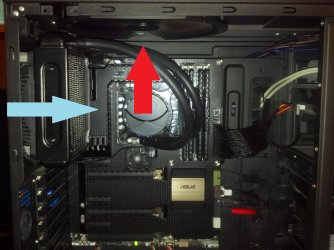
This is random, but The water cooler did suggest to have the fan in the back be a intake to the radiator and not an external. (although it said you can do it this way) I chose to have it be external like it was before, as I have 2 80mm intake in front, an 230mm intake on the side, and two 120mm fans at the top being external. I am wondering if maybe I should make the back an internal. I just feel like that is 3 internals and only 2 externals. I feel like I should have 3 externals. What do you guys think?

Once again, thanks for all the help and effort you guys put forth to answer my questions...:)

(btw, thanks for the info about the artic silver and the wait time)
Was gonna rep again but can't :(
 

My Computer My Computer

Computer type
PC/Desktop
Computer Manufacturer/Model Number
Custom Built
OS
Windows 10 Pro
CPU
AMD Ryzen 5 2400G Processor with Radeon RX Vega 11 Graphics
Motherboard
ASRock X470 Master SLI/AC AM4 AMD Promontory X470 SATA 6Gb/s
Memory
G.SKILL Ripjaws V Series 16GB (2 x 8GB) 288-Pin DDR4 SDRAM D
Graphics Card(s)
2047MB NVIDIA GeForce GTX 1060 6GB (EVGA)
Sound Card
Motherboard Built in
Monitor(s) Displays
Acer R240HY bidx 23.8-Inch IPS HDMI DVI VGA (1920 x 1080) Wi
Screen Resolution
1920 x 1080
Hard Drives
1TB Sandisk SSD PLUS (Main drive)
500 GB Seagate 7200 RPM (Games)
500 GB Western Digital 7200 RPM (Virtual Machines)
PSU
CORSAIR TX Series TX650M 650W 80+ Gold Modular Power Supply
Case
CORSAIR CARBIDE SPEC-02 Mid-Tower Gaming Case, Red LED Fan
Cooling
220mm, two 120mm, and four 60mm fans
Keyboard
Wired Dell keyboard
Mouse
Wireless Logitech mouse
Internet Speed
250mb down, 30mb up
Antivirus
Panda Cloud Antivirus
Browser
Chrome-ish x64
Other Info
Your awesome for reading this.
supposedly it is normal because the paste needs to cure

My experience with Corsair coolers though didn't end up with good results from me

cure time is 24 to 48hrs and you must turn it on and off for a hour or so then shut down repeat for a while

I did these steps with a H80I and my temps were through the roof I went and got a Antec 920 the Big brother of my Antec 620 and it behaved itself

Something about corsairs square block design I don't like it just seems to not fit properly no matter what you do I used almost a whole tube a of paste trying to get the temps right and one shot with the Antec 920 so that just tells me the cooler is a POS pretty much and people who have had luck are hella lucky IMHO
 

My Computer My Computer

Computer type
PC/Desktop
Computer Manufacturer/Model Number
CoreI7-6700K MrFingerIII Special Builds
OS
Windows 10 Home Premium 64bit sp1
CPU
Intel I7-6700K @ 4.6 Ghz 1.344 volts everyday OC
Motherboard
Asrock Fatality K6 Z170 Socket 1151
Memory
32GB G-Skill TridentZ 3200mhz 16-18-18-38 DDR4
Graphics Card(s)
Sli Gigabyte Windforce GTX 980 G1
Sound Card
AC97 Creative Rage Tactic 3D Headphones Bluetooth
Monitor(s) Displays
27" Asus ROG Swift PG278Q G-Sync 48" Vizio Smart HD TV
Screen Resolution
2560x1440p 27"- 48" Currently Gaming at 2560x1440p Res 2K
Hard Drives
250GB Samsung Evo840SSD Seagate baracuda 500 GB WD Mybook 500Gb 1TB Seagate Barracuda
PSU
HX1050w Corsair Silver 80plus certified crosfire/sli
Case
Enthod Pro Full Tower
Cooling
Corsair H110i GT 280 mm High Performance WaterBlock
Keyboard
Logitech wireless keyboard
Mouse
Logitech wireless mouse
Internet Speed
Cox Cable 100+ mb
Antivirus
WebRoot Spysweeper with Antivirus
Browser
IE-10, Chrome, Opera
Other Info
My Other Rig is a AMD FX8320E @4.6Ghz 16GB Ballistic Sport Ram
Mobo Asrock Fatality 990FX 120GB OCZ SSD 1TB Seagate Barracuda Corsair H75 Cooling PSU Corsair CX750
GPU GTX Gigabyte 970G1

My Computers My Computers

System One System Two

  • Computer type
    PC/Desktop
    Computer Manufacturer/Model Number
    ALWAYS UNDER CONSTRUCTION
    OS
    Windows 11 Pro
    CPU
    Ryzen 9 5900X
    Motherboard
    Asus X570 Crosshair Viii Hero
    Memory
    32GB G Skill DDR4-3600
    Graphics Card(s)
    EVGA RTX 3080 FTW 3 Ultra
    Sound Card
    On Board/Sennheiser PC37X Headset
    Monitor(s) Displays
    3 X Asus 27"
    Screen Resolution
    2560x1440
    Hard Drives
    2 X 1 TB NVME drives
    PSU
    EVGA 850
    Case
    Phanteks Eclipse P400A
    Cooling
    EVGA 280 AIO
    Keyboard
    Logitech G510s/ Logitech G13
    Mouse
    Logitech G502
    Internet Speed
    24/1
    Antivirus
    ESET/MBAM Pro/SAS Pro
    Browser
    Chrome/ Firefox/ Edge
  • Computer type
    Laptop
    System Manufacturer/Model Number
    Dell 16 Plus
    OS
    Windows 11 Pro
    CPU
    Intel Ultra 9 288V
    Memory
    32 GB LPDDR5X 8533
    Monitor(s) Displays
    16" Mini-LED HDR600 Touch 90 Hz
    Screen Resolution
    2560X1600
    Hard Drives
    1 TB NVME
supposedly it is normal because the paste needs to cure

My experience with Corsair coolers though didn't end up with good results from me

cure time is 24 to 48hrs and you must turn it on and off for a hour or so then shut down repeat for a while

I did these steps with a H80I and my temps were through the roof I went and got a Antec 920 the Big brother of my Antec 620 and it behaved itself

Something about corsairs square block design I don't like it just seems to not fit properly no matter what you do I used almost a whole tube a of paste trying to get the temps right and one shot with the Antec 920 so that just tells me the cooler is a POS pretty much and people who have had luck are hella lucky IMHO

Solar, I don't know why, but some people have great results with Corsair coolers. I never have and I've owned 3 of them. My H100 got bad results. Ny NH-D14 got better temps than the H100. Personally, I think there are manufacturing defects in some of their coolers. Some people get great results. I never did. As far as I'm concerned, the NH-D14 is the best air cooler you can buy. But, I won't be buying another Corsair AIO cooler.
 

My Computers My Computers

System One System Two

  • Computer type
    PC/Desktop
    Computer Manufacturer/Model Number
    ALWAYS UNDER CONSTRUCTION
    OS
    Windows 11 Pro
    CPU
    Ryzen 9 5900X
    Motherboard
    Asus X570 Crosshair Viii Hero
    Memory
    32GB G Skill DDR4-3600
    Graphics Card(s)
    EVGA RTX 3080 FTW 3 Ultra
    Sound Card
    On Board/Sennheiser PC37X Headset
    Monitor(s) Displays
    3 X Asus 27"
    Screen Resolution
    2560x1440
    Hard Drives
    2 X 1 TB NVME drives
    PSU
    EVGA 850
    Case
    Phanteks Eclipse P400A
    Cooling
    EVGA 280 AIO
    Keyboard
    Logitech G510s/ Logitech G13
    Mouse
    Logitech G502
    Internet Speed
    24/1
    Antivirus
    ESET/MBAM Pro/SAS Pro
    Browser
    Chrome/ Firefox/ Edge
  • Computer type
    Laptop
    System Manufacturer/Model Number
    Dell 16 Plus
    OS
    Windows 11 Pro
    CPU
    Intel Ultra 9 288V
    Memory
    32 GB LPDDR5X 8533
    Monitor(s) Displays
    16" Mini-LED HDR600 Touch 90 Hz
    Screen Resolution
    2560X1600
    Hard Drives
    1 TB NVME
The Corsair units made by Asetek are generally regarded as the best ones.......but with so many other options out there, it would be hard to talk me into one.
 

My Computer My Computer

Computer type
PC/Desktop
Computer Manufacturer/Model Number
Custom Built
OS
Windows 7 Professional 64bit SP1
CPU
Intel Core i5-3570K @ 4.5GHz
Motherboard
Asus Sabertooth Z77
Memory
Corsair Vengeance 16GB (4x4) @1866MHz CL 9-9-9-24 1T
Graphics Card(s)
EVGA GTX 750 Ti FTW
Sound Card
Onboard Audio
Monitor(s) Displays
Dell S2309W
Screen Resolution
1920x1080
Hard Drives
Samsung 830 128GB SSD - OS
(4) Seagate 5TB HDD
(1) Seagate 2TB HDD
PSU
Seasonic X750 80+ Gold Full Modular
Case
Antec Eleven Hundred Super Mid Tower
Cooling
Intel Liquid Cooler
Keyboard
Max Nighthawk X8 Mechanical keyboard
Mouse
Mionix Naos 7000
Internet Speed
50 Mbps Down / 10 Mbps Up
Antivirus
Microsoft Security Essentials/Malwarebytes Anti-Malware
Browser
Chrome/Firefox
Other Info
Klipsch ProMedia 2.1's
Asus RT-N66R Wireless Router
Wait, so are you guys saying the one I bought (even though it has good reviews) is not a good one? Should I take the one I have back and get another? Like the one that was originally suggested? Antec 620 no maintenance water cooler??

This is random, but The water cooler did suggest to have the fan in the back be a intake to the radiator and not an external. (although it said you can do it this way) I chose to have it be external like it was before, as I have 2 80mm intake in front, an 230mm intake on the side, and two 120mm fans at the top being external. I am wondering if maybe I should make the back an internal. I just feel like that is 4 internals and only 2 externals. I feel like I should have 3 externals. What do you guys think?

Also lady suggested from the show us your rig post that the water cooler could be throttled by the bios.
About the throttling. How would I know? What numbers in the bios should I look for?
 

My Computer My Computer

Computer type
PC/Desktop
Computer Manufacturer/Model Number
Custom Built
OS
Windows 10 Pro
CPU
AMD Ryzen 5 2400G Processor with Radeon RX Vega 11 Graphics
Motherboard
ASRock X470 Master SLI/AC AM4 AMD Promontory X470 SATA 6Gb/s
Memory
G.SKILL Ripjaws V Series 16GB (2 x 8GB) 288-Pin DDR4 SDRAM D
Graphics Card(s)
2047MB NVIDIA GeForce GTX 1060 6GB (EVGA)
Sound Card
Motherboard Built in
Monitor(s) Displays
Acer R240HY bidx 23.8-Inch IPS HDMI DVI VGA (1920 x 1080) Wi
Screen Resolution
1920 x 1080
Hard Drives
1TB Sandisk SSD PLUS (Main drive)
500 GB Seagate 7200 RPM (Games)
500 GB Western Digital 7200 RPM (Virtual Machines)
PSU
CORSAIR TX Series TX650M 650W 80+ Gold Modular Power Supply
Case
CORSAIR CARBIDE SPEC-02 Mid-Tower Gaming Case, Red LED Fan
Cooling
220mm, two 120mm, and four 60mm fans
Keyboard
Wired Dell keyboard
Mouse
Wireless Logitech mouse
Internet Speed
250mb down, 30mb up
Antivirus
Panda Cloud Antivirus
Browser
Chrome-ish x64
Other Info
Your awesome for reading this.
Wait, so are you guys saying the one I bought (even though it has good reviews) is not a good one? Should I take the one I have back and get another? Like the one that was originally suggested? Antec 620 no maintenance water cooler??

This is random, but The water cooler did suggest to have the fan in the back be a intake to the radiator and not an external. (although it said you can do it this way) I chose to have it be external like it was before, as I have 2 80mm intake in front, an 230mm intake on the side, and two 120mm fans at the top being external. I am wondering if maybe I should make the back an internal. I just feel like that is 4 internals and only 2 externals. I feel like I should have 3 externals. What do you guys think?

Also lady suggested from the show us your rig post that the water cooler could be throttled by the bios.
About the throttling. How would I know? What numbers in the bios should I look for?

If you can return an open and installed water cooler that's functioning then that would be a trick ! I would say in hind sight a double thick Corsair rad like the H80i would have been best or one of the many other brands available. If you continue to use the H55 unit then consider a pair of quiet fans that run off the 12v PSU. Also in your bios turn off the Quiet "n" Cool option and the pump and 12v fan headers should give a steady full 12v and that way your pump will run wide open which is good but all case fans plugged into the mobo will also run at 12v.
 

My Computer My Computer

Computer type
PC/Desktop
Computer Manufacturer/Model Number
A blend of brains, brawn and dumb luck.
OS
Windows 7 Ultimate 64
CPU
i7 3770k OC'd 4.6 @ 1.17v, also FX 8120 & i5 miniITX
Motherboard
MSI P67A-GD80 b3
Memory
32 gb G.Skill Sniper DDR3 10-12-12-31 @ 2133
Graphics Card(s)
XFX Radeon 7870 2GB DDR5
Sound Card
Sound Blaster Z Series Card
Monitor(s) Displays
(2) LG LED 23" 1920 x 1080 2ms Monitors via mini d-port
Screen Resolution
1680 X 1050 p
Hard Drives
Samsung 256 gb 830 SSD sata III
(1) 1 tb WD Black
(2) 1 tb Hitachi deskmates/sata II
(2) 1 tb WD green/sata II
(2) 3 tb Seagate Barracuda
(1) 120 gb OCZ Vertex SS
(1) Drobo 5N w/5 Seagate 3tb
PSU
EVGA modular 1000G2 80% gold rating & APC 1200 RS
Case
CoolerMaster Storm Styker
Cooling
7 case fans 140mm & 120mm, NZXT Kraken X60
Keyboard
(2) Logitech Illuminated Keyboards (1) usb (1) wireless
Mouse
Logitech G700 & T-BC21 - nano nx for the laptop
Internet Speed
Basic 120mbps down
Antivirus
Trend Micro Titanium Max Security & Malwarebytes Premium
Browser
Chrome and IE 10
Other Info
5 Noctua case fans + 3 Noctua in p/p on NZXT cooler
Integrated hot swap drive bays for 2.5" Drives
(2) Lite-on dvd/cd/Blu Ray optical 22X
Integrated fan controller and led on/off
HP Officejet Pro 8630 all-n-one
Hot-swappable 3.5" hard drive bay
Netgear Nighthawk router
Asus USB 3 & sata 6 PCIe card
Vantec IDE to sata adptr./Ultra sata adptr
Lenovo L420 i5 lappy with m sata
Drobo 5N advanced NAS

My Computers My Computers

System One System Two

  • Computer type
    PC/Desktop
    Computer Manufacturer/Model Number
    ALWAYS UNDER CONSTRUCTION
    OS
    Windows 11 Pro
    CPU
    Ryzen 9 5900X
    Motherboard
    Asus X570 Crosshair Viii Hero
    Memory
    32GB G Skill DDR4-3600
    Graphics Card(s)
    EVGA RTX 3080 FTW 3 Ultra
    Sound Card
    On Board/Sennheiser PC37X Headset
    Monitor(s) Displays
    3 X Asus 27"
    Screen Resolution
    2560x1440
    Hard Drives
    2 X 1 TB NVME drives
    PSU
    EVGA 850
    Case
    Phanteks Eclipse P400A
    Cooling
    EVGA 280 AIO
    Keyboard
    Logitech G510s/ Logitech G13
    Mouse
    Logitech G502
    Internet Speed
    24/1
    Antivirus
    ESET/MBAM Pro/SAS Pro
    Browser
    Chrome/ Firefox/ Edge
  • Computer type
    Laptop
    System Manufacturer/Model Number
    Dell 16 Plus
    OS
    Windows 11 Pro
    CPU
    Intel Ultra 9 288V
    Memory
    32 GB LPDDR5X 8533
    Monitor(s) Displays
    16" Mini-LED HDR600 Touch 90 Hz
    Screen Resolution
    2560X1600
    Hard Drives
    1 TB NVME
...This is random, but The water cooler did suggest to have the fan in the back be a intake to the radiator and not an external. (although it said you can do it this way) I chose to have it be external like it was before, as I have 2 80mm intake in front, an 230mm intake on the side, and two 120mm fans at the top being external. I am wondering if maybe I should make the back an internal. I just feel like that is 4 internals and only 2 externals. I feel like I should have 3 externals. What do you guys think?...

The theory behind making the water cooler fan an intake is it will be drawing cooler outside air through the radiator instead of the warmer inside air. You might want to try it just to see if it actually makes a difference.

...Also lady suggested from the show us your rig post that the water cooler could be throttled by the bios.
About the throttling. How would I know? What numbers in the bios should I look for?

It depends on where you plugged the pump cable into. If it's plugged into the CPU fan header or an regular, here should be a setting somewhere in the BIOS to determine what the speed will be. You would have to consult your MOBO manual since BIOSes will vary somewhat from MOBO to MOBO. Try adjust the speed higher to see if it makes a difference. You will just have to experiment

The cooler you chose is one of the smaller ones so there is a possibility it just isn't big enough to do the job.
 

My Computer My Computer

Computer type
PC/Desktop
Computer Manufacturer/Model Number
Custom Build
OS
Win 7 Ultimate 64 bit
CPU
Intel i7-3930K
Motherboard
ASUS P9X79 WS
Memory
Kingston HyperX Genesis 32GB Kit (8x4GB Modules) 1600MHz DDR
Graphics Card(s)
MSI R7850 Twin Frozr 2GD5/OC Radeon HD 7850 2GB 256-bit GDDR
Sound Card
Asus Xonar Essence STX
Monitor(s) Displays
3x Asus VG248QE 24", Vizio 32" TV
Screen Resolution
1920 x 1080, ?
Hard Drives
Samsung 128GB 840 Pro SSD (1),
Samsung 4TB 850 EVO SSDs (4)
Samsung 4TB 850 EVO SSDs (16) external backup drives used in 2.5" hot swap bays in the computer.
PSU
Corsair HX750w
Case
Antec Two Hundred v2 (modified)
Cooling
Cooler Master GeminII S524 120mm (fan replaced with a 140mm)
Keyboard
Logitech G510s
Mouse
Logitech M525 (two in use)
Internet Speed
=< 32Mbps down, 8Mbps up
Antivirus
AVAST!, MBAM, SAS, Spybot S&D (all but MBAM free) Glary Util
Browser
IE11
Other Info
LSI 9211-8i HBA card (8 SATA III ports), 2.5" & 3.5" Hot Swap Bays, HooToo HT-CR001 PCI-E to USB 3.0 Internal Hub + 6 Slot Card Reader, and LG Model CH12LS28 BD-ROM Optical Drive. Also, ScanSnap S1500 ADF duplexing scanner, Canon 9000F flat bed scanner, Corsair SP2500 2.1 speakers, Samsung CLP 415nw laser color printer, Cyberpower PP2200SW UPS
I have mine set up to pull outside, cold air in and push it across the fins, and the hot air directly out the top of the case and that IS the most optimum setup because as long as the fan isn't starved for air, the air outside the case will always be cooler than the air inside the case. I have my pump/fan plugged into the CPU fan header and in my BIOS in the Monitor section, I have the option to change it to Silent, Standard, Turbo, and Manual. A quick look in your motherboard manual will give you the information you need about fan header settings.

Here is a picture of my setup, which is the most efficient orientation with the equipment I have.

Case Airflow.jpg
 

My Computer My Computer

Computer type
PC/Desktop
Computer Manufacturer/Model Number
Custom Built
OS
Windows 7 Professional 64bit SP1
CPU
Intel Core i5-3570K @ 4.5GHz
Motherboard
Asus Sabertooth Z77
Memory
Corsair Vengeance 16GB (4x4) @1866MHz CL 9-9-9-24 1T
Graphics Card(s)
EVGA GTX 750 Ti FTW
Sound Card
Onboard Audio
Monitor(s) Displays
Dell S2309W
Screen Resolution
1920x1080
Hard Drives
Samsung 830 128GB SSD - OS
(4) Seagate 5TB HDD
(1) Seagate 2TB HDD
PSU
Seasonic X750 80+ Gold Full Modular
Case
Antec Eleven Hundred Super Mid Tower
Cooling
Intel Liquid Cooler
Keyboard
Max Nighthawk X8 Mechanical keyboard
Mouse
Mionix Naos 7000
Internet Speed
50 Mbps Down / 10 Mbps Up
Antivirus
Microsoft Security Essentials/Malwarebytes Anti-Malware
Browser
Chrome/Firefox
Other Info
Klipsch ProMedia 2.1's
Asus RT-N66R Wireless Router
supposedly it is normal because the paste needs to cure

My experience with Corsair coolers though didn't end up with good results from me

cure time is 24 to 48hrs and you must turn it on and off for a hour or so then shut down repeat for a while

I did these steps with a H80I and my temps were through the roof I went and got a Antec 920 the Big brother of my Antec 620 and it behaved itself

Something about corsairs square block design I don't like it just seems to not fit properly no matter what you do I used almost a whole tube a of paste trying to get the temps right and one shot with the Antec 920 so that just tells me the cooler is a POS pretty much and people who have had luck are hella lucky IMHO

Solar, I don't know why, but some people have great results with Corsair coolers. I never have and I've owned 3 of them. My H100 got bad results. Ny NH-D14 got better temps than the H100. Personally, I think there are manufacturing defects in some of their coolers. Some people get great results. I never did. As far as I'm concerned, the NH-D14 is the best air cooler you can buy. But, I won't be buying another Corsair AIO cooler.
I concur Corsair coolers won't grace my machines ever again
 

My Computer My Computer

Computer type
PC/Desktop
Computer Manufacturer/Model Number
CoreI7-6700K MrFingerIII Special Builds
OS
Windows 10 Home Premium 64bit sp1
CPU
Intel I7-6700K @ 4.6 Ghz 1.344 volts everyday OC
Motherboard
Asrock Fatality K6 Z170 Socket 1151
Memory
32GB G-Skill TridentZ 3200mhz 16-18-18-38 DDR4
Graphics Card(s)
Sli Gigabyte Windforce GTX 980 G1
Sound Card
AC97 Creative Rage Tactic 3D Headphones Bluetooth
Monitor(s) Displays
27" Asus ROG Swift PG278Q G-Sync 48" Vizio Smart HD TV
Screen Resolution
2560x1440p 27"- 48" Currently Gaming at 2560x1440p Res 2K
Hard Drives
250GB Samsung Evo840SSD Seagate baracuda 500 GB WD Mybook 500Gb 1TB Seagate Barracuda
PSU
HX1050w Corsair Silver 80plus certified crosfire/sli
Case
Enthod Pro Full Tower
Cooling
Corsair H110i GT 280 mm High Performance WaterBlock
Keyboard
Logitech wireless keyboard
Mouse
Logitech wireless mouse
Internet Speed
Cox Cable 100+ mb
Antivirus
WebRoot Spysweeper with Antivirus
Browser
IE-10, Chrome, Opera
Other Info
My Other Rig is a AMD FX8320E @4.6Ghz 16GB Ballistic Sport Ram
Mobo Asrock Fatality 990FX 120GB OCZ SSD 1TB Seagate Barracuda Corsair H75 Cooling PSU Corsair CX750
GPU GTX Gigabyte 970G1
I have mine set up to pull outside, cold air in and push it across the fins, and the hot air directly out the top of the case and that IS the most optimum setup because as long as the fan isn't starved for air, the air outside the case will always be cooler than the air inside the case. I have my pump/fan plugged into the CPU fan header and in my BIOS in the Monitor section, I have the option to change it to Silent, Standard, Turbo, and Manual. A quick look in your motherboard manual will give you the information you need about fan header settings.

Here is a picture of my setup, which is the most efficient orientation with the equipment I have.

View attachment 285027
I have always had mine push /pull pushing air out the back /would there honestly be a difference going the other way ? I am very curious
 

My Computer My Computer

Computer type
PC/Desktop
Computer Manufacturer/Model Number
CoreI7-6700K MrFingerIII Special Builds
OS
Windows 10 Home Premium 64bit sp1
CPU
Intel I7-6700K @ 4.6 Ghz 1.344 volts everyday OC
Motherboard
Asrock Fatality K6 Z170 Socket 1151
Memory
32GB G-Skill TridentZ 3200mhz 16-18-18-38 DDR4
Graphics Card(s)
Sli Gigabyte Windforce GTX 980 G1
Sound Card
AC97 Creative Rage Tactic 3D Headphones Bluetooth
Monitor(s) Displays
27" Asus ROG Swift PG278Q G-Sync 48" Vizio Smart HD TV
Screen Resolution
2560x1440p 27"- 48" Currently Gaming at 2560x1440p Res 2K
Hard Drives
250GB Samsung Evo840SSD Seagate baracuda 500 GB WD Mybook 500Gb 1TB Seagate Barracuda
PSU
HX1050w Corsair Silver 80plus certified crosfire/sli
Case
Enthod Pro Full Tower
Cooling
Corsair H110i GT 280 mm High Performance WaterBlock
Keyboard
Logitech wireless keyboard
Mouse
Logitech wireless mouse
Internet Speed
Cox Cable 100+ mb
Antivirus
WebRoot Spysweeper with Antivirus
Browser
IE-10, Chrome, Opera
Other Info
My Other Rig is a AMD FX8320E @4.6Ghz 16GB Ballistic Sport Ram
Mobo Asrock Fatality 990FX 120GB OCZ SSD 1TB Seagate Barracuda Corsair H75 Cooling PSU Corsair CX750
GPU GTX Gigabyte 970G1
It all depends on how much airflow is available behind your case, and even then, you may not see a degree or two difference. I just know that I can't turn mine any other way and get it any better. The cooler the air is going across the fins, the faster/more efficiently it will cool the water down which in turn will return cooler water to the water block, and I know the air outside is cooler than the air inside. If I ever get replacement fans and set them up in push/pull, I will pull outside air in and push it across the fins.
 

My Computer My Computer

Computer type
PC/Desktop
Computer Manufacturer/Model Number
Custom Built
OS
Windows 7 Professional 64bit SP1
CPU
Intel Core i5-3570K @ 4.5GHz
Motherboard
Asus Sabertooth Z77
Memory
Corsair Vengeance 16GB (4x4) @1866MHz CL 9-9-9-24 1T
Graphics Card(s)
EVGA GTX 750 Ti FTW
Sound Card
Onboard Audio
Monitor(s) Displays
Dell S2309W
Screen Resolution
1920x1080
Hard Drives
Samsung 830 128GB SSD - OS
(4) Seagate 5TB HDD
(1) Seagate 2TB HDD
PSU
Seasonic X750 80+ Gold Full Modular
Case
Antec Eleven Hundred Super Mid Tower
Cooling
Intel Liquid Cooler
Keyboard
Max Nighthawk X8 Mechanical keyboard
Mouse
Mionix Naos 7000
Internet Speed
50 Mbps Down / 10 Mbps Up
Antivirus
Microsoft Security Essentials/Malwarebytes Anti-Malware
Browser
Chrome/Firefox
Other Info
Klipsch ProMedia 2.1's
Asus RT-N66R Wireless Router
It all depends on how much airflow is available behind your case, and even then, you may not see a degree or two difference. I just know that I can't turn mine any other way and get it any better. The cooler the air is going across the fins, the faster/more efficiently it will cool the water down which in turn will return cooler water to the water block, and I know the air outside is cooler than the air inside. If I ever get replacement fans and set them up in push/pull, I will pull outside air in and push it across the fins.


Maybe I should try that sounds like it makes sense really

I just wish I could add one more fan going up sucking air out of the case
 

My Computer My Computer

Computer type
PC/Desktop
Computer Manufacturer/Model Number
CoreI7-6700K MrFingerIII Special Builds
OS
Windows 10 Home Premium 64bit sp1
CPU
Intel I7-6700K @ 4.6 Ghz 1.344 volts everyday OC
Motherboard
Asrock Fatality K6 Z170 Socket 1151
Memory
32GB G-Skill TridentZ 3200mhz 16-18-18-38 DDR4
Graphics Card(s)
Sli Gigabyte Windforce GTX 980 G1
Sound Card
AC97 Creative Rage Tactic 3D Headphones Bluetooth
Monitor(s) Displays
27" Asus ROG Swift PG278Q G-Sync 48" Vizio Smart HD TV
Screen Resolution
2560x1440p 27"- 48" Currently Gaming at 2560x1440p Res 2K
Hard Drives
250GB Samsung Evo840SSD Seagate baracuda 500 GB WD Mybook 500Gb 1TB Seagate Barracuda
PSU
HX1050w Corsair Silver 80plus certified crosfire/sli
Case
Enthod Pro Full Tower
Cooling
Corsair H110i GT 280 mm High Performance WaterBlock
Keyboard
Logitech wireless keyboard
Mouse
Logitech wireless mouse
Internet Speed
Cox Cable 100+ mb
Antivirus
WebRoot Spysweeper with Antivirus
Browser
IE-10, Chrome, Opera
Other Info
My Other Rig is a AMD FX8320E @4.6Ghz 16GB Ballistic Sport Ram
Mobo Asrock Fatality 990FX 120GB OCZ SSD 1TB Seagate Barracuda Corsair H75 Cooling PSU Corsair CX750
GPU GTX Gigabyte 970G1
What are your options up top?
 

My Computer My Computer

Computer type
PC/Desktop
Computer Manufacturer/Model Number
Custom Built
OS
Windows 7 Professional 64bit SP1
CPU
Intel Core i5-3570K @ 4.5GHz
Motherboard
Asus Sabertooth Z77
Memory
Corsair Vengeance 16GB (4x4) @1866MHz CL 9-9-9-24 1T
Graphics Card(s)
EVGA GTX 750 Ti FTW
Sound Card
Onboard Audio
Monitor(s) Displays
Dell S2309W
Screen Resolution
1920x1080
Hard Drives
Samsung 830 128GB SSD - OS
(4) Seagate 5TB HDD
(1) Seagate 2TB HDD
PSU
Seasonic X750 80+ Gold Full Modular
Case
Antec Eleven Hundred Super Mid Tower
Cooling
Intel Liquid Cooler
Keyboard
Max Nighthawk X8 Mechanical keyboard
Mouse
Mionix Naos 7000
Internet Speed
50 Mbps Down / 10 Mbps Up
Antivirus
Microsoft Security Essentials/Malwarebytes Anti-Malware
Browser
Chrome/Firefox
Other Info
Klipsch ProMedia 2.1's
Asus RT-N66R Wireless Router
I have 200mm spaces but can only use one due to the block also no fan over 90mm will fit because of the loop hoses
 

My Computer My Computer

Computer type
PC/Desktop
Computer Manufacturer/Model Number
CoreI7-6700K MrFingerIII Special Builds
OS
Windows 10 Home Premium 64bit sp1
CPU
Intel I7-6700K @ 4.6 Ghz 1.344 volts everyday OC
Motherboard
Asrock Fatality K6 Z170 Socket 1151
Memory
32GB G-Skill TridentZ 3200mhz 16-18-18-38 DDR4
Graphics Card(s)
Sli Gigabyte Windforce GTX 980 G1
Sound Card
AC97 Creative Rage Tactic 3D Headphones Bluetooth
Monitor(s) Displays
27" Asus ROG Swift PG278Q G-Sync 48" Vizio Smart HD TV
Screen Resolution
2560x1440p 27"- 48" Currently Gaming at 2560x1440p Res 2K
Hard Drives
250GB Samsung Evo840SSD Seagate baracuda 500 GB WD Mybook 500Gb 1TB Seagate Barracuda
PSU
HX1050w Corsair Silver 80plus certified crosfire/sli
Case
Enthod Pro Full Tower
Cooling
Corsair H110i GT 280 mm High Performance WaterBlock
Keyboard
Logitech wireless keyboard
Mouse
Logitech wireless mouse
Internet Speed
Cox Cable 100+ mb
Antivirus
WebRoot Spysweeper with Antivirus
Browser
IE-10, Chrome, Opera
Other Info
My Other Rig is a AMD FX8320E @4.6Ghz 16GB Ballistic Sport Ram
Mobo Asrock Fatality 990FX 120GB OCZ SSD 1TB Seagate Barracuda Corsair H75 Cooling PSU Corsair CX750
GPU GTX Gigabyte 970G1
If you can return an open and installed water cooler that's functioning then that would be a trick !

I actually can, already asked Best Buy. They stated I could return it should it not be adequate for my needs. I just need the receipt and box as well as all parts and screws. I have all that. :thumbsup:
So if I needed to return it I could, need to return in 1 1/2 weeks though.

You also asked about fans. I believe in positive air flow. More intake fans than outtake fans. All of the pcie cut outs and a lot of the back of the case is made to allow for airflow. Positive air pressure uses those to push air and dust out. Negative air flow uses them to pull air and dust in. Tests have shown that positive air flow reduces dust by 30%. It also pushes hot air out while bringing cooler air in. Even the U S Navy, because of chemical warfare, have all their ships with positive air flow, to push any chemicals out of the ship. Silverstone has a good explanation of it. All of my fans are intakes except the rear fan.
SilverStone Technology Co., Ltd. What is positive air pressure?

Thank you for the information, I did see this and read it. Appreciated it. I think you are right from what I read that it would be better to have the rear 120mm fan being an intake into the radiator for the water cooler. :)

The theory behind making the water cooler fan an intake is it will be drawing cooler outside air through the radiator instead of the warmer inside air. You might want to try it just to see if it actually makes a difference. It depends on where you plugged the pump cable into. If it's plugged into the CPU fan header or an regular, here should be a setting somewhere in the BIOS to determine what the speed will be. You would have to consult your MOBO manual since BIOSes will vary somewhat from MOBO to MOBO. Try adjust the speed higher to see if it makes a difference. You will just have to experiment

The cooler you chose is one of the smaller ones so there is a possibility it just isn't big enough to do the job.

I am going to try that, thank you for the information! :)

I have mine set up to pull outside, cold air in and push it across the fins, and the hot air directly out the top of the case and that IS the most optimum setup because as long as the fan isn't starved for air, the air outside the case will always be cooler than the air inside the case. I have my pump/fan plugged into the CPU fan header and in my BIOS in the Monitor section, I have the option to change it to Silent, Standard, Turbo, and Manual. A quick look in your motherboard manual will give you the information you need about fan header settings.

Thank you! So would turbo be the setting it should be at? I have AMD cool and quiet already disabled. (CPU disabled it)
Should I set it to turbo? Would that be better I am guessing? Although will it make my water cooler run higher and die out quicker?

My Follow up so far:

Ok everyone, I have now done cable management (it's much better) and have gotten all the possible cables I could back there. If you see in the pics it went from cluttered to clean (mostly). I also removed extra unnecessary drive bays that were taking up space, preventing my front intake fans from working the best they could.

Before: https://skydrive.live.com/redir?resid=8D063682B3D3CCF2!5188&authkey=!AFvyDq78ofdxW2c&v=3

https://skydrive.live.com/redir?resid=8D063682B3D3CCF2!5189&authkey=!AOO1V3Ch5-yul0k&v=3

(forums upload pics didn't work again, maybe pics are to large? > IDK)
After:
https://skydrive.live.com/redir?resid=8D063682B3D3CCF2!5192&authkey=!AFKBII0HuqUQe9E&v=3

https://skydrive.live.com/redir?resid=8D063682B3D3CCF2!5191&authkey=!AOMfKa4qrY36eJM&v=3

I struggled to get my black plate on but I did it. Anyways, now the cables that are there are pushed to the back and not affecting the front intake fans. (I know its kind of hard to tell.)
Pictures don't do it justice. I have a lot of cables running from the bottom through the holes and running up back in the back of the case, then going to their destination.
When I look at the pics it doesn't look like I did much, but sigh*

Anyways, I have not yet set the rear fan to intake yet. It is still exterior.

I decided to do a stress test for an hour using ASUS PC Diagnostics.
My temps are as follows:

Temp in room /outside
Unknown (probably 75 F (23c) / 66 F (18c)
Box fan on in room, set to medium though. But that is like always.

Before starting stress test (idle- 15% cpu usage) :

CPU: 60 F / 15c
Graphics card: 90F / 32c
Motherboard: 100F / 37c
Hard drives: 80 F / 26c

During stress test almost complete (100% cpu uasge) :

CPU: 115 F / 46c
Graphics card: 110F / 43c
Motherboard: 120F / 48c
Hard drives: 98 F / 36c

After stress test complete it is idling at:

CPU: 67 F / 19c
Graphics card: 94 F / 34c
Motherboard: 103F / 39c
Hard drives: 97 F / 36c

Looks like waiting a little did the trick! (As well as the cable management.) Much better temps!
I am thinking this is good, but awaiting opinions. I will probably do another stress test with the rear fan set to intake on the radiator and see what happens...

 
Last edited:

My Computer My Computer

Computer type
PC/Desktop
Computer Manufacturer/Model Number
Custom Built
OS
Windows 10 Pro
CPU
AMD Ryzen 5 2400G Processor with Radeon RX Vega 11 Graphics
Motherboard
ASRock X470 Master SLI/AC AM4 AMD Promontory X470 SATA 6Gb/s
Memory
G.SKILL Ripjaws V Series 16GB (2 x 8GB) 288-Pin DDR4 SDRAM D
Graphics Card(s)
2047MB NVIDIA GeForce GTX 1060 6GB (EVGA)
Sound Card
Motherboard Built in
Monitor(s) Displays
Acer R240HY bidx 23.8-Inch IPS HDMI DVI VGA (1920 x 1080) Wi
Screen Resolution
1920 x 1080
Hard Drives
1TB Sandisk SSD PLUS (Main drive)
500 GB Seagate 7200 RPM (Games)
500 GB Western Digital 7200 RPM (Virtual Machines)
PSU
CORSAIR TX Series TX650M 650W 80+ Gold Modular Power Supply
Case
CORSAIR CARBIDE SPEC-02 Mid-Tower Gaming Case, Red LED Fan
Cooling
220mm, two 120mm, and four 60mm fans
Keyboard
Wired Dell keyboard
Mouse
Wireless Logitech mouse
Internet Speed
250mb down, 30mb up
Antivirus
Panda Cloud Antivirus
Browser
Chrome-ish x64
Other Info
Your awesome for reading this.
Those temps are great. What are you using to stress test it? I'd turn the fan around so it is sucking outside air in and see if that makes any difference. Also, and this is debatable, but if you are feeling frisky, you may want to turn your radiator around so the hoses are on top of the rad......it's suppose to help get rid of air bubbles throughout the loop.
 

My Computer My Computer

Computer type
PC/Desktop
Computer Manufacturer/Model Number
Custom Built
OS
Windows 7 Professional 64bit SP1
CPU
Intel Core i5-3570K @ 4.5GHz
Motherboard
Asus Sabertooth Z77
Memory
Corsair Vengeance 16GB (4x4) @1866MHz CL 9-9-9-24 1T
Graphics Card(s)
EVGA GTX 750 Ti FTW
Sound Card
Onboard Audio
Monitor(s) Displays
Dell S2309W
Screen Resolution
1920x1080
Hard Drives
Samsung 830 128GB SSD - OS
(4) Seagate 5TB HDD
(1) Seagate 2TB HDD
PSU
Seasonic X750 80+ Gold Full Modular
Case
Antec Eleven Hundred Super Mid Tower
Cooling
Intel Liquid Cooler
Keyboard
Max Nighthawk X8 Mechanical keyboard
Mouse
Mionix Naos 7000
Internet Speed
50 Mbps Down / 10 Mbps Up
Antivirus
Microsoft Security Essentials/Malwarebytes Anti-Malware
Browser
Chrome/Firefox
Other Info
Klipsch ProMedia 2.1's
Asus RT-N66R Wireless Router
Back
Top