TEST -Update 7 installation media

Yes, it should have tried to integrate all .msu files in the folders created by WUD.

Sounds like you have mucked around with the folder structure.


I downloaded Windows updates using WUD, copied my Win7 Pro x64 CD to my SSD and was able to get UPDATE7v5 to run with 216 .msu files in my windows update directory (I moved all the files to the same folder).
--- EDIT IN RED --- I should not have moved the .MSU files (or have unchecked the box in WUD which saves the updates in folders by category. Looking at the .CMD itself I see it looks in the specific folders. Running again, expecting no problems this time. ---
After UPDATE7V5 mounted the Windows installation, it proceeded very quickly - I remember seeing "6 of 6" and within 30 seconds it was done. I could not find a log file showing what I saw on the screen as the program ran and didn't figure out how to scroll back in the buffer to get the info.

My question is: does this sound like a normal execution? I expected to see "1 of 216" ... or at least "1 of 200" if 6 of the .msu files did not apply...
 

My Computers My Computers

System One System Two

  • Computer type
    PC/Desktop
    OS
    7 X64
    CPU
    i5 8400
    Motherboard
    gigabyte b365m ds3h
    Memory
    2x8gb 3200mhz
    Hard Drives
    various
    PSU
    pure power 11 400w cm
    Case
    Coolermaster
    Cooling
    cryorig m9i
  • Computer type
    PC/Desktop
    OS
    7x64
    CPU
    g5400
    Motherboard
    ga b365m ds3h
    Memory
    8gb ddr4 2400
    PSU
    xfx pro 450w
You can update your 7 installation media exactly per instructions.

If you would rather update your recovery media, you would need to copy the install.wim onto your HD and point at it when asked.

It is likely a split wim structure, so you need to join them first.


How can I accomplish this task with:
Recovery DVD Media ( 3CD's)
Windows 7 Home Professional

Thank you
 

My Computers My Computers

System One System Two

  • Computer type
    PC/Desktop
    OS
    7 X64
    CPU
    i5 8400
    Motherboard
    gigabyte b365m ds3h
    Memory
    2x8gb 3200mhz
    Hard Drives
    various
    PSU
    pure power 11 400w cm
    Case
    Coolermaster
    Cooling
    cryorig m9i
  • Computer type
    PC/Desktop
    OS
    7x64
    CPU
    g5400
    Motherboard
    ga b365m ds3h
    Memory
    8gb ddr4 2400
    PSU
    xfx pro 450w
DVD recovery media

Copy install .win file to external hard drive
and follow tutorial posted as was instructed... correct?...

First. Option I dint quite understand, if it's more complex to do it with dvd media, or what is straight
forward approach to do that!
Note.
I just have reinstall from scratch last year, what will be beneficial to my since I have done
fresh restore.

Thank you for you post, again.
 

My Computer My Computer

Computer type
Laptop
Computer Manufacturer/Model Number
Azure Blade 15.6
OS
Windows 10 Pro Version 22H2 64-bit Edition
CPU
Intel(R) Core(TM) i7-10875H CPU @ 2.30GHz 2.30 GHz
Memory
2.0 GB (31.8 GB usable)
Monitor(s) Displays
4K UHD OLED TOUCH
Screen Resolution
3840 x 2160
Hard Drives
1 TB
Mouse
Logitech MX Master 3S
Antivirus
Windows Security
Browser
Google Chrome
Other Info
______________________________________________


______________________________________________
Anyone who wants to give this a try:

1. Put your win7 dvd in the drive, rt click it and select COPY. Then rt click your partition (e.g. C ) and PASTE.
It will take a few mins and you should have afolder on c containing the installation files, like this:

View attachment 259223

2. Install WUD - tiny program:

View attachment 259230

[ Windows Updates Downloader (WUD) Program Files ]

Get the relevant update list Windows Updates Downloader (WUD) Update Files (ULs)

Unzip the update list you downloaded and click the ulz file.Then the list will show up when you run WUD.exe


Run WUD

Select a folder to download them to ( e.g. c:\updates ). Recommended tick boxes as below - ( ie10 optional ). Then click Download button

View attachment 260623


3. Extract this onto C. UPDATE7v5.zip

View attachment 285818

Then RUN AS ADMIN on the .cmd

View attachment 259227

And off it goes

View attachment 259228

View attachment 259229

It will take a while to integrate the updates - probably half an hour or so. Then it will offer to make a bootable installation iso.

NOTE: This assumes you start with the 7 iso that already has SP1 integrated.

latest official Win7 installer ISO with SP1

NOTE: When you boot your updated iso, all editions will be available - however, only the edition you updated will include the updates, of course.
Hello now you will have to forgive my ignorance because I am not too bright with this stuff is this to make updating quicker or saves them for another install should you need to do one?

I have just spent the last three hours reinstalling 7 onto my spare laptop and as usual most of the updates go in ok but others fail then reappear as fresh ones then install ok so if this for saving them or make updating easier I will try it as it will obviously save time.
 

My Computer My Computer

Computer type
PC/Desktop
Computer Manufacturer/Model Number
Own build (new) Desk1 / Asus ROG Win 7 / Desk2 1st build
OS
Desk1 7 Home Prem / Desk2 10 Pro / Main lap Asus ROG 10 Pro 2 laptop Toshiba 7 Pro Asus P2520 7 & 10
CPU
Desk1 i5 3750K / Laptop i7 GTX 860M / Desk2 i5 2500
Motherboard
Desk1 Asus P877-V / Desk2 Gigabyte H67 UD3H / Laptop ?
Memory
Desk1 8GB (1866) / Desk2 16GB (1333) / Laptop 8Gb DDR3
Graphics Card(s)
Desk 1& 2NVidia GTX 650 & Laptops on board Intel
Sound Card
Desk 1 & 2 -XONAR DG Realtek High Def audio Laptop
Monitor(s) Displays
Desk 1 Benq HD 2450 / Desk2 Philips 24" / Laptop 17.5"
Screen Resolution
1920x1080 D1 & D2 & Laptop 1
Hard Drives
Desk1 Samsung 120GB 830 SSD
Asus ROG 256GB 850 Pro SSD
Desk2 Samsung 840 256 SSD
Toshiba 120GB EVO
PSU
Desk 1 Corsair HX 1050/ Laptop ? / Desk 2 Corsair HX 650
Case
Desk 1 Cooler HAF XM ? Toshiba laptop / Desk2 Coolermaster
Cooling
Fans on all Desk1 -2 Desk2 - all Coolermasters 5 Laptop ?
Keyboard
Desk 1 MS Sidewinder X6 Desk 2 MS Sidewinder X 4
Mouse
Desk 1&2 - Gigabyte MS 900 gamer - laptop - Logitec wireless
Internet Speed
ADSL2+
Other Info
One other Desktop (tester) and spare Toshba laptop both with SSD's
Running Kaspersky 2016 ISS on all machines config'd identically
Logitec audio stereo systems on each machine (x3)
Canon MG5250MFC
Router/modem TP-Link running WPA2SK
Yes, that is what it is for. Useful for clean install and upgrade/repair install.
 

My Computers My Computers

System One System Two

  • Computer type
    PC/Desktop
    OS
    7 X64
    CPU
    i5 8400
    Motherboard
    gigabyte b365m ds3h
    Memory
    2x8gb 3200mhz
    Hard Drives
    various
    PSU
    pure power 11 400w cm
    Case
    Coolermaster
    Cooling
    cryorig m9i
  • Computer type
    PC/Desktop
    OS
    7x64
    CPU
    g5400
    Motherboard
    ga b365m ds3h
    Memory
    8gb ddr4 2400
    PSU
    xfx pro 450w
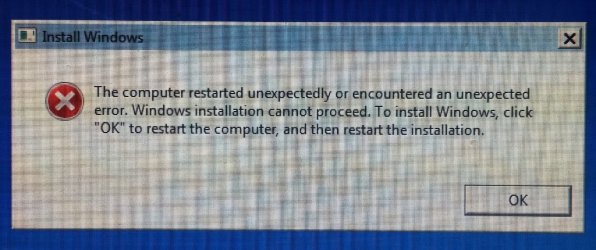
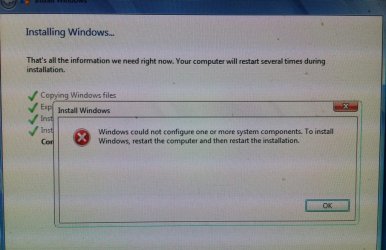
After I install clean copy of windows on pc.. when on last step it says windows could not configure one or more system components. restart computer and then reinstall. has anyone got this before?
 

My Computer My Computer

Computer type
PC/Desktop
OS
windows 7 64bit
After I install clean copy of windows on pc.. when on last step it says windows could not configure one or more system components. restart computer and then reinstall. has anyone got this before?

I got the same error message and after I restarted I get "The computer restarted unexpectedly or encountered an unexpected error." repeatedly
 

Attachments

  • 20150227_145121.jpg
    20150227_145121.jpg
    113.1 KB · Views: 1
  • 20150227_144840.jpg
    20150227_144840.jpg
    120.5 KB · Views: 1

My Computer My Computer

Computer type
PC/Desktop
OS
Windows 7 Professional x64
same

After I install clean copy of windows on pc.. when on last step it says windows could not configure one or more system components. restart computer and then reinstall. has anyone got this before?

I got the same error message and after I restarted I get "The computer restarted unexpectedly or encountered an unexpected error." repeatedly

same thing for me
 

My Computer My Computer

Computer type
PC/Desktop
OS
windows 7 64bit

My Computers My Computers

System One System Two

  • Computer type
    PC/Desktop
    OS
    7 X64
    CPU
    i5 8400
    Motherboard
    gigabyte b365m ds3h
    Memory
    2x8gb 3200mhz
    Hard Drives
    various
    PSU
    pure power 11 400w cm
    Case
    Coolermaster
    Cooling
    cryorig m9i
  • Computer type
    PC/Desktop
    OS
    7x64
    CPU
    g5400
    Motherboard
    ga b365m ds3h
    Memory
    8gb ddr4 2400
    PSU
    xfx pro 450w
After I install clean copy of windows on pc.. when on last step it says windows could not configure one or more system components. restart computer and then reinstall. has anyone got this before?

I got the same error message and after I restarted I get "The computer restarted unexpectedly or encountered an unexpected error." repeatedly

did you figure this out?
 

My Computer My Computer

Computer type
PC/Desktop
OS
windows 7 64bit
I get the same error as well. Also, is there a way to have this program do all versions of 7 or do I have to run it 4 times, selecting a different version each time? It'd be nice if when it asks, there was a 5 option or something that says update all versions or have the option to type for the choice 1-4 and have it do 1 through 4. Just a thought. Also, every time I run the Windows Updates Downloader, either for x86 or x64, it errors out saying it can't find Windows6.1-KB2970228-x64.msu or Windows6.1-KB2970228-x86.msu. I don't know if anyone can change that or not. Just wanted to let people know. Thanks!
 

My Computer My Computer

Computer type
PC/Desktop
Computer Manufacturer/Model Number
Custom Build
OS
Linux - OpenSuSE x64, Windows 7 Home Premium x64.
CPU
Intel
Motherboard
Asus
Memory
8GB DDR2
Graphics Card(s)
nVidia
Browser
Chrome
Also, every time I run the Windows Updates Downloader, either for x86 or x64, it errors out saying it can't find Windows6.1-KB2970228-x64.msu or Windows6.1-KB2970228-x86.msu. I don't know if anyone can change that or not. Just wanted to let people know. Thanks!

I got that error message too. After googling KB2970228 I found out that this update was making problems on some machines, so Microsoft pulled it from the auto updates. That's probably why it ain't there anymore.
Someone should take that one out of the WUD update list to get rid of this message.
 

My Computer My Computer

Computer type
PC/Desktop
OS
Windows 7 x64
I edited the ADM.REG and the DEF.REG

Code:
[HKEY_LOCAL_MACHINE\WIM_Admin\Software\Microsoft\Internet Explorer\Main]
"Start Page"="www.google.at"
"Secondary Start Pages"="www.******.at"

[HKEY_LOCAL_MACHINE\WIM_Admin\Software\Microsoft\Windows\CurrentVersion\Explorer\Advanced]
"HideFileExt"=dword:00000000
The two start pages work perfectly but the Hide File Extensions is not working. What am I doing wrong here?
 

My Computer My Computer

Computer type
PC/Desktop
OS
Windows 7 x64
Awesome! Thank you very much for this post. The entire process was flawless :)
 

My Computer My Computer

OS
Windows 7 Professional 64bit
CPU
AMD Athlon II X3 440
Motherboard
ASUS M4A77TD
Memory
12.0 GB Dual-Channel DDR3 @ 669MHz
Graphics Card(s)
AMD Radeon HD 6850
Sound Card
AMD High Definition Audio Device
Monitor(s) Displays
Dell 317FP, Generic PnP Monitor
Screen Resolution
1920x1080
Hard Drives
112GB OCZ OCZ-AGIL ITY3 SATA Disk Device (SSD)
932GB Western Digital WDC WD10 01FALS-00E3A0 SATA Disk Device (SATA)
466GB Western Digital WDC WD50 01AALS-00L3B2 SATA Disk Device (SATA)
Case
ANTEC 300 ILLUSION
Cooling
CoolerMaster Hyper 212 plus
Other Info
I have two 4GB Corsair XMS3 modules and two 2GB Corsair XMS3 modules.
This looks perfect, but....

What option do you choose if you're integrating into an Enterprise Image?

Please:cry:

Thanks in Advance
VW
 

My Computer My Computer

Computer type
PC/Desktop
Computer Manufacturer/Model Number
hp a6554f
OS
7 enterprise 64
Will have a look.
 

My Computers My Computers

System One System Two

  • Computer type
    PC/Desktop
    OS
    7 X64
    CPU
    i5 8400
    Motherboard
    gigabyte b365m ds3h
    Memory
    2x8gb 3200mhz
    Hard Drives
    various
    PSU
    pure power 11 400w cm
    Case
    Coolermaster
    Cooling
    cryorig m9i
  • Computer type
    PC/Desktop
    OS
    7x64
    CPU
    g5400
    Motherboard
    ga b365m ds3h
    Memory
    8gb ddr4 2400
    PSU
    xfx pro 450w
The extracted folder will be called something like GSP1RMCENXVOL

Run the cmd file, browse to the extracted folder, browse to the updates folder, then select the image you want to update.

Enterprise only has one image:

2015-04-29_180751.jpg
 

My Computers My Computers

System One System Two

  • Computer type
    PC/Desktop
    OS
    7 X64
    CPU
    i5 8400
    Motherboard
    gigabyte b365m ds3h
    Memory
    2x8gb 3200mhz
    Hard Drives
    various
    PSU
    pure power 11 400w cm
    Case
    Coolermaster
    Cooling
    cryorig m9i
  • Computer type
    PC/Desktop
    OS
    7x64
    CPU
    g5400
    Motherboard
    ga b365m ds3h
    Memory
    8gb ddr4 2400
    PSU
    xfx pro 450w
Wow this looks great SIW2. Has this been tested to work for Repair Installs too?

I haven't done a clean install since 2011 but I have done a couple of Repair Installs which has saved me a lot of time.

This will be really handy.
 

My Computer My Computer

Computer type
PC/Desktop
Computer Manufacturer/Model Number
Custom Build
OS
Win 7 Ultimate, Win 8.1 Pro, Linux Mint 19 Cinnamon (All 64-Bit)
CPU
Intel i5 4690K
Motherboard
Gigabyte Z97X-UD3H
Memory
Corsair Vengeance LP 32GB DDR3
Graphics Card(s)
MSI GTX 1060 GAMING X 6GB
Sound Card
Onboard
Hard Drives
Samsung 850 EVO 250GB SSD (x2)
Samsung 860 EVO 1TB SSD (x2)
Crucial MX300 525GB SSD
WD Blue 2TB 5400rpm Intellipark Disabled (x2)
PSU
Corsair HX750i
Case
Phanteks Enthoo Pro
Cooling
CM Hyper 212 EVO on CPU, Noctua Redux NF-P14S 1500rpm (x6)
Keyboard
Corsair K70 RGB LUX
Mouse
Corsair Sabre RGB
Antivirus
Avast Free, MalwareBytes, SAS & CryptoPrevent
Browser
Chrome
Other Info
StarTech PEXESAT322I 2 Port PCI-E SATA Card
ASUS PCE-AC56 Dual-band AC1300 Wireless Card
Akasa FC.Six Manual Fan Controller
And a Partridge in a Pear Tree!
Yes, it works for repair installs too.
 

My Computers My Computers

System One System Two

  • Computer type
    PC/Desktop
    OS
    7 X64
    CPU
    i5 8400
    Motherboard
    gigabyte b365m ds3h
    Memory
    2x8gb 3200mhz
    Hard Drives
    various
    PSU
    pure power 11 400w cm
    Case
    Coolermaster
    Cooling
    cryorig m9i
  • Computer type
    PC/Desktop
    OS
    7x64
    CPU
    g5400
    Motherboard
    ga b365m ds3h
    Memory
    8gb ddr4 2400
    PSU
    xfx pro 450w
Back
Top