
Hi there
Hoping someone can help me with this booting problem.
About six months ago my hard drive failed and I had buy a new HD and re-install Win 7. I had created a backup on an external HD, but for some reason I could not restore the computer using this backup. I'm not sure if any of the backup data transferred onto the HD when I tried to do this. I therefore did a clean install of Win 7 and then copied the files I wanted across from the backup on the external HD.
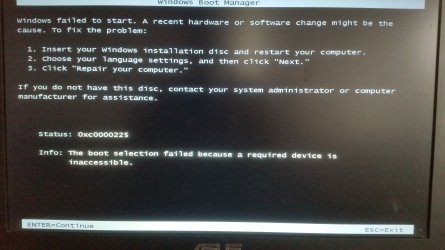
Now, whenever I switch on the laptop the first screen I see is the from the Windows Boot Manager, which says "Windows failed to start. A recent hardware or software change might be the cause.... and it gives the "status as 0xc0000225. Info: The boot selection failed because a required device is inaccessible."
I then hit enter and the laptop boots successfully and all is good. The only reason why I have decided to fix this now is because I want to upgrade to Win 10, and I don't want this to cause any problems during installation.
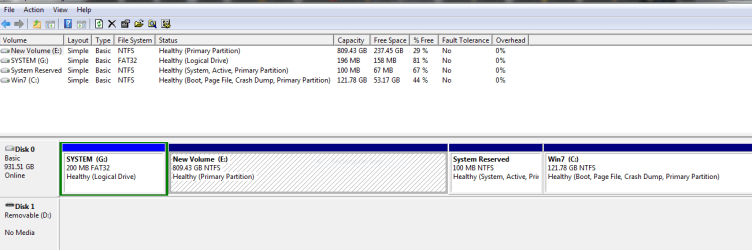
The C drive is where I installed the new copy of Win 7 Op System and the E drive is the partition I created to store my data files etc. I'm not sure what the other drives are?
I have attached screens of the screen described above and also the Windows disk management screen.
Thanks for your help.
Hoping someone can help me with this booting problem.
About six months ago my hard drive failed and I had buy a new HD and re-install Win 7. I had created a backup on an external HD, but for some reason I could not restore the computer using this backup. I'm not sure if any of the backup data transferred onto the HD when I tried to do this. I therefore did a clean install of Win 7 and then copied the files I wanted across from the backup on the external HD.
Now, whenever I switch on the laptop the first screen I see is the from the Windows Boot Manager, which says "Windows failed to start. A recent hardware or software change might be the cause.... and it gives the "status as 0xc0000225. Info: The boot selection failed because a required device is inaccessible."
I then hit enter and the laptop boots successfully and all is good. The only reason why I have decided to fix this now is because I want to upgrade to Win 10, and I don't want this to cause any problems during installation.
The C drive is where I installed the new copy of Win 7 Op System and the E drive is the partition I created to store my data files etc. I'm not sure what the other drives are?
I have attached screens of the screen described above and also the Windows disk management screen.
Thanks for your help.
Attachments
Last edited:
My Computer
- Computer type
- Laptop
- Computer Manufacturer/Model Number
- Asus
- OS
- Windows 7 Home Premium 64bit
- CPU
- Intel i5 - 3210M
- Memory
- 8gb
- Hard Drives
- 1 TB
- Antivirus
- Avast


