Solved The Color Scheme Keeps Changing To Windows 7 Basic At Random?!

tkovack1

New member
Local time
11:32 PM
Messages
11
Location
Columbus, Ohio
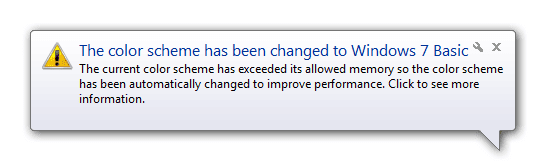
I have a Windows 7 computer. Windows 7 keeps changing my color scheme to Windows 7 Basic randomly. When I am using Google Chrome, I will randomly get a message in the Taskbar that says: "Windows has detected that your computer's performance is slow". Then about 1 minute and 30 seconds later, I will randomly get another message on the Taskbar that says: "The color scheme has been changed to Windows 7 Basic". :confused:

Then, I will have to change my color scheme back to Windows 7 Aero by going to Control Panel> Appearance And Personalization>Personalization and by clicking on the Windows 7 Aero theme. Then I get a box in the middle of my screen that says "Please Wait" and everything goes black and white for about 2 minutes.


I know that Windows 7 changes my color scheme because of performance problems, but why? That's why I am posting this thread. I am tired of changing my color scheme to Windows 7 Aero every 30 minutes. :( Thanks! :)
 

Attachments

  • Error 3.png
    Error 3.png
    3.9 KB · Views: 79
  • Error 6.png
    Error 6.png
    5 KB · Views: 79
Last edited:

My Computer

Computer type
PC/Desktop
Computer Manufacturer/Model Number
Dell Inspiron One
OS
Windows 7 Home Premium 64-bit
Antivirus
Kaspersky
I found a way to make Windows 7 stop changing my color scheme because for performance problems. But I still want to know why. ;) Thanks! :)
 
Last edited:

My Computer

Computer type
PC/Desktop
Computer Manufacturer/Model Number
Dell Inspiron One
OS
Windows 7 Home Premium 64-bit
Antivirus
Kaspersky
IMHO, while Microsoft doesn't seem to want to own to it, the DWM (Desktop Window Manager) has resource issues. It’s been my experience that the service, essential to the Aero-glass appearance on Windows 7, can easily be “maxed out” if there is too much pixel real estate in front of you. My current environment uses two dedicated graphics adapters (AMD HD 5450 and AMD HD 6450) for 3 1600x1200 monitors. And the Aero-glass appearance can only be maintained for a short time before the system automatically shifts to “Basic” appearance mode (and a varienty of Event ID errors, 9024/9025/9026, are logged in the Application log). Restarting the DWM service re-enables the Aero-glass mode, but that will only last a short time.

Would I be correct in assuming that you, too, have large screen space?:huh:

The Internet is populated with lots of complaints about DWM, all from people with lots of monitor space (very large monitor, multiple monitors, low-end or high-end graphic adapters). Many are running x64 and have lots of RAM, but the issue keeps popping up. The common thread that I see is that they all have very large total screen space in front of them.

My wife’s machine, conversely, never has issues with Aero-glass. But she only has a single 1280x1024 monitor in front of her, and the critical resources used are much less.

You can get an idea of the resources being exhausted through Microsoft’s SysInternal’s Process Explorer tool; a tool which provides far greater details about each Window's process and is available as a free download from technet.microsoft.com/en-us/sysinternals/bb896653. Once running this tool, select the dwm.exe process, right-click for Properties, then select the GPU Graph option. You will see how close to maximum the resources are for this service.


superuser.com
www.sevenforums.com
 

My Computer

OS
Windows 7 Enterprise x64
Thank you for the reply. :)
 
Last edited:

My Computer

Computer type
PC/Desktop
Computer Manufacturer/Model Number
Dell Inspiron One
OS
Windows 7 Home Premium 64-bit
Antivirus
Kaspersky
How to fix the Changing Color Scheme

When you open Google Chrome you got a Message in Task at the bottom with a Warning sign it says Color Scheme Change to Windows 7 Basic so i know how to fix that Problem but you keep doing it it will not save if you Shut down your PC.

Steps:
[*]1st click the Start Orb or press the windows button on your keyboard
[*]2nd search only Service and click the Services Running on this Computer
[*]3rd look for Desktop Window Manager Session Manager but keep the Google Chrome open.
[*]4th Click the Stop button at the Info.
[*]5th Click the Start button.
[*]Wait for 1.5 seconds maybe and tada! you get the Windows 7 Ultimate/Professional/Home Premium task bar.

Hope it Worked in you!:):):)

Warning:

Once you Shut down/Restart your PC/Laptop that will not save but i will find a way to fix that problem.
 
Last edited:

My Computer

Computer type
Laptop
Computer Manufacturer/Model Number
HP
OS
Windows 7 Ultimate x64
CPU
T6600 @2.20GHz 2.20GHz
Motherboard
dsv
Memory
129
Graphics Card(s)
Intel(R) Core(TM)2 Duo
Hard Drives
Local (Disk :C)
Antivirus
Avira
Browser
Google Chrome
I don't know what functionality you use by doing this but maybe you can use a batch file to stop the service, which then opens Chrome.

Open notepad, copy paste below. Save as: change file type to all, and save as chrome.bat
Code:
net stop UxSms
start "C:\Program Files (x86)\Google\Chrome\Application\chrome.exe"
exit
 

My Computer

Computer type
PC/Desktop
Computer Manufacturer/Model Number
Custom Build
OS
Windows 7 Ultimate x64 SP1
CPU
AMD Phenom 2 1090T
Motherboard
Gigabyte GA-890FXA-UD5
Memory
2x8GB Kingston HyperX Fury Black 1600Mhz Unganged
Graphics Card(s)
MSI GTX 970 Gaming 4G
Sound Card
Realtek On-Board HD 7.1 Audio / Logitech G35
Monitor(s) Displays
3xAcer GD245HQ
Screen Resolution
1920x1080
Hard Drives
Samsung 850 Pro 512GB SSD - OS /
WD Caviar Black SATA 3 - 1 TBx2 - Dynamic RAID 0 /
WD Caviar Green SATA 2 - 640GBx2 - Dynamic RAID 0 /
WD Caviar Green SATA 2 - 640GB - Internal Backup /
Seagate Barracude SATA 3 - 3TB - External Backup/ Sync
PSU
HighPower 1000W
Case
Cooler Master HAF 932
Cooling
Noctua NH-D14
Keyboard
Logitech G19
Mouse
Logitech G500
Internet Speed
100/4 Mbit Cable (100GB quota)
Antivirus
ZoneAlarm Extreme Security / MBAM Pro / MBAE Free / SAS Free
Browser
IE 11 - Firefox - Chrome
Other Info
Logitech F710/ G27/ G940/ Z5500 // TrackIR 5 // Nvidia 3D Surround Vision
IMHO, while Microsoft doesn't seem to want to own to it, the DWM (Desktop Window Manager) has resource issues. It’s been my experience that the service, essential to the Aero-glass appearance on Windows 7, can easily be “maxed out” if there is too much pixel real estate in front of you. My current environment uses two dedicated graphics adapters (AMD HD 5450 and AMD HD 6450) for 3 1600x1200 monitors. And the Aero-glass appearance can only be maintained for a short time before the system automatically shifts to “Basic” appearance mode (and a varienty of Event ID errors, 9024/9025/9026, are logged in the Application log). Restarting the DWM service re-enables the Aero-glass mode, but that will only last a short time.

Would I be correct in assuming that you, too, have large screen space?:huh:

The Internet is populated with lots of complaints about DWM, all from people with lots of monitor space (very large monitor, multiple monitors, low-end or high-end graphic adapters). Many are running x64 and have lots of RAM, but the issue keeps popping up. The common thread that I see is that they all have very large total screen space in front of them.

My wife’s machine, conversely, never has issues with Aero-glass. But she only has a single 1280x1024 monitor in front of her, and the critical resources used are much less.

You can get an idea of the resources being exhausted through Microsoft’s SysInternal’s Process Explorer tool; a tool which provides far greater details about each Window's process and is available as a free download from technet.microsoft.com/en-us/sysinternals/bb896653. Once running this tool, select the dwm.exe process, right-click for Properties, then select the GPU Graph option. You will see how close to maximum the resources are for this service.


superuser.com
www.sevenforums.com

Switch IE to allow Software Rendering rather than GPU rendering. I believe this setting is NOT allowing Windows to manage the physical memory space. I have tested it and applied this change on a Dual Monitor AMD / On Board Intel video card set up with 6G of physical memory and the issue is resolved. Internet Explorer hits the physical memory first and we are telling windows that it's not allowed to control it because it's a graphic. In IE under options the very first check box (remember it take a computer restart) to allow software rendering instead of GPU rendering and Windows will then be allowed to manage the memory space properly and will not throttle itself down by sacrificing the AERO graphics. 2 days tested on 4 office computers now and it does seem to solve the issue. Would recommend same for Chrome users to.
 

My Computer

Computer type
PC/Desktop
Computer Manufacturer/Model Number
HP Pavillion p7-1080t
OS
Windows 7 64-bit
CPU
Intel i-5 Quad
Motherboard
HP don't know the chipset
Memory
6GB
Graphics Card(s)
AMD Radeon HD 6450 and on board Intel HD Graphics
Hard Drives
1 T
Antivirus
Nortons Business
Browser
Internet Explorer 11
Back
Top