I took my adventure to google to try to resolve this issue, the reason why i ask is I try to repair my internet and I get this.
Here is what I have done so far.
-I tried all of those things and I finally got it fixed:
go to start ,search and type:- cmd, right click on returned cmd.exe and select "run as administrator" at the prompt type:-
net localgroup Administrators /add networkservice
press enter then type:
net localgroup Administrators /add localservice
press enter then type:
exit
press enter and restart your computer
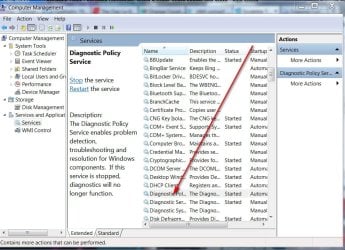
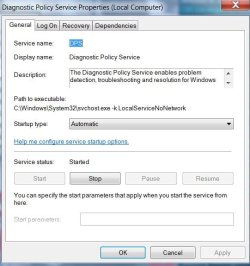
Open services and make sure the service is started.
-Follow these methods mentioned below and check,
Method 1: I would suggest you to follow these steps.
a. Click on Start button.
b, Enter services.msc in Start search option.
c. Right click the Diagnostics Policy Services and start the services.
Method 2: This issue may occur when the account Trusted installer is missing the permissions for the key below:
HKEY_LOCAL_MACHINE\SYSTEM\CurrentControlSet\Services\DPS\Parameters
Permission needed: Full Control, Read
Note: Serious problems might occur if you modify the registry incorrectly. Therefore, make sure that you follow these steps carefully. For added protection,
back up the registry before you modify it. Then, you can restore the registry if a problem occurs. For more information about how to back up and restore the
registry, click the following article number to view the article in the Microsoft Knowledge Base:
(Back up the registry - Windows Help )
a. In Registry Editor(click start, type “regedit” and hit enter), browse to the above mentioned key for which you need to add permission.
b. Right click the key, and click Permissions. (HKEY_LOCAL_MACHINE\SYSTEM\CurrentControlSet\Services\DPS\Parameters)
c. Click “Add” Button under usernames. Make sure Locations is selected to be the local computer.
d. In the "Enter the object names to select field, type "NT SERVICE\mpssvc". Then click “Check name.”
e. Click OK.
f. Then select the account which appears in the list, and add the appropriate permission (Full Control, Read) for it.
g. When this is done, click OK.
-Remove/uninstall all the network adapters and do scan for hardware changes.
a. Click on Start button.
b. In the start search type Devmgmt.msc and press Enter.
c. Uninstall all the network devices you have there.
d. Scan for hardware changes, your device will then automatically be installed over again.
Now, try running the network diagnostic service, it should start.
-sfc /scannow
-enabled DiagLog
-Windows repair tool
Here is what I have done so far.
-I tried all of those things and I finally got it fixed:
go to start ,search and type:- cmd, right click on returned cmd.exe and select "run as administrator" at the prompt type:-
net localgroup Administrators /add networkservice
press enter then type:
net localgroup Administrators /add localservice
press enter then type:
exit
press enter and restart your computer
Open services and make sure the service is started.
-Follow these methods mentioned below and check,
Method 1: I would suggest you to follow these steps.
a. Click on Start button.
b, Enter services.msc in Start search option.
c. Right click the Diagnostics Policy Services and start the services.
Method 2: This issue may occur when the account Trusted installer is missing the permissions for the key below:
HKEY_LOCAL_MACHINE\SYSTEM\CurrentControlSet\Services\DPS\Parameters
Permission needed: Full Control, Read
Note: Serious problems might occur if you modify the registry incorrectly. Therefore, make sure that you follow these steps carefully. For added protection,
back up the registry before you modify it. Then, you can restore the registry if a problem occurs. For more information about how to back up and restore the
registry, click the following article number to view the article in the Microsoft Knowledge Base:
(Back up the registry - Windows Help )
a. In Registry Editor(click start, type “regedit” and hit enter), browse to the above mentioned key for which you need to add permission.
b. Right click the key, and click Permissions. (HKEY_LOCAL_MACHINE\SYSTEM\CurrentControlSet\Services\DPS\Parameters)
c. Click “Add” Button under usernames. Make sure Locations is selected to be the local computer.
d. In the "Enter the object names to select field, type "NT SERVICE\mpssvc". Then click “Check name.”
e. Click OK.
f. Then select the account which appears in the list, and add the appropriate permission (Full Control, Read) for it.
g. When this is done, click OK.
-Remove/uninstall all the network adapters and do scan for hardware changes.
a. Click on Start button.
b. In the start search type Devmgmt.msc and press Enter.
c. Uninstall all the network devices you have there.
d. Scan for hardware changes, your device will then automatically be installed over again.
Now, try running the network diagnostic service, it should start.
-sfc /scannow
-enabled DiagLog
-Windows repair tool
My Computer
At a glance
Windows 7 UltimateAMD Phenom(tm) II x2 555 ~3.2GHz6144 MB RamAsus NVIDIA GeForce GTX 460
- OS
- Windows 7 Ultimate
- CPU
- AMD Phenom(tm) II x2 555 ~3.2GHz
- Motherboard
- ASUS M2N-SLI Deluxe AM2
- Memory
- 6144 MB Ram
- Graphics Card(s)
- Asus NVIDIA GeForce GTX 460
- Sound Card
- On board 5.1 surround sound
- Monitor(s) Displays
- 19"
- Hard Drives
- Western digital 7200 RPM
- PSU
- 900 W
- Case
- Full Tower
- Cooling
- Air