The diagnostics policy service is not running

GlobesStudios

Win7 Theme Designer
Power User
Local time
9:19 AM
Messages
177
Whenever I try troubleshooting internet connection problems (which I often do) I run into the same message time and time again without fail; "The diagnostics policy service is not running" I attempted to go into services.msc and fix the problem, when I attempted to start the service manually I got the following message; "The Diagnostic Policy Service service on Local Computer started and then stopped. Some services stop automatically if they are not in use by other services or programs."

Please don't tell me to reformat my computer, because that's my last resort, I don't have any restore points from before the problem occurred, and I don't want to run a repair install. If anyone can find a solution I will be forever grateful.
 

My Computer My Computer

At a glance

Windows 7 Ultimate x64Intel Core 2 Duo E8400Mushkin DDR2 4096MB (2048MBx2) 800Mhz CL 5-5-...Club3D ATI Radeon HD4850 512MB PCIe
OS
Windows 7 Ultimate x64
CPU
Intel Core 2 Duo E8400
Motherboard
GIGABYTE GA-EX38-DS4
Memory
Mushkin DDR2 4096MB (2048MBx2) 800Mhz CL 5-5-5-18 SP
Graphics Card(s)
Club3D ATI Radeon HD4850 512MB PCIe
Monitor(s) Displays
Asus 22" VK222U 2ms LCD
Screen Resolution
1680x1050
Hard Drives
Seagate ST3500320AS 500GB SATA2 32MB
PSU
Enermax Pro82+ 525W
Case
NZXT Trinity
Cooling
Arctic Cooling Case Fan AF12025 120mm
Keyboard
Logitech Media Keyboard
Mouse
Logitech RX700 Cordless
Whenever I try troubleshooting internet connection problems (which I often do) I run into the same message time and time again without fail; "The diagnostics policy service is not running" I attempted to go into services.msc and fix the problem, when I attempted to start the service manually I got the following message; "The Diagnostic Policy Service service on Local Computer started and then stopped. Some services stop automatically if they are not in use by other services or programs."

In searching for an answer on this issue, I see that you have either had this problem for quite some time or solved your initial query from Dec. 2009 ( http://www.sevenforums.com/general-discussion/46341-cannot-start-diagnostic-policy-service.html )
and are now having the problem again. Can you tell us what transpired between then and now?

Also, in the interest of time, it would be good if you could provide us with the attempts you have already made to resolve the problem.

Please don't tell me to reformat my computer, because that's my last resort, I don't have any restore points from before the problem occurred, and I don't want to run a repair install. If anyone can find a solution I will be forever grateful.

Googling returned many hits regarding this issue, & not too many solutions. Many people's issues were resolved by System Restore, but you have already addressed that, and although you express a lack of interest in running (http://www.sevenforums.com/tutorials/3413-repair-install.html ), that may turn out to be your only option.

That said, a few resolutions did turn up. These may be redundant, but given the sparsity of info provided, they may be redundant:


1) Make sure that MSConfig\General startup selection is set to normal. Restart. Did service start and stay running?

2) Try setting the service to Automatic start. Restart the machine, see if problem solved.

3) Run SFC: http://www.sevenforums.com/tutorials/1538-sfc-scannow-command-system-file-checker.html

From: Windows Diagonastic policy service is not running

In Device Manager, uninstall all your network adapters and restart your computer, after which your NW devices will be automatically reinstalled. Check whether the service can be restarted now.

Finally, make sure that SR is turned on and assign it enough disk space to accomodate you when these issues occur.

Another very useful practice is to acquire a good imaging program (such as Acronis) and make regular partition back ups. I can't tell you how 'lifesaving' this can be, although at this moment, it's likely that you can imagine. :)

James
 

My Computer My Computer

At a glance

Win7U 64 RTMQ95508GB GskillASUS|EAH4850/HTDI/1GD3/A
OS
Win7U 64 RTM
CPU
Q9550
Motherboard
GA-EP45-UD3R
Memory
8GB Gskill
Graphics Card(s)
ASUS|EAH4850/HTDI/1GD3/A
Sound Card
xfi Plat
Monitor(s) Displays
Dell 2405fpw
Screen Resolution
1920x1200
Hard Drives
Seagate & WD sata Drives
PSU
Antec
Case
Antec
Keyboard
MS Natural Ergonomic 4000
Mouse
Logitech MX610 USB Cordless
Whenever I try troubleshooting internet connection problems (which I often do) I run into the same message time and time again without fail; "The diagnostics policy service is not running" I attempted to go into services.msc and fix the problem, when I attempted to start the service manually I got the following message; "The Diagnostic Policy Service service on Local Computer started and then stopped. Some services stop automatically if they are not in use by other services or programs."

In searching for an answer on this issue, I see that you have either had this problem for quite some time or solved your initial query from Dec. 2009 ( http://www.sevenforums.com/general-discussion/46341-cannot-start-diagnostic-policy-service.html )
and are now having the problem again. Can you tell us what transpired between then and now?

Also, in the interest of time, it would be good if you could provide us with the attempts you have already made to resolve the problem.

Please don't tell me to reformat my computer, because that's my last resort, I don't have any restore points from before the problem occurred, and I don't want to run a repair install. If anyone can find a solution I will be forever grateful.
Googling returned many hits regarding this issue, & not too many solutions. Many people's issues were resolved by System Restore, but you have already addressed that, and although you express a lack of interest in running (http://www.sevenforums.com/tutorials/3413-repair-install.html ), that may turn out to be your only option.

That said, a few resolutions did turn up. These may be redundant, but given the sparsity of info provided, they may be redundant:


1) Make sure that MSConfig\General startup selection is set to normal. Restart. Did service start and stay running?

2) Try setting the service to Automatic start. Restart the machine, see if problem solved.

3) Run SFC: http://www.sevenforums.com/tutorials/1538-sfc-scannow-command-system-file-checker.html

From: Windows Diagonastic policy service is not running

In Device Manager, uninstall all your network adapters and restart your computer, after which your NW devices will be automatically reinstalled. Check whether the service can be restarted now.

Finally, make sure that SR is turned on and assign it enough disk space to accomodate you when these issues occur.

Another very useful practice is to acquire a good imaging program (such as Acronis) and make regular partition back ups. I can't tell you how 'lifesaving' this can be, although at this moment, it's likely that you can imagine. :)

James

Yes I've had the problem for ages but now that my internet needs diagnosing often its worse.

1) Tried it, didn't work.
2)Always been set to that.
3)I'll run a scan now inform you of results.

I tried all the other options you listed nothing worked. And running a repair install would mean fixing my disc drive which doesn't work, unless you know of a different way to do it.
 

My Computer My Computer

At a glance

Windows 7 Ultimate x64Intel Core 2 Duo E8400Mushkin DDR2 4096MB (2048MBx2) 800Mhz CL 5-5-...Club3D ATI Radeon HD4850 512MB PCIe
OS
Windows 7 Ultimate x64
CPU
Intel Core 2 Duo E8400
Motherboard
GIGABYTE GA-EX38-DS4
Memory
Mushkin DDR2 4096MB (2048MBx2) 800Mhz CL 5-5-5-18 SP
Graphics Card(s)
Club3D ATI Radeon HD4850 512MB PCIe
Monitor(s) Displays
Asus 22" VK222U 2ms LCD
Screen Resolution
1680x1050
Hard Drives
Seagate ST3500320AS 500GB SATA2 32MB
PSU
Enermax Pro82+ 525W
Case
NZXT Trinity
Cooling
Arctic Cooling Case Fan AF12025 120mm
Keyboard
Logitech Media Keyboard
Mouse
Logitech RX700 Cordless
...running a repair install would mean fixing my disc drive which doesn't work, unless you know of a different way to do it.

I'm not sure what you mean by this. When you post back with the results of the SFC scan, would you mind being specific regarding your disc drive issues or any other issues at play?

Thanks,
James
 

My Computer My Computer

At a glance

Win7U 64 RTMQ95508GB GskillASUS|EAH4850/HTDI/1GD3/A
OS
Win7U 64 RTM
CPU
Q9550
Motherboard
GA-EP45-UD3R
Memory
8GB Gskill
Graphics Card(s)
ASUS|EAH4850/HTDI/1GD3/A
Sound Card
xfi Plat
Monitor(s) Displays
Dell 2405fpw
Screen Resolution
1920x1200
Hard Drives
Seagate & WD sata Drives
PSU
Antec
Case
Antec
Keyboard
MS Natural Ergonomic 4000
Mouse
Logitech MX610 USB Cordless
...running a repair install would mean fixing my disc drive which doesn't work, unless you know of a different way to do it.
I'm not sure what you mean by this. When you post back with the results of the SFC scan, would you mind being specific regarding your disc drive issues or any other issues at play?

Thanks,
James

My cd-rom drive is broken beyond repair, I rather not run a repair install or reformat because that would mean replacing it. unless i could run it from usb or something.
I will run the scan tonight and post the results in the morning
 

My Computer My Computer

At a glance

Windows 7 Ultimate x64Intel Core 2 Duo E8400Mushkin DDR2 4096MB (2048MBx2) 800Mhz CL 5-5-...Club3D ATI Radeon HD4850 512MB PCIe
OS
Windows 7 Ultimate x64
CPU
Intel Core 2 Duo E8400
Motherboard
GIGABYTE GA-EX38-DS4
Memory
Mushkin DDR2 4096MB (2048MBx2) 800Mhz CL 5-5-5-18 SP
Graphics Card(s)
Club3D ATI Radeon HD4850 512MB PCIe
Monitor(s) Displays
Asus 22" VK222U 2ms LCD
Screen Resolution
1680x1050
Hard Drives
Seagate ST3500320AS 500GB SATA2 32MB
PSU
Enermax Pro82+ 525W
Case
NZXT Trinity
Cooling
Arctic Cooling Case Fan AF12025 120mm
Keyboard
Logitech Media Keyboard
Mouse
Logitech RX700 Cordless

My Computer My Computer

At a glance

Win7U 64 RTMQ95508GB GskillASUS|EAH4850/HTDI/1GD3/A
OS
Win7U 64 RTM
CPU
Q9550
Motherboard
GA-EP45-UD3R
Memory
8GB Gskill
Graphics Card(s)
ASUS|EAH4850/HTDI/1GD3/A
Sound Card
xfi Plat
Monitor(s) Displays
Dell 2405fpw
Screen Resolution
1920x1200
Hard Drives
Seagate & WD sata Drives
PSU
Antec
Case
Antec
Keyboard
MS Natural Ergonomic 4000
Mouse
Logitech MX610 USB Cordless
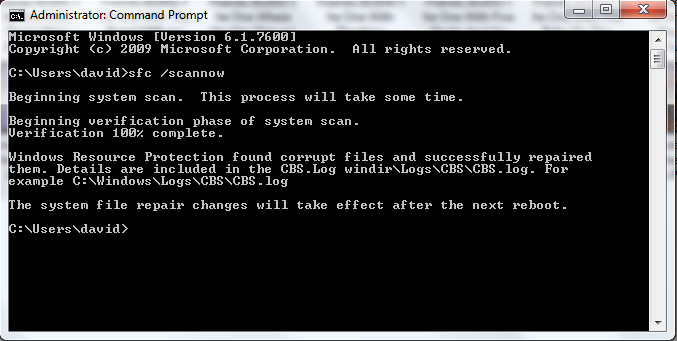
Okay the results of my scan came back

a0865a4f691893b6b32445e57a258590.png


this is the log:
CBS.txt
 

My Computer My Computer

At a glance

Windows 7 Ultimate x64Intel Core 2 Duo E8400Mushkin DDR2 4096MB (2048MBx2) 800Mhz CL 5-5-...Club3D ATI Radeon HD4850 512MB PCIe
OS
Windows 7 Ultimate x64
CPU
Intel Core 2 Duo E8400
Motherboard
GIGABYTE GA-EX38-DS4
Memory
Mushkin DDR2 4096MB (2048MBx2) 800Mhz CL 5-5-5-18 SP
Graphics Card(s)
Club3D ATI Radeon HD4850 512MB PCIe
Monitor(s) Displays
Asus 22" VK222U 2ms LCD
Screen Resolution
1680x1050
Hard Drives
Seagate ST3500320AS 500GB SATA2 32MB
PSU
Enermax Pro82+ 525W
Case
NZXT Trinity
Cooling
Arctic Cooling Case Fan AF12025 120mm
Keyboard
Logitech Media Keyboard
Mouse
Logitech RX700 Cordless
does this help my case?

when I open the event viewer I get an error message:

Event log service is unavailable verify that the service is running.


When i try running the service manually I get:

Windows could not start the Windows Event Log service on Local Computer.

Error 4201: The instance name passed was not recognized as valid by a WMI
data provider

Is this related to my original problem?
 

My Computer My Computer

At a glance

Windows 7 Ultimate x64Intel Core 2 Duo E8400Mushkin DDR2 4096MB (2048MBx2) 800Mhz CL 5-5-...Club3D ATI Radeon HD4850 512MB PCIe
OS
Windows 7 Ultimate x64
CPU
Intel Core 2 Duo E8400
Motherboard
GIGABYTE GA-EX38-DS4
Memory
Mushkin DDR2 4096MB (2048MBx2) 800Mhz CL 5-5-5-18 SP
Graphics Card(s)
Club3D ATI Radeon HD4850 512MB PCIe
Monitor(s) Displays
Asus 22" VK222U 2ms LCD
Screen Resolution
1680x1050
Hard Drives
Seagate ST3500320AS 500GB SATA2 32MB
PSU
Enermax Pro82+ 525W
Case
NZXT Trinity
Cooling
Arctic Cooling Case Fan AF12025 120mm
Keyboard
Logitech Media Keyboard
Mouse
Logitech RX700 Cordless
First, the SFC. As you can see from the returned message in the command window, SFC found corrupt files and successfully repaired all of them. Attached is a file called GLB_sfcdetails.txt. It lists only the files that were repaired. You can see that there are quite a few.

So SFC has repaired the all the corrupt or changed system files on your machine. This may include any 'hacks' or changes you may have made (i.e., to make an old program work, etc.).

1st question: Has this resolved your problem with the DP Service?

does this help my case?

when I open the event viewer I get an error message:

Event log service is unavailable verify that the service is running.


When i try running the service manually I get:

Windows could not start the Windows Event Log service on Local Computer.

Error 4201: The instance name passed was not recognized as valid by a WMI
data provider

Is this related to my original problem?


I can't say if this is related to your original problem, but here are a few links you can view where resolution has been reached, and a google search that will likely turn up more:

Ammars' IT Blog: Error 4201: The instance name passed was not recognized as valid by a WMI data provider

Cannot start event log service on Vista Ultimate

Error 4201: The instance name passed was not recognized as valid by a WMIdata provider - Google Search

In the 1st 2 links, there are 2 different solutions (the 2nd link has quite a few posts that you will have to scroll through, but there are 2 answers that worked for different users, possibly more. The 1st link is one post).

All of this said, I still recommend a repair install, and with the links provided in my previous post for the low cost cd readers and the articles specifying how to do a repair via USB, there really is no reason not to.

James
 

Attachments

My Computer My Computer

At a glance

Win7U 64 RTMQ95508GB GskillASUS|EAH4850/HTDI/1GD3/A
OS
Win7U 64 RTM
CPU
Q9550
Motherboard
GA-EP45-UD3R
Memory
8GB Gskill
Graphics Card(s)
ASUS|EAH4850/HTDI/1GD3/A
Sound Card
xfi Plat
Monitor(s) Displays
Dell 2405fpw
Screen Resolution
1920x1200
Hard Drives
Seagate & WD sata Drives
PSU
Antec
Case
Antec
Keyboard
MS Natural Ergonomic 4000
Mouse
Logitech MX610 USB Cordless
It didn't solve my problem I'm still having the DP problem.. nothing else I can do?
 

My Computer My Computer

At a glance

Windows 7 Ultimate x64Intel Core 2 Duo E8400Mushkin DDR2 4096MB (2048MBx2) 800Mhz CL 5-5-...Club3D ATI Radeon HD4850 512MB PCIe
OS
Windows 7 Ultimate x64
CPU
Intel Core 2 Duo E8400
Motherboard
GIGABYTE GA-EX38-DS4
Memory
Mushkin DDR2 4096MB (2048MBx2) 800Mhz CL 5-5-5-18 SP
Graphics Card(s)
Club3D ATI Radeon HD4850 512MB PCIe
Monitor(s) Displays
Asus 22" VK222U 2ms LCD
Screen Resolution
1680x1050
Hard Drives
Seagate ST3500320AS 500GB SATA2 32MB
PSU
Enermax Pro82+ 525W
Case
NZXT Trinity
Cooling
Arctic Cooling Case Fan AF12025 120mm
Keyboard
Logitech Media Keyboard
Mouse
Logitech RX700 Cordless
Turns out my problems were connected! I performed something in the cmd prompt in safe mode, to fix my event log viewer, and it fixed DP!

I have not seen this solution anyway related to DP so here it is:

Start the computer in Safe Mode without networking.
Open a command prompt as administrator
Type "net stop winmgmt" without quotes and press enter to make certain the wmi service is not running.
Go to the windows\system32\WBEM\ and rename the Repository folder.
Restart the system to normal mode.
Open a command prompt as administrator.
Type "net stop winmgmt" without quotes and press enter to stop the wmi service.
Type winmgmt /resetRepository and restart the system.

Test the event viewer/Troubleshooting
 

My Computer My Computer

At a glance

Windows 7 Ultimate x64Intel Core 2 Duo E8400Mushkin DDR2 4096MB (2048MBx2) 800Mhz CL 5-5-...Club3D ATI Radeon HD4850 512MB PCIe
OS
Windows 7 Ultimate x64
CPU
Intel Core 2 Duo E8400
Motherboard
GIGABYTE GA-EX38-DS4
Memory
Mushkin DDR2 4096MB (2048MBx2) 800Mhz CL 5-5-5-18 SP
Graphics Card(s)
Club3D ATI Radeon HD4850 512MB PCIe
Monitor(s) Displays
Asus 22" VK222U 2ms LCD
Screen Resolution
1680x1050
Hard Drives
Seagate ST3500320AS 500GB SATA2 32MB
PSU
Enermax Pro82+ 525W
Case
NZXT Trinity
Cooling
Arctic Cooling Case Fan AF12025 120mm
Keyboard
Logitech Media Keyboard
Mouse
Logitech RX700 Cordless
Excellent! Thanks for posting back with your results, and the connection between the Diagnostic Policy issues and Event Viewer error:4201. :)

James
 

My Computer My Computer

At a glance

Win7U 64 RTMQ95508GB GskillASUS|EAH4850/HTDI/1GD3/A
OS
Win7U 64 RTM
CPU
Q9550
Motherboard
GA-EP45-UD3R
Memory
8GB Gskill
Graphics Card(s)
ASUS|EAH4850/HTDI/1GD3/A
Sound Card
xfi Plat
Monitor(s) Displays
Dell 2405fpw
Screen Resolution
1920x1200
Hard Drives
Seagate & WD sata Drives
PSU
Antec
Case
Antec
Keyboard
MS Natural Ergonomic 4000
Mouse
Logitech MX610 USB Cordless
I had the same problem starting a couple weeks ago. I thought it must have something to do with a bunch of tweaks I had done after installing a new SSD. Today I found out which one it was. I had disabled DiagLog in Performance Monitor. By enabling it again and rebooting I now have DP services again. Here's how:
Start->Administrative tools-->Performance monitor. Click on data collector sets and then expand Startup Event Trace Sessions. If the entry for DiagLog is disabled, right click on it, select Properties, and in the Trace Session tab check the Enabled box. OK everything and close Performance Monitor. Reboot (not sure if that's needed, but it certainly won't hurt) and then check DP services again. In my case, everything was back to normal.

Hope this helps.
 

My Computer My Computer

At a glance

Windows 7 Ultimate x64Intel i7 4790 @ 3.60 GHz16 GBNVIDIA GeForce GTX 750 Ti
Computer type
PC/Desktop
Computer Manufacturer/Model Number
Dell Inspiron 870
OS
Windows 7 Ultimate x64
CPU
Intel i7 4790 @ 3.60 GHz
Motherboard
Dell
Memory
16 GB
Graphics Card(s)
NVIDIA GeForce GTX 750 Ti
Sound Card
Onboard, Realtek HD Audio
Monitor(s) Displays
ASUS ProArt
Screen Resolution
1920*1200
Hard Drives
Samsung 840 EVO 250 GB SSD
Various HDDs
Keyboard
Logitech K800 Wireless
Mouse
Logitech MX Master
Browser
Firefox 42.0
SOLVED - Diagnostic Policy Service (DSP)

Thanks khodges747

Spent hours and hours to find a solution. THIS one did the trick.

Me too installed Windows7 on an SSD and performed some tweaks.
Found that my DiagLog was disabled as well.

Now the Diagnostic Policy Service (DSP) functions again as expected.

Thank you so much.
 

My Computer My Computer

At a glance

Windows 7 ProfessionalIntel i7 [email protected]8GBATI FirePro V5800
OS
Windows 7 Professional
CPU
Intel i7 [email protected]
Motherboard
ASUS P7P55D-E Deluxe
Memory
8GB
Graphics Card(s)
ATI FirePro V5800
Monitor(s) Displays
NEC PA241W
Hard Drives
many WDC & Seagate
Case
Lian-Li
Cooling
Liquid and quiet fans
annoyance

I have no problem starting my DPS, but every time I reboot or restart after shut down I have to restart the DPS. Does anybody know how to resolve this issue, to keep the service running after shut down and restart. :(
 

My Computer My Computer

At a glance

windows 7 home premium 64bitdual INTEL (R)PENTIUM(R) [email protected] GHz 2.3...4.00 GB (3.89) usableIntel(R)HD Graphics
Computer type
Laptop
Computer Manufacturer/Model Number
asus
OS
windows 7 home premium 64bit
CPU
dual INTEL (R)PENTIUM(R) [email protected] GHz 2.30 GHz
Motherboard
X55A
Memory
4.00 GB (3.89) usable
Graphics Card(s)
Intel(R)HD Graphics
Hard Drives
Toshiba MQO1ABD050 ATA Device
Antivirus
AVAST!, IObit, Windows Defender
Browser
Internet Explorer
The only thing I can suggest is to verify that the Diagnostic Policy Service is set to run automatically. It sounds as if it may be set to run manually on your machine for some reason.

Try this: Go to the Start menu, type "services" in the search bar and click on the entry called Services (you can also find it in Administrative tools). Scroll down the list of services to find Diagnostic Policy Service. If not already set to Automatic, double click on it and change the setting.

Hope this helps.
 

My Computer My Computer

At a glance

Windows 7 Ultimate x64Intel i7 4790 @ 3.60 GHz16 GBNVIDIA GeForce GTX 750 Ti
Computer type
PC/Desktop
Computer Manufacturer/Model Number
Dell Inspiron 870
OS
Windows 7 Ultimate x64
CPU
Intel i7 4790 @ 3.60 GHz
Motherboard
Dell
Memory
16 GB
Graphics Card(s)
NVIDIA GeForce GTX 750 Ti
Sound Card
Onboard, Realtek HD Audio
Monitor(s) Displays
ASUS ProArt
Screen Resolution
1920*1200
Hard Drives
Samsung 840 EVO 250 GB SSD
Various HDDs
Keyboard
Logitech K800 Wireless
Mouse
Logitech MX Master
Browser
Firefox 42.0
almost there

I appreciate the input but I did do that in administrative tools(services)that worked but, I had to go into my registry editor and activated it there. And then when I checked my IP Helper I found it disabled again. What do you think is going on with this. I would appreciate some more input. :confused:
 

My Computer My Computer

At a glance

windows 7 home premium 64bitdual INTEL (R)PENTIUM(R) [email protected] GHz 2.3...4.00 GB (3.89) usableIntel(R)HD Graphics
Computer type
Laptop
Computer Manufacturer/Model Number
asus
OS
windows 7 home premium 64bit
CPU
dual INTEL (R)PENTIUM(R) [email protected] GHz 2.30 GHz
Motherboard
X55A
Memory
4.00 GB (3.89) usable
Graphics Card(s)
Intel(R)HD Graphics
Hard Drives
Toshiba MQO1ABD050 ATA Device
Antivirus
AVAST!, IObit, Windows Defender
Browser
Internet Explorer
I really hope one of the experts looks at this thread and gives you some advice, because we've already exhausted my knowledge. Obviously some other program or service is turning your DSP off even after you turn it on, but I have no idea what program or service that might be. Sorry I can't be of more help.
 

My Computer My Computer

At a glance

Windows 7 Ultimate x64Intel i7 4790 @ 3.60 GHz16 GBNVIDIA GeForce GTX 750 Ti
Computer type
PC/Desktop
Computer Manufacturer/Model Number
Dell Inspiron 870
OS
Windows 7 Ultimate x64
CPU
Intel i7 4790 @ 3.60 GHz
Motherboard
Dell
Memory
16 GB
Graphics Card(s)
NVIDIA GeForce GTX 750 Ti
Sound Card
Onboard, Realtek HD Audio
Monitor(s) Displays
ASUS ProArt
Screen Resolution
1920*1200
Hard Drives
Samsung 840 EVO 250 GB SSD
Various HDDs
Keyboard
Logitech K800 Wireless
Mouse
Logitech MX Master
Browser
Firefox 42.0
I had the same problem starting a couple weeks ago. I thought it must have something to do with a bunch of tweaks I had done after installing a new SSD. Today I found out which one it was. I had disabled DiagLog in Performance Monitor. By enabling it again and rebooting I now have DP services again. Here's how:
Start->Administrative tools-->Performance monitor. Click on data collector sets and then expand Startup Event Trace Sessions. If the entry for DiagLog is disabled, right click on it, select Properties, and in the Trace Session tab check the Enabled box. OK everything and close Performance Monitor. Reboot (not sure if that's needed, but it certainly won't hurt) and then check DP services again. In my case, everything was back to normal.

Hope this helps.

im using windows 8.1
spent 2 days on why my Network troubleshooter find out that the DPS starts up then stops.

Code:
The Diagnostic Policy Service service on local computer started and then stopped. Some services stop automatically if they are not in use by services or programs.

I had no restore points to go back on and after many searching and fixing in the end i found that your post worked, unbelievable how problematic DPS is and the proper info to fix it is very rare.

So many thanks khodges747 :D: cool:
Reboot (not sure if that's needed, but it certainly won't hurt)
and to reassure, yes you'll need to reboot to get DPS to work.
 

My Computer My Computer

At a glance

win 8.1
Computer type
PC/Desktop
OS
win 8.1
Back
Top