the latest windows update cannot be removed

Thanks
I get the list of installed updates
Right click the 10 jan 2019 one and select uninstall
then do a restart.
the file to be uninstalled is now gone but another one appears. this happened many times

the update numbers are in the image above - how can i make them clearer?

should i post the pic on a website?
 

My Computer My Computer

Computer type
PC/Desktop
Computer Manufacturer/Model Number
toshiba
OS
windows 7 home premium /64
Other Info
Just an old laptop. Satellite L675 019
It did not work for me.

If you wish to uninstall all the Updates that came in on 10 Jan, then you have to do each one, one after the other, until they are all gone. Then reboot the computer, you should not need to reboot after each one.
 

My Computer My Computer

Computer type
PC/Desktop
Computer Manufacturer/Model Number
Self built using existing case
OS
Windows 7 Home Premium 64 bit sp1
CPU
Intel i5 3570 3.4Ghz Ivy Bridge SKT 1155 quad core
Motherboard
Gigabyte Z77-HD3 SKT 1155 2xSata 3, 4x USB 3.0
Memory
G-Skill Rip Jaws 16Gb (8x2) DDR3 -1600 PC3 12800 CL 10 red
Graphics Card(s)
Gigabyte NVIDIA GT610 1Gb DDR3 810/1200 PCI-E 2.0 Silent
Sound Card
NVIDIA High Definition & Realtech High Definition Audio
Monitor(s) Displays
2 x Philips 226V4L 16:9 aspect ratio
Screen Resolution
1920 x 1080 HD
Hard Drives
Samsung 840 Pro 256gb SSD, SATA 3.
Hitachi Touro Portable 1tb, USB 3.0 HDD used for image b/ups.
PSU
Corsair VS450
Case
Codeng
Cooling
PSU fan & CPU fan
Keyboard
Logitech
Mouse
Logitech Wireless trackball M570
Internet Speed
Wireless 3G. 3mg down & 550kb up.
Antivirus
Bitdefender Internet Security 2020
Browser
Opera (Current Version) & Firefox
Other Info
MS Office 2013 Pro. Davis weather station software. MGE Nova 600 avr UPS.
I guess it is understandable that you do not believe that a new one keeps appearing.
thanks

but i just deleted one. internet off. setting at download but let me choose....
and KB4103718 has appeared after the update dated 12 1 2019
 
Last edited:

My Computer My Computer

Computer type
PC/Desktop
Computer Manufacturer/Model Number
toshiba
OS
windows 7 home premium /64
Other Info
Just an old laptop. Satellite L675 019
Hi Rick33,

1) change Windows Update to LET ME CHOOSE.
2) REBOOT
3) UN-install all those installed 10 jan
4) REBOOT
5) Open Windows update - RIGHT click on those problem ones - select Hide
6)REBOOT
7)Create Restore Point

Note the PREVIOUS restore points INCLUDE the problem updates - delete them


Roy
 

My Computer My Computer

Computer type
PC/Desktop
Computer Manufacturer/Model Number
medionl/Aspire 6930G/acer x55a
OS
W7 home premium 32bit/W7HP 64bit/w10 tp insider ring
CPU
E5300 dual core
Motherboard
medion MS7366
Memory
3gb
Graphics Card(s)
Nvidia Geforce 7100 Nforce 630i
Monitor(s) Displays
avixc
Internet Speed
n (isp resticted to 72)
Antivirus
mse/pands
Browser
palemoon
Other Info
Belkin Fd7050 n USB using Railink RT2870 drivers, more upto date
sadly windows does not do that!
KB3177467 - nothing happens when i right click 12 10 2018 is the date on it.
change Windows Update to LET ME CHOOSE. well it has been set that way since this problem started.
new ones still keep appearing! (even with internet off!
How do i delete the one that right click does nothing?
thanks for your help

This is on a windowsclub website
Microsoft explains why Windows 7 Update KB3177467 failed
looks interesting

looks like servicing stack updates were uninstallable
PC Repair Tool is this just a scam - or will it help? link was on the windows club page
 

My Computer My Computer

Computer type
PC/Desktop
Computer Manufacturer/Model Number
toshiba
OS
windows 7 home premium /64
Other Info
Just an old laptop. Satellite L675 019
Hi Rick33,

That KB is a Servicing Stack update and once installed IS virtually uninstallable
MS keep changing the rules:mad: and its UN-HIDEABLE

IF this KB is NOT installed - future updates WILL fail, as it has become a pre-requisite
MS spotted that a lot of W7 users were only installing Security updates only.
It wasnt originally security see V1 this is V2. sneaky devils

Roy
 

My Computer My Computer

Computer type
PC/Desktop
Computer Manufacturer/Model Number
medionl/Aspire 6930G/acer x55a
OS
W7 home premium 32bit/W7HP 64bit/w10 tp insider ring
CPU
E5300 dual core
Motherboard
medion MS7366
Memory
3gb
Graphics Card(s)
Nvidia Geforce 7100 Nforce 630i
Monitor(s) Displays
avixc
Internet Speed
n (isp resticted to 72)
Antivirus
mse/pands
Browser
palemoon
Other Info
Belkin Fd7050 n USB using Railink RT2870 drivers, more upto date
MS spotted that a lot of W7 users were only installing Security updates only.
It wasnt originally security see V1 this is V2. Sneaky devils.
:banghead:
 

My Computer My Computer

Computer type
Laptop
Computer Manufacturer/Model Number
Fujitsu LIFEBOOK
OS
Win 7 HP SP1 64-bit Vista HB SP2 32-bit Linux Mint 18.3
CPU
Intel(R) Pentium(R) CPU P6200 @ 2.13GHz
Motherboard
FUJITSU FJNBB06
Memory
4.00 GB
Graphics Card(s)
Intel(R) Graphics Media Accelerator HD
Sound Card
[1] Realtek High Definition Audio [2] Intel(R) Display Audio
Screen Resolution
1366 x 768 x 32 bits (4294967296 colors) @ 59 Hz
Hard Drives
TOSHIBA MK5076GSX
Antivirus
AVG FREE
well it finally stopped adding updates - nothing now from 2019.
but system restore still does not work.
ideas anyone?
thanks
 

My Computer My Computer

Computer type
PC/Desktop
Computer Manufacturer/Model Number
toshiba
OS
windows 7 home premium /64
Other Info
Just an old laptop. Satellite L675 019
Hi Rick33,

Well it finally stopped adding updates - nothing now from 2019.
But system restore still does not work.
Ideas anyone?

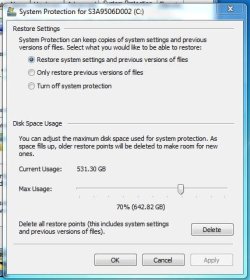
Make sure you have System Restore turned on!

To change the amount of disk space used for System Restore Points:-

Click Start => Control Panel => System => System protection in the left hand pane.
Close the Control Panel => All Control Panel Items => System window.
Click C: to highlight it => click Configure.

Adjust the Max Usage: slider to how much disk space you want System Protection to use => click OK => click OK.

I hope this helps!
 

My Computer My Computer

Computer type
Laptop
Computer Manufacturer/Model Number
Fujitsu LIFEBOOK
OS
Win 7 HP SP1 64-bit Vista HB SP2 32-bit Linux Mint 18.3
CPU
Intel(R) Pentium(R) CPU P6200 @ 2.13GHz
Motherboard
FUJITSU FJNBB06
Memory
4.00 GB
Graphics Card(s)
Intel(R) Graphics Media Accelerator HD
Sound Card
[1] Realtek High Definition Audio [2] Intel(R) Display Audio
Screen Resolution
1366 x 768 x 32 bits (4294967296 colors) @ 59 Hz
Hard Drives
TOSHIBA MK5076GSX
Antivirus
AVG FREE
this is how it always is.
what do you think?
thanks
NOTE this laptop is only used for the internet. a separate laptop is for creative activities and never connects to the Internet
 

Attachments

  • systemrestore.JPG
    systemrestore.JPG
    37.4 KB · Views: 21

My Computer My Computer

Computer type
PC/Desktop
Computer Manufacturer/Model Number
toshiba
OS
windows 7 home premium /64
Other Info
Just an old laptop. Satellite L675 019
Hi

That % is remarkably high, as you only Surf on it
So is the amount currently in use

I'd take it down to 10%.

It MIGHT be whats causing your problem. WU creates temporary files before it performs the actuall task, now if you've' not got enough spare space it WILL fail.


Roy
 

My Computer My Computer

Computer type
PC/Desktop
Computer Manufacturer/Model Number
medionl/Aspire 6930G/acer x55a
OS
W7 home premium 32bit/W7HP 64bit/w10 tp insider ring
CPU
E5300 dual core
Motherboard
medion MS7366
Memory
3gb
Graphics Card(s)
Nvidia Geforce 7100 Nforce 630i
Monitor(s) Displays
avixc
Internet Speed
n (isp resticted to 72)
Antivirus
mse/pands
Browser
palemoon
Other Info
Belkin Fd7050 n USB using Railink RT2870 drivers, more upto date
Thanks Roy, that is the opposite to what i was advised years ago!
was told to leave lots of room for system restore points!
as system restore no longer works, i suspect i will have to go back to factory specs.grooooooooon!

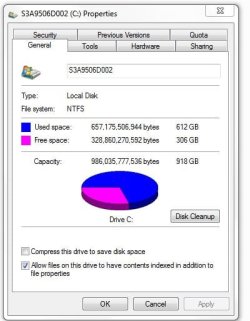
does this pic help?
 

Attachments

  • T-17 properties.JPG
    T-17 properties.JPG
    35.8 KB · Views: 15
Last edited:

My Computer My Computer

Computer type
PC/Desktop
Computer Manufacturer/Model Number
toshiba
OS
windows 7 home premium /64
Other Info
Just an old laptop. Satellite L675 019
Hi Rick33,

That % is remarkably high, as you only Surf on it.
So is the amount currently in use.
I'd take it down to 10%.

It MIGHT be whats causing your problem. WU creates temporary files before it performs the actuall task, now if you've' not got enough spare space it WILL fail.

Well it finally stopped adding updates - nothing now from 2019.
But system restore still does not work.

You could try changing the amount of disk space used for System Restore Points to 10% or 20%.

Click Start => Control Panel => System => System protection in the left hand pane.
Close the Control Panel => All Control Panel Items => System window.
Click C: to highlight it => click Configure.

Adjust the Max Usage: slider to how much disk space you want System Protection to use => click OK => click OK.

I hope this helps!
 

My Computer My Computer

Computer type
Laptop
Computer Manufacturer/Model Number
Fujitsu LIFEBOOK
OS
Win 7 HP SP1 64-bit Vista HB SP2 32-bit Linux Mint 18.3
CPU
Intel(R) Pentium(R) CPU P6200 @ 2.13GHz
Motherboard
FUJITSU FJNBB06
Memory
4.00 GB
Graphics Card(s)
Intel(R) Graphics Media Accelerator HD
Sound Card
[1] Realtek High Definition Audio [2] Intel(R) Display Audio
Screen Resolution
1366 x 768 x 32 bits (4294967296 colors) @ 59 Hz
Hard Drives
TOSHIBA MK5076GSX
Antivirus
AVG FREE
"Adjust the Max Usage: slider to how much disk space you want System Protection to use => click OK => click OK."
Is that the one that should be 20%?
thanks for your help
 

My Computer My Computer

Computer type
PC/Desktop
Computer Manufacturer/Model Number
toshiba
OS
windows 7 home premium /64
Other Info
Just an old laptop. Satellite L675 019
Hi Rick33,

"Adjust the Max Usage: slider to how much disk space you want System Protection to use => click OK => click OK."
Is that the one that should be 20%?

Yes, or what % you think is best!
 

My Computer My Computer

Computer type
Laptop
Computer Manufacturer/Model Number
Fujitsu LIFEBOOK
OS
Win 7 HP SP1 64-bit Vista HB SP2 32-bit Linux Mint 18.3
CPU
Intel(R) Pentium(R) CPU P6200 @ 2.13GHz
Motherboard
FUJITSU FJNBB06
Memory
4.00 GB
Graphics Card(s)
Intel(R) Graphics Media Accelerator HD
Sound Card
[1] Realtek High Definition Audio [2] Intel(R) Display Audio
Screen Resolution
1366 x 768 x 32 bits (4294967296 colors) @ 59 Hz
Hard Drives
TOSHIBA MK5076GSX
Antivirus
AVG FREE
thanks - for years it has been 70% !!
see pic above post 31
 
Last edited:

My Computer My Computer

Computer type
PC/Desktop
Computer Manufacturer/Model Number
toshiba
OS
windows 7 home premium /64
Other Info
Just an old laptop. Satellite L675 019
306gb has to be enough spare room for system restore don't you think?
thanks
 

My Computer My Computer

Computer type
PC/Desktop
Computer Manufacturer/Model Number
toshiba
OS
windows 7 home premium /64
Other Info
Just an old laptop. Satellite L675 019
Hi Rick33,

306gb has to be enough spare room for system restore don't you think?

Only you can decide what is enough room.

You could simplify this decision by looking at the amount of space a System Restore point uses. Then work out how many System Restore points you would actually need to be on the safe side!

Just a thought!
 

My Computer My Computer

Computer type
Laptop
Computer Manufacturer/Model Number
Fujitsu LIFEBOOK
OS
Win 7 HP SP1 64-bit Vista HB SP2 32-bit Linux Mint 18.3
CPU
Intel(R) Pentium(R) CPU P6200 @ 2.13GHz
Motherboard
FUJITSU FJNBB06
Memory
4.00 GB
Graphics Card(s)
Intel(R) Graphics Media Accelerator HD
Sound Card
[1] Realtek High Definition Audio [2] Intel(R) Display Audio
Screen Resolution
1366 x 768 x 32 bits (4294967296 colors) @ 59 Hz
Hard Drives
TOSHIBA MK5076GSX
Antivirus
AVG FREE
306gb has to be enough spare room for system restore don't you think?
thanks
If it helps to have comparison, I just checked mine and its set at 4% (34.24gb). Its always been fine and has never been changed since Win 7 installed.
 

My Computer My Computer

Computer type
PC/Desktop
Computer Manufacturer/Model Number
Compaq
OS
Windows 7 Home Premium 32bit.
CPU
AMD Athlon x2 2.30 GHz
Memory
4 GB Ram
Back
Top