
the latest windows update cannot be removed

thanks
Microsoft says...Well simple answer is you need at least 300 megabytes (MB) of free space on each disk that is 500 MB or larger. “System Restore might use between three and five percent of the space on each disk. As the amount of space fills up with restore points, it deletes older restore points to make room for new ones.Jan 11, 2012

but i do not see how this will get the system restore working!
how do i delete very old system restore points?
thanks guys
 

My Computer My Computer

Computer type
PC/Desktop
Computer Manufacturer/Model Number
toshiba
OS
windows 7 home premium /64
Other Info
Just an old laptop. Satellite L675 019
......how do i delete very old system restore points?
thanks guys
Using standard Disk Cleanup in Win 7, you simply click on Clean up system files button. Just follow this link starting at step 5, it will delete all but most recent restore point as started at step 7.
Disk Cleanup - Open and Use

After that you could set slide to % point your comfortable with. Can’t answer if that will get restore working, unless it removes garbage that then allow it to work.
 

My Computer My Computer

Computer type
PC/Desktop
Computer Manufacturer/Model Number
Compaq
OS
Windows 7 Home Premium 32bit.
CPU
AMD Athlon x2 2.30 GHz
Memory
4 GB Ram
thanks all
o open Disk Cleanup on a Windows Vista or Windows 7 computer, follow these steps:
Click Start.
Go to All Programs > Accessories > System Tools.
Click Disk Cleanup.
Choose what type of files and folders to delete at the Files to delete section.
Click OK.
 

My Computer My Computer

Computer type
PC/Desktop
Computer Manufacturer/Model Number
toshiba
OS
windows 7 home premium /64
Other Info
Just an old laptop. Satellite L675 019
My Computer My Computer

Computer type
Laptop
Computer Manufacturer/Model Number
Fujitsu LIFEBOOK
OS
Win 7 HP SP1 64-bit Vista HB SP2 32-bit Linux Mint 18.3
CPU
Intel(R) Pentium(R) CPU P6200 @ 2.13GHz
Motherboard
FUJITSU FJNBB06
Memory
4.00 GB
Graphics Card(s)
Intel(R) Graphics Media Accelerator HD
Sound Card
[1] Realtek High Definition Audio [2] Intel(R) Display Audio
Screen Resolution
1366 x 768 x 32 bits (4294967296 colors) @ 59 Hz
Hard Drives
TOSHIBA MK5076GSX
Antivirus
AVG FREE
thanks never heard of that one. looks a bit complicated for me!
the only way of removing most but not all of the old system restores is by using old software- that may have been 'adjusted' by now.
i would have like to go back to an earlier system restore when it work. suspect that cannot be done now.
 

My Computer My Computer

Computer type
PC/Desktop
Computer Manufacturer/Model Number
toshiba
OS
windows 7 home premium /64
Other Info
Just an old laptop. Satellite L675 019

Hi Rick33,

Thanks never heard of that one. Looks a bit complicated for me!
The only way of removing most but not all of the old system restores is by using old software- that may have been 'adjusted' by now.
i would have liked to go back to an earlier system restore when it work. I suspect that cannot be done now.

No, because when you run Disk Cleanup suggested by Struggling7 [post #42], it will have deleted all the Restore Points except the last one!
 

My Computer My Computer

Computer type
Laptop
Computer Manufacturer/Model Number
Fujitsu LIFEBOOK
OS
Win 7 HP SP1 64-bit Vista HB SP2 32-bit Linux Mint 18.3
CPU
Intel(R) Pentium(R) CPU P6200 @ 2.13GHz
Motherboard
FUJITSU FJNBB06
Memory
4.00 GB
Graphics Card(s)
Intel(R) Graphics Media Accelerator HD
Sound Card
[1] Realtek High Definition Audio [2] Intel(R) Display Audio
Screen Resolution
1366 x 768 x 32 bits (4294967296 colors) @ 59 Hz
Hard Drives
TOSHIBA MK5076GSX
Antivirus
AVG FREE
swatithot
thanks Paul

Acer Chromebook CB3-532-C6T1 15.6” Laptop is looking more attractive every day!
opinions?
over the last couple of years i have had several issues with windows updates....
 

My Computer My Computer

Computer type
PC/Desktop
Computer Manufacturer/Model Number
toshiba
OS
windows 7 home premium /64
Other Info
Just an old laptop. Satellite L675 019
My Computer My Computer

Computer type
Laptop
Computer Manufacturer/Model Number
Fujitsu LIFEBOOK
OS
Win 7 HP SP1 64-bit Vista HB SP2 32-bit Linux Mint 18.3
CPU
Intel(R) Pentium(R) CPU P6200 @ 2.13GHz
Motherboard
FUJITSU FJNBB06
Memory
4.00 GB
Graphics Card(s)
Intel(R) Graphics Media Accelerator HD
Sound Card
[1] Realtek High Definition Audio [2] Intel(R) Display Audio
Screen Resolution
1366 x 768 x 32 bits (4294967296 colors) @ 59 Hz
Hard Drives
TOSHIBA MK5076GSX
Antivirus
AVG FREE

My Computer My Computer

Computer type
PC/Desktop
OS
Windows 7 x64, Vista x64, 8.1 smartphone
CPU
Intel E8400 65W 64-bit
Motherboard
Gigabyte EP45-UD3LR
Memory
DDR2 2 x 2GB, 1GB x 2
Graphics Card(s)
XFX Radeon HD5750
Sound Card
AMD High Definition Audio; Realtek High Definition Audio
Monitor(s) Displays
iiyama prolite X2377HDS
Screen Resolution
1920 x 1080
Hard Drives
500GB 7200 rpm Seagate ST3500413AS 16MB, 500GB 5400 rpm Toshiba MQ02ABF050H 32MB, 200GB 7200 rpm Seagate ST3200820AS 8MB, 2TB 7200 rpm Western Digital WD20EZRX 64MB
PSU
Enermax Liberty Modular
Case
Antec P193 Midi Tower
Keyboard
Mionix ZIBAL 60
Mouse
Razer USB 2.0 Diamondback Mouse or Huion Graphics Tablet
Browser
Internet Explorer, Lunascape, Firefox, Opera, Avast Safezone
thanks iko
now if you know how i can get systems restore working again....
 

My Computer My Computer

Computer type
PC/Desktop
Computer Manufacturer/Model Number
toshiba
OS
windows 7 home premium /64
Other Info
Just an old laptop. Satellite L675 019

My Computer My Computer

Computer type
Laptop
Computer Manufacturer/Model Number
Fujitsu LIFEBOOK
OS
Win 7 HP SP1 64-bit Vista HB SP2 32-bit Linux Mint 18.3
CPU
Intel(R) Pentium(R) CPU P6200 @ 2.13GHz
Motherboard
FUJITSU FJNBB06
Memory
4.00 GB
Graphics Card(s)
Intel(R) Graphics Media Accelerator HD
Sound Card
[1] Realtek High Definition Audio [2] Intel(R) Display Audio
Screen Resolution
1366 x 768 x 32 bits (4294967296 colors) @ 59 Hz
Hard Drives
TOSHIBA MK5076GSX
Antivirus
AVG FREE
thanks iko
now if you know how i can get systems restore working again....

What updates did Windows Update (WU) install that changed your computer?

What problems are you having with these particular updates after they were installed?

Were you aware, that because you ran Disk Cleanup, that you will no longer be able to use System Restore to undo these previous changes? That is because Disk Cleanup would have wiped out these system restore points from storage.

Seems to me like your problems doubled during interaction with the GUI WU.
 

My Computer My Computer

Computer type
PC/Desktop
OS
Windows 7 x64, Vista x64, 8.1 smartphone
CPU
Intel E8400 65W 64-bit
Motherboard
Gigabyte EP45-UD3LR
Memory
DDR2 2 x 2GB, 1GB x 2
Graphics Card(s)
XFX Radeon HD5750
Sound Card
AMD High Definition Audio; Realtek High Definition Audio
Monitor(s) Displays
iiyama prolite X2377HDS
Screen Resolution
1920 x 1080
Hard Drives
500GB 7200 rpm Seagate ST3500413AS 16MB, 500GB 5400 rpm Toshiba MQ02ABF050H 32MB, 200GB 7200 rpm Seagate ST3200820AS 8MB, 2TB 7200 rpm Western Digital WD20EZRX 64MB
PSU
Enermax Liberty Modular
Case
Antec P193 Midi Tower
Keyboard
Mionix ZIBAL 60
Mouse
Razer USB 2.0 Diamondback Mouse or Huion Graphics Tablet
Browser
Internet Explorer, Lunascape, Firefox, Opera, Avast Safezone
thanks all. i will set it back to factory specs
 

My Computer My Computer

Computer type
PC/Desktop
Computer Manufacturer/Model Number
toshiba
OS
windows 7 home premium /64
Other Info
Just an old laptop. Satellite L675 019
UH OH means something looks wrong.
swatithot = its what i thought
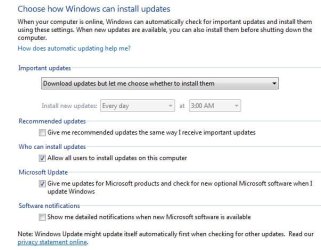
system is set to download but let me choose to install update.
it installed updates today anyway!
have not set back to factory specs yet.
see attached
thanks
 

Attachments

  • manual update.JPG
    manual update.JPG
    47.8 KB · Views: 9
  • new updates when set to manually update.JPG
    new updates when set to manually update.JPG
    17.1 KB · Views: 0

My Computer My Computer

Computer type
PC/Desktop
Computer Manufacturer/Model Number
toshiba
OS
windows 7 home premium /64
Other Info
Just an old laptop. Satellite L675 019
Hi Rick33,

Thanks all. I will set it back to factory specs.

Another option to try before you do a Clean Install is to do a Repair Install!

A repair install differs from a clean install in the fact that it ONLY replaces the corrupted OS with a new fresh copy. This means that ALL your User Accounts, Folders, Files, Documents, Pictures, Music, Videos, Data Files, Icons, and any installed programs are left intact. It does however, delete ALL the Window updates, and can affect, sounds, services, visual effect settings and device drivers by re-setting them to default. You cannot do a repair install at boot, in Safe Mode, using a system repair disk, or using an integrated Windows update disk. Basically, this process can ONLY be performed from within the LIVE OS.

I hope this helps!
 

My Computer My Computer

Computer type
Laptop
Computer Manufacturer/Model Number
Fujitsu LIFEBOOK
OS
Win 7 HP SP1 64-bit Vista HB SP2 32-bit Linux Mint 18.3
CPU
Intel(R) Pentium(R) CPU P6200 @ 2.13GHz
Motherboard
FUJITSU FJNBB06
Memory
4.00 GB
Graphics Card(s)
Intel(R) Graphics Media Accelerator HD
Sound Card
[1] Realtek High Definition Audio [2] Intel(R) Display Audio
Screen Resolution
1366 x 768 x 32 bits (4294967296 colors) @ 59 Hz
Hard Drives
TOSHIBA MK5076GSX
Antivirus
AVG FREE
A repair install how do i do this on a toshiba
thanks

cannot find repair install on the internet

there is no repair disc - only the hard drive partition

toshiba satellite L675 -019 WIN 7/64

UPDATE******* have found recovery disk- set of 4 that i made. maybe they will help!
 
Last edited:

My Computer My Computer

Computer type
PC/Desktop
Computer Manufacturer/Model Number
toshiba
OS
windows 7 home premium /64
Other Info
Just an old laptop. Satellite L675 019
Hi Rick33,

A repair install how di i do this on a toshiba?

Cannot find repair install on the internet!

Have you got a recovery partition [reset to factory]?
If the answer to this is no, I will post the instructions for the Repair Install.
 

My Computer My Computer

Computer type
Laptop
Computer Manufacturer/Model Number
Fujitsu LIFEBOOK
OS
Win 7 HP SP1 64-bit Vista HB SP2 32-bit Linux Mint 18.3
CPU
Intel(R) Pentium(R) CPU P6200 @ 2.13GHz
Motherboard
FUJITSU FJNBB06
Memory
4.00 GB
Graphics Card(s)
Intel(R) Graphics Media Accelerator HD
Sound Card
[1] Realtek High Definition Audio [2] Intel(R) Display Audio
Screen Resolution
1366 x 768 x 32 bits (4294967296 colors) @ 59 Hz
Hard Drives
TOSHIBA MK5076GSX
Antivirus
AVG FREE
I believe the computers repair partition is to reset to factory specs.
thanks
 
Last edited:

My Computer My Computer

Computer type
PC/Desktop
Computer Manufacturer/Model Number
toshiba
OS
windows 7 home premium /64
Other Info
Just an old laptop. Satellite L675 019
Hi Rick33,

I believe the computers repair partition is reset to factory specs.

OK.

If you use the computers repair partition, make sure that you just use the repair option and not the factory reset option. The factory reset option will erase/delete everything on your HDD, including all your documents, photos, installed programs etc.

I hope this helps!
 

My Computer My Computer

Computer type
Laptop
Computer Manufacturer/Model Number
Fujitsu LIFEBOOK
OS
Win 7 HP SP1 64-bit Vista HB SP2 32-bit Linux Mint 18.3
CPU
Intel(R) Pentium(R) CPU P6200 @ 2.13GHz
Motherboard
FUJITSU FJNBB06
Memory
4.00 GB
Graphics Card(s)
Intel(R) Graphics Media Accelerator HD
Sound Card
[1] Realtek High Definition Audio [2] Intel(R) Display Audio
Screen Resolution
1366 x 768 x 32 bits (4294967296 colors) @ 59 Hz
Hard Drives
TOSHIBA MK5076GSX
Antivirus
AVG FREE
thanks

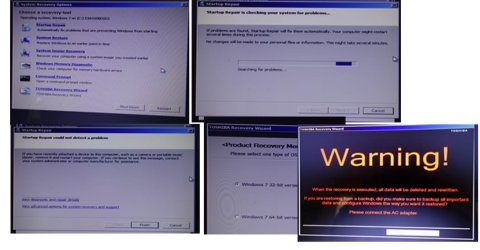
sadly it does NOT look like i have the option
hopefully the pic is sharp enough
 

Attachments

  • repair.jpg
    repair.jpg
    82.5 KB · Views: 5
Last edited:

My Computer My Computer

Computer type
PC/Desktop
Computer Manufacturer/Model Number
toshiba
OS
windows 7 home premium /64
Other Info
Just an old laptop. Satellite L675 019
Back
Top