The most SECURE browser?

My Computer

Computer type
Laptop
Computer Manufacturer/Model Number
ASUS
OS
Microsoft Windows 7 Home Premium 64-bit 7601 Multiprocessor Free Service Pack 1
CPU
AMD C-60 APU with Radeon(tm) HD Graphics
Motherboard
ASUSTeK COMPUTER INC. X501U
Memory
4.00 GB
Graphics Card(s)
AMD Radeon HD 6290 Graphics
Sound Card
(1) AMD High Definition Audio Device (2) Realtek High Defi
Screen Resolution
1366 x 768 x 32 bits (4294967296 colors) @ 60 Hz
Hard Drives
Hitachi HTS545050A7E380 SATA Disk Device
Antivirus
Comodo CIS & FW, SecureAplus App Whitelisting, Threatfire
Browser
Cyberfox 64bit, Opera 64bit, Airfox
Other Info
Spy-The-Spy, HitmanPro.Alert, Norton Connect Safe, MJRegWatcher, BitDefender TrafficLight, Voodoo Shield, Zemana AntiMalware
Be aware, that a browser set up to be most secure will take more steps to view videos, etc. as these elements will be blocked by default. You have to allow most things. Like a firewall, this is great if you don't just click accept for everything to stop the nagging. take a look at Aviator, a Chromium based browser.

WhiteHat Releases Aviator Browser for Windows | Threatpost | The first stop for security news

https://www.whitehatsec.com/aviator/

A Guy

ok i installed Aviator and wow i love it super super fast and secure.. thank you for posting about this browser my new main browser...
 

My Computer

Computer type
PC/Desktop
Computer Manufacturer/Model Number
Custom Build (Monster*212)
OS
Win-7 H-Prem-x64 Linux-M-Mate-x64
CPU
intel i7 4770k
Motherboard
Gigabyte z78x-hd3 gaming
Memory
Corsair Dominator Platinum DDR3 16 GB (1,866 MHz)
Graphics Card(s)
GIGABYTE GeForce GTX 1060 GV-N1060G1 GAMING-3GD 2
Sound Card
NVIDIA High Definition Audio
Monitor(s) Displays
HP 2711x LED 1080p
Screen Resolution
1920x1080
Hard Drives
SAMSUNG 850 EVO 2.5" 250GB SSD
1tb 7200RPM HDD
250GB 7200RPM HDD
PSU
EVGA 600wattB 80+
Case
Cougar Panzer Max
Cooling
CORSAIR H60 liquid cooling
Keyboard
Logitech
Mouse
logitech
Internet Speed
Cable
Antivirus
Avast
Browser
Chrome
Other Info
LG Bluray reader
Site Permissions

Adjust on a per site basis.
 

Attachments

  • Adjust site permissions.jpg
    Adjust site permissions.jpg
    168.3 KB · Views: 38

My Computer

Computer type
Laptop
Computer Manufacturer/Model Number
ASUS
OS
Microsoft Windows 7 Home Premium 64-bit 7601 Multiprocessor Free Service Pack 1
CPU
AMD C-60 APU with Radeon(tm) HD Graphics
Motherboard
ASUSTeK COMPUTER INC. X501U
Memory
4.00 GB
Graphics Card(s)
AMD Radeon HD 6290 Graphics
Sound Card
(1) AMD High Definition Audio Device (2) Realtek High Defi
Screen Resolution
1366 x 768 x 32 bits (4294967296 colors) @ 60 Hz
Hard Drives
Hitachi HTS545050A7E380 SATA Disk Device
Antivirus
Comodo CIS & FW, SecureAplus App Whitelisting, Threatfire
Browser
Cyberfox 64bit, Opera 64bit, Airfox
Other Info
Spy-The-Spy, HitmanPro.Alert, Norton Connect Safe, MJRegWatcher, BitDefender TrafficLight, Voodoo Shield, Zemana AntiMalware
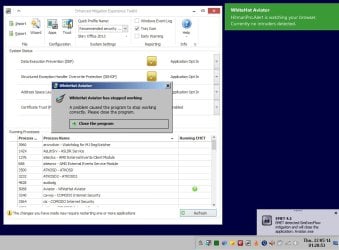
Aviator vs EMET

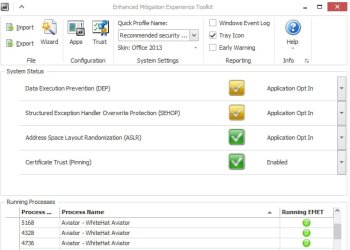
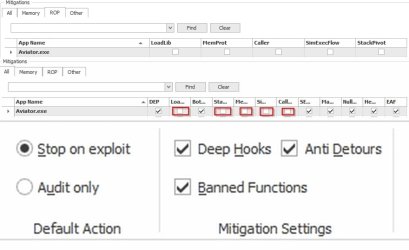
Aviator won't run unless EMET is configured as shown. Don't know why - it must be the way it's built!

Running under default settings:

Only one process appears

Aviator vs EMET 2.jpg

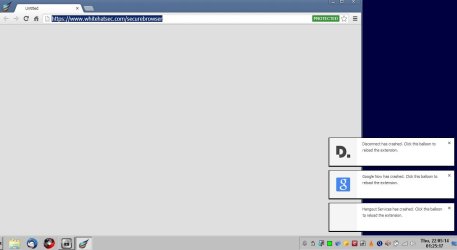
Running with some settings disabled (I don't remember the settings combination used).

Disconnect, Google Now and Hangout Services crash.

Aviator vs EMET.jpg

These worked:

EMET Configuration.jpg
EMET Configuration_1.jpg

I see three processes when it's up and running. Don't know much about them though. Took a look using Resource Monitor and Process Hacker. One runs at Medium Integrity Level and the other two at Untrusted Level. Can't make much sense of the rest of it!
 

My Computer

Computer type
Laptop
Computer Manufacturer/Model Number
ASUS
OS
Microsoft Windows 7 Home Premium 64-bit 7601 Multiprocessor Free Service Pack 1
CPU
AMD C-60 APU with Radeon(tm) HD Graphics
Motherboard
ASUSTeK COMPUTER INC. X501U
Memory
4.00 GB
Graphics Card(s)
AMD Radeon HD 6290 Graphics
Sound Card
(1) AMD High Definition Audio Device (2) Realtek High Defi
Screen Resolution
1366 x 768 x 32 bits (4294967296 colors) @ 60 Hz
Hard Drives
Hitachi HTS545050A7E380 SATA Disk Device
Antivirus
Comodo CIS & FW, SecureAplus App Whitelisting, Threatfire
Browser
Cyberfox 64bit, Opera 64bit, Airfox
Other Info
Spy-The-Spy, HitmanPro.Alert, Norton Connect Safe, MJRegWatcher, BitDefender TrafficLight, Voodoo Shield, Zemana AntiMalware
Thanks. None of those fixed the issue. I've e-mailed them.

The install video was of a Virtual Machine where the only other installed apps are VirtualBox's Guest additions and .NET 4.5.1. The DLL is there in the Aviator folder, but something fails when installing Aviator into a 64bit or a 32bit W7 pro VM.
 

My Computer

Computer type
Laptop
Computer Manufacturer/Model Number
Employer provided Dell Latitude
OS
W7 Pro SP1 64bit
CPU
i7
Memory
8GB
Graphics Card(s)
Intel HD Graphics
Hard Drives
crappy SSD
Antivirus
Employer mandated Symantec Endpoint Protection
Browser
Pale Moon 64bit, IE11 64bit & Chrome 64bit

Yea at work we use the unsupported installer cleanup utility... It may be unsupported but it still work :D

I have sent an inquiry to Whitehat as far as that .DLL problem goes after installation. I installed Chrome (wasn't sure if Aviator had certain dependencies from it) but it did not resolved the issue.

I installed Aviator from a fresh install so the windows Cleanup Utility most likely won't help.

I'm on the train heading to work so I'm sorry if I miss a post already providing a solution to this problem.
 

My Computer

Computer type
PC/Desktop
Computer Manufacturer/Model Number
Dell Inspiron 530
OS
Windows 7 Professional Version 6.1 Build 7601 SP1
CPU
Q6600
Motherboard
IDK
Memory
4GB Total
Graphics Card(s)
GeForce 9500GT =(
Sound Card
Onboard
Monitor(s) Displays
Smaller than what i want
Screen Resolution
Not up to par
Hard Drives
Not an SSD
PSU
350 Watt or W/E this model comes with
Case
Dell Inspiron 530
Cooling
Factory
Keyboard
Logitech G510
Mouse
Logitech G500
Internet Speed
Eh, its okay.
Browser
Aviator.
Other Info
I want my old computer back.
anameIssues;278255EICallender;2782313]Fix seems to be Fix problems that programs cannot be installed or uninstalled although I tend to use the no longer supported Windows Installer Cleanup Utility.

How to Install and Run the Windows Installer Cleanup Utility if Windows Installer Fails to Work - The Winhelponline Blog I have a copy if needed.

and reinstall this: Download Microsoft Visual C++ 2010 Redistributable Package (x64) from Official Microsoft Download Center

But that's just my take on it![/QUOTE]
Thanks. None of those fixed the issue. I've e-mailed them.

The install video was of a Virtual Machine where the only other installed apps are VirtualBox's Guest additions and .NET 4.5.1. The DLL is there in the Aviator folder, but something fails when installing Aviator into a 64bit or a 32bit W7 pro VM.[/QUOTE]

LOL. I missed the part where u said u already emailed them. Well, two emails for one issue can't hurt. maybe that will help speed up and fix the issu. Please post the reply as will i
 

My Computer

Computer type
PC/Desktop
Computer Manufacturer/Model Number
Dell Inspiron 530
OS
Windows 7 Professional Version 6.1 Build 7601 SP1
CPU
Q6600
Motherboard
IDK
Memory
4GB Total
Graphics Card(s)
GeForce 9500GT =(
Sound Card
Onboard
Monitor(s) Displays
Smaller than what i want
Screen Resolution
Not up to par
Hard Drives
Not an SSD
PSU
350 Watt or W/E this model comes with
Case
Dell Inspiron 530
Cooling
Factory
Keyboard
Logitech G510
Mouse
Logitech G500
Internet Speed
Eh, its okay.
Browser
Aviator.
Other Info
I want my old computer back.
Hi there.

if you need a secure browser there's only one type -- use an old fashioned paper ENCYCLOPAEDIA. No spyware etc -- just takes a bit longer to use of course and all the links aren't always available. 100% safe though. !!!

Using the Internet always carries a certain amount of risk -- just have a clean backup image that you can restore if you feel your system isn't working properly or has got some ad/trial/spy or other rubbish ware installed somehow. I don't like things like registry cleaners / system scanners etc.

Cheers
jimbo
 

My Computer

Computer type
PC/Desktop
Computer Manufacturer/Model Number
Custom built, several laptops HP/ASUS
OS
Linux CENTOS 7 / various Windows OS'es and servers
CPU
Intel i7 Intel i5
Memory
8GB, 16GB
Graphics Card(s)
On Motherboard
Sound Card
Realtek HD audio
Monitor(s) Displays
Apple Cinema display, Samsung LCD
Screen Resolution
1920 X 1080
Hard Drives
4 X 1TB SATA
Mouse
Toshiba wireless laser
Internet Speed
> 20MB up
Hi there.

if you need a secure browser there's only one type -- use an old fashioned paper ENCYCLOPAEDIA. No spyware etc -- just takes a bit longer to use of course and all the links aren't always available. 100% safe though. !!!
~~~
No way.
You could get an infection from a paper cut
...or drop a book on your toes
...or the shelf could fall on you.
:-)
 

My Computer

Computer type
Laptop
Computer Manufacturer/Model Number
Employer provided Dell Latitude
OS
W7 Pro SP1 64bit
CPU
i7
Memory
8GB
Graphics Card(s)
Intel HD Graphics
Hard Drives
crappy SSD
Antivirus
Employer mandated Symantec Endpoint Protection
Browser
Pale Moon 64bit, IE11 64bit & Chrome 64bit
Aviator in VM

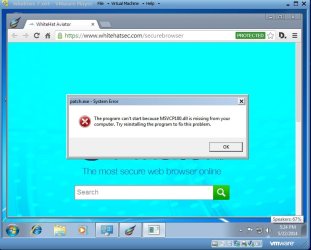
I get a similar issue but Aviator runs okay! Used VMware Player. Aviator installs no problem. I only get the error when I try to launch Aviator and then it still runs.

Error.jpg

Aviator_VMware.jpg
 

My Computer

Computer type
Laptop
Computer Manufacturer/Model Number
ASUS
OS
Microsoft Windows 7 Home Premium 64-bit 7601 Multiprocessor Free Service Pack 1
CPU
AMD C-60 APU with Radeon(tm) HD Graphics
Motherboard
ASUSTeK COMPUTER INC. X501U
Memory
4.00 GB
Graphics Card(s)
AMD Radeon HD 6290 Graphics
Sound Card
(1) AMD High Definition Audio Device (2) Realtek High Defi
Screen Resolution
1366 x 768 x 32 bits (4294967296 colors) @ 60 Hz
Hard Drives
Hitachi HTS545050A7E380 SATA Disk Device
Antivirus
Comodo CIS & FW, SecureAplus App Whitelisting, Threatfire
Browser
Cyberfox 64bit, Opera 64bit, Airfox
Other Info
Spy-The-Spy, HitmanPro.Alert, Norton Connect Safe, MJRegWatcher, BitDefender TrafficLight, Voodoo Shield, Zemana AntiMalware
Hi there.

if you need a secure browser there's only one type -- use an old fashioned paper ENCYCLOPAEDIA. No spyware etc -- just takes a bit longer to use of course and all the links aren't always available. 100% safe though. !!!

Using the Internet always carries a certain amount of risk -- just have a clean backup image that you can restore if you feel your system isn't working properly or has got some ad/trial/spy or other rubbish ware installed somehow. I don't like things like registry cleaners / system scanners etc.

Cheers
jimbo

Hi there.

if you need a secure browser there's only one type -- use an old fashioned paper ENCYCLOPAEDIA. No spyware etc -- just takes a bit longer to use of course and all the links aren't always available. 100% safe though. !!!
~~~
No way.
You could get an infection from a paper cut
...or drop a book on your toes
...or the shelf could fall on you.
:-)

Haha. I'd rather get an internet infection and learn how to fight it off. Helps my digitized immune system learn and adapt to new threats :D

Here is what i sent to Whitehat Aviator:

I receive an error concerning a .DLL file (Not sure of th exact .DLL as i do not have my computer on front of me), however, Aviator still seems to function properly. I installed this on two freshly installed Windows 7 machines. I installed Aviator before the Windows updates. I thought Aviator might have some type of dependencies on Chrome so when I did a fresh Win7 install on my machine installed Chrome first and still received the error. Also, i installed Aviator before installing updates of any kind from windows 7 which this disc has SP1 integrated in to it.

Please help..

This is the response that i received back:

Hi,

The missing “msvcp100.dll” file problem is fixed by downloading this package from Microsoft: Download Microsoft Visual C++ 2010 Redistributable Package (x86) from Official Microsoft Download Center . After installing that it should contain the missing file and Aviator should work. I don’t think it’s presence is contingent on Chrome, but rather Microsoft security updates.

Hope this helps!
 
Last edited:

My Computer

Computer type
PC/Desktop
Computer Manufacturer/Model Number
Dell Inspiron 530
OS
Windows 7 Professional Version 6.1 Build 7601 SP1
CPU
Q6600
Motherboard
IDK
Memory
4GB Total
Graphics Card(s)
GeForce 9500GT =(
Sound Card
Onboard
Monitor(s) Displays
Smaller than what i want
Screen Resolution
Not up to par
Hard Drives
Not an SSD
PSU
350 Watt or W/E this model comes with
Case
Dell Inspiron 530
Cooling
Factory
Keyboard
Logitech G510
Mouse
Logitech G500
Internet Speed
Eh, its okay.
Browser
Aviator.
Other Info
I want my old computer back.
Install issues

Okay so I've installed it on Windows no problem. The only problem was a separate install on a VM but it still worked. I make regular system image backups - at least one every week.

I think I'll keep it around for a few months to see how it goes.

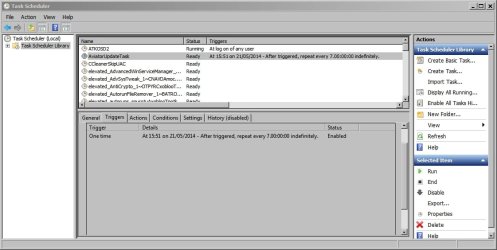
It's set to check for updates every 5 hours via Task Scheduler. I changed that to check for updates every 7 days.
 

Attachments

  • Task Scheduler.jpg
    Task Scheduler.jpg
    226.9 KB · Views: 0

My Computer

Computer type
Laptop
Computer Manufacturer/Model Number
ASUS
OS
Microsoft Windows 7 Home Premium 64-bit 7601 Multiprocessor Free Service Pack 1
CPU
AMD C-60 APU with Radeon(tm) HD Graphics
Motherboard
ASUSTeK COMPUTER INC. X501U
Memory
4.00 GB
Graphics Card(s)
AMD Radeon HD 6290 Graphics
Sound Card
(1) AMD High Definition Audio Device (2) Realtek High Defi
Screen Resolution
1366 x 768 x 32 bits (4294967296 colors) @ 60 Hz
Hard Drives
Hitachi HTS545050A7E380 SATA Disk Device
Antivirus
Comodo CIS & FW, SecureAplus App Whitelisting, Threatfire
Browser
Cyberfox 64bit, Opera 64bit, Airfox
Other Info
Spy-The-Spy, HitmanPro.Alert, Norton Connect Safe, MJRegWatcher, BitDefender TrafficLight, Voodoo Shield, Zemana AntiMalware
Okay so I've installed it on Windows no problem. The only problem was a separate install on a VM but it still worked. I make regular system image backups - at least one every week.

I think I'll keep it around for a few months to see how it goes.

It's set to check for updates every 5 hours via Task Scheduler. I changed that to check for updates every 7 days.

I wish i had the $ to buy a three terabyte USB 3.0 to send my backups to. And before that i wish i could buy a system that has USB 3.0 capabilities.

I sold my other computer to help a buddy fix his Corvette. I almost wish i hadn't done that :cry:

Need to update my computer specs. I miss playing my games on Ultra settings and multi tasking and using CUDA for when i need it :(
 

My Computer

Computer type
PC/Desktop
Computer Manufacturer/Model Number
Dell Inspiron 530
OS
Windows 7 Professional Version 6.1 Build 7601 SP1
CPU
Q6600
Motherboard
IDK
Memory
4GB Total
Graphics Card(s)
GeForce 9500GT =(
Sound Card
Onboard
Monitor(s) Displays
Smaller than what i want
Screen Resolution
Not up to par
Hard Drives
Not an SSD
PSU
350 Watt or W/E this model comes with
Case
Dell Inspiron 530
Cooling
Factory
Keyboard
Logitech G510
Mouse
Logitech G500
Internet Speed
Eh, its okay.
Browser
Aviator.
Other Info
I want my old computer back.
The link in post #61 is to VC++ 64bit and that did not fix the issue.

The link from Aviator support (via exitPr0gram) was to VC++ 32bit and that does fix the issue. I figured that it would. I also figured that Aviator support would suggest that. The problem is, the user should not need to go thru those steps. The installer should check for prerequisites and offer to install them. Also, the installer should have a clearer message about Aviator already being installed. The current wording seems rather flawed.

I still don't understand why the DLL of interest is included in the install, but is not used. Or maybe more than one of these DLLs is needed.

I'll continue to check the e-mail account that I used to contact them...
...no reply yet :-(
 

My Computer

Computer type
Laptop
Computer Manufacturer/Model Number
Employer provided Dell Latitude
OS
W7 Pro SP1 64bit
CPU
i7
Memory
8GB
Graphics Card(s)
Intel HD Graphics
Hard Drives
crappy SSD
Antivirus
Employer mandated Symantec Endpoint Protection
Browser
Pale Moon 64bit, IE11 64bit & Chrome 64bit
Installer check

The link in post #61 is to VC++ 64bit and that did not fix the issue.

The problem is, the user should not need to go thru those steps. The installer should check for prerequisites and offer to install them. Also, the installer should have a clearer message about Aviator already being installed. The current wording seems rather flawed.

That would be the logical approach!
 

My Computer

Computer type
Laptop
Computer Manufacturer/Model Number
ASUS
OS
Microsoft Windows 7 Home Premium 64-bit 7601 Multiprocessor Free Service Pack 1
CPU
AMD C-60 APU with Radeon(tm) HD Graphics
Motherboard
ASUSTeK COMPUTER INC. X501U
Memory
4.00 GB
Graphics Card(s)
AMD Radeon HD 6290 Graphics
Sound Card
(1) AMD High Definition Audio Device (2) Realtek High Defi
Screen Resolution
1366 x 768 x 32 bits (4294967296 colors) @ 60 Hz
Hard Drives
Hitachi HTS545050A7E380 SATA Disk Device
Antivirus
Comodo CIS & FW, SecureAplus App Whitelisting, Threatfire
Browser
Cyberfox 64bit, Opera 64bit, Airfox
Other Info
Spy-The-Spy, HitmanPro.Alert, Norton Connect Safe, MJRegWatcher, BitDefender TrafficLight, Voodoo Shield, Zemana AntiMalware
The link in post #61 is to VC++ 64bit and that did not fix the issue.

The link from Aviator support (via exitPr0gram) was to VC++ 32bit and that does fix the issue. I figured that it would. I also figured that Aviator support would suggest that. The problem is, the user should not need to go thru those steps. The installer should check for prerequisites and offer to install them. Also, the installer should have a clearer message about Aviator already being installed. The current wording seems rather flawed.

I still don't understand why the DLL of interest is included in the install, but is not used. Or maybe more than one of these DLLs is needed.

I'll continue to check the e-mail account that I used to contact them...
...no reply yet :-(

Well this browser, if i'm not mistaken, is somewhat new. It was ported over from a Linux distribution so they got a few kinks to work out, i'm sure.
 

My Computer

Computer type
PC/Desktop
Computer Manufacturer/Model Number
Dell Inspiron 530
OS
Windows 7 Professional Version 6.1 Build 7601 SP1
CPU
Q6600
Motherboard
IDK
Memory
4GB Total
Graphics Card(s)
GeForce 9500GT =(
Sound Card
Onboard
Monitor(s) Displays
Smaller than what i want
Screen Resolution
Not up to par
Hard Drives
Not an SSD
PSU
350 Watt or W/E this model comes with
Case
Dell Inspiron 530
Cooling
Factory
Keyboard
Logitech G510
Mouse
Logitech G500
Internet Speed
Eh, its okay.
Browser
Aviator.
Other Info
I want my old computer back.
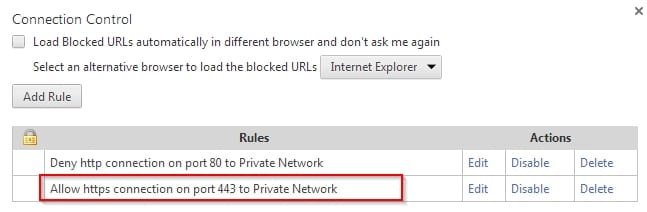
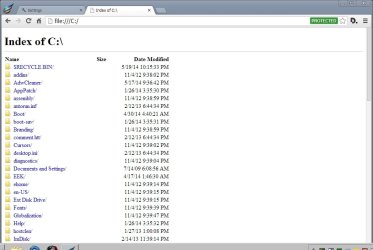
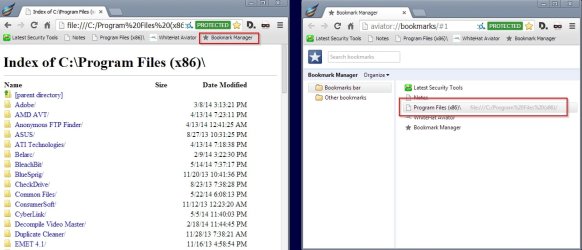
File browser now working

aviator://settings/NetworkPortConnection

File Browser.jpg

Index of C.jpg

Possibly needs to be enabled on a temporary basis when needed.

Just to add a little more safety:

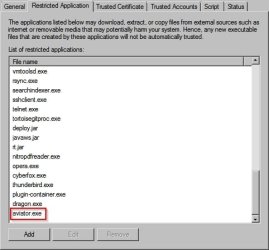
Whitelisting.jpg
 
Last edited:

My Computer

Computer type
Laptop
Computer Manufacturer/Model Number
ASUS
OS
Microsoft Windows 7 Home Premium 64-bit 7601 Multiprocessor Free Service Pack 1
CPU
AMD C-60 APU with Radeon(tm) HD Graphics
Motherboard
ASUSTeK COMPUTER INC. X501U
Memory
4.00 GB
Graphics Card(s)
AMD Radeon HD 6290 Graphics
Sound Card
(1) AMD High Definition Audio Device (2) Realtek High Defi
Screen Resolution
1366 x 768 x 32 bits (4294967296 colors) @ 60 Hz
Hard Drives
Hitachi HTS545050A7E380 SATA Disk Device
Antivirus
Comodo CIS & FW, SecureAplus App Whitelisting, Threatfire
Browser
Cyberfox 64bit, Opera 64bit, Airfox
Other Info
Spy-The-Spy, HitmanPro.Alert, Norton Connect Safe, MJRegWatcher, BitDefender TrafficLight, Voodoo Shield, Zemana AntiMalware
UserAgent Switcher

@ exitPr0gram

Hi. This add on works for me:

User Agent Switcher for Chrome

However some SF features won't work if set to a non default browser.

Just click the icon to set user agent or right click for other options.
 

My Computer

Computer type
Laptop
Computer Manufacturer/Model Number
ASUS
OS
Microsoft Windows 7 Home Premium 64-bit 7601 Multiprocessor Free Service Pack 1
CPU
AMD C-60 APU with Radeon(tm) HD Graphics
Motherboard
ASUSTeK COMPUTER INC. X501U
Memory
4.00 GB
Graphics Card(s)
AMD Radeon HD 6290 Graphics
Sound Card
(1) AMD High Definition Audio Device (2) Realtek High Defi
Screen Resolution
1366 x 768 x 32 bits (4294967296 colors) @ 60 Hz
Hard Drives
Hitachi HTS545050A7E380 SATA Disk Device
Antivirus
Comodo CIS & FW, SecureAplus App Whitelisting, Threatfire
Browser
Cyberfox 64bit, Opera 64bit, Airfox
Other Info
Spy-The-Spy, HitmanPro.Alert, Norton Connect Safe, MJRegWatcher, BitDefender TrafficLight, Voodoo Shield, Zemana AntiMalware
@ exitPr0gram

Hi. This add on works for me:

User Agent Switcher for Chrome

However some SF features won't work if set to a non default browser.

Just click the icon to set user agent or right click for other options.

Awesome. Thank you.

By the way changing to Agent Switcher to a lesser known agent works as a work-around to use Wifi HotSpot for cellphone companies that do not want you to use their Mobile Hot spot. :cool: ... But only if it is controlled on the client side.

When i get home (Finally gonna get home at a normal time today) i will use that ASAP!!!
 

My Computer

Computer type
PC/Desktop
Computer Manufacturer/Model Number
Dell Inspiron 530
OS
Windows 7 Professional Version 6.1 Build 7601 SP1
CPU
Q6600
Motherboard
IDK
Memory
4GB Total
Graphics Card(s)
GeForce 9500GT =(
Sound Card
Onboard
Monitor(s) Displays
Smaller than what i want
Screen Resolution
Not up to par
Hard Drives
Not an SSD
PSU
350 Watt or W/E this model comes with
Case
Dell Inspiron 530
Cooling
Factory
Keyboard
Logitech G510
Mouse
Logitech G500
Internet Speed
Eh, its okay.
Browser
Aviator.
Other Info
I want my old computer back.
Windows Bookmarks

For UsernameIssues - the fix in Post #77 seems to enable bookmarking of any Windows Directory, File or Folder!
 

Attachments

  • Bookmark Manager - Aviator.jpg
    Bookmark Manager - Aviator.jpg
    328.2 KB · Views: 1

My Computer

Computer type
Laptop
Computer Manufacturer/Model Number
ASUS
OS
Microsoft Windows 7 Home Premium 64-bit 7601 Multiprocessor Free Service Pack 1
CPU
AMD C-60 APU with Radeon(tm) HD Graphics
Motherboard
ASUSTeK COMPUTER INC. X501U
Memory
4.00 GB
Graphics Card(s)
AMD Radeon HD 6290 Graphics
Sound Card
(1) AMD High Definition Audio Device (2) Realtek High Defi
Screen Resolution
1366 x 768 x 32 bits (4294967296 colors) @ 60 Hz
Hard Drives
Hitachi HTS545050A7E380 SATA Disk Device
Antivirus
Comodo CIS & FW, SecureAplus App Whitelisting, Threatfire
Browser
Cyberfox 64bit, Opera 64bit, Airfox
Other Info
Spy-The-Spy, HitmanPro.Alert, Norton Connect Safe, MJRegWatcher, BitDefender TrafficLight, Voodoo Shield, Zemana AntiMalware
Back
Top