The official Windows7 USB DVD Download Tool problem

hon

New member
Local time
5:47 PM
Messages
1
Location
KL, Malaysia
I have a 32-bit Windows 7 and wish to upgrade to 64-bit.

I use the official Windows7 USB DVD Download Tool to create the USB bootdisk. My problem is that if I create the USB bootdisk with 32-bit Installation disk then it fine. But when I create the 64-bit Installation disk it give me error of something "bootsec could not be run", I have even try using administrator privilege.

How do I create a 64-bit USB install disk using 32-bit system?
 

My Computer My Computer

At a glance

Windows 7 Ultimate x86
OS
Windows 7 Ultimate x86
I have a 32-bit Windows 7 and wish to upgrade to 64-bit.

I use the official Windows7 USB DVD Download Tool to create the USB bootdisk. My problem is that if I create the USB bootdisk with 32-bit Installation disk then it fine. But when I create the 64-bit Installation disk it give me error of something "bootsec could not be run", I have even try using administrator privilege.

How do I create a 64-bit USB install disk using 32-bit system?

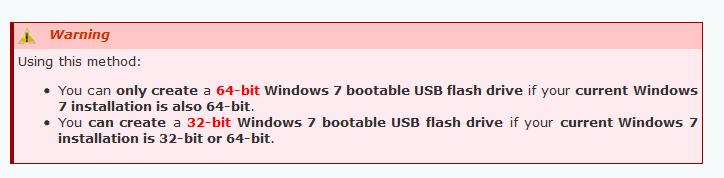
Hello hon the problem you are having is explained below.

Capture.PNG

and this tutorial for creating a USB Windows 7 Installation Key Drive will explain the process in detail.


You either have to create a 64 bit USB bootable install disk on another computer running 64 bit Windows 7 or re-install Widows 7 on your computer using the 64 bit disk first, then create a 64 bit USB bootable disk after installation.
 

My Computer My Computer

At a glance

Windows 10 Pro x 2/Windows 11 HomeIntel i7 2600K @ 3.40 GHzCorsair Vengeance 16GB DDR3 1600MHz CL8 Dual ...EVGA GeForce RTX 3080 XC3 ULTRA GAMING 10GB G...
Computer type
PC/Desktop
Computer Manufacturer/Model Number
My own abomination, I call it the Money Pit
OS
Windows 10 Pro x 2/Windows 11 Home
CPU
Intel i7 2600K @ 3.40 GHz
Motherboard
ASUS Sabertooth P67
Memory
Corsair Vengeance 16GB DDR3 1600MHz CL8 Dual Channel Kit
Graphics Card(s)
EVGA GeForce RTX 3080 XC3 ULTRA GAMING 10GB GDDR6X
Sound Card
Onboard Realtek or Nvidia High Definition Audio (HDMI)
Monitor(s) Displays
Samsung JS7000 50" SUHD TV or Samsung 27" FHD 60Hz 8ms GTG V
Screen Resolution
1920 x 1080
Hard Drives
1 x Samsung 870 EVO 250 GB SSD (Windows 10 Pro), 1 x Samsung 850 EVO 250 GB SSD (Windows 10 Pro)
PSU
Corsair AX860 - 860W Modular Power Supply
Case
Phanteks Enthoo Luxe Full Tower Case - Black
Cooling
CORSAIR Hydro Series H150i PRO RGB 360mm Liquid CPU Cooler
Keyboard
Logitech K830 Illuminated Living-Room Keyboard
Mouse
Logitech MX Anywhere 2S Wireless Mouse
Internet Speed
100 Mbps
Antivirus
ESET Internet Security
Browser
Latest Version Of Firefox & Microsoft Edge Chromium Stable
Other Info
LG Super Multi Blue Internal Blu-ray Disk Rewriter - BH10LS30
6x2 HDMI Switcher (6 inputs, 2 outputs) so I can send the output of my Cable Box, Roku, or any my 4 computers to either my TV or Monitor separately or simultaneously.
I wanted to make a bootable 64-bit Windows 7 USB from a 32-bit Windows XP install, but encountered the same error.

What I did to fix it was to install EasyBCD and then copy bootsect.exe from EasyBCD's folder to Windows 7 USB/DVD Download Tool's, as explained here: Windows 7 USB/DVD Download Tool (find When creating a bootable USB device, I am getting an error about bootsect on that page)
 

My Computer My Computer

At a glance

Windows 7 Ultimate x64 (SP1)Celeron2 GBIntel IGP
OS
Windows 7 Ultimate x64 (SP1)
CPU
Celeron
Memory
2 GB
Graphics Card(s)
Intel IGP
Sound Card
Realtek
I'm just wondering why you are trying to do this. When you are done upgrading to Windows 7/64 then make a boot disk using you 64 bit system.
 

My Computer My Computer

At a glance

Windows 10 Pro. 64/ version 1709 Windows 7 Pr...Intel i7-6800K @ 4.3Corsair Platinum 16 gig @2400EVGA GTX 1070 OC
Computer type
PC/Desktop
Computer Manufacturer/Model Number
Home made Desktop
OS
Windows 10 Pro. 64/ version 1709 Windows 7 Pro/64
CPU
Intel i7-6800K @ 4.3
Motherboard
ASUS X-99 Deluxe II
Memory
Corsair Platinum 16 gig @2400
Graphics Card(s)
EVGA GTX 1070 OC
Monitor(s) Displays
Asus 27" LED LCD/VE278Q
Screen Resolution
1920-1080 or 1280-720 HDMI
Hard Drives
INTEL SSD 730-240 Gb Sata 3.0/
PSU
EVGA Platium 1200W
Case
Phanteks Luxe Tempered Glass 8 fans/ one radiator
Cooling
XSPC/ Water Cooled CPU
Keyboard
Das 4 Professional
Mouse
Logitech M705/MX Anywhere 2-S
Internet Speed
100 mbits
Antivirus
Microsoft Security Essentials/ Malwarebytes Premium 3.0/ SAS
Browser
I.E. 11 default/Firefox/ ISP Time Warner Cable/Spectrum
Other Info
LG BluRay Burner/
Sound system-KLipsch-THX/
Icy Dock ssd Hot Swap bays.
Back
Top