The partition table does not have a valid system partition

Thank you all very much for your help and the suggestions.

This is by far the most helpful forum I have ever been on. :D
 

My Computer My Computer

At a glance

windows 7 Pro x64Intel I5 2500KG.SKILL Ripjaw + Ripjaw X 16gb totalEvga 780 gtx Superclocked ACX Cooler
Computer type
PC/Desktop
Computer Manufacturer/Model Number
ME
OS
windows 7 Pro x64
CPU
Intel I5 2500K
Motherboard
ASRock Z68 PROFESSIONAL GEN3 LGA 1155 Intel Z68 HDMI SATA 6G
Memory
G.SKILL Ripjaw + Ripjaw X 16gb total
Graphics Card(s)
Evga 780 gtx Superclocked ACX Cooler
Monitor(s) Displays
Asus VG278 3D Vision 2 Monitor
Screen Resolution
1920x1080p
Hard Drives
Crucial M4 CT256M4SSD2CCA 2.5" 256GB SATA III SSD

x3 Western Digital Caviar Black WD2001FASS 2TB 7200 RPM 64MB(6TB)

Fantom Drives G-Force3 3TB Black External Hard Drive GF3B3000U (3TB)
PSU
Antec High Current Pro HCP-1200 1200W ATX12V / EPS12V SLI Re
Case
COOLER MASTER HAF 922
Cooling
Cooler Master RR-B10-212P-G1 Hyper 212 Plus
Keyboard
Microsoft X4 sidewinder
Mouse
Logitech G400
Internet Speed
5 mbps up/ 75 down
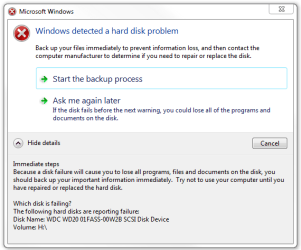
Actually I seem to be having a lot of problems with one of my new hard drives.

It started last night when I was attempting to back up my e: got to about 60% then froze.

When I rebooted my pc I got this message. Despite a number of formats it still keeps coming back.
 

Attachments

  • Capture.PNG
    Capture.PNG
    14.1 KB · Views: 15

My Computer My Computer

At a glance

windows 7 Pro x64Intel I5 2500KG.SKILL Ripjaw + Ripjaw X 16gb totalEvga 780 gtx Superclocked ACX Cooler
Computer type
PC/Desktop
Computer Manufacturer/Model Number
ME
OS
windows 7 Pro x64
CPU
Intel I5 2500K
Motherboard
ASRock Z68 PROFESSIONAL GEN3 LGA 1155 Intel Z68 HDMI SATA 6G
Memory
G.SKILL Ripjaw + Ripjaw X 16gb total
Graphics Card(s)
Evga 780 gtx Superclocked ACX Cooler
Monitor(s) Displays
Asus VG278 3D Vision 2 Monitor
Screen Resolution
1920x1080p
Hard Drives
Crucial M4 CT256M4SSD2CCA 2.5" 256GB SATA III SSD

x3 Western Digital Caviar Black WD2001FASS 2TB 7200 RPM 64MB(6TB)

Fantom Drives G-Force3 3TB Black External Hard Drive GF3B3000U (3TB)
PSU
Antec High Current Pro HCP-1200 1200W ATX12V / EPS12V SLI Re
Case
COOLER MASTER HAF 922
Cooling
Cooler Master RR-B10-212P-G1 Hyper 212 Plus
Keyboard
Microsoft X4 sidewinder
Mouse
Logitech G400
Internet Speed
5 mbps up/ 75 down
I have one WD Cavier black. Will not boot same problem as above. 2 partitions on the drive partition 1 is 100 mb partion 2 is the rest of the drive. I set partition 2 as active and ran the repair 3 times (4 actually) and no luck in the diagnosis and repair details the last line always says . The partition table does not have a valid system partition.
Repair action : Partition table repair
Result: Completed successfully. Error code = 0x0
Time taken = 2590 ms

This is the same result each time I click finish and the computer just reboots to the cd even though it is not first in the boot order. I cannot see the main (WD 1gb) disk in the Bios setup but it is seen under the SATA6 Marvel controller during post. I can see it now it was listed as disk 2 (after the USB drive) not sure how that happened. BOOTMGR is missing.
 

My Computer My Computer

At a glance

Windows 7 64 bitIntelcorsairNividia G460
Computer Manufacturer/Model Number
ASUS P6X58
OS
Windows 7 64 bit
CPU
Intel
Motherboard
Asus p6x58d
Memory
corsair
Graphics Card(s)
Nividia G460
Screen Resolution
1080p
Hard Drives
1 WD 1gb Cavier Black SATA6, 1 external 640GB USB for backups
Case
Thermaltake
Plug the WIn7 HD in a port where BIOS registers it.

Boot the Win7 DVD Repair console or Repair CD, access a Command Line to Mark the 100mb System Reserved partition Active: http://www.sevenforums.com/tutorials/71432-partition-mark-active.html

Now return to DVD/Repair CD Recovery Tools list to run Startup Repair up to 3 separate times with reboots until Win7 starts. http://www.sevenforums.com/tutorials/105541-startup-repair-run-3-separate-times.html

You can also boot free Partition Wizard CD to see if your partitions are intact, mark 100mb Active, Explore files, and attempt to Rebuild MBR on Disk tab. If you post a camera snap of the PW drive map we can help you better.

If all fails, you can copy out your data using DVD/Repair CD: http://www.sevenforums.com/tutorials/93347-copy-paste-windows-recovery-console.html

Then wipe the HD to clean reinstall Win7: http://www.sevenforums.com/installation-setup/125874-re-install-windows-7-a.html#post1086729
 
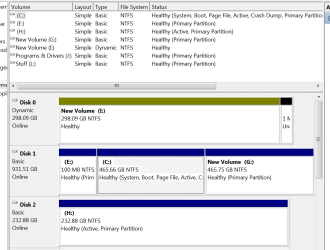
YOU GUYS ROCK!!!!!!!!!!!!!! Crashed my computer last weekend and finally after following this post, Im back up!!!!!!!!!!!! However, posting snippets of my management screen cause I still have 1 drive that seems to be dynamic and it shouldn't be. Also, I have more than one partition active which I dont believe I should. OS is on the c: drive. Windows 7 Ultimate x64
5 Drives in.PNG

5 Drives in continued.PNG

And Once again, YOU GUYS ROCK!!!!!!!!!!!!!
 

My Computer My Computer

At a glance

Windows 7 Ultimate x64Intel Pentium D 925 Processor HH80553PG0804MN...2 OCZ Gold XTC 1024MB PC6400 DDR2 800MHz MemoryDiamond Radeon X1950 Pro Video Card - 512MB
Computer Manufacturer/Model Number
Me
OS
Windows 7 Ultimate x64
CPU
Intel Pentium D 925 Processor HH80553PG0804MN - 3.0GHz,
Motherboard
XFX nForce 650i Ultra NVIDA Socket 775 ATX Motherboard
Memory
2 OCZ Gold XTC 1024MB PC6400 DDR2 800MHz Memory
Graphics Card(s)
Diamond Radeon X1950 Pro Video Card - 512MB
Sound Card
Creative Labs Sound Blaster X-Fi XtremeGamer PCI Sound Card
Monitor(s) Displays
Gateway FHX2300 bmid 23" Full HD Widescreen Monitor
Hard Drives
5
PSU
Ultra / X-Connect / 500-Watt / ATX Modular Power Supply
When you repaired Win7, you must have marked C active to recover the System boot files back into it succesfully. But in doing so you cut out the 100mb System Reserved partition which had been originally created to hold these files and the System Active flags. So it is now sitting useless unless you want to repair it by marking Active, then running Startup Repair x3 to transfer the boot files over to it and regain its functionality. It's major asset its putting the Repair Console from the DVD Repair console and Repair CD onto the F8 Advanced Boot Tools menu. http://www.sevenforums.com/tutorials/105541-startup-repair-run-3-separate-times.html

If you choose not to recover the System Reserved partition as boot partition, then you can use free Partition Wizard to remove it using Option Two here: http://www.sevenforums.com/tutorials/93322-partition-wizard-use-bootable-cd.html

You can also use free Partition Wizard bootable CD to convert the Dynamic disk back to Basic, but you'll need to use the older version of PW CD to get this in the free version: partition wizard 4.2 free.zip - Windows Live#

To mark H Inactive, rightclick in PW CD on H>Modify>Set to Inactive, OK, Apply.
 
Thanks for the quick reply. If I do the start-up repair 3 times, do I need to disconnect my other drives first like I did before?? And using the procedure above to change the dynamic disk, will I loss any files from the disk? Also, there is a old windows xp operating system that doesn't work on one of my drives. Anything special to delete it or just select and delete??? Thanks!!!
 

My Computer My Computer

At a glance

Windows 7 Ultimate x64Intel Pentium D 925 Processor HH80553PG0804MN...2 OCZ Gold XTC 1024MB PC6400 DDR2 800MHz MemoryDiamond Radeon X1950 Pro Video Card - 512MB
Computer Manufacturer/Model Number
Me
OS
Windows 7 Ultimate x64
CPU
Intel Pentium D 925 Processor HH80553PG0804MN - 3.0GHz,
Motherboard
XFX nForce 650i Ultra NVIDA Socket 775 ATX Motherboard
Memory
2 OCZ Gold XTC 1024MB PC6400 DDR2 800MHz Memory
Graphics Card(s)
Diamond Radeon X1950 Pro Video Card - 512MB
Sound Card
Creative Labs Sound Blaster X-Fi XtremeGamer PCI Sound Card
Monitor(s) Displays
Gateway FHX2300 bmid 23" Full HD Widescreen Monitor
Hard Drives
5
PSU
Ultra / X-Connect / 500-Watt / ATX Modular Power Supply
As long as the only drive partition marked Active is the 100mb System Reserved partition then Startup Repair should work correctly within three tries to write the System MBR to it without disconnecting the other HD's.

If not, then try disconnecting them.

The only method I know to non-destructively convert Dynamic to Basic is PW version 4.2, which download is linked above. But I would back up my files anyway.

Other methods: http://www.sevenforums.com/tutorials/26829-convert-dynamic-disk-basic-disk.html?ltr=C
 
Thanks...I'll post back after I try it
 

My Computer My Computer

At a glance

Windows 7 Ultimate x64Intel Pentium D 925 Processor HH80553PG0804MN...2 OCZ Gold XTC 1024MB PC6400 DDR2 800MHz MemoryDiamond Radeon X1950 Pro Video Card - 512MB
Computer Manufacturer/Model Number
Me
OS
Windows 7 Ultimate x64
CPU
Intel Pentium D 925 Processor HH80553PG0804MN - 3.0GHz,
Motherboard
XFX nForce 650i Ultra NVIDA Socket 775 ATX Motherboard
Memory
2 OCZ Gold XTC 1024MB PC6400 DDR2 800MHz Memory
Graphics Card(s)
Diamond Radeon X1950 Pro Video Card - 512MB
Sound Card
Creative Labs Sound Blaster X-Fi XtremeGamer PCI Sound Card
Monitor(s) Displays
Gateway FHX2300 bmid 23" Full HD Widescreen Monitor
Hard Drives
5
PSU
Ultra / X-Connect / 500-Watt / ATX Modular Power Supply
I'd use PW CD to Modify>mark Active/Inactive as well - it's easier.

Then you can do the conversion.
 
When I try to install Partition Wizard 4.2 on my computer, I get the message, "Application cannot run in win32 mode". The way around this would be....??????
 

My Computer My Computer

At a glance

Windows 7 Ultimate x64Intel Pentium D 925 Processor HH80553PG0804MN...2 OCZ Gold XTC 1024MB PC6400 DDR2 800MHz MemoryDiamond Radeon X1950 Pro Video Card - 512MB
Computer Manufacturer/Model Number
Me
OS
Windows 7 Ultimate x64
CPU
Intel Pentium D 925 Processor HH80553PG0804MN - 3.0GHz,
Motherboard
XFX nForce 650i Ultra NVIDA Socket 775 ATX Motherboard
Memory
2 OCZ Gold XTC 1024MB PC6400 DDR2 800MHz Memory
Graphics Card(s)
Diamond Radeon X1950 Pro Video Card - 512MB
Sound Card
Creative Labs Sound Blaster X-Fi XtremeGamer PCI Sound Card
Monitor(s) Displays
Gateway FHX2300 bmid 23" Full HD Widescreen Monitor
Hard Drives
5
PSU
Ultra / X-Connect / 500-Watt / ATX Modular Power Supply
The (Jonathan King) download link for PW4.2 is a zip file. Once unpacked you get a number of supporting files (dlls etc) and an executable. Pwiz.exe. Double click should launch the application. It works for me on Windows 7 x64 and XP x32.

It is not a bootable version. For dynamic to basic disk conversion bootable versions are not desirable anyway.
 

My Computer My Computer

At a glance

Windows 7x64 Home Premium SP1Intel i7 2600kG.Skill Ripjaws (DDR3-1600) 2x4GBNvidia GeForce GTS 450; Intel HD Graphics 300...
Computer type
PC/Desktop
Computer Manufacturer/Model Number
Own build
OS
Windows 7x64 Home Premium SP1
CPU
Intel i7 2600k
Motherboard
ASUS P8Z68 Deluxe
Memory
G.Skill Ripjaws (DDR3-1600) 2x4GB
Graphics Card(s)
Nvidia GeForce GTS 450; Intel HD Graphics 3000(GT2+)
Monitor(s) Displays
Dell Ultrasharp IPS panel U2311H, Samsung SyncMaster P2350
Screen Resolution
1920x1080
Hard Drives
Samsung 850 Pro SSD 256GB, Samsung SSD 840 120GB, Seagates 1TB Barracuda ST31000528AS x2
PSU
Seasonic M12II 520W
Case
Lian Li Lancool PC-K60
Cooling
Case: 1x120mm, 3x140mm CPU: Hyper 212+
Keyboard
Logitech MK520 (wireless)
Mouse
Logitech MK520
Internet Speed
6-7 Mbps
Antivirus
Norton Security Premium, Malwarebytes on 2 (MSE on 3rd PC)
Browser
FireFox
Other Info
Audio: Logitech Z523 2.1
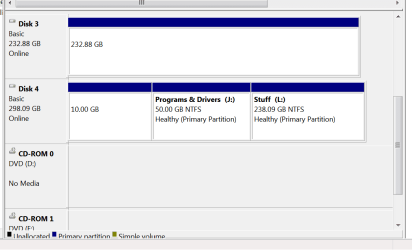
Ok, So far so good.... Now, one last thing. I have a disk with no drive letter and I KNOW it has data on it cause there are still files I cant find. Ive attached a snippet of my computer management screen. Any ideas how to get THIS back. FYI EVERYTHING has worked so far!!!!!!! :-)
 

Attachments

  • Unknown.PNG
    Unknown.PNG
    15.3 KB · Views: 12

My Computer My Computer

At a glance

Windows 7 Ultimate x64Intel Pentium D 925 Processor HH80553PG0804MN...2 OCZ Gold XTC 1024MB PC6400 DDR2 800MHz MemoryDiamond Radeon X1950 Pro Video Card - 512MB
Computer Manufacturer/Model Number
Me
OS
Windows 7 Ultimate x64
CPU
Intel Pentium D 925 Processor HH80553PG0804MN - 3.0GHz,
Motherboard
XFX nForce 650i Ultra NVIDA Socket 775 ATX Motherboard
Memory
2 OCZ Gold XTC 1024MB PC6400 DDR2 800MHz Memory
Graphics Card(s)
Diamond Radeon X1950 Pro Video Card - 512MB
Sound Card
Creative Labs Sound Blaster X-Fi XtremeGamer PCI Sound Card
Monitor(s) Displays
Gateway FHX2300 bmid 23" Full HD Widescreen Monitor
Hard Drives
5
PSU
Ultra / X-Connect / 500-Watt / ATX Modular Power Supply
Right click the HDD and see if the "change drive letter" option is greyed out.
 

My Computer My Computer

At a glance

W 7 64-bit UltimateIntel Q9550 Yorkfield8GB Dominator 8500C5DATI : XFX 5870
Computer Manufacturer/Model Number
* BFK Customs *
OS
W 7 64-bit Ultimate
CPU
Intel Q9550 Yorkfield
Motherboard
ASUS P5Q Pro
Memory
8GB Dominator 8500C5D
Graphics Card(s)
ATI : XFX 5870
Sound Card
Realtek HD Audio 7-1
Monitor(s) Displays
1x 47" LCD HDMI & 3x 26" LCD HDMI
Screen Resolution
1920x1080P & 1920x1200
Hard Drives
1x 80GB Intel X25-M G2 SSD : 1x 500GB & 1x 640GB WD Caviar Black(s)
PSU
Corsair 620HX
Case
Cooler Master RC-690
Cooling
Tuniq Tower 120, 2x 140mm and 3x 120mm case fans
Keyboard
Microsoft 500
Mouse
Razer Diamondback 3G
Internet Speed
14 Mb/s
Other Info
1x Koutech 3Gb/s SATA HDD Hot Swap Rack
Yes, its available however when I try to click on it I get the message that says "the operation failed because the disk management console view is not up-to-date. refresh the view (tried that) or close console then restart or reboot (tried those). Suggestions ??
Thanks for ALL the help!!!!!
 

My Computer My Computer

At a glance

Windows 7 Ultimate x64Intel Pentium D 925 Processor HH80553PG0804MN...2 OCZ Gold XTC 1024MB PC6400 DDR2 800MHz MemoryDiamond Radeon X1950 Pro Video Card - 512MB
Computer Manufacturer/Model Number
Me
OS
Windows 7 Ultimate x64
CPU
Intel Pentium D 925 Processor HH80553PG0804MN - 3.0GHz,
Motherboard
XFX nForce 650i Ultra NVIDA Socket 775 ATX Motherboard
Memory
2 OCZ Gold XTC 1024MB PC6400 DDR2 800MHz Memory
Graphics Card(s)
Diamond Radeon X1950 Pro Video Card - 512MB
Sound Card
Creative Labs Sound Blaster X-Fi XtremeGamer PCI Sound Card
Monitor(s) Displays
Gateway FHX2300 bmid 23" Full HD Widescreen Monitor
Hard Drives
5
PSU
Ultra / X-Connect / 500-Watt / ATX Modular Power Supply
You can use Partition Wizard for this operation, even rightclick Explore the partition to make sure files are there (you cut listings off the top of your screenshot).

If not, use Recover Partition Wizard on PW.

Sometimes Disk Mgmt is wrong, even PW Windows version. The solution is PW bootable CD to settle which is correct.
 
Last edited:
There is no guarantee in performing these types of operations that your data will not be lost. It should have been backed up before hand.

I don't think a primary partition has been created

Go back into partition wizard.
Try (A)
right click partition>modify>set partition primary
right click partition>change drive letter
if this succeeds your probably done.
If not you need to run the PW data recovery wizard.

Try (B)
See option 4 of the tutorial
http://www.sevenforums.com/tutorials/26829-convert-dynamic-disk-basic-disk.html

You should be able to use ver 4.2 and you shouldn't need a bootable PW for this.
ver 4.2 downloaded was never bootable.
 

My Computer My Computer

At a glance

Windows 7x64 Home Premium SP1Intel i7 2600kG.Skill Ripjaws (DDR3-1600) 2x4GBNvidia GeForce GTS 450; Intel HD Graphics 300...
Computer type
PC/Desktop
Computer Manufacturer/Model Number
Own build
OS
Windows 7x64 Home Premium SP1
CPU
Intel i7 2600k
Motherboard
ASUS P8Z68 Deluxe
Memory
G.Skill Ripjaws (DDR3-1600) 2x4GB
Graphics Card(s)
Nvidia GeForce GTS 450; Intel HD Graphics 3000(GT2+)
Monitor(s) Displays
Dell Ultrasharp IPS panel U2311H, Samsung SyncMaster P2350
Screen Resolution
1920x1080
Hard Drives
Samsung 850 Pro SSD 256GB, Samsung SSD 840 120GB, Seagates 1TB Barracuda ST31000528AS x2
PSU
Seasonic M12II 520W
Case
Lian Li Lancool PC-K60
Cooling
Case: 1x120mm, 3x140mm CPU: Hyper 212+
Keyboard
Logitech MK520 (wireless)
Mouse
Logitech MK520
Internet Speed
6-7 Mbps
Antivirus
Norton Security Premium, Malwarebytes on 2 (MSE on 3rd PC)
Browser
FireFox
Other Info
Audio: Logitech Z523 2.1
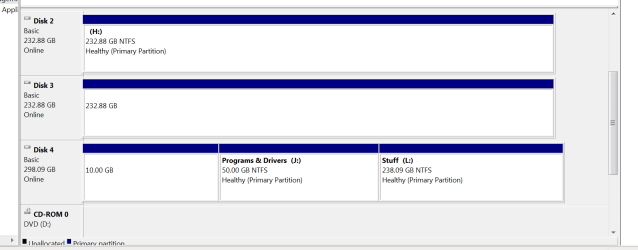
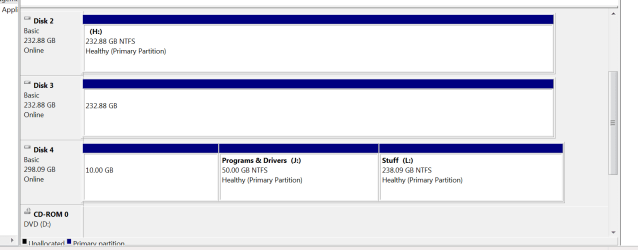
Ok, So, one last question. I have removed the data from the hard drive that has the unmarked partition on it. Would in be better to boot into Partition wizard and format the drive to hopefully get it all compacted together again or just as good to run the format with partition wizard from the windows 7 gui?? in the attached png.....drive H and the unlabeled disk 3 are all the same hard drive.
 

Attachments

  • Unknown.PNG
    Unknown.PNG
    15.3 KB · Views: 4

My Computer My Computer

At a glance

Windows 7 Ultimate x64Intel Pentium D 925 Processor HH80553PG0804MN...2 OCZ Gold XTC 1024MB PC6400 DDR2 800MHz MemoryDiamond Radeon X1950 Pro Video Card - 512MB
Computer Manufacturer/Model Number
Me
OS
Windows 7 Ultimate x64
CPU
Intel Pentium D 925 Processor HH80553PG0804MN - 3.0GHz,
Motherboard
XFX nForce 650i Ultra NVIDA Socket 775 ATX Motherboard
Memory
2 OCZ Gold XTC 1024MB PC6400 DDR2 800MHz Memory
Graphics Card(s)
Diamond Radeon X1950 Pro Video Card - 512MB
Sound Card
Creative Labs Sound Blaster X-Fi XtremeGamer PCI Sound Card
Monitor(s) Displays
Gateway FHX2300 bmid 23" Full HD Widescreen Monitor
Hard Drives
5
PSU
Ultra / X-Connect / 500-Watt / ATX Modular Power Supply
Back
Top