The Processor Dual

You can swap the SSD from your current tower. But the OS that is on there will not work. You will have to transfer the OS of the new tower to the SSD (easy) and transfer the OS of the old tower to whatever HDD you put in. The OEM OS has to always stay with the system it came with.
 

My Computer

Computer Manufacturer/Model Number
HP, Dell, Gateway, Toshiba - 4 laptops and 2 desktops
OS
Vista, Windows7, Mint Mate, Zorin, Windows 8
CPU
from 1.6GHz Duo to i7
Monitor(s) Displays
2x HP w2207
Hard Drives
5x HDD, 7x SSD, 12x Externals
Keyboard
with trackball - no mices
Mouse
Trackball mice
Internet Speed
DSL 6000
You can swap the SSD from your current tower. But the OS that is on there will not work. You will have to transfer the OS of the new tower to the SSD (easy) and transfer the OS of the old tower to whatever HDD you put in. The OEM OS has to always stay with the system it came with.

Can I put the new HDD into the HP, then format it clean, then install Windows on it?
 

My Computer

Computer type
PC/Desktop
OS
Windows 7 Professional 64 bit

My Computer

Computer Manufacturer/Model Number
HP, Dell, Gateway, Toshiba - 4 laptops and 2 desktops
OS
Vista, Windows7, Mint Mate, Zorin, Windows 8
CPU
from 1.6GHz Duo to i7
Monitor(s) Displays
2x HP w2207
Hard Drives
5x HDD, 7x SSD, 12x Externals
Keyboard
with trackball - no mices
Mouse
Trackball mice
Internet Speed
DSL 6000
Computer Parts, Laptops, Electronics, and More - Newegg.com

Above link is to Intel i-5 machines up to 500.

You don't need an i-5, but if it's in your budget you might consider one.

Some are refurbished.

Don't push the buy button on anything without further advice from someone.

I don't know what you might find at Best Buy, Walmart, Costco, etc.

Trust me, I will do nothing until I get opinion/advice from here. I will pick out a few and get input.
 

My Computer

Computer type
PC/Desktop
OS
Windows 7 Professional 64 bit
You can swap the SSD from your current tower. But the OS that is on there will not work. You will have to transfer the OS of the new tower to the SSD (easy) and transfer the OS of the old tower to whatever HDD you put in. The OEM OS has to always stay with the system it came with.

Can I put the new HDD into the HP, then format it clean, then install Windows on it?

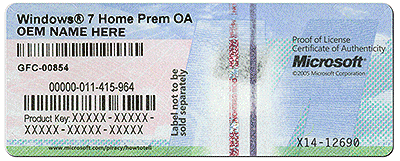
If you have the original installation disk, then yes. Else you will have to download the OS and activate it with the key that is on the COA sticker on the box.

What is the OS on your box and is there a COA sticker (in the back) that looks like that.
 

Attachments

  • coa-stickers.gif
    coa-stickers.gif
    495.9 KB · Views: 9

My Computer

Computer Manufacturer/Model Number
HP, Dell, Gateway, Toshiba - 4 laptops and 2 desktops
OS
Vista, Windows7, Mint Mate, Zorin, Windows 8
CPU
from 1.6GHz Duo to i7
Monitor(s) Displays
2x HP w2207
Hard Drives
5x HDD, 7x SSD, 12x Externals
Keyboard
with trackball - no mices
Mouse
Trackball mice
Internet Speed
DSL 6000
You can swap the SSD from your current tower. But the OS that is on there will not work. You will have to transfer the OS of the new tower to the SSD (easy) and transfer the OS of the old tower to whatever HDD you put in. The OEM OS has to always stay with the system it came with.

Can I put the new HDD into the HP, then format it clean, then install Windows on it?

You can put pretty much any drive into any machine and install Windows to it.

Activating the installation is another question.

What you can activate depends on the PARTICULARS of the Windows license you have.

What are the gory details on this "Windows" you refer to?

OEM? Retail? Bought at Best Buy? Downloaded from someone? Copied from someone? Bought on Ebay. Bought by a friend but you don't know where he got it? Burned from an ISO?
 

My Computer

Computer type
PC/Desktop
Computer Manufacturer/Model Number
Ignatz Special; 4 speed manual gearbox; factory air conditioning; one of one
OS
Windows 7 Home Premium SP1, 64-bit
CPU
Intel Skylake i5-6600K, not overclocked
Motherboard
AsRock Z170M Extreme 4, micro ATX
Memory
8 GB HyperX DDR4-2666 (2 x 4 GB)
Graphics Card(s)
none; graphics are integrated on CPU
Sound Card
onboard: Realtek ALC1150; external: USB Behringer UF0-202
Monitor(s) Displays
Dell S2340M 23 inch IPS
Screen Resolution
1600 x 900
Hard Drives
System: Crucial MX100 series SSD, 128 GB;
Data: Samsung Spinpoint 103SJ, 1 TB;
Backup: WD Caviar Green WD30EZRX-00D8PB0, 3 TB
PSU
Rosewill SilentNight 500 watt fanless, semi-modular
Case
Antec Solo II
Cooling
Noctua NH-U12S; Noctua F12 intake, Noctua S12A exhaust
Keyboard
Microsoft 200 6JH-00001 USB
Mouse
Dell or Microsoft optical wired; USB
Antivirus
Microsoft Security Essentials and Malwarebytes Premium
Browser
Pale Moon
Other Info
All fans PWM; speeds at idle: CPU circa 500 rpm; intake circa 600 rpm; exhaust circa 600 rpm; CPU temps 27 idle and 47 C load in a warm room (27 C/81 F) when running Intel Extreme Tuning Utility stress test.
What's the consensus on refurbished?
 

My Computer

Computer type
PC/Desktop
OS
Windows 7 Professional 64 bit
You can swap the SSD from your current tower. But the OS that is on there will not work. You will have to transfer the OS of the new tower to the SSD (easy) and transfer the OS of the old tower to whatever HDD you put in. The OEM OS has to always stay with the system it came with.

Can I put the new HDD into the HP, then format it clean, then install Windows on it?

You can put pretty much any drive into any machine and install Windows to it.

Activating the installation is another question.

What you can activate depends on the PARTICULARS of the Windows license you have.

What are the gory details on this "Windows" you refer to?

OEM? Retail? Bought at Best Buy? Downloaded from someone? Copied from someone? Bought on Ebay. Bought by a friend but you don't know where he got it? Burned from an ISO?

It came with my Dell refurbished that bit the dust Thursday.
 

My Computer

Computer type
PC/Desktop
OS
Windows 7 Professional 64 bit
You can swap the SSD from your current tower. But the OS that is on there will not work. You will have to transfer the OS of the new tower to the SSD (easy) and transfer the OS of the old tower to whatever HDD you put in. The OEM OS has to always stay with the system it came with.

Can I put the new HDD into the HP, then format it clean, then install Windows on it?

If you have the original installation disk, then yes. Else you will have to download the OS and activate it with the key that is on the COA sticker on the box.

What is the OS on your box and is there a COA sticker (in the back) that looks like that.

The safer thing might be to wipe the drive, sell it, by itself, then sell the HP, minus the HDD for a few bucks on CL.
 

My Computer

Computer type
PC/Desktop
OS
Windows 7 Professional 64 bit
What's the consensus on refurbished?

As a general term, not much. Primarily because you can't find out the details of what that means in any particular case.

You might go to the Dell Outlet Store at Dell's own website. They sell a lot of machines that are effectively new but that can't be labeled as new. Returned items, discontinued stuff, etc. They would have no hours or low hours. That's better than "refurbished" when you can't get more details.

But the Dell Outlet may not have what you want at any given time. And some items they do have may not be much cheaper than the outright new equivalent.

If in doubt, I'd buy new. You have enough budget and don't need a powerful PC.

Newegg is reliable as a dealer and better than most at customer service.

I've heard Costco and Amazon have good return policies also.

Generally--any breakdown beyond 30 days will force you to deal with the manufacturer of the particular part, rather than the retailer.

Up to you to read the fine print.
 

My Computer

Computer type
PC/Desktop
Computer Manufacturer/Model Number
Ignatz Special; 4 speed manual gearbox; factory air conditioning; one of one
OS
Windows 7 Home Premium SP1, 64-bit
CPU
Intel Skylake i5-6600K, not overclocked
Motherboard
AsRock Z170M Extreme 4, micro ATX
Memory
8 GB HyperX DDR4-2666 (2 x 4 GB)
Graphics Card(s)
none; graphics are integrated on CPU
Sound Card
onboard: Realtek ALC1150; external: USB Behringer UF0-202
Monitor(s) Displays
Dell S2340M 23 inch IPS
Screen Resolution
1600 x 900
Hard Drives
System: Crucial MX100 series SSD, 128 GB;
Data: Samsung Spinpoint 103SJ, 1 TB;
Backup: WD Caviar Green WD30EZRX-00D8PB0, 3 TB
PSU
Rosewill SilentNight 500 watt fanless, semi-modular
Case
Antec Solo II
Cooling
Noctua NH-U12S; Noctua F12 intake, Noctua S12A exhaust
Keyboard
Microsoft 200 6JH-00001 USB
Mouse
Dell or Microsoft optical wired; USB
Antivirus
Microsoft Security Essentials and Malwarebytes Premium
Browser
Pale Moon
Other Info
All fans PWM; speeds at idle: CPU circa 500 rpm; intake circa 600 rpm; exhaust circa 600 rpm; CPU temps 27 idle and 47 C load in a warm room (27 C/81 F) when running Intel Extreme Tuning Utility stress test.
It came with my Dell refurbished that bit the dust Thursday.

Then it's an OEM version and can't be activated on some other machine.

Installed and used for 30 days, yes.

Installed, activated and used after 30 days, no.

Only "retail" versions can be installed on some other machine.

Retail Windows 7 is very very difficult to find now.

All you see anymore is OEM versions and they can be installed to any PC, but only that PC. If you get another PC, you need to buy again.
 

My Computer

Computer type
PC/Desktop
Computer Manufacturer/Model Number
Ignatz Special; 4 speed manual gearbox; factory air conditioning; one of one
OS
Windows 7 Home Premium SP1, 64-bit
CPU
Intel Skylake i5-6600K, not overclocked
Motherboard
AsRock Z170M Extreme 4, micro ATX
Memory
8 GB HyperX DDR4-2666 (2 x 4 GB)
Graphics Card(s)
none; graphics are integrated on CPU
Sound Card
onboard: Realtek ALC1150; external: USB Behringer UF0-202
Monitor(s) Displays
Dell S2340M 23 inch IPS
Screen Resolution
1600 x 900
Hard Drives
System: Crucial MX100 series SSD, 128 GB;
Data: Samsung Spinpoint 103SJ, 1 TB;
Backup: WD Caviar Green WD30EZRX-00D8PB0, 3 TB
PSU
Rosewill SilentNight 500 watt fanless, semi-modular
Case
Antec Solo II
Cooling
Noctua NH-U12S; Noctua F12 intake, Noctua S12A exhaust
Keyboard
Microsoft 200 6JH-00001 USB
Mouse
Dell or Microsoft optical wired; USB
Antivirus
Microsoft Security Essentials and Malwarebytes Premium
Browser
Pale Moon
Other Info
All fans PWM; speeds at idle: CPU circa 500 rpm; intake circa 600 rpm; exhaust circa 600 rpm; CPU temps 27 idle and 47 C load in a warm room (27 C/81 F) when running Intel Extreme Tuning Utility stress test.
What's the consensus on refurbished?

As a general term, not much. Primarily because you can't find out the details of what that means in any particular case.

You might go to the Dell Outlet Store at Dell's own website. They sell a lot of machines that are effectively new but that can't be labeled as new. Returned items, discontinued stuff, etc. They would have no hours or low hours. That's better than "refurbished" when you can't get more details.

But the Dell Outlet may not have what you want at any given time. And some items they do have may not be much cheaper than the outright new equivalent.

If in doubt, I'd buy new. You have enough budget and don't need a powerful PC.

Newegg is reliable as a dealer and better than most at customer service.

I've heard Costco and Amazon have good return policies also.

Generally--any breakdown beyond 30 days will force you to deal with the manufacturer of the particular part, rather than the retailer.

Up to you to read the fine print.

Im going shopping now. Will go to Dell, Newegg, and Amazon. I will get back with a wishlist.
 

My Computer

Computer type
PC/Desktop
OS
Windows 7 Professional 64 bit
I would not buy refurbished same as I never buy a used car. But that may be just me.
 

My Computer

Computer Manufacturer/Model Number
HP, Dell, Gateway, Toshiba - 4 laptops and 2 desktops
OS
Vista, Windows7, Mint Mate, Zorin, Windows 8
CPU
from 1.6GHz Duo to i7
Monitor(s) Displays
2x HP w2207
Hard Drives
5x HDD, 7x SSD, 12x Externals
Keyboard
with trackball - no mices
Mouse
Trackball mice
Internet Speed
DSL 6000
HP ProDesk 400 G1 (E3U19UT#ABA) Desktop PC Pentium G3420 (3.2GHz) 4GB DDR3 500GB HDD Windows 7 Professional 64-Bit with Windows 8.1 Pro License - Newegg.com

Don't know if the above HP is shown in any of my earlier links.

$390, new, Intel Pentium G3420 processor, Windows 7 Professional installed, Windows 8.1 included which you could likely sell. DVD burner, 500 GB 7200 rpm drive, 4 GB RAM, integrated graphics, 3 year parts warranty, supposedly marked down from 580.

I think HP sells this as a "business" PC, so it probably doesn't have a bunch of software.

I'll take a look at Dell Outlet in a few minutes.
 

My Computer

Computer type
PC/Desktop
Computer Manufacturer/Model Number
Ignatz Special; 4 speed manual gearbox; factory air conditioning; one of one
OS
Windows 7 Home Premium SP1, 64-bit
CPU
Intel Skylake i5-6600K, not overclocked
Motherboard
AsRock Z170M Extreme 4, micro ATX
Memory
8 GB HyperX DDR4-2666 (2 x 4 GB)
Graphics Card(s)
none; graphics are integrated on CPU
Sound Card
onboard: Realtek ALC1150; external: USB Behringer UF0-202
Monitor(s) Displays
Dell S2340M 23 inch IPS
Screen Resolution
1600 x 900
Hard Drives
System: Crucial MX100 series SSD, 128 GB;
Data: Samsung Spinpoint 103SJ, 1 TB;
Backup: WD Caviar Green WD30EZRX-00D8PB0, 3 TB
PSU
Rosewill SilentNight 500 watt fanless, semi-modular
Case
Antec Solo II
Cooling
Noctua NH-U12S; Noctua F12 intake, Noctua S12A exhaust
Keyboard
Microsoft 200 6JH-00001 USB
Mouse
Dell or Microsoft optical wired; USB
Antivirus
Microsoft Security Essentials and Malwarebytes Premium
Browser
Pale Moon
Other Info
All fans PWM; speeds at idle: CPU circa 500 rpm; intake circa 600 rpm; exhaust circa 600 rpm; CPU temps 27 idle and 47 C load in a warm room (27 C/81 F) when running Intel Extreme Tuning Utility stress test.
Dell Factory Outlet: Error

Above is the only possibility I saw at Dell Outlet. $429 "certified refurbished". Not sure if it's a bargain. It's an i-3 Intel.
 

My Computer

Computer type
PC/Desktop
Computer Manufacturer/Model Number
Ignatz Special; 4 speed manual gearbox; factory air conditioning; one of one
OS
Windows 7 Home Premium SP1, 64-bit
CPU
Intel Skylake i5-6600K, not overclocked
Motherboard
AsRock Z170M Extreme 4, micro ATX
Memory
8 GB HyperX DDR4-2666 (2 x 4 GB)
Graphics Card(s)
none; graphics are integrated on CPU
Sound Card
onboard: Realtek ALC1150; external: USB Behringer UF0-202
Monitor(s) Displays
Dell S2340M 23 inch IPS
Screen Resolution
1600 x 900
Hard Drives
System: Crucial MX100 series SSD, 128 GB;
Data: Samsung Spinpoint 103SJ, 1 TB;
Backup: WD Caviar Green WD30EZRX-00D8PB0, 3 TB
PSU
Rosewill SilentNight 500 watt fanless, semi-modular
Case
Antec Solo II
Cooling
Noctua NH-U12S; Noctua F12 intake, Noctua S12A exhaust
Keyboard
Microsoft 200 6JH-00001 USB
Mouse
Dell or Microsoft optical wired; USB
Antivirus
Microsoft Security Essentials and Malwarebytes Premium
Browser
Pale Moon
Other Info
All fans PWM; speeds at idle: CPU circa 500 rpm; intake circa 600 rpm; exhaust circa 600 rpm; CPU temps 27 idle and 47 C load in a warm room (27 C/81 F) when running Intel Extreme Tuning Utility stress test.
see comments in bold.

I'll check processor power at another web site and add to this thread in a few minutes.

After checking Dell/Dell Outlet, Amazon, and Newegg, putting in preferred specs, this what I've seen that would work.

Inspiron Small Desktop | Dell

dual core i3-4150 3.5 ghz; Windows 8.1; includes McAfee subscription which I'd get rid of; 4 GB RAM; 1 TB 7200 rpm drive. Apparently no other software in default configuration.


Inspiron Small Desktop | Dell

Same processor as above (i3-4150); Windows 7 Home Premium 64 bit; McAfee; 4 GB RAM, 1 TB 7200 rpm drive; appears to be same as the first Dell except Win 7 instead of Win 8.


Acer VX2631-UR11 Desktop PC Intel Core i3 4130 (3.40GHz) 4GB DDR3 500GB HDD Windows 7 Home Premium 64-Bit - Newegg.com

Slightly slower i3-4130; smaller 500 GB hard drive; I don't see any reason to consider this one.

Amazon.com : Lenovo ThinkCentre M78 10BR000AUS Tower Desktop (3.70 GHz AMD APU A4-6300B Processor, 4GB DDR3, 500GB HDD, Windows 7 Professional) : Computers & Accessories


smaller 500 GB hard drive; AMD A4-6300B processor which I know nothing about; Win 7 Pro; 4 GB RAM;

Amazon.com : Lenovo ThinkCentre E73 10AU002PUS i3-4130 4GB 500GB 7200rpm W7P Small Desktop Computer : Computers & Accessories

i-3 4130 processor, same as the rejected Acer above; smaller 500 gb drive; 4 gb ram; Win 7 pro

Opinions?
 

My Computer

Computer type
PC/Desktop
Computer Manufacturer/Model Number
Ignatz Special; 4 speed manual gearbox; factory air conditioning; one of one
OS
Windows 7 Home Premium SP1, 64-bit
CPU
Intel Skylake i5-6600K, not overclocked
Motherboard
AsRock Z170M Extreme 4, micro ATX
Memory
8 GB HyperX DDR4-2666 (2 x 4 GB)
Graphics Card(s)
none; graphics are integrated on CPU
Sound Card
onboard: Realtek ALC1150; external: USB Behringer UF0-202
Monitor(s) Displays
Dell S2340M 23 inch IPS
Screen Resolution
1600 x 900
Hard Drives
System: Crucial MX100 series SSD, 128 GB;
Data: Samsung Spinpoint 103SJ, 1 TB;
Backup: WD Caviar Green WD30EZRX-00D8PB0, 3 TB
PSU
Rosewill SilentNight 500 watt fanless, semi-modular
Case
Antec Solo II
Cooling
Noctua NH-U12S; Noctua F12 intake, Noctua S12A exhaust
Keyboard
Microsoft 200 6JH-00001 USB
Mouse
Dell or Microsoft optical wired; USB
Antivirus
Microsoft Security Essentials and Malwarebytes Premium
Browser
Pale Moon
Other Info
All fans PWM; speeds at idle: CPU circa 500 rpm; intake circa 600 rpm; exhaust circa 600 rpm; CPU temps 27 idle and 47 C load in a warm room (27 C/81 F) when running Intel Extreme Tuning Utility stress test.
see comments in bold.

I'll check processor power at another web site and add to this thread in a few minutes.

After checking Dell/Dell Outlet, Amazon, and Newegg, putting in preferred specs, this what I've seen that would work.

Inspiron Small Desktop | Dell

dual core i3-4150 3.5 ghz; Windows 8.1; includes McAfee subscription which I'd get rid of; 4 GB RAM; 1 TB 7200 rpm drive. Apparently no other software in default configuration.


Inspiron Small Desktop | Dell

Same processor as above (i3-4150); Windows 7 Home Premium 64 bit; McAfee; 4 GB RAM, 1 TB 7200 rpm drive; appears to be same as the first Dell except Win 7 instead of Win 8.


Acer VX2631-UR11 Desktop PC Intel Core i3 4130 (3.40GHz) 4GB DDR3 500GB HDD Windows 7 Home Premium 64-Bit - Newegg.com

Slightly slower i3-4130; smaller 500 GB hard drive; I don't see any reason to consider this one.

Amazon.com : Lenovo ThinkCentre M78 10BR000AUS Tower Desktop (3.70 GHz AMD APU A4-6300B Processor, 4GB DDR3, 500GB HDD, Windows 7 Professional) : Computers & Accessories


smaller 500 GB hard drive; AMD A4-6300B processor which I know nothing about; Win 7 Pro; 4 GB RAM;

Amazon.com : Lenovo ThinkCentre E73 10AU002PUS i3-4130 4GB 500GB 7200rpm W7P Small Desktop Computer : Computers & Accessories

i-3 4130 processor, same as the rejected Acer above; smaller 500 gb drive; 4 gb ram; Win 7 pro

Opinions?

I amended the post ig, and added some from Tigerdirect
 

My Computer

Computer type
PC/Desktop
OS
Windows 7 Professional 64 bit
Most of those are in small or narrow boxes that are a dog if you want to work in them. The Lenovo with an A4 has a normal box, but I would stay away from an A4.
 

My Computer

Computer Manufacturer/Model Number
HP, Dell, Gateway, Toshiba - 4 laptops and 2 desktops
OS
Vista, Windows7, Mint Mate, Zorin, Windows 8
CPU
from 1.6GHz Duo to i7
Monitor(s) Displays
2x HP w2207
Hard Drives
5x HDD, 7x SSD, 12x Externals
Keyboard
with trackball - no mices
Mouse
Trackball mice
Internet Speed
DSL 6000
see comments in bold.

I'll check processor power at another web site and add to this thread in a few minutes.

After checking Dell/Dell Outlet, Amazon, and Newegg, putting in preferred specs, this what I've seen that would work.

Inspiron Small Desktop | Dell

dual core i3-4150 3.5 ghz; Windows 8.1; includes McAfee subscription which I'd get rid of; 4 GB RAM; 1 TB 7200 rpm drive. Apparently no other software in default configuration.


Inspiron Small Desktop | Dell

Same processor as above (i3-4150); Windows 7 Home Premium 64 bit; McAfee; 4 GB RAM, 1 TB 7200 rpm drive; appears to be same as the first Dell except Win 7 instead of Win 8.


Acer VX2631-UR11 Desktop PC Intel Core i3 4130 (3.40GHz) 4GB DDR3 500GB HDD Windows 7 Home Premium 64-Bit - Newegg.com

Slightly slower i3-4130; smaller 500 GB hard drive; I don't see any reason to consider this one.

Amazon.com : Lenovo ThinkCentre M78 10BR000AUS Tower Desktop (3.70 GHz AMD APU A4-6300B Processor, 4GB DDR3, 500GB HDD, Windows 7 Professional) : Computers & Accessories


smaller 500 GB hard drive; AMD A4-6300B processor which I know nothing about; Win 7 Pro; 4 GB RAM;

Amazon.com : Lenovo ThinkCentre E73 10AU002PUS i3-4130 4GB 500GB 7200rpm W7P Small Desktop Computer : Computers & Accessories

i-3 4130 processor, same as the rejected Acer above; smaller 500 gb drive; 4 gb ram; Win 7 pro

Opinions?

Keep in mind, the HDD makes no difference because I will put the Kingston SSD in the new one, wipe new HDD and sell it separately.
 

My Computer

Computer type
PC/Desktop
OS
Windows 7 Professional 64 bit
Back
Top