Solved The right-click context menu and 7-Zip

DrWho

Banned
VIP
Local time
8:35 AM
Messages
154
Location
Central Florida, USA
I use 7Zip for my compression and de-compression program,
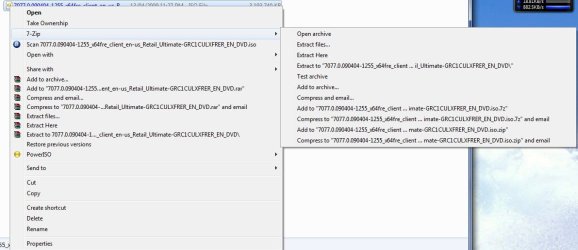
and when I install it into Windows XP, I get this nice context menu when I right click on a file:


That makes it real easy to access 7Zip.
But, when I install 7Zip into Win-7, I don't get it installed into the Right Click menu. That makes using 7Zip very difficult.

My question for the group:
Is there some way to force Win-7 to add 7Zip to the context menu?

Hopefully,
The Doctor :cool:
 
Last edited by a moderator:

My Computer My Computer

Computer Manufacturer/Model Number
Home Made
OS
Windows XP-Pro-SP3, Windows 7
CPU
AMD, 2X, Dual Core 5200+
Motherboard
MSI K9N Platinum
Memory
6 gig DDR2, Super Talent
Graphics Card(s)
Winfast
Sound Card
On Board AC97
Monitor(s) Displays
19" Envision LCD
Screen Resolution
1024x768
Hard Drives
3x , Maxtor/Seagate SATA2 (160, 160, 200gig)
PSU
Antec Earthwatts 650
Case
Pac Man Mid-Tower
Cooling
11 fans
Keyboard
Generic
Mouse
MS digital
Internet Speed
5 Meg Cable
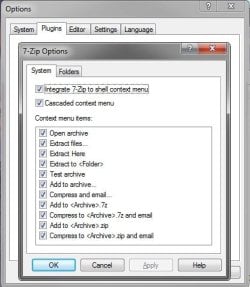
7-Zip options > Plugins, 7-Zip > Options > System
 

My Computer My Computer

Computer Manufacturer/Model Number
Haha! You peeked. Why so nosey?
OS
XP / Windows 7 Pro RTM
You gotta be kidding me!
It's really that simple?

Now you make me feel bad.:(:confused::cry:

If that works for me, you have a friend for life!;)

Thanks a million,
The Doctor :cool:
 

My Computer My Computer

Computer Manufacturer/Model Number
Home Made
OS
Windows XP-Pro-SP3, Windows 7
CPU
AMD, 2X, Dual Core 5200+
Motherboard
MSI K9N Platinum
Memory
6 gig DDR2, Super Talent
Graphics Card(s)
Winfast
Sound Card
On Board AC97
Monitor(s) Displays
19" Envision LCD
Screen Resolution
1024x768
Hard Drives
3x , Maxtor/Seagate SATA2 (160, 160, 200gig)
PSU
Antec Earthwatts 650
Case
Pac Man Mid-Tower
Cooling
11 fans
Keyboard
Generic
Mouse
MS digital
Internet Speed
5 Meg Cable
Well, I found the path you mentioned, under "Tools" on the upper 7Zip tool bar. All the options I wanted and need were already checked, but I did select some more options, like setting up the "associations" while I was in there, to make 7Zip more useful.

But, 7Zip still does not appear in the right click context (Drop Down) menu.

If I click on "Open With" , I can get to 7Zip that way, but that's not the full context menu that I selected in the Options.

Close, and closer, but still no Cigar!

But I wouldn't even be that close without your help, ten, so I do thank you.;)

The Doctor :cool:
 

My Computer My Computer

Computer Manufacturer/Model Number
Home Made
OS
Windows XP-Pro-SP3, Windows 7
CPU
AMD, 2X, Dual Core 5200+
Motherboard
MSI K9N Platinum
Memory
6 gig DDR2, Super Talent
Graphics Card(s)
Winfast
Sound Card
On Board AC97
Monitor(s) Displays
19" Envision LCD
Screen Resolution
1024x768
Hard Drives
3x , Maxtor/Seagate SATA2 (160, 160, 200gig)
PSU
Antec Earthwatts 650
Case
Pac Man Mid-Tower
Cooling
11 fans
Keyboard
Generic
Mouse
MS digital
Internet Speed
5 Meg Cable
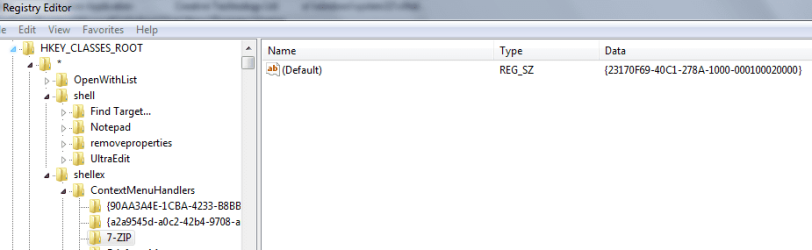
Hmm, weird. Do you have this in your registry?
 

Attachments

  • 7zip.PNG
    7zip.PNG
    12.5 KB · Views: 22,041

My Computer My Computer

Computer Manufacturer/Model Number
Haha! You peeked. Why so nosey?
OS
XP / Windows 7 Pro RTM
Yup, GOT IT!

That is, yes I have that entry in my registry.

Ain't that weird?

:cool:
 

My Computer My Computer

Computer Manufacturer/Model Number
Home Made
OS
Windows XP-Pro-SP3, Windows 7
CPU
AMD, 2X, Dual Core 5200+
Motherboard
MSI K9N Platinum
Memory
6 gig DDR2, Super Talent
Graphics Card(s)
Winfast
Sound Card
On Board AC97
Monitor(s) Displays
19" Envision LCD
Screen Resolution
1024x768
Hard Drives
3x , Maxtor/Seagate SATA2 (160, 160, 200gig)
PSU
Antec Earthwatts 650
Case
Pac Man Mid-Tower
Cooling
11 fans
Keyboard
Generic
Mouse
MS digital
Internet Speed
5 Meg Cable
I'm at a lose then. Works fine for me.
 

My Computer My Computer

Computer Manufacturer/Model Number
Haha! You peeked. Why so nosey?
OS
XP / Windows 7 Pro RTM
Strange, I didn't have to change any settings and it works for me.

2009-05-07_021751.jpg
 

My Computer My Computer

Computer Manufacturer/Model Number
Home Brew
OS
Windows 7 Ultimate Vista Ultimate x64
CPU
Core 2 Duo E8500 3.16Ghz @ 3.8Ghz
Motherboard
eVGA 750i FTW
Memory
2x2Gigs Patriot PC2-6400 LL
Graphics Card(s)
Inno3D GeForce GTX260 216 SP
Monitor(s) Displays
ASUS VW222U 22" 2ms Response time
Screen Resolution
1680x1050
Hard Drives
SATA 150GB
SATA II 250GB
USB IDE 750GB Ext.
PSU
HYTEC 600W & Thermaltake 650W Toughpower Power Exp
Case
Thermaltake Armor LCS (Liquid Cooling System)
Cooling
Liquid Cooling System
Keyboard
Logitech G15 Gaming Keyboard
Mouse
Logitech G9 Gaming Mouse
:D:D:D
Even your little avatar looks lost!

Oh well, it's a small thing in the list of problems that I face every day.

I certainly DO appreciate your help!

Thanks again,
The Doctor :cool:
 

My Computer My Computer

Computer Manufacturer/Model Number
Home Made
OS
Windows XP-Pro-SP3, Windows 7
CPU
AMD, 2X, Dual Core 5200+
Motherboard
MSI K9N Platinum
Memory
6 gig DDR2, Super Talent
Graphics Card(s)
Winfast
Sound Card
On Board AC97
Monitor(s) Displays
19" Envision LCD
Screen Resolution
1024x768
Hard Drives
3x , Maxtor/Seagate SATA2 (160, 160, 200gig)
PSU
Antec Earthwatts 650
Case
Pac Man Mid-Tower
Cooling
11 fans
Keyboard
Generic
Mouse
MS digital
Internet Speed
5 Meg Cable
Very strange! I get the complete menu too.

Un-install your copy, then delete the program folder. See if this download works any better:
Download 7-Zip 4.65 - FileHippo.com
 

My Computer My Computer

Computer type
PC/Desktop
Computer Manufacturer/Model Number
Bruce ... somewhere in his 40's
OS
Windows 7 Ultimate 32bit SP1
CPU
Intel(R) Core(TM)2 Quad CPU @ 2.40GHz, 2400 MHz
Motherboard
INTEL/D975XBX2
Memory
4 GB
Graphics Card(s)
ATI Radeon HD 2600 Pro
Monitor(s) Displays
Samsung SyncMaster 914v
Screen Resolution
1280 x 1024
Hard Drives
2/500GB each ... ST3500630AS ATA Device.
One is not connected
PSU
Rocketfish 700 W
Case
G.Skill Gigabyte Chassis
Keyboard
Standard PS/2 Keyboard
Mouse
Microsoft PS/2 Mouse
Internet Speed
DSL
Antivirus
Avira Internet Security
Browser
IE 11
Other Info
ATI HDMI Audio
Very strange! I get the complete menu too.

Un-install your copy, then delete the program folder. See if this download works any better:
Download 7-Zip 4.65 - FileHippo.com

YUP, that's the same version I have on my Utilities disk, that I install for myself and share with all my customers.
It even works on vista, so I don't understand why it won't work right, here on Windows 7 RC1.

The context menu that you get............ is it the same one I showed in my opening post?

Doc :cool:
 

My Computer My Computer

Computer Manufacturer/Model Number
Home Made
OS
Windows XP-Pro-SP3, Windows 7
CPU
AMD, 2X, Dual Core 5200+
Motherboard
MSI K9N Platinum
Memory
6 gig DDR2, Super Talent
Graphics Card(s)
Winfast
Sound Card
On Board AC97
Monitor(s) Displays
19" Envision LCD
Screen Resolution
1024x768
Hard Drives
3x , Maxtor/Seagate SATA2 (160, 160, 200gig)
PSU
Antec Earthwatts 650
Case
Pac Man Mid-Tower
Cooling
11 fans
Keyboard
Generic
Mouse
MS digital
Internet Speed
5 Meg Cable
Yes it's the same
 

My Computer My Computer

Computer type
PC/Desktop
Computer Manufacturer/Model Number
Bruce ... somewhere in his 40's
OS
Windows 7 Ultimate 32bit SP1
CPU
Intel(R) Core(TM)2 Quad CPU @ 2.40GHz, 2400 MHz
Motherboard
INTEL/D975XBX2
Memory
4 GB
Graphics Card(s)
ATI Radeon HD 2600 Pro
Monitor(s) Displays
Samsung SyncMaster 914v
Screen Resolution
1280 x 1024
Hard Drives
2/500GB each ... ST3500630AS ATA Device.
One is not connected
PSU
Rocketfish 700 W
Case
G.Skill Gigabyte Chassis
Keyboard
Standard PS/2 Keyboard
Mouse
Microsoft PS/2 Mouse
Internet Speed
DSL
Antivirus
Avira Internet Security
Browser
IE 11
Other Info
ATI HDMI Audio
Well, that's the same version of 7Zip that I use.

I didn't realize that 7Zip was so widely used. I feel somewhat vindicated.

Well, I've changed HD's and right now I'm in Win-7, beta 7048 and I still don't have 7Zip in my context menu, even though all the settings are correct in the program.

It just gets weirderer and weirderer!

Doc :cool:
 

My Computer My Computer

Computer Manufacturer/Model Number
Home Made
OS
Windows XP-Pro-SP3, Windows 7
CPU
AMD, 2X, Dual Core 5200+
Motherboard
MSI K9N Platinum
Memory
6 gig DDR2, Super Talent
Graphics Card(s)
Winfast
Sound Card
On Board AC97
Monitor(s) Displays
19" Envision LCD
Screen Resolution
1024x768
Hard Drives
3x , Maxtor/Seagate SATA2 (160, 160, 200gig)
PSU
Antec Earthwatts 650
Case
Pac Man Mid-Tower
Cooling
11 fans
Keyboard
Generic
Mouse
MS digital
Internet Speed
5 Meg Cable
I reinstalled 7Zip, but still NO JOY.

I'm back in XP now, because after getting an MS Update, I was having all sorts of problems getting back into this forum.

I think I'll just give up on this quest, for now.
I already have enough grey hairs. ;)

A while ago, while in Win-7, I heard a "Click" and the whole PC locked up.
It sounded like a HD dropping out. Go figure!

Again, I thank all of you who have offered your help.

The Doctor :cool:
 

My Computer My Computer

Computer Manufacturer/Model Number
Home Made
OS
Windows XP-Pro-SP3, Windows 7
CPU
AMD, 2X, Dual Core 5200+
Motherboard
MSI K9N Platinum
Memory
6 gig DDR2, Super Talent
Graphics Card(s)
Winfast
Sound Card
On Board AC97
Monitor(s) Displays
19" Envision LCD
Screen Resolution
1024x768
Hard Drives
3x , Maxtor/Seagate SATA2 (160, 160, 200gig)
PSU
Antec Earthwatts 650
Case
Pac Man Mid-Tower
Cooling
11 fans
Keyboard
Generic
Mouse
MS digital
Internet Speed
5 Meg Cable
I had the same problem. In my case I had installed the 32bit version of 7-zip on a 64 bit version of windows 7 (RC1). It ran fine but no context menus.

I installed the 64bit version of 7-zip and the context menus worked!
 

My Computer My Computer

OS
Win7
DrWho,

Double check to make sure that you right click on the 7-Zip shortcut and click on Properties, Compatibility tab, and check "Run this program as an administrator". 7-Zip may not function properly if it is not elevated.

In 7-Zip, click on Tools, Options, Plugins tab, System tab to select the items you want to see in the context menu.

7zip.jpg

Hope this helps,
Shawn
 

My Computer My Computer

Computer type
PC/Desktop
Computer Manufacturer/Model Number
Self built custom
OS
64-bit Windows 11 Pro for Workstations
CPU
Intel i7-8700K OC'd to 5 GHz
Motherboard
ASUS ROG Maximus XI Formula Z390
Memory
64 GB (4x16GB) G.SKILL TridentZ RGB DDR4 3600 MHz
Graphics Card(s)
ASUS ROG-STRIX-GTX1080TI-O11G-GAMING
Sound Card
Integrated
Monitor(s) Displays
2 x Samsung Odyssey G7 27"
Screen Resolution
2560x1440
Hard Drives
1TB Samsung 990 PRO M.2,
4TB Samsung 990 PRO PRO M.2,
TerraMaster F8 SSD Plus NAS
PSU
Seasonic Prime Titanium 850W
Case
Thermaltake Core P3
Cooling
Corsair Hydro H115i
Keyboard
Logitech wireless K800
Mouse
Logitech MX Master 4
Internet Speed
2 Gb/s Download and 100 Mb/s Upload
Antivirus
Malwarebyte Anti-Malware Premium
Browser
Google Chrome
Other Info
Logitech Z625 speaker system,
Logitech BRIO 4K Pro webcam,
HP Color LaserJet Pro MFP M477fdn,
APC SMART-UPS RT 1000 XL - SURT1000XLI,
Galaxy S23 Plus phone
Well Shawn, it would help a lot, if it worked. I've actually done all of the above.
But, we're not talking about the normal setup here......we're talking about something that apparently is BROKE. It's the toaster that won't toast, or the blender that won't blend.

But, I wasn't foolish enough, unlike some, to blow off my XP and replace it with a barely tested new OS. I'm on XP-Pro-SP3 right now and I'm here 99.99% of the time.
I'm "testing" Windows 7, to get more familiar with it and learn how to tweak it and tune it, so when it becomes MS's next big thing, I'll be prepared to make it run in a way that won't drive my already elderly customers right over the edge.

I've not given up 'yet' on 7Zip or any program that I think SHOULD run on Win-7.
Still "testing".......

Thanks to all who have contributed to this thread,

The Doctor :cool:
 

My Computer My Computer

Computer Manufacturer/Model Number
Home Made
OS
Windows XP-Pro-SP3, Windows 7
CPU
AMD, 2X, Dual Core 5200+
Motherboard
MSI K9N Platinum
Memory
6 gig DDR2, Super Talent
Graphics Card(s)
Winfast
Sound Card
On Board AC97
Monitor(s) Displays
19" Envision LCD
Screen Resolution
1024x768
Hard Drives
3x , Maxtor/Seagate SATA2 (160, 160, 200gig)
PSU
Antec Earthwatts 650
Case
Pac Man Mid-Tower
Cooling
11 fans
Keyboard
Generic
Mouse
MS digital
Internet Speed
5 Meg Cable
I had the same problem. In my case I had installed the 32bit version of 7-zip on a 64 bit version of windows 7 (RC1). It ran fine but no context menus.

I installed the 64bit version of 7-zip and the context menus worked!

Ya know....they say that the first sign of insanity is doing the same thing over and over and expecting to get different results.

Guilty as charged!!!
I'm running Win-7 Ultimate 64 and I was installing the 32 bit version of 7Zip. ( I feel like such a KLUTZ! )

When I re-read the above quoted post, it all of a sudden hit me like the proverbial "ton of bricks".
I actually had the x64 version on my Utilities disk, but I was still using the 32 bit version.
When I looked in C:\Program Files (x86)\ and there was 7Zip, it all became very clear, what I was doing wrong.
So now, that version of 7Zip is gone and the 64 bit version is properly installed in the 64 bit Program Files folder and all is right with the world.

Now if this dad-burned RAIN would just stop.......
We've not had any rain all winter here in FL and now that it's started, it won't stop. I think the faucet is broken.;)

Sort of along that same line, for those of us not yet at ease with having two "Program Files" folders, I was installing the latest version of AVG 8.5 FREE for a friend of mine, over the weekend, and I ran my little batch file to "Kill The Nag Box". Well it wasn't working.
So I looked to see where AVG was being installed, and sure nuff, it was in the C:\Program Files (x86)\ folder and my batch file was written to address the C:\Program Files\ folder, which is now the folder for 64 bit programs.

So, having the correct information, I quickly re-wrote my batch file and now I have one that will work for both 32 bit and 64 bit windows.
For those that are interested, here's the batch file, to kill that annoying nag box that drops down under the AVG 8.5 FREE Control Panel, window.

@Echo off
cls
del "C:\Program Files\AVG\AVG8\avgmwdef_us.mht"
del "C:\Program Files\AVG\AVG8\avgresf.dll"
del "C:\Program Files\AVG\AVG8\avgfree_us.mht"

REM With these three files deleted, the AVG nag box will NO Longer appear at
REM the bottom of the AVG Control panel window. (32 bit versions of windows)

del "C:\Program Files (x86)\AVG\AVG8\avgmwdef_us.mht"
del "C:\Program Files (x86)\AVG\AVG8\avgresf.dll"
del "C:\Program Files (x86)\AVG\AVG8\avgfree_us.mht"

Rem The three lines above will kill the nag box on 64 bit windows.
Rem Windows Vista and Windows 7, 64 bit.

Enough, already!

The Doctor :cool:
 

My Computer My Computer

Computer Manufacturer/Model Number
Home Made
OS
Windows XP-Pro-SP3, Windows 7
CPU
AMD, 2X, Dual Core 5200+
Motherboard
MSI K9N Platinum
Memory
6 gig DDR2, Super Talent
Graphics Card(s)
Winfast
Sound Card
On Board AC97
Monitor(s) Displays
19" Envision LCD
Screen Resolution
1024x768
Hard Drives
3x , Maxtor/Seagate SATA2 (160, 160, 200gig)
PSU
Antec Earthwatts 650
Case
Pac Man Mid-Tower
Cooling
11 fans
Keyboard
Generic
Mouse
MS digital
Internet Speed
5 Meg Cable
LOL, I'm happy to hear that you got it sorted out Doctor. :)
 

My Computer My Computer

Computer type
PC/Desktop
Computer Manufacturer/Model Number
Self built custom
OS
64-bit Windows 11 Pro for Workstations
CPU
Intel i7-8700K OC'd to 5 GHz
Motherboard
ASUS ROG Maximus XI Formula Z390
Memory
64 GB (4x16GB) G.SKILL TridentZ RGB DDR4 3600 MHz
Graphics Card(s)
ASUS ROG-STRIX-GTX1080TI-O11G-GAMING
Sound Card
Integrated
Monitor(s) Displays
2 x Samsung Odyssey G7 27"
Screen Resolution
2560x1440
Hard Drives
1TB Samsung 990 PRO M.2,
4TB Samsung 990 PRO PRO M.2,
TerraMaster F8 SSD Plus NAS
PSU
Seasonic Prime Titanium 850W
Case
Thermaltake Core P3
Cooling
Corsair Hydro H115i
Keyboard
Logitech wireless K800
Mouse
Logitech MX Master 4
Internet Speed
2 Gb/s Download and 100 Mb/s Upload
Antivirus
Malwarebyte Anti-Malware Premium
Browser
Google Chrome
Other Info
Logitech Z625 speaker system,
Logitech BRIO 4K Pro webcam,
HP Color LaserJet Pro MFP M477fdn,
APC SMART-UPS RT 1000 XL - SURT1000XLI,
Galaxy S23 Plus phone
Me too, but I wouldn't have gotten it done without 'Y'alls' help.

I really do appreciate all the help I've received from this forum.

As forums go, this one is an unqualified 10.

I just hope that someone, somewhere has benefited from my own posts.

Cheers Mates!
The Doctor :cool:
 

My Computer My Computer

Computer Manufacturer/Model Number
Home Made
OS
Windows XP-Pro-SP3, Windows 7
CPU
AMD, 2X, Dual Core 5200+
Motherboard
MSI K9N Platinum
Memory
6 gig DDR2, Super Talent
Graphics Card(s)
Winfast
Sound Card
On Board AC97
Monitor(s) Displays
19" Envision LCD
Screen Resolution
1024x768
Hard Drives
3x , Maxtor/Seagate SATA2 (160, 160, 200gig)
PSU
Antec Earthwatts 650
Case
Pac Man Mid-Tower
Cooling
11 fans
Keyboard
Generic
Mouse
MS digital
Internet Speed
5 Meg Cable
Back
Top