Theme - Change or Save

How to Change or Save a Windows 7 Theme

   Information
This will show you how to choose a theme to change the pictures (desktop background), colors, and sounds on your computer all at once in Windows 7.

You will also see how to save and delete your custom theme. Saving or deleting a theme is not available in Windows 7 Starter and Home Basic.


   Note

  • My Themes is your current theme. These .theme files are located in the hidden C:\Users\User-Name\AppData\Local\Microsoft\Windows\Themes folder.
  • Aero Themes are the Windows Aero themes. They are located in the C:\Windows\Resources\Themes folder.
  • Basic and High Contrast Themes are the Windows 7 Basic, Windows Classic, High Contrast #1, High Contrast #2, High Contrast Black, and High Contrast White themes. They are located in the C:\Windows\Resources\Ease of Access Themes folder.
  • Regional Themes - See: http://www.sevenforums.com/tutorials/1176-themes-regional.html
   Tip


OPTION ONE

To Change the Theme in Windows 7 Starter and Home Basic


1. Open the Control Panel (icons view), and click on the Display icon.

2. In the left blue pane, click on the Change color scheme link. (see screenshot below)
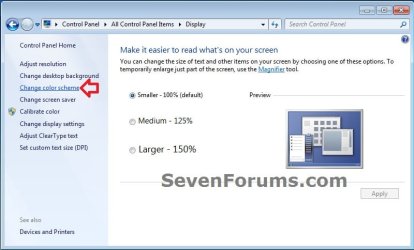
Starter_Basic-1.jpg
3. Select the color scheme (theme) that you would like, and click on Apply to test to see how you like it. (see screenshot below)
NOTE: Aero themes are not available in the Windows 7 Starter and Home Basic editions.
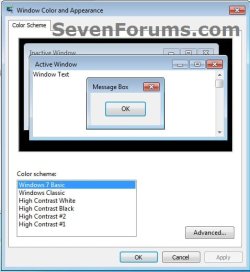
Starter_Basic-2.jpg
4. When finished, click on OK. (see screenshot below step 3)

5. Close the Display window. (see screenshot below step 1)


OPTION TWO

To Change the Theme in Windows 7 Home Premium, Professional, Ultimate, and Enterprise


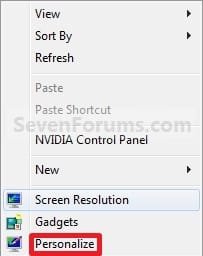
1. Right click on a empty space on the desktop and click on Personalize. (See screenshot below)
170d1230590495-theme-change-save-right_click.jpg

2. To Change the Theme
A) Click on one of the available themes. (See screenshot below)
NOTE: See the NOTE box at the top of the tutorial for more about these. To have the regional themes added, see: http://www.sevenforums.com/tutorials/1176-themes-regional.html.
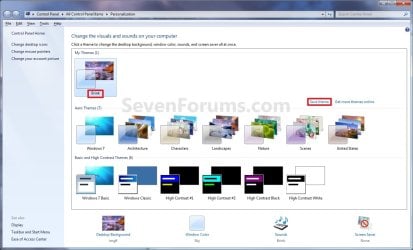
Personalization.jpg
B) Go to step 4.
3. To Create a Custom Theme
NOTE: Any changes that you make to a theme that you have already saved will automatically be updated and saved to it. There will be no need to save it as a new theme again in step 4 below unless you want a new theme.
A) Change the Desktop Background picture and settings.

B) Change the Window Color and Appearance settings.

C) Change the Sounds for the Windows 7 sound events to any sound file that you would like instead.

D) Change the Screen Saver and settings to be used for this theme pack.

E) Change, add, or remove any Desktop Icons that you want to with.

F) Change the Mouse Pointers to use pointers of your choice.

G) Proceed to OPTION TWO below to save your customized theme as a theme pack.
4. To Save the Current Theme to a File
NOTE: This will be your custom theme with a picture (desktop background), colors, sounds, and screen saver that you have selected and put together for the theme.
A) Under My Themes, click on the Save theme link towards the right. (See screenshot above)
NOTE: This will save your theme as .theme file for use on your computer only. If you want to share the theme with family and friends, then see: http://www.sevenforums.com/tutorials/2026-theme-pack-create-save-install-delete.html.

B) Type in a name you want for this theme, and click on the Save button. (See screenshot below)
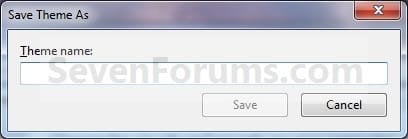
Name.jpg
5. To Delete a Selected Theme
NOTE: You cannot delete the current theme. If you want to delete the current theme, then you must select another theme in step 2 first.
A) Under My Themes, right click on the saved theme you want to delete and click on Delete theme. (See screenshot below)
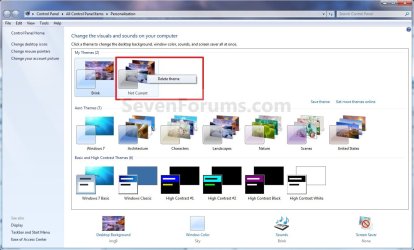
Delete.jpg
B) Click on Yes to confirm the deletion. (See screenshot below)
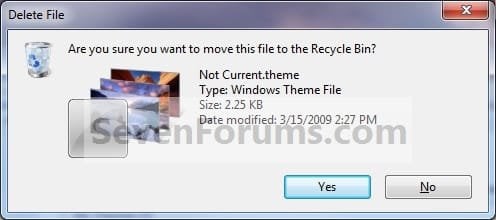
Confirm.jpg
That's it,
Shawn


Attachments

  • Right_Click.jpg
    Right_Click.jpg
    26.1 KB · Views: 500,696
Last edited:
Success!

Thank you Shawn for your help!

The actual name I had given the new theme had a space in it so, I quoted the path in the policy window.

I renamed the theme to not have spaces and I moved it to c:\Theme\newTheme.theme

Now when I create a new user, either Admin or standard, the new user gets the desired theme on initial login.

Thank you very much for your prompt, accurate and helpful reply to my post!
 

My Computer

OS
Windows
You're most welcome Erco. I'm happy to hear that you got it sorted. :)
 

My Computer

Computer type
PC/Desktop
Computer Manufacturer/Model Number
Self built custom
OS
64-bit Windows 11 Pro for Workstations
CPU
Intel i7-8700K OC'd to 5 GHz
Motherboard
ASUS ROG Maximus XI Formula Z390
Memory
64 GB (4x16GB) G.SKILL TridentZ RGB DDR4 3600 MHz
Graphics Card(s)
ASUS ROG-STRIX-GTX1080TI-O11G-GAMING
Sound Card
Integrated
Monitor(s) Displays
2 x Samsung Odyssey G7 27"
Screen Resolution
2560x1440
Hard Drives
1TB Samsung 990 PRO M.2,
4TB Samsung 990 PRO PRO M.2,
TerraMaster F8 SSD Plus NAS
PSU
Seasonic Prime Titanium 850W
Case
Thermaltake Core P3
Cooling
Corsair Hydro H115i
Keyboard
Logitech wireless K800
Mouse
Logitech MX Master 4
Internet Speed
2 Gb/s Download and 100 Mb/s Upload
Antivirus
Malwarebyte Anti-Malware Premium
Browser
Google Chrome
Other Info
Logitech Z625 speaker system,
Logitech BRIO 4K Pro webcam,
HP Color LaserJet Pro MFP M477fdn,
APC SMART-UPS RT 1000 XL - SURT1000XLI,
Galaxy S23 Plus phone
Hey Shawn, I happened to come across a similar problem that someone else was having. They posted it on either page 1 or 2.

Whenever I restart my computer Windows 7 will automatically create an unsaved theme that replaces my current saved theme (I still have my saved theme there its just not the one being used). I'm using a video animation for a background, and the reason that the unsaved theme that is automatically being used instead of my other saved theme is quite annoying is because it causes all my icons text to appear as black and unreadable on my black background. Is their any way to possibly change which theme windows 7 will use upon start-up. I've tried deleting the other theme, etc, but it gets created over and over again upon start-up.
 

My Computer

OS
Windows 7 Ultimate x64

My Computer

Computer type
PC/Desktop
Computer Manufacturer/Model Number
Self built custom
OS
64-bit Windows 11 Pro for Workstations
CPU
Intel i7-8700K OC'd to 5 GHz
Motherboard
ASUS ROG Maximus XI Formula Z390
Memory
64 GB (4x16GB) G.SKILL TridentZ RGB DDR4 3600 MHz
Graphics Card(s)
ASUS ROG-STRIX-GTX1080TI-O11G-GAMING
Sound Card
Integrated
Monitor(s) Displays
2 x Samsung Odyssey G7 27"
Screen Resolution
2560x1440
Hard Drives
1TB Samsung 990 PRO M.2,
4TB Samsung 990 PRO PRO M.2,
TerraMaster F8 SSD Plus NAS
PSU
Seasonic Prime Titanium 850W
Case
Thermaltake Core P3
Cooling
Corsair Hydro H115i
Keyboard
Logitech wireless K800
Mouse
Logitech MX Master 4
Internet Speed
2 Gb/s Download and 100 Mb/s Upload
Antivirus
Malwarebyte Anti-Malware Premium
Browser
Google Chrome
Other Info
Logitech Z625 speaker system,
Logitech BRIO 4K Pro webcam,
HP Color LaserJet Pro MFP M477fdn,
APC SMART-UPS RT 1000 XL - SURT1000XLI,
Galaxy S23 Plus phone
themes

hi
i have windows 7 home basic 32 bit so can i change the themes in my computer .
plz help me as soon as possible.
thank u ........:(
 

My Computer

OS
windows 7 home basice version is 32 bit
Hello Rim, and welcome to Seven Forums.

By default the Windows 7 Starter and Home Basic editions do not have the Personalization features included in them, such as changing and saving themes.

You could use Option Two in the tutorial below to be able to change the desktop background and theme in Windows 7 Home Basic though.
http://www.sevenforums.com/tutorials/47294-desktop-background-change-windows-7-starter.html

To save and use custom themes in Windows 7 Home Basic, you would need to use a 3rd party program like the pay for WindowsBlinds.

Hope this helps,
Shawn
 

My Computer

Computer type
PC/Desktop
Computer Manufacturer/Model Number
Self built custom
OS
64-bit Windows 11 Pro for Workstations
CPU
Intel i7-8700K OC'd to 5 GHz
Motherboard
ASUS ROG Maximus XI Formula Z390
Memory
64 GB (4x16GB) G.SKILL TridentZ RGB DDR4 3600 MHz
Graphics Card(s)
ASUS ROG-STRIX-GTX1080TI-O11G-GAMING
Sound Card
Integrated
Monitor(s) Displays
2 x Samsung Odyssey G7 27"
Screen Resolution
2560x1440
Hard Drives
1TB Samsung 990 PRO M.2,
4TB Samsung 990 PRO PRO M.2,
TerraMaster F8 SSD Plus NAS
PSU
Seasonic Prime Titanium 850W
Case
Thermaltake Core P3
Cooling
Corsair Hydro H115i
Keyboard
Logitech wireless K800
Mouse
Logitech MX Master 4
Internet Speed
2 Gb/s Download and 100 Mb/s Upload
Antivirus
Malwarebyte Anti-Malware Premium
Browser
Google Chrome
Other Info
Logitech Z625 speaker system,
Logitech BRIO 4K Pro webcam,
HP Color LaserJet Pro MFP M477fdn,
APC SMART-UPS RT 1000 XL - SURT1000XLI,
Galaxy S23 Plus phone
I had the problem that 'Unsaved Theme' did not appear when I had changed e.g. the color or intensity.
This prevented me from saving the new theme. The new settings re-appered after reboot, though.
The cause was that the file 'Custom.theme' in 'C:\Users\UserName\AppData\Local\Microsoft\Windows\Themes'
was marked as 'ReadOnly'. Removing this attribute, solved my problem.
 

My Computer

Computer Manufacturer/Model Number
HomeGrown Mk. 3
OS
Windows 7 Ultimate x64, Windows 7 Home Premium 64bit
CPU
Intel Core I5 760
Motherboard
ASUS P7P55D Premium
Memory
OCZ DDR3-1600 CL8 4*2GB
Graphics Card(s)
Gainward Nvidia GeForce GTX465
Sound Card
Onboard
Monitor(s) Displays
Benq G2420HD *2
Screen Resolution
1920*1080
Hard Drives
OCZ VERTEX2, 120GB
WD Black Caviar WDC WD1002FAEX, 1TB
PSU
Coolermaster GX 750W
Cooling
Plenty - 12 fans 120 and 140mm
Hello Poul,

Thank you for posting back with your results. :)
 

My Computer

Computer type
PC/Desktop
Computer Manufacturer/Model Number
Self built custom
OS
64-bit Windows 11 Pro for Workstations
CPU
Intel i7-8700K OC'd to 5 GHz
Motherboard
ASUS ROG Maximus XI Formula Z390
Memory
64 GB (4x16GB) G.SKILL TridentZ RGB DDR4 3600 MHz
Graphics Card(s)
ASUS ROG-STRIX-GTX1080TI-O11G-GAMING
Sound Card
Integrated
Monitor(s) Displays
2 x Samsung Odyssey G7 27"
Screen Resolution
2560x1440
Hard Drives
1TB Samsung 990 PRO M.2,
4TB Samsung 990 PRO PRO M.2,
TerraMaster F8 SSD Plus NAS
PSU
Seasonic Prime Titanium 850W
Case
Thermaltake Core P3
Cooling
Corsair Hydro H115i
Keyboard
Logitech wireless K800
Mouse
Logitech MX Master 4
Internet Speed
2 Gb/s Download and 100 Mb/s Upload
Antivirus
Malwarebyte Anti-Malware Premium
Browser
Google Chrome
Other Info
Logitech Z625 speaker system,
Logitech BRIO 4K Pro webcam,
HP Color LaserJet Pro MFP M477fdn,
APC SMART-UPS RT 1000 XL - SURT1000XLI,
Galaxy S23 Plus phone
Hy! I was wondering... If I have a selected theme. How can I move between pictures in my desktope without using right click?

Tnx
 

My Computer

OS
Windows 7
Hello Niet, and welcome to Seven Forums.

You could create a desktop slideshow to have different desktop background images shuffle as often as you like automatically.

Hope this helps,
Shawn
 

My Computer

Computer type
PC/Desktop
Computer Manufacturer/Model Number
Self built custom
OS
64-bit Windows 11 Pro for Workstations
CPU
Intel i7-8700K OC'd to 5 GHz
Motherboard
ASUS ROG Maximus XI Formula Z390
Memory
64 GB (4x16GB) G.SKILL TridentZ RGB DDR4 3600 MHz
Graphics Card(s)
ASUS ROG-STRIX-GTX1080TI-O11G-GAMING
Sound Card
Integrated
Monitor(s) Displays
2 x Samsung Odyssey G7 27"
Screen Resolution
2560x1440
Hard Drives
1TB Samsung 990 PRO M.2,
4TB Samsung 990 PRO PRO M.2,
TerraMaster F8 SSD Plus NAS
PSU
Seasonic Prime Titanium 850W
Case
Thermaltake Core P3
Cooling
Corsair Hydro H115i
Keyboard
Logitech wireless K800
Mouse
Logitech MX Master 4
Internet Speed
2 Gb/s Download and 100 Mb/s Upload
Antivirus
Malwarebyte Anti-Malware Premium
Browser
Google Chrome
Other Info
Logitech Z625 speaker system,
Logitech BRIO 4K Pro webcam,
HP Color LaserJet Pro MFP M477fdn,
APC SMART-UPS RT 1000 XL - SURT1000XLI,
Galaxy S23 Plus phone
@Brink : would it be a problem if i took ownership of the 4 High contrast themes and deleted them? thanks.
 

My Computer

Computer type
PC/Desktop
Computer Manufacturer/Model Number
Self assembled
OS
Windows 10 Home 64Bit
CPU
Intel Core i5 10400 @ 2.90GHz
Motherboard
Intel Corporation DG41WV (PROCESSOR)
Memory
8.00GB Single-Channel Unknown @ 1329MHz (16-20-20-38)
Sound Card
Realtek High Definition Audio
Monitor(s) Displays
DELL E170S
Screen Resolution
1280x1024 pixels
Hard Drives
931GB TOSHIBA DT01ACA100 (SATA)
238GB TEAM TM8PS7256G (SATA SSD)
Case
Nothing Fancy
Cooling
Fans
Keyboard
A4 Tech Co LTD
Mouse
A4 Tech Co Ltd/Logitech
Internet Speed
25 Mbps
Hello Koolkat,

It will not be a problem at all. They will just not be available in Personalization to select afterwards. :)

I would recommend to keep a copy of them saved somewhere as a backup if you like in case you may wish to add any one of them back later.
 

My Computer

Computer type
PC/Desktop
Computer Manufacturer/Model Number
Self built custom
OS
64-bit Windows 11 Pro for Workstations
CPU
Intel i7-8700K OC'd to 5 GHz
Motherboard
ASUS ROG Maximus XI Formula Z390
Memory
64 GB (4x16GB) G.SKILL TridentZ RGB DDR4 3600 MHz
Graphics Card(s)
ASUS ROG-STRIX-GTX1080TI-O11G-GAMING
Sound Card
Integrated
Monitor(s) Displays
2 x Samsung Odyssey G7 27"
Screen Resolution
2560x1440
Hard Drives
1TB Samsung 990 PRO M.2,
4TB Samsung 990 PRO PRO M.2,
TerraMaster F8 SSD Plus NAS
PSU
Seasonic Prime Titanium 850W
Case
Thermaltake Core P3
Cooling
Corsair Hydro H115i
Keyboard
Logitech wireless K800
Mouse
Logitech MX Master 4
Internet Speed
2 Gb/s Download and 100 Mb/s Upload
Antivirus
Malwarebyte Anti-Malware Premium
Browser
Google Chrome
Other Info
Logitech Z625 speaker system,
Logitech BRIO 4K Pro webcam,
HP Color LaserJet Pro MFP M477fdn,
APC SMART-UPS RT 1000 XL - SURT1000XLI,
Galaxy S23 Plus phone
Hello Koolkat,

It will not be a problem at all. They will just not be available in Personalization to select afterwards. :)

I would recommend to keep a copy of them saved somewhere as a backup if you like in case you may wish to add any one of them back later.

I have never used them in my entire life :D. So i deleted them without a backup :p :o
 

My Computer

Computer type
PC/Desktop
Computer Manufacturer/Model Number
Self assembled
OS
Windows 10 Home 64Bit
CPU
Intel Core i5 10400 @ 2.90GHz
Motherboard
Intel Corporation DG41WV (PROCESSOR)
Memory
8.00GB Single-Channel Unknown @ 1329MHz (16-20-20-38)
Sound Card
Realtek High Definition Audio
Monitor(s) Displays
DELL E170S
Screen Resolution
1280x1024 pixels
Hard Drives
931GB TOSHIBA DT01ACA100 (SATA)
238GB TEAM TM8PS7256G (SATA SSD)
Case
Nothing Fancy
Cooling
Fans
Keyboard
A4 Tech Co LTD
Mouse
A4 Tech Co Ltd/Logitech
Internet Speed
25 Mbps
LOL, I here you. I only played with a bit to see what they were like, but that's about it. ;)
 

My Computer

Computer type
PC/Desktop
Computer Manufacturer/Model Number
Self built custom
OS
64-bit Windows 11 Pro for Workstations
CPU
Intel i7-8700K OC'd to 5 GHz
Motherboard
ASUS ROG Maximus XI Formula Z390
Memory
64 GB (4x16GB) G.SKILL TridentZ RGB DDR4 3600 MHz
Graphics Card(s)
ASUS ROG-STRIX-GTX1080TI-O11G-GAMING
Sound Card
Integrated
Monitor(s) Displays
2 x Samsung Odyssey G7 27"
Screen Resolution
2560x1440
Hard Drives
1TB Samsung 990 PRO M.2,
4TB Samsung 990 PRO PRO M.2,
TerraMaster F8 SSD Plus NAS
PSU
Seasonic Prime Titanium 850W
Case
Thermaltake Core P3
Cooling
Corsair Hydro H115i
Keyboard
Logitech wireless K800
Mouse
Logitech MX Master 4
Internet Speed
2 Gb/s Download and 100 Mb/s Upload
Antivirus
Malwarebyte Anti-Malware Premium
Browser
Google Chrome
Other Info
Logitech Z625 speaker system,
Logitech BRIO 4K Pro webcam,
HP Color LaserJet Pro MFP M477fdn,
APC SMART-UPS RT 1000 XL - SURT1000XLI,
Galaxy S23 Plus phone
HI, My comuter wont let me save themes for sharing. i right click on the theme, then click save theme for sharing, then it says "Windows can't fing one of the files in this theme. Do you still want to save the theme?" then i ckicl yes, and it does it again, and again, and again. Is there a fix?
 

My Computer

OS
Windows 7 Ultimate 64-bit
Hello Yoyodude,

See the tutorial below instead to see if it may help. The error indicates that one of the files (ex: sound, wallpaper, screen saver, etc....) could not be found to be included in the .themepack file. You'll need to track down which one it is by seeing which one doesn't work for you, then fix it by setting the correct location of the file.

http://www.sevenforums.com/tutorials/2026-theme-pack-create-save-install-delete.html

Hope this helps,
Shawn
 

My Computer

Computer type
PC/Desktop
Computer Manufacturer/Model Number
Self built custom
OS
64-bit Windows 11 Pro for Workstations
CPU
Intel i7-8700K OC'd to 5 GHz
Motherboard
ASUS ROG Maximus XI Formula Z390
Memory
64 GB (4x16GB) G.SKILL TridentZ RGB DDR4 3600 MHz
Graphics Card(s)
ASUS ROG-STRIX-GTX1080TI-O11G-GAMING
Sound Card
Integrated
Monitor(s) Displays
2 x Samsung Odyssey G7 27"
Screen Resolution
2560x1440
Hard Drives
1TB Samsung 990 PRO M.2,
4TB Samsung 990 PRO PRO M.2,
TerraMaster F8 SSD Plus NAS
PSU
Seasonic Prime Titanium 850W
Case
Thermaltake Core P3
Cooling
Corsair Hydro H115i
Keyboard
Logitech wireless K800
Mouse
Logitech MX Master 4
Internet Speed
2 Gb/s Download and 100 Mb/s Upload
Antivirus
Malwarebyte Anti-Malware Premium
Browser
Google Chrome
Other Info
Logitech Z625 speaker system,
Logitech BRIO 4K Pro webcam,
HP Color LaserJet Pro MFP M477fdn,
APC SMART-UPS RT 1000 XL - SURT1000XLI,
Galaxy S23 Plus phone
I find it almost impossible to believe that we don't have full control of our desktops in home and starter edition. i think that really sucks! They have a photograph in the Australian edition that I would like on my desktop but since I am using the home edition I guess BiLL Gates don't think I have that right.

However despite bill gates, i have managed by hook and crooke to get my photograph on my desktop, it's just a shame that i had to go through so much time and trouble to do so.
 

My Computer

Computer Manufacturer/Model Number
Custom
OS
Windows 7
CPU
Phenom II X6
Motherboard
Asus is
Memory
16 gig
Graphics Card(s)
ATI 1800
Sound Card
on board or.
Monitor(s) Displays
Acer T238
Hard Drives
sata
PSU
Corsair Gold 1000
Case
Corsair
Cooling
Corsair watercooling
Keyboard
Saetek
Mouse
Logitech G700
Internet Speed
T3
Hello Ancient,

The Windows 7 Starter and Home Basic editions are cheaper since they do not have as many features included. That's the trade off for getting a lower purchase price versus the other editions. You get what you pay for. ;)

If you have not already, the tutorial below can give you a nice permanent option to allow you to easily change your desktop background as you like.

http://www.sevenforums.com/tutorials/47294-desktop-background-change-windows-7-starter.html

Hope this helps,
Shawn
 

My Computer

Computer type
PC/Desktop
Computer Manufacturer/Model Number
Self built custom
OS
64-bit Windows 11 Pro for Workstations
CPU
Intel i7-8700K OC'd to 5 GHz
Motherboard
ASUS ROG Maximus XI Formula Z390
Memory
64 GB (4x16GB) G.SKILL TridentZ RGB DDR4 3600 MHz
Graphics Card(s)
ASUS ROG-STRIX-GTX1080TI-O11G-GAMING
Sound Card
Integrated
Monitor(s) Displays
2 x Samsung Odyssey G7 27"
Screen Resolution
2560x1440
Hard Drives
1TB Samsung 990 PRO M.2,
4TB Samsung 990 PRO PRO M.2,
TerraMaster F8 SSD Plus NAS
PSU
Seasonic Prime Titanium 850W
Case
Thermaltake Core P3
Cooling
Corsair Hydro H115i
Keyboard
Logitech wireless K800
Mouse
Logitech MX Master 4
Internet Speed
2 Gb/s Download and 100 Mb/s Upload
Antivirus
Malwarebyte Anti-Malware Premium
Browser
Google Chrome
Other Info
Logitech Z625 speaker system,
Logitech BRIO 4K Pro webcam,
HP Color LaserJet Pro MFP M477fdn,
APC SMART-UPS RT 1000 XL - SURT1000XLI,
Galaxy S23 Plus phone
Back
Top