
Theme not Changing?

My Computer

Computer type
Laptop
Computer Manufacturer/Model Number
Sager NP9170
OS
Win 7 Pro x64 / Win 10 Pro
CPU
Intel(R) Core(TM) i7-3630QM CPU @ 2.40GHz
Motherboard
CLEVO P170EM
Memory
12 GB
Graphics Card(s)
(1) Intel(R) HD Graphics 4000 (2) NVIDIA GeForce GTX 675M
Sound Card
(1) Realtek High Definition Audio (2) Intel(R) Display Aud
Monitor(s) Displays
17.3
Screen Resolution
1920x1080
Hard Drives
(1) Samsung 860 EVO 500GB(OS) (1) Samsung 860 EVO 500GB(Data)
Keyboard
Backlite
Antivirus
MSE, Malwarebytes Pro
Browser
Firefox
Other Info
DESKTOP: Custom-built.
OS: Win 10 Pro x64.
CASE: Rosewill R5.
CPU: Intel I5 4670K CPU @ 3.40GHz.
CPU COOLER: Cool Master Hyper 212 EVO.
MOTHERBOARD: Asus Z87-A.
MEMORY: Kingston HyperX 2x4 GB.
GPU: Nvidia Geforce 650 TI.
PSU: Corsair TX750.
DRIVES: (1) Samsung 840 120 GB SSD (2) Western Digital blue 500 GB 7200 RPM.
Ok Bongo i did as u said, an the troubleshooter after it finished, said it made changes to my system and it said Problems Found( The current theme does not support Aero) Fixed

And the theme is still not working, as in not changing my screen?? And the Unsignedthemeservice only shows in services an not task manager?
 

My Computer

Computer Manufacturer/Model Number
Acer Aspire 5551G
OS
Windows 7 Home Premium 64bit
CPU
AMD Turion II P520 Dual-Core Processor 2.30 Ghz
Motherboard
Acer JE50_DN
Memory
4 GB
Graphics Card(s)
ATI Mobility Radeon HD 5470
Hard Drives
C 283 GB
And the Unsignedthemeservice only shows in services an not task manager?
Go to services & restart it.

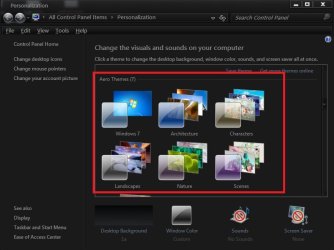
Are you or can you use the Aero themes (screenshot) that can with Windows 7
Jerry
 

Attachments

  • h.jpg
    h.jpg
    49.1 KB · Views: 7

My Computer

Computer type
Laptop
Computer Manufacturer/Model Number
Sager NP9170
OS
Win 7 Pro x64 / Win 10 Pro
CPU
Intel(R) Core(TM) i7-3630QM CPU @ 2.40GHz
Motherboard
CLEVO P170EM
Memory
12 GB
Graphics Card(s)
(1) Intel(R) HD Graphics 4000 (2) NVIDIA GeForce GTX 675M
Sound Card
(1) Realtek High Definition Audio (2) Intel(R) Display Aud
Monitor(s) Displays
17.3
Screen Resolution
1920x1080
Hard Drives
(1) Samsung 860 EVO 500GB(OS) (1) Samsung 860 EVO 500GB(Data)
Keyboard
Backlite
Antivirus
MSE, Malwarebytes Pro
Browser
Firefox
Other Info
DESKTOP: Custom-built.
OS: Win 10 Pro x64.
CASE: Rosewill R5.
CPU: Intel I5 4670K CPU @ 3.40GHz.
CPU COOLER: Cool Master Hyper 212 EVO.
MOTHERBOARD: Asus Z87-A.
MEMORY: Kingston HyperX 2x4 GB.
GPU: Nvidia Geforce 650 TI.
PSU: Corsair TX750.
DRIVES: (1) Samsung 840 120 GB SSD (2) Western Digital blue 500 GB 7200 RPM.
Yes i can use the themes that came wit windows 7 and can download digitally signed ones from microsoft and they work ??
 

My Computer

Computer Manufacturer/Model Number
Acer Aspire 5551G
OS
Windows 7 Home Premium 64bit
CPU
AMD Turion II P520 Dual-Core Processor 2.30 Ghz
Motherboard
Acer JE50_DN
Memory
4 GB
Graphics Card(s)
ATI Mobility Radeon HD 5470
Hard Drives
C 283 GB
Is Desktop Window Manager running in services?
Did you get Unsignedthemeservice running in task manager?(If not go to services & restart it)
When you use the themes that came with windows 7 does Aero work?
Jerry
 

My Computer

Computer type
Laptop
Computer Manufacturer/Model Number
Sager NP9170
OS
Win 7 Pro x64 / Win 10 Pro
CPU
Intel(R) Core(TM) i7-3630QM CPU @ 2.40GHz
Motherboard
CLEVO P170EM
Memory
12 GB
Graphics Card(s)
(1) Intel(R) HD Graphics 4000 (2) NVIDIA GeForce GTX 675M
Sound Card
(1) Realtek High Definition Audio (2) Intel(R) Display Aud
Monitor(s) Displays
17.3
Screen Resolution
1920x1080
Hard Drives
(1) Samsung 860 EVO 500GB(OS) (1) Samsung 860 EVO 500GB(Data)
Keyboard
Backlite
Antivirus
MSE, Malwarebytes Pro
Browser
Firefox
Other Info
DESKTOP: Custom-built.
OS: Win 10 Pro x64.
CASE: Rosewill R5.
CPU: Intel I5 4670K CPU @ 3.40GHz.
CPU COOLER: Cool Master Hyper 212 EVO.
MOTHERBOARD: Asus Z87-A.
MEMORY: Kingston HyperX 2x4 GB.
GPU: Nvidia Geforce 650 TI.
PSU: Corsair TX750.
DRIVES: (1) Samsung 840 120 GB SSD (2) Western Digital blue 500 GB 7200 RPM.
Yes Dwm is running and Aero does work with the window 7 themes??
Yea Unsignedthemeservice is in task manger now under services not processes..
 

My Computer

Computer Manufacturer/Model Number
Acer Aspire 5551G
OS
Windows 7 Home Premium 64bit
CPU
AMD Turion II P520 Dual-Core Processor 2.30 Ghz
Motherboard
Acer JE50_DN
Memory
4 GB
Graphics Card(s)
ATI Mobility Radeon HD 5470
Hard Drives
C 283 GB
Do you per chance have ATI's Catalyst Control Center installed and running in the background?
 

My Computer

Computer Manufacturer/Model Number
Pugh Technologies
OS
W7 Professional x64
CPU
AMD Athlon II X3 445 Rana 3.10 GHz
Motherboard
MSI 870A-G54
Memory
PNY XLR DDR3 1600 4x2GB
Graphics Card(s)
NVIDIA GeForce GTS 450 (fermi) 1GB GDDR5
Sound Card
Realtek ALC892 onboard
Monitor(s) Displays
ASUS VE205t, Viewsonic VX2035WM
Screen Resolution
1600x900, 1600x1050
Hard Drives
977GB Hitachi Hitachi HDS721010CLA332
244GB Western Digital WDC WD2500AAJS-65B4A0
488GB Western Digital WDC WD5000AAJS-00A8B0
488GB Western Digital WDC WD5000AAKS-00UU3A0
PSU
Antec EarthWatts EA650 650W
Case
ThermalTake Armor A90 Mid Tower
Cooling
3x 120mm in, 1x 120mm & 200mm out, self built hydro-cooler
Keyboard
Logitec 55
Mouse
Razer Deathadder
Internet Speed
20 Mbps D/L, 9 Mbps U/L
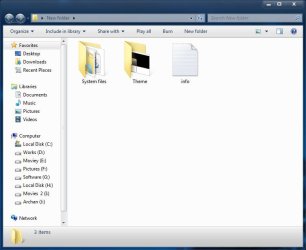
Follow the tutorial

http://www.sevenforums.com/tutorials/28377-theme-how-apply-custom-themes.html

Extracting the downloaded zip , you get this
1.JPG

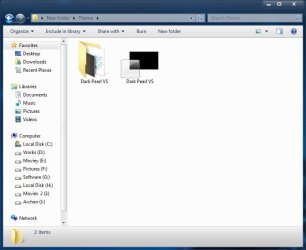
Open the theme folder ,and you get this
2.JPG

Copy and paste these two in C:\Windows\Resources\Themes . The theme is applicable now .

Now get System File Replacer . Replace the exsplorer.exe and explorerframe.dll using it . The theme is complete now .

   Warning
 

My Computer

Computer type
PC/Desktop
Computer Manufacturer/Model Number
Self Assembled
OS
Microsoft Windows 10 Pro Insider Preview 64-bit
CPU
Intel(R) Core(TM) i3-4130 CPU @ 3.40GHz
Motherboard
Gigabyte Technology Co., Ltd. B85M-D3H
Memory
Corsair Vengence 4GB x2 (8.00GB Dual-Channel DDR3 @ 798MHz)
Graphics Card(s)
2047MB GeForce GTS 450 (ZOTAC International)
Sound Card
Onboard (Realtek High Definition Audio)
Monitor(s) Displays
LG Flatron E2040T
Screen Resolution
1600x900
Hard Drives
Western Digital 1 TB
Seagate 500 GB
PSU
Corsair VS550
Case
Cooler Master K380
Cooling
Cooler Master Seidon 120V Plus
Keyboard
Logitech MK260r
Mouse
Logitech MK260r
Internet Speed
PMPL Broadband
Antivirus
Windows Defender + MBAM
Browser
Firefox
Other Info
Dell Studio 15" Laptop
Follow the tutorial

http://www.sevenforums.com/tutorials/28377-theme-how-apply-custom-themes.html

Extracting the downloaded zip , you get this
View attachment 127514

Open the theme folder ,and you get this
View attachment 127515

Copy and paste these two in C:\Windows\Resources\Themes . The theme is applicable now .

Now get System File Replacer . Replace the exsplorer.exe and explorerframe.dll using it . The theme is complete now .

   Warning

Thanks Arc they may have given up no reply after LiquidSnak posted
Jerry
 

My Computer

Computer type
Laptop
Computer Manufacturer/Model Number
Sager NP9170
OS
Win 7 Pro x64 / Win 10 Pro
CPU
Intel(R) Core(TM) i7-3630QM CPU @ 2.40GHz
Motherboard
CLEVO P170EM
Memory
12 GB
Graphics Card(s)
(1) Intel(R) HD Graphics 4000 (2) NVIDIA GeForce GTX 675M
Sound Card
(1) Realtek High Definition Audio (2) Intel(R) Display Aud
Monitor(s) Displays
17.3
Screen Resolution
1920x1080
Hard Drives
(1) Samsung 860 EVO 500GB(OS) (1) Samsung 860 EVO 500GB(Data)
Keyboard
Backlite
Antivirus
MSE, Malwarebytes Pro
Browser
Firefox
Other Info
DESKTOP: Custom-built.
OS: Win 10 Pro x64.
CASE: Rosewill R5.
CPU: Intel I5 4670K CPU @ 3.40GHz.
CPU COOLER: Cool Master Hyper 212 EVO.
MOTHERBOARD: Asus Z87-A.
MEMORY: Kingston HyperX 2x4 GB.
GPU: Nvidia Geforce 650 TI.
PSU: Corsair TX750.
DRIVES: (1) Samsung 840 120 GB SSD (2) Western Digital blue 500 GB 7200 RPM.
Yes LiguidSnak I do have ATI's Catalyst Control Center installed and running in the background.
Is that conflicting with the theme issue?
 

My Computer

Computer Manufacturer/Model Number
Acer Aspire 5551G
OS
Windows 7 Home Premium 64bit
CPU
AMD Turion II P520 Dual-Core Processor 2.30 Ghz
Motherboard
Acer JE50_DN
Memory
4 GB
Graphics Card(s)
ATI Mobility Radeon HD 5470
Hard Drives
C 283 GB
I have already tried that tutorial, and unfortunately not working here....
 

My Computer

Computer Manufacturer/Model Number
Acer Aspire 5551G
OS
Windows 7 Home Premium 64bit
CPU
AMD Turion II P520 Dual-Core Processor 2.30 Ghz
Motherboard
Acer JE50_DN
Memory
4 GB
Graphics Card(s)
ATI Mobility Radeon HD 5470
Hard Drives
C 283 GB
Yes LiguidSnak I do have ATI's Catalyst Control Center installed and running in the background.
Is that conflicting with the theme issue?

Try disableling it & see, doing a google search it looks like you need to do it in msconfig uncheck & restart
Jerry
 

My Computer

Computer type
Laptop
Computer Manufacturer/Model Number
Sager NP9170
OS
Win 7 Pro x64 / Win 10 Pro
CPU
Intel(R) Core(TM) i7-3630QM CPU @ 2.40GHz
Motherboard
CLEVO P170EM
Memory
12 GB
Graphics Card(s)
(1) Intel(R) HD Graphics 4000 (2) NVIDIA GeForce GTX 675M
Sound Card
(1) Realtek High Definition Audio (2) Intel(R) Display Aud
Monitor(s) Displays
17.3
Screen Resolution
1920x1080
Hard Drives
(1) Samsung 860 EVO 500GB(OS) (1) Samsung 860 EVO 500GB(Data)
Keyboard
Backlite
Antivirus
MSE, Malwarebytes Pro
Browser
Firefox
Other Info
DESKTOP: Custom-built.
OS: Win 10 Pro x64.
CASE: Rosewill R5.
CPU: Intel I5 4670K CPU @ 3.40GHz.
CPU COOLER: Cool Master Hyper 212 EVO.
MOTHERBOARD: Asus Z87-A.
MEMORY: Kingston HyperX 2x4 GB.
GPU: Nvidia Geforce 650 TI.
PSU: Corsair TX750.
DRIVES: (1) Samsung 840 120 GB SSD (2) Western Digital blue 500 GB 7200 RPM.
ok ill give it a shot, Bongo
 

My Computer

Computer Manufacturer/Model Number
Acer Aspire 5551G
OS
Windows 7 Home Premium 64bit
CPU
AMD Turion II P520 Dual-Core Processor 2.30 Ghz
Motherboard
Acer JE50_DN
Memory
4 GB
Graphics Card(s)
ATI Mobility Radeon HD 5470
Hard Drives
C 283 GB

My Computer

Computer type
Laptop
Computer Manufacturer/Model Number
Sager NP9170
OS
Win 7 Pro x64 / Win 10 Pro
CPU
Intel(R) Core(TM) i7-3630QM CPU @ 2.40GHz
Motherboard
CLEVO P170EM
Memory
12 GB
Graphics Card(s)
(1) Intel(R) HD Graphics 4000 (2) NVIDIA GeForce GTX 675M
Sound Card
(1) Realtek High Definition Audio (2) Intel(R) Display Aud
Monitor(s) Displays
17.3
Screen Resolution
1920x1080
Hard Drives
(1) Samsung 860 EVO 500GB(OS) (1) Samsung 860 EVO 500GB(Data)
Keyboard
Backlite
Antivirus
MSE, Malwarebytes Pro
Browser
Firefox
Other Info
DESKTOP: Custom-built.
OS: Win 10 Pro x64.
CASE: Rosewill R5.
CPU: Intel I5 4670K CPU @ 3.40GHz.
CPU COOLER: Cool Master Hyper 212 EVO.
MOTHERBOARD: Asus Z87-A.
MEMORY: Kingston HyperX 2x4 GB.
GPU: Nvidia Geforce 650 TI.
PSU: Corsair TX750.
DRIVES: (1) Samsung 840 120 GB SSD (2) Western Digital blue 500 GB 7200 RPM.
Yes LiguidSnak I do have ATI's Catalyst Control Center installed and running in the background.
Is that conflicting with the theme issue?

Try disableling it & see, doing a google search it looks like you need to do it in msconfig uncheck & restart
Jerry
Also set the catalyst settings to default, just in case if it has something to do with your problem.
 

My Computer

Computer Manufacturer/Model Number
HCL
OS
Winbdows 7 ultimate x64 | Ubuntu 12.04 x64 LTS
CPU
Core 2 Duo e7400 @ 2.90GHz
Motherboard
Gigabyte G31M-ES2L
Memory
3GB DDR2
Graphics Card(s)
Asus Nvidia GTX 560Ti 1GB
Sound Card
On-board
Monitor(s) Displays
HCL eZeeBee 18.5" LCD
Screen Resolution
1366x768 @ 60Hz
Hard Drives
Western Digital 320GB
PSU
Corsair CX500 V2 500W
Cooling
Stock
Keyboard
Stock
Mouse
Stock
Internet Speed
15-25kBps D/L | 10kBps U/L | Hey Don't laugh
Disabling ATI's Catalyst Control Center did not help??
God help me, lol
 

My Computer

Computer Manufacturer/Model Number
Acer Aspire 5551G
OS
Windows 7 Home Premium 64bit
CPU
AMD Turion II P520 Dual-Core Processor 2.30 Ghz
Motherboard
Acer JE50_DN
Memory
4 GB
Graphics Card(s)
ATI Mobility Radeon HD 5470
Hard Drives
C 283 GB
Does an other theme work for you ?
 

My Computer

Computer type
PC/Desktop
Computer Manufacturer/Model Number
Self Assembled
OS
Microsoft Windows 10 Pro Insider Preview 64-bit
CPU
Intel(R) Core(TM) i3-4130 CPU @ 3.40GHz
Motherboard
Gigabyte Technology Co., Ltd. B85M-D3H
Memory
Corsair Vengence 4GB x2 (8.00GB Dual-Channel DDR3 @ 798MHz)
Graphics Card(s)
2047MB GeForce GTS 450 (ZOTAC International)
Sound Card
Onboard (Realtek High Definition Audio)
Monitor(s) Displays
LG Flatron E2040T
Screen Resolution
1600x900
Hard Drives
Western Digital 1 TB
Seagate 500 GB
PSU
Corsair VS550
Case
Cooler Master K380
Cooling
Cooler Master Seidon 120V Plus
Keyboard
Logitech MK260r
Mouse
Logitech MK260r
Internet Speed
PMPL Broadband
Antivirus
Windows Defender + MBAM
Browser
Firefox
Other Info
Dell Studio 15" Laptop
Only the ones that came with windows 7, and i am able to use digitally signed ones from microsoft if i download them. No custom themes work?
 

My Computer

Computer Manufacturer/Model Number
Acer Aspire 5551G
OS
Windows 7 Home Premium 64bit
CPU
AMD Turion II P520 Dual-Core Processor 2.30 Ghz
Motherboard
Acer JE50_DN
Memory
4 GB
Graphics Card(s)
ATI Mobility Radeon HD 5470
Hard Drives
C 283 GB
Custom themes work only when the three system files namely themeservice.dll , themeui.dll and uxtheme.dll are patched . Are you sure that you have patched these three files properly ?
 

My Computer

Computer type
PC/Desktop
Computer Manufacturer/Model Number
Self Assembled
OS
Microsoft Windows 10 Pro Insider Preview 64-bit
CPU
Intel(R) Core(TM) i3-4130 CPU @ 3.40GHz
Motherboard
Gigabyte Technology Co., Ltd. B85M-D3H
Memory
Corsair Vengence 4GB x2 (8.00GB Dual-Channel DDR3 @ 798MHz)
Graphics Card(s)
2047MB GeForce GTS 450 (ZOTAC International)
Sound Card
Onboard (Realtek High Definition Audio)
Monitor(s) Displays
LG Flatron E2040T
Screen Resolution
1600x900
Hard Drives
Western Digital 1 TB
Seagate 500 GB
PSU
Corsair VS550
Case
Cooler Master K380
Cooling
Cooler Master Seidon 120V Plus
Keyboard
Logitech MK260r
Mouse
Logitech MK260r
Internet Speed
PMPL Broadband
Antivirus
Windows Defender + MBAM
Browser
Firefox
Other Info
Dell Studio 15" Laptop
I patched them before and followed the tutorial and theme directions and it did not work so i unpatched those files, and im using Uxstlye -http://www.sevenforums.com/tutorials/34579-enabling-custom-themes-windows-7-a.html


and still don work
 

My Computer

Computer Manufacturer/Model Number
Acer Aspire 5551G
OS
Windows 7 Home Premium 64bit
CPU
AMD Turion II P520 Dual-Core Processor 2.30 Ghz
Motherboard
Acer JE50_DN
Memory
4 GB
Graphics Card(s)
ATI Mobility Radeon HD 5470
Hard Drives
C 283 GB
Back
Top