"This PC has unsupported hardware" error message

Sylveon Fetish

Banned
VIP
Local time
8:48 AM
Messages
138
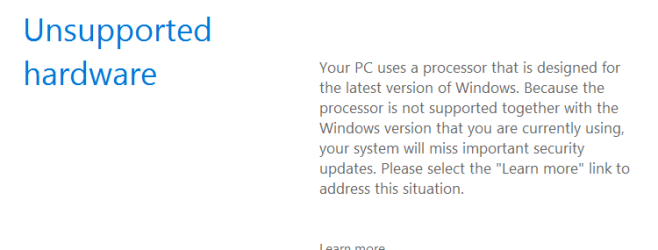
On my Lenovo b570 laptop, I am randomly getting popups during games with "This PC has unsupported hardware" messages.

Which nothing could be further from the truth. This laptop originally came preinstalled with Windows 7 and it never gave that error message with the old now defunct hard drive. And my new hard drive came from another Windows 7 computer so it is not the hard drive either. It says in the error message something about the processor but considering that Windows 7 came preinstalled on this machine, that is false.

In fact, Lenovo has drivers for Windows 7 64-bit only. No Windows Vista or earlier, and no Windows 8 or 10. This is a Windows 7 designed PC.

But I still get the error message
 

My Computer

Computer type
PC/Desktop
Computer Manufacturer/Model Number
Dell Optiplex 780
OS
Windows 7 Ultimate 64-bit SP1
CPU
Intel Core 2 Duo E8400 @ 3.00GHz
Motherboard
Dell Inc. 03NVJ6 (CPU)
Memory
8.00GB Single-Channel DDR3 @ 531MHz (7-7-7-20)
Graphics Card(s)
Intel Q45/Q43 Express Chipset (Dell)
Sound Card
SoundMAX Integrated Digital High Definition Audio
Monitor(s) Displays
Viore
Screen Resolution
1920x1080
Hard Drives
149GB Seagate ST3160318AS (SATA)
Keyboard
Dell
Mouse
Dell
Internet Speed
up to 7 Mbps (average 3.2 Mbps)
Antivirus
AVG IS
Browser
Firefox, Chrome
Open Control Panel & select Device Manager & see if there are any yellow exclamation marks alongside any item. Get back to us if there are any.

When you say the Hard Drive came from another Windows 7 computer, did you do a fresh install of Windows 7, or are you using it without a fresh install. If that is the case there would probably have been some hardware on the old computer that is not on your computer & it is looking for that hardware & hence the message.
 

My Computer

Computer type
PC/Desktop
Computer Manufacturer/Model Number
Self built using existing case
OS
Windows 7 Home Premium 64 bit sp1
CPU
Intel i5 3570 3.4Ghz Ivy Bridge SKT 1155 quad core
Motherboard
Gigabyte Z77-HD3 SKT 1155 2xSata 3, 4x USB 3.0
Memory
G-Skill Rip Jaws 16Gb (8x2) DDR3 -1600 PC3 12800 CL 10 red
Graphics Card(s)
Gigabyte NVIDIA GT610 1Gb DDR3 810/1200 PCI-E 2.0 Silent
Sound Card
NVIDIA High Definition & Realtech High Definition Audio
Monitor(s) Displays
2 x Philips 226V4L 16:9 aspect ratio
Screen Resolution
1920 x 1080 HD
Hard Drives
Samsung 840 Pro 256gb SSD, SATA 3.
Hitachi Touro Portable 1tb, USB 3.0 HDD used for image b/ups.
PSU
Corsair VS450
Case
Codeng
Cooling
PSU fan & CPU fan
Keyboard
Logitech
Mouse
Logitech Wireless trackball M570
Internet Speed
Wireless 3G. 3mg down & 550kb up.
Antivirus
Bitdefender Internet Security 2020
Browser
Opera (Current Version) & Firefox
Other Info
MS Office 2013 Pro. Davis weather station software. MGE Nova 600 avr UPS.
Open Control Panel & select Device Manager & see if there are any yellow exclamation marks alongside any item. Get back to us if there are any.

When you say the Hard Drive came from another Windows 7 computer, did you do a fresh install of Windows 7, or are you using it without a fresh install. If that is the case there would probably have been some hardware on the old computer that is not on your computer & it is looking for that hardware & hence the message.


It is a clean install. I used Gparted to wipe the drive first.
 

My Computer

Computer type
PC/Desktop
Computer Manufacturer/Model Number
Dell Optiplex 780
OS
Windows 7 Ultimate 64-bit SP1
CPU
Intel Core 2 Duo E8400 @ 3.00GHz
Motherboard
Dell Inc. 03NVJ6 (CPU)
Memory
8.00GB Single-Channel DDR3 @ 531MHz (7-7-7-20)
Graphics Card(s)
Intel Q45/Q43 Express Chipset (Dell)
Sound Card
SoundMAX Integrated Digital High Definition Audio
Monitor(s) Displays
Viore
Screen Resolution
1920x1080
Hard Drives
149GB Seagate ST3160318AS (SATA)
Keyboard
Dell
Mouse
Dell
Internet Speed
up to 7 Mbps (average 3.2 Mbps)
Antivirus
AVG IS
Browser
Firefox, Chrome
Have you had a look in Device Manager as I suggested in Post #2 to see if there are any yellow exclamation marks.
 

My Computer

Computer type
PC/Desktop
Computer Manufacturer/Model Number
Self built using existing case
OS
Windows 7 Home Premium 64 bit sp1
CPU
Intel i5 3570 3.4Ghz Ivy Bridge SKT 1155 quad core
Motherboard
Gigabyte Z77-HD3 SKT 1155 2xSata 3, 4x USB 3.0
Memory
G-Skill Rip Jaws 16Gb (8x2) DDR3 -1600 PC3 12800 CL 10 red
Graphics Card(s)
Gigabyte NVIDIA GT610 1Gb DDR3 810/1200 PCI-E 2.0 Silent
Sound Card
NVIDIA High Definition & Realtech High Definition Audio
Monitor(s) Displays
2 x Philips 226V4L 16:9 aspect ratio
Screen Resolution
1920 x 1080 HD
Hard Drives
Samsung 840 Pro 256gb SSD, SATA 3.
Hitachi Touro Portable 1tb, USB 3.0 HDD used for image b/ups.
PSU
Corsair VS450
Case
Codeng
Cooling
PSU fan & CPU fan
Keyboard
Logitech
Mouse
Logitech Wireless trackball M570
Internet Speed
Wireless 3G. 3mg down & 550kb up.
Antivirus
Bitdefender Internet Security 2020
Browser
Opera (Current Version) & Firefox
Other Info
MS Office 2013 Pro. Davis weather station software. MGE Nova 600 avr UPS.
There isn't now after I restarted the computer. I don't know if there were before I restarted my computer.
 

My Computer

Computer type
PC/Desktop
Computer Manufacturer/Model Number
Dell Optiplex 780
OS
Windows 7 Ultimate 64-bit SP1
CPU
Intel Core 2 Duo E8400 @ 3.00GHz
Motherboard
Dell Inc. 03NVJ6 (CPU)
Memory
8.00GB Single-Channel DDR3 @ 531MHz (7-7-7-20)
Graphics Card(s)
Intel Q45/Q43 Express Chipset (Dell)
Sound Card
SoundMAX Integrated Digital High Definition Audio
Monitor(s) Displays
Viore
Screen Resolution
1920x1080
Hard Drives
149GB Seagate ST3160318AS (SATA)
Keyboard
Dell
Mouse
Dell
Internet Speed
up to 7 Mbps (average 3.2 Mbps)
Antivirus
AVG IS
Browser
Firefox, Chrome
no exclamation points anywhere and obviously MS is mistaking because Lenovo doesn't support Windows 10 on this machine
 

Attachments

  • Capture.PNG
    Capture.PNG
    7 KB · Views: 52

My Computer

Computer type
PC/Desktop
Computer Manufacturer/Model Number
Dell Optiplex 780
OS
Windows 7 Ultimate 64-bit SP1
CPU
Intel Core 2 Duo E8400 @ 3.00GHz
Motherboard
Dell Inc. 03NVJ6 (CPU)
Memory
8.00GB Single-Channel DDR3 @ 531MHz (7-7-7-20)
Graphics Card(s)
Intel Q45/Q43 Express Chipset (Dell)
Sound Card
SoundMAX Integrated Digital High Definition Audio
Monitor(s) Displays
Viore
Screen Resolution
1920x1080
Hard Drives
149GB Seagate ST3160318AS (SATA)
Keyboard
Dell
Mouse
Dell
Internet Speed
up to 7 Mbps (average 3.2 Mbps)
Antivirus
AVG IS
Browser
Firefox, Chrome
That is the message microsoft has been giving to users (like me) who are using a Kaby Lake cpu on windows 7. But the laptop you are on I believe uses a Sandy Bridge cpu, so its weird you are getting that message. Suggest you run intel driver detect to update your drivers. If you indeed are running a Kaby Lake cpu, you're going to keep getting that message, but you can ignore it.

Intel® Driver Update Utility
 

My Computer

Computer type
PC/Desktop
Computer Manufacturer/Model Number
diy
OS
Win7 pro x64
CPU
stock i7 7700k
Motherboard
Gigabyte Z270N-WIFI mini-ITX
Memory
Corsair Vengeance LPX 16GB (2x8GB) DDR4 @ 3200MHz
Graphics Card(s)
integrated Intel HD 630
Sound Card
onboard Realtek ALC1220
Monitor(s) Displays
two vertically mounted samsung 55" 4k un55mu8000
Screen Resolution
1920x1280
Hard Drives
256GB Samsung EVO 960 M.2 pci-e NVMe SSD
PSU
SilverStone Nightjar ST45NF 450Watt Fanless
Case
No case. Motherboard is mounted directly onto power supply
Cooling
Evercool low profile 815EP with Panaflow 12L fan at 7v
Keyboard
Ortek MCK-86 mini
Mouse
Belkin 5-button USB
Internet Speed
spectrum 400mbps
There was an update the caused older machines to falsely get that message.
Run a restore or update as i believe it was repaired.
 

My Computer

Computer type
PC/Desktop
Computer Manufacturer/Model Number
Owner Builder
OS
Windows 7 Ultimate x64 SP1 OEM
CPU
Intel i7 3930K
Motherboard
Asus X79 Deluxe
Memory
Kingston Genesis KHX2133C11D3K4/32G
Graphics Card(s)
Asus RTX 2070 Ti Turbo fan series
Sound Card
Creative Sound Blaster ZXR
Monitor(s) Displays
Samsung U32J39 UHD
Screen Resolution
3840 x 2160
Hard Drives
Samsung 860 Pro 256 GB
OCZ Vertex 4 512GB
Western Digital Black 4TB
PSU
Corsair AX850
Case
Gigabyte
Cooling
Push - Pull 120 mm Noctua PWM, Scythe Big Shuriken 2 Rev. B
Keyboard
Logitech K800 Backlit
Mouse
Logitech MX2 Master
Internet Speed
NBN 25 Mbps
Antivirus
Kaspersky Internet Security
Browser
Mozilla FireFox
Other Info
TP-Link Archer VR600v
Sennheiser TR220 WiFi Head Phones.
Hi,
There was also a update that affected older amd processors too but as far as I'm aware E8400 is not a amd processor :)
The irony was MS was going to send a update to fix the update that stopped windows from updating lol :confused:

I haven't updated for April yet on a Q9550 Intel processor so who knows what will happen :)
And March's non security updates have not been installed either
But policy is do not even think of updating unless you have a system image created well before doing so ;)
 

My Computer

Computer type
PC/Desktop
Computer Manufacturer/Model Number
Custom assembled by me :}
OS
Win-7-Pro64bit 7-H-Prem-64bit
CPU
i7-5930K 2nd i9-9940x both water blocked VRM's too
Motherboard
ASUS SABERTOOTH X99 2nd ASUS x299 Apex
Memory
Trident-z 3200C14 2nd Trident-z 3600C16
Graphics Card(s)
EVGA 1080ti ftw3 2nd Titan Xp both water blocked
Sound Card
Built-in Realtek
Monitor(s) Displays
1-AOC G2460PG 24"G-Sync 144Hz/ 2nd 1-ASUS VG248QE 24" 144Hz
Screen Resolution
1920 x 1080 144Hz
Hard Drives
2-Samsung M.2 Evo & Evo Plus
2-Samsung 850 EVO 500GB SSD's/ 3-2.5 W.D. Black 1tb-&3-1tb/3-3.5 WD Black 1tb hdd's
PSU
EVGA SuperNOVA 1000-P2 2nd 1200-P2
Case
2-Corsair Obsidian Series 450D Black ATX Mid Tower
Cooling
Custom water loops
Keyboard
Logitech G710+/ 2nd Logitech G910
Mouse
2-RedDragon M901 Perdition 16400 dpi Gaming mouse = wired
Internet Speed
Comcast Ping 19ms 89.31mbps download speed 6.12mbps upload
Antivirus
Malwarebytes Pro/ Superantispyware Pro
Browser
FireFox & Pale moon
Other Info
2nd ASUS X299 Apex/Intel i9-9940x with Custom water loop/7H-Prem-x64/Corsair 450D case/Ram Trident-z 3600C16 4x8gb / Samsung970Evo plus 500gb SSD/Dual ssd EZ swap evo/PSU EVGA SuperNova 1200w-P2 80+Platinum/GPU Titan Xp /8-ML-140 on push-pull on 2-280GTX rads
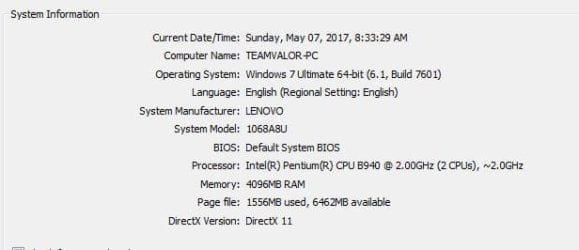
I don't know what a "Sandy Bridge" CPU is. Mine is Intel. I've only heard of Intel, AMD, and Nvidia. Never heard of Sandy Bridge but this is the specs.
 

Attachments

  • dxdiag.JPG
    dxdiag.JPG
    24.2 KB · Views: 42

My Computer

Computer type
PC/Desktop
Computer Manufacturer/Model Number
Dell Optiplex 780
OS
Windows 7 Ultimate 64-bit SP1
CPU
Intel Core 2 Duo E8400 @ 3.00GHz
Motherboard
Dell Inc. 03NVJ6 (CPU)
Memory
8.00GB Single-Channel DDR3 @ 531MHz (7-7-7-20)
Graphics Card(s)
Intel Q45/Q43 Express Chipset (Dell)
Sound Card
SoundMAX Integrated Digital High Definition Audio
Monitor(s) Displays
Viore
Screen Resolution
1920x1080
Hard Drives
149GB Seagate ST3160318AS (SATA)
Keyboard
Dell
Mouse
Dell
Internet Speed
up to 7 Mbps (average 3.2 Mbps)
Antivirus
AVG IS
Browser
Firefox, Chrome
Hi,
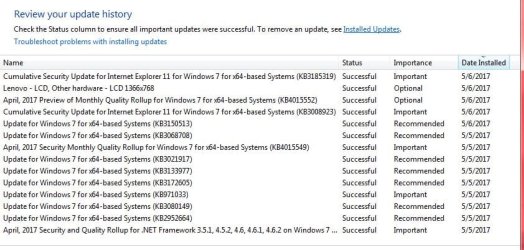
Post the last round of updates that were installed possibly we can follow the rabbit hole to them and the known issues posted about them.
 

My Computer

Computer type
PC/Desktop
Computer Manufacturer/Model Number
Custom assembled by me :}
OS
Win-7-Pro64bit 7-H-Prem-64bit
CPU
i7-5930K 2nd i9-9940x both water blocked VRM's too
Motherboard
ASUS SABERTOOTH X99 2nd ASUS x299 Apex
Memory
Trident-z 3200C14 2nd Trident-z 3600C16
Graphics Card(s)
EVGA 1080ti ftw3 2nd Titan Xp both water blocked
Sound Card
Built-in Realtek
Monitor(s) Displays
1-AOC G2460PG 24"G-Sync 144Hz/ 2nd 1-ASUS VG248QE 24" 144Hz
Screen Resolution
1920 x 1080 144Hz
Hard Drives
2-Samsung M.2 Evo & Evo Plus
2-Samsung 850 EVO 500GB SSD's/ 3-2.5 W.D. Black 1tb-&3-1tb/3-3.5 WD Black 1tb hdd's
PSU
EVGA SuperNOVA 1000-P2 2nd 1200-P2
Case
2-Corsair Obsidian Series 450D Black ATX Mid Tower
Cooling
Custom water loops
Keyboard
Logitech G710+/ 2nd Logitech G910
Mouse
2-RedDragon M901 Perdition 16400 dpi Gaming mouse = wired
Internet Speed
Comcast Ping 19ms 89.31mbps download speed 6.12mbps upload
Antivirus
Malwarebytes Pro/ Superantispyware Pro
Browser
FireFox & Pale moon
Other Info
2nd ASUS X299 Apex/Intel i9-9940x with Custom water loop/7H-Prem-x64/Corsair 450D case/Ram Trident-z 3600C16 4x8gb / Samsung970Evo plus 500gb SSD/Dual ssd EZ swap evo/PSU EVGA SuperNova 1200w-P2 80+Platinum/GPU Titan Xp /8-ML-140 on push-pull on 2-280GTX rads
List of updates according to update history
 

Attachments

  • updates.JPG
    updates.JPG
    75.3 KB · Views: 2

My Computer

Computer type
PC/Desktop
Computer Manufacturer/Model Number
Dell Optiplex 780
OS
Windows 7 Ultimate 64-bit SP1
CPU
Intel Core 2 Duo E8400 @ 3.00GHz
Motherboard
Dell Inc. 03NVJ6 (CPU)
Memory
8.00GB Single-Channel DDR3 @ 531MHz (7-7-7-20)
Graphics Card(s)
Intel Q45/Q43 Express Chipset (Dell)
Sound Card
SoundMAX Integrated Digital High Definition Audio
Monitor(s) Displays
Viore
Screen Resolution
1920x1080
Hard Drives
149GB Seagate ST3160318AS (SATA)
Keyboard
Dell
Mouse
Dell
Internet Speed
up to 7 Mbps (average 3.2 Mbps)
Antivirus
AVG IS
Browser
Firefox, Chrome
"April 2017 preview (KB4015552 is causing the problem"
Uninstall it and it will go away, if not keep uninstalling those latest updates till you hit the correct one.
 

My Computer

Computer type
PC/Desktop
Computer Manufacturer/Model Number
(custom shop build)
OS
Microsoft Windows 7 Professional 64-bit SP1
CPU
Intel(R) Core(TM) i7-4790K CPU @ 4.00GHz
Motherboard
Gigabyte Z97X-SLI
Memory
8 GB
Graphics Card(s)
NVIDIA GeForce GTX 970
Sound Card
Realtek High Definition Audio
Monitor(s) Displays
Dell 2007FP
Screen Resolution
1600 1200 (native)
Hard Drives
(1)Crucial M500 480GB SATA 6Gbps 2.5"
(2)Crucial M500 480GB SATA 6Gbps 2.5"
PSU
EVGA 1000W
Case
Antec
Cooling
CoolerMaster
Keyboard
Logitech
Mouse
Logitech
Antivirus
Microsoft Security Essentials
Browser
Internet Explorer 11
"April 2017 preview (KB4015552 is causing the problem"
Uninstall it and it will go away, if not keep uninstalling those latest updates till you hit the correct one.


I can't. it is not listed in "installed updates" therefore I cannot uninstall it
 

My Computer

Computer type
PC/Desktop
Computer Manufacturer/Model Number
Dell Optiplex 780
OS
Windows 7 Ultimate 64-bit SP1
CPU
Intel Core 2 Duo E8400 @ 3.00GHz
Motherboard
Dell Inc. 03NVJ6 (CPU)
Memory
8.00GB Single-Channel DDR3 @ 531MHz (7-7-7-20)
Graphics Card(s)
Intel Q45/Q43 Express Chipset (Dell)
Sound Card
SoundMAX Integrated Digital High Definition Audio
Monitor(s) Displays
Viore
Screen Resolution
1920x1080
Hard Drives
149GB Seagate ST3160318AS (SATA)
Keyboard
Dell
Mouse
Dell
Internet Speed
up to 7 Mbps (average 3.2 Mbps)
Antivirus
AVG IS
Browser
Firefox, Chrome

My Computer

Computer type
PC/Desktop
Computer Manufacturer/Model Number
Custom assembled by me :}
OS
Win-7-Pro64bit 7-H-Prem-64bit
CPU
i7-5930K 2nd i9-9940x both water blocked VRM's too
Motherboard
ASUS SABERTOOTH X99 2nd ASUS x299 Apex
Memory
Trident-z 3200C14 2nd Trident-z 3600C16
Graphics Card(s)
EVGA 1080ti ftw3 2nd Titan Xp both water blocked
Sound Card
Built-in Realtek
Monitor(s) Displays
1-AOC G2460PG 24"G-Sync 144Hz/ 2nd 1-ASUS VG248QE 24" 144Hz
Screen Resolution
1920 x 1080 144Hz
Hard Drives
2-Samsung M.2 Evo & Evo Plus
2-Samsung 850 EVO 500GB SSD's/ 3-2.5 W.D. Black 1tb-&3-1tb/3-3.5 WD Black 1tb hdd's
PSU
EVGA SuperNOVA 1000-P2 2nd 1200-P2
Case
2-Corsair Obsidian Series 450D Black ATX Mid Tower
Cooling
Custom water loops
Keyboard
Logitech G710+/ 2nd Logitech G910
Mouse
2-RedDragon M901 Perdition 16400 dpi Gaming mouse = wired
Internet Speed
Comcast Ping 19ms 89.31mbps download speed 6.12mbps upload
Antivirus
Malwarebytes Pro/ Superantispyware Pro
Browser
FireFox & Pale moon
Other Info
2nd ASUS X299 Apex/Intel i9-9940x with Custom water loop/7H-Prem-x64/Corsair 450D case/Ram Trident-z 3600C16 4x8gb / Samsung970Evo plus 500gb SSD/Dual ssd EZ swap evo/PSU EVGA SuperNova 1200w-P2 80+Platinum/GPU Titan Xp /8-ML-140 on push-pull on 2-280GTX rads
Appears to be an M$ screwup. There is a post on gHacks a week or so ago, same older CPU, same problem. I know with mine I tried W10 for a day or so when the freebie was out, and found out my E8400 was not 100% compatible, so I dumped the whole thing.
Guess they missed some filters in the check for 'too new' hardware update.
Art.
 

My Computer

Computer type
PC/Desktop
Computer Manufacturer/Model Number
Home built
OS
Win7 sp1 Pro 64bit / XP sp2 Pro (games only)
CPU
Intel Core 2 Duo E8400 @ 3.00GHz
Motherboard
Intel Corporation DP35DP (CPU1)
Memory
8.00 GB Dual-Channel DDR2 @ 400MHz (5-5-5-18)
Graphics Card(s)
1024MB GeForce GTX 560
Sound Card
NVIDIA High Definition Audio
Monitor(s) Displays
SyncMaster (2048x1152@60Hz)
Hard Drives
240GB Sandisc Extreme Pro SSD
244GB Seagate ST3250410AS
488GB Seagate ST500DM002-1BD142
931GB Western Digital WDC WD1003FZEX
PSU
Corsair 720
Case
ATX
Keyboard
HID Keyboard Device Logitech
Mouse
HID-compliant mouse Microsoft
Other Info
TSSTcorp CDDVDW SH-S223L

HL-DT-ST BD-RE BH12LS35
Edited:
Sandy Bridge is the 2nd generation of i3, i5 and i7 architecture witch include new Pentiums and Xenon.
Skylake is the 6th generation.
Kaby Lake is the 7th generation.
Pentium B940 is from the 2nd generation (Sandy Bridge).
 
Last edited:

My Computers

System One System Two

  • Computer type
    PC/Desktop
    Computer Manufacturer/Model Number
    custom build
    OS
    Windows 7 HP 64
    CPU
    i5 6600K - 800MHz to 4200MHz
    Motherboard
    GA-Z170-HD3P
    Memory
    4+4G GSkill DDR4 3000
    Graphics Card(s)
    IG - Intel 530
    Monitor(s) Displays
    Samsung 226BW
    Screen Resolution
    1680x1050
    Hard Drives
    (1) -1 SM951 – 128GB M.2 AHCI PCIe SSD drive for Windows 7 and Lubuntu
    (2) -1 WD SATA 3 - 1T for Data
    (3) -1 WD SATA 3 - 1T for backup
    PSU
    Thermaltake 450W TR2 gold
    Keyboard
    Old and good Chicony mechanical keyboard
    Mouse
    Logitech mX performance - 9 buttons (had to disable some)
    Internet Speed
    500Mb/s
    Browser
    Firefox 64
    Other Info
    TinyWall firewall
  • Computer type
    Laptop
    System Manufacturer/Model Number
    Asus Q550LF
    OS
    Windows 7 Pro
    CPU
    i7-4500U 800MHz to 3.0GHz
    Motherboard
    Asus Q550LF
    Memory
    (4+4)G DDR3 1600
    Graphics Card(s)
    IG intel 4400 + NVIDIA GeForce GT 745M
    Sound Card
    Realtek
    Monitor(s) Displays
    LG Display LP156WF4-SPH1
    Screen Resolution
    1920 x 1080
    Hard Drives
    BX500 120G SSD for Windows and programs +
    1T HDD for data
    Internet Speed
    500 Mb/s
    Browser
    Firefox
    Other Info
    TinyWall firewall
Sandy Bridge is the 6th generation of i3, i5 and i7 architecture witch include new Pentiums and Xenon .

Unless I'm mistaken Sandy Bridge is the 2nd generation of Core architecture. Skylake is the 6th.
 

My Computer

Computer type
PC/Desktop
OS
Windows 7 Professional x64 SP1
I uninstalled that update and even ran a patch posted on Reddit (it is a workaround for the newer processors) but I am STILL getting that message on this older processor! EVERYBODY on Reddit says that the patch works flawlessly but nothing could be further from the truth.

Anything else to try?
 

My Computer

Computer type
PC/Desktop
Computer Manufacturer/Model Number
Dell Optiplex 780
OS
Windows 7 Ultimate 64-bit SP1
CPU
Intel Core 2 Duo E8400 @ 3.00GHz
Motherboard
Dell Inc. 03NVJ6 (CPU)
Memory
8.00GB Single-Channel DDR3 @ 531MHz (7-7-7-20)
Graphics Card(s)
Intel Q45/Q43 Express Chipset (Dell)
Sound Card
SoundMAX Integrated Digital High Definition Audio
Monitor(s) Displays
Viore
Screen Resolution
1920x1080
Hard Drives
149GB Seagate ST3160318AS (SATA)
Keyboard
Dell
Mouse
Dell
Internet Speed
up to 7 Mbps (average 3.2 Mbps)
Antivirus
AVG IS
Browser
Firefox, Chrome
please post the link to the reddit thread
 

My Computer

Computer type
PC/Desktop
Computer Manufacturer/Model Number
diy
OS
Win7 pro x64
CPU
stock i7 7700k
Motherboard
Gigabyte Z270N-WIFI mini-ITX
Memory
Corsair Vengeance LPX 16GB (2x8GB) DDR4 @ 3200MHz
Graphics Card(s)
integrated Intel HD 630
Sound Card
onboard Realtek ALC1220
Monitor(s) Displays
two vertically mounted samsung 55" 4k un55mu8000
Screen Resolution
1920x1280
Hard Drives
256GB Samsung EVO 960 M.2 pci-e NVMe SSD
PSU
SilverStone Nightjar ST45NF 450Watt Fanless
Case
No case. Motherboard is mounted directly onto power supply
Cooling
Evercool low profile 815EP with Panaflow 12L fan at 7v
Keyboard
Ortek MCK-86 mini
Mouse
Belkin 5-button USB
Internet Speed
spectrum 400mbps
Back
Top