

Fureon
New member
- Local time
- 5:17 AM
- Messages
- 3
Thumbnail generation failure + problem accessing files
Hello there. I really enjoy Windows 7, but recently I ran into a problem that keeps making me swear like a sailor and elicit tremendous amounts of HATE when I try to solve it (and can't).
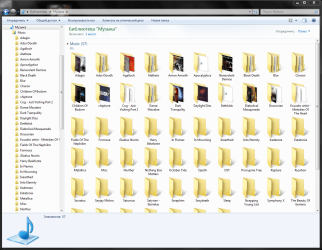
The thing is, all of a sudden more than half of the folder thumbnails in my Music library disappeared. But that's not the case... explorer.exe started to hang up (as in, raises the CPU usage to 100% and stops operating until killed and relaunched) whenever I tried to open any folder without a thumbnail. So I deleted the thumbnail cache and the missing thumbnails still wouldn't generate. F5 had no use. I thought my HDD failed and the folders were damaged, but then I went into the Music folder instead of library (while in "Table" view) and everything worked normally. However, if I ought to choose any view that has thumbnails, Explorer hung up when I would try to do anything with a folder that has no thumbnail. Heck, it even hung up when I changed the view or just selected a folder.
So it all came down to:
If thumbnails are off ("always show icons" thing), everything seems to work fine.
This is clearly not a hard drive issue, as I managed to copy the folders to another disk (via command prompt, because Explorer hung up everytime I tried) and it was still the same.
Neither this is a library issue - with thumbnails turned off, the library works.
The music files themselves are OK too.
I already tried:
I shall run an antivirus scan tomorrow just in case, but... can anybody tell me what the heck is happening? Please help...
Hello there. I really enjoy Windows 7, but recently I ran into a problem that keeps making me swear like a sailor and elicit tremendous amounts of HATE when I try to solve it (and can't).
The thing is, all of a sudden more than half of the folder thumbnails in my Music library disappeared. But that's not the case... explorer.exe started to hang up (as in, raises the CPU usage to 100% and stops operating until killed and relaunched) whenever I tried to open any folder without a thumbnail. So I deleted the thumbnail cache and the missing thumbnails still wouldn't generate. F5 had no use. I thought my HDD failed and the folders were damaged, but then I went into the Music folder instead of library (while in "Table" view) and everything worked normally. However, if I ought to choose any view that has thumbnails, Explorer hung up when I would try to do anything with a folder that has no thumbnail. Heck, it even hung up when I changed the view or just selected a folder.
So it all came down to:
If thumbnails are off ("always show icons" thing), everything seems to work fine.
This is clearly not a hard drive issue, as I managed to copy the folders to another disk (via command prompt, because Explorer hung up everytime I tried) and it was still the same.
Neither this is a library issue - with thumbnails turned off, the library works.
The music files themselves are OK too.
I already tried:
- Resetting the thumbnail cache countless times (both with Windows' Disk Cleanup and CCleaner)
- Deleting every single Thumbs.db in those folders
- Resetting the icon cache
- Moving the "failed" folders to another location to see if thumbnails will appear when they are not grouped with "OK" folders.
- /sfc scannow
- Full CHKDSK (with cluster & bad sector check and all)
I shall run an antivirus scan tomorrow just in case, but... can anybody tell me what the heck is happening? Please help...
Attachments
Last edited:
My Computer
At a glance
Windows 7 Ultimate x86 RTMIntel Core 2 Duo E6750 @ 2.66 GHz3GB DDR2 SDRAMNVIDIA GeForce 8600 GTS
- OS
- Windows 7 Ultimate x86 RTM
- CPU
- Intel Core 2 Duo E6750 @ 2.66 GHz
- Motherboard
- Gigabyte GA-P35-DS3R
- Memory
- 3GB DDR2 SDRAM
- Graphics Card(s)
- NVIDIA GeForce 8600 GTS
- Hard Drives
- SATA SAMSUNG SCSI Disk Device (186 GB)
SATA WDC WD32 SCSI Disk Device (298 GB)
