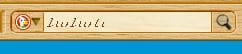
tiny font in Firefox

ellenc

New member
Member
VIP
Local time
3:07 PM
Messages
147
My beloved Firefox is giving me grief again. It's displaying a tiny font size that I've tried to fix, with no success. Don't have this problem in Opera or pale moon. please see attached. Thanks. ec
 

Attachments

  • tiny font 1.JPG
    tiny font 1.JPG
    22.5 KB · Views: 19
  • tiny font 2.JPG
    tiny font 2.JPG
    10 KB · Views: 19

My Computer

Computer Manufacturer/Model Number
Dell Inspiron 546
OS
Windows 7 Professional
CPU
2.70gigahertz AMD Athlon 7750 Dual-Core
Motherboard
Dell, Inc. 0F896N A02
Memory
3328 Megabytes Usable Installed Memory
Graphics Card(s)
ATI Radcon HD 3200 Graphics
Monitor(s) Displays
Dell E1709W 17,2" monitor
Hard Drives
309.54G usable hard drive capacity
161.25G hard drive free space
Seagate FreeAgent Go 500G external drive
Seagate FreeAgent Go 160G external drive
Maxtor One Touch 250G external drive
tiny font, con't

Thanks very much for your prompt reply. Actually, the font size on the web pages is fine. It's the tiny font size in the Firefox address bar that's the problem, as shown in the attachment I sent. I've tried to fix the problem as a Windows "metrics" (problem but that doesn't address the font size in the URL bar; it relates to non-browser settings (Windows color and appearance). It's weird that suddently the font size in the Firefox address bar shrank. I really appreciate your taking the time to help me. ellenc

 

Attachments

  • tiny font 1.JPG
    tiny font 1.JPG
    22.5 KB · Views: 11

My Computer

Computer Manufacturer/Model Number
Dell Inspiron 546
OS
Windows 7 Professional
CPU
2.70gigahertz AMD Athlon 7750 Dual-Core
Motherboard
Dell, Inc. 0F896N A02
Memory
3328 Megabytes Usable Installed Memory
Graphics Card(s)
ATI Radcon HD 3200 Graphics
Monitor(s) Displays
Dell E1709W 17,2" monitor
Hard Drives
309.54G usable hard drive capacity
161.25G hard drive free space
Seagate FreeAgent Go 500G external drive
Seagate FreeAgent Go 160G external drive
Maxtor One Touch 250G external drive
System font settings

It looks like the same font in your menu bar. That's set via Windows. Right click Desktop > Personalize > Themes and edit your current theme. I think changing the font for "Active Title Bar" should work but it may be one of the other settings so don't rule those out.
 

My Computer

Computer type
Laptop
Computer Manufacturer/Model Number
ASUS
OS
Microsoft Windows 7 Home Premium 64-bit 7601 Multiprocessor Free Service Pack 1
CPU
AMD C-60 APU with Radeon(tm) HD Graphics
Motherboard
ASUSTeK COMPUTER INC. X501U
Memory
4.00 GB
Graphics Card(s)
AMD Radeon HD 6290 Graphics
Sound Card
(1) AMD High Definition Audio Device (2) Realtek High Defi
Screen Resolution
1366 x 768 x 32 bits (4294967296 colors) @ 60 Hz
Hard Drives
Hitachi HTS545050A7E380 SATA Disk Device
Antivirus
Comodo CIS & FW, SecureAplus App Whitelisting, Threatfire
Browser
Cyberfox 64bit, Opera 64bit, Airfox
Other Info
Spy-The-Spy, HitmanPro.Alert, Norton Connect Safe, MJRegWatcher, BitDefender TrafficLight, Voodoo Shield, Zemana AntiMalware
Firefox tiny font

Success! Sincere thanks to each of you for your time and fantastic help. ellen
 

My Computer

Computer Manufacturer/Model Number
Dell Inspiron 546
OS
Windows 7 Professional
CPU
2.70gigahertz AMD Athlon 7750 Dual-Core
Motherboard
Dell, Inc. 0F896N A02
Memory
3328 Megabytes Usable Installed Memory
Graphics Card(s)
ATI Radcon HD 3200 Graphics
Monitor(s) Displays
Dell E1709W 17,2" monitor
Hard Drives
309.54G usable hard drive capacity
161.25G hard drive free space
Seagate FreeAgent Go 500G external drive
Seagate FreeAgent Go 160G external drive
Maxtor One Touch 250G external drive
Glad you got the issue sorted
 

My Computer

Computer Manufacturer/Model Number
W530-3630QM1
OS
windows 7 home 64bit
CPU
INTEL-CORE I7
Memory
16GB
Hard Drives
750GB
Browser
Chrome
Success! Sincere thanks to each of you for your time and fantastic help. ellen
That's great to hear ellenc! :thumbsup: Thank you for posting back.
Could you be more specific, and the steps you took, was it one of maxie's suggestions or Callender's?

If one of their suggestions is working okay you can finalize your thread by marking it solved. It really helps when other members are looking for an answer.

If something does go a-wry later on, you can always re-mark it Unsolved and continue your thread.

Its the green button next to the orange Post Reply button that only you can see because it is your thread.
reply.png
solvebutton.gif
 

My Computer

Computer type
PC/Desktop
Computer Manufacturer/Model Number
Gateway DX4831-01e (Mid-Tower Desktop)
OS
Originally Win 7 Hm Prem x64 Ver 6.1.7600 Build 7601-SP1 | Upgraded to Windows 10 December 14, 2019
CPU
Intel i3 530 2.93GHz, 2933MHz 2 Cores 4 Logical Processors
Motherboard
Gateway H57M01 133 megahertz
Memory
6GB of 1,333MHz DDR3 SDRAM
Graphics Card(s)
32MB Intel Graphics Media Accelerator HD IGChip
Sound Card
Realtek High Definition Audio
Monitor(s) Displays
Gateway HX2000 20inch TFT active matrix TN
Screen Resolution
1600 x 900 x 59 hertz
Hard Drives
WDC WD10EADS-00M2B0 [HDD] (1000.20 GB) -- drive 0,
HL-DT-ST DVDRAM GH41N [CD-ROM dr]
Four card readers, and Four USB 2.0
PSU
300watts.
Case
Mid-Tower Desktop
Cooling
Stock from Gateway
Keyboard
Natural Ergonomic Keyboard 4000, see Other Info
Mouse
Orig. Gateway wore out now using Insignia USB wired optical
Internet Speed
Vz FIOS 10ms png 57.64Mbps down 65.53Mbps up Speedtest.org
Antivirus
Zamana Anti-logger with Anti-malware, MSE, Windows Firewall,
Browser
IE11.0.9600.19399-Upd ver11.0.135, Firefox 68.0.1 x64
Other Info
System Specs by Belarc.

BIOS: American Megatrends Inc. P01-A0 11/17/2009

Replaced the MS 'Natural' Standard PS/2 Enhanced 101-102 Keyboard with a new Natural Ergonomic Keyboard 4000 on August 1st 2014.

Canon Pixma MG3222 Printer.

Updated to IE11 on 12102015 | Fios Quantum Router g1100

Additional AV: SpywareBlaster, manual Mbam, SAS
Back
Top