Solved Title bar glow

Thank you very much, sir. This one really works! One thing though is there seems to be no change in appearance between an active and an inactive window. But that's no biggie, I can live with that. You did an awesome job and got rid of my problem. :D
 

My Computer

Computer type
PC/Desktop
OS
Windows 7 Ultimate x64
Bongo, or anyone else please, I'm sorry to bother you, I've noticed it's mentioned that people can use Ave's Windows7 Style Builder, however I see it comes with a price and as a student, it's a little bit to high for me at the moment.
I was wondering if it is at all possible for you to (please, if you may have time or find time) create a very basic theme for me. I just would like to remove the titlebar font glow as the poster of this topic has asked about, and to remove the glossy/glass look from the squares around icons in the taskbar, so it looks flat. Oh, and I almost forgot (not included in the screenshot), in the corner of windows where the minimize and maximize, and [x] are to remove the gloss/glass overlay, if at all possible.
I have included a screen shot of what I am trying to change on my desktop.
http://i.imgur.com/HserrXK.jpg

 

My Computer

Computer type
PC/Desktop
OS
Windows 7 x64 Pro, Windows 8.1 x64 Pro, Windows 10 TP 10041
I wish someone would make this changes to a basic Aero theme, like previous poster asked.

Many people are forced to use Aero theme only because it will prevent tearing in video playback and this would make it much more bearable.
 

My Computer

Computer type
PC/Desktop
OS
Windows 7 64
Bongo, or anyone else please, I'm sorry to bother you, I've noticed it's mentioned that people can use Ave's Windows7 Style Builder, however I see it comes with a price and as a student, it's a little bit to high for me at the moment.
I was wondering if it is at all possible for you to (please, if you may have time or find time) create a very basic theme for me. I just would like to remove the titlebar font glow as the poster of this topic has asked about, and to remove the glossy/glass look from the squares around icons in the taskbar, so it looks flat. Oh, and I almost forgot (not included in the screenshot), in the corner of windows where the minimize and maximize, and [x] are to remove the gloss/glass overlay, if at all possible.
I have included a screen shot of what I am trying to change on my desktop.
http://i.imgur.com/HserrXK.jpg
Sorry it's late but I was sick.
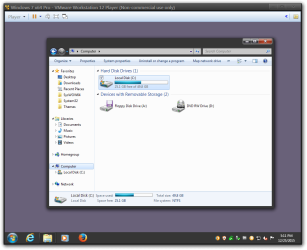
Here you go, let me know if it's OK

Jerry

I wish someone would make this changes to a basic Aero theme, like previous poster asked.

Many people are forced to use Aero theme only because it will prevent tearing in video playback and this would make it much more bearable.
Welcome to the Seven Forums

Try it out.

Jerry
Windows 7 x64 Pro - VMware Workstation 12 Player (Non-commercial use only).png
 

Attachments

My Computer

Computer type
Laptop
Computer Manufacturer/Model Number
Sager NP9170
OS
Win 7 Pro x64 / Win 10 Pro
CPU
Intel(R) Core(TM) i7-3630QM CPU @ 2.40GHz
Motherboard
CLEVO P170EM
Memory
12 GB
Graphics Card(s)
(1) Intel(R) HD Graphics 4000 (2) NVIDIA GeForce GTX 675M
Sound Card
(1) Realtek High Definition Audio (2) Intel(R) Display Aud
Monitor(s) Displays
17.3
Screen Resolution
1920x1080
Hard Drives
(1) Samsung 860 EVO 500GB(OS) (1) Samsung 860 EVO 500GB(Data)
Keyboard
Backlite
Antivirus
MSE, Malwarebytes Pro
Browser
Firefox
Other Info
DESKTOP: Custom-built.
OS: Win 10 Pro x64.
CASE: Rosewill R5.
CPU: Intel I5 4670K CPU @ 3.40GHz.
CPU COOLER: Cool Master Hyper 212 EVO.
MOTHERBOARD: Asus Z87-A.
MEMORY: Kingston HyperX 2x4 GB.
GPU: Nvidia Geforce 650 TI.
PSU: Corsair TX750.
DRIVES: (1) Samsung 840 120 GB SSD (2) Western Digital blue 500 GB 7200 RPM.
Try open shell. GitHub - Open-Shell/Open-Shell-Menu: Classic Shell Reborn.. You can set a custom start menu button (orb). I primarily use it to get rid of the stupid metro menu but I did find an orb that I like. There are tons I that found. You can google it to find some. I recently saw a thread here. Big Group of custom Start Orbs. Although I haven't tried that specific download I do recognize some of them. If you are good enough you might be able to customize your own. I don't have that kind of skill or creativity. This page talks about creating one. Classic Shell: Custom Start Buttons
 

My Computers

System One System Two

Back
Top