To know whether a program exist or not

Nihal mazhar

New member
Member
Local time
1:34 PM
Messages
63
I am creating this thread because i want to know if there are any software which exists that can track or record windows activities . I want this because after I log on to windows sometimes windows misbehaves(unresponsive and freezing) and I will have to shut down and restart the system to get it back to normal condition.Other times it starts up and the system is completely normal.So if any program exists that could do as I said I will be able to sort out my problems by comparing the activities of the computer when it starts up normally and that of when it is abnormal
 

My Computer

Computer type
PC/Desktop
Computer Manufacturer/Model Number
Fujitsu
OS
Windows 7 home basics x64
CPU
intel core i5 2430M @2.40GHz
Motherboard
fujitsu
Memory
4gb samsung/hynix
Graphics Card(s)
intel integrated hd graphics 3000
Sound Card
realtek HD audio
Monitor(s) Displays
lcd
Hard Drives
seagate momentus thin 250gb @5400rpm
Cooling
air cooling
Keyboard
QWERTY
Mouse
synaptic touchpad and wireless LOGITECH mouse
Internet Speed
upto 2MBps
Antivirus
kaspersky
Browser
mozilla
Windows has a built in program called event viewer. It is an indispensable tool for monitoring the health of systems and troubleshooting issues when they arise. This might be a good starting point.

Event Viewer [Vista]

Then there are some "hidden tools that might be of use.

10+ Useful System Tools Hidden in Windows

Finally, some 3rd party developers have created specialized tools that concentrate on individual components. Software like
SpeedFan, Speccy, Rainmeter, and the mother of all 60+ monitoring tools.

Hopefully this will get you going in the right direction.
 

My Computer

Computer type
Laptop
Computer Manufacturer/Model Number
Sony Vaio VPCEB47GM Laptop
OS
Win 7 Pro 64-bit
CPU
Intel i5 2.4 Ghz
Memory
8GB DDR3
Graphics Card(s)
Intel HD 3000
Sound Card
IDT High Definition
Monitor(s) Displays
15.6 WGXA Anti-Glare LED
Screen Resolution
1280x800
Hard Drives
640Gb 7200rpm
Antivirus
MSE
Browser
Opera (primary) with IE9 backup
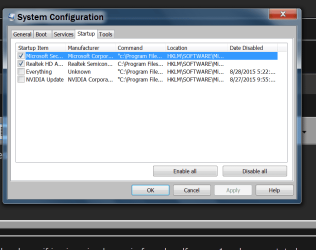
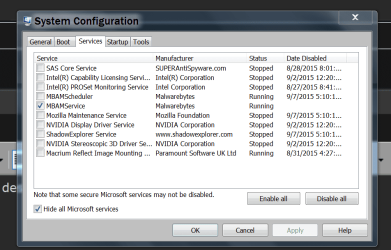
Take a look at what programs are starting when you boot might give you a clue.

msconfig

msconfig STARTUP.PNG

msconfig SERVECES.PNG


Jack
 

My Computer

Computer type
PC/Desktop
Computer Manufacturer/Model Number
Home made Desktop
OS
Windows 10 Pro. 64/ version 1709 Windows 7 Pro/64
CPU
Intel i7-6800K @ 4.3
Motherboard
ASUS X-99 Deluxe II
Memory
Corsair Platinum 16 gig @2400
Graphics Card(s)
EVGA GTX 1070 OC
Monitor(s) Displays
Asus 27" LED LCD/VE278Q
Screen Resolution
1920-1080 or 1280-720 HDMI
Hard Drives
INTEL SSD 730-240 Gb Sata 3.0/
PSU
EVGA Platium 1200W
Case
Phanteks Luxe Tempered Glass 8 fans/ one radiator
Cooling
XSPC/ Water Cooled CPU
Keyboard
Das 4 Professional
Mouse
Logitech M705/MX Anywhere 2-S
Internet Speed
100 mbits
Antivirus
Microsoft Security Essentials/ Malwarebytes Premium 3.0/ SAS
Browser
I.E. 11 default/Firefox/ ISP Time Warner Cable/Spectrum
Other Info
LG BluRay Burner/
Sound system-KLipsch-THX/
Icy Dock ssd Hot Swap bays.
Hi

There are some very good / excellent Utilities by some MS staff.

Sysinternals Process Utilities

Process Monitor v3.31 is the best as it monitor live

Do check out the other as most can be a great help.

These utilities are all standalone, and small size.

Maybe use the full & complete; Sysinternals Suite


Eric.
 

My Computer

Computer type
Laptop
Computer Manufacturer/Model Number
Toshiba L630 and L735
OS
Windows 7 x64
Hard Drives
240 GB SSD
Back
Top