
How to Turn Toggle Keys Tone On or Off in Windows 7 and Windows 8
Information
This tutorial will show you how to turn on or off the tone you hear when the CAPS LOCK, NUM LOCK, or SCROLL LOCK toggle keys are pressed in Windows 7 and Windows 8.
Tip
You may also have a setting for this in your keyboard properties when you open the Control Panel (icons view) and click/tap on the Keyboard icon. This will vary depending on what the drivers for that brand of keyboard has included with it though.
OPTION ONE
Turn On or Off Toggle Keys Tone in Control Panel
1. Open the Control Panel (icons view) in Windows 7 and Windows 8, and click/tap on the Ease of Access Center icon.
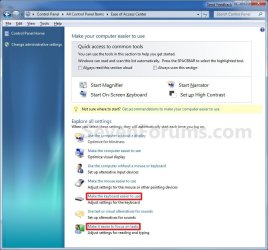
2. Click on either the Make the Keyboard Easier To Use or Make it easier to focus on tasks link, and do to step 3 or 4 below for what you would like to do. (see screenshot below)
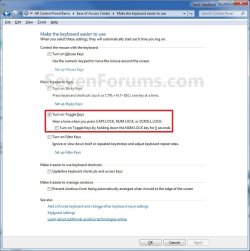
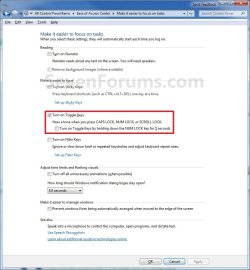
3. To Turn On Toggle Keys Tone A) Check the Turn on Toggle Keys box, and go to step 5 or 7 below. (see screenshots below step 7)4. To Turn Off Toggle Keys Tone
NOTE: This is the default setting. A) Uncheck the Turn on Toggle Keys box, and go to step 5 or 7 below. (see screenshots below step 7)5. To Enable NUM LOCK Key to Turn On Toggle Keys Tone
Note
This will allow you to toggle the Toggle Keys Tone on or off by holding down the NUM LOCK key for 5 seconds.
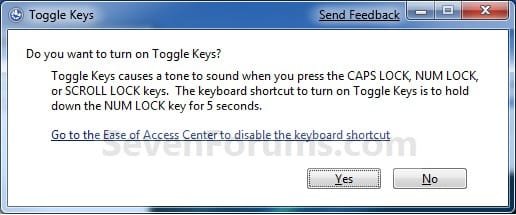
- When Toggle Keys is turned off, you will hear a sick sounding tone.
- When Toggle Keys is turned on, you will here a beep tone and may need to click on Yes to confirm.
6. To Disable NUM LOCK Key to Turn On Toggle Keys Tone A) Uncheck the Turn on Toggle Keys by holding down the NUM LOCK key for 5 seconds box, and go to step 7 below. (see screenshots below step 7)
7. Click/tap on OK, and close the Ease of Access Center window. (see screenshots below)
OPTION ONE
Turn On or Off Toggle Keys Tone in PC settings
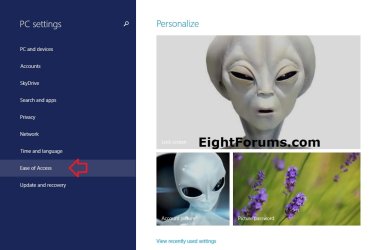
NOTE: This option is only available in Windows 8.1 and Windows RT 8.1. 1. Open PC settings, and click/tap on Ease of Access on the left side. (see screenshot below)
2. Click/tap on Keyboard on the left side of Ease of Access, and do step 3 or 4 below for what you would like to do. (see screenshot below)
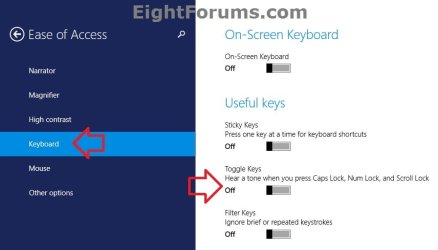
3. To Turn On Toggle Keys Tone A) Under Toggle Keys on the right side of Keyboard, move the slider to the right to turn it on, and go to step 5 below. (see screenshot below step 2)
4. To Turn Off Toggle Keys Tone
NOTE: This is the default setting. A) Under Toggle Keys on the right side of Keyboard, move the slider to the left to turn it off, and go to step 5 below. (see screenshot below step 2)
5. When finished, you could close PC settings if you like.
That's it,
Shawn
Last edited:


