JavaScript is disabled. For a better experience, please enable JavaScript in your browser before proceeding.
You are using an out of date browser. It may not display this or other websites correctly.
You should upgrade or use an
alternative browser .
Too many processes running
Hello!
This is my first post and visit here so please guide me in the right direction if I'm doing anything wrong.
Lately my laptop is going very slow. A good example is that I`m running Chrome, Winamp and when I open a new tab in Chrome, type something and press enter my CPU Usage skyrockets and the music goes in slow motion. Once my windows crashed and got BSOD.
I've tried to remove some processes by googling them to see what they do and removed the ones I tought are unnecesary. It jumps from 0% to 63% from what I've seen watching it for a minute. Even the processes reduce/increase themselves.
Please have a look through my processes and advise me on which I should remove.
Task manager
Task manager (all users)
If there is any other info you need, please let me know.
Thank you!
Computer type Laptop Computer Manufacturer/Model Number Dell OS Windows 7 Home Premium 64bit CPU Intel(R) Core(TM) i5-2430M @2.40 GHz 2.40 GHz Memory 4 Gb Graphics Card(s) GeForceGT 550M Hard Drives 278 GB? LOL Antivirus N/A Browser Google Chrome
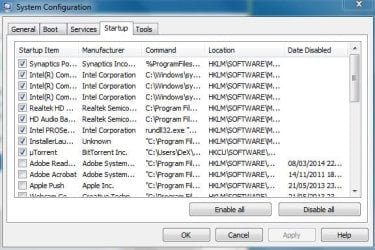
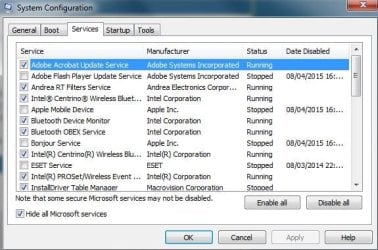
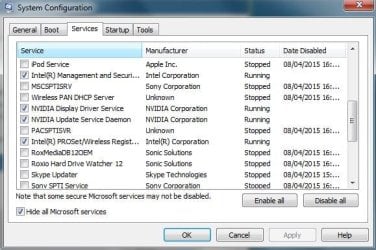
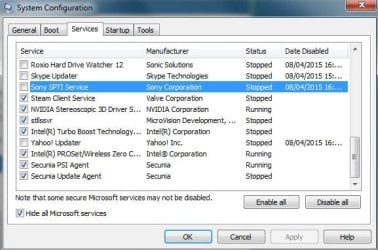
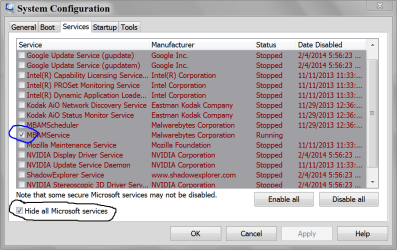
Pictures of msconfig/
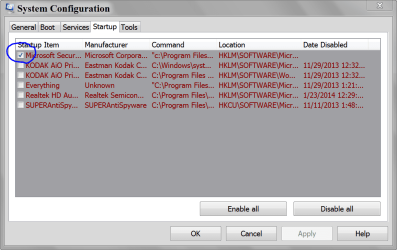
Startup and
Non Microsoft Services would tell us a lot.
Your system spec show this.
Hard Drives 278 GB? LOL
Antivirus N/A
Browser Google Chrome
You are not using a anti virus. If that is true; WHY?
Computer type PC/Desktop Computer Manufacturer/Model Number Home made Desktop OS Windows 10 Pro. 64/ version 1709 Windows 7 Pro/64 CPU Intel i7-6800K @ 4.3 Motherboard ASUS X-99 Deluxe II Memory Corsair Platinum 16 gig @2400 Graphics Card(s) EVGA GTX 1070 OC Monitor(s) Displays Asus 27" LED LCD/VE278Q Screen Resolution 1920-1080 or 1280-720 HDMI Hard Drives INTEL SSD 730-240 Gb Sata 3.0/ PSU EVGA Platium 1200W Case Phanteks Luxe Tempered Glass 8 fans/ one radiator Cooling XSPC/ Water Cooled CPU Keyboard Das 4 Professional Mouse Logitech M705/MX Anywhere 2-S Internet Speed 100 mbits Antivirus Microsoft Security Essentials/ Malwarebytes Premium 3.0/ SAS Browser I.E. 11 default/Firefox/ ISP Time Warner Cable/Spectrum Other Info LG BluRay Burner/
Sound system-KLipsch-THX/
Icy Dock ssd Hot Swap bays.
New member
Thread Starter
Sure, here.
You are not using a anti virus. If that is true; WHY?
I am deciding on which one I should pick. Since I'm buying one it should worth it. Did a recent scan and it was fine, used CCleaner and Malwarebytes.
Computer type Laptop Computer Manufacturer/Model Number Dell OS Windows 7 Home Premium 64bit CPU Intel(R) Core(TM) i5-2430M @2.40 GHz 2.40 GHz Memory 4 Gb Graphics Card(s) GeForceGT 550M Hard Drives 278 GB? LOL Antivirus N/A Browser Google Chrome
You need a anti virus. Install MSE and use it or decide on another one.
I do not recommend using your computer online without a anti virus.
I also recommend removing uTorrent!
You got to many things running at boot and in the background. Here is mine as they are set.
Computer type PC/Desktop Computer Manufacturer/Model Number Home made Desktop OS Windows 10 Pro. 64/ version 1709 Windows 7 Pro/64 CPU Intel i7-6800K @ 4.3 Motherboard ASUS X-99 Deluxe II Memory Corsair Platinum 16 gig @2400 Graphics Card(s) EVGA GTX 1070 OC Monitor(s) Displays Asus 27" LED LCD/VE278Q Screen Resolution 1920-1080 or 1280-720 HDMI Hard Drives INTEL SSD 730-240 Gb Sata 3.0/ PSU EVGA Platium 1200W Case Phanteks Luxe Tempered Glass 8 fans/ one radiator Cooling XSPC/ Water Cooled CPU Keyboard Das 4 Professional Mouse Logitech M705/MX Anywhere 2-S Internet Speed 100 mbits Antivirus Microsoft Security Essentials/ Malwarebytes Premium 3.0/ SAS Browser I.E. 11 default/Firefox/ ISP Time Warner Cable/Spectrum Other Info LG BluRay Burner/
Sound system-KLipsch-THX/
Icy Dock ssd Hot Swap bays.
New member
Thread Starter
I always thought that those from intel, nvidia and realtek should always run.
My whole life was a lie.
Aren't they the drivers required?
I`m installing MSE, unticking everything, reboot and return.
Computer type Laptop Computer Manufacturer/Model Number Dell OS Windows 7 Home Premium 64bit CPU Intel(R) Core(TM) i5-2430M @2.40 GHz 2.40 GHz Memory 4 Gb Graphics Card(s) GeForceGT 550M Hard Drives 278 GB? LOL Antivirus N/A Browser Google Chrome
Windows 7 will start those unchecked items when you or Windows 7 request them to start. Only when needed.
Computer type PC/Desktop Computer Manufacturer/Model Number Home made Desktop OS Windows 10 Pro. 64/ version 1709 Windows 7 Pro/64 CPU Intel i7-6800K @ 4.3 Motherboard ASUS X-99 Deluxe II Memory Corsair Platinum 16 gig @2400 Graphics Card(s) EVGA GTX 1070 OC Monitor(s) Displays Asus 27" LED LCD/VE278Q Screen Resolution 1920-1080 or 1280-720 HDMI Hard Drives INTEL SSD 730-240 Gb Sata 3.0/ PSU EVGA Platium 1200W Case Phanteks Luxe Tempered Glass 8 fans/ one radiator Cooling XSPC/ Water Cooled CPU Keyboard Das 4 Professional Mouse Logitech M705/MX Anywhere 2-S Internet Speed 100 mbits Antivirus Microsoft Security Essentials/ Malwarebytes Premium 3.0/ SAS Browser I.E. 11 default/Firefox/ ISP Time Warner Cable/Spectrum Other Info LG BluRay Burner/
Sound system-KLipsch-THX/
Icy Dock ssd Hot Swap bays.
New member
Thread Starter
The processes number has decreased but the CPU usage and physical memory is still quite high with no programs running (after reboot).
Computer type Laptop Computer Manufacturer/Model Number Dell OS Windows 7 Home Premium 64bit CPU Intel(R) Core(TM) i5-2430M @2.40 GHz 2.40 GHz Memory 4 Gb Graphics Card(s) GeForceGT 550M Hard Drives 278 GB? LOL Antivirus N/A Browser Google Chrome
I see only 4 processes running. All the others just sit there doing nothing. But you have far too many startups. Disable them ALL.
Computer Manufacturer/Model Number HP, Dell, Gateway, Toshiba - 4 laptops and 2 desktops OS Vista, Windows7, Mint Mate, Zorin, Windows 8 CPU from 1.6GHz Duo to i7 Monitor(s) Displays 2x HP w2207 Hard Drives 5x HDD, 7x SSD, 12x Externals Keyboard with trackball - no mices Mouse Trackball mice Internet Speed DSL 6000