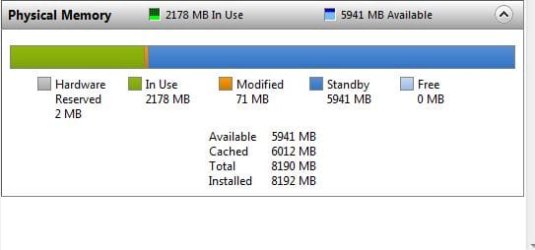
Too much memory on standby.....

sfxworks

New member
Member
Local time
4:03 AM
Messages
30

My Computer My Computer

At a glance

Windows 7 Iltimate x64
OS
Windows 7 Iltimate x64
Well it don't look all that bad. You could check the top of the display and see what is using the ram. You could also go to msconfig/start up and see if their are some things you could uncheck. How many things are checked and what are they?
 

My Computer My Computer

At a glance

Windows 10 Pro. 64/ version 1709 Windows 7 Pr...Intel i7-6800K @ 4.3Corsair Platinum 16 gig @2400EVGA GTX 1070 OC
Computer type
PC/Desktop
Computer Manufacturer/Model Number
Home made Desktop
OS
Windows 10 Pro. 64/ version 1709 Windows 7 Pro/64
CPU
Intel i7-6800K @ 4.3
Motherboard
ASUS X-99 Deluxe II
Memory
Corsair Platinum 16 gig @2400
Graphics Card(s)
EVGA GTX 1070 OC
Monitor(s) Displays
Asus 27" LED LCD/VE278Q
Screen Resolution
1920-1080 or 1280-720 HDMI
Hard Drives
INTEL SSD 730-240 Gb Sata 3.0/
PSU
EVGA Platium 1200W
Case
Phanteks Luxe Tempered Glass 8 fans/ one radiator
Cooling
XSPC/ Water Cooled CPU
Keyboard
Das 4 Professional
Mouse
Logitech M705/MX Anywhere 2-S
Internet Speed
100 mbits
Antivirus
Microsoft Security Essentials/ Malwarebytes Premium 3.0/ SAS
Browser
I.E. 11 default/Firefox/ ISP Time Warner Cable/Spectrum
Other Info
LG BluRay Burner/
Sound system-KLipsch-THX/
Icy Dock ssd Hot Swap bays.
Nothing wrong from the looks of those, standby is nothing but a cache. Don't forget Windows 7 will pre-load as much as possible into free memory to help speed things up (Superfetch), and will release it as needed by running applications. It's only if the memory manager doesn't release it as needed that there is a problem.
 

My Computer My Computer

At a glance

Win 7 Ultimate x64FX-8350 @ 4.6 GHz so farADATA XPG V1 Series Black 8GB DDR3 1600Sapphire R9 270x Dual-X
Computer type
PC/Desktop
Computer Manufacturer/Model Number
Me
OS
Win 7 Ultimate x64
CPU
FX-8350 @ 4.6 GHz so far
Motherboard
Asus M5A97 EVO
Memory
ADATA XPG V1 Series Black 8GB DDR3 1600
Graphics Card(s)
Sapphire R9 270x Dual-X
Sound Card
Xonar DGX w/ Corsair Vengence 1300
Monitor(s) Displays
Acer S232HL Abid
Screen Resolution
1920x1080
Hard Drives
120 GB OCZ Vertex 3
500 GB Seagate 7200.12
PSU
Antec Earthwatts 650W Green
Case
Antec Three Hundred
Cooling
Cooler Master 212 EVO
Keyboard
Logitech G510
Mouse
Logitech G500s
Internet Speed
35000/3000
Well it don't look all that bad. You could check the top of the display and see what is using the ram. You could also go to msconfig/start up and see if their are some things you could uncheck. How many things are checked and what are they?


Just disabled SuperFetch and removed all usergroups that could lock pages in memory. Still hovering over 4g's for standby. . . This normal?

No non-microsoft services are enabled except wampapache, teamviewer, and norton. Even with all of them off it only shrinks a few hundred megs.
 

My Computer My Computer

At a glance

Windows 7 Iltimate x64
OS
Windows 7 Iltimate x64
Yes normal. Windows 7 will use it if needed. It's kind of like standby is waiting at the gate waiting to be needed. When Windows 7 ask for the use of more ram standby jumps right out their and does it's job.
 

My Computer My Computer

At a glance

Windows 10 Pro. 64/ version 1709 Windows 7 Pr...Intel i7-6800K @ 4.3Corsair Platinum 16 gig @2400EVGA GTX 1070 OC
Computer type
PC/Desktop
Computer Manufacturer/Model Number
Home made Desktop
OS
Windows 10 Pro. 64/ version 1709 Windows 7 Pro/64
CPU
Intel i7-6800K @ 4.3
Motherboard
ASUS X-99 Deluxe II
Memory
Corsair Platinum 16 gig @2400
Graphics Card(s)
EVGA GTX 1070 OC
Monitor(s) Displays
Asus 27" LED LCD/VE278Q
Screen Resolution
1920-1080 or 1280-720 HDMI
Hard Drives
INTEL SSD 730-240 Gb Sata 3.0/
PSU
EVGA Platium 1200W
Case
Phanteks Luxe Tempered Glass 8 fans/ one radiator
Cooling
XSPC/ Water Cooled CPU
Keyboard
Das 4 Professional
Mouse
Logitech M705/MX Anywhere 2-S
Internet Speed
100 mbits
Antivirus
Microsoft Security Essentials/ Malwarebytes Premium 3.0/ SAS
Browser
I.E. 11 default/Firefox/ ISP Time Warner Cable/Spectrum
Other Info
LG BluRay Burner/
Sound system-KLipsch-THX/
Icy Dock ssd Hot Swap bays.
You have a s*** load of memory. Why in the world on your concerned?
Standby is just that standby waiting for use other then cache.
Aka., consider it free.

So turn SuperFetch back on and leave well enough alone.
 

My Computer My Computer

At a glance

Windows 10 Pro (x64)Intel Core i7-3930K (3.2GHz - 4.5GHz)4x Samsung 4GB PC3-12800 DDR3 (16GB 1600MHz)Nvidia Geforce GTX 690
Computer type
PC/Desktop
Computer Manufacturer/Model Number
Alienware Aurora ALX R4
OS
Windows 10 Pro (x64)
CPU
Intel Core i7-3930K (3.2GHz - 4.5GHz)
Motherboard
Alienware Aurora-R4 x79
Memory
4x Samsung 4GB PC3-12800 DDR3 (16GB 1600MHz)
Graphics Card(s)
Nvidia Geforce GTX 690
Sound Card
SteelSeries Siberia Elite
Monitor(s) Displays
Dell UltraSharp U3011
Screen Resolution
2560x1600
Hard Drives
Samsung 850 Pro 256 GB, Seagate 1TB Desktop Hybrid HDD, 2x Western Digital 4TB Green HDD
PSU
875W Some Dell PSU <.<
Case
Alienware Aurora ALX
Cooling
Custom Liquid Cooling (EK CPU & GPU blocks) dual EK 480RAD
Keyboard
Logitech G710+ Mechanical
Mouse
Logitech G700s
Internet Speed
Verizon Fios (50 mbps average)
Other Info
Server: Intel NUC D54250WYK: i5-4250U, 16GB, 256 GB mSATA, Windows Server 2012 R2
You have a s*** load of memory. Why in the world on your concerned?
Standby is just that standby waiting for use other then cache.
Aka., consider it free.

So turn SuperFetch back on and leave well enough alone.

Becuase I have 0 page files available and when that happens things get a lot slower. Not to mention when im testing java apps it can't reserve enough memory because its all on standby.
 

My Computer My Computer

At a glance

Windows 7 Iltimate x64
OS
Windows 7 Iltimate x64
Things should not behave in any slow manner when accessing memory that the OS has placed on the standby list in any way, so that doesn't seem like your problem (standby pages are available to other processes than the one that originally used the page if necessary, so there's basically no observable overhead in accessing a standby page). Also, Java itself doesn't reserve memory, it reserves virtual address space (and the memory manager then reserves actual RAM or paging file space, depending on what's available). Also, reserving memory doesn't actually do anything but let the memory manager know that the memory *might* be needed - you only take an allocation hit on commit. It sounds perhaps like you're looking in the wrong place to troubleshoot your problem...
 

My Computer My Computer

At a glance

Windows 10 Pro x64Intel Core i7 4790K @ 4.5GHz32GB DDR3Nvidia GeForce GTX970
Computer type
PC/Desktop
Computer Manufacturer/Model Number
Custom
OS
Windows 10 Pro x64
CPU
Intel Core i7 4790K @ 4.5GHz
Motherboard
Asus Maximus Hero VII
Memory
32GB DDR3
Graphics Card(s)
Nvidia GeForce GTX970
Sound Card
Realtek HD Audio
Screen Resolution
1920x1200
Hard Drives
1x Samsung 250GB SSD
4x WD RE 2TB (RAIDZ)
PSU
Corsair AX760i
Case
Fractal Design Define R4
Cooling
Noctua NH-D15
cluberti I think you got it. Looking in the wrong places.
To the OP. What problem are you trying to solve. What are you trying to get your computer to do that it isn't doing. Believe me Windows 7 will handle your ram without a problem, just let it do it's thing. We will help you but I don't think we understand your problem or what you are trying to fix. As of now I don't think it's broke.
 

My Computer My Computer

At a glance

Windows 10 Pro. 64/ version 1709 Windows 7 Pr...Intel i7-6800K @ 4.3Corsair Platinum 16 gig @2400EVGA GTX 1070 OC
Computer type
PC/Desktop
Computer Manufacturer/Model Number
Home made Desktop
OS
Windows 10 Pro. 64/ version 1709 Windows 7 Pro/64
CPU
Intel i7-6800K @ 4.3
Motherboard
ASUS X-99 Deluxe II
Memory
Corsair Platinum 16 gig @2400
Graphics Card(s)
EVGA GTX 1070 OC
Monitor(s) Displays
Asus 27" LED LCD/VE278Q
Screen Resolution
1920-1080 or 1280-720 HDMI
Hard Drives
INTEL SSD 730-240 Gb Sata 3.0/
PSU
EVGA Platium 1200W
Case
Phanteks Luxe Tempered Glass 8 fans/ one radiator
Cooling
XSPC/ Water Cooled CPU
Keyboard
Das 4 Professional
Mouse
Logitech M705/MX Anywhere 2-S
Internet Speed
100 mbits
Antivirus
Microsoft Security Essentials/ Malwarebytes Premium 3.0/ SAS
Browser
I.E. 11 default/Firefox/ ISP Time Warner Cable/Spectrum
Other Info
LG BluRay Burner/
Sound system-KLipsch-THX/
Icy Dock ssd Hot Swap bays.
Do you have your PageFile Disabled?
If so you should re-enable it. There is nothing to be gained by disabling it, and may in fact cause issues.
On occasion some applications can cause problems if there is n PF one found.


With 8GB of RAM, it should ideally look something like this:
1.JPG

Notice the Free Space is 0?
This means Windows is actually using all the RAM to its full potential.

As already mentioned, Standby should not cause any issues.

Its basically just DATA you have used, or Windows think you will use. When you launch a program thats been cached to Standby mode, it instantly gets turned into "In Use".
This means it doesn't need to access the HD for the info, making it faster and more responsive.

On the other hand, if you start a program that needs more memory, it can instantly dump the oldest items out of standby to make room.

It's much more efficient letting Windows manage it. I mean, why have that much memory if you do not want it to be used?
 

My Computer My Computer

At a glance

Windows 7 Home Premium 64bitIntel Core i7 2700k8GB Mushkin Redline Ridgebacks @1866EVGA GTX570 SC
Computer Manufacturer/Model Number
Custom (Self Build)
OS
Windows 7 Home Premium 64bit
CPU
Intel Core i7 2700k
Motherboard
eVGA P67 SLI
Memory
8GB Mushkin Redline Ridgebacks @1866
Graphics Card(s)
EVGA GTX570 SC
Sound Card
XiFi Titanium HD
Monitor(s) Displays
LG W2453V
Screen Resolution
1920x1080
Hard Drives
Intel 320 80GB -- Intel X25-V 40GB --WD Black 1TB x2 -- WD Blue 640GB
PSU
Seasonic x750
Case
Corsair 600T SE White
Cooling
eVGA Superclocked CPU Cooler
Keyboard
Saitek Cyborg
Antivirus
Kaspersky
Browser
IE
Other Info
LG BD/DVD
Becuase I have 0 page files available and when that happens things get a lot slower. Not to mention when im testing java apps it can't reserve enough memory because its all on standby.

No its not because of standby, its because you have no page file for memory that is in use by other processes. Standby memory is not paged out to the pagefile, it is overwritten the moment it is needed. However, other processes are stuck in memory as well as "Modified" memory. Without a pagefile the Modified (orange bar) memory will grow and grow.
 

My Computer My Computer

At a glance

Windows 10 Pro (x64)Intel Core i7-3930K (3.2GHz - 4.5GHz)4x Samsung 4GB PC3-12800 DDR3 (16GB 1600MHz)Nvidia Geforce GTX 690
Computer type
PC/Desktop
Computer Manufacturer/Model Number
Alienware Aurora ALX R4
OS
Windows 10 Pro (x64)
CPU
Intel Core i7-3930K (3.2GHz - 4.5GHz)
Motherboard
Alienware Aurora-R4 x79
Memory
4x Samsung 4GB PC3-12800 DDR3 (16GB 1600MHz)
Graphics Card(s)
Nvidia Geforce GTX 690
Sound Card
SteelSeries Siberia Elite
Monitor(s) Displays
Dell UltraSharp U3011
Screen Resolution
2560x1600
Hard Drives
Samsung 850 Pro 256 GB, Seagate 1TB Desktop Hybrid HDD, 2x Western Digital 4TB Green HDD
PSU
875W Some Dell PSU <.<
Case
Alienware Aurora ALX
Cooling
Custom Liquid Cooling (EK CPU & GPU blocks) dual EK 480RAD
Keyboard
Logitech G710+ Mechanical
Mouse
Logitech G700s
Internet Speed
Verizon Fios (50 mbps average)
Other Info
Server: Intel NUC D54250WYK: i5-4250U, 16GB, 256 GB mSATA, Windows Server 2012 R2
Ok then consider this.

Maybe the problem isn't that its on standby. Maybe its because the rate at which the pages are "released on request" is slow and that is whats causing a performance drop. I mean, I have free memory now and things are running a lot smoother. Before, when it was 0, windows always had to waste time releasing memory and giving it to the application that requested it. Still, I only have ~1.6 free. And when I run my main major java application I usually append -Xnx4g to it. Yet it still has trouble giving itself that much memory and runs slow as a result.
 

My Computer My Computer

At a glance

Windows 7 Iltimate x64
OS
Windows 7 Iltimate x64
IMHO if you are trying to allocate ram to anything you are creating the problem. Let Windows 7 take care of the ram. If for what ever reason you run short of ram just install more ram.
 

My Computer My Computer

At a glance

Windows 10 Pro. 64/ version 1709 Windows 7 Pr...Intel i7-6800K @ 4.3Corsair Platinum 16 gig @2400EVGA GTX 1070 OC
Computer type
PC/Desktop
Computer Manufacturer/Model Number
Home made Desktop
OS
Windows 10 Pro. 64/ version 1709 Windows 7 Pro/64
CPU
Intel i7-6800K @ 4.3
Motherboard
ASUS X-99 Deluxe II
Memory
Corsair Platinum 16 gig @2400
Graphics Card(s)
EVGA GTX 1070 OC
Monitor(s) Displays
Asus 27" LED LCD/VE278Q
Screen Resolution
1920-1080 or 1280-720 HDMI
Hard Drives
INTEL SSD 730-240 Gb Sata 3.0/
PSU
EVGA Platium 1200W
Case
Phanteks Luxe Tempered Glass 8 fans/ one radiator
Cooling
XSPC/ Water Cooled CPU
Keyboard
Das 4 Professional
Mouse
Logitech M705/MX Anywhere 2-S
Internet Speed
100 mbits
Antivirus
Microsoft Security Essentials/ Malwarebytes Premium 3.0/ SAS
Browser
I.E. 11 default/Firefox/ ISP Time Warner Cable/Spectrum
Other Info
LG BluRay Burner/
Sound system-KLipsch-THX/
Icy Dock ssd Hot Swap bays.
IMHO if you are trying to allocate ram to anything you are creating the problem. Let Windows 7 take care of the ram. If for what ever reason you run short of ram just install more ram.

But...its a server. And if I don't include that part then it will result in out of memory issues when I still have free memory..
 

My Computer My Computer

At a glance

Windows 7 Iltimate x64
OS
Windows 7 Iltimate x64
If there is a program reporting out of memory, then that program is not compatible with windows 7 :(

There are a couple of issues like this and the "Documents and Setings" folder that cn cause some programs to simply not function properly on W7.

If you are writing your own JAVA apps, you may need to find a different way of detecting the memory used/free. Or possibly make sure your java VM is Windows 7 compatible etc...

The Java VM should NOT be saying there is no memory. Or maybe if is says "no free ram" it also says "XXX on standby" in the same function call? The addition of the two of those is in fact the "free ram for application use".
 

My Computer My Computer

At a glance

Windows 7 x64 Ultimatei7 96012 Gig Corsair DominatorNvidia 480
Computer Manufacturer/Model Number
Scratch built
OS
Windows 7 x64 Ultimate
CPU
i7 960
Motherboard
Asus P6X58D
Memory
12 Gig Corsair Dominator
Graphics Card(s)
Nvidia 480
Sound Card
Maudio Delta 44 + breakout box
Monitor(s) Displays
Dell UltraSharp U2410 24in and Samsung 21 dual monitors
Screen Resolution
1920x1200 and 1280x1024
Hard Drives
Primary: Intel X-25M G2 160G SSD
Secondary: Segate baracuda 1.0 TB
HDs in AHCI mode.
PSU
Corasair TX850
Case
Cooler Master HAF
Cooling
Corsair H50
Keyboard
Logitech G15 + N52 game pad
Mouse
Logitech MX518
Internet Speed
15kbs down 4.5kbps up
Other Info
WEI 7.6
CPU & RAM 7.6
Graphics 7.9
Hard disk 7.7
Also, why using -Xmx4g? Are you sure setting the maximum heap size to the maximum a 32bit process can address (unless this is running in a 64bit JVM environment) is even wise? Also, is it just this particular java VM having issues on the server?
 

My Computer My Computer

At a glance

Windows 10 Pro x64Intel Core i7 4790K @ 4.5GHz32GB DDR3Nvidia GeForce GTX970
Computer type
PC/Desktop
Computer Manufacturer/Model Number
Custom
OS
Windows 10 Pro x64
CPU
Intel Core i7 4790K @ 4.5GHz
Motherboard
Asus Maximus Hero VII
Memory
32GB DDR3
Graphics Card(s)
Nvidia GeForce GTX970
Sound Card
Realtek HD Audio
Screen Resolution
1920x1200
Hard Drives
1x Samsung 250GB SSD
4x WD RE 2TB (RAIDZ)
PSU
Corsair AX760i
Case
Fractal Design Define R4
Cooling
Noctua NH-D15
I hear that win7 will free up that standy ram when it is needed, but it doesn't for me. When i see my ram running out it will just run out my programs will lag and my standby ram stays, its driving me nuts that almost half my ram just stays in standby and never gets used. I cant unzip a file while watching a youtube video.

I have a quadcore Q9559 @ 2.83GHz with 4 gigs of ram and a 1 gig geforce gtx 560 vid card

Any ideas?
 

My Computer My Computer

At a glance

win7
Computer type
PC/Desktop
OS
win7
I hear that win7 will free up that standy ram when it is needed, but it doesn't for me. When i see my ram running out it will just run out my programs will lag and my standby ram stays, its driving me nuts that almost half my ram just stays in standby and never gets used. I cant unzip a file while watching a youtube video.

I have a quadcore Q9559 @ 2.83GHz with 4 gigs of ram and a 1 gig geforce gtx 560 vid card

Any ideas?

RAM has nothing to do with your problem. There are many factors to consider when having a performance issue then just RAM. Your CPU for instance could be a bottleneck, or your Graphics card, or your Hard Drive. Not every performance problem is because of RAM. The fact that Standby is unchanged means your RAM is not the problem, nothing is fully utilizing it to the need of overwriting Standby.

And you should have opened a new thread...
 

My Computer My Computer

At a glance

Windows 10 Pro (x64)Intel Core i7-3930K (3.2GHz - 4.5GHz)4x Samsung 4GB PC3-12800 DDR3 (16GB 1600MHz)Nvidia Geforce GTX 690
Computer type
PC/Desktop
Computer Manufacturer/Model Number
Alienware Aurora ALX R4
OS
Windows 10 Pro (x64)
CPU
Intel Core i7-3930K (3.2GHz - 4.5GHz)
Motherboard
Alienware Aurora-R4 x79
Memory
4x Samsung 4GB PC3-12800 DDR3 (16GB 1600MHz)
Graphics Card(s)
Nvidia Geforce GTX 690
Sound Card
SteelSeries Siberia Elite
Monitor(s) Displays
Dell UltraSharp U3011
Screen Resolution
2560x1600
Hard Drives
Samsung 850 Pro 256 GB, Seagate 1TB Desktop Hybrid HDD, 2x Western Digital 4TB Green HDD
PSU
875W Some Dell PSU <.<
Case
Alienware Aurora ALX
Cooling
Custom Liquid Cooling (EK CPU & GPU blocks) dual EK 480RAD
Keyboard
Logitech G710+ Mechanical
Mouse
Logitech G700s
Internet Speed
Verizon Fios (50 mbps average)
Other Info
Server: Intel NUC D54250WYK: i5-4250U, 16GB, 256 GB mSATA, Windows Server 2012 R2
...Without a pagefile the Modified (orange bar) memory will grow and grow.
I don't use the Windows 7 paging file, and my modified memory does not continually grow.
 
Last edited:

My Computer My Computer

At a glance

Windows 7 Professional SP1 64bit, Manjaro Xfc...Intel i7-3930K @ 4.2GHzCorsair Dominator 64GB Quad Channel DDR3 @ 16...EVGA GeForce GTX Titan Black Superclocked (×2...
Computer type
PC/Desktop
OS
Windows 7 Professional SP1 64bit, Manjaro Xfce, Debian 10 64bit Xfce
CPU
Intel i7-3930K @ 4.2GHz
Motherboard
ASUS P9X79 WS
Memory
Corsair Dominator 64GB Quad Channel DDR3 @ 1600MHz
Graphics Card(s)
EVGA GeForce GTX Titan Black Superclocked (×2, SLI)
Monitor(s) Displays
Sony Bravia 46"
Screen Resolution
1920×1080 (Full Screen), 1366×768 (Windows)
Hard Drives
Samsung 860 PRO 4TB SSD, Samsung 850 EVO 1TB SSD, Western Digital WD Gold 16TB 7200 RPM 512MB Cache HDD
PSU
Corsair AX1200 (1200W, 100.4A @ 12V)
Case
Corsair Obsidian 750D
Cooling
Corsair H110, 5 NOCTUA NF-A14 industrialPPC-3000 PWM Fans
Keyboard
Logitech K360
Mouse
Logitech M220
Browser
Firefox Developer Edition, Pale Moon, Tor
Well if it isnt my ram, then why is it when my free ram reaches zero, i experience my lag issues and only then. If i have free ram i never have lag. and when it reaches zero, my comp stops what its doing, and the standby ram stays teh same, and i have to wait for my free ram for it to fix the problem.
 

My Computer My Computer

At a glance

win7
Computer type
PC/Desktop
OS
win7
Back
Top