Toshiba A300 Display Driver

itchellzew

New member
Local time
6:11 PM
Messages
15
I am running Windows 7 64-Bit on my Toshiba A300, and when I get my monitor in a certain position (same position every time) I hear the noise like I plugged in a flash drive and then the notification pops up and says "USB device not recognized". Sometimes if my computer is in that one bad position when I try to start it up, nothing happens. You can hear the hard drive turn on, but the screen stays black and the hard drive quits spinning. If I turn off & close my computer then move the monitor to a different position it will turn back on. I have left my computer just sitting there for a really long time hoping that some sort of error would come up eventually but nothing ever does. The only thing I can come up with is that my display or monitor driver is not updated. I have tried to find the newest driver and been unsuccessful. I have also tried to let the computer search for the newest driver but it doesn't find anything and I'm pretty sure there are new drivers out there. Any help on this matter would be greatly appreciated. Thanks!

Display Adapter: ATI Mobility Radeon HD 3650
Driver Version: 8.632.1.2000
Driver Date: 8/17/2009

Monitor: Generic PnP Monitor
Driver Version: 6.1.7600.16385
Driver Date: 6/21/2006
 

My Computer My Computer

OS
Windows 7 Professional 32-Bit
Hiyya CM and welcome Now I am not quite sure what you are asking - is the monitor the original flip up screen or are you running a free standing and larger monitor?
 

My Computer My Computer

Computer type
PC/Desktop
Computer Manufacturer/Model Number
Own build (new) Desk1 / Asus ROG Win 7 / Desk2 1st build
OS
Desk1 7 Home Prem / Desk2 10 Pro / Main lap Asus ROG 10 Pro 2 laptop Toshiba 7 Pro Asus P2520 7 & 10
CPU
Desk1 i5 3750K / Laptop i7 GTX 860M / Desk2 i5 2500
Motherboard
Desk1 Asus P877-V / Desk2 Gigabyte H67 UD3H / Laptop ?
Memory
Desk1 8GB (1866) / Desk2 16GB (1333) / Laptop 8Gb DDR3
Graphics Card(s)
Desk 1& 2NVidia GTX 650 & Laptops on board Intel
Sound Card
Desk 1 & 2 -XONAR DG Realtek High Def audio Laptop
Monitor(s) Displays
Desk 1 Benq HD 2450 / Desk2 Philips 24" / Laptop 17.5"
Screen Resolution
1920x1080 D1 & D2 & Laptop 1
Hard Drives
Desk1 Samsung 120GB 830 SSD
Asus ROG 256GB 850 Pro SSD
Desk2 Samsung 840 256 SSD
Toshiba 120GB EVO
PSU
Desk 1 Corsair HX 1050/ Laptop ? / Desk 2 Corsair HX 650
Case
Desk 1 Cooler HAF XM ? Toshiba laptop / Desk2 Coolermaster
Cooling
Fans on all Desk1 -2 Desk2 - all Coolermasters 5 Laptop ?
Keyboard
Desk 1 MS Sidewinder X6 Desk 2 MS Sidewinder X 4
Mouse
Desk 1&2 - Gigabyte MS 900 gamer - laptop - Logitec wireless
Internet Speed
ADSL2+
Other Info
One other Desktop (tester) and spare Toshba laptop both with SSD's
Running Kaspersky 2016 ISS on all machines config'd identically
Logitec audio stereo systems on each machine (x3)
Canon MG5250MFC
Router/modem TP-Link running WPA2SK
The monitor is the original monitor. This problem only started after upgrading to windows 7 is why I think it's a driver issue. Thanks!
 

My Computer My Computer

OS
Windows 7 Professional 32-Bit
The monitor is the original monitor. This problem only started after upgrading to windows 7 is why I think it's a driver issue. Thanks!
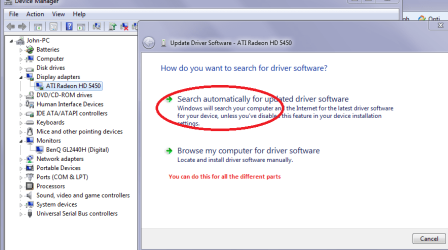
Hiyya CM try going to the Device Manager in Control Panel open it up as in pic - it is the same as my main machine here.
Right click on update drivers you will get a search for screen it will then search the net for the driver and give you the result.

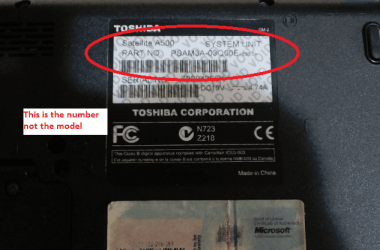
If that doesn't work may need to go to the Toshiba site and download drivers from it. Just as I found out - with the Toshiba's I have had you will need to quote that model number on the machine as that dictates where the machine originated
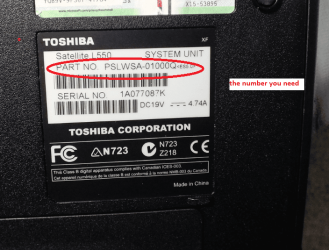
My L550 Satellite is Part number : PSLWSA-01000Q which I think is the part number for my Australian laptop.
So you need to specify A300 and then that number on the sticker.

I know this now because I recently fixed a Toshy laptop for a friend and the part number turned out to be an American one and on questioning the friend had indeed bought it on Ebay from the US so making the download site specific to the US ones.

One other thing I also installed 7 on a previously Vista machine (A200) by adding a a new hard drive but it made no difference to the screen it was just dull so I am thinking perhaps the connections between the keyboard part and the screen may be getting near their use by date - hope not but it does pay to think of the very simplest things as well as I have fell into the trap of thinking the worst - as in some applications problems and when they have been purely mechanical, and sometimes easily fixed.

Let us know how you get on:)
 

Attachments

  • LAPPY.PNG
    LAPPY.PNG
    30.4 KB · Views: 18

My Computer My Computer

Computer type
PC/Desktop
Computer Manufacturer/Model Number
Own build (new) Desk1 / Asus ROG Win 7 / Desk2 1st build
OS
Desk1 7 Home Prem / Desk2 10 Pro / Main lap Asus ROG 10 Pro 2 laptop Toshiba 7 Pro Asus P2520 7 & 10
CPU
Desk1 i5 3750K / Laptop i7 GTX 860M / Desk2 i5 2500
Motherboard
Desk1 Asus P877-V / Desk2 Gigabyte H67 UD3H / Laptop ?
Memory
Desk1 8GB (1866) / Desk2 16GB (1333) / Laptop 8Gb DDR3
Graphics Card(s)
Desk 1& 2NVidia GTX 650 & Laptops on board Intel
Sound Card
Desk 1 & 2 -XONAR DG Realtek High Def audio Laptop
Monitor(s) Displays
Desk 1 Benq HD 2450 / Desk2 Philips 24" / Laptop 17.5"
Screen Resolution
1920x1080 D1 & D2 & Laptop 1
Hard Drives
Desk1 Samsung 120GB 830 SSD
Asus ROG 256GB 850 Pro SSD
Desk2 Samsung 840 256 SSD
Toshiba 120GB EVO
PSU
Desk 1 Corsair HX 1050/ Laptop ? / Desk 2 Corsair HX 650
Case
Desk 1 Cooler HAF XM ? Toshiba laptop / Desk2 Coolermaster
Cooling
Fans on all Desk1 -2 Desk2 - all Coolermasters 5 Laptop ?
Keyboard
Desk 1 MS Sidewinder X6 Desk 2 MS Sidewinder X 4
Mouse
Desk 1&2 - Gigabyte MS 900 gamer - laptop - Logitec wireless
Internet Speed
ADSL2+
Other Info
One other Desktop (tester) and spare Toshba laptop both with SSD's
Running Kaspersky 2016 ISS on all machines config'd identically
Logitec audio stereo systems on each machine (x3)
Canon MG5250MFC
Router/modem TP-Link running WPA2SK
Thanks for the advice. I have already tried updating it through device manager, and it didn't work. I have also already been to Toshiba's website and looked for update drivers but couldn't find the right ones. I thought someone on here might be better at it than me or know something I don't. My computer is customized so the model number is only A300 not A300-XXXX that is used for search on Toshiba's website. The website used to have a part number search but I couldn't find it anymore. Any more help on diagnosing this problem is greatly appreciated!
 

My Computer My Computer

OS
Windows 7 Professional 32-Bit
Your driver was a very first release judging by the looks of it if not the first if it actually is a 7 driver try here

AMD Catalyst

2012 driver.. :)
 

My Computer My Computer

Computer type
PC/Desktop
OS
Windows 7 Ultimate 64
CPU
AMD FX - 8350 Oc
Motherboard
ASUS Crosshair V Formula-Z AMD 990FX
Memory
16GB Corsair Vengeance
Graphics Card(s)
HD 4870 1GB
Sound Card
Onboard.
Monitor(s) Displays
Samsung Syncmaster 2032MW & ASUS p191
Screen Resolution
1680x1050
Hard Drives
1 TB WD
320gb WD
PSU
650w OCZ PSU
Case
Zalman Z11
Cooling
Antec H20 920 , 6x Antec Quiet
Keyboard
Logitech RAZ71 Keyboard
Mouse
Logitech RAZ71 Wireless Mouse
Internet Speed
120mb Virgin
Antivirus
Malwarebytes
Browser
Chrome
Hiyya cm mate here are the numbers you need to enter into the search in the Toshiba site to get the right gear if you haven't got these stickers on the back with that part number it might be an uphill slog my friend.
 

Attachments

  • CM1.PNG
    CM1.PNG
    84 KB · Views: 9
  • CM2.PNG
    CM2.PNG
    152.5 KB · Views: 9

My Computer My Computer

Computer type
PC/Desktop
Computer Manufacturer/Model Number
Own build (new) Desk1 / Asus ROG Win 7 / Desk2 1st build
OS
Desk1 7 Home Prem / Desk2 10 Pro / Main lap Asus ROG 10 Pro 2 laptop Toshiba 7 Pro Asus P2520 7 & 10
CPU
Desk1 i5 3750K / Laptop i7 GTX 860M / Desk2 i5 2500
Motherboard
Desk1 Asus P877-V / Desk2 Gigabyte H67 UD3H / Laptop ?
Memory
Desk1 8GB (1866) / Desk2 16GB (1333) / Laptop 8Gb DDR3
Graphics Card(s)
Desk 1& 2NVidia GTX 650 & Laptops on board Intel
Sound Card
Desk 1 & 2 -XONAR DG Realtek High Def audio Laptop
Monitor(s) Displays
Desk 1 Benq HD 2450 / Desk2 Philips 24" / Laptop 17.5"
Screen Resolution
1920x1080 D1 & D2 & Laptop 1
Hard Drives
Desk1 Samsung 120GB 830 SSD
Asus ROG 256GB 850 Pro SSD
Desk2 Samsung 840 256 SSD
Toshiba 120GB EVO
PSU
Desk 1 Corsair HX 1050/ Laptop ? / Desk 2 Corsair HX 650
Case
Desk 1 Cooler HAF XM ? Toshiba laptop / Desk2 Coolermaster
Cooling
Fans on all Desk1 -2 Desk2 - all Coolermasters 5 Laptop ?
Keyboard
Desk 1 MS Sidewinder X6 Desk 2 MS Sidewinder X 4
Mouse
Desk 1&2 - Gigabyte MS 900 gamer - laptop - Logitec wireless
Internet Speed
ADSL2+
Other Info
One other Desktop (tester) and spare Toshba laptop both with SSD's
Running Kaspersky 2016 ISS on all machines config'd identically
Logitec audio stereo systems on each machine (x3)
Canon MG5250MFC
Router/modem TP-Link running WPA2SK
Thanks for the help. What I meant earlier was I couldn't find the box to enter the part number into on the download page of Toshiba's support site. I do have my part number just fyi. Thanks for helping!
 

My Computer My Computer

OS
Windows 7 Professional 32-Bit
Thanks for the help. What I meant earlier was I couldn't find the box to enter the part number into on the download page of Toshiba's support site. I do have my part number just fyi. Thanks for helping!
No probs cm I know what you mean it was a mystery to me too until the support people at Toshiba in Sydney put me right as I just entering L550 and all combos of the model name - very confusing set up from Toshiba:D
 

My Computer My Computer

Computer type
PC/Desktop
Computer Manufacturer/Model Number
Own build (new) Desk1 / Asus ROG Win 7 / Desk2 1st build
OS
Desk1 7 Home Prem / Desk2 10 Pro / Main lap Asus ROG 10 Pro 2 laptop Toshiba 7 Pro Asus P2520 7 & 10
CPU
Desk1 i5 3750K / Laptop i7 GTX 860M / Desk2 i5 2500
Motherboard
Desk1 Asus P877-V / Desk2 Gigabyte H67 UD3H / Laptop ?
Memory
Desk1 8GB (1866) / Desk2 16GB (1333) / Laptop 8Gb DDR3
Graphics Card(s)
Desk 1& 2NVidia GTX 650 & Laptops on board Intel
Sound Card
Desk 1 & 2 -XONAR DG Realtek High Def audio Laptop
Monitor(s) Displays
Desk 1 Benq HD 2450 / Desk2 Philips 24" / Laptop 17.5"
Screen Resolution
1920x1080 D1 & D2 & Laptop 1
Hard Drives
Desk1 Samsung 120GB 830 SSD
Asus ROG 256GB 850 Pro SSD
Desk2 Samsung 840 256 SSD
Toshiba 120GB EVO
PSU
Desk 1 Corsair HX 1050/ Laptop ? / Desk 2 Corsair HX 650
Case
Desk 1 Cooler HAF XM ? Toshiba laptop / Desk2 Coolermaster
Cooling
Fans on all Desk1 -2 Desk2 - all Coolermasters 5 Laptop ?
Keyboard
Desk 1 MS Sidewinder X6 Desk 2 MS Sidewinder X 4
Mouse
Desk 1&2 - Gigabyte MS 900 gamer - laptop - Logitec wireless
Internet Speed
ADSL2+
Other Info
One other Desktop (tester) and spare Toshba laptop both with SSD's
Running Kaspersky 2016 ISS on all machines config'd identically
Logitec audio stereo systems on each machine (x3)
Canon MG5250MFC
Router/modem TP-Link running WPA2SK
Well I updated my display driver to version 8.634 after it crashed on me. It still brings up the USB notification like before, but I guess as long as it works its alright with me. I just thought it might be a simple fix, but it don't seem like it. I'm in med school and don't have time to fool with it really. So, I'm just going to let it slide for now. Thanks for all the help!
 

My Computer My Computer

OS
Windows 7 Professional 32-Bit
Back
Top