Tracking Down SharpShell errors in Event Viewer

Foxfan100

New member
Local time
9:30 PM
Messages
16
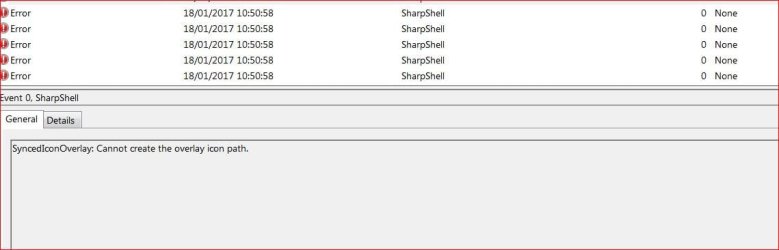
I have suddenly started getting a slew of SharpShell "0" Application errors in my Event Viewer. These aren't a major problem, but I would like to know exactly what the source application that's causing them is.

There is nothing specific that I can see in the error messages, and whilst I could probably spend time toggling between running applications and the Event Viewer, in hopes of snapshotting the cause and effect, I haven't got the time.

If anyone has information on how to identify the application easily, I'd welcome it. I've spent a lot of time searching for suggestions and relevant stuff, but there don't seem to be any.
 

My Computer

Computer type
PC/Desktop
Computer Manufacturer/Model Number
Dell XPS8300
OS
Win 7 Ultimate 64
CPU
i7
Memory
12gb
Graphics Card(s)
nvidia
Monitor(s) Displays
Dell
Hard Drives
Sata 1gb
SharpShell

SharpShell makes it easy to create Windows Shell Extensions using the .NET Framework.

Source: SharpShell - Home
A quick and dirty way would be to do a search for sharpshell: Go to the start orb in the lower left corner and type/copy/paste sharpshell into the search box and see how many entries show up, it would depend on how many projects/source application's you installed that would determine the amount you'd see. But, that won't identify the culprit, can you post one of the events, one with the most detail so we can look it over?

If you want more detailed information these two utilities may also help: https://Process Monitor | technet.microsoft.com, and https://Process Explorer | technet.microsoft.com I'd try Process Monitor first. The best way to set the filters for either would be to check their Help files. You're looking for sharpshell.dll

Related: Tips For Debugging a Windows Shell Extension
 

My Computer

Computer type
PC/Desktop
Computer Manufacturer/Model Number
Gateway DX4831-01e (Mid-Tower Desktop)
OS
Originally Win 7 Hm Prem x64 Ver 6.1.7600 Build 7601-SP1 | Upgraded to Windows 10 December 14, 2019
CPU
Intel i3 530 2.93GHz, 2933MHz 2 Cores 4 Logical Processors
Motherboard
Gateway H57M01 133 megahertz
Memory
6GB of 1,333MHz DDR3 SDRAM
Graphics Card(s)
32MB Intel Graphics Media Accelerator HD IGChip
Sound Card
Realtek High Definition Audio
Monitor(s) Displays
Gateway HX2000 20inch TFT active matrix TN
Screen Resolution
1600 x 900 x 59 hertz
Hard Drives
WDC WD10EADS-00M2B0 [HDD] (1000.20 GB) -- drive 0,
HL-DT-ST DVDRAM GH41N [CD-ROM dr]
Four card readers, and Four USB 2.0
PSU
300watts.
Case
Mid-Tower Desktop
Cooling
Stock from Gateway
Keyboard
Natural Ergonomic Keyboard 4000, see Other Info
Mouse
Orig. Gateway wore out now using Insignia USB wired optical
Internet Speed
Vz FIOS 10ms png 57.64Mbps down 65.53Mbps up Speedtest.org
Antivirus
Zamana Anti-logger with Anti-malware, MSE, Windows Firewall,
Browser
IE11.0.9600.19399-Upd ver11.0.135, Firefox 68.0.1 x64
Other Info
System Specs by Belarc.

BIOS: American Megatrends Inc. P01-A0 11/17/2009

Replaced the MS 'Natural' Standard PS/2 Enhanced 101-102 Keyboard with a new Natural Ergonomic Keyboard 4000 on August 1st 2014.

Canon Pixma MG3222 Printer.

Updated to IE11 on 12102015 | Fios Quantum Router g1100

Additional AV: SpywareBlaster, manual Mbam, SAS
Sharpshell

Thanks for the response.

I'll work through the points on this as methodically as I can.

1) the only occurrence of sharpshell.dll is in Program Files\Box\Box Sync.
2) the errors crop up randomly at intervals during the day. There is no scheduled Box task set to run, and the Box Sync Update Service is set to Manual.
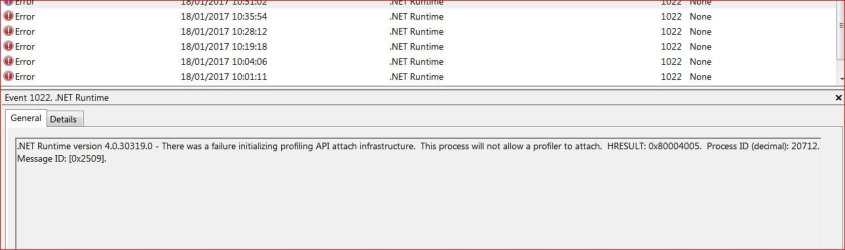
3) the Sharpshell errors occur at the same time as a .NET error (shot attached) and I notice that the last Win 7 Update Rollup contained some .NET features. These errors have only started in the last 7 days or so.
4) I've tried to tie the .NET error PID to something, but of course it's transient, and gone before I can see what it is. As you suggest, logging via Procmon is probably the only way to track it down.
5) there are shots of the Sharpshell and .NET errors attached.
 

Attachments

  • sha1.JPG
    sha1.JPG
    51.9 KB · Views: 1
  • sha2.JPG
    sha2.JPG
    70.5 KB · Views: 2
  • sha3.JPG
    sha3.JPG
    24.4 KB · Views: 1
  • sha4.JPG
    sha4.JPG
    70.4 KB · Views: 1
  • sha5.JPG
    sha5.JPG
    71.3 KB · Views: 2

My Computer

Computer type
PC/Desktop
Computer Manufacturer/Model Number
Dell XPS8300
OS
Win 7 Ultimate 64
CPU
i7
Memory
12gb
Graphics Card(s)
nvidia
Monitor(s) Displays
Dell
Hard Drives
Sata 1gb
Hi Foxfan,
The access denied shown is from windows search/indexing.
normal fix is to turn off reboot turn back on.

Roy
 

My Computer

Computer type
PC/Desktop
Computer Manufacturer/Model Number
medionl/Aspire 6930G/acer x55a
OS
W7 home premium 32bit/W7HP 64bit/w10 tp insider ring
CPU
E5300 dual core
Motherboard
medion MS7366
Memory
3gb
Graphics Card(s)
Nvidia Geforce 7100 Nforce 630i
Monitor(s) Displays
avixc
Internet Speed
n (isp resticted to 72)
Antivirus
mse/pands
Browser
palemoon
Other Info
Belkin Fd7050 n USB using Railink RT2870 drivers, more upto date
Hi Foxfan,
The access denied shown is from windows search/indexing.
normal fix is to turn off reboot turn back on.

Roy

Thanks.

I've turned Search on and off, but it doesn't seem to make any difference.

What I don't understand (because I don't know much about the guts of SharpShell) is why a SharpShell 0 error should have anything to do with the Program Data\Microsoft\Search etc folder.
 

My Computer

Computer type
PC/Desktop
Computer Manufacturer/Model Number
Dell XPS8300
OS
Win 7 Ultimate 64
CPU
i7
Memory
12gb
Graphics Card(s)
nvidia
Monitor(s) Displays
Dell
Hard Drives
Sata 1gb
The relationship between sharpshell and search is, even though search resides in programdata it searches everywhere else and sharpshell is in a program in the Programs Folder (Box\Box Sync). Normally search doesn't search in programdata:

   Information
Even if you uncheck and re-check your system drive C: in an attempt to have it fully indexed, the following folders will always be excluded:
C:\programdata\
C:\Users\Default\AppData
C:\Users\[YOUR_USERNAME]\AppData
C:\Windows​
Source: Windows Search - Configure and Use

I did find a small reference to turning search on and off, mainly the Search Service, if you go this route substitute Icaros with Box\Box Sync, from what I've seen Icaros uses .NET Framework 4.0 and possibly sharpshell. I offer this because the post above, this one, has event errors similar to yours:
There are basically 4 ways (that I know of) to avoid the error:

1. Disable all Icaros Property Filetypes in IcarosConfig (this will disable the Property Handler).
2. Disable Windows Search (Indexing) in Services (if you don't use it).
3. Remove any file locations containing Icaros' Property Filetypes (mkv, ogm, flv etc.), from the 'Included locations' list in the 'Indexing options' utility.
4. Exclude the Icaros Property Filetypes from being indexed, by unchecking them in the 'Indexing options' utility, under Advanced -> File Types.
5. Ignore the error. :)

Just understand that this error is harmless, it's more of a reminder than an actual error.

Source from the Icaros Developer: Archived posts
Have you tried allowing Box Sync Update to run its service automatically?

If you believe this is from a recent .NET update go to programs and features and run a repair on your .NET 4 program., maybe even a sfc /scannow.

The sharpshell (SS) developer has this page near the bottom showing how to use the debugger for it. Make sure SS is signed and registered. He is open to discussions.

Latest version of SS (2.2) I thought of uninstalling Box but seen posts that it didn't help doing that with programs that use SS. Do you have the latest Box Sync?

If you're paying for Box try asking there: Help - Box
 

My Computer

Computer type
PC/Desktop
Computer Manufacturer/Model Number
Gateway DX4831-01e (Mid-Tower Desktop)
OS
Originally Win 7 Hm Prem x64 Ver 6.1.7600 Build 7601-SP1 | Upgraded to Windows 10 December 14, 2019
CPU
Intel i3 530 2.93GHz, 2933MHz 2 Cores 4 Logical Processors
Motherboard
Gateway H57M01 133 megahertz
Memory
6GB of 1,333MHz DDR3 SDRAM
Graphics Card(s)
32MB Intel Graphics Media Accelerator HD IGChip
Sound Card
Realtek High Definition Audio
Monitor(s) Displays
Gateway HX2000 20inch TFT active matrix TN
Screen Resolution
1600 x 900 x 59 hertz
Hard Drives
WDC WD10EADS-00M2B0 [HDD] (1000.20 GB) -- drive 0,
HL-DT-ST DVDRAM GH41N [CD-ROM dr]
Four card readers, and Four USB 2.0
PSU
300watts.
Case
Mid-Tower Desktop
Cooling
Stock from Gateway
Keyboard
Natural Ergonomic Keyboard 4000, see Other Info
Mouse
Orig. Gateway wore out now using Insignia USB wired optical
Internet Speed
Vz FIOS 10ms png 57.64Mbps down 65.53Mbps up Speedtest.org
Antivirus
Zamana Anti-logger with Anti-malware, MSE, Windows Firewall,
Browser
IE11.0.9600.19399-Upd ver11.0.135, Firefox 68.0.1 x64
Other Info
System Specs by Belarc.

BIOS: American Megatrends Inc. P01-A0 11/17/2009

Replaced the MS 'Natural' Standard PS/2 Enhanced 101-102 Keyboard with a new Natural Ergonomic Keyboard 4000 on August 1st 2014.

Canon Pixma MG3222 Printer.

Updated to IE11 on 12102015 | Fios Quantum Router g1100

Additional AV: SpywareBlaster, manual Mbam, SAS
Got it!

This has happened because Box uses these dlls in the Explorer shell (and also the FreeCommander file manager which is based on Explorer). Disabling them using Autoruns gets rid of the EV errors.

If it were not for the generous space allocation on Box, I'd uninstall it right now!
 

Attachments

  • box-dll.JPG
    box-dll.JPG
    46.2 KB · Views: 5

My Computer

Computer type
PC/Desktop
Computer Manufacturer/Model Number
Dell XPS8300
OS
Win 7 Ultimate 64
CPU
i7
Memory
12gb
Graphics Card(s)
nvidia
Monitor(s) Displays
Dell
Hard Drives
Sata 1gb
I hope that's great news, do you think that disabling those .dlls will cause any problems?

Just curious, what type of plan do you have with Box?
 

My Computer

Computer type
PC/Desktop
Computer Manufacturer/Model Number
Gateway DX4831-01e (Mid-Tower Desktop)
OS
Originally Win 7 Hm Prem x64 Ver 6.1.7600 Build 7601-SP1 | Upgraded to Windows 10 December 14, 2019
CPU
Intel i3 530 2.93GHz, 2933MHz 2 Cores 4 Logical Processors
Motherboard
Gateway H57M01 133 megahertz
Memory
6GB of 1,333MHz DDR3 SDRAM
Graphics Card(s)
32MB Intel Graphics Media Accelerator HD IGChip
Sound Card
Realtek High Definition Audio
Monitor(s) Displays
Gateway HX2000 20inch TFT active matrix TN
Screen Resolution
1600 x 900 x 59 hertz
Hard Drives
WDC WD10EADS-00M2B0 [HDD] (1000.20 GB) -- drive 0,
HL-DT-ST DVDRAM GH41N [CD-ROM dr]
Four card readers, and Four USB 2.0
PSU
300watts.
Case
Mid-Tower Desktop
Cooling
Stock from Gateway
Keyboard
Natural Ergonomic Keyboard 4000, see Other Info
Mouse
Orig. Gateway wore out now using Insignia USB wired optical
Internet Speed
Vz FIOS 10ms png 57.64Mbps down 65.53Mbps up Speedtest.org
Antivirus
Zamana Anti-logger with Anti-malware, MSE, Windows Firewall,
Browser
IE11.0.9600.19399-Upd ver11.0.135, Firefox 68.0.1 x64
Other Info
System Specs by Belarc.

BIOS: American Megatrends Inc. P01-A0 11/17/2009

Replaced the MS 'Natural' Standard PS/2 Enhanced 101-102 Keyboard with a new Natural Ergonomic Keyboard 4000 on August 1st 2014.

Canon Pixma MG3222 Printer.

Updated to IE11 on 12102015 | Fios Quantum Router g1100

Additional AV: SpywareBlaster, manual Mbam, SAS
I hope that's great news, do you think that disabling those .dlls will cause any problems?

Just curious, what type of plan do you have with Box?

I don't have Box running all the time (or any other cloud services) and start it up when I need to use it. I haven't seen any problems from the disabled DLLs, but the EV now doesn't log hundreds of Sharpshell errors, which seem to arise any time the shell is invoked.


I still haven't worked out why this went from never producing errors to always doing so. Obviously something was updated or changed, but I'm not sure I'll be able to identify what and when.


I'm still using the basic free Box plan. Where I am, broadband is very slow, especially on uploads, which severely limits the amount of data I can sensibly load to clouds.
 

My Computer

Computer type
PC/Desktop
Computer Manufacturer/Model Number
Dell XPS8300
OS
Win 7 Ultimate 64
CPU
i7
Memory
12gb
Graphics Card(s)
nvidia
Monitor(s) Displays
Dell
Hard Drives
Sata 1gb
Do you use PowerArchiver (PA)? Here's a recent thread were one of the admins says about sharpshell and PA:
it is a backup bug, it doesnt have anything to do with icons in any way, it is just that backup writes wrong values in PA registry once completed and causes issues…
Even if you don't use PA; Is FreeCommander similar? It may still be a clue to what's going on. Maybe Box has the same problem with sharpshell and Box's registry. You've already touched on that in your #7 post.

I agree with your assumption that:
Obviously something was updated or changed,
Being that sharpshell and possibly Box works with .net, have you tried repairing your .net versions? I don't remember if repairing was suggested earlier or not.

Go to: Control Panel\All Control Panel Items\Programs and Features, let it populate then look for .net framework >left click on the entry [if more than one do each separately] >click on uninstall/change >make sure the repair radio button is selected and click on next and follow the prompts to finish.
The initial screen does say: repair to its original state, so you may want to consider a windows update check, I never did a check thinking that windows would catch-up during the next monthly update, in the mean time it fixed a problem that I had and it never came back. At one time I had several .net entries back to v2.0 but over the years microsoft consolidated them all to v4.6.1 .

In case you see an error that the native repair can not continue because the installer (MSI) is missing or corrupt [that could be the cause of your problem] try this: Introducing the Microsoft .NET Framework Repair Tool/.net blog
Make sure you click on the download center link shown in the "get the latest version section", the blog states that the tool goes up to v4.5.1 but the details section at the download page has a note that it is revised to work on v4.6.1 back to v2.0 SP1 . Related: .NET Framework Versions and Dependencies


I looked around and Box is one of few storage solutions that offer free/10GB/250MB upload, the only other that offers greater is google drive at 15GB free, upload limits vary.
Some users hate google because of its ubiquity and privacy concerns but I use gmail and I've set the privacy controls to max, they've been running HTTPS for 12years now and gmail's been encrypted since 2010, we've been using gmail since 2004 and the only problem, if you can call it a problem was the other day when my wife started up her new laptop and signed-in to her gmail, we both received an email notifying us if we recognize the new sign-in, all we had to do is click on yes, it's OK, and that was that.

I could go on and make this tl;dnr :o so if you have any questions about google drive just ask.

 

My Computer

Computer type
PC/Desktop
Computer Manufacturer/Model Number
Gateway DX4831-01e (Mid-Tower Desktop)
OS
Originally Win 7 Hm Prem x64 Ver 6.1.7600 Build 7601-SP1 | Upgraded to Windows 10 December 14, 2019
CPU
Intel i3 530 2.93GHz, 2933MHz 2 Cores 4 Logical Processors
Motherboard
Gateway H57M01 133 megahertz
Memory
6GB of 1,333MHz DDR3 SDRAM
Graphics Card(s)
32MB Intel Graphics Media Accelerator HD IGChip
Sound Card
Realtek High Definition Audio
Monitor(s) Displays
Gateway HX2000 20inch TFT active matrix TN
Screen Resolution
1600 x 900 x 59 hertz
Hard Drives
WDC WD10EADS-00M2B0 [HDD] (1000.20 GB) -- drive 0,
HL-DT-ST DVDRAM GH41N [CD-ROM dr]
Four card readers, and Four USB 2.0
PSU
300watts.
Case
Mid-Tower Desktop
Cooling
Stock from Gateway
Keyboard
Natural Ergonomic Keyboard 4000, see Other Info
Mouse
Orig. Gateway wore out now using Insignia USB wired optical
Internet Speed
Vz FIOS 10ms png 57.64Mbps down 65.53Mbps up Speedtest.org
Antivirus
Zamana Anti-logger with Anti-malware, MSE, Windows Firewall,
Browser
IE11.0.9600.19399-Upd ver11.0.135, Firefox 68.0.1 x64
Other Info
System Specs by Belarc.

BIOS: American Megatrends Inc. P01-A0 11/17/2009

Replaced the MS 'Natural' Standard PS/2 Enhanced 101-102 Keyboard with a new Natural Ergonomic Keyboard 4000 on August 1st 2014.

Canon Pixma MG3222 Printer.

Updated to IE11 on 12102015 | Fios Quantum Router g1100

Additional AV: SpywareBlaster, manual Mbam, SAS
Thanks for your response.

The PowerArchiver forum thread is in fact mine. I'm a tester of the latest version(s), and my Sharpshell problems arose at around the time I installed a beta, so I was trying to discover whether the two are related. It turns out that they're not.

FreeCommander is a jazzed-up file manager, which is built over Explorer. It shares the shell, which is why either it or Explorer produced the errors.

I have considered a .NET repair, but, since I disabled the DLLs from Box, I haven't had any errors reported from .NET. I'm pretty sure I had several versions listed in programs, but since the December 2016 .NET Rollup, I've now only got 4.6.2.

I've used Box, Dropbox, Googledrive and OneDrive across Windows, Android and iOS. Whilst I share the reservations about Google, as a range of applications across those platforms, it fits most of my needs, and I have set security and privacy as high as it allows.
Box we've talked about, and OneDrive now barely cuts it IMHO. Dropbox is the next best solution for me.
 

My Computer

Computer type
PC/Desktop
Computer Manufacturer/Model Number
Dell XPS8300
OS
Win 7 Ultimate 64
CPU
i7
Memory
12gb
Graphics Card(s)
nvidia
Monitor(s) Displays
Dell
Hard Drives
Sata 1gb
You're welcome,

Ahh...PA_Fan, Foxfan, now it clicks... As long as your happy, until later my friend.
 

My Computer

Computer type
PC/Desktop
Computer Manufacturer/Model Number
Gateway DX4831-01e (Mid-Tower Desktop)
OS
Originally Win 7 Hm Prem x64 Ver 6.1.7600 Build 7601-SP1 | Upgraded to Windows 10 December 14, 2019
CPU
Intel i3 530 2.93GHz, 2933MHz 2 Cores 4 Logical Processors
Motherboard
Gateway H57M01 133 megahertz
Memory
6GB of 1,333MHz DDR3 SDRAM
Graphics Card(s)
32MB Intel Graphics Media Accelerator HD IGChip
Sound Card
Realtek High Definition Audio
Monitor(s) Displays
Gateway HX2000 20inch TFT active matrix TN
Screen Resolution
1600 x 900 x 59 hertz
Hard Drives
WDC WD10EADS-00M2B0 [HDD] (1000.20 GB) -- drive 0,
HL-DT-ST DVDRAM GH41N [CD-ROM dr]
Four card readers, and Four USB 2.0
PSU
300watts.
Case
Mid-Tower Desktop
Cooling
Stock from Gateway
Keyboard
Natural Ergonomic Keyboard 4000, see Other Info
Mouse
Orig. Gateway wore out now using Insignia USB wired optical
Internet Speed
Vz FIOS 10ms png 57.64Mbps down 65.53Mbps up Speedtest.org
Antivirus
Zamana Anti-logger with Anti-malware, MSE, Windows Firewall,
Browser
IE11.0.9600.19399-Upd ver11.0.135, Firefox 68.0.1 x64
Other Info
System Specs by Belarc.

BIOS: American Megatrends Inc. P01-A0 11/17/2009

Replaced the MS 'Natural' Standard PS/2 Enhanced 101-102 Keyboard with a new Natural Ergonomic Keyboard 4000 on August 1st 2014.

Canon Pixma MG3222 Printer.

Updated to IE11 on 12102015 | Fios Quantum Router g1100

Additional AV: SpywareBlaster, manual Mbam, SAS
Hi Foxfan,

Not sure if you've seen this:
Box.com has changed the way it handles publicly shared accounts and folders after a researcher found confidential documents and data belonging to Box.com users via Google, Bing and other search engines. While Box.com maintains this is a case of its customers unintentionally over-sharing, it says it has “fixed” the issue.

Source: Box.com Plugs Account Data Leakage Flaw | Threatpost | The first stop for security news
btw: You may have seen Nicolredmay's post and my follow-up to it, I alerted management to have it moved and mine deleted.
 

My Computer

Computer type
PC/Desktop
Computer Manufacturer/Model Number
Gateway DX4831-01e (Mid-Tower Desktop)
OS
Originally Win 7 Hm Prem x64 Ver 6.1.7600 Build 7601-SP1 | Upgraded to Windows 10 December 14, 2019
CPU
Intel i3 530 2.93GHz, 2933MHz 2 Cores 4 Logical Processors
Motherboard
Gateway H57M01 133 megahertz
Memory
6GB of 1,333MHz DDR3 SDRAM
Graphics Card(s)
32MB Intel Graphics Media Accelerator HD IGChip
Sound Card
Realtek High Definition Audio
Monitor(s) Displays
Gateway HX2000 20inch TFT active matrix TN
Screen Resolution
1600 x 900 x 59 hertz
Hard Drives
WDC WD10EADS-00M2B0 [HDD] (1000.20 GB) -- drive 0,
HL-DT-ST DVDRAM GH41N [CD-ROM dr]
Four card readers, and Four USB 2.0
PSU
300watts.
Case
Mid-Tower Desktop
Cooling
Stock from Gateway
Keyboard
Natural Ergonomic Keyboard 4000, see Other Info
Mouse
Orig. Gateway wore out now using Insignia USB wired optical
Internet Speed
Vz FIOS 10ms png 57.64Mbps down 65.53Mbps up Speedtest.org
Antivirus
Zamana Anti-logger with Anti-malware, MSE, Windows Firewall,
Browser
IE11.0.9600.19399-Upd ver11.0.135, Firefox 68.0.1 x64
Other Info
System Specs by Belarc.

BIOS: American Megatrends Inc. P01-A0 11/17/2009

Replaced the MS 'Natural' Standard PS/2 Enhanced 101-102 Keyboard with a new Natural Ergonomic Keyboard 4000 on August 1st 2014.

Canon Pixma MG3222 Printer.

Updated to IE11 on 12102015 | Fios Quantum Router g1100

Additional AV: SpywareBlaster, manual Mbam, SAS
Very interesting, and thanks for the heads-up.

I'm not entirely happy with the levels of security on any of the cloud services, and I certainly don't share anything with anyone i.e. mine are all private. If I did want to share, I'd open a free account just for that (away from my stuff), and wouldn't share anything critical anyway.

I encrypt everything that needs it as well.
 

My Computer

Computer type
PC/Desktop
Computer Manufacturer/Model Number
Dell XPS8300
OS
Win 7 Ultimate 64
CPU
i7
Memory
12gb
Graphics Card(s)
nvidia
Monitor(s) Displays
Dell
Hard Drives
Sata 1gb
You're welcome...:thumbsup:, unfortunately it's a sign of the times we live in.... :(
 

My Computer

Computer type
PC/Desktop
Computer Manufacturer/Model Number
Gateway DX4831-01e (Mid-Tower Desktop)
OS
Originally Win 7 Hm Prem x64 Ver 6.1.7600 Build 7601-SP1 | Upgraded to Windows 10 December 14, 2019
CPU
Intel i3 530 2.93GHz, 2933MHz 2 Cores 4 Logical Processors
Motherboard
Gateway H57M01 133 megahertz
Memory
6GB of 1,333MHz DDR3 SDRAM
Graphics Card(s)
32MB Intel Graphics Media Accelerator HD IGChip
Sound Card
Realtek High Definition Audio
Monitor(s) Displays
Gateway HX2000 20inch TFT active matrix TN
Screen Resolution
1600 x 900 x 59 hertz
Hard Drives
WDC WD10EADS-00M2B0 [HDD] (1000.20 GB) -- drive 0,
HL-DT-ST DVDRAM GH41N [CD-ROM dr]
Four card readers, and Four USB 2.0
PSU
300watts.
Case
Mid-Tower Desktop
Cooling
Stock from Gateway
Keyboard
Natural Ergonomic Keyboard 4000, see Other Info
Mouse
Orig. Gateway wore out now using Insignia USB wired optical
Internet Speed
Vz FIOS 10ms png 57.64Mbps down 65.53Mbps up Speedtest.org
Antivirus
Zamana Anti-logger with Anti-malware, MSE, Windows Firewall,
Browser
IE11.0.9600.19399-Upd ver11.0.135, Firefox 68.0.1 x64
Other Info
System Specs by Belarc.

BIOS: American Megatrends Inc. P01-A0 11/17/2009

Replaced the MS 'Natural' Standard PS/2 Enhanced 101-102 Keyboard with a new Natural Ergonomic Keyboard 4000 on August 1st 2014.

Canon Pixma MG3222 Printer.

Updated to IE11 on 12102015 | Fios Quantum Router g1100

Additional AV: SpywareBlaster, manual Mbam, SAS
Back
Top