What happened when you ran the installer file? Did it complete normally? Did it fail with an error message, complaining about hardware not found?I uninstalled the original drive I had downloaded from Trandscent and downloaded and installed the driver you suggested because I didn't get a CD with the expansion card. Didn't help.
Well, that's certainly the good news we were shooting for. I suspect reseating the card and trying another power supply cable were good things to try, and they obviously produced the desired results.So today I went back into computer and pushed harder on the expansion card to make sure it was seated in board. I also, which I think might of been the problem, was remove the 4 pin white connector and plug it into another white 4 pin connector. I wasn't sure which 4 pin white connectors were hot and didn't know for sure how to test and find a power supply for sure.
Anyway everything is working.
However it's still not possible for the device to be working without drivers. Your screenshot of Device Manager showing the two Renesas USB 3.0 devices is perfect. So my guess is that you are now actually running the driver I pointed you to and that you ran (but said "didn't help"). While it might not seemed to have helped initially, after you re-seated the card and used a different power supply cable the just-installed drivers now actually did have proper hardware to apply themselves to.
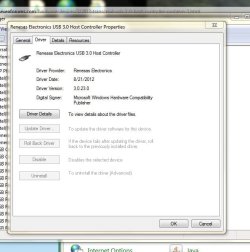
If you right-click on the Renesas 3.0 XHCI Host Controller item in Device Manager, select Properties, and then select the Driver tab, I suspect you will now see that the driver IS installed and that it is the very Renesas 3.0.23.0 version from 8/21/2012 that I pointed you to and that you just installed.
If it's not that driver, it's still got to be some other driver... because hardware can't work without some driver installed. So what is the driver vendor, version and date, shown on the Driver tab of that device??
Also, if you go into Control Panel, Programs, and then slide down until you see the Renesas USB 3.0 driver software (which I'm sure will be there), look over on the right and you'll see the "installed date" and "version". Again, I suspect it will be today's date and version 3.0.23.0 corresponding to your installing the file I pointed you to today. So, what do you see in Control Panel?
Anyway, sounds like you've emerged victorious!! And that's what's important. Excellent.
My Computer
- Computer type
- PC/Desktop
- Computer Manufacturer/Model Number
- Home-built, two systems (1) and (2)
- OS
- Windows 7 Pro x64 (1), Win7 Pro X64 (2)
- CPU
- i5-3350p 3.1Ghz/6MB-cache (1); E8400 3.0Ghz/6MB-cache (2)
- Motherboard
- ASUS P8Z77-V Pro (1); ASUS P5Q3 (2)
- Memory
- 8GB PC3-12800 DDR3 (1); 4GB PC3-10600 DDR3 (2)
- Graphics Card(s)
- ATI HD7750 (1), (see TV cards); ATI R7 250 (2)
- Sound Card
- Realtek ALC892 HD Audio (1); Realtek ALC1200 HD Audio (2)
- Monitor(s) Displays
- Eizo HD2441W LCD, Eizo S2433W (1); Eizo 24" S2433W (2)
- Screen Resolution
- 1920x1200, 1920x1200 (1); 1920x1200 (2)
- Hard Drives
- (1) 1TB SATA-II (7200RPM), 2x2TB SATA-III (7200RPM), 250GB SATA-III (10000RPM) for OS; 2x2TB external USB 3.0
(2) 320GB SATA-II (7200RPM), 750GB SATA-II (7200RPM), 150GB SATA-II (10000RPM) for OS; 2TB external USB 3.0
- PSU
- Nesteq ECS-6001 600W (1); Nesteq ECS-5001 500W (2)
- Case
- Acousti-Case 360 (1) and (2)
- Cooling
- Noctua NH-U12P SE2 for CPU, 2x120mm case fans (1) and (2)
- Keyboard
- IBM PS/2 (1) and (2)
- Mouse
- Logitech MX Revolution wireless (1); Microsoft wired (2)
- Internet Speed
- 100mbps down / 10mbps up
- Antivirus
- Microsoft Security Essentials; Malwarebyte Anti-Malware Pro
- Browser
- Firefox
- Other Info
- Ceton InfiniTV 4-tuner cablecard-enabled TV card as well as Hauppauge HVR-2250 OTA/ATSC 2-tuner TV card in (1), running under Win7 WMC