transcend usb 3.0 and host controller problem

Maxheadroom

New member
Power User
VIP
Local time
7:00 PM
Messages
246
ive spent about 2 hours trying to sort this simple job out to no avail so would be appreciated if someone could help,

i bought a transcend usb 3.0 pcie card today followed the instructions installing it then installed the driver from transcend, rebooted the pc and tested with a new samsung 1tb m3 external drive, files move across but what looks like the same speed as usb 2.0.
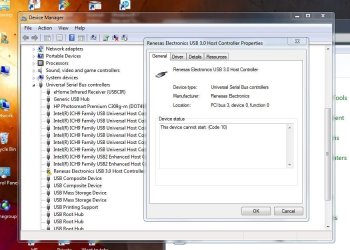
everything seems ok in device manager there's no yellow flags.

in all programs theres a new program, Usb 3.0 Host Controller utility ive tried running that but get the message usb 3.0 host controller not found, im guessing this is the reason for the slow speed.
 

My Computer

Computer Manufacturer/Model Number
home built
OS
windows 7 64bit build 7600
CPU
Intel I7 920
Motherboard
ASUS P6T Deluxe V2
Memory
Corsair 6GB (3x2GB) 1600MHz Triple Channel i7
Graphics Card(s)
XFX RADEON HD 5870
Sound Card
Creative Xfi Elite pro
Monitor(s) Displays
Hyundai W240D 24" Samsung Syncmaster 930
Screen Resolution
1920x1200 and 1280x1024
Hard Drives
WD Velociraptor 150gb
Western Digital WD7502ABYS 750GB Raid Edition
PSU
Corsair 850W TX Series PSU
Case
Coolermaster HAF 932 Full Tower
Cooling
Noctua NH-U12P
Keyboard
logitech G15 orange
Mouse
logitech mx revolution
Internet Speed
13mb
Hi there ... I think your Transcend USB 3.0 Card uses the Renesas Electronics -> USB 3.0 Host Controller Driver .. That should have come with the Driver Download from Transcend Website ... Have to say Renesas Drivers seem to have problems in a lot of Systems .. You can Download this Driver from the Renesas Website .. Sorry do not have any more suggestions ....
 

My Computer

Computer Manufacturer/Model Number
W530-3630QM1
OS
windows 7 home 64bit
CPU
INTEL-CORE I7
Memory
16GB
Hard Drives
750GB
Browser
Chrome
i bought a transcend usb 3.0 pcie card today followed the instructions installing it then installed the driver from transcend, rebooted the pc and tested with a new samsung 1tb m3 external drive, files move across but what looks like the same speed as usb 2.0.
everything seems ok in device manager there's no yellow flags.

in all programs theres a new program, Usb 3.0 Host Controller utility ive tried running that but get the message usb 3.0 host controller not found, im guessing this is the reason for the slow speed.
I have this Transcend 2-port USB 3.0 PCIe card in my own machine, and it works perfectly. Been running with it for several years problem-free, to handle my Verbatim 2TB USB 3.0 external drive.

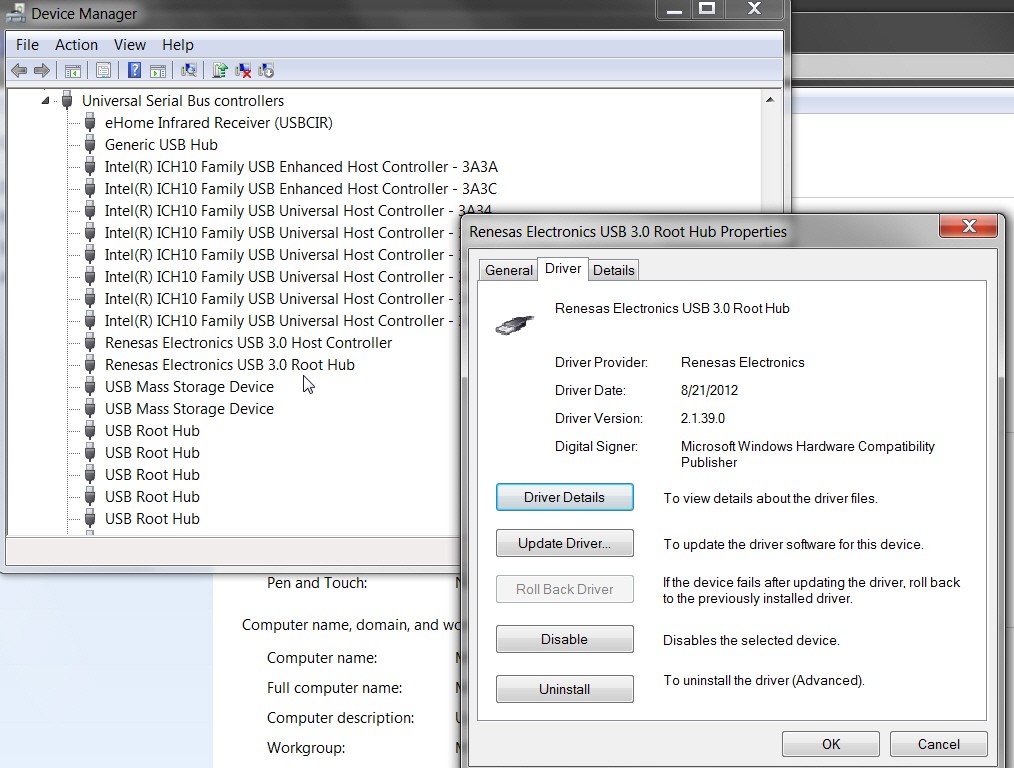
If you have installed the drivers from the Transcend web site correctly, you should show TWO items from Renesas in Device Manager:

lpd5.jpg


If you have a USB 3.0 drive plugged in, and you didn't have USB 3.0 support, you'd get a popup message from Windows advising "you could get faster performance of your USB 3.0 device if...".

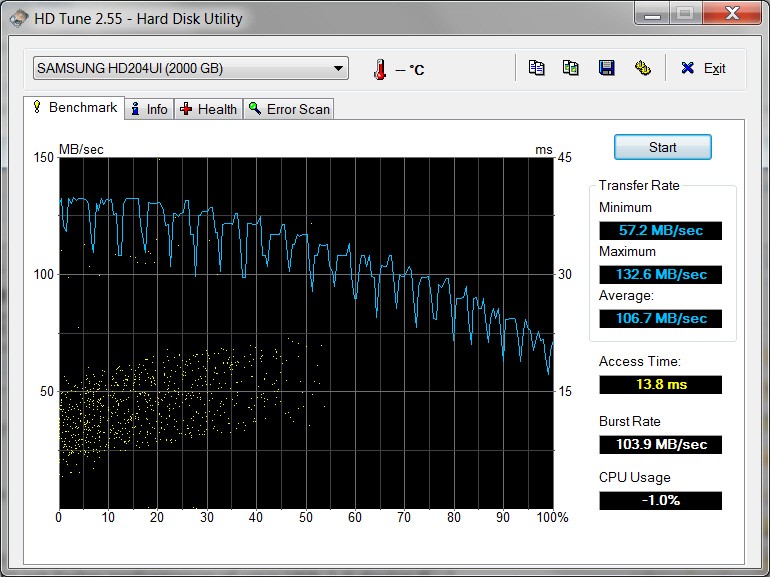
Also, I don't know what is the basis for your feeling that it's only performing at USB 2.0 speed, but if you download and install "HD Tune" (free) and run it on your own external USB 3.0 drive, you should get performance that probably will look similar to the following (note: speeds are in BYTES/sec):

48pu.jpg


Note that external USB 3.0 drives are typically SATA-II/III drives in an external enclosure that uses the USB 3.0 interface. But just because it's a 6.0Gb/s SATA-III drive in the case, doesn't mean you're going to get 6.0Gb/s SATA-III performance. You'll still get USB 3.0 performance.

When I run backups to my external USB 3.0 drive, I may get an average of about 800-900Mb/s, which is around the value of 100MB/s or thereabouts as shown with HD Tune.


Most important is to be sure your Device Manager setup looks like mine, and that you have the correct driver from Transcend for your particular card. My card is the TS-PDU3.
 
Last edited:

My Computer

Computer type
PC/Desktop
Computer Manufacturer/Model Number
Home-built, two systems (1) and (2)
OS
Windows 7 Pro x64 (1), Win7 Pro X64 (2)
CPU
i5-3350p 3.1Ghz/6MB-cache (1); E8400 3.0Ghz/6MB-cache (2)
Motherboard
ASUS P8Z77-V Pro (1); ASUS P5Q3 (2)
Memory
8GB PC3-12800 DDR3 (1); 4GB PC3-10600 DDR3 (2)
Graphics Card(s)
ATI HD7750 (1), (see TV cards); ATI R7 250 (2)
Sound Card
Realtek ALC892 HD Audio (1); Realtek ALC1200 HD Audio (2)
Monitor(s) Displays
Eizo HD2441W LCD, Eizo S2433W (1); Eizo 24" S2433W (2)
Screen Resolution
1920x1200, 1920x1200 (1); 1920x1200 (2)
Hard Drives
(1) 1TB SATA-II (7200RPM), 2x2TB SATA-III (7200RPM), 250GB SATA-III (10000RPM) for OS; 2x2TB external USB 3.0

(2) 320GB SATA-II (7200RPM), 750GB SATA-II (7200RPM), 150GB SATA-II (10000RPM) for OS; 2TB external USB 3.0
PSU
Nesteq ECS-6001 600W (1); Nesteq ECS-5001 500W (2)
Case
Acousti-Case 360 (1) and (2)
Cooling
Noctua NH-U12P SE2 for CPU, 2x120mm case fans (1) and (2)
Keyboard
IBM PS/2 (1) and (2)
Mouse
Logitech MX Revolution wireless (1); Microsoft wired (2)
Internet Speed
100mbps down / 10mbps up
Antivirus
Microsoft Security Essentials; Malwarebyte Anti-Malware Pro
Browser
Firefox
Other Info
Ceton InfiniTV 4-tuner cablecard-enabled TV card as well as Hauppauge HVR-2250 OTA/ATSC 2-tuner TV card in (1), running under Win7 WMC
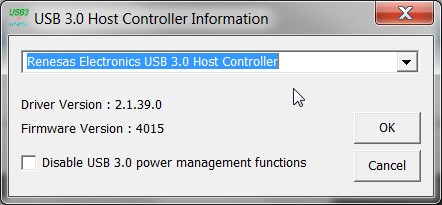
Just updated to the 2.1.39.0 driver which is the latest version on the Transcend site (for my TS-PDU3).

f69n.jpg
 

My Computer

Computer type
PC/Desktop
Computer Manufacturer/Model Number
Home-built, two systems (1) and (2)
OS
Windows 7 Pro x64 (1), Win7 Pro X64 (2)
CPU
i5-3350p 3.1Ghz/6MB-cache (1); E8400 3.0Ghz/6MB-cache (2)
Motherboard
ASUS P8Z77-V Pro (1); ASUS P5Q3 (2)
Memory
8GB PC3-12800 DDR3 (1); 4GB PC3-10600 DDR3 (2)
Graphics Card(s)
ATI HD7750 (1), (see TV cards); ATI R7 250 (2)
Sound Card
Realtek ALC892 HD Audio (1); Realtek ALC1200 HD Audio (2)
Monitor(s) Displays
Eizo HD2441W LCD, Eizo S2433W (1); Eizo 24" S2433W (2)
Screen Resolution
1920x1200, 1920x1200 (1); 1920x1200 (2)
Hard Drives
(1) 1TB SATA-II (7200RPM), 2x2TB SATA-III (7200RPM), 250GB SATA-III (10000RPM) for OS; 2x2TB external USB 3.0

(2) 320GB SATA-II (7200RPM), 750GB SATA-II (7200RPM), 150GB SATA-II (10000RPM) for OS; 2TB external USB 3.0
PSU
Nesteq ECS-6001 600W (1); Nesteq ECS-5001 500W (2)
Case
Acousti-Case 360 (1) and (2)
Cooling
Noctua NH-U12P SE2 for CPU, 2x120mm case fans (1) and (2)
Keyboard
IBM PS/2 (1) and (2)
Mouse
Logitech MX Revolution wireless (1); Microsoft wired (2)
Internet Speed
100mbps down / 10mbps up
Antivirus
Microsoft Security Essentials; Malwarebyte Anti-Malware Pro
Browser
Firefox
Other Info
Ceton InfiniTV 4-tuner cablecard-enabled TV card as well as Hauppauge HVR-2250 OTA/ATSC 2-tuner TV card in (1), running under Win7 WMC
in all programs theres a new program, Usb 3.0 Host Controller utility ive tried running that but get the message usb 3.0 host controller not found, im guessing this is the reason for the slow speed.
After running the downloaded installer to the 2.1.39.0 version of the Transcend driver, running that "USB 3.0 Host Controller Utility" produces the following:

moyv.jpg


Note that in order for me to be able to run the driver update I had to re-boot (to be sure no programs were using the USB 3.0 adapter). I also had to stop my "Green Button" software which manages the Verbatim drive and spins it down after being idle for 10 minutes, again to guarantee that no programs were actually using the USB 3.0 adapter.

Once that was done, the driver update installation went fine.
 

My Computer

Computer type
PC/Desktop
Computer Manufacturer/Model Number
Home-built, two systems (1) and (2)
OS
Windows 7 Pro x64 (1), Win7 Pro X64 (2)
CPU
i5-3350p 3.1Ghz/6MB-cache (1); E8400 3.0Ghz/6MB-cache (2)
Motherboard
ASUS P8Z77-V Pro (1); ASUS P5Q3 (2)
Memory
8GB PC3-12800 DDR3 (1); 4GB PC3-10600 DDR3 (2)
Graphics Card(s)
ATI HD7750 (1), (see TV cards); ATI R7 250 (2)
Sound Card
Realtek ALC892 HD Audio (1); Realtek ALC1200 HD Audio (2)
Monitor(s) Displays
Eizo HD2441W LCD, Eizo S2433W (1); Eizo 24" S2433W (2)
Screen Resolution
1920x1200, 1920x1200 (1); 1920x1200 (2)
Hard Drives
(1) 1TB SATA-II (7200RPM), 2x2TB SATA-III (7200RPM), 250GB SATA-III (10000RPM) for OS; 2x2TB external USB 3.0

(2) 320GB SATA-II (7200RPM), 750GB SATA-II (7200RPM), 150GB SATA-II (10000RPM) for OS; 2TB external USB 3.0
PSU
Nesteq ECS-6001 600W (1); Nesteq ECS-5001 500W (2)
Case
Acousti-Case 360 (1) and (2)
Cooling
Noctua NH-U12P SE2 for CPU, 2x120mm case fans (1) and (2)
Keyboard
IBM PS/2 (1) and (2)
Mouse
Logitech MX Revolution wireless (1); Microsoft wired (2)
Internet Speed
100mbps down / 10mbps up
Antivirus
Microsoft Security Essentials; Malwarebyte Anti-Malware Pro
Browser
Firefox
Other Info
Ceton InfiniTV 4-tuner cablecard-enabled TV card as well as Hauppauge HVR-2250 OTA/ATSC 2-tuner TV card in (1), running under Win7 WMC
everything in driver manager looks the same except my driver reports the version being 3.0.23.0, theres two drivers on that page i installed the one that says 'with SATA power connector' as mine has that connector

a transfer of a 2.4 gb file took 50 seconds at an average speed of 50MB/s
the usb host controller utility is still saying the host controller cant be found
 

My Computer

Computer Manufacturer/Model Number
home built
OS
windows 7 64bit build 7600
CPU
Intel I7 920
Motherboard
ASUS P6T Deluxe V2
Memory
Corsair 6GB (3x2GB) 1600MHz Triple Channel i7
Graphics Card(s)
XFX RADEON HD 5870
Sound Card
Creative Xfi Elite pro
Monitor(s) Displays
Hyundai W240D 24" Samsung Syncmaster 930
Screen Resolution
1920x1200 and 1280x1024
Hard Drives
WD Velociraptor 150gb
Western Digital WD7502ABYS 750GB Raid Edition
PSU
Corsair 850W TX Series PSU
Case
Coolermaster HAF 932 Full Tower
Cooling
Noctua NH-U12P
Keyboard
logitech G15 orange
Mouse
logitech mx revolution
Internet Speed
13mb
Just to be sure, is your card the TS-PDC3 (4-pin Molex plus SATA power connectors)? Mine is TS-PDU3 (4-pin Molex power connector only).

And you do have the SATA power connector on the card actually connected via power cable to your PSU, right? The card cannot work in USB 3.0 mode without the external PSU power connection.

Don't know what else to suggest, other than to return the card as defective, and get a replacement. I've never used a TS-PDC3, but I've used two TS-PDU3 cards in two machines and both have worked problem-free.

If your Device Manager shows the two Renesas items properly as in my screenshot (one of which is the USB 3.0 Host Controller), and yet their utility program claims "host controller not found", I don't know what to say but to try a replacement card (TS-PDU3 if you have Molex power cable nearby).

Maybe try another vendor's similar card, like StarTech?
 

My Computer

Computer type
PC/Desktop
Computer Manufacturer/Model Number
Home-built, two systems (1) and (2)
OS
Windows 7 Pro x64 (1), Win7 Pro X64 (2)
CPU
i5-3350p 3.1Ghz/6MB-cache (1); E8400 3.0Ghz/6MB-cache (2)
Motherboard
ASUS P8Z77-V Pro (1); ASUS P5Q3 (2)
Memory
8GB PC3-12800 DDR3 (1); 4GB PC3-10600 DDR3 (2)
Graphics Card(s)
ATI HD7750 (1), (see TV cards); ATI R7 250 (2)
Sound Card
Realtek ALC892 HD Audio (1); Realtek ALC1200 HD Audio (2)
Monitor(s) Displays
Eizo HD2441W LCD, Eizo S2433W (1); Eizo 24" S2433W (2)
Screen Resolution
1920x1200, 1920x1200 (1); 1920x1200 (2)
Hard Drives
(1) 1TB SATA-II (7200RPM), 2x2TB SATA-III (7200RPM), 250GB SATA-III (10000RPM) for OS; 2x2TB external USB 3.0

(2) 320GB SATA-II (7200RPM), 750GB SATA-II (7200RPM), 150GB SATA-II (10000RPM) for OS; 2TB external USB 3.0
PSU
Nesteq ECS-6001 600W (1); Nesteq ECS-5001 500W (2)
Case
Acousti-Case 360 (1) and (2)
Cooling
Noctua NH-U12P SE2 for CPU, 2x120mm case fans (1) and (2)
Keyboard
IBM PS/2 (1) and (2)
Mouse
Logitech MX Revolution wireless (1); Microsoft wired (2)
Internet Speed
100mbps down / 10mbps up
Antivirus
Microsoft Security Essentials; Malwarebyte Anti-Malware Pro
Browser
Firefox
Other Info
Ceton InfiniTV 4-tuner cablecard-enabled TV card as well as Hauppauge HVR-2250 OTA/ATSC 2-tuner TV card in (1), running under Win7 WMC
a transfer of a 2.4 gb file took 50 seconds at an average speed of 50MB/s
I just did a 4.9GB/s file copy in 51 seconds. So your rate is 1/2 mine.

But I'm copying from a reasonably fast SATA-II drive to the USB 3.0 drive. Your source drive may be slower than mine, so the whole copy task is slowed down by a slower source drive?

What does HD Tune show when testing out your USB drive by itself? How does it compare to my screenshot?
 

My Computer

Computer type
PC/Desktop
Computer Manufacturer/Model Number
Home-built, two systems (1) and (2)
OS
Windows 7 Pro x64 (1), Win7 Pro X64 (2)
CPU
i5-3350p 3.1Ghz/6MB-cache (1); E8400 3.0Ghz/6MB-cache (2)
Motherboard
ASUS P8Z77-V Pro (1); ASUS P5Q3 (2)
Memory
8GB PC3-12800 DDR3 (1); 4GB PC3-10600 DDR3 (2)
Graphics Card(s)
ATI HD7750 (1), (see TV cards); ATI R7 250 (2)
Sound Card
Realtek ALC892 HD Audio (1); Realtek ALC1200 HD Audio (2)
Monitor(s) Displays
Eizo HD2441W LCD, Eizo S2433W (1); Eizo 24" S2433W (2)
Screen Resolution
1920x1200, 1920x1200 (1); 1920x1200 (2)
Hard Drives
(1) 1TB SATA-II (7200RPM), 2x2TB SATA-III (7200RPM), 250GB SATA-III (10000RPM) for OS; 2x2TB external USB 3.0

(2) 320GB SATA-II (7200RPM), 750GB SATA-II (7200RPM), 150GB SATA-II (10000RPM) for OS; 2TB external USB 3.0
PSU
Nesteq ECS-6001 600W (1); Nesteq ECS-5001 500W (2)
Case
Acousti-Case 360 (1) and (2)
Cooling
Noctua NH-U12P SE2 for CPU, 2x120mm case fans (1) and (2)
Keyboard
IBM PS/2 (1) and (2)
Mouse
Logitech MX Revolution wireless (1); Microsoft wired (2)
Internet Speed
100mbps down / 10mbps up
Antivirus
Microsoft Security Essentials; Malwarebyte Anti-Malware Pro
Browser
Firefox
Other Info
Ceton InfiniTV 4-tuner cablecard-enabled TV card as well as Hauppauge HVR-2250 OTA/ATSC 2-tuner TV card in (1), running under Win7 WMC
heres mine


p3qd.png


n1p3qdp
 

My Computer

Computer Manufacturer/Model Number
home built
OS
windows 7 64bit build 7600
CPU
Intel I7 920
Motherboard
ASUS P6T Deluxe V2
Memory
Corsair 6GB (3x2GB) 1600MHz Triple Channel i7
Graphics Card(s)
XFX RADEON HD 5870
Sound Card
Creative Xfi Elite pro
Monitor(s) Displays
Hyundai W240D 24" Samsung Syncmaster 930
Screen Resolution
1920x1200 and 1280x1024
Hard Drives
WD Velociraptor 150gb
Western Digital WD7502ABYS 750GB Raid Edition
PSU
Corsair 850W TX Series PSU
Case
Coolermaster HAF 932 Full Tower
Cooling
Noctua NH-U12P
Keyboard
logitech G15 orange
Mouse
logitech mx revolution
Internet Speed
13mb
You know, I am suspicious of your Samsung M3 drive as being "the culprit" here.

Aside from the strange bizarre periodic/cyclical performance battering in the middle of that graph that greatly distorted the average (were you running something else in the machine while doing this benchmark test??) the starting and ending graph values doesn't look all that different from an "official benchmark" of the drive done by CDRInfo. Your graph looks like their graph (minus your strange up/down spikes). And your access time is the same as theirs.

It's a 5400rpm drive, with only 8MB cache.

You didn't post a screenshot of Device Manager, but you do have BOTH of the Renesas items (USB 3.0 Root Hub as well as USB 3.0 Host Controller)? And the Host Controller right-click -> properties shows "this device is working properly"? I can't explain why the Renesas Host Controller Utility shows "cannot find" for you.

Do you have access to another USB 3.0 drive you might try? A larger/faster one, just for comparison?

Remember, USB 2.0 is only rated at 480Mb/s. That's what, 50-60MB/s? Your drive is obviously performing much better than that (at least twice USB 2.0, strongly suggesting it cannot truly be running at USB 2.0 speed), despite its unquestionably "relatively low" performance as far as other external USB 3.0 drives. For example, the Samsung HD204UI SATA-II drive which is actually inside my own Verbatim drive (shown in my HD Tune picture) has 32MB cache, vs. 8MB in your drive's case. That makes a difference.
 

My Computer

Computer type
PC/Desktop
Computer Manufacturer/Model Number
Home-built, two systems (1) and (2)
OS
Windows 7 Pro x64 (1), Win7 Pro X64 (2)
CPU
i5-3350p 3.1Ghz/6MB-cache (1); E8400 3.0Ghz/6MB-cache (2)
Motherboard
ASUS P8Z77-V Pro (1); ASUS P5Q3 (2)
Memory
8GB PC3-12800 DDR3 (1); 4GB PC3-10600 DDR3 (2)
Graphics Card(s)
ATI HD7750 (1), (see TV cards); ATI R7 250 (2)
Sound Card
Realtek ALC892 HD Audio (1); Realtek ALC1200 HD Audio (2)
Monitor(s) Displays
Eizo HD2441W LCD, Eizo S2433W (1); Eizo 24" S2433W (2)
Screen Resolution
1920x1200, 1920x1200 (1); 1920x1200 (2)
Hard Drives
(1) 1TB SATA-II (7200RPM), 2x2TB SATA-III (7200RPM), 250GB SATA-III (10000RPM) for OS; 2x2TB external USB 3.0

(2) 320GB SATA-II (7200RPM), 750GB SATA-II (7200RPM), 150GB SATA-II (10000RPM) for OS; 2TB external USB 3.0
PSU
Nesteq ECS-6001 600W (1); Nesteq ECS-5001 500W (2)
Case
Acousti-Case 360 (1) and (2)
Cooling
Noctua NH-U12P SE2 for CPU, 2x120mm case fans (1) and (2)
Keyboard
IBM PS/2 (1) and (2)
Mouse
Logitech MX Revolution wireless (1); Microsoft wired (2)
Internet Speed
100mbps down / 10mbps up
Antivirus
Microsoft Security Essentials; Malwarebyte Anti-Malware Pro
Browser
Firefox
Other Info
Ceton InfiniTV 4-tuner cablecard-enabled TV card as well as Hauppauge HVR-2250 OTA/ATSC 2-tuner TV card in (1), running under Win7 WMC
yes sorry i did a file transfer while doing the bench, here it is as it should look and does look just like the bench you linked too, also added a pic of device manager but i think theres nothing really going on there.

the last image is of a file transfer the same file as before 2.4gb and that was from my C drive which is an OCZ-vertex2 120gb SSD to the Samsung m3 and it took just shy of 42 seconds the same file from C to to the m3 but using usb2.0 took 100 seconds, does that sound about right am i expecting to much from the 10x faster hype?

no unfortunately i cant put my hands on another 3.0 drive for comparison.


o0hb.png


4k46.png


63g0.png
 

My Computer

Computer Manufacturer/Model Number
home built
OS
windows 7 64bit build 7600
CPU
Intel I7 920
Motherboard
ASUS P6T Deluxe V2
Memory
Corsair 6GB (3x2GB) 1600MHz Triple Channel i7
Graphics Card(s)
XFX RADEON HD 5870
Sound Card
Creative Xfi Elite pro
Monitor(s) Displays
Hyundai W240D 24" Samsung Syncmaster 930
Screen Resolution
1920x1200 and 1280x1024
Hard Drives
WD Velociraptor 150gb
Western Digital WD7502ABYS 750GB Raid Edition
PSU
Corsair 850W TX Series PSU
Case
Coolermaster HAF 932 Full Tower
Cooling
Noctua NH-U12P
Keyboard
logitech G15 orange
Mouse
logitech mx revolution
Internet Speed
13mb
There are LOTS of variables here, but I still think your Transcend card is actually working properly. I think the "culprit" definitely is your Samsung M3 drive.

For example, is it formatted FAT32 (from the factory)? I think if you re-format it to NTFS it might perform a bit better, but don't hold me to it.

Also, just because USB 3.0 "promises" 10X the speed of USB 2.0, things don't happen quite that way in the real world... especially when other factors such as CPU speed, motherboard chipset and SATA/USB controller hardware, data file block size, etc., are taken into consideration. You may get terrific performance (e.g. doing a "system image" backup to a external USB 3.0 drive with Macrium Reflect) which might be up there at about 900Mb/s, or you might get "file copy" showing wide variations depending on source device and source file characteristics.

Just to demonstrate how variable this all can be (and yet it's all absolutely using USB 3.0), I ran some more of my own experiments, using a "decently strong" desktop and a "decently strong" laptop:

(a) desktop - ASUS P8Z77, 8GB, i5-3350p quadcore @ 3.1Ghz, Intel Z77 chipset USB 3.0, Asmedia USB 3.0; multiple SATA hard drives

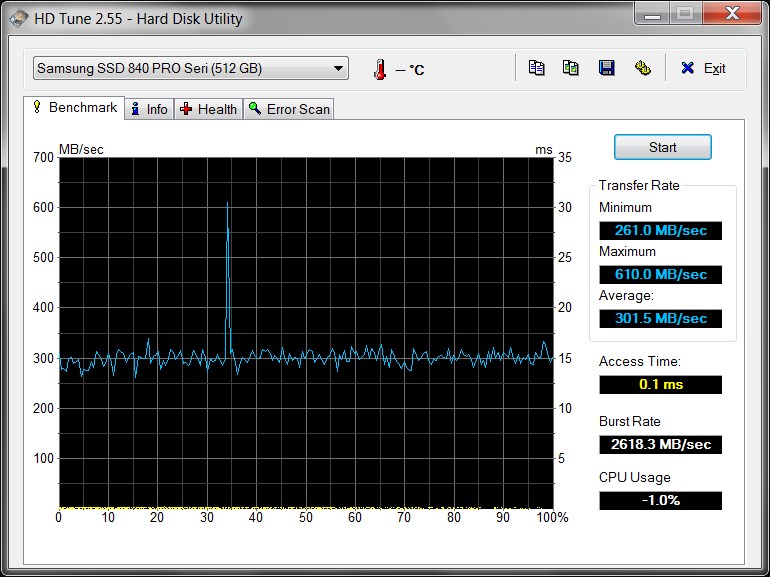
(b) laptop - Lenovo W530, 8GB, i7-3740QM quadcore @ 2.7Ghz, Intel QM77 chipset USB 3.0; 512GB Samsung 840 Pro SSD

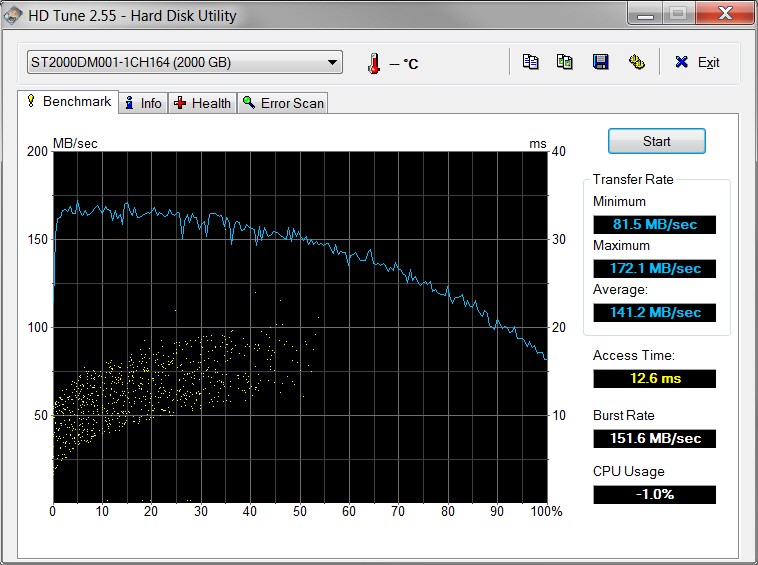
The desktop machine has two different 2TB Verbatim USB 3.0 drives attached. I've installed probably nine different Verbatim drives on assorted machines, and it seems that each one comes with yet another different internal SATA drive inside. These two particular Verbatim drives have (a) Seagate ST2000DL003 in one, and (b) Seagate ST2000DM001 in the other. The DL003 (drive letter W) is a 5900rpm SATA-III 6GB/s drive with 64MB cache and is plugged into one of the Asmedia USB 3.0 ports on the motherboard, and the DM001 (drive letter V) is a 7200rpm SATA-III 6GB/s drive with 64MB cache plugged into one of the Intel USB 3.0 ports on the motherboard.

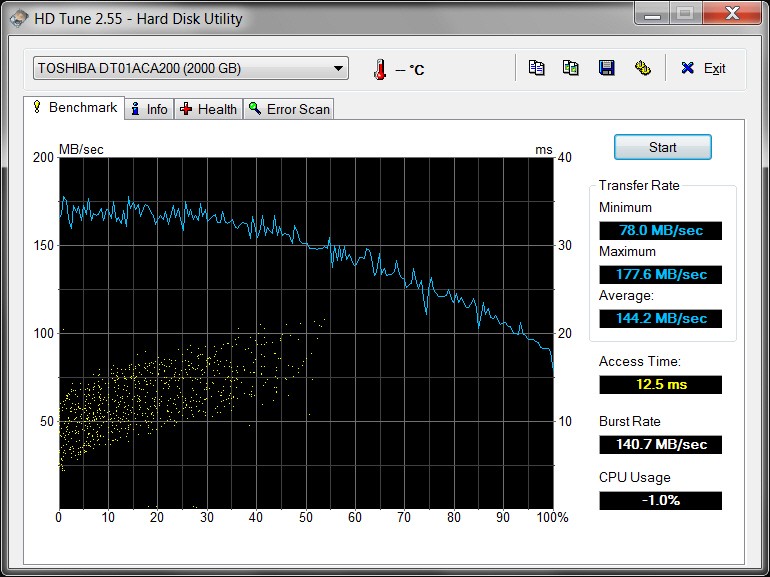
The laptop machine has one 2TB Verbatim USB 3.0 drive attached, and this time it's actually a Toshiba DT01ACA200 drive inside (drive letter V). This is a 7200rpm SATA-III 6GB/s drive with 32MB cache and is plugged into one of the Intel USB 3.0 ports on the laptop. The laptop has a 512GB Samsung 840 Pro SSD drive in it (no other hard drive).

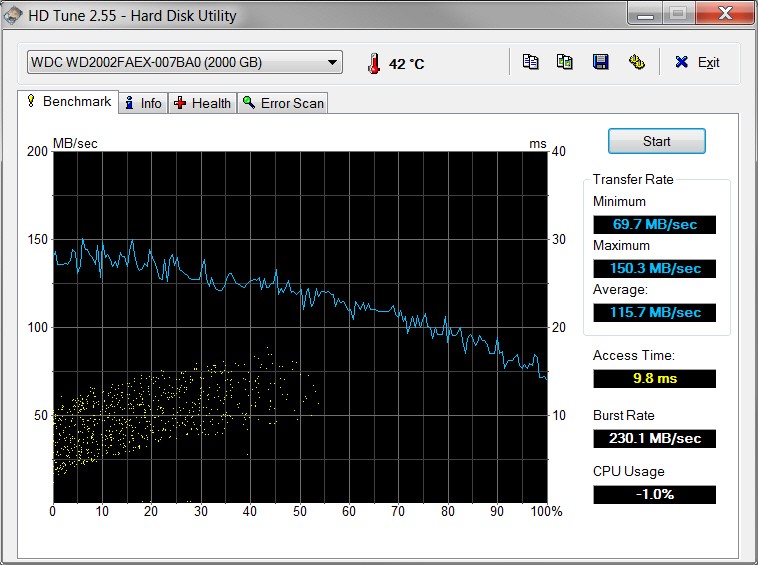
The experiments involved copying a 5GB file (a WTV recorded TV file), initially located on the M partition of the desktop machine. This is a WD2002FAEX (WD Caviar Black) 7200rpm SATA-III 6GB/s 64MB cache drive. All drives are formatted as NTFS.

The same 5GB file was copied with four different source/destination combinations and resulting elapsed durations:

(1) desktop: copy 5GB file from M to V - 50 seconds
(2) desktop: copy 5GB file from M to W - 1 minute 12 seconds
(3) copy 5GB file from desktop M to D-partition (on SSD) in the laptop via my gigabit network - 54 seconds
(4) laptop: copy 5GB file from D (on SSD) to V (USB 3.0) - 33 seconds

Obviously, (1) and (2) demonstrates that with the same source drive speed, the copy time is a function of the destination drive speed. Since the source is the same and both target drives are USB 3.0, the only possible explanation for the 50 seconds vs. 1 minute 12 seconds different copy durations must be the different speeds of the target drives (I assume the Asmedia and Intel USB 3.0 speeds are the same).

And (4) demonstrates that if the source drive (SSD) is significantly faster (than SATA-III hard drive), once again copy duration can be significantly reduced.

So depending on source and destination hardware characteristics, the same 5GB file copy can take either 33 seconds, 50 seconds, or 1 minute 12 seconds.

==> I think your particular situation is caused by the "very modest performance" of the Samsung M3 drive.

For reference, the following HD Tune benchmarks are provided showing very different performance characteristics between them all. All three different Verbatim drives are provided, along with the WD2002FAEX "source" drive on the desktop, along with the 512GB Samsung 840 Pro SSD on the laptop.

Note the significant increase in performance between the Verbatim DL003 vs. both the Verbatim DM001 as well as the Toshiba DT01ACA200. And yet all three are considered "USB 3.0".

(1) Verbatim DL003 (W - desktop)

ohlb.jpg


(2) Verbatim DM001 (V - desktop)

9j74.jpg


(3) Verbatim DT01ACA200 (V - laptop)

zl5f.jpg


(4) WD2002FAEX (M - desktop)

aurp.jpg


(5) 512GB Samsung 840 Pro (laptop), with Samsung Magician software running on the laptop, utilizing "rapid mode" and "over provisioning" for optimized SSD performance:

tl70.jpg
 

My Computer

Computer type
PC/Desktop
Computer Manufacturer/Model Number
Home-built, two systems (1) and (2)
OS
Windows 7 Pro x64 (1), Win7 Pro X64 (2)
CPU
i5-3350p 3.1Ghz/6MB-cache (1); E8400 3.0Ghz/6MB-cache (2)
Motherboard
ASUS P8Z77-V Pro (1); ASUS P5Q3 (2)
Memory
8GB PC3-12800 DDR3 (1); 4GB PC3-10600 DDR3 (2)
Graphics Card(s)
ATI HD7750 (1), (see TV cards); ATI R7 250 (2)
Sound Card
Realtek ALC892 HD Audio (1); Realtek ALC1200 HD Audio (2)
Monitor(s) Displays
Eizo HD2441W LCD, Eizo S2433W (1); Eizo 24" S2433W (2)
Screen Resolution
1920x1200, 1920x1200 (1); 1920x1200 (2)
Hard Drives
(1) 1TB SATA-II (7200RPM), 2x2TB SATA-III (7200RPM), 250GB SATA-III (10000RPM) for OS; 2x2TB external USB 3.0

(2) 320GB SATA-II (7200RPM), 750GB SATA-II (7200RPM), 150GB SATA-II (10000RPM) for OS; 2TB external USB 3.0
PSU
Nesteq ECS-6001 600W (1); Nesteq ECS-5001 500W (2)
Case
Acousti-Case 360 (1) and (2)
Cooling
Noctua NH-U12P SE2 for CPU, 2x120mm case fans (1) and (2)
Keyboard
IBM PS/2 (1) and (2)
Mouse
Logitech MX Revolution wireless (1); Microsoft wired (2)
Internet Speed
100mbps down / 10mbps up
Antivirus
Microsoft Security Essentials; Malwarebyte Anti-Malware Pro
Browser
Firefox
Other Info
Ceton InfiniTV 4-tuner cablecard-enabled TV card as well as Hauppauge HVR-2250 OTA/ATSC 2-tuner TV card in (1), running under Win7 WMC
i think your probably right the samsung m3 is just not that fast, that being said i will at some point check on a second pc the same set up just to rule out any hardware problem i may have with my pc
thank you for your help and informationhttp://www.sevenforums.com/members/dsperber.html dsperber its been very handy
 

My Computer

Computer Manufacturer/Model Number
home built
OS
windows 7 64bit build 7600
CPU
Intel I7 920
Motherboard
ASUS P6T Deluxe V2
Memory
Corsair 6GB (3x2GB) 1600MHz Triple Channel i7
Graphics Card(s)
XFX RADEON HD 5870
Sound Card
Creative Xfi Elite pro
Monitor(s) Displays
Hyundai W240D 24" Samsung Syncmaster 930
Screen Resolution
1920x1200 and 1280x1024
Hard Drives
WD Velociraptor 150gb
Western Digital WD7502ABYS 750GB Raid Edition
PSU
Corsair 850W TX Series PSU
Case
Coolermaster HAF 932 Full Tower
Cooling
Noctua NH-U12P
Keyboard
logitech G15 orange
Mouse
logitech mx revolution
Internet Speed
13mb
USB 3.0 Expansion Card TS-PDU3

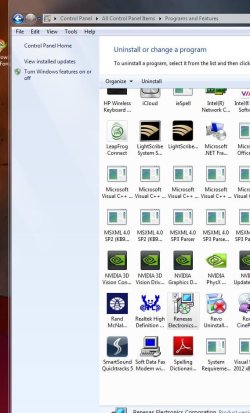
I'm late to the party but can I ask a couple of questions. I just installed this expansion card and bought and hooked up a 4 pin modex cable, I think you call it that. Not sure if I used the right power cord. Anyway I downloaded the Transcend software and I can't get my computer to recognize this card. See attached clips. Thanks
 

Attachments

  • Capture USB 3.0.JPG
    Capture USB 3.0.JPG
    90.2 KB · Views: 0
  • CapturePrograms and Features USB 3.0.JPG
    CapturePrograms and Features USB 3.0.JPG
    78.5 KB · Views: 0

My Computer

OS
Windows 7 Home Premium 32 bit
I'm late to the party but can I ask a couple of questions. I just installed this expansion card and bought and hooked up a 4 pin modex cable
Actually, that's MOLEX, which is a description of the large plastic 4-pin connector.

Presumably you connected an available 4-pin connector coming off of your power supply to the 4-pin connector on the Transcend card, which you have installed in an available PCIe X1 slot of your PC.

Note that the power connector provides the additional power required to support the USB 3.0 devices which would connect to the card. If there was not this extra power connect, the PCIe bus would not provide sufficient power for the card to properly connect to attached USB 3.0 devices, and the card would not function in USB 3.0 mode. This has happened to me when I forgot to attach that power cable in the past.

As to whether it would even work in a degraded USB 2.0 mode without attached power cable, I don't know. But it's obviously NOT designed to work that way.

In any case I would still think the card would be recognizable and drivers installable, even if you didn't have a proper additional power cable connection to it.


Not sure if I used the right power cord.
There's only one type of 4-pin MOLEX-connector cable that can attach to the card, as any other SATA-style connectors from the power supply simply cannot be used as their connectors are incompatible.


Anyway I downloaded the Transcend software and I can't get my computer to recognize this card. See attached clips. Thanks
The screenshot shows "card cannot start". It could be DOA, or perhaps it's got an odd hardware id and the downloaded transcend software didn't recognize it.

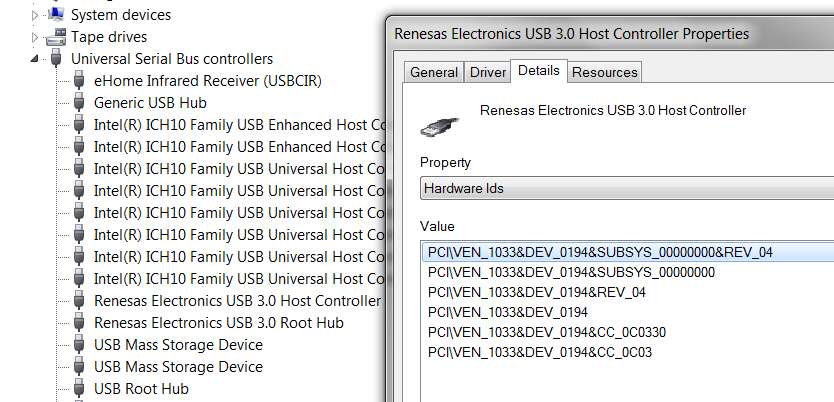
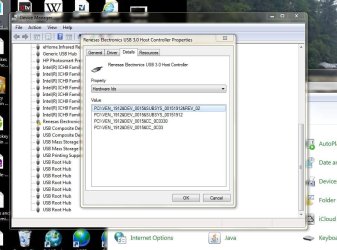
If you select the Details tab (in Device Manager properties for the card), and select the second item (Hardware IDs) in the Property dropdown box list, that will present a set of value strings describing the card. That should also be what the driver installer software INF file is looking for. Can you please post a screenshot of those Hardware IDs for the card?

As I previously posted earlier on this thread, I myself have this 2-port Transcend TS-PDU3 PCIe USB 3.0 controller card in my own PC, and its Hardware IDs are as follows:

b1rh.jpg
 

My Computer

Computer type
PC/Desktop
Computer Manufacturer/Model Number
Home-built, two systems (1) and (2)
OS
Windows 7 Pro x64 (1), Win7 Pro X64 (2)
CPU
i5-3350p 3.1Ghz/6MB-cache (1); E8400 3.0Ghz/6MB-cache (2)
Motherboard
ASUS P8Z77-V Pro (1); ASUS P5Q3 (2)
Memory
8GB PC3-12800 DDR3 (1); 4GB PC3-10600 DDR3 (2)
Graphics Card(s)
ATI HD7750 (1), (see TV cards); ATI R7 250 (2)
Sound Card
Realtek ALC892 HD Audio (1); Realtek ALC1200 HD Audio (2)
Monitor(s) Displays
Eizo HD2441W LCD, Eizo S2433W (1); Eizo 24" S2433W (2)
Screen Resolution
1920x1200, 1920x1200 (1); 1920x1200 (2)
Hard Drives
(1) 1TB SATA-II (7200RPM), 2x2TB SATA-III (7200RPM), 250GB SATA-III (10000RPM) for OS; 2x2TB external USB 3.0

(2) 320GB SATA-II (7200RPM), 750GB SATA-II (7200RPM), 150GB SATA-II (10000RPM) for OS; 2TB external USB 3.0
PSU
Nesteq ECS-6001 600W (1); Nesteq ECS-5001 500W (2)
Case
Acousti-Case 360 (1) and (2)
Cooling
Noctua NH-U12P SE2 for CPU, 2x120mm case fans (1) and (2)
Keyboard
IBM PS/2 (1) and (2)
Mouse
Logitech MX Revolution wireless (1); Microsoft wired (2)
Internet Speed
100mbps down / 10mbps up
Antivirus
Microsoft Security Essentials; Malwarebyte Anti-Malware Pro
Browser
Firefox
Other Info
Ceton InfiniTV 4-tuner cablecard-enabled TV card as well as Hauppauge HVR-2250 OTA/ATSC 2-tuner TV card in (1), running under Win7 WMC
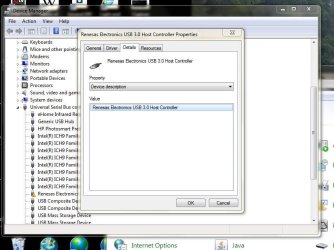
This is the card I got.
I wanted to see a screenshot of the SECOND item in that Property dropdown list... Hardware IDs. What you've captured is the FIRST item... Device Description. Please post another screenshot of Hardware IDs.

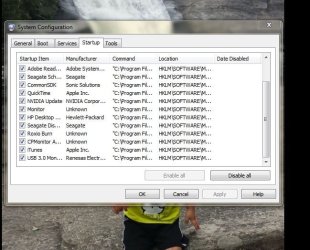
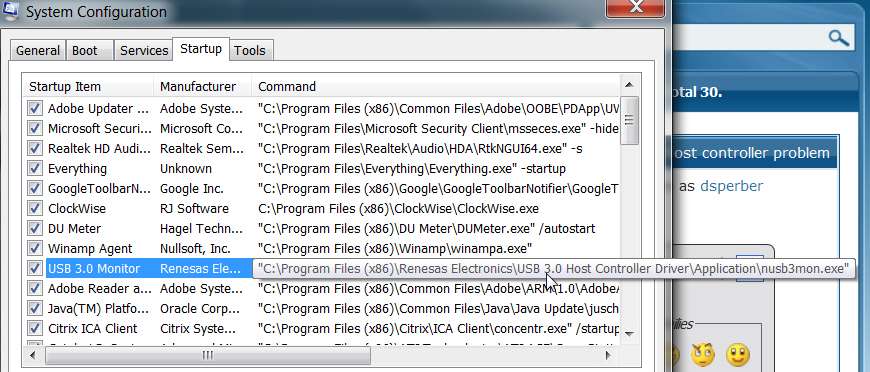
And I don't know why you posted that second screenshot of your MSCONFIG startup items, but it looks like it probably matches my own. You haven't captured enough to show everything but it looks right. Here's mine.

y9ea.jpg


All of this says to me that you probably did get the proper Renesas driver software installed, but for some reason the card is not starting.

Have you tried re-seating the card? Re-connecting the Molex power cable to it (be careful about pulling it out and putting it back on... this really should be done with the card removed, so you can hold it with both hands for leverage so as not to break the plastic power connector on the card away from the card)?

Try uninstalling the driver/software using Control Panel (uninstall a program)... "Renesas Electronics USB 3.0 Host Controller Driver", and then re-boot, and then reinstall the drivers again to see if this time it works.


Or... maybe the card is DOA. Or, maybe it's "generic junk".

Worst case, buy another 2-port one from B&H for $13. They're only 2-ports, but I've installed several of these in friend's machines and they've all worked. I did try and install a 4-port card from StarTech once and it NEVER worked. Finally threw it out and installed this 2-port Transcend card and it worked perfectly.

I know, you said you got a 4-port "generic" card from Newegg... so just return it, as it doesn't work. It's about the same $12 price as that 2-port Transcend TS-PDU3 for $13 from B&H, but I "virtually guarantee" the 2-port Transcend card will work. Or, you can get the same 2-port Transcend TS-PDU3 from Newegg for $15. So just get Newegg to exchange your defective 4-port card for a 2-port TS-PDU3.

Don't waste too much more time on this. Newegg will exchange it for no charge. Go with one from Transcend that's known to work... I vouch for it.
 

My Computer

Computer type
PC/Desktop
Computer Manufacturer/Model Number
Home-built, two systems (1) and (2)
OS
Windows 7 Pro x64 (1), Win7 Pro X64 (2)
CPU
i5-3350p 3.1Ghz/6MB-cache (1); E8400 3.0Ghz/6MB-cache (2)
Motherboard
ASUS P8Z77-V Pro (1); ASUS P5Q3 (2)
Memory
8GB PC3-12800 DDR3 (1); 4GB PC3-10600 DDR3 (2)
Graphics Card(s)
ATI HD7750 (1), (see TV cards); ATI R7 250 (2)
Sound Card
Realtek ALC892 HD Audio (1); Realtek ALC1200 HD Audio (2)
Monitor(s) Displays
Eizo HD2441W LCD, Eizo S2433W (1); Eizo 24" S2433W (2)
Screen Resolution
1920x1200, 1920x1200 (1); 1920x1200 (2)
Hard Drives
(1) 1TB SATA-II (7200RPM), 2x2TB SATA-III (7200RPM), 250GB SATA-III (10000RPM) for OS; 2x2TB external USB 3.0

(2) 320GB SATA-II (7200RPM), 750GB SATA-II (7200RPM), 150GB SATA-II (10000RPM) for OS; 2TB external USB 3.0
PSU
Nesteq ECS-6001 600W (1); Nesteq ECS-5001 500W (2)
Case
Acousti-Case 360 (1) and (2)
Cooling
Noctua NH-U12P SE2 for CPU, 2x120mm case fans (1) and (2)
Keyboard
IBM PS/2 (1) and (2)
Mouse
Logitech MX Revolution wireless (1); Microsoft wired (2)
Internet Speed
100mbps down / 10mbps up
Antivirus
Microsoft Security Essentials; Malwarebyte Anti-Malware Pro
Browser
Firefox
Other Info
Ceton InfiniTV 4-tuner cablecard-enabled TV card as well as Hauppauge HVR-2250 OTA/ATSC 2-tuner TV card in (1), running under Win7 WMC
Sorry, worse than my kids. I should have read better. How can I get my config to show the hole line like you did, because mine doesn't say what yours does? Thanks
 

Attachments

  • Capture Device manager #2.JPG
    Capture Device manager #2.JPG
    87.2 KB · Views: 1

My Computer

OS
Windows 7 Home Premium 32 bit
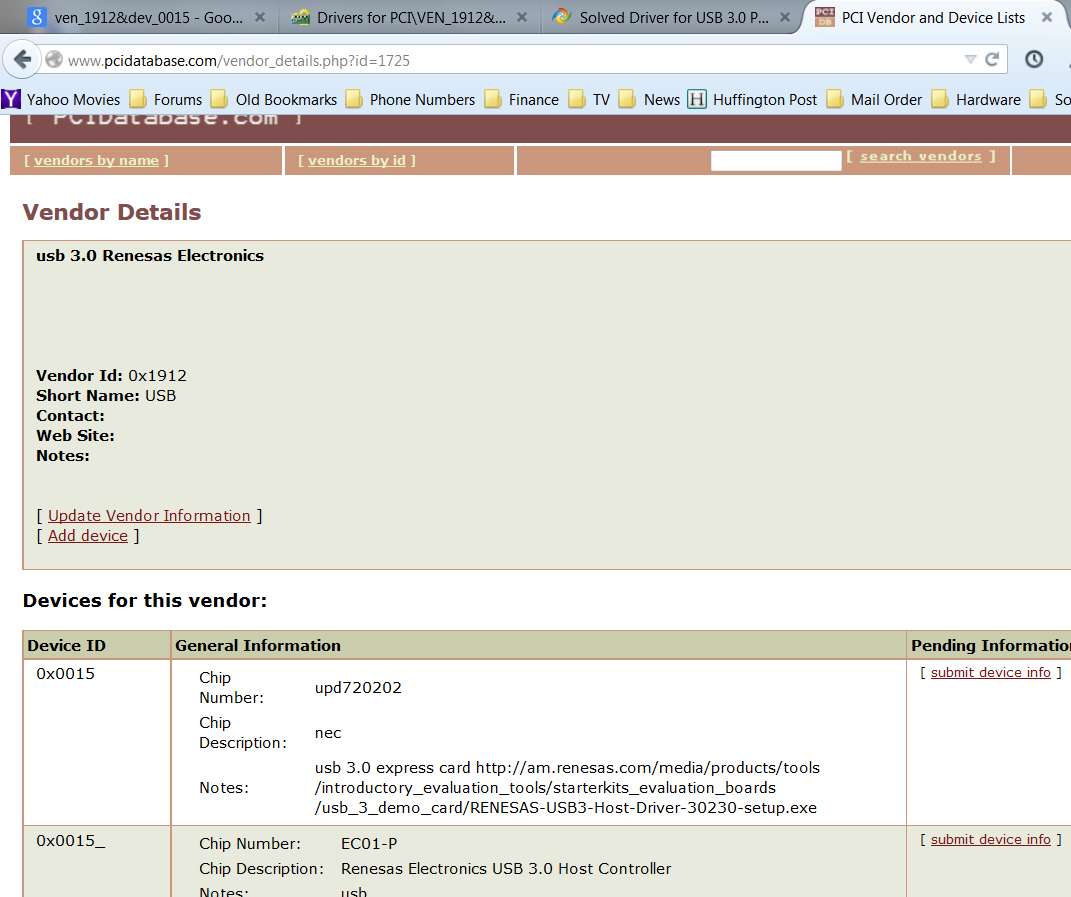
Your Hardware ID (VEN_1912&DEV_0015) shows this card to be an NEC chip, not the same as the original Renesas chip (VEN_1933&DEV_0194) which is in my own theoretically identical Transcend TS-PDU3 card but purchased some years ago. Looks like vendor 1933 doesn't exist any longer, since NEC acquired Renesas back in 2010.

Nevertheless, for your current TS-PDU3 the vendor/device info is as follows:

1hql.jpg


Did you not get a driver CD with the card? If you do have a driver CD, there might be an \NEC 3.0 folder on it. Inside that folder you should possibly find a \uPD720200 or \uPD720202 sub-folder, inside of which should then be a SETUP.EXE to install the driver for your card. If you can find this, RUN that SETUP.EXE to install the drivers for your card.

If you didn't get a driver CD with the card or you don't have an \NEC 3.0 folder on it, I believe you can download the correct driver from the URL address shown in my screenshot above. This is the 3.0.23.0 driver, which I believe is the most current version of the driver for VEN_1912&DEV_0015 device id, i.e. your current USB 3.0 card.

If you download that driver installer file and run it, if it works you should be good to go. If you get an error message popup about "hardware not found" or something to that effect, then we need to look further.

Please report back as to your success or failure with the driver I pointed you to.


As far as how I got the "whole line" to display in MSCONFIG System Configuration -> Startup tab, just hover the mouse over the right side of that line, and you'll get the flyout which will show you everything in that operand which the mouse is hovering over.

Are we talking about that MSCONFIG screenshot, or a different screenshot?

Anyway, please try the driver I pointed you to.
 

My Computer

Computer type
PC/Desktop
Computer Manufacturer/Model Number
Home-built, two systems (1) and (2)
OS
Windows 7 Pro x64 (1), Win7 Pro X64 (2)
CPU
i5-3350p 3.1Ghz/6MB-cache (1); E8400 3.0Ghz/6MB-cache (2)
Motherboard
ASUS P8Z77-V Pro (1); ASUS P5Q3 (2)
Memory
8GB PC3-12800 DDR3 (1); 4GB PC3-10600 DDR3 (2)
Graphics Card(s)
ATI HD7750 (1), (see TV cards); ATI R7 250 (2)
Sound Card
Realtek ALC892 HD Audio (1); Realtek ALC1200 HD Audio (2)
Monitor(s) Displays
Eizo HD2441W LCD, Eizo S2433W (1); Eizo 24" S2433W (2)
Screen Resolution
1920x1200, 1920x1200 (1); 1920x1200 (2)
Hard Drives
(1) 1TB SATA-II (7200RPM), 2x2TB SATA-III (7200RPM), 250GB SATA-III (10000RPM) for OS; 2x2TB external USB 3.0

(2) 320GB SATA-II (7200RPM), 750GB SATA-II (7200RPM), 150GB SATA-II (10000RPM) for OS; 2TB external USB 3.0
PSU
Nesteq ECS-6001 600W (1); Nesteq ECS-5001 500W (2)
Case
Acousti-Case 360 (1) and (2)
Cooling
Noctua NH-U12P SE2 for CPU, 2x120mm case fans (1) and (2)
Keyboard
IBM PS/2 (1) and (2)
Mouse
Logitech MX Revolution wireless (1); Microsoft wired (2)
Internet Speed
100mbps down / 10mbps up
Antivirus
Microsoft Security Essentials; Malwarebyte Anti-Malware Pro
Browser
Firefox
Other Info
Ceton InfiniTV 4-tuner cablecard-enabled TV card as well as Hauppauge HVR-2250 OTA/ATSC 2-tuner TV card in (1), running under Win7 WMC
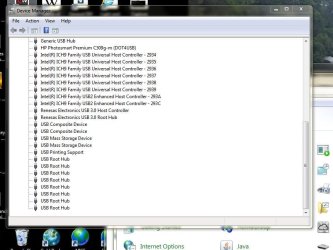
I uninstalled the original drive I had downloaded from Trandscent and downloaded and installed the driver you suggested because I didn't get a CD with the expansion card. Didn't help. So today I went back into computer and pushed harder on the expansion card to make sure it was seated in board. I also, which I think might of been the problem, was remove the 4 pin white connector and plug it into another white 4 pin connector. I wasn't sure which 4 pin white connectors were hot and didn't know for sure how to test and find a power supply for sure.
Anyway everything is working. See attached clip where two Renesas refurances are showing up in device manager. Is this OK? Thanks for your help.
 

Attachments

  • Capture Reconnected to different connector 4 pin power cable.JPG
    Capture Reconnected to different connector 4 pin power cable.JPG
    73.8 KB · Views: 0

My Computer

OS
Windows 7 Home Premium 32 bit
Back
Top