Transparency - Enable Full Clear Glass Transparency

How to Enable "Full Clear Glass Transparency" in Windows 7

   Information
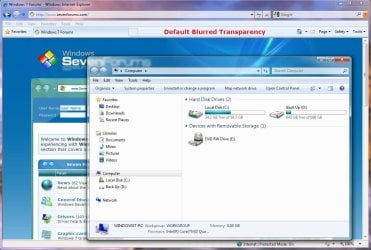
By default when you enabled transparency in Windows 7, the transparency will be blurred a bit in the window borders. This will show you how to have the window borders fully clear and transparent like glass instead for your current account only, or for all user accounts on the computer.

The Windows 7 Starter and Home Basic editions do not have Aero Transparency included in them.

   Note
This will not make the taskbar clear, on window borders. One side effect though is that when you have a window border with text on top of another window with text, the text will tend to overlap each other since the window is clear instead of with a opaque (blurred) background.
   Warning
You will only be able to apply this while logged in an administrator account.

You will not have the Transparency option if you have a Basic and High Contrast Theme instead of a Aero Theme.

Aero Requirements to be Enabled in Windows 7:
NOTE: If Aero is not enabled, then Transparency will not work even when enabled.
  • 1 GHz 32-bit or 64-bit processor
  • 1 GB of system memory
  • Support for DirectX 9 graphics with 128 MB memory (in order to enable Aero theme)
  • You must be have True Color (32 bit) set instead of High Color (16 bit).
  • The desktop composition and Animate controls and elements inside windows options need to be enabled in Visual Effects.
  • The Desktop Window Manager Session Manager and Themes Services need to be set as Started and Automatic.
  • Refresh or update your WEI score. You will need an WEI score minimum of 2.0 in both Graphics & Gaming graphics in order for Aero to be activated.

EXAMPLE: Full Clear Transparency and Default Blurred Transparency
NOTE: Notice how the Computer window borders are completely transparent when this is enabled. Enabled.jpg
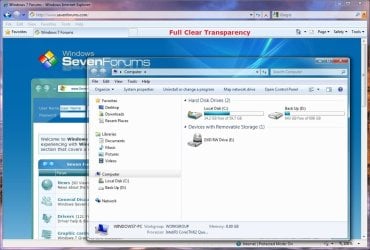
Default.jpg


STEP ONE

Replace System Files to Make this Work


NOTE: Credit goes to LFB for this addition. Thank you LFB. 1. Click on the Download button below to download the DWM_32-bit_7127.zip or DWM_64-bit_7127.zip file for your 32-bit (x86) or 64-bit (x64) Windows 7 version. For 32-bit Windows 7:

Download


For 64-bit Windows 7:

Download


2. Click on Save, and save the .zip file to the desktop.

3. Open the .zip file and extract (drag and drop) the dwm.exe and uDWM.dll files to the desktop.

4. Right click on each the dwm.exe and uDWM.dll files (one at a time) on the desktop and click on Properties, General tab, the Unblock button, and on OK. (See screenshots below)
NOTE: If you do not have a Unblock button under the General tab, then the shortcut is already unblocked and you can continue on to step 5. Unblock1.jpgUnblock2.jpg
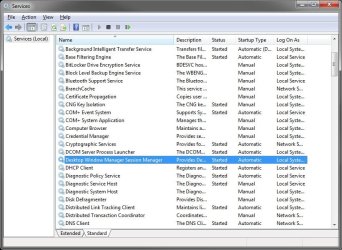
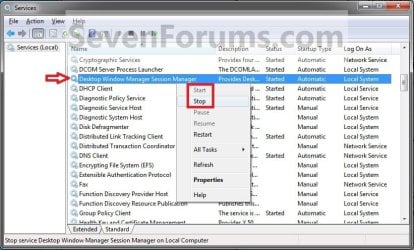
5. Stop the Desktop Windows Manager Session Manager Service. (See screenshot below) Services.jpg
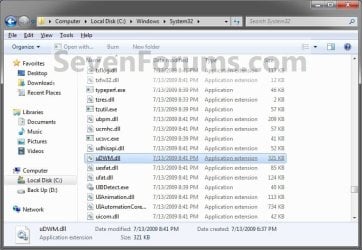
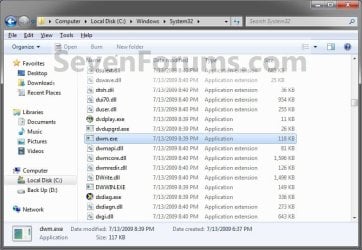
6. In Windows Explorer, navigate to and make a backup copy of the original C:\Windows\System32\dwm.exe and C:\Windows\System32\uDWM.dll files at these locations. (See screenshots below)
NOTE: You will need these backups if you ever would like to restore them. dwm.exe.jpg
uDWM.dll.jpg

7. In Windows Explorer, take ownership and give yourself full permission of the C:\Windows\System32\dwm.exe and C:\Windows\System32\uDWM.dll files at these locations. (See screenshots above)

8. Copy and Paste the dwm.exe and uDWM.dll files on the desktop into the C:\Windows\System32 folder.

9. Select Copy and Replace and approve the replacement of these default files with the downloaded ones.
NOTE: If you ever run a sfc /scannow command, it will consider these as modified files, and will replace them with the default ones. You'll have to do this tutorial again to have the full clear transparency back.

10. Start the Desktop Windows Manager Session Manager Service. (See screenshot below step 5)

11. Do either OPTION ONE or OPTION TWO below.


OPTION ONE

For Current User Account Only

1. To Enable Current User Full Transparency A) Click on the Download button below to download the file below. Enable_Current_User_Full_Transparency.reg

Download


B) Go to step 4.
2. To Undo Current User Full Transparency A) Click on the Download button below to download the file below. Undo_Current_User_Full_Transparency.reg

Download


3. Save the .reg file to the desktop.

4. Right click on the downloaded .reg file, and click on Merge.

5. Click on Run, Yes (UAC), Yes, and OK when prompted.

6. Log off and log on, or restart the computer to apply.

7. When done, you can delete the downloaded .reg file if you like.


OPTION TWO

For All User Accounts

1. To Enable All Users Full Transparency A) Click on the Download button below to download the file below. Enable_All_Users_Full_Transparency.reg

Download


B) Go to step 4.
2. To Undo All Users Full Transparency A) Click on the Download button below to download the file below. Undo_All_Users_Full_Transparency.reg

Download


3. Save the .reg file to the desktop.

4. Right click on the downloaded .reg file and click on Merge.

5. Click on Run, Yes (UAC), Yes, and OK when prompted.

6. Enable Transparency and adjust the color intensity to the far left in all user accounts on the computer.
NOTE: The current user account will have transparency enabled and color intensity adjusted automatically with this download, but any other user accounts on the computer will need to enable transparency to prevent a blending affect in the window borders.

7. Log off and log on, or restart the computer to apply.

8. When done, you can delete the downloaded .reg file if you like.
That's it,
Shawn


Attachments

Last edited:
Sweet, works great, thanks! :D
 

My Computer My Computer

Computer Manufacturer/Model Number
Toshiba Satellite L500
OS
Windows 7 Home Premium x64 OEM --> RTM clean install
CPU
Intel T4400
Motherboard
? - laptop inbuilt ?
Memory
4Gb
Graphics Card(s)
? - Mobile Intel(R) 4 Series Express Chipset Family ?
Sound Card
Realtek
Monitor(s) Displays
? + extended to a 42" LG55PC plasma tele!
Screen Resolution
1366 * 768
Hard Drives
320Gb 5500rpm
PSU
?
Case
?
Cooling
?
Internet Speed
3Meg, when it works.
Other Info
A LOWLY LAPTOP!
You're most welcome Allen. Thank you. :)
 

My Computer My Computer

Computer type
PC/Desktop
Computer Manufacturer/Model Number
Self built custom
OS
64-bit Windows 11 Pro for Workstations
CPU
Intel i7-8700K OC'd to 5 GHz
Motherboard
ASUS ROG Maximus XI Formula Z390
Memory
64 GB (4x16GB) G.SKILL TridentZ RGB DDR4 3600 MHz
Graphics Card(s)
ASUS ROG-STRIX-GTX1080TI-O11G-GAMING
Sound Card
Integrated
Monitor(s) Displays
2 x Samsung Odyssey G7 27"
Screen Resolution
2560x1440
Hard Drives
1TB Samsung 990 PRO M.2,
4TB Samsung 990 PRO PRO M.2,
TerraMaster F8 SSD Plus NAS
PSU
Seasonic Prime Titanium 850W
Case
Thermaltake Core P3
Cooling
Corsair Hydro H115i
Keyboard
Logitech wireless K800
Mouse
Logitech MX Master 4
Internet Speed
2 Gb/s Download and 100 Mb/s Upload
Antivirus
Malwarebyte Anti-Malware Premium
Browser
Google Chrome
Other Info
Logitech Z625 speaker system,
Logitech BRIO 4K Pro webcam,
HP Color LaserJet Pro MFP M477fdn,
APC SMART-UPS RT 1000 XL - SURT1000XLI,
Galaxy S23 Plus phone
will this work if my computer WEI score for aero is 1.9 and the aero effect wont turn on at all
 

My Computer My Computer

Computer Manufacturer/Model Number
Dell Dimension 3000
OS
Windows 7 Home Premium 32-bit
CPU
Intel Pentium 4 Processor 2.8GHz Prescott 90mm Technology
Motherboard
Dell Computer Corp. 0F8403 (Microprocessor)
Memory
1.00GB Dual-Channel DDR @ 166MHz (2.5-3-3-7)
Graphics Card(s)
82865G Graphics Controller
Sound Card
SoundMax Integrated Digital Audio
Monitor(s) Displays
Dell E171FP
Screen Resolution
1280x1024
Hard Drives
156GB Western Digital WDC WD1600AAJB-56WRAQ ATA Device
Case
Dell Dimesion 3000 Stock Case
Keyboard
Dell RT7D20
Mouse
HP R41126
Internet Speed
8 Mbps(Downloading) 1Mbps(Uploading)
Hello Zekramcross,

Sorry, but no. Aero will have to be able to run for this to work since it uses Aero. :(
 

My Computer My Computer

Computer type
PC/Desktop
Computer Manufacturer/Model Number
Self built custom
OS
64-bit Windows 11 Pro for Workstations
CPU
Intel i7-8700K OC'd to 5 GHz
Motherboard
ASUS ROG Maximus XI Formula Z390
Memory
64 GB (4x16GB) G.SKILL TridentZ RGB DDR4 3600 MHz
Graphics Card(s)
ASUS ROG-STRIX-GTX1080TI-O11G-GAMING
Sound Card
Integrated
Monitor(s) Displays
2 x Samsung Odyssey G7 27"
Screen Resolution
2560x1440
Hard Drives
1TB Samsung 990 PRO M.2,
4TB Samsung 990 PRO PRO M.2,
TerraMaster F8 SSD Plus NAS
PSU
Seasonic Prime Titanium 850W
Case
Thermaltake Core P3
Cooling
Corsair Hydro H115i
Keyboard
Logitech wireless K800
Mouse
Logitech MX Master 4
Internet Speed
2 Gb/s Download and 100 Mb/s Upload
Antivirus
Malwarebyte Anti-Malware Premium
Browser
Google Chrome
Other Info
Logitech Z625 speaker system,
Logitech BRIO 4K Pro webcam,
HP Color LaserJet Pro MFP M477fdn,
APC SMART-UPS RT 1000 XL - SURT1000XLI,
Galaxy S23 Plus phone
Can you help?

I don't know what I did but I cant see Desktop Windows Manager Session Manager anymore. I did see it when I did this at first but then I can't see it no more and it's disabled :cry:
 

My Computer My Computer

Computer Manufacturer/Model Number
Sony VAIO VPCEG33FL/W
OS
Windows 7 Home Premium x64
CPU
Intel Core i5
Motherboard
Sony Corporation VAIO
Memory
4GB DDR3
Graphics Card(s)
NVIDIA GeForce 410M
Sound Card
Conexant SmartAudio HD
Monitor(s) Displays
1
Screen Resolution
1366 x 768
Hard Drives
Toshiba 500GB
Internet Speed
Download 4.58 Mbps Upload 0.95 Mbps
Other Info
I have not changed anything from my laptop but I will change the RAM soon :D

My Computer My Computer

Computer Manufacturer/Model Number
Sony VAIO VPCEG33FL/W
OS
Windows 7 Home Premium x64
CPU
Intel Core i5
Motherboard
Sony Corporation VAIO
Memory
4GB DDR3
Graphics Card(s)
NVIDIA GeForce 410M
Sound Card
Conexant SmartAudio HD
Monitor(s) Displays
1
Screen Resolution
1366 x 768
Hard Drives
Toshiba 500GB
Internet Speed
Download 4.58 Mbps Upload 0.95 Mbps
Other Info
I have not changed anything from my laptop but I will change the RAM soon :D
I don't know what I did but I cant see Desktop Windows Manager Session Manager anymore. I did see it when I did this at first but then I can't see it no more and it's disabled :cry:

Hello PacMan, and welcome to Seven Forums.

Do you have the Desktop Windows Manager Session Manager service listed in your Services at all like in the screenshot below?

I'm not sure what you mean when you say you can't see it, but it's disabled. If it's just disabled, then you should be able to set it to be Automatic, apply, then Start it.

http://www.sevenforums.com/tutorials/2495-services-start-disable.html

Services.jpg

Hope this helps for now, :)
Shawn
 

My Computer My Computer

Computer type
PC/Desktop
Computer Manufacturer/Model Number
Self built custom
OS
64-bit Windows 11 Pro for Workstations
CPU
Intel i7-8700K OC'd to 5 GHz
Motherboard
ASUS ROG Maximus XI Formula Z390
Memory
64 GB (4x16GB) G.SKILL TridentZ RGB DDR4 3600 MHz
Graphics Card(s)
ASUS ROG-STRIX-GTX1080TI-O11G-GAMING
Sound Card
Integrated
Monitor(s) Displays
2 x Samsung Odyssey G7 27"
Screen Resolution
2560x1440
Hard Drives
1TB Samsung 990 PRO M.2,
4TB Samsung 990 PRO PRO M.2,
TerraMaster F8 SSD Plus NAS
PSU
Seasonic Prime Titanium 850W
Case
Thermaltake Core P3
Cooling
Corsair Hydro H115i
Keyboard
Logitech wireless K800
Mouse
Logitech MX Master 4
Internet Speed
2 Gb/s Download and 100 Mb/s Upload
Antivirus
Malwarebyte Anti-Malware Premium
Browser
Google Chrome
Other Info
Logitech Z625 speaker system,
Logitech BRIO 4K Pro webcam,
HP Color LaserJet Pro MFP M477fdn,
APC SMART-UPS RT 1000 XL - SURT1000XLI,
Galaxy S23 Plus phone
I don't know what I did but I cant see Desktop Windows Manager Session Manager anymore. I did see it when I did this at first but then I can't see it no more and it's disabled :cry:

Wait, never mind :) I found my solution here http://www.sevenforums.com/customization/218749-lost-use-aero-theme.html all I did was run troubleshoot and it fixed my my problem :D Sorry I freaked out :p oh and I love this! thank you! :cool:

No problem. I'm glad to hear that you got it sorted. :)

Sounds like you may have just forgot to enable and start it again.
 

My Computer My Computer

Computer type
PC/Desktop
Computer Manufacturer/Model Number
Self built custom
OS
64-bit Windows 11 Pro for Workstations
CPU
Intel i7-8700K OC'd to 5 GHz
Motherboard
ASUS ROG Maximus XI Formula Z390
Memory
64 GB (4x16GB) G.SKILL TridentZ RGB DDR4 3600 MHz
Graphics Card(s)
ASUS ROG-STRIX-GTX1080TI-O11G-GAMING
Sound Card
Integrated
Monitor(s) Displays
2 x Samsung Odyssey G7 27"
Screen Resolution
2560x1440
Hard Drives
1TB Samsung 990 PRO M.2,
4TB Samsung 990 PRO PRO M.2,
TerraMaster F8 SSD Plus NAS
PSU
Seasonic Prime Titanium 850W
Case
Thermaltake Core P3
Cooling
Corsair Hydro H115i
Keyboard
Logitech wireless K800
Mouse
Logitech MX Master 4
Internet Speed
2 Gb/s Download and 100 Mb/s Upload
Antivirus
Malwarebyte Anti-Malware Premium
Browser
Google Chrome
Other Info
Logitech Z625 speaker system,
Logitech BRIO 4K Pro webcam,
HP Color LaserJet Pro MFP M477fdn,
APC SMART-UPS RT 1000 XL - SURT1000XLI,
Galaxy S23 Plus phone
Hi, it's me and my quirky machine...again.
I used the reg files and logged off and rebooted but the blur effect is still there. Tried both for All Users and Current User. :confused:
 

My Computer My Computer

Computer type
PC/Desktop
Computer Manufacturer/Model Number
Home Built Desktop By DataTech
OS
Windows 7 Ultimate X64 SP1
CPU
Intel i5-2550K, Differing ~4.4-4.8GHz No built in GPU
Motherboard
ASUS P8Z68-V PRO/GEN3
Memory
16GB G.Skill Sniper 1866MHz @ 2133MHz 2x8GB
Graphics Card(s)
ASUS GTX650TIB-DC2OC-2GD5, (650TI Boost)
Sound Card
Onboard Realtek 5-1
Monitor(s) Displays
Samsung P2570HD
Screen Resolution
1920x1080
Hard Drives
Samsung 840 Pro 256GB SSD for OS, 500GB Seagate Constellation (Enterprise drive) for Data
PSU
Corsair HX650W
Case
Inwin Dragon Rider
Cooling
Hyper 212 EVO w/two Noctua fans, push-pull, @1300 RPM
Keyboard
E-Z Eyes, bright yellow keys with large characters
Mouse
steelseries SENSEI Laser Pro Gaming
Internet Speed
48-51Mbs Mbs down, 11 Mbs up Xfinity Cable
Antivirus
Norton Internet Security 2013
Browser
IE 10, Opera, Pale Moon if needed
Other Info
4 case fans, LG BluRay-RE, ASUS DVD-RW, Mr. Fusion power supply, 1.21 gigawatts.
Hey Gary,

I know silly question, but did you do the "Step One" section first?
 

My Computer My Computer

Computer type
PC/Desktop
Computer Manufacturer/Model Number
Self built custom
OS
64-bit Windows 11 Pro for Workstations
CPU
Intel i7-8700K OC'd to 5 GHz
Motherboard
ASUS ROG Maximus XI Formula Z390
Memory
64 GB (4x16GB) G.SKILL TridentZ RGB DDR4 3600 MHz
Graphics Card(s)
ASUS ROG-STRIX-GTX1080TI-O11G-GAMING
Sound Card
Integrated
Monitor(s) Displays
2 x Samsung Odyssey G7 27"
Screen Resolution
2560x1440
Hard Drives
1TB Samsung 990 PRO M.2,
4TB Samsung 990 PRO PRO M.2,
TerraMaster F8 SSD Plus NAS
PSU
Seasonic Prime Titanium 850W
Case
Thermaltake Core P3
Cooling
Corsair Hydro H115i
Keyboard
Logitech wireless K800
Mouse
Logitech MX Master 4
Internet Speed
2 Gb/s Download and 100 Mb/s Upload
Antivirus
Malwarebyte Anti-Malware Premium
Browser
Google Chrome
Other Info
Logitech Z625 speaker system,
Logitech BRIO 4K Pro webcam,
HP Color LaserJet Pro MFP M477fdn,
APC SMART-UPS RT 1000 XL - SURT1000XLI,
Galaxy S23 Plus phone
Well, no, I went to the reg entires first thinking there is two different ways to do it.
I can't take ownership in Step 6(The 2nd step 6) there. The Take Ownership option doesn't appear in the context menu for either file but does for other field, ex, a folder on my desktop.
 

My Computer My Computer

Computer type
PC/Desktop
Computer Manufacturer/Model Number
Home Built Desktop By DataTech
OS
Windows 7 Ultimate X64 SP1
CPU
Intel i5-2550K, Differing ~4.4-4.8GHz No built in GPU
Motherboard
ASUS P8Z68-V PRO/GEN3
Memory
16GB G.Skill Sniper 1866MHz @ 2133MHz 2x8GB
Graphics Card(s)
ASUS GTX650TIB-DC2OC-2GD5, (650TI Boost)
Sound Card
Onboard Realtek 5-1
Monitor(s) Displays
Samsung P2570HD
Screen Resolution
1920x1080
Hard Drives
Samsung 840 Pro 256GB SSD for OS, 500GB Seagate Constellation (Enterprise drive) for Data
PSU
Corsair HX650W
Case
Inwin Dragon Rider
Cooling
Hyper 212 EVO w/two Noctua fans, push-pull, @1300 RPM
Keyboard
E-Z Eyes, bright yellow keys with large characters
Mouse
steelseries SENSEI Laser Pro Gaming
Internet Speed
48-51Mbs Mbs down, 11 Mbs up Xfinity Cable
Antivirus
Norton Internet Security 2013
Browser
IE 10, Opera, Pale Moon if needed
Other Info
4 case fans, LG BluRay-RE, ASUS DVD-RW, Mr. Fusion power supply, 1.21 gigawatts.
No worries. You should be able to use OPTION THREE in the tutorial below to take ownership of them.

Take Ownership of file
 

My Computer My Computer

Computer type
PC/Desktop
Computer Manufacturer/Model Number
Self built custom
OS
64-bit Windows 11 Pro for Workstations
CPU
Intel i7-8700K OC'd to 5 GHz
Motherboard
ASUS ROG Maximus XI Formula Z390
Memory
64 GB (4x16GB) G.SKILL TridentZ RGB DDR4 3600 MHz
Graphics Card(s)
ASUS ROG-STRIX-GTX1080TI-O11G-GAMING
Sound Card
Integrated
Monitor(s) Displays
2 x Samsung Odyssey G7 27"
Screen Resolution
2560x1440
Hard Drives
1TB Samsung 990 PRO M.2,
4TB Samsung 990 PRO PRO M.2,
TerraMaster F8 SSD Plus NAS
PSU
Seasonic Prime Titanium 850W
Case
Thermaltake Core P3
Cooling
Corsair Hydro H115i
Keyboard
Logitech wireless K800
Mouse
Logitech MX Master 4
Internet Speed
2 Gb/s Download and 100 Mb/s Upload
Antivirus
Malwarebyte Anti-Malware Premium
Browser
Google Chrome
Other Info
Logitech Z625 speaker system,
Logitech BRIO 4K Pro webcam,
HP Color LaserJet Pro MFP M477fdn,
APC SMART-UPS RT 1000 XL - SURT1000XLI,
Galaxy S23 Plus phone
It worked for the .dll file because the Take Ownership was present. Option 3 won't work for the dwm.exe. I changed ownership to my account name but I get this when trying to copy the new one:
denied.png
 
Last edited:

My Computer My Computer

Computer type
PC/Desktop
Computer Manufacturer/Model Number
Home Built Desktop By DataTech
OS
Windows 7 Ultimate X64 SP1
CPU
Intel i5-2550K, Differing ~4.4-4.8GHz No built in GPU
Motherboard
ASUS P8Z68-V PRO/GEN3
Memory
16GB G.Skill Sniper 1866MHz @ 2133MHz 2x8GB
Graphics Card(s)
ASUS GTX650TIB-DC2OC-2GD5, (650TI Boost)
Sound Card
Onboard Realtek 5-1
Monitor(s) Displays
Samsung P2570HD
Screen Resolution
1920x1080
Hard Drives
Samsung 840 Pro 256GB SSD for OS, 500GB Seagate Constellation (Enterprise drive) for Data
PSU
Corsair HX650W
Case
Inwin Dragon Rider
Cooling
Hyper 212 EVO w/two Noctua fans, push-pull, @1300 RPM
Keyboard
E-Z Eyes, bright yellow keys with large characters
Mouse
steelseries SENSEI Laser Pro Gaming
Internet Speed
48-51Mbs Mbs down, 11 Mbs up Xfinity Cable
Antivirus
Norton Internet Security 2013
Browser
IE 10, Opera, Pale Moon if needed
Other Info
4 case fans, LG BluRay-RE, ASUS DVD-RW, Mr. Fusion power supply, 1.21 gigawatts.
After taking ownership of the dwm.exe file, did you also set permissions for your account to have "Full control" of it? :)

This would be steps 17-21 in OPTION THREE for more details.

Take Ownership of file
 

My Computer My Computer

Computer type
PC/Desktop
Computer Manufacturer/Model Number
Self built custom
OS
64-bit Windows 11 Pro for Workstations
CPU
Intel i7-8700K OC'd to 5 GHz
Motherboard
ASUS ROG Maximus XI Formula Z390
Memory
64 GB (4x16GB) G.SKILL TridentZ RGB DDR4 3600 MHz
Graphics Card(s)
ASUS ROG-STRIX-GTX1080TI-O11G-GAMING
Sound Card
Integrated
Monitor(s) Displays
2 x Samsung Odyssey G7 27"
Screen Resolution
2560x1440
Hard Drives
1TB Samsung 990 PRO M.2,
4TB Samsung 990 PRO PRO M.2,
TerraMaster F8 SSD Plus NAS
PSU
Seasonic Prime Titanium 850W
Case
Thermaltake Core P3
Cooling
Corsair Hydro H115i
Keyboard
Logitech wireless K800
Mouse
Logitech MX Master 4
Internet Speed
2 Gb/s Download and 100 Mb/s Upload
Antivirus
Malwarebyte Anti-Malware Premium
Browser
Google Chrome
Other Info
Logitech Z625 speaker system,
Logitech BRIO 4K Pro webcam,
HP Color LaserJet Pro MFP M477fdn,
APC SMART-UPS RT 1000 XL - SURT1000XLI,
Galaxy S23 Plus phone
After taking ownership of the dwm.exe file, did you also set permissions for your account to have "Full control" of it? :)

This would be steps 17-21 in OPTION THREE for more details.

Take Ownership of file
No, once again I got ahead of myself.:o After setting the permissions for the dwm.exe (original) I got 'er done. Thanks for all the help mate.:party:

Do you have any idea why the Take Ownership shortcut wasn't available for the dwm.exe?
 

My Computer My Computer

Computer type
PC/Desktop
Computer Manufacturer/Model Number
Home Built Desktop By DataTech
OS
Windows 7 Ultimate X64 SP1
CPU
Intel i5-2550K, Differing ~4.4-4.8GHz No built in GPU
Motherboard
ASUS P8Z68-V PRO/GEN3
Memory
16GB G.Skill Sniper 1866MHz @ 2133MHz 2x8GB
Graphics Card(s)
ASUS GTX650TIB-DC2OC-2GD5, (650TI Boost)
Sound Card
Onboard Realtek 5-1
Monitor(s) Displays
Samsung P2570HD
Screen Resolution
1920x1080
Hard Drives
Samsung 840 Pro 256GB SSD for OS, 500GB Seagate Constellation (Enterprise drive) for Data
PSU
Corsair HX650W
Case
Inwin Dragon Rider
Cooling
Hyper 212 EVO w/two Noctua fans, push-pull, @1300 RPM
Keyboard
E-Z Eyes, bright yellow keys with large characters
Mouse
steelseries SENSEI Laser Pro Gaming
Internet Speed
48-51Mbs Mbs down, 11 Mbs up Xfinity Cable
Antivirus
Norton Internet Security 2013
Browser
IE 10, Opera, Pale Moon if needed
Other Info
4 case fans, LG BluRay-RE, ASUS DVD-RW, Mr. Fusion power supply, 1.21 gigawatts.
Great news Gary. You're always most welcome. :party:

Application files, (EX: BAT, CMD, CPL, EXE, and MSC) will still have Run as administrator instead of Take Ownership in the context menu. It was an either or, and thought it best to leave "Run as administrator" for them.
 

My Computer My Computer

Computer type
PC/Desktop
Computer Manufacturer/Model Number
Self built custom
OS
64-bit Windows 11 Pro for Workstations
CPU
Intel i7-8700K OC'd to 5 GHz
Motherboard
ASUS ROG Maximus XI Formula Z390
Memory
64 GB (4x16GB) G.SKILL TridentZ RGB DDR4 3600 MHz
Graphics Card(s)
ASUS ROG-STRIX-GTX1080TI-O11G-GAMING
Sound Card
Integrated
Monitor(s) Displays
2 x Samsung Odyssey G7 27"
Screen Resolution
2560x1440
Hard Drives
1TB Samsung 990 PRO M.2,
4TB Samsung 990 PRO PRO M.2,
TerraMaster F8 SSD Plus NAS
PSU
Seasonic Prime Titanium 850W
Case
Thermaltake Core P3
Cooling
Corsair Hydro H115i
Keyboard
Logitech wireless K800
Mouse
Logitech MX Master 4
Internet Speed
2 Gb/s Download and 100 Mb/s Upload
Antivirus
Malwarebyte Anti-Malware Premium
Browser
Google Chrome
Other Info
Logitech Z625 speaker system,
Logitech BRIO 4K Pro webcam,
HP Color LaserJet Pro MFP M477fdn,
APC SMART-UPS RT 1000 XL - SURT1000XLI,
Galaxy S23 Plus phone
windows 7 full glass effect

hey brink, this is the first forum i've ever registered with so hope i'm in the right place writing this.
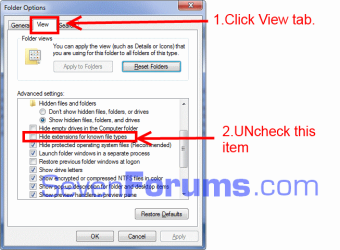
I followed your tutorial to the letter on how to get full glass effect on windows 7 home premium (i hope) and all was going well until i tried to take over dwm file. the udwm.dll was no problem to take over but when i tried the same thing with the dwm file there was simply no option showing up. also it may be nothing but in your screen shot of the dwm file mine has no .exe next to it. it is in the same place as yours with the same files above and below and is the same file size as well if this makes any difference i don't know cause my knowledge is limited and i sure could use your expertise. thanks. ps cool alien pic on ur profile,
 

My Computer My Computer

Computer type
Laptop
Computer Manufacturer/Model Number
asus
OS
windows 7 home premium 64 bit
Welcome to Seven Forums avacrack.
Go to Control Panel\All Control Panel Items\Folder Options, The window below will open, follow the instructions. This will show the .exe extension.
As Brink stated the Take Ownership won't be available on application files but will have Run as Administrator.

file options.png
 

My Computer My Computer

Computer type
PC/Desktop
Computer Manufacturer/Model Number
Home Built Desktop By DataTech
OS
Windows 7 Ultimate X64 SP1
CPU
Intel i5-2550K, Differing ~4.4-4.8GHz No built in GPU
Motherboard
ASUS P8Z68-V PRO/GEN3
Memory
16GB G.Skill Sniper 1866MHz @ 2133MHz 2x8GB
Graphics Card(s)
ASUS GTX650TIB-DC2OC-2GD5, (650TI Boost)
Sound Card
Onboard Realtek 5-1
Monitor(s) Displays
Samsung P2570HD
Screen Resolution
1920x1080
Hard Drives
Samsung 840 Pro 256GB SSD for OS, 500GB Seagate Constellation (Enterprise drive) for Data
PSU
Corsair HX650W
Case
Inwin Dragon Rider
Cooling
Hyper 212 EVO w/two Noctua fans, push-pull, @1300 RPM
Keyboard
E-Z Eyes, bright yellow keys with large characters
Mouse
steelseries SENSEI Laser Pro Gaming
Internet Speed
48-51Mbs Mbs down, 11 Mbs up Xfinity Cable
Antivirus
Norton Internet Security 2013
Browser
IE 10, Opera, Pale Moon if needed
Other Info
4 case fans, LG BluRay-RE, ASUS DVD-RW, Mr. Fusion power supply, 1.21 gigawatts.
full glass transparency

thanks heaps to britton 30. full glass effect now up and running and like it very much.:)
 

My Computer My Computer

Computer type
Laptop
Computer Manufacturer/Model Number
asus
OS
windows 7 home premium 64 bit
Good to hear it is fixed for you. :)
 

My Computer My Computer

Computer type
PC/Desktop
Computer Manufacturer/Model Number
Home Built Desktop By DataTech
OS
Windows 7 Ultimate X64 SP1
CPU
Intel i5-2550K, Differing ~4.4-4.8GHz No built in GPU
Motherboard
ASUS P8Z68-V PRO/GEN3
Memory
16GB G.Skill Sniper 1866MHz @ 2133MHz 2x8GB
Graphics Card(s)
ASUS GTX650TIB-DC2OC-2GD5, (650TI Boost)
Sound Card
Onboard Realtek 5-1
Monitor(s) Displays
Samsung P2570HD
Screen Resolution
1920x1080
Hard Drives
Samsung 840 Pro 256GB SSD for OS, 500GB Seagate Constellation (Enterprise drive) for Data
PSU
Corsair HX650W
Case
Inwin Dragon Rider
Cooling
Hyper 212 EVO w/two Noctua fans, push-pull, @1300 RPM
Keyboard
E-Z Eyes, bright yellow keys with large characters
Mouse
steelseries SENSEI Laser Pro Gaming
Internet Speed
48-51Mbs Mbs down, 11 Mbs up Xfinity Cable
Antivirus
Norton Internet Security 2013
Browser
IE 10, Opera, Pale Moon if needed
Other Info
4 case fans, LG BluRay-RE, ASUS DVD-RW, Mr. Fusion power supply, 1.21 gigawatts.
Back
Top