

(Due to real-life issues, I will no longer continue development on any of these programs. Sorry. But if anyone wants to continue development, the source code is linked below.)
System Transparency
All files can be downloaded from here - 404 Not Found | DeviantArt
I've added a nice bit of updates that some might like. Check em out!
Screenshots.
"Non-Aero" is shown by features that probably won't work too well with Aero enabled...I cannot test this, so if anyone can, please post your results.
In Action:
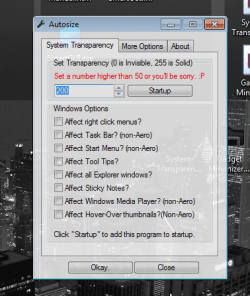
Main Interface updated with new GUI
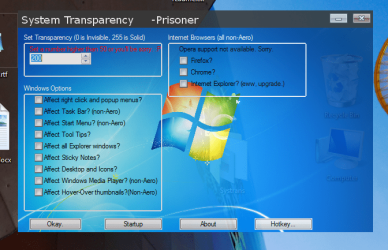
At work using the hotkey.
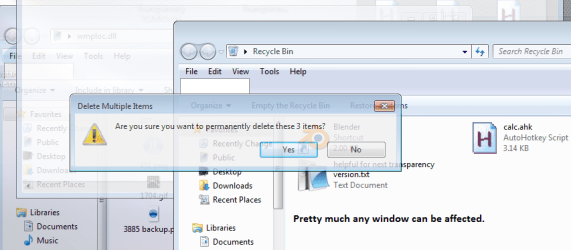
Before:

After (non-Aero):

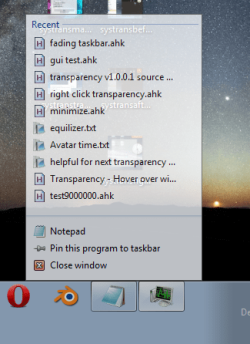
Right Click Menu:

Right Click Menu on taskbar:
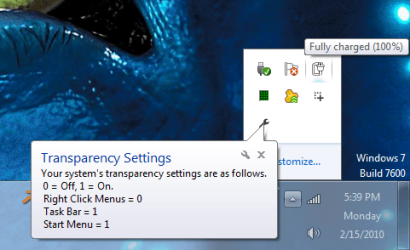
Tray Notification:
Tool Tip Transparency:
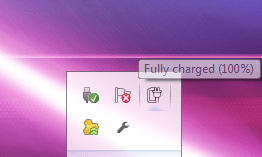
Note: I am aware that tray tips are also made transparent with this, and that they look ugly as hell with the fade feature. I can't help this, as far as I know. Sorry.
More task bar items have been added to transparency.

Note: This includes: Network info, Volume, Clock & Calendar, Battery, Action Center, and the small popup window that appears when you click the arrow in the tray notifications.
Every Explorer window will be transparent in around 2 clicks. No hotkey needed.
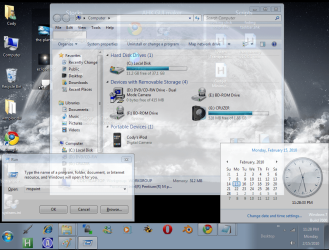
Note: This does not include any third-party programs. In theory, this should, and so far has, act{ed} on any window that is opened with Explorer. For example, Control Panel, Computer, Documents, Music...etc.
Browser support (non-Aero):
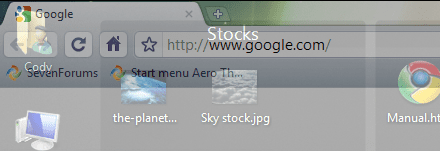
Note: Opera currently not supported...don't know why, I think it's something to do with the browser's code...as mine is functioning for the other browsers...
Sticky Notes:
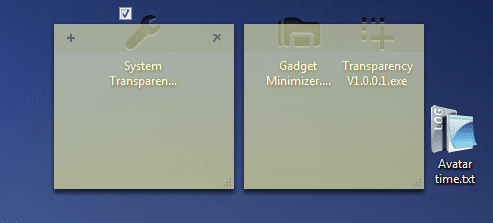
For those who use the Sticky Notes feature, I bring you the option to make those transparent, too.
Thumbnail Support (non-Aero):
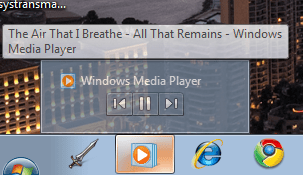
Transparency for thumbnails on systems that don't support Aero effects. Note that a small graphical glitch may occur when using this feature, when right clicking an item on the taskbar.
Windows Media Player (non-Aero)
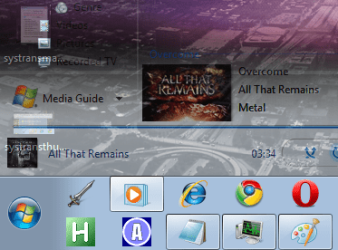
For the rest of us without Aero...you can make the Media Player transparent. Best for use with a light wmploc.dll background if you have edited yours. You can see the drawbacks of a darker one here... iTunes support will be added on in a few days.
Desktop Icon Transparency
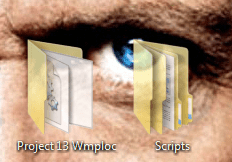
I don't believe I've seen this on any major program...
This setting makes your desktop icons transparent, not just the labels, the entire icon is made transparent to whatever setting you want. Nifty, but EXTREMELY slow on desktops with a lot of icons. You have been warned..... :shock:
NOTE: UNRECOMMENDED TO RUN WITH ANY IMAGE EDITING SOFTWARE THAT USES TRANSPARENCY SETTINGS. AERO ALSO NOT RECOMMENDED.
Crappy GUI version: View attachment System Transparency.exe (not going to update anymore)
New GUI version: View attachment System_Transparency_by_Prisoner7.zip
I have become aware that some antivirus programs pick this file up as malware. Current users can probably tell you that there have been no problems with it. It's probably due to the language it uses... sorry if it's an inconvenience.
Virustotal scan results: Results
Note about the GUI: If you go look for the images, please don't edit them... It would hurt my feelings. (except the Win7.png file, you can change that to whatever you want, so long as it stays the same file name and resolution.)
Source Code:
Before you scream at me for how inefficient it is, how poorly commented it is, or how I haven't used proper coding conventions, please remember that I was 14 when I started this and had no previous coding experience.
So with that out of the way..
View attachment Source Code.txt
Updates:
1.0.3.2
Added option to make tooltips transparent, added 2 lines to reset taskbar and start menu to full opacity when the program is closed, added saving transparency level to an .ini file. Also added transparency to the "more notifications" box that pops up when you click the arrow by your notifications.
1.1.0.2
Made all windows running on Explorer.exe become transparent, added some more items to become transparent on the taskbar (Volume, Networks, Battery, Action Center), cleaned up some useless code.
1.2.5.2
Merged with Transparency, added browser support, added WMP support, added thumbnail transparency, added an "add to startup" feature, moved the .ini file save location due to a conflict with the save feature, cleaned up some more code to compromise for the new additions, fixed a few other bugs.
1.3.2.2
Program now saves all of its settings to the .ini file, reads them off at program startup, and automatically minimizes. Added ability to make desktop icons transparent. Oh yea, threw some credits in the info section.
1.5.0.2
You can now remove the User picture from the start menu.
If you need to, you can now restart the explorer process. This is for emergency situations, it's not "clean"... it kills the task and restarts it.
Added a button to run a second copy (or more) of the program, so you can set different levels of transparency.
You can show a working system clock (Currently in 24Hour format) by the mouse.
You can show the desktop as a taskbar button. This can be helpful for... I dunno. I just did it.
Also set the ability to send the ALT+TAB keys when you move your mouse to the left side of the screen. This activates whatever program runs when you hold alt and tab.
And finally, allowed for the tray icon to be hidden and unhidden.
-------------------------------
Gadget Minimizer Bug has been fixed.
Shortly after finishing Transparency, a person (floralelephants) posted an idea to minimize and maximize Desktop Gadgets. I got on it, and, pretty quickly, came up with this.
Screenshots:
Main window. Just a bit of reading, pretty simple.

Tray tips for information...
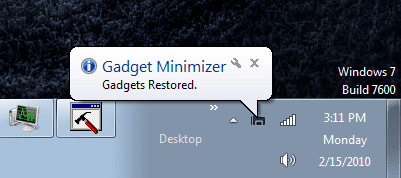
It doing what it does.
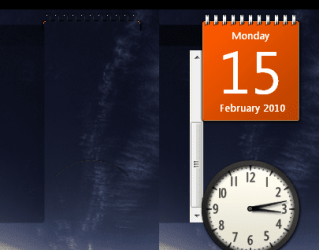
You can see there is still a bit of the window there, but it can't be helped. Sorry.
And here's the download link.
View attachment 54408 (sorry again X64 users, only X86, but you can emulate it I think..trying to get X64 support.)
To run, just double click, follow directions. Have fun.
-------------------------------
AlwaysOnTop
I thought people who have a lot of windows open at once might find this helpful. It's pretty simple, but effective. It has two features currently, just some things I pieced together and found that they worked together really well.
View attachment AlwaysOnTop.exe
Features:
Always On Top: Sets any window to the top, and sticks it there. It can also affect windows that are normally always on top, so that they act like regular windows (not always on top...)
Minimize to Title Bar: Resizes the window so that it looks like only the title bar is showing.
Note: A small bit of credits for this feature go to Rajat on the Autohotkey.com forums for making a script similar to this.
Also note that I know there is a program out called "AlwaysOnTop" that does this feature. This isn't affiliated with that, I don't intend to infringe any copyrights or whatever may be on it. I just used this as a simple name.
---------------------
Afterthoughts: Brink, if I'm exceeding my thread size limit tell me so I can save these back to my hard drive and delete them off here...maybe repost them somewhere else.
System Transparency
All files can be downloaded from here - 404 Not Found | DeviantArt
I've added a nice bit of updates that some might like. Check em out!
Screenshots.
"Non-Aero" is shown by features that probably won't work too well with Aero enabled...I cannot test this, so if anyone can, please post your results.
In Action:
Main Interface updated with new GUI
At work using the hotkey.
Before:
After (non-Aero):
Right Click Menu:
Right Click Menu on taskbar:
Tray Notification:
Tool Tip Transparency:
Note: I am aware that tray tips are also made transparent with this, and that they look ugly as hell with the fade feature. I can't help this, as far as I know. Sorry.
More task bar items have been added to transparency.
Note: This includes: Network info, Volume, Clock & Calendar, Battery, Action Center, and the small popup window that appears when you click the arrow in the tray notifications.
Every Explorer window will be transparent in around 2 clicks. No hotkey needed.
Note: This does not include any third-party programs. In theory, this should, and so far has, act{ed} on any window that is opened with Explorer. For example, Control Panel, Computer, Documents, Music...etc.
Browser support (non-Aero):
Note: Opera currently not supported...don't know why, I think it's something to do with the browser's code...as mine is functioning for the other browsers...
Sticky Notes:
For those who use the Sticky Notes feature, I bring you the option to make those transparent, too.
Thumbnail Support (non-Aero):
Transparency for thumbnails on systems that don't support Aero effects. Note that a small graphical glitch may occur when using this feature, when right clicking an item on the taskbar.
Windows Media Player (non-Aero)
For the rest of us without Aero...you can make the Media Player transparent.
Best for use with a light wmploc.dll background if you have edited yours. You can see the drawbacks of a darker one here... iTunes support will be added on in a few days.Desktop Icon Transparency
I don't believe I've seen this on any major program...
This setting makes your desktop icons transparent, not just the labels, the entire icon is made transparent to whatever setting you want. Nifty, but EXTREMELY slow on desktops with a lot of icons. You have been warned..... :shock:
NOTE: UNRECOMMENDED TO RUN WITH ANY IMAGE EDITING SOFTWARE THAT USES TRANSPARENCY SETTINGS. AERO ALSO NOT RECOMMENDED.
Crappy GUI version: View attachment System Transparency.exe (not going to update anymore)
New GUI version: View attachment System_Transparency_by_Prisoner7.zip
I have become aware that some antivirus programs pick this file up as malware. Current users can probably tell you that there have been no problems with it. It's probably due to the language it uses... sorry if it's an inconvenience.
Virustotal scan results: Results
Note about the GUI: If you go look for the images, please don't edit them... It would hurt my feelings.
(except the Win7.png file, you can change that to whatever you want, so long as it stays the same file name and resolution.)Source Code:
Before you scream at me for how inefficient it is, how poorly commented it is, or how I haven't used proper coding conventions, please remember that I was 14 when I started this and had no previous coding experience.
So with that out of the way..
View attachment Source Code.txt
Updates:
1.0.3.2
Added option to make tooltips transparent, added 2 lines to reset taskbar and start menu to full opacity when the program is closed, added saving transparency level to an .ini file. Also added transparency to the "more notifications" box that pops up when you click the arrow by your notifications.
1.1.0.2
Made all windows running on Explorer.exe become transparent, added some more items to become transparent on the taskbar (Volume, Networks, Battery, Action Center), cleaned up some useless code.
1.2.5.2
Merged with Transparency, added browser support, added WMP support, added thumbnail transparency, added an "add to startup" feature, moved the .ini file save location due to a conflict with the save feature, cleaned up some more code to compromise for the new additions, fixed a few other bugs.
1.3.2.2
Program now saves all of its settings to the .ini file, reads them off at program startup, and automatically minimizes. Added ability to make desktop icons transparent. Oh yea, threw some credits in the info section.
1.5.0.2
You can now remove the User picture from the start menu.
If you need to, you can now restart the explorer process. This is for emergency situations, it's not "clean"... it kills the task and restarts it.
Added a button to run a second copy (or more) of the program, so you can set different levels of transparency.
You can show a working system clock (Currently in 24Hour format) by the mouse.
You can show the desktop as a taskbar button. This can be helpful for... I dunno. I just did it.
Also set the ability to send the ALT+TAB keys when you move your mouse to the left side of the screen. This activates whatever program runs when you hold alt and tab.
And finally, allowed for the tray icon to be hidden and unhidden.
-------------------------------
Gadget Minimizer Bug has been fixed.
Shortly after finishing Transparency, a person (floralelephants) posted an idea to minimize and maximize Desktop Gadgets. I got on it, and, pretty quickly, came up with this.
Screenshots:
Main window. Just a bit of reading, pretty simple.
Tray tips for information...
It doing what it does.
You can see there is still a bit of the window there, but it can't be helped. Sorry.
And here's the download link.
View attachment 54408 (sorry again X64 users, only X86, but you can emulate it I think..trying to get X64 support.)
To run, just double click, follow directions. Have fun.
-------------------------------
AlwaysOnTop
I thought people who have a lot of windows open at once might find this helpful. It's pretty simple, but effective. It has two features currently, just some things I pieced together and found that they worked together really well.
View attachment AlwaysOnTop.exe
Features:
Always On Top: Sets any window to the top, and sticks it there. It can also affect windows that are normally always on top, so that they act like regular windows (not always on top...
)Minimize to Title Bar: Resizes the window so that it looks like only the title bar is showing.
Note: A small bit of credits for this feature go to Rajat on the Autohotkey.com forums for making a script similar to this.
Also note that I know there is a program out called "AlwaysOnTop" that does this feature. This isn't affiliated with that, I don't intend to infringe any copyrights or whatever may be on it. I just used this as a simple name.
---------------------
Afterthoughts: Brink, if I'm exceeding my thread size limit
tell me so I can save these back to my hard drive and delete them off here...maybe repost them somewhere else. Attachments
Last edited:
My Computer
- Computer type
- PC/Desktop
- Computer Manufacturer/Model Number
- Custom built
- OS
- Windows 8 Pro 64-bit
- CPU
- Intel Core i7 950 @4.4GHz
- Motherboard
- EVGA 131-GT-E767
- Memory
- 12GB DDR3 1333MHz @1400 (9-9-9-24)
- Graphics Card(s)
- 2x AMD Radeon HD 6770
- Sound Card
- Sound Blaster Audigy
- Monitor(s) Displays
- Acer S231HL + Acer E19T5W
- Screen Resolution
- 1920x1080 + 1440x900
- Hard Drives
- 128GB Samsung 840 Pro
1TB Seagate Barracuda 7200RPM 64mb
500GB Seagate Barracuda 7200RPM 16mb
- PSU
- Corsair GS800
- Case
- Custom-made
- Cooling
- CM Hyper212+, lots of fans
- Keyboard
- NMB RT8255C+
- Mouse
- Func MS-3
- Internet Speed
- 30/1.5
- Antivirus
- Microsoft Security Essentials/Spybot SD/Malwarebytes
- Browser
- Google Chrome
- Other Info
- Onkyo TX-27 receiver & two Realistic Optimus T100s.


 Interesting programs.


