trick required to run all 4GB of RAM

ricksis

New member
Member
Local time
12:57 PM
Messages
84
Location
Leeuwarden, Netherlands
I know this forum is for win7 users, but I trust these admins here and the community's advise.

I'm running a Vista powered Lenovo laptop. I bought it with pre-installed Vista Business 32-bit, although it has 4Gb RAM, and windows only recognizes about 2.33 GB. Is there any trick you might know so i could run all 4 GB? Besides reinstalling a 64-bit version of windows... Like, an upgrade from 32 to 64 that would do the job.

Thanks
 

My Computer My Computer

At a glance

Microsoft Windows 7 Ultimate 64-bitIntel(R) Core(TM) i5 CPU 3230M @ 2.53GHz8,00 GB DDR3@1600MhznVidia GT730M
Computer type
Laptop
Computer Manufacturer/Model Number
Acer
OS
Microsoft Windows 7 Ultimate 64-bit
CPU
Intel(R) Core(TM) i5 CPU 3230M @ 2.53GHz
Motherboard
Sony Corporation Base Board VAIO
Memory
8,00 GB DDR3@1600Mhz
Graphics Card(s)
nVidia GT730M
Screen Resolution
1920 x 1080
Some of it is likely hardware reserve for the graphics.
This can typically be adjusted in the bios.
You'll never show the entire 4gigs using 32 bit windows though.
You would have to switch to 64 bit to ever have use of more than 3.2 gigs.
 

My Computer My Computer

At a glance

Windows 7 x64Intel i7 2600kG.skill Ripjaw 16gigs @ 1866Nvidia gtx580 (evga)
Computer Manufacturer/Model Number
Insane hobo technologies. ;-)
OS
Windows 7 x64
CPU
Intel i7 2600k
Motherboard
Asrock z68 extreme 4 gen 3
Memory
G.skill Ripjaw 16gigs @ 1866
Graphics Card(s)
Nvidia gtx580 (evga)
Sound Card
Integrated HD audio + hdmi
Monitor(s) Displays
24" ASUS widescreen + 42" insignia
Screen Resolution
1080p (1920x1080)
Hard Drives
128 Samsung 830
256 Samsung 840
3 x 1tb storage drive (various)
1 western digital 1tb (eSATA)
1 Seagate 1tb (eSATA)
PSU
1 kilowatt SLI/Crossfire rated Silverstone modular
Case
NZXT Phantom + additional 220 fan
Cooling
Zalmann
Keyboard
Microsoft wireless 3000 (v2)
Mouse
MS - wireless 5000 (bluetrack)
Internet Speed
depends on if you ask me or my provider.
Other Info
The above information is provided as is, and the author assumes no responsibility for issues it may cause with your sanity or fanboyism.
I guess I found the trick :D.

So what could I do for my computer to see at least those 3.2 GB RAM? From bios what? I definitely need them.
 

My Computer My Computer

At a glance

Microsoft Windows 7 Ultimate 64-bitIntel(R) Core(TM) i5 CPU 3230M @ 2.53GHz8,00 GB DDR3@1600MhznVidia GT730M
Computer type
Laptop
Computer Manufacturer/Model Number
Acer
OS
Microsoft Windows 7 Ultimate 64-bit
CPU
Intel(R) Core(TM) i5 CPU 3230M @ 2.53GHz
Motherboard
Sony Corporation Base Board VAIO
Memory
8,00 GB DDR3@1600Mhz
Graphics Card(s)
nVidia GT730M
Screen Resolution
1920 x 1080
I guess I found the trick :D.

So what could I do for my computer to see at least those 3.2 GB RAM? From bios what? I definitely need them.

Firly sure you are already "seeing" the ~3.25 but you shared video memory is subtracted from that hence your current total.
 

My Computer My Computer

At a glance

Win 8 Release candidate 8400[email protected]4 gigsNvidia 9600M
Computer Manufacturer/Model Number
HP Pavillion dv-7 1005 Tx
OS
Win 8 Release candidate 8400
CPU
[email protected]
Memory
4 gigs
Graphics Card(s)
Nvidia 9600M
Sound Card
HD built-in
Monitor(s) Displays
17" Wxga
Screen Resolution
1440x900
Cooling
none
Internet Speed
45Mb down 5Mb up
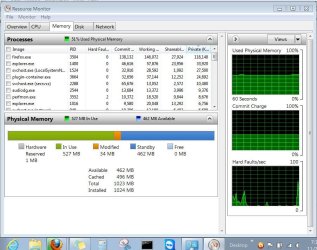
Type Resource Monitor into Start Search box, open it then choose Memory tab where you'll see your Physical Memory (RAM) usage breakdown in a graph like this:

Capture.JPG
 

Attachments

  • Untitled.jpg
    Untitled.jpg
    186.9 KB · Views: 51

My Computer My Computer

At a glance

Microsoft Windows 7 Ultimate 64-bitIntel(R) Core(TM) i5 CPU 3230M @ 2.53GHz8,00 GB DDR3@1600MhznVidia GT730M
Computer type
Laptop
Computer Manufacturer/Model Number
Acer
OS
Microsoft Windows 7 Ultimate 64-bit
CPU
Intel(R) Core(TM) i5 CPU 3230M @ 2.53GHz
Motherboard
Sony Corporation Base Board VAIO
Memory
8,00 GB DDR3@1600Mhz
Graphics Card(s)
nVidia GT730M
Screen Resolution
1920 x 1080
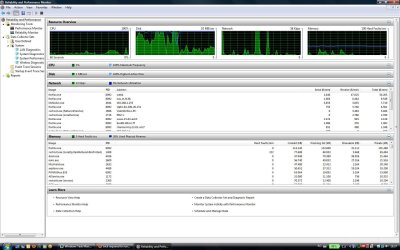
Please follow the instructions as given and post back the Memory tab of the Resource Monitor, not Reliability Monitor.

I even attached a picture so you'd know what it looks like.
 
Please follow the instructions as given and post back the Memory tab of the Resource Monitor, not Reliability Monitor.

I even attached a picture so you'd know what it looks like.

I said in the first post, I'm running Windows Vista. I didn't and still don't find the Resource monitor. Searching in the bar gives me nothing.
 

My Computer My Computer

At a glance

Microsoft Windows 7 Ultimate 64-bitIntel(R) Core(TM) i5 CPU 3230M @ 2.53GHz8,00 GB DDR3@1600MhznVidia GT730M
Computer type
Laptop
Computer Manufacturer/Model Number
Acer
OS
Microsoft Windows 7 Ultimate 64-bit
CPU
Intel(R) Core(TM) i5 CPU 3230M @ 2.53GHz
Motherboard
Sony Corporation Base Board VAIO
Memory
8,00 GB DDR3@1600Mhz
Graphics Card(s)
nVidia GT730M
Screen Resolution
1920 x 1080
Resource monitor is in task manager / performance tab?
 

My Computer My Computer

At a glance

Microsoft Windows 10 Professional / Windows 7...Intel i5-357016GB DDR3AMD Radeon HD 7850 2GB
Computer type
PC/Desktop
OS
Microsoft Windows 10 Professional / Windows 7 Professional
CPU
Intel i5-3570
Motherboard
Lenovo Mahobay
Memory
16GB DDR3
Graphics Card(s)
AMD Radeon HD 7850 2GB
Sound Card
(1) Realtek HD Audio (2) AMD HD Audio
Monitor(s) Displays
LG LS192WS
Screen Resolution
1440 x 900 @ 32bit color
Hard Drives
(1) SUV300S37A/120G (2) ST3500413AS SATA Disk Device AHCI mode enabled.
PSU
Corsair HX620
Case
Thermaltake V4 Black Edition
Cooling
Cooler Master Hyper 212 + Artic Silver 5 on CPU/GPU
Keyboard
Dell SK-8115
Mouse
Razer Copperhead with MAPED mat (awesome!)
Internet Speed
100 Mbps up/down
Browser
Chrome
I'm sorry I don't use Vista. I'd ask in Vista forums.

Or maybe someone here knows where in Vista all available RAM is apportioned in a graph.
 
Yeah, no Resource Monitor in Vista. I always deplored that. It is such a handy tool.
 

My Computer My Computer

At a glance

Vista, Windows7, Mint Mate, Zorin, Windows 8from 1.6GHz Duo to i7
Computer Manufacturer/Model Number
HP, Dell, Gateway, Toshiba - 4 laptops and 2 desktops
OS
Vista, Windows7, Mint Mate, Zorin, Windows 8
CPU
from 1.6GHz Duo to i7
Monitor(s) Displays
2x HP w2207
Hard Drives
5x HDD, 7x SSD, 12x Externals
Keyboard
with trackball - no mices
Mouse
Trackball mice
Internet Speed
DSL 6000
So no genuine answer for me? :(
 

My Computer My Computer

At a glance

Microsoft Windows 7 Ultimate 64-bitIntel(R) Core(TM) i5 CPU 3230M @ 2.53GHz8,00 GB DDR3@1600MhznVidia GT730M
Computer type
Laptop
Computer Manufacturer/Model Number
Acer
OS
Microsoft Windows 7 Ultimate 64-bit
CPU
Intel(R) Core(TM) i5 CPU 3230M @ 2.53GHz
Motherboard
Sony Corporation Base Board VAIO
Memory
8,00 GB DDR3@1600Mhz
Graphics Card(s)
nVidia GT730M
Screen Resolution
1920 x 1080
Yes, please ask at Vista forums I linked earlier.

This is a forum for Win7 which absorbs most of our focus, so our Vista help may be limited to commonalities which are unfortunately not present here.
 
Back
Top