Solved Tried installing over Primary partition

tmorinbmw

New member
Local time
3:24 PM
Messages
23
While doing an install of Win7 Ult. x64 on my Dell Studio XPS 9100. During the installation, it asked me what partition and I remember selecting "OS: ???? Primary". Now it's stuck in limbo because it keeps giving an error message: "the computer restarted unexpectedly or the installation was stopped unexpectedly. Windows installation cannot proceed." (I had to hard restart it because it froze) and restarting.
 

My Computer

Computer Manufacturer/Model Number
Dell Studio XPS 9100
OS
Windows 7 Home Premium x64
CPU
Intel i7
Memory
9GB
Graphics Card(s)
Ati
Monitor(s) Displays
Dual
Hard Drives
1Tb

My Computer

Computer Manufacturer/Model Number
Dell Studio XPS 9100
OS
Windows 7 Home Premium x64
CPU
Intel i7
Memory
9GB
Graphics Card(s)
Ati
Monitor(s) Displays
Dual
Hard Drives
1Tb
Did you miss the step to Delete the partitions you don't need during reinstall? This would have avoided possibly installing multiple OS's or having wasted space on partitions that aren't needed.

Please type Disk Management in Start Search box.

Maximize Window, open Snipping Tool from Start Menu, draw a rectangular snip around the drive map and listings, post it back so we can look over the configuration. Screen Shots
 
Did you miss the step to Delete the partitions you don't need during reinstall? This would have avoided possibly installing multiple OS's or having wasted space on partitions that aren't needed.

Please type Disk Management in Start Search box.

Maximize Window, open Snipping Tool from Start Menu, draw a rectangular snip around the drive map and listings, post it back so we can look over the configuration. Screen Shots

I didn't miss the step about deleating partitions, I just don't know what I'm doing when it comes to this sort of thing and thought it a good idea to leave them for now. I'm in the process of restoring my back up files and will post some screen shots soon! :cool:
 

My Computer

Computer Manufacturer/Model Number
Dell Studio XPS 9100
OS
Windows 7 Home Premium x64
CPU
Intel i7
Memory
9GB
Graphics Card(s)
Ati
Monitor(s) Displays
Dual
Hard Drives
1Tb
You should post a screenshot of disk management as soon as you can so we can take a look and give you some advice before you start restoring all your files and installing programs.
 

My Computer

Computer type
PC/Desktop
Computer Manufacturer/Model Number
Skylake Special #666
OS
Windows 10 Pro x64
CPU
Intel Core i7 6700K
Motherboard
Asus Sabertooth Z170 Mark 1
Memory
GSkill TridentZ RGB 16GB 3600 16-16-16-36
Graphics Card(s)
EVGA GTX 980 Ti SC x2
Sound Card
Realtek High Definition
Monitor(s) Displays
AOC G2460PG
Screen Resolution
1920 x 1080 144Hz
Hard Drives
Samsung 860 Pro 256GB, Seagate Barracuda 4TB x2
PSU
EVGA 1000 P2, EVGA White Custom Braided Cables
Case
Corsair Vengeance C70 Gunmetal Black
Cooling
Corsair H100i v2, Corsair ML120 x2, Thermal Grizzly Kryonaut
Keyboard
Logitech G910 Orion Spectrum
Mouse
Logitech G700s
Internet Speed
Verizon Fios Quantum Gateway 75/75
Antivirus
Windows Defender, Malwarebytes Free 3.8.3
Browser
Chrome
Other Info
Corsair SP120 x4, LG Blu-ray Drive, Durabrand HT-395 100 Watt Dolby Digital Amp, Corsair H2100 Wireless 7.1 Headset
Capture.JPG

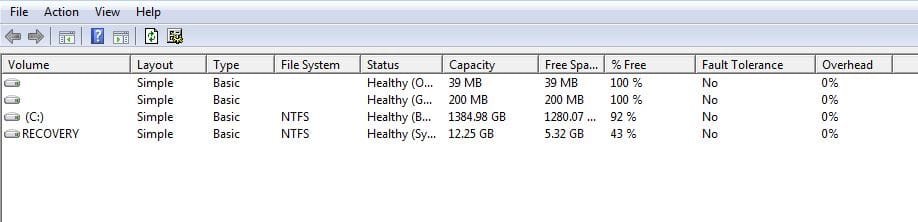
I think I see what your getting at. Now I have 4 different 'volumes'
 

My Computer

Computer Manufacturer/Model Number
Dell Studio XPS 9100
OS
Windows 7 Home Premium x64
CPU
Intel i7
Memory
9GB
Graphics Card(s)
Ati
Monitor(s) Displays
Dual
Hard Drives
1Tb
We would need the whole page shot, but you look fine. What is the 39MB partition ?
 

My Computer

Computer type
PC/Desktop
Computer Manufacturer/Model Number
Skylake Special #666
OS
Windows 10 Pro x64
CPU
Intel Core i7 6700K
Motherboard
Asus Sabertooth Z170 Mark 1
Memory
GSkill TridentZ RGB 16GB 3600 16-16-16-36
Graphics Card(s)
EVGA GTX 980 Ti SC x2
Sound Card
Realtek High Definition
Monitor(s) Displays
AOC G2460PG
Screen Resolution
1920 x 1080 144Hz
Hard Drives
Samsung 860 Pro 256GB, Seagate Barracuda 4TB x2
PSU
EVGA 1000 P2, EVGA White Custom Braided Cables
Case
Corsair Vengeance C70 Gunmetal Black
Cooling
Corsair H100i v2, Corsair ML120 x2, Thermal Grizzly Kryonaut
Keyboard
Logitech G910 Orion Spectrum
Mouse
Logitech G700s
Internet Speed
Verizon Fios Quantum Gateway 75/75
Antivirus
Windows Defender, Malwarebytes Free 3.8.3
Browser
Chrome
Other Info
Corsair SP120 x4, LG Blu-ray Drive, Durabrand HT-395 100 Watt Dolby Digital Amp, Corsair H2100 Wireless 7.1 Headset
We would need the whole page shot, but you look fine. What is the 39MB partition ?
That looks like a Dell system. They always have this 39MB partition in Fat32. I suspect some tools in that partition.

PS: LOL, in his first post he even says that it is a Dell.
 

My Computer

Computer Manufacturer/Model Number
HP, Dell, Gateway, Toshiba - 4 laptops and 2 desktops
OS
Vista, Windows7, Mint Mate, Zorin, Windows 8
CPU
from 1.6GHz Duo to i7
Monitor(s) Displays
2x HP w2207
Hard Drives
5x HDD, 7x SSD, 12x Externals
Keyboard
with trackball - no mices
Mouse
Trackball mice
Internet Speed
DSL 6000
We would need the whole page shot, but you look fine. What is the 39MB partition ?
That looks like a Dell system. They always have this 39MB partition in Fat32. I suspect some tools in that partition.

PS: LOL, in his first post he even says that it is a Dell.

Yep. What a shame.
 

My Computer

Computer type
PC/Desktop
Computer Manufacturer/Model Number
Skylake Special #666
OS
Windows 10 Pro x64
CPU
Intel Core i7 6700K
Motherboard
Asus Sabertooth Z170 Mark 1
Memory
GSkill TridentZ RGB 16GB 3600 16-16-16-36
Graphics Card(s)
EVGA GTX 980 Ti SC x2
Sound Card
Realtek High Definition
Monitor(s) Displays
AOC G2460PG
Screen Resolution
1920 x 1080 144Hz
Hard Drives
Samsung 860 Pro 256GB, Seagate Barracuda 4TB x2
PSU
EVGA 1000 P2, EVGA White Custom Braided Cables
Case
Corsair Vengeance C70 Gunmetal Black
Cooling
Corsair H100i v2, Corsair ML120 x2, Thermal Grizzly Kryonaut
Keyboard
Logitech G910 Orion Spectrum
Mouse
Logitech G700s
Internet Speed
Verizon Fios Quantum Gateway 75/75
Antivirus
Windows Defender, Malwarebytes Free 3.8.3
Browser
Chrome
Other Info
Corsair SP120 x4, LG Blu-ray Drive, Durabrand HT-395 100 Watt Dolby Digital Amp, Corsair H2100 Wireless 7.1 Headset
Capture 2.JPG

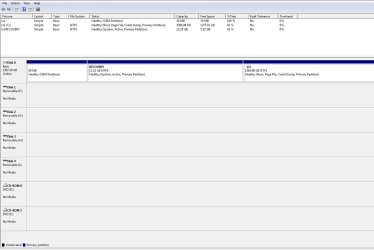
Here's another. I'm not sure what the 39 mb one is but, I hope that's what you want?
 

My Computer

Computer Manufacturer/Model Number
Dell Studio XPS 9100
OS
Windows 7 Home Premium x64
CPU
Intel i7
Memory
9GB
Graphics Card(s)
Ati
Monitor(s) Displays
Dual
Hard Drives
1Tb
If your happy, I`m happy :party::party:

Is it running ok ? Booting ok ??

Although I don`t think the recovery partition should be marked active. Guys ???
 

My Computer

Computer type
PC/Desktop
Computer Manufacturer/Model Number
Skylake Special #666
OS
Windows 10 Pro x64
CPU
Intel Core i7 6700K
Motherboard
Asus Sabertooth Z170 Mark 1
Memory
GSkill TridentZ RGB 16GB 3600 16-16-16-36
Graphics Card(s)
EVGA GTX 980 Ti SC x2
Sound Card
Realtek High Definition
Monitor(s) Displays
AOC G2460PG
Screen Resolution
1920 x 1080 144Hz
Hard Drives
Samsung 860 Pro 256GB, Seagate Barracuda 4TB x2
PSU
EVGA 1000 P2, EVGA White Custom Braided Cables
Case
Corsair Vengeance C70 Gunmetal Black
Cooling
Corsair H100i v2, Corsair ML120 x2, Thermal Grizzly Kryonaut
Keyboard
Logitech G910 Orion Spectrum
Mouse
Logitech G700s
Internet Speed
Verizon Fios Quantum Gateway 75/75
Antivirus
Windows Defender, Malwarebytes Free 3.8.3
Browser
Chrome
Other Info
Corsair SP120 x4, LG Blu-ray Drive, Durabrand HT-395 100 Watt Dolby Digital Amp, Corsair H2100 Wireless 7.1 Headset
If your happy, I`m happy :party::party:

Is it running ok ? Booting ok ??

Although I don`t think the recovery partition should be marked active. Guys ???

I've only restarted it once for IE9 and it seems ok. Is there a way to get rid of that 39mb partition and the recovery?
 

My Computer

Computer Manufacturer/Model Number
Dell Studio XPS 9100
OS
Windows 7 Home Premium x64
CPU
Intel i7
Memory
9GB
Graphics Card(s)
Ati
Monitor(s) Displays
Dual
Hard Drives
1Tb
I wouldn`t touch it. Your boot files are on the recovery partition, if you deleted it you wouldn`t be able to boot.
 

My Computer

Computer type
PC/Desktop
Computer Manufacturer/Model Number
Skylake Special #666
OS
Windows 10 Pro x64
CPU
Intel Core i7 6700K
Motherboard
Asus Sabertooth Z170 Mark 1
Memory
GSkill TridentZ RGB 16GB 3600 16-16-16-36
Graphics Card(s)
EVGA GTX 980 Ti SC x2
Sound Card
Realtek High Definition
Monitor(s) Displays
AOC G2460PG
Screen Resolution
1920 x 1080 144Hz
Hard Drives
Samsung 860 Pro 256GB, Seagate Barracuda 4TB x2
PSU
EVGA 1000 P2, EVGA White Custom Braided Cables
Case
Corsair Vengeance C70 Gunmetal Black
Cooling
Corsair H100i v2, Corsair ML120 x2, Thermal Grizzly Kryonaut
Keyboard
Logitech G910 Orion Spectrum
Mouse
Logitech G700s
Internet Speed
Verizon Fios Quantum Gateway 75/75
Antivirus
Windows Defender, Malwarebytes Free 3.8.3
Browser
Chrome
Other Info
Corsair SP120 x4, LG Blu-ray Drive, Durabrand HT-395 100 Watt Dolby Digital Amp, Corsair H2100 Wireless 7.1 Headset

My Computer

Computer Manufacturer/Model Number
Dell Studio XPS 9100
OS
Windows 7 Home Premium x64
CPU
Intel i7
Memory
9GB
Graphics Card(s)
Ati
Monitor(s) Displays
Dual
Hard Drives
1Tb
No problem, glad to help.:thumbsup:
 

My Computer

Computer type
PC/Desktop
Computer Manufacturer/Model Number
Skylake Special #666
OS
Windows 10 Pro x64
CPU
Intel Core i7 6700K
Motherboard
Asus Sabertooth Z170 Mark 1
Memory
GSkill TridentZ RGB 16GB 3600 16-16-16-36
Graphics Card(s)
EVGA GTX 980 Ti SC x2
Sound Card
Realtek High Definition
Monitor(s) Displays
AOC G2460PG
Screen Resolution
1920 x 1080 144Hz
Hard Drives
Samsung 860 Pro 256GB, Seagate Barracuda 4TB x2
PSU
EVGA 1000 P2, EVGA White Custom Braided Cables
Case
Corsair Vengeance C70 Gunmetal Black
Cooling
Corsair H100i v2, Corsair ML120 x2, Thermal Grizzly Kryonaut
Keyboard
Logitech G910 Orion Spectrum
Mouse
Logitech G700s
Internet Speed
Verizon Fios Quantum Gateway 75/75
Antivirus
Windows Defender, Malwarebytes Free 3.8.3
Browser
Chrome
Other Info
Corsair SP120 x4, LG Blu-ray Drive, Durabrand HT-395 100 Watt Dolby Digital Amp, Corsair H2100 Wireless 7.1 Headset
I turned my machine on today, walked away for a few minutes, came back and it was in screen saver mode(I think?). I tried moving to mouse to awake it then the space bar and finally had to hard restart. I ran chkdsk as mentioned in the event viewer and no problems were found.
 

My Computer

Computer Manufacturer/Model Number
Dell Studio XPS 9100
OS
Windows 7 Home Premium x64
CPU
Intel i7
Memory
9GB
Graphics Card(s)
Ati
Monitor(s) Displays
Dual
Hard Drives
1Tb
You may need to update your Display driver - what driver is currently installed in Device Manager? Check optional Windows Updates now to see if any newer drivers have been delivered. Install your other WIndows Updates now if there are any cued. Right click a blank area of the Desktop to choose Personalize and turn off Screen Saver, use an Aero theme slideshow instead.

The 39mb partition should still run Dell Diagnostics if needed, but they will have to be run from boot. Follow these steps to try to run them now to see if they work, and what they find if they do: How to Run the Dell 32-bit Diagnostics Utility | Dell. If it will no longer run then there is a bootable download on Dell's site to burn to CD if ever needed.

Since the Dell Recovery partition on Studio XPS is triggered from the F8 boot menu it will not run now from boot since the F8 menu is rewritten during Win7 reinstall. Hopefully you made the Factory Recovery Disks if you think you might need to ever restore to Factory Condition to sell the computer. You can also try to relink the Recovery partition using this method: Dell Recovery Partition - restoring F8 link.

If this doesn't work or you simply don't want the Recovery partition any longer because you made the disks or have no use for it, then I can help you remove it and recover the System boot files and disk space into C through a series of steps using free Partition Wizard bootable CD which is an excellent learning experience with the most valuable tool we use here.

The modern way to run recovery of a Clean Reinstall is to save externally an image backup of your new installation which can be re-imaged to the HD or its replacement in 20 minutes if Win7 ever becomes irreparable.
 
You may need to update your Display driver - what driver is currently installed in Device Manager? Check optional Windows Updates now to see if any newer drivers have been delivered. Install your other WIndows Updates now if there are any cued. Right click a blank area of the Desktop to choose Personalize and turn off Screen Saver, use an Aero theme slideshow instead.

To be as thourogh as possible;
I installed 55 MS updates and the machine restarted.
Upon reboot it automaticly ran chkdsk to verify consistancy then installed the updates.
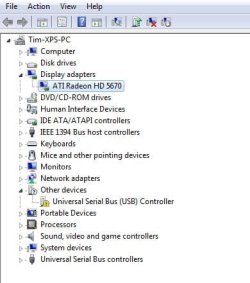
I came back here and attached a snip of my device manager (notice my display adapter and USB), I think it's the USB 3.0.
Capture 3.JPG

I have to step out for an hour or so and will be back. Should I leave it on and see what happens?
 

My Computer

Computer Manufacturer/Model Number
Dell Studio XPS 9100
OS
Windows 7 Home Premium x64
CPU
Intel i7
Memory
9GB
Graphics Card(s)
Ati
Monitor(s) Displays
Dual
Hard Drives
1Tb
If the Disk Check keeps running at reboot then I would test the HD using maker's HD Diagnostic extended CD scan, then run Disk Check from System Recovery Options Command Line.

Unless Updates delivers a newer driver or other problems arise I think you're OK with the Display driver as long as you have it installed and it isn't using the placeholder Standard VGA driver which is isn't.

What you do need is to go to the Dell Support Downloads webpage for your tag number, look for the USB controller in the Driver downloads list for your version of Win7. If it isn't broken out then download and install the latest Chipset.

Then go back to top of the steps I've been giving you and check off each one to make sure they are complete, asking back any questions if needed.
 
Back
Top