Triple boot machine needs to have XP gone...

Tinsby

New member
Member
VIP
Local time
4:21 AM
Messages
176
Hello,

My triple boot machine has XP, 7 and Linux/Ubuntu on it. I'd like to take XP off and be left with 7 and Linux.

Since XP was on the drive first, 7 has written it's boot info into XP. I also know that if I remove XP, 7 won't boot as there is no MBR for it.

I have Acronis backups of everything, can't use the 7 backup method due to XP being there, that's fine, I know my backups are valid.

I am trying to figure out a way to remove XP and be left with a 7 and Linux system that will boot. I am wondering if I blow out the XP partition, can I use the install CD of 7 to repair or create an MBR for it? Right now on XP I have EasyBCD set up to point to the install point of Linux. It's all working fine but I use XP little to none and its pointless to have it anymore. I'll just keep the backup of it somewhere.

Right now the way Linux is installed the grub bootloader is only controlling Ubuntu, not any version of windows. It was done that way to prevent the possibility that if grub becomes corrupt I wouldn't be able to boot to anything. This method of install I used prevents grub from modifying the MBR. So if I was to lose the MBR I'd still have Linux or vice versa.

Thanks to all who reply!

Tinsby
 

My Computer My Computer

Computer type
PC/Desktop
Computer Manufacturer/Model Number
Home/Custom built
OS
Dual boot Win7 Pro 64 & Linux Mint 18.3
CPU
Intel Core 2 Quad Core
Motherboard
Asus Rampage Extreme
Memory
8GB
Graphics Card(s)
Nvidia GeForce GTX 750 Ti
Sound Card
PCIe Supreme FX X-fi
Monitor(s) Displays
Viewsonic VX2450WM LED
Screen Resolution
1920x1080
Hard Drives
Intel SSD 240GB
WD 500GB HDD
PSU
Corsair 850 watt
Case
Lian Li
Cooling
Zalman
Keyboard
MS natural/ergonomic
Mouse
Intellimouse
Internet Speed
240 Mbps +/- Dnld, 12Mbps Upld via Xfinity Blast
Antivirus
Norton Security Suite by Xfinity
Browser
Firefox & Chrome
Other Info
4 slot memory card reader
Floppy drive
2 DVD burners
Brother MFCJ450dw AIO Printer/Scanner/Fax
eSATA connections
hi gregrocker,

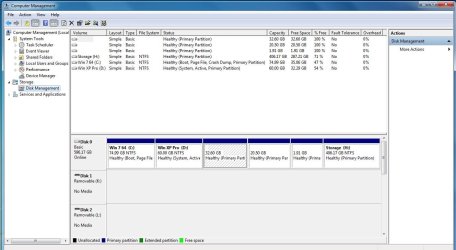
Here you go:

Partition C is of course 7 since I am in 7
" " D " ""XP
The 32.6GB one is / root Ubuntu partition formatted to ext4
" 20.50GB " is the /home Ubuntu partition " " "
" 1.91GB is the Ubuntu swap file not formatted
" "H" is my Storage drive

Hth you and the others thanks!

J T
 

Attachments

  • Capture.JPG
    Capture.JPG
    102.1 KB · Views: 6

My Computer My Computer

Computer type
PC/Desktop
Computer Manufacturer/Model Number
Home/Custom built
OS
Dual boot Win7 Pro 64 & Linux Mint 18.3
CPU
Intel Core 2 Quad Core
Motherboard
Asus Rampage Extreme
Memory
8GB
Graphics Card(s)
Nvidia GeForce GTX 750 Ti
Sound Card
PCIe Supreme FX X-fi
Monitor(s) Displays
Viewsonic VX2450WM LED
Screen Resolution
1920x1080
Hard Drives
Intel SSD 240GB
WD 500GB HDD
PSU
Corsair 850 watt
Case
Lian Li
Cooling
Zalman
Keyboard
MS natural/ergonomic
Mouse
Intellimouse
Internet Speed
240 Mbps +/- Dnld, 12Mbps Upld via Xfinity Blast
Antivirus
Norton Security Suite by Xfinity
Browser
Firefox & Chrome
Other Info
4 slot memory card reader
Floppy drive
2 DVD burners
Brother MFCJ450dw AIO Printer/Scanner/Fax
eSATA connections
That should do it!

Mark Win7 partition Active, reboot into Win7 disk to run Startup repair up to 3 separate times until 7 boots and holds System flag.

Delete XPired in Disk Mgmt to Extend c into the space.

If you need to add Linux to 7 boot menu: http://www.sevenforums.com/installation-setup/83923-where-install-ubuntu-my-system.html#post733626

gregrocker,

Will your method give the the 'system reserved space' in disk management as if I had installed 7 by itself? I assume that running the installer multiple times will create it and take the boot flag from XPired correct?

>>>> XPired <<<< nice one lol never heard that one b4!;D

J T
 

My Computer My Computer

Computer type
PC/Desktop
Computer Manufacturer/Model Number
Home/Custom built
OS
Dual boot Win7 Pro 64 & Linux Mint 18.3
CPU
Intel Core 2 Quad Core
Motherboard
Asus Rampage Extreme
Memory
8GB
Graphics Card(s)
Nvidia GeForce GTX 750 Ti
Sound Card
PCIe Supreme FX X-fi
Monitor(s) Displays
Viewsonic VX2450WM LED
Screen Resolution
1920x1080
Hard Drives
Intel SSD 240GB
WD 500GB HDD
PSU
Corsair 850 watt
Case
Lian Li
Cooling
Zalman
Keyboard
MS natural/ergonomic
Mouse
Intellimouse
Internet Speed
240 Mbps +/- Dnld, 12Mbps Upld via Xfinity Blast
Antivirus
Norton Security Suite by Xfinity
Browser
Firefox & Chrome
Other Info
4 slot memory card reader
Floppy drive
2 DVD burners
Brother MFCJ450dw AIO Printer/Scanner/Fax
eSATA connections
No, System Reserved is only issued when you install Win7 on a blank drive, or delete it and the C partitions during reinstall. It is of so little consequence that pondering whether you have it is a waste of time. You only need to know that if you have it, it should always be System Active.
 
Greg,
It looks like Disk 0 has 6 primary partitions.
I thought the max is 4, or 3 primary and unlimited logical ?
Is this because some partitions are for Linux ?

Sorry to interrupt, just curious, back to lurking :)
 

My Computer My Computer

Computer type
PC/Desktop
Computer Manufacturer/Model Number
home built
OS
Multi-Boot W7_Pro_x64 W8.1_Pro_x64 W10_Pro_x64 +Linux_VMs +Chromium_VM
CPU
AMD Athlon II x4 620
Motherboard
Gigabyte GA-MA785G-UD3H
Memory
6GB GSkill DDR2 800
Graphics Card(s)
AMD 4670 GPU + AMD 4200 IGP
Sound Card
on board Realtek ALC889A
Monitor(s) Displays
RCA 40" LCD TV, Insignia 32" LCD TV, HP 15" LCD monitor
Screen Resolution
1680 x 1050
Hard Drives
OCZ Vertex 3 120GB,
Samsung F3 1TB (3),
Several others - WD, Seagate, Hitachi, ...
PSU
Corsair 500 W
Case
Rosewill mid tower
Cooling
CM 90mm rifle
Keyboard
Gyration wireless, Logitech wireless, Dell USB wired
Mouse
Gyration wireless, Logitech wireless, V7 USB wired
Internet Speed
Spectrum - 100Mbps D / 10Mbps U
Antivirus
Avast, MBAM3, EMET, WinPatrol
Browser
Pale Moon, Firefox, IE
Other Info
2 multi-boot PC's
Mainly HTPC/Office/Gen purpose (no gaming).
Trendnet USB KVM.
LG DVD burner/Blue Ray Player.
Tray system for removable SATA backup drives.

Not currently OCd, under-volted.
I use Hybrid sleep, rarely re-boot or shutdown.

Hauppauge HD-PVR, Avermedia PCIe TV Tuner, Hauppauge PCI TV Tuner.
Yeah I noticed that but assumed its the misreporting Disk Management normally does of Linux partitions. If not then it would have had to be converted to Dynamic to have more than four Primary partitions. If you want more than four partitions on an MBR disk then at three you must create the fourth as Logical to add any others within the Logical container partition.

If it presents problems I'd suggest using Partition Wizard to convert the Linux to Logical but don't know what the consequences would be since i don't support Linux.

What do you think David? Are you Linux-fluent? Never hesitate to jump into the threads I'm in because this way we can learn from you more.
 
No, I don't have Linux ...
It's something I might add if I don't like the way Windows goes in the future.
If I do install Linux, I would install it on a separate HD, just because of the horror stories I've read.
If I could help, I would :(
I didn't think about Disk Management misreporting ...
 

My Computer My Computer

Computer type
PC/Desktop
Computer Manufacturer/Model Number
home built
OS
Multi-Boot W7_Pro_x64 W8.1_Pro_x64 W10_Pro_x64 +Linux_VMs +Chromium_VM
CPU
AMD Athlon II x4 620
Motherboard
Gigabyte GA-MA785G-UD3H
Memory
6GB GSkill DDR2 800
Graphics Card(s)
AMD 4670 GPU + AMD 4200 IGP
Sound Card
on board Realtek ALC889A
Monitor(s) Displays
RCA 40" LCD TV, Insignia 32" LCD TV, HP 15" LCD monitor
Screen Resolution
1680 x 1050
Hard Drives
OCZ Vertex 3 120GB,
Samsung F3 1TB (3),
Several others - WD, Seagate, Hitachi, ...
PSU
Corsair 500 W
Case
Rosewill mid tower
Cooling
CM 90mm rifle
Keyboard
Gyration wireless, Logitech wireless, Dell USB wired
Mouse
Gyration wireless, Logitech wireless, V7 USB wired
Internet Speed
Spectrum - 100Mbps D / 10Mbps U
Antivirus
Avast, MBAM3, EMET, WinPatrol
Browser
Pale Moon, Firefox, IE
Other Info
2 multi-boot PC's
Mainly HTPC/Office/Gen purpose (no gaming).
Trendnet USB KVM.
LG DVD burner/Blue Ray Player.
Tray system for removable SATA backup drives.

Not currently OCd, under-volted.
I use Hybrid sleep, rarely re-boot or shutdown.

Hauppauge HD-PVR, Avermedia PCIe TV Tuner, Hauppauge PCI TV Tuner.
Greg,
It looks like Disk 0 has 6 primary partitions.
I thought the max is 4, or 3 primary and unlimited logical ?
Is this because some partitions are for Linux ?

Sorry to interrupt, just curious, back to lurking :)

David,

The Linux partitions are invisible to the MS OS, Windows doesn't understand the ext4 journeling file system. I don't see the partitions as other drives in Windows explorer either.There was/is ext2 ext3 as well as ext4 and others for Linux.

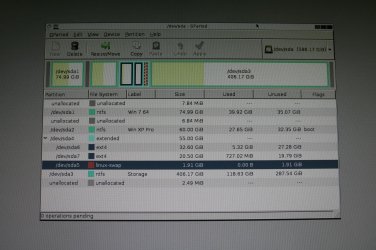
I have attached a screenshot of the partition manager for Linux called "GParted" (Gnome Partition Editor) this will work for ntfs as well. It's free for d/l if you ever want to try it. It runs right from the CD.
Note that the boot flag, in the flag column, is for XP in the screenshot. In Gparted I can easily move that flag to any of the available OS's that are there as need be.

Hope that helps somewhat.

Regards J T
 

Attachments

  • IMG_0293.jpg
    IMG_0293.jpg
    960.8 KB · Views: 8
Last edited:

My Computer My Computer

Computer type
PC/Desktop
Computer Manufacturer/Model Number
Home/Custom built
OS
Dual boot Win7 Pro 64 & Linux Mint 18.3
CPU
Intel Core 2 Quad Core
Motherboard
Asus Rampage Extreme
Memory
8GB
Graphics Card(s)
Nvidia GeForce GTX 750 Ti
Sound Card
PCIe Supreme FX X-fi
Monitor(s) Displays
Viewsonic VX2450WM LED
Screen Resolution
1920x1080
Hard Drives
Intel SSD 240GB
WD 500GB HDD
PSU
Corsair 850 watt
Case
Lian Li
Cooling
Zalman
Keyboard
MS natural/ergonomic
Mouse
Intellimouse
Internet Speed
240 Mbps +/- Dnld, 12Mbps Upld via Xfinity Blast
Antivirus
Norton Security Suite by Xfinity
Browser
Firefox & Chrome
Other Info
4 slot memory card reader
Floppy drive
2 DVD burners
Brother MFCJ450dw AIO Printer/Scanner/Fax
eSATA connections
Linux fans can read those like we read Disk Mgmt. I can't even see the flags - are they color coded?

Nevertheless, the steps I gave you to mark 7 Active + 3 Startup Repairs for moving the boot manager have worked literally thousands of times here, including for Linux users. The shortcut we also use Bootmgr - Move to C:\ with EasyBCD which does the job completely for Win7 drives may not work with Linux although if you want to experiment with it we would be interested in the results. You sound tech-oriented.

You may need to remove Grub to add it back later using Barman's method in Dual boot Ubuntu-Win7 which also has never been reported to fail in years of linking it. Our tutorial for doing the job from bare metal is Dual Boot - Windows 7 and Linux - Windows 7 Forums
 
Just a note of thanks!

Linux fans can read those like we read Disk Mgmt. I can't even see the flags - are they color coded?

Nevertheless, the steps I gave you to mark 7 Active + 3 Startup Repairs for moving the boot manager have worked literally thousands of times here, including for Linux users. The shortcut we also use Bootmgr - Move to C:\ with EasyBCD which does the job completely for Win7 drives may not work with Linux although if you want to experiment with it we would be interested in the results. You sound tech-oriented.

You may need to remove Grub to add it back later using Barman's method in Dual boot Ubuntu-Win7 which also has never been reported to fail in years of linking it. Our tutorial for doing the job from bare metal is Dual Boot - Windows 7 and Linux - Windows 7 Forums

Hi gregrocker,

No the boot flag isn't color coded in GParted, but there is a flags column and the word "boot" is on the XP partition. Sorry that capture is so dark I did it with my digital camera not directly from the screen. Looks better when you enlarge it....

I will be sure to try your method since it seems to work out ok. But I am guessing that it works for a 'normal' install of Linux, mine isn't installed the way most people do it. My Grub is on the same partition that Linux resides on. Normally if you let the installer do it's thing, it immediately wants to install Grub to /sda which is the MBR for Windows. That puts Grub in charge of all the booting for both systems. If Grub becomes corrupted you can't boot to either one, assuming it's a dual boot. My installation prevents that. By installing Grub on the Linux partition, it can't get at the MBR to change it. If my MBR goes south, I can still use Linux or vice versa. Of course for the system to see Linux I have EasyBCD on XP and using the Linux tab I simply added the location on the HD and voila! It works great.

I would suggest anyone wanting to try any of the various Linux versions or 'distros' find a place to d/l it and put it on a disc and run it from a 'live CD' that way you can use it and try it but any changes you make, won't be saved. That way you can see if you like one version better than another......... or maybe none of them :D Needless to say that it runs slowly from a live CD but it's a great way to try it out. You will have a choice to "Install beside Windows" if you do that, it will install and when you are done with it, just go to Control Panel and remove it like a normal program. May I suggest one other thing? Those wanting to replace XPired with another OS but don't want to buy a new OS for an older machine, should try Lubuntu (not a typo note the "L") this OS is a pared down version of Ubuntu that is great for machines that don't have a lot of RAM or a fast processor, It's interface is very 'Windows like' and if you want to have a secure machine, and not pay for a new OS. Make a live CD and give Lubuntu a try, I run it on my wife's old Dell and it's fine!

You may feel free to delete this information. I didn't want to hijack the post and turn it into a Linux discussion topic, so my apologies!

I am still experimenting with Linux, and by no means will I dump 7 for Ubuntu. It can do a lot but if I want to get some serious work done I immediately boot to 7! There are simply too many things that are proprietary to the MS OS that won't run natively on Linux even if you use a Linux program called Wine, the results of trying to run a windows program are still "iffy!"

Regards and thanks, it's a great forum!

J T
 

My Computer My Computer

Computer type
PC/Desktop
Computer Manufacturer/Model Number
Home/Custom built
OS
Dual boot Win7 Pro 64 & Linux Mint 18.3
CPU
Intel Core 2 Quad Core
Motherboard
Asus Rampage Extreme
Memory
8GB
Graphics Card(s)
Nvidia GeForce GTX 750 Ti
Sound Card
PCIe Supreme FX X-fi
Monitor(s) Displays
Viewsonic VX2450WM LED
Screen Resolution
1920x1080
Hard Drives
Intel SSD 240GB
WD 500GB HDD
PSU
Corsair 850 watt
Case
Lian Li
Cooling
Zalman
Keyboard
MS natural/ergonomic
Mouse
Intellimouse
Internet Speed
240 Mbps +/- Dnld, 12Mbps Upld via Xfinity Blast
Antivirus
Norton Security Suite by Xfinity
Browser
Firefox & Chrome
Other Info
4 slot memory card reader
Floppy drive
2 DVD burners
Brother MFCJ450dw AIO Printer/Scanner/Fax
eSATA connections
I believe Barmans method in the link would work for Dual Booting your arrangement. You can converse with him in that thread or ask him to look in here. I am not fluent in Linux
 
Hi guys, Have to admit that I'm not really fluent with modern versions of linux or multi boots involving them

my way of working with this layout would be to create a boot partition (system reserved) from within windows 7, this could be done by various methods, but I would use Partition wizard, to create and mark this active. i would then use the windows 7 disk to perform three or more, as needed, boot repairs, to allow the system to boot into windows 7, via the new system reserved partition.

Once this is working reliably I would format the XPired disk partition.

I would then, all from within the Windows 7 install use WUBI to pick up the linux install, if available for the linux distribution, or use Easybcd to add the Linux into the boot sequence, this should work painlessly , as EasyBCD can bypass Grub and write the required native code

Since version 2.2 EasyBCD is a commercial program, but there is a free community edition based on the version 2.1 i still use EasyBCD Community Edition Free Download

Partition wizard free is available here ... Best Free Partition Manager Freeware and free partition magic for Windows 7, Windows 8, Windows Vista and Windows XP 32 bit & 64 bit. MiniTool Free Partition Manager Software Home Edition.

this method will give a flexible system for the future, any changes or additions just need to be installed, and pointed to using EasyBCD
 

My Computers My Computers

System One System Two

  • Computer type
    PC/Desktop
    Computer Manufacturer/Model Number
    ChillBlast - Custom to my design
    OS
    Windows 11 Pro x64 [Latest Release and Release Preview]
    CPU
    Ryzen 9 5950X, 3.8 - 5.2 MHz
    Motherboard
    Asus Prime X570-Pro
    Memory
    64GB [2 x 32GB] DDR4 3200MHz
    Graphics Card(s)
    4GB NVIDIA GEFORCE GTX 1650 Ti
    Sound Card
    On-board SPDIF to 5.1 System + HDMI [5.1 system]
    Monitor(s) Displays
    32" UHD 32 Bit HDR Monitor + 43" UHD 4K 32Bit HDR TV
    Screen Resolution
    2 x 3840 x 2160 @60Hz
    Hard Drives
    1TB M2 SSD OS, 500GB Fast Access SSD, 2 x 8TB Data + Various Externals from 1TB to 4TB, 10TB NAS
    PSU
    NZXT C750 80 PLUS Gold 750W Modular PSU
    Case
    Workstation Case [Matt Black]
    Cooling
    NZXT Kraken X63 280mm CPU Cooler +2x Quiet Case fans
    Keyboard
    Logitech Wireless MX Keys & K400 + others
    Mouse
    Logitech Wireless MX Master 3S
    Internet Speed
    920 MB Down 50 MB Up
    Antivirus
    BitDefender Total Security Pro
    Browser
    Chrome (always run latest Non-Beta)
    Other Info
    Also run ...
    Laptop - Quad 8GB - Windows 10 Pro x64
    Nexus 7 Android tablet x2
    Samsung 10.2" tablet
    Blackview TAB 8 4G Android Tablet c/w Keyboard
    Wacom Intuos Pro Medium Pen Pad
    Wacom Intuos Pro Small Pen Pad
    Wacom Expresskeys Remote
    Loopdeck+ Graphics Controller
    Shuttle Pro v2 Control
  • Computer type
    Laptop
    System Manufacturer/Model Number
    Dell XPS 17 10750H
    OS
    Windows 11 Pro x64 Latest RP
    CPU
    Intel I7 10750H 5.0GHz
    Motherboard
    Dell XPS
    Memory
    32GB [2x16GB] DDR4 2933 MHz
    Graphics Card(s)
    nVidia GTX1650Ti 4 GB GDDR6
    Sound Card
    Stock [Realtek] 4 Speaker
    Monitor(s) Displays
    17" IPS UHD+ Infinity Edge Touchscreen
    Screen Resolution
    3840 x 2400
    Hard Drives
    2TB M2 NVMe, 4TB External + various 500GB & 1TB External NVMe (also have access to spinner HDD from
    PSU
    Stock
    Case
    Stock XPS Aluminium & Carbon Fibre
    Cooling
    Stock - Active Fan Control
    Keyboard
    Backlit + Various Logitech
    Mouse
    Stock Track Pad + Logitech MX Trackball
    Internet Speed
    72 MB Down 18MB Up
    Browser
    Chrome
    Other Info
    Also run ...
    Laptop - Quad 8GB - Windows 10 Pro x64
    Nexus 7 Android tablet x2
    10.2" tablet
    Sony Z3 Android Smartphone
    Wacom Intuos Pro Medium Pen Pad
    Wacom Intuos Pro Small Pen Pad
    Wacom Expresskeys Remote
    Loopdeck+ Graphics Controller
    Shuttle Pro v2 Control Pad
    10TB NAS
Unconventional install of Linux on my machine

Hi guys, Have to admit that I'm not really fluent with modern versions of linux or multi boots involving them

my way of working with this layout would be to create a boot partition (system reserved) from within windows 7, this could be done by various methods, but I would use Partition wizard, to create and mark this active. i would then use the windows 7 disk to perform three or more, as needed, boot repairs, to allow the system to boot into windows 7, via the new system reserved partition.

Once this is working reliably I would format the XPired disk partition.

I would then, all from within the Windows 7 install use WUBI to pick up the linux install, if available for the linux distribution, or use Easybcd to add the Linux into the boot sequence, this should work painlessly , as EasyBCD can bypass Grub and write the required native code

Since version 2.2 EasyBCD is a commercial program, but there is a free community edition based on the version 2.1 i still use EasyBCD Community Edition Free Download

Partition wizard free is available here ... Best Free Partition Manager Freeware and free partition magic for Windows 7, Windows 8, Windows Vista and Windows XP 32 bit & 64 bit. MiniTool Free Partition Manager Software Home Edition.

this method will give a flexible system for the future, any changes or additions just need to be installed, and pointed to using EasyBCD

Hello Nigel,

Thanks for your input.

Anyone using the installer for Ubuntu will find that it puts Grub in charge of booting both Windows and Ubuntu. That's fine as long as Grub isn't corrupted or fails. If it does you have neither Windows or Linux. The trick is to put Grub on the "/" (root) where the Linux OS resides. This way if Grub fails you only lose Linux not the whole box. The default install for Grub is a position where it modifies the MBR of Windows, you want to avoid that! Hence the install method that I used. The MBR is intact and still controls Windows and Grub controls Linux.

My thought was to simply move the boot flag using GParted to the windows 7 partition, where there is no MBR and use the install disc as suggested, or Easy BCD, to re-create the MBR. Once it's working, assuming it does then I can get rid of the XPired partition. Currently EasyBCD is handling the boot order from within XPIred.

Note that I do have an Acronis image of the HD so I can fall back on that, if the idea above fails. If there is something that I am missing in my thinking, please advise. I'm sure your method will work but it seems very destructive and requires the use of WUBI which will not allow me to put Grub where it needs to be, for my purposes.

Cheers and thanks from this side,

J T
 

My Computer My Computer

Computer type
PC/Desktop
Computer Manufacturer/Model Number
Home/Custom built
OS
Dual boot Win7 Pro 64 & Linux Mint 18.3
CPU
Intel Core 2 Quad Core
Motherboard
Asus Rampage Extreme
Memory
8GB
Graphics Card(s)
Nvidia GeForce GTX 750 Ti
Sound Card
PCIe Supreme FX X-fi
Monitor(s) Displays
Viewsonic VX2450WM LED
Screen Resolution
1920x1080
Hard Drives
Intel SSD 240GB
WD 500GB HDD
PSU
Corsair 850 watt
Case
Lian Li
Cooling
Zalman
Keyboard
MS natural/ergonomic
Mouse
Intellimouse
Internet Speed
240 Mbps +/- Dnld, 12Mbps Upld via Xfinity Blast
Antivirus
Norton Security Suite by Xfinity
Browser
Firefox & Chrome
Other Info
4 slot memory card reader
Floppy drive
2 DVD burners
Brother MFCJ450dw AIO Printer/Scanner/Fax
eSATA connections
Barman58 et al,

Just to keep you informed, I did make a HD that contained an Acronis image of Win 7 and Ubuntu / Linux. I had to use the install disk as expected to restore 7 to a bootable condition. However, the image of Linux failed to boot, even after installing EasyBCD as I had done in XP on the original HD. Why it failed I have no idea, it appeared that Acronis was finding all the Linux partitions during the backup process.

At this point I'm sure glad I didn't use the original HD with all 3 OS's on it!

For now I will let XPired on the drive, it's not hurting anything and just not use it or deny it web access if I have to use it for an audio program. In the future I will make a new install of 7 and put an image on top of it, and make a new Ubuntu install on that drive.

Thanks to all who replied to my query.

J T
 

My Computer My Computer

Computer type
PC/Desktop
Computer Manufacturer/Model Number
Home/Custom built
OS
Dual boot Win7 Pro 64 & Linux Mint 18.3
CPU
Intel Core 2 Quad Core
Motherboard
Asus Rampage Extreme
Memory
8GB
Graphics Card(s)
Nvidia GeForce GTX 750 Ti
Sound Card
PCIe Supreme FX X-fi
Monitor(s) Displays
Viewsonic VX2450WM LED
Screen Resolution
1920x1080
Hard Drives
Intel SSD 240GB
WD 500GB HDD
PSU
Corsair 850 watt
Case
Lian Li
Cooling
Zalman
Keyboard
MS natural/ergonomic
Mouse
Intellimouse
Internet Speed
240 Mbps +/- Dnld, 12Mbps Upld via Xfinity Blast
Antivirus
Norton Security Suite by Xfinity
Browser
Firefox & Chrome
Other Info
4 slot memory card reader
Floppy drive
2 DVD burners
Brother MFCJ450dw AIO Printer/Scanner/Fax
eSATA connections

My Computer My Computer

Computer type
PC/Desktop
Computer Manufacturer/Model Number
home built
OS
Multi-Boot W7_Pro_x64 W8.1_Pro_x64 W10_Pro_x64 +Linux_VMs +Chromium_VM
CPU
AMD Athlon II x4 620
Motherboard
Gigabyte GA-MA785G-UD3H
Memory
6GB GSkill DDR2 800
Graphics Card(s)
AMD 4670 GPU + AMD 4200 IGP
Sound Card
on board Realtek ALC889A
Monitor(s) Displays
RCA 40" LCD TV, Insignia 32" LCD TV, HP 15" LCD monitor
Screen Resolution
1680 x 1050
Hard Drives
OCZ Vertex 3 120GB,
Samsung F3 1TB (3),
Several others - WD, Seagate, Hitachi, ...
PSU
Corsair 500 W
Case
Rosewill mid tower
Cooling
CM 90mm rifle
Keyboard
Gyration wireless, Logitech wireless, Dell USB wired
Mouse
Gyration wireless, Logitech wireless, V7 USB wired
Internet Speed
Spectrum - 100Mbps D / 10Mbps U
Antivirus
Avast, MBAM3, EMET, WinPatrol
Browser
Pale Moon, Firefox, IE
Other Info
2 multi-boot PC's
Mainly HTPC/Office/Gen purpose (no gaming).
Trendnet USB KVM.
LG DVD burner/Blue Ray Player.
Tray system for removable SATA backup drives.

Not currently OCd, under-volted.
I use Hybrid sleep, rarely re-boot or shutdown.

Hauppauge HD-PVR, Avermedia PCIe TV Tuner, Hauppauge PCI TV Tuner.
HI DavidW7ncus,

Yes it seems that way. It's just puzzling that when you do a backup of Linux, Acronis shows you the ext4 partitions. But showing is one thing and being able to use them is another.

Thanks,

F Wolf
 

My Computer My Computer

Computer type
PC/Desktop
Computer Manufacturer/Model Number
Home/Custom built
OS
Dual boot Win7 Pro 64 & Linux Mint 18.3
CPU
Intel Core 2 Quad Core
Motherboard
Asus Rampage Extreme
Memory
8GB
Graphics Card(s)
Nvidia GeForce GTX 750 Ti
Sound Card
PCIe Supreme FX X-fi
Monitor(s) Displays
Viewsonic VX2450WM LED
Screen Resolution
1920x1080
Hard Drives
Intel SSD 240GB
WD 500GB HDD
PSU
Corsair 850 watt
Case
Lian Li
Cooling
Zalman
Keyboard
MS natural/ergonomic
Mouse
Intellimouse
Internet Speed
240 Mbps +/- Dnld, 12Mbps Upld via Xfinity Blast
Antivirus
Norton Security Suite by Xfinity
Browser
Firefox & Chrome
Other Info
4 slot memory card reader
Floppy drive
2 DVD burners
Brother MFCJ450dw AIO Printer/Scanner/Fax
eSATA connections
I think that if you need to backup a linux partition with Acronis, you need to use the sector by sector backup, this does not look at format and data but simply reads and writes back the data on a bit by bit basis. this type of "raw" backup can be useful at times but by it's nature is a 100% size copy only, (no Compression), and must be restored in it's entirety
 

My Computers My Computers

System One System Two

  • Computer type
    PC/Desktop
    Computer Manufacturer/Model Number
    ChillBlast - Custom to my design
    OS
    Windows 11 Pro x64 [Latest Release and Release Preview]
    CPU
    Ryzen 9 5950X, 3.8 - 5.2 MHz
    Motherboard
    Asus Prime X570-Pro
    Memory
    64GB [2 x 32GB] DDR4 3200MHz
    Graphics Card(s)
    4GB NVIDIA GEFORCE GTX 1650 Ti
    Sound Card
    On-board SPDIF to 5.1 System + HDMI [5.1 system]
    Monitor(s) Displays
    32" UHD 32 Bit HDR Monitor + 43" UHD 4K 32Bit HDR TV
    Screen Resolution
    2 x 3840 x 2160 @60Hz
    Hard Drives
    1TB M2 SSD OS, 500GB Fast Access SSD, 2 x 8TB Data + Various Externals from 1TB to 4TB, 10TB NAS
    PSU
    NZXT C750 80 PLUS Gold 750W Modular PSU
    Case
    Workstation Case [Matt Black]
    Cooling
    NZXT Kraken X63 280mm CPU Cooler +2x Quiet Case fans
    Keyboard
    Logitech Wireless MX Keys & K400 + others
    Mouse
    Logitech Wireless MX Master 3S
    Internet Speed
    920 MB Down 50 MB Up
    Antivirus
    BitDefender Total Security Pro
    Browser
    Chrome (always run latest Non-Beta)
    Other Info
    Also run ...
    Laptop - Quad 8GB - Windows 10 Pro x64
    Nexus 7 Android tablet x2
    Samsung 10.2" tablet
    Blackview TAB 8 4G Android Tablet c/w Keyboard
    Wacom Intuos Pro Medium Pen Pad
    Wacom Intuos Pro Small Pen Pad
    Wacom Expresskeys Remote
    Loopdeck+ Graphics Controller
    Shuttle Pro v2 Control
  • Computer type
    Laptop
    System Manufacturer/Model Number
    Dell XPS 17 10750H
    OS
    Windows 11 Pro x64 Latest RP
    CPU
    Intel I7 10750H 5.0GHz
    Motherboard
    Dell XPS
    Memory
    32GB [2x16GB] DDR4 2933 MHz
    Graphics Card(s)
    nVidia GTX1650Ti 4 GB GDDR6
    Sound Card
    Stock [Realtek] 4 Speaker
    Monitor(s) Displays
    17" IPS UHD+ Infinity Edge Touchscreen
    Screen Resolution
    3840 x 2400
    Hard Drives
    2TB M2 NVMe, 4TB External + various 500GB & 1TB External NVMe (also have access to spinner HDD from
    PSU
    Stock
    Case
    Stock XPS Aluminium & Carbon Fibre
    Cooling
    Stock - Active Fan Control
    Keyboard
    Backlit + Various Logitech
    Mouse
    Stock Track Pad + Logitech MX Trackball
    Internet Speed
    72 MB Down 18MB Up
    Browser
    Chrome
    Other Info
    Also run ...
    Laptop - Quad 8GB - Windows 10 Pro x64
    Nexus 7 Android tablet x2
    10.2" tablet
    Sony Z3 Android Smartphone
    Wacom Intuos Pro Medium Pen Pad
    Wacom Intuos Pro Small Pen Pad
    Wacom Expresskeys Remote
    Loopdeck+ Graphics Controller
    Shuttle Pro v2 Control Pad
    10TB NAS
Barman58,

Your assumption may well be correct. When I restored the backup I did it sector by sector, BUT, the backup itself was compressed so doing it that way served no purpose! Never thought to make it that way to start. Maybe I will try it that way when I feel I have the time to wait,as you know it takes forever....

Cheers,

J T
 

My Computer My Computer

Computer type
PC/Desktop
Computer Manufacturer/Model Number
Home/Custom built
OS
Dual boot Win7 Pro 64 & Linux Mint 18.3
CPU
Intel Core 2 Quad Core
Motherboard
Asus Rampage Extreme
Memory
8GB
Graphics Card(s)
Nvidia GeForce GTX 750 Ti
Sound Card
PCIe Supreme FX X-fi
Monitor(s) Displays
Viewsonic VX2450WM LED
Screen Resolution
1920x1080
Hard Drives
Intel SSD 240GB
WD 500GB HDD
PSU
Corsair 850 watt
Case
Lian Li
Cooling
Zalman
Keyboard
MS natural/ergonomic
Mouse
Intellimouse
Internet Speed
240 Mbps +/- Dnld, 12Mbps Upld via Xfinity Blast
Antivirus
Norton Security Suite by Xfinity
Browser
Firefox & Chrome
Other Info
4 slot memory card reader
Floppy drive
2 DVD burners
Brother MFCJ450dw AIO Printer/Scanner/Fax
eSATA connections
Back
Top