
Triple boot XP, Win7-32bit, Win7-64 bit

Once you confirm this with your new install and decide this is the way you want to boot all of your HD's then post back a screenshot of your full Disk Management drive map and listings with all drives plugged. Use Snipping tool in Start Menu. We will give you the steps to do a full BIOS-managed multi-boot via BBS.

OK, got the x64 installed and can boot from it, have to use the BBS to boot the older systems as although the x64 is on drive 3 (of 4) it will boot into x64 without intervention. I would have expected it to boot from disk 1, but hey!

Please advise on how to set up the multi boot?

Cheers
Bob
 

Attachments
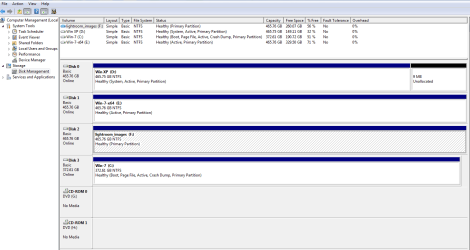
  • edenforge.PNG
    edenforge.PNG
    26.7 KB · Views: 20

My Computer My Computer

At a glance

XP Pro and Windows 7core2/quad Q9550 2.83GHz4 GB DDR3 1333MHz?
Computer Manufacturer/Model Number
Self Build
OS
XP Pro and Windows 7
CPU
core2/quad Q9550 2.83GHz
Motherboard
Asustek P5E3
Memory
4 GB DDR3 1333MHz
Graphics Card(s)
?
Sound Card
on board
Monitor(s) Displays
1x 22" Wide + 1x 19"
Hard Drives
4x Hitachi 500Gb SATA-II
Case
Antec Sonata
Keyboard
MS
Mouse
MS
You should have done it like I described in post #18.
You would have a triple boot menu. I have been dual booting for years with racks of hard drives.
 

My Computer My Computer

At a glance

Win7 Win 10, Win 8.1AMD FX-8350, Corsair H100i16GB G.SKILL Ripjaws DDR3EVGA GTX 980, EVGA GTX 860
Computer type
PC/Desktop
Computer Manufacturer/Model Number
Made by Dixon Butz
OS
Win7 Win 10, Win 8.1
CPU
AMD FX-8350, Corsair H100i
Motherboard
ASUS Crosshair V Formula-Z
Memory
16GB G.SKILL Ripjaws DDR3
Graphics Card(s)
EVGA GTX 980, EVGA GTX 860
Sound Card
Denon x4200 Dolby AMOS!
Monitor(s) Displays
65" Samsung 4K, +3 27inch
Screen Resolution
4K, 1080x3
Hard Drives
2TB Samsung hd204ui

1X Samsung 850 SSD
PSU
1000w EVGA, 2000VA UPS, 1000VA UPS and many others
Case
Lian Li
Cooling
Corsair H100i
Keyboard
Logitech K800
Mouse
Logitech Couch Mouse
Internet Speed
Gigabit!
Antivirus
Defender
Browser
Slimjet Chrome
Set the XP HD as first HD to boot in BIOS setup which will then startup up to your Windows Dual Boot menu, then use the BBS key to boot 64 bit. See how you like this arrangement.

If you want to change your 32 bit Win7 to also boot via BBS key we can give you the steps to make it boot independently of XP so that it is removed from the Windows dual boot and also bootable via BIOS boot menu or first in BIOS boot order.

Otherwise if you decide you want to add 64 bit to the Windows Dual Boot, then simply install EasyBCD 2.0 to 32 bit Win7 and Add 64 bit Win7.

Again, with OS's on separate HD's then booting via BIOS Boot Menu is the cleanest method, as HD's can come and go as you please. A Windows-managed Dual Boot interlocks the HD's so that you cannot remove them without major surgery.
 
Again, with OS's on separate HD's then booting via BIOS Boot Menu is the cleanest method, as HD's can come and go as you please. A Windows-managed Dual Boot interlocks the HD's so that you cannot remove them without major surgery.

Major surgery? On a quad boot pc if hd3 with some operating system dies, the drive can be be removed. Just delete the entry in the boot loader.
Or, replace the drive and restore the image backup.
 

My Computer My Computer

At a glance

Win7 Win 10, Win 8.1AMD FX-8350, Corsair H100i16GB G.SKILL Ripjaws DDR3EVGA GTX 980, EVGA GTX 860
Computer type
PC/Desktop
Computer Manufacturer/Model Number
Made by Dixon Butz
OS
Win7 Win 10, Win 8.1
CPU
AMD FX-8350, Corsair H100i
Motherboard
ASUS Crosshair V Formula-Z
Memory
16GB G.SKILL Ripjaws DDR3
Graphics Card(s)
EVGA GTX 980, EVGA GTX 860
Sound Card
Denon x4200 Dolby AMOS!
Monitor(s) Displays
65" Samsung 4K, +3 27inch
Screen Resolution
4K, 1080x3
Hard Drives
2TB Samsung hd204ui

1X Samsung 850 SSD
PSU
1000w EVGA, 2000VA UPS, 1000VA UPS and many others
Case
Lian Li
Cooling
Corsair H100i
Keyboard
Logitech K800
Mouse
Logitech Couch Mouse
Internet Speed
Gigabit!
Antivirus
Defender
Browser
Slimjet Chrome
The OS's installed after XP in his case would have to have their System MBR recovered to their partition before they are able to boot on their own, if they are initially multi-booted by installing the newest OS last while others are plugged in.


This is done by unplugging all other HD's, setting target HD first to boot in BIOS, marking drive Active, then running Startup Repair from the booted Win7 DVD Repair console or REpair CD up to 3 separate times.
 
Back
Top