Solved Trojan Horse and backdoor.poison

infotech

New member
Local time
5:23 PM
Messages
12
Location
India
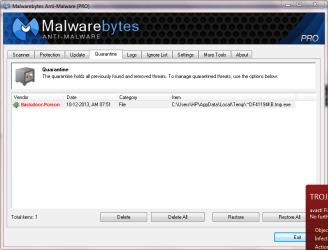
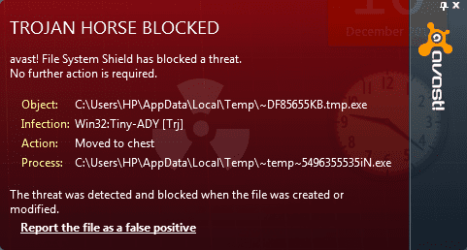
How can i remove this trojan Horse?. I am unable to remove it through avast and malwarebytes. Is there any idea to remove without harming the file system. Please help
 

Attachments

  • Trojan horse.PNG
    Trojan horse.PNG
    22.5 KB · Views: 50
  • Backdoor.PNG
    Backdoor.PNG
    28.5 KB · Views: 2

My Computer My Computer

At a glance

Windows 7 ultimate 32bitIntel core i33Gbintel HD graphics
Computer type
Laptop
Computer Manufacturer/Model Number
HP pavilion dv6 3017TU
OS
Windows 7 ultimate 32bit
CPU
Intel core i3
Memory
3Gb
Graphics Card(s)
intel HD graphics
Hard Drives
320gb
Internet Speed
7.2mb/s
Antivirus
Windows defender
Browser
internet explorer and google chrome 30
Other Info
I use my laptop for my college homework and project
Please download AdwCleaner by Xplode and save to your Desktop.
  • Double click on AdwCleaner.exe to run the tool.
    Vista/Windows 7/8 users right-click and select Run As Administrator.
  • Click on the Scan button.
  • AdwCleaner will begin...be patient as the scan may take some time to complete.
  • After the scan has finished, click on the Report button...a logfile (AdwCleaner[R#].txt) will open in Notepad for review (where the largest value of # represents the most recent report).
  • The contents of the log file may be confusing. Unless you see a program name that you know should not be removed, don't worry about it. If you see an entry you want to keep, let me know about it.
  • Copy and paste the contents of that logfile in your next reply.
  • A copy of all logfiles are saved in the C:\AdwCleaner folder which was created when running the tool.

Using AdwCleaner v3: Scan & Clean:
Double click on AdwCleaner.exe to run the tool again.
Click on the Scan button.
AdwCleaner will begin to scan your computer like it did before.
After the scan has finished...

This time click on the Clean button.
Press OK when asked to close all programs and follow the onscreen prompts.
Press OK again to allow AdwCleaner to restart the computer and complete the removal process.
After rebooting, a logfile report (AdwCleaner[S#].txt) will open automatically (where the largest value of # represents the most recent report).
Copy and paste the contents of that logfile in your next reply.
A copy of that logfile will also be saved in the C:\AdwCleaner folder
 

My Computer My Computer

At a glance

Windows 7 Home Premium 64BitAMD A6-3420M 1.5GHZ OC - 2.0GHZ4GB DDR3 1600MHZAMD RADEON 6520G+AMD RADEON HD7470M 1GB DDR3
Computer type
Laptop
Computer Manufacturer/Model Number
Packard Bell
OS
Windows 7 Home Premium 64Bit
CPU
AMD A6-3420M 1.5GHZ OC - 2.0GHZ
Memory
4GB DDR3 1600MHZ
Graphics Card(s)
AMD RADEON 6520G+AMD RADEON HD7470M 1GB DDR3
Screen Resolution
1366x768
Hard Drives
500GB SATA
Internet Speed
18Mb Unlimited
Antivirus
AVAST!
Browser
MOZILLA FIREFOX
Another useful one
Please download Junkware Removal Tool to your desktop.
  • Shut down your protection software now to avoid potential conflicts.
  • Run the tool by double-clicking it. If you are using Windows Vista, 7, or 8; instead of double-clicking, right-mouse click JRT.exe and select "Run as Administrator".
  • The tool will open and start scanning your system.
  • Please be patient as this can take a while to complete depending on your system's specifications.
  • On completion, a log (JRT.txt) is saved to your desktop and will automatically open.
  • Post the contents of JRT.txt into your next message
 

My Computer My Computer

At a glance

Windows 7 Home Premium 64BitAMD A6-3420M 1.5GHZ OC - 2.0GHZ4GB DDR3 1600MHZAMD RADEON 6520G+AMD RADEON HD7470M 1GB DDR3
Computer type
Laptop
Computer Manufacturer/Model Number
Packard Bell
OS
Windows 7 Home Premium 64Bit
CPU
AMD A6-3420M 1.5GHZ OC - 2.0GHZ
Memory
4GB DDR3 1600MHZ
Graphics Card(s)
AMD RADEON 6520G+AMD RADEON HD7470M 1GB DDR3
Screen Resolution
1366x768
Hard Drives
500GB SATA
Internet Speed
18Mb Unlimited
Antivirus
AVAST!
Browser
MOZILLA FIREFOX
Its likely a bit of software is creating these temporary files - possibly during each restart of the computer, which is why you never appear to be able to get rid of it.

Instead of running a handful of malware detection programs, perform a clean startup to determine if its one of the programs in your startup that is generating these files:
http://www.sevenforums.com/tutorial...ation-conflicts-performing-clean-startup.html
 

My Computer My Computer

At a glance

Windows 10 Pro x64 ; Xubuntu x64Intel i7 860 @ 2.80 GHz O/C'ed to 4.0GHz16GB Corsair Vengance DDR3 @ 661 MHz Dual Cha...EVGA NVidia GTX 560 1024MB
Computer type
PC/Desktop
Computer Manufacturer/Model Number
Golden Mk. I.4
OS
Windows 10 Pro x64 ; Xubuntu x64
CPU
Intel i7 860 @ 2.80 GHz O/C'ed to 4.0GHz
Motherboard
Gigabyte P55A-UD3R Rev.1. Award BIOS F13
Memory
16GB Corsair Vengance DDR3 @ 661 MHz Dual Channel (9-9-9-24)
Graphics Card(s)
EVGA NVidia GTX 560 1024MB
Sound Card
Realtek Integrated
Monitor(s) Displays
Dual Samsung SyncMaster 2494HS
Screen Resolution
1920*1080 and 1920*1080
Hard Drives
1*Samsung 840 EVO 120GB SSD;
1*OCZ Vertex 2 60GB SSD;
2*Samsung F3 SpinPoint 1TB in RAID0;
1*Samsung F1 SpinPoint 1TB;
2*Western Digital 1TB External USB 3.0
1*Western Digital 500GB External USB 3.0
1*Seagate 500GB External USB 2.0
PSU
Thermaltake ToughPower QFan 750W
Case
Thermaltake Element S VK60001W2Z
Cooling
Corsair H60 Water Cooling, 2*230mm and 2*80mm case fans
Keyboard
Logitech G110
Mouse
Logitech MX518
Another useful one
Please download Junkware Removal Tool to your desktop.
  • Shut down your protection software now to avoid potential conflicts.
  • Run the tool by double-clicking it. If you are using Windows Vista, 7, or 8; instead of double-clicking, right-mouse click JRT.exe and select "Run as Administrator".
  • The tool will open and start scanning your system.
  • Please be patient as this can take a while to complete depending on your system's specifications.
  • On completion, a log (JRT.txt) is saved to your desktop and will automatically open.
  • Post the contents of JRT.txt into your next message

After scanning here is the result.


~~~~~~~~~~~~~~~~~~~~~~~~~~~~~~~~~~~~~~~~~~~~~~~~~~~~~~~~~~~~~
Junkware Removal Tool (JRT) by Thisisu
Version: 6.0.8 (11.05.2013:1)
OS: Windows 7 Ultimate x86
Ran by Hp on 10-12-2013 at 13:42:57.80
~~~~~~~~~~~~~~~~~~~~~~~~~~~~~~~~~~~~~~~~~~~~~~~~~~~~~~~~~~~~~


~~~ Services


~~~ Registry Values


~~~ Registry Keys


~~~ Files


~~~ Folders


~~~ Event Viewer Logs were cleared


~~~~~~~~~~~~~~~~~~~~~~~~~~~~~~~~~~~~~~~~~~~~~~~~~~~~~~~~~~~~~
Scan was completed on 10-12-2013 at 13:46:54.54
End of JRT log
~~~~~~~~~~~~~~~~~~~~~~~~~~~~~~~~~~~~~~~~~~~~~~~~~~~~~~~~~~~~~
 

My Computer My Computer

At a glance

Windows 7 ultimate 32bitIntel core i33Gbintel HD graphics
Computer type
Laptop
Computer Manufacturer/Model Number
HP pavilion dv6 3017TU
OS
Windows 7 ultimate 32bit
CPU
Intel core i3
Memory
3Gb
Graphics Card(s)
intel HD graphics
Hard Drives
320gb
Internet Speed
7.2mb/s
Antivirus
Windows defender
Browser
internet explorer and google chrome 30
Other Info
I use my laptop for my college homework and project
Avast detected Win32:Tiny-ADY[trj] moved to chest. But i want to remove it completely from my laptop.
 

My Computer My Computer

At a glance

Windows 7 ultimate 32bitIntel core i33Gbintel HD graphics
Computer type
Laptop
Computer Manufacturer/Model Number
HP pavilion dv6 3017TU
OS
Windows 7 ultimate 32bit
CPU
Intel core i3
Memory
3Gb
Graphics Card(s)
intel HD graphics
Hard Drives
320gb
Internet Speed
7.2mb/s
Antivirus
Windows defender
Browser
internet explorer and google chrome 30
Other Info
I use my laptop for my college homework and project
See post 4
 

My Computer My Computer

At a glance

Windows 10 Pro x64 ; Xubuntu x64Intel i7 860 @ 2.80 GHz O/C'ed to 4.0GHz16GB Corsair Vengance DDR3 @ 661 MHz Dual Cha...EVGA NVidia GTX 560 1024MB
Computer type
PC/Desktop
Computer Manufacturer/Model Number
Golden Mk. I.4
OS
Windows 10 Pro x64 ; Xubuntu x64
CPU
Intel i7 860 @ 2.80 GHz O/C'ed to 4.0GHz
Motherboard
Gigabyte P55A-UD3R Rev.1. Award BIOS F13
Memory
16GB Corsair Vengance DDR3 @ 661 MHz Dual Channel (9-9-9-24)
Graphics Card(s)
EVGA NVidia GTX 560 1024MB
Sound Card
Realtek Integrated
Monitor(s) Displays
Dual Samsung SyncMaster 2494HS
Screen Resolution
1920*1080 and 1920*1080
Hard Drives
1*Samsung 840 EVO 120GB SSD;
1*OCZ Vertex 2 60GB SSD;
2*Samsung F3 SpinPoint 1TB in RAID0;
1*Samsung F1 SpinPoint 1TB;
2*Western Digital 1TB External USB 3.0
1*Western Digital 500GB External USB 3.0
1*Seagate 500GB External USB 2.0
PSU
Thermaltake ToughPower QFan 750W
Case
Thermaltake Element S VK60001W2Z
Cooling
Corsair H60 Water Cooling, 2*230mm and 2*80mm case fans
Keyboard
Logitech G110
Mouse
Logitech MX518
Its likely a bit of software is creating these temporary files - possibly during each restart of the computer, which is why you never appear to be able to get rid of it.

Instead of running a handful of malware detection programs, perform a clean startup to determine if its one of the programs in your startup that is generating these files:
http://www.sevenforums.com/tutorial...ation-conflicts-performing-clean-startup.html

Yes I just did that. And I uninstalled everything but the same problem pops up even after using Another antivirus programme like AVG, TM etc.
 

My Computer My Computer

At a glance

Windows 7 ultimate 32bitIntel core i33Gbintel HD graphics
Computer type
Laptop
Computer Manufacturer/Model Number
HP pavilion dv6 3017TU
OS
Windows 7 ultimate 32bit
CPU
Intel core i3
Memory
3Gb
Graphics Card(s)
intel HD graphics
Hard Drives
320gb
Internet Speed
7.2mb/s
Antivirus
Windows defender
Browser
internet explorer and google chrome 30
Other Info
I use my laptop for my college homework and project
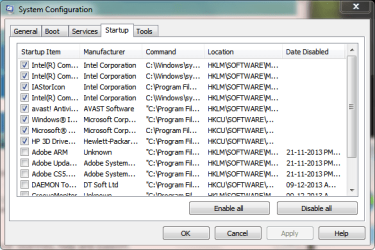
What did you uninstall? Paste a screen capture image showing all the items in your Startup tab of MSCONFIG.
 

My Computer My Computer

At a glance

Windows 10 Pro x64 ; Xubuntu x64Intel i7 860 @ 2.80 GHz O/C'ed to 4.0GHz16GB Corsair Vengance DDR3 @ 661 MHz Dual Cha...EVGA NVidia GTX 560 1024MB
Computer type
PC/Desktop
Computer Manufacturer/Model Number
Golden Mk. I.4
OS
Windows 10 Pro x64 ; Xubuntu x64
CPU
Intel i7 860 @ 2.80 GHz O/C'ed to 4.0GHz
Motherboard
Gigabyte P55A-UD3R Rev.1. Award BIOS F13
Memory
16GB Corsair Vengance DDR3 @ 661 MHz Dual Channel (9-9-9-24)
Graphics Card(s)
EVGA NVidia GTX 560 1024MB
Sound Card
Realtek Integrated
Monitor(s) Displays
Dual Samsung SyncMaster 2494HS
Screen Resolution
1920*1080 and 1920*1080
Hard Drives
1*Samsung 840 EVO 120GB SSD;
1*OCZ Vertex 2 60GB SSD;
2*Samsung F3 SpinPoint 1TB in RAID0;
1*Samsung F1 SpinPoint 1TB;
2*Western Digital 1TB External USB 3.0
1*Western Digital 500GB External USB 3.0
1*Seagate 500GB External USB 2.0
PSU
Thermaltake ToughPower QFan 750W
Case
Thermaltake Element S VK60001W2Z
Cooling
Corsair H60 Water Cooling, 2*230mm and 2*80mm case fans
Keyboard
Logitech G110
Mouse
Logitech MX518
What did you uninstall? Paste a screen capture image showing all the items in your Startup tab of MSCONFIG.

Sorry for the late reply. Here is the screenshot. Well i reinstalled some software again after trying the above.
 

Attachments

  • msconfig.PNG
    msconfig.PNG
    17.5 KB · Views: 34
  • msconfig1.PNG
    msconfig1.PNG
    17.7 KB · Views: 34

My Computer My Computer

At a glance

Windows 7 ultimate 32bitIntel core i33Gbintel HD graphics
Computer type
Laptop
Computer Manufacturer/Model Number
HP pavilion dv6 3017TU
OS
Windows 7 ultimate 32bit
CPU
Intel core i3
Memory
3Gb
Graphics Card(s)
intel HD graphics
Hard Drives
320gb
Internet Speed
7.2mb/s
Antivirus
Windows defender
Browser
internet explorer and google chrome 30
Other Info
I use my laptop for my college homework and project
Just so you understand the 'nature' of backdoor.poison Backdoor:W32/PoisonIvy

Warning! Backdoor Trojans

These are the most dangerous, and most widespread, type of Trojan.
Backdoor Trojans provide the author or ‘master’ of the Trojan with remote ‘administration’ of victim machines. Unlike legitimate remote administration utilities, they install, launch and run invisibly, without the consent or knowledge of the user. Once installed, backdoor Trojans can be instructed to send, receive, execute and delete files, harvest confidential data from the computer, log activity on the computer and more.

If your computer was used for online banking or has credit card information on it, all passwords should be changed immediately to include those used for email, eBay and forums.
You should consider them to be compromised.

They should be changed by using a different computer and not the infected one, if not an attacker may get the new passwords and transaction information.


Banking and credit card institutions should be notified of the possible security breech.
More info can be found below:
How Do I Handle Possible Identify Theft, Internet Fraud and CC Fraud?
How to report ID theft, fraud, drive-by installs, hijacking and malware? Security | DSLReports, ISP Information

Download Combofix from any of the links below, and save it to your desktop.<--Important
Link 1
Link 2
Link 3

Click on this link Here to see a list of programs that should be disabled.
The list is not all inclusive. If yours is not listed and you don't know how to disable it, please ask.
If your anti-virus or firewall complains, please allow this script to run as it is not malicious.
Next: Disconnect from the internet. If you are on Cable or DSL, unplug your computer from the modem.
Next: Please disable all onboard security programs (all running with back ground protection) as it may hinder the scanner from working.
This includes Antivirus, Firewall, and any Spyware scanners that run in the background.
  • Double click combofix.exe and follow the prompts.
  • When finished, it will produce a log for you. Post that log and a HiJackthis log in your next reply
Note: Do not mouseclick combofix's window while its running. That may cause it to stall
Please be patient while the scan runs, at times it may appear to stall.
When finished and after reboot (in case it asks to reboot), it should open a log, combofix.txt.
After rebooting ensure your Security applications have been re-enabled.

In your next reply post:
ComboFix.txt
***A guide and tutorial on "How to use Combofix" can be found here:
ComboFix: A guide and tutorial on using ComboFix

 

My Computer My Computer

At a glance

Windows 7 Ultimate 32bit SP1Intel(R) Core(TM)2 Quad CPU @ 2.40GHz, 2400 MHz4 GBATI Radeon HD 2600 Pro
Computer type
PC/Desktop
Computer Manufacturer/Model Number
Bruce ... somewhere in his 40's
OS
Windows 7 Ultimate 32bit SP1
CPU
Intel(R) Core(TM)2 Quad CPU @ 2.40GHz, 2400 MHz
Motherboard
INTEL/D975XBX2
Memory
4 GB
Graphics Card(s)
ATI Radeon HD 2600 Pro
Monitor(s) Displays
Samsung SyncMaster 914v
Screen Resolution
1280 x 1024
Hard Drives
2/500GB each ... ST3500630AS ATA Device.
One is not connected
PSU
Rocketfish 700 W
Case
G.Skill Gigabyte Chassis
Keyboard
Standard PS/2 Keyboard
Mouse
Microsoft PS/2 Mouse
Internet Speed
DSL
Antivirus
Avira Internet Security
Browser
IE 11
Other Info
ATI HDMI Audio
Finally i solved the problem myself. I am listing these steps so that it could be a least help to others like me if possible.

1) First i installed the Software named "Spy-bot search and destroy" and uninstalled other antispyware software like avast malwarebytes etc.
2) Turned system protection off, because this trojan can restore itself from system restore points. Delete those recovery points
3) Reboot the computer in Safe mode.( type "msconfig" in run program and look for the options)
4) In safe mode start the "spy-bot search and destroy program. Scan everything that the program will provide in option
5) scanning will take time and it will show some infected registry. Click fix found option.
6) Type %temp% in Run program and delete those temporary files( Skip system files)
7) Now type msconfig in run program and uncheck the safe mode option
8) Reboot the computer in Normal mode and now you can turn on system recovery and install Antivirus and do a scan and be happy now.
i hope i helped you. I tried these steps and i got my clean laptop again.
 

My Computer My Computer

At a glance

Windows 7 ultimate 32bitIntel core i33Gbintel HD graphics
Computer type
Laptop
Computer Manufacturer/Model Number
HP pavilion dv6 3017TU
OS
Windows 7 ultimate 32bit
CPU
Intel core i3
Memory
3Gb
Graphics Card(s)
intel HD graphics
Hard Drives
320gb
Internet Speed
7.2mb/s
Antivirus
Windows defender
Browser
internet explorer and google chrome 30
Other Info
I use my laptop for my college homework and project
Back
Top