Trojans in Updates???

Willowhoop

New member
Pro User
Local time
5:08 AM
Messages
91
Location
Australia
Hi guys,
Today I downloaded my important updates and a couple of suggested ones.
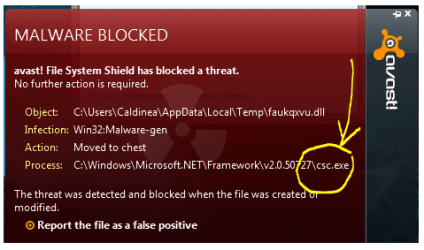
Since rebooting the PC to activate them, I have had Avast (paid version) sending quite a few of the updates into quarantine, stating that they have trojans attached. Below is the only info I can find for you. Let me know how to access other info you may need please.

Capture-5.jpg


Thanks & cheers
Willow
 

My Computer

Computer Manufacturer/Model Number
ALTECH Gigabyte Technology Co., Ltd. P55A-UD3R
OS
Windows 7 Professional 64-bit (6.1 Build 7600)
CPU
Intel(R)Core(TM)i7CPU 860 @2.80GHz(8 CPUs)
Motherboard
Gigabyte Technology Co., Ltd.
Memory
4 gig
Graphics Card(s)
NVIDIA GEForce GT240 2776MB
Sound Card
High Definition Audio Device (5x) Digital Audio
Monitor(s) Displays
Samsung SyncMaster [Monitor] (23.1"vis)2333SWPLUS
Screen Resolution
1920 x 1080
Hard Drives
Corsair 115gb 2.5" SSD, MLC, SATA-II (CSSD-F115GB2-BRKT-A) Force Series F115
Hitachi HDT721010SLA360 ATA D
Maxtor OneTouch USB Dev
WD 10EADS External USB Device (1000.20 GB)
PSU
Don't know
Case
Antec
Cooling
Don't know but its huge
Keyboard
Logitech Wave
Mouse
Logitech
Internet Speed
adsl2+
Man your pc looks infected sugest you all soo scan with online bitdefender or another program to be sure it's clean, try all soo the iobit 360, it's a free soofter.
 

My Computer

Computer Manufacturer/Model Number
AMD
OS
Windows 7 Ultimate x32
CPU
Athlon
Hi Willow,

Where did you get these updates from? Are these Windows updates? If so, they are unlikely to contain trojans.

You might want to also scan your system more thoroughly now with the following:

Free ESET Online Antivirus Scanner

Also download, install and run Malwarebytes

Let us know where you got these updates from ASAP.

Regards,
Golden
 

My Computer

Computer type
PC/Desktop
Computer Manufacturer/Model Number
Golden Mk. I.4
OS
Windows 10 Pro x64 ; Xubuntu x64
CPU
Intel i7 860 @ 2.80 GHz O/C'ed to 4.0GHz
Motherboard
Gigabyte P55A-UD3R Rev.1. Award BIOS F13
Memory
16GB Corsair Vengance DDR3 @ 661 MHz Dual Channel (9-9-9-24)
Graphics Card(s)
EVGA NVidia GTX 560 1024MB
Sound Card
Realtek Integrated
Monitor(s) Displays
Dual Samsung SyncMaster 2494HS
Screen Resolution
1920*1080 and 1920*1080
Hard Drives
1*Samsung 840 EVO 120GB SSD;
1*OCZ Vertex 2 60GB SSD;
2*Samsung F3 SpinPoint 1TB in RAID0;
1*Samsung F1 SpinPoint 1TB;
2*Western Digital 1TB External USB 3.0
1*Western Digital 500GB External USB 3.0
1*Seagate 500GB External USB 2.0
PSU
Thermaltake ToughPower QFan 750W
Case
Thermaltake Element S VK60001W2Z
Cooling
Corsair H60 Water Cooling, 2*230mm and 2*80mm case fans
Keyboard
Logitech G110
Mouse
Logitech MX518
I got notification from window update itself guys, went to the microsoft site from the update link to see what was being recommended and what was on the optional list. Is this a false site???? OMG you have me really scared now.

Here's the image of where I got the notification from :

Capture-6.jpg
 

My Computer

Computer Manufacturer/Model Number
ALTECH Gigabyte Technology Co., Ltd. P55A-UD3R
OS
Windows 7 Professional 64-bit (6.1 Build 7600)
CPU
Intel(R)Core(TM)i7CPU 860 @2.80GHz(8 CPUs)
Motherboard
Gigabyte Technology Co., Ltd.
Memory
4 gig
Graphics Card(s)
NVIDIA GEForce GT240 2776MB
Sound Card
High Definition Audio Device (5x) Digital Audio
Monitor(s) Displays
Samsung SyncMaster [Monitor] (23.1"vis)2333SWPLUS
Screen Resolution
1920 x 1080
Hard Drives
Corsair 115gb 2.5" SSD, MLC, SATA-II (CSSD-F115GB2-BRKT-A) Force Series F115
Hitachi HDT721010SLA360 ATA D
Maxtor OneTouch USB Dev
WD 10EADS External USB Device (1000.20 GB)
PSU
Don't know
Case
Antec
Cooling
Don't know but its huge
Keyboard
Logitech Wave
Mouse
Logitech
Internet Speed
adsl2+
No, no need to panic. Its all good.

Just to give you some comfort, if you click on the two important updates, a list will come up : take screen capture of that list and post it here. Does it look similar to this one?
 

Attachments

  • Capture.PNG
    Capture.PNG
    44.8 KB · Views: 41

My Computer

Computer type
PC/Desktop
Computer Manufacturer/Model Number
Golden Mk. I.4
OS
Windows 10 Pro x64 ; Xubuntu x64
CPU
Intel i7 860 @ 2.80 GHz O/C'ed to 4.0GHz
Motherboard
Gigabyte P55A-UD3R Rev.1. Award BIOS F13
Memory
16GB Corsair Vengance DDR3 @ 661 MHz Dual Channel (9-9-9-24)
Graphics Card(s)
EVGA NVidia GTX 560 1024MB
Sound Card
Realtek Integrated
Monitor(s) Displays
Dual Samsung SyncMaster 2494HS
Screen Resolution
1920*1080 and 1920*1080
Hard Drives
1*Samsung 840 EVO 120GB SSD;
1*OCZ Vertex 2 60GB SSD;
2*Samsung F3 SpinPoint 1TB in RAID0;
1*Samsung F1 SpinPoint 1TB;
2*Western Digital 1TB External USB 3.0
1*Western Digital 500GB External USB 3.0
1*Seagate 500GB External USB 2.0
PSU
Thermaltake ToughPower QFan 750W
Case
Thermaltake Element S VK60001W2Z
Cooling
Corsair H60 Water Cooling, 2*230mm and 2*80mm case fans
Keyboard
Logitech G110
Mouse
Logitech MX518
I have a strong suspicion this is a false positive, but I've just trawled the AVAST forums and cant find an issue related to the Windows updates. We really need an experienced AVAST user to help out here, to see if they have experienced similar issues, and if they know how to fix it.

In the meantime please do the following in this order:

1. Scan your PC using that ESET link I posted earlier.
2. If the ESET scan comes up clean, then ensure that AVAST and its database are up to date.
3. Try to download the Windows updates again.

Post back with the results.

Regards,
Golden

*** EDIT : in the AVAST blocking window is the process quoted called CSC.EXE, as shown in this image below.

*** EDIT2 : The AVAST forums have a lot of messages about suspected false positives several times a day related to strangely named .dll's. It appears that the culprit may be this CSC.EXE process. See here http://forum.avast.com/index.php?topic=69690.0

Lets see what other forum members can add.
 

Attachments

  • Capture.PNG
    Capture.PNG
    21.2 KB · Views: 5
Last edited:

My Computer

Computer type
PC/Desktop
Computer Manufacturer/Model Number
Golden Mk. I.4
OS
Windows 10 Pro x64 ; Xubuntu x64
CPU
Intel i7 860 @ 2.80 GHz O/C'ed to 4.0GHz
Motherboard
Gigabyte P55A-UD3R Rev.1. Award BIOS F13
Memory
16GB Corsair Vengance DDR3 @ 661 MHz Dual Channel (9-9-9-24)
Graphics Card(s)
EVGA NVidia GTX 560 1024MB
Sound Card
Realtek Integrated
Monitor(s) Displays
Dual Samsung SyncMaster 2494HS
Screen Resolution
1920*1080 and 1920*1080
Hard Drives
1*Samsung 840 EVO 120GB SSD;
1*OCZ Vertex 2 60GB SSD;
2*Samsung F3 SpinPoint 1TB in RAID0;
1*Samsung F1 SpinPoint 1TB;
2*Western Digital 1TB External USB 3.0
1*Western Digital 500GB External USB 3.0
1*Seagate 500GB External USB 2.0
PSU
Thermaltake ToughPower QFan 750W
Case
Thermaltake Element S VK60001W2Z
Cooling
Corsair H60 Water Cooling, 2*230mm and 2*80mm case fans
Keyboard
Logitech G110
Mouse
Logitech MX518
No, no need to panic. Its all good.

Just to give you some comfort, if you click on the two important updates, a list will come up : take screen capture of that list and post it here. Does it look similar to this one?

Done, and yes it does look like yours

Capture-7.jpg
 

My Computer

Computer Manufacturer/Model Number
ALTECH Gigabyte Technology Co., Ltd. P55A-UD3R
OS
Windows 7 Professional 64-bit (6.1 Build 7600)
CPU
Intel(R)Core(TM)i7CPU 860 @2.80GHz(8 CPUs)
Motherboard
Gigabyte Technology Co., Ltd.
Memory
4 gig
Graphics Card(s)
NVIDIA GEForce GT240 2776MB
Sound Card
High Definition Audio Device (5x) Digital Audio
Monitor(s) Displays
Samsung SyncMaster [Monitor] (23.1"vis)2333SWPLUS
Screen Resolution
1920 x 1080
Hard Drives
Corsair 115gb 2.5" SSD, MLC, SATA-II (CSSD-F115GB2-BRKT-A) Force Series F115
Hitachi HDT721010SLA360 ATA D
Maxtor OneTouch USB Dev
WD 10EADS External USB Device (1000.20 GB)
PSU
Don't know
Case
Antec
Cooling
Don't know but its huge
Keyboard
Logitech Wave
Mouse
Logitech
Internet Speed
adsl2+
Yep - you have the same update as me awaiting too KB976902 10.2MB.

Try those 3 steps I outlined above, and then report back. I'm going to ask Corinne (one of the resident security experts) to have a look at this too. Please follow all her instructions.

Regards,
Golden

EDIT : I've asked Corinne to have a look at this when she gets some time. Please be patient as she may be busy with other things. We will sort you out - dont' worry :)
 

My Computer

Computer type
PC/Desktop
Computer Manufacturer/Model Number
Golden Mk. I.4
OS
Windows 10 Pro x64 ; Xubuntu x64
CPU
Intel i7 860 @ 2.80 GHz O/C'ed to 4.0GHz
Motherboard
Gigabyte P55A-UD3R Rev.1. Award BIOS F13
Memory
16GB Corsair Vengance DDR3 @ 661 MHz Dual Channel (9-9-9-24)
Graphics Card(s)
EVGA NVidia GTX 560 1024MB
Sound Card
Realtek Integrated
Monitor(s) Displays
Dual Samsung SyncMaster 2494HS
Screen Resolution
1920*1080 and 1920*1080
Hard Drives
1*Samsung 840 EVO 120GB SSD;
1*OCZ Vertex 2 60GB SSD;
2*Samsung F3 SpinPoint 1TB in RAID0;
1*Samsung F1 SpinPoint 1TB;
2*Western Digital 1TB External USB 3.0
1*Western Digital 500GB External USB 3.0
1*Seagate 500GB External USB 2.0
PSU
Thermaltake ToughPower QFan 750W
Case
Thermaltake Element S VK60001W2Z
Cooling
Corsair H60 Water Cooling, 2*230mm and 2*80mm case fans
Keyboard
Logitech G110
Mouse
Logitech MX518
I have a strong suspicion this is a false positive, but I've just trawled the AVAST forums and cant find an issue related to the Windows updates. We really need an experienced AVAST user to help out here, to see if they have experienced similar issues, and if they know how to fix it.

In the meantime please do the following in this order:

1. Scan your PC using that ESET link I posted earlier.
2. If the ESET scan comes up clean, then ensure that AVAST and its database are up to date.
3. Try to download the Windows updates again.

Post back with the results.

Regards,
Golden

*** EDIT : in the AVAST blocking window is the process quoted called CSC.EXE, as shown in this image below.

*** EDIT2 : The AVAST forums have a lot of messages about suspected false positives several times a day related to strangely named .dll's. It appears that the culprit may be this CSC.EXE process. See here Win32:Malware-gen popping up

Lets see what other forum members can add.

Yes that image you have attached is the same as the ones I have had coming up. I haven't had time to snip and save them. I have been keeping everything updated. My Avast says that it is up to date and yet there is another red box popping up saying that the last update was unable to complete?? I have been looking into it, but I'm not having much luck as I really don't know what I am looking for, hence being here and asking. I never do anything I don't understand without asking first. Most of the time its logical and I can figure it out... this one has me a little perplexed, to say the least. I'll do some more prowling around and keep you posted too.
 

My Computer

Computer Manufacturer/Model Number
ALTECH Gigabyte Technology Co., Ltd. P55A-UD3R
OS
Windows 7 Professional 64-bit (6.1 Build 7600)
CPU
Intel(R)Core(TM)i7CPU 860 @2.80GHz(8 CPUs)
Motherboard
Gigabyte Technology Co., Ltd.
Memory
4 gig
Graphics Card(s)
NVIDIA GEForce GT240 2776MB
Sound Card
High Definition Audio Device (5x) Digital Audio
Monitor(s) Displays
Samsung SyncMaster [Monitor] (23.1"vis)2333SWPLUS
Screen Resolution
1920 x 1080
Hard Drives
Corsair 115gb 2.5" SSD, MLC, SATA-II (CSSD-F115GB2-BRKT-A) Force Series F115
Hitachi HDT721010SLA360 ATA D
Maxtor OneTouch USB Dev
WD 10EADS External USB Device (1000.20 GB)
PSU
Don't know
Case
Antec
Cooling
Don't know but its huge
Keyboard
Logitech Wave
Mouse
Logitech
Internet Speed
adsl2+
I have a strong suspicion this is a false positive, but I've just trawled the AVAST forums and cant find an issue related to the Windows updates. We really need an experienced AVAST user to help out here, to see if they have experienced similar issues, and if they know how to fix it.

In the meantime please do the following in this order:

1. Scan your PC using that ESET link I posted earlier.
2. If the ESET scan comes up clean, then ensure that AVAST and its database are up to date.
3. Try to download the Windows updates again.

Post back with the results.

Regards,
Golden

*** EDIT : in the AVAST blocking window is the process quoted called CSC.EXE, as shown in this image below.

*** EDIT2 : The AVAST forums have a lot of messages about suspected false positives several times a day related to strangely named .dll's. It appears that the culprit may be this CSC.EXE process. See here Win32:Malware-gen popping up

Lets see what other forum members can add.

Yes that image you have attached is the same as the ones I have had coming up. I haven't had time to snip and save them. I have been keeping everything updated. My Avast says that it is up to date and yet there is another red box popping up saying that the last update was unable to complete?? I have been looking into it, but I'm not having much luck as I really don't know what I am looking for, hence being here and asking. I never do anything I don't understand without asking first. Most of the time its logical and I can figure it out... this one has me a little perplexed, to say the least. I'll do some more prowling around and keep you posted too.

Just managed to catch one for you

Capture-8.jpg
 

My Computer

Computer Manufacturer/Model Number
ALTECH Gigabyte Technology Co., Ltd. P55A-UD3R
OS
Windows 7 Professional 64-bit (6.1 Build 7600)
CPU
Intel(R)Core(TM)i7CPU 860 @2.80GHz(8 CPUs)
Motherboard
Gigabyte Technology Co., Ltd.
Memory
4 gig
Graphics Card(s)
NVIDIA GEForce GT240 2776MB
Sound Card
High Definition Audio Device (5x) Digital Audio
Monitor(s) Displays
Samsung SyncMaster [Monitor] (23.1"vis)2333SWPLUS
Screen Resolution
1920 x 1080
Hard Drives
Corsair 115gb 2.5" SSD, MLC, SATA-II (CSSD-F115GB2-BRKT-A) Force Series F115
Hitachi HDT721010SLA360 ATA D
Maxtor OneTouch USB Dev
WD 10EADS External USB Device (1000.20 GB)
PSU
Don't know
Case
Antec
Cooling
Don't know but its huge
Keyboard
Logitech Wave
Mouse
Logitech
Internet Speed
adsl2+
OK. Just saw your image : yes its the CSC.exe problems again as posted by other users on the AVAST forums. (see link posted earlier)

Look out for Corinne's post/s when she visits here - her suggestions/advice/instructions should take precedence over anything else.

Regards,
Golden
 

My Computer

Computer type
PC/Desktop
Computer Manufacturer/Model Number
Golden Mk. I.4
OS
Windows 10 Pro x64 ; Xubuntu x64
CPU
Intel i7 860 @ 2.80 GHz O/C'ed to 4.0GHz
Motherboard
Gigabyte P55A-UD3R Rev.1. Award BIOS F13
Memory
16GB Corsair Vengance DDR3 @ 661 MHz Dual Channel (9-9-9-24)
Graphics Card(s)
EVGA NVidia GTX 560 1024MB
Sound Card
Realtek Integrated
Monitor(s) Displays
Dual Samsung SyncMaster 2494HS
Screen Resolution
1920*1080 and 1920*1080
Hard Drives
1*Samsung 840 EVO 120GB SSD;
1*OCZ Vertex 2 60GB SSD;
2*Samsung F3 SpinPoint 1TB in RAID0;
1*Samsung F1 SpinPoint 1TB;
2*Western Digital 1TB External USB 3.0
1*Western Digital 500GB External USB 3.0
1*Seagate 500GB External USB 2.0
PSU
Thermaltake ToughPower QFan 750W
Case
Thermaltake Element S VK60001W2Z
Cooling
Corsair H60 Water Cooling, 2*230mm and 2*80mm case fans
Keyboard
Logitech G110
Mouse
Logitech MX518
Yep - you have the same update as me awaiting too KB976902 10.2MB.

Try those 3 steps I outlined above, and then report back. I'm going to ask Corinne (one of the resident security experts) to have a look at this too. Please follow all her instructions.

Regards,
Golden

EDIT : I've asked Corinne to have a look at this when she gets some time. Please be patient as she may be busy with other things. We will sort you out - dont' worry :)

Thank you. I'm in no hurry and going nowhere except to get some sleep. Its just gone past 3.10am here. Will check in when I'm up and about.
Thanks for the Avast forum too, interesting reading. Have registered and will watch proceedings.

Cheers, and have a good day.
 

My Computer

Computer Manufacturer/Model Number
ALTECH Gigabyte Technology Co., Ltd. P55A-UD3R
OS
Windows 7 Professional 64-bit (6.1 Build 7600)
CPU
Intel(R)Core(TM)i7CPU 860 @2.80GHz(8 CPUs)
Motherboard
Gigabyte Technology Co., Ltd.
Memory
4 gig
Graphics Card(s)
NVIDIA GEForce GT240 2776MB
Sound Card
High Definition Audio Device (5x) Digital Audio
Monitor(s) Displays
Samsung SyncMaster [Monitor] (23.1"vis)2333SWPLUS
Screen Resolution
1920 x 1080
Hard Drives
Corsair 115gb 2.5" SSD, MLC, SATA-II (CSSD-F115GB2-BRKT-A) Force Series F115
Hitachi HDT721010SLA360 ATA D
Maxtor OneTouch USB Dev
WD 10EADS External USB Device (1000.20 GB)
PSU
Don't know
Case
Antec
Cooling
Don't know but its huge
Keyboard
Logitech Wave
Mouse
Logitech
Internet Speed
adsl2+
ooooo, Malware scan completed

Capture-9.jpg


For some reason (you may be able to rectify), I click on the link to run the online scan you suggested and nothing happens?

I'm running MSE now, and prelim scan shows that malicious or potentially unwanted software might exist on my computer. Will let you know more after scan completes. (& yes I'm supposed to be hitting the mattress, but I have to fix this... lol)
 

My Computer

Computer Manufacturer/Model Number
ALTECH Gigabyte Technology Co., Ltd. P55A-UD3R
OS
Windows 7 Professional 64-bit (6.1 Build 7600)
CPU
Intel(R)Core(TM)i7CPU 860 @2.80GHz(8 CPUs)
Motherboard
Gigabyte Technology Co., Ltd.
Memory
4 gig
Graphics Card(s)
NVIDIA GEForce GT240 2776MB
Sound Card
High Definition Audio Device (5x) Digital Audio
Monitor(s) Displays
Samsung SyncMaster [Monitor] (23.1"vis)2333SWPLUS
Screen Resolution
1920 x 1080
Hard Drives
Corsair 115gb 2.5" SSD, MLC, SATA-II (CSSD-F115GB2-BRKT-A) Force Series F115
Hitachi HDT721010SLA360 ATA D
Maxtor OneTouch USB Dev
WD 10EADS External USB Device (1000.20 GB)
PSU
Don't know
Case
Antec
Cooling
Don't know but its huge
Keyboard
Logitech Wave
Mouse
Logitech
Internet Speed
adsl2+
Hi, Willowhoop.

I see you also posted in the Avast thread. Good move. As you will see from that thread, there has since been an Avast definitions update and members are now reporting they are no longer receiving the warning.

That said, the .dll's you posted in your screen capture plus the fact that MBAM identified a trojan leads me to believe a combination of issues here, first the Avast f/p t hat appears to have been rectified and second, what MBAM has detected as a trojan.

I suggest you allow MBAM to quarantine what was found and update Avast and see what the results are. If problems persist, I suggest a System Restore to prior to the Windows Update, followed by an updated MBAM scan. Then update Avast to the latest definitions. When you are certain your computer is clean, check again for Microsoft updates.
 

My Computer

OS
Windows 7 & Windows Vista Ultimate

My Computer

Computer Manufacturer/Model Number
HP Pavilion Elite HPE-410f
OS
Windows 7 Ultimate x64
CPU
AMD Phenom x6 1045t
Motherboard
N/A
Memory
8 GB
Graphics Card(s)
ATI Radeon HD 5570
Sound Card
Realtek Highdefinition Audio / 5.1 Dolby Setup
Monitor(s) Displays
HP w2207h Widescreen
Screen Resolution
1680*1050
Hard Drives
1 TB (fixed), 320 Portable maxtor, Server Hard drives
PSU
350 Watt
Case
HP CASE
Cooling
Bass
Keyboard
Logitech MX 5500
Mouse
Logitech MX 5500
Internet Speed
ROAD RUNNER 16MB D/512 U
Hi Willow,

In summary, you had a mixture of false positive (FP) from Avast, and an unrelated trojan picked up by MBAM.
Please follow Corinne's suggestions. If you need help with any of that then please post back here.

Regards,
Golden
 

My Computer

Computer type
PC/Desktop
Computer Manufacturer/Model Number
Golden Mk. I.4
OS
Windows 10 Pro x64 ; Xubuntu x64
CPU
Intel i7 860 @ 2.80 GHz O/C'ed to 4.0GHz
Motherboard
Gigabyte P55A-UD3R Rev.1. Award BIOS F13
Memory
16GB Corsair Vengance DDR3 @ 661 MHz Dual Channel (9-9-9-24)
Graphics Card(s)
EVGA NVidia GTX 560 1024MB
Sound Card
Realtek Integrated
Monitor(s) Displays
Dual Samsung SyncMaster 2494HS
Screen Resolution
1920*1080 and 1920*1080
Hard Drives
1*Samsung 840 EVO 120GB SSD;
1*OCZ Vertex 2 60GB SSD;
2*Samsung F3 SpinPoint 1TB in RAID0;
1*Samsung F1 SpinPoint 1TB;
2*Western Digital 1TB External USB 3.0
1*Western Digital 500GB External USB 3.0
1*Seagate 500GB External USB 2.0
PSU
Thermaltake ToughPower QFan 750W
Case
Thermaltake Element S VK60001W2Z
Cooling
Corsair H60 Water Cooling, 2*230mm and 2*80mm case fans
Keyboard
Logitech G110
Mouse
Logitech MX518
Thank you all so much.

Corrine, I shall do as you suggest, and repost if anything does not rectify itself.

Golden, you rock!!
 

My Computer

Computer Manufacturer/Model Number
ALTECH Gigabyte Technology Co., Ltd. P55A-UD3R
OS
Windows 7 Professional 64-bit (6.1 Build 7600)
CPU
Intel(R)Core(TM)i7CPU 860 @2.80GHz(8 CPUs)
Motherboard
Gigabyte Technology Co., Ltd.
Memory
4 gig
Graphics Card(s)
NVIDIA GEForce GT240 2776MB
Sound Card
High Definition Audio Device (5x) Digital Audio
Monitor(s) Displays
Samsung SyncMaster [Monitor] (23.1"vis)2333SWPLUS
Screen Resolution
1920 x 1080
Hard Drives
Corsair 115gb 2.5" SSD, MLC, SATA-II (CSSD-F115GB2-BRKT-A) Force Series F115
Hitachi HDT721010SLA360 ATA D
Maxtor OneTouch USB Dev
WD 10EADS External USB Device (1000.20 GB)
PSU
Don't know
Case
Antec
Cooling
Don't know but its huge
Keyboard
Logitech Wave
Mouse
Logitech
Internet Speed
adsl2+
Hey, its all part of the Windows7 forums service! I certainly wouldn't have been able to help if it hadn't been for everything I have learn't from all the members here :cool:
 

My Computer

Computer type
PC/Desktop
Computer Manufacturer/Model Number
Golden Mk. I.4
OS
Windows 10 Pro x64 ; Xubuntu x64
CPU
Intel i7 860 @ 2.80 GHz O/C'ed to 4.0GHz
Motherboard
Gigabyte P55A-UD3R Rev.1. Award BIOS F13
Memory
16GB Corsair Vengance DDR3 @ 661 MHz Dual Channel (9-9-9-24)
Graphics Card(s)
EVGA NVidia GTX 560 1024MB
Sound Card
Realtek Integrated
Monitor(s) Displays
Dual Samsung SyncMaster 2494HS
Screen Resolution
1920*1080 and 1920*1080
Hard Drives
1*Samsung 840 EVO 120GB SSD;
1*OCZ Vertex 2 60GB SSD;
2*Samsung F3 SpinPoint 1TB in RAID0;
1*Samsung F1 SpinPoint 1TB;
2*Western Digital 1TB External USB 3.0
1*Western Digital 500GB External USB 3.0
1*Seagate 500GB External USB 2.0
PSU
Thermaltake ToughPower QFan 750W
Case
Thermaltake Element S VK60001W2Z
Cooling
Corsair H60 Water Cooling, 2*230mm and 2*80mm case fans
Keyboard
Logitech G110
Mouse
Logitech MX518
Hey, its all part of the Windows7 forums service! I certainly wouldn't have been able to help if it hadn't been for everything I have learn't from all the members here :cool:

I too am learning a lot. I spend time just reading through posts, not to be a nosy dora, but to hopefully learn more, and I think I do. I love Win7, never thought I'd move away from XP, but Win7 is by far a more superior OS in all ways. Having it, and a beaut new PC has motivated me to learn more.

I nearly forgot to mention that I couldn't get Eset to run last night, its running now. MBAM has quarantined the trojan, and all seems well now. I will only post the Eset scan if I have an queries.

Thank you again hun :D
 

My Computer

Computer Manufacturer/Model Number
ALTECH Gigabyte Technology Co., Ltd. P55A-UD3R
OS
Windows 7 Professional 64-bit (6.1 Build 7600)
CPU
Intel(R)Core(TM)i7CPU 860 @2.80GHz(8 CPUs)
Motherboard
Gigabyte Technology Co., Ltd.
Memory
4 gig
Graphics Card(s)
NVIDIA GEForce GT240 2776MB
Sound Card
High Definition Audio Device (5x) Digital Audio
Monitor(s) Displays
Samsung SyncMaster [Monitor] (23.1"vis)2333SWPLUS
Screen Resolution
1920 x 1080
Hard Drives
Corsair 115gb 2.5" SSD, MLC, SATA-II (CSSD-F115GB2-BRKT-A) Force Series F115
Hitachi HDT721010SLA360 ATA D
Maxtor OneTouch USB Dev
WD 10EADS External USB Device (1000.20 GB)
PSU
Don't know
Case
Antec
Cooling
Don't know but its huge
Keyboard
Logitech Wave
Mouse
Logitech
Internet Speed
adsl2+
Back
Top