Solved Trouble formatting

googy

New member
Local time
9:02 AM
Messages
10
I recently got given a hdd by a friend. It has xp on it. I run w7 ultimate. So I figured I'd format the newly acquired hdd and keep it for some extra storage space. Only problem is I get an error saying "windows can not complete the format". Any ideas on how I can fix this and format the drive?
 

My Computer

OS
Windows 7 Ultimate x32
Go to 'disk management' and try to format it using that instead of right clicking the drive, Be careful in there, make sure your formatting the right drive...

Click the orb and type 'disk management' in the search
 

My Computer

Computer type
PC/Desktop
Computer Manufacturer/Model Number
Self Build
OS
MS Windows 7 Professional 64-bit SP1
CPU
AMD FX(tm)-6100 Six-Core Processor Socket AM3+ (942)
Motherboard
ASUSTeK COMPUTER INC. SABERTOOTH 990FX (AM3r2)
Memory
8.00 GB Dual-Channel DDR3 @ 802MHz (11-11-11-36) 1.5Volts
Graphics Card(s)
NVIDIA GeForce GTX 560 Ti
Sound Card
Onboard Realtek HD
Monitor(s) Displays
shimian (1920x1080@60Hz)
Screen Resolution
1920*1080
Hard Drives
OCZ-AGIL ITY3 SATA Disk Device 120GB
PSU
Corsair TX 750
Case
Corsair
Cooling
WaterCooled
Keyboard
Microsoft Wired
Mouse
Logitech USB Optical TiltWheel Mouse
Internet Speed
Realtek PCIe GBE Family Controller 20MB*1MB
Antivirus
Avast
Browser
Firefox
Other Info
150GB Internal Hard Drive for Backing Up Important Files -
Hauppauge Nova-DT Dual DVB-T Tuner Device (+IR) -
USB PC Camera with Mic (SN9C105)
No go. "windows cannot format the system partition on this disk"

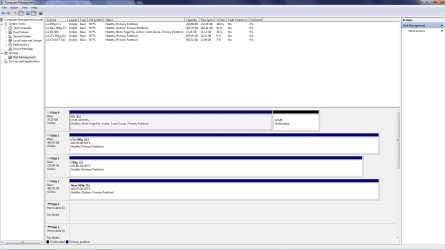
Here's what my disk management screen looks like if it helps

Untitled.png

D: Is what I installed W7 on, C: is xp.
 

My Computer

OS
Windows 7 Ultimate x32
Win7 was incorrectly installed from another OS which is why it is lettered D when booted. It should always show as C if it is correctly installed from boot.

In addition C: XP holds the System boot files for Win7 as shown by the System Active flags. So you likely installed Win7 from C and it placed the boot files on C configuring a Dual Boot as it does when installed last.

In addition all of your data drives are incorrectly marked Active which will further confuse the installer or Repair function. So start by marking them all Inactive: Partition - Mark as Inactive - Windows 7 Forums

What I would then do is unplug XP HD, boot the Win7 installer to reinstall Win7 from boot so that it claims the letter C. Then plug back in the XP HD and wipe it with Diskpart Clean Command, create and format a partition in Disk Mgmt. Partition or Volume - Create New

If you want to keep Win7 on D, then mark D Active, unplug XP HD, boot the Win7 installer to run Startup Repair - Run 3 Separate Times until Win7 partition boot and holds the System Active flags. Then plug back in XP HD, wipe it using Diskpart Clean Command, format in Disk Mgmt.

 
@gregrocker, I actually got it done, but I took a different route. I ran an upgrade install on the xp drive then just formatted it. Worked a treat. Can I just use the "Change Drive Letters And Paths" option in Disk Management to put my drives in the proper order??
 

My Computer

OS
Windows 7 Ultimate x32
That is not a route - sounds like a mess. Why would you Upgrade a drive to format it?

Could you not wait for advice based on real world solutions?

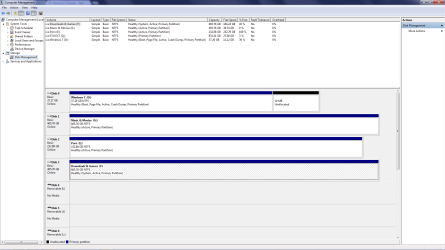
Need to see another Disk Mgmt screenshot.

You cannot change the drive letter of an OS - it will always ruin it.
 
That is not a route - sounds like a mess. Why would you Upgrade a drive to format it?

Could you not wait for advice based on real world solutions?

Need to see another Disk Mgmt screenshot.

You cannot change the drive letter of an OS - it will always ruin it.

It was actually a suggestion from the guy I got the drive off. It seems to have worked so it's not an issue how I got the job done it's the result.

result.png
 

My Computer

OS
Windows 7 Ultimate x32
Googy,
First, I will take exception to Greg's suggestion regarding unmarking active partitions.

All of my disks are always marked as Active. Marking as Active does NOT mean that an OS is there, but simply that the disk has been prepared such that one could install an OS on the Disk.

Would you do me a favor and give all of your partitions meaninful names?

You can do that with DiskManagment.

After doing that, then make a fresh Disk Management snapshot please.

Oops, just saw that you've posted a fresh msg. Let me look there.
 

My Computer

Computer Manufacturer/Model Number
Toshiba Satellite S875D-S7239 laptop
OS
MS Windows 7 Ultimate SP1 64-bit
CPU
AMD A10-4600M
Motherboard
AMD Pumori (Socket FT1)
Memory
6.00 GB Dual-Channel DDR3 @ 798MHz (11-11-12-28)
Graphics Card(s)
AMD Radeon HD 7660G
Sound Card
High Definition Audio Device
Monitor(s) Displays
Generic PnP Monitor (1600x900@60Hz)
Screen Resolution
1600x900@60Hz
Hard Drives
SSD 119GB Corsair CSSD-V128GB2 ATA Device
Keyboard
Standard PS/2 Keyboard
Mouse
HP Wireless Optical Mobile Mouse Model FHA-3410
Internet Speed
What the local pub, local coffee shop offers.
Other Info
Optical Drive:MATSHITA BD-CMB UJ160B ATA Device


Also have an Asus ha1002xp netbook with Win 7 Ultimate installed.
Googy,

Everything looks fine.

Your "OS" partition is labeled D which is fine. On many systems, that ends up being the letter assigned.

As mentioned, by Greg, assigning another Letter to the drive can play havoc.

What I would suggest: assigning another drive letter, maybe K: to your partition with a C: assignment.

I seriously recommend giving each partition a meaningful name.
 

My Computer

Computer Manufacturer/Model Number
Toshiba Satellite S875D-S7239 laptop
OS
MS Windows 7 Ultimate SP1 64-bit
CPU
AMD A10-4600M
Motherboard
AMD Pumori (Socket FT1)
Memory
6.00 GB Dual-Channel DDR3 @ 798MHz (11-11-12-28)
Graphics Card(s)
AMD Radeon HD 7660G
Sound Card
High Definition Audio Device
Monitor(s) Displays
Generic PnP Monitor (1600x900@60Hz)
Screen Resolution
1600x900@60Hz
Hard Drives
SSD 119GB Corsair CSSD-V128GB2 ATA Device
Keyboard
Standard PS/2 Keyboard
Mouse
HP Wireless Optical Mobile Mouse Model FHA-3410
Internet Speed
What the local pub, local coffee shop offers.
Other Info
Optical Drive:MATSHITA BD-CMB UJ160B ATA Device


Also have an Asus ha1002xp netbook with Win 7 Ultimate installed.
Googy,

Everything looks fine.

Your "OS" partition is labeled D which is fine. On many systems, that ends up being the letter assigned.

As mentioned, by Greg, assigning another Letter to the drive can play havoc.

What I would suggest: assigning another drive letter, maybe K: to your partition with a C: assignment.

I seriously recommend giving each partition a meaningful name.


Meaningful name??? Something like this?

result1.png
 

My Computer

OS
Windows 7 Ultimate x32
yes.
 

My Computer

Computer Manufacturer/Model Number
Toshiba Satellite S875D-S7239 laptop
OS
MS Windows 7 Ultimate SP1 64-bit
CPU
AMD A10-4600M
Motherboard
AMD Pumori (Socket FT1)
Memory
6.00 GB Dual-Channel DDR3 @ 798MHz (11-11-12-28)
Graphics Card(s)
AMD Radeon HD 7660G
Sound Card
High Definition Audio Device
Monitor(s) Displays
Generic PnP Monitor (1600x900@60Hz)
Screen Resolution
1600x900@60Hz
Hard Drives
SSD 119GB Corsair CSSD-V128GB2 ATA Device
Keyboard
Standard PS/2 Keyboard
Mouse
HP Wireless Optical Mobile Mouse Model FHA-3410
Internet Speed
What the local pub, local coffee shop offers.
Other Info
Optical Drive:MATSHITA BD-CMB UJ160B ATA Device


Also have an Asus ha1002xp netbook with Win 7 Ultimate installed.
Apparently you didn't read the first step I gave you where is to mark all of the data drives Inactive, so when you ran the Repairs with XP drive unplugged it has now written the System boot files to F Games partition.

No partitions other than an OS partition should be marked Active. The reason for this has long been stated and is dealt with here every day: When any other partition is marked Active it can derail the System boot files onto itself during install, reinstall or repairs.

So mark all partitions except Win7 Inactive, boot the Win7 installer to run Startup Repair up to 3 separate times until Win7 starts it's partition holds the System Active flags.

If this fails, unplug all other hD's except Win7 HD to repeat the repairs.
 
I do it all of the time and never had any problems.
 

My Computer

Computer Manufacturer/Model Number
Toshiba Satellite S875D-S7239 laptop
OS
MS Windows 7 Ultimate SP1 64-bit
CPU
AMD A10-4600M
Motherboard
AMD Pumori (Socket FT1)
Memory
6.00 GB Dual-Channel DDR3 @ 798MHz (11-11-12-28)
Graphics Card(s)
AMD Radeon HD 7660G
Sound Card
High Definition Audio Device
Monitor(s) Displays
Generic PnP Monitor (1600x900@60Hz)
Screen Resolution
1600x900@60Hz
Hard Drives
SSD 119GB Corsair CSSD-V128GB2 ATA Device
Keyboard
Standard PS/2 Keyboard
Mouse
HP Wireless Optical Mobile Mouse Model FHA-3410
Internet Speed
What the local pub, local coffee shop offers.
Other Info
Optical Drive:MATSHITA BD-CMB UJ160B ATA Device


Also have an Asus ha1002xp netbook with Win 7 Ultimate installed.
Can you see that by following your advice contradicting me that he has wound up with the System boot files on his F: Games HD?

The only functional purpose for the Active flag is to signal an OS is installed there, or the System boot files are intended to be written there.
 
Apparently you didn't read the first step I gave you where is to mark all of the data drives Inactive, so when you ran the Repairs with XP drive unplugged it has now written the System boot files to F Games partition.

No partitions other than an OS partition should be marked Active. The reason for this has long been stated and is dealt with here every day: When any other partition is marked Active it can derail the System boot files onto itself during install, reinstall or repairs.

So mark all partitions except Win7 Inactive, boot the Win7 installer to run Startup Repair up to 3 separate times until Win7 starts it's partition holds the System Active flags.

If this fails, unplug all other hD's except Win7 HD to repeat the repairs.


So how do I get the system files off of the other hdd?
 

My Computer

OS
Windows 7 Ultimate x32
Hello? :confused:

I took the time earlier to write out steps so specific they could not possibly be misunderstood:

Win7 was incorrectly installed from another OS which is why it is lettered D when booted. It should always show as C if it is correctly installed from boot.

In addition C: XP holds the System boot files for Win7 as shown by the System Active flags. So you likely installed Win7 from C and it placed the boot files on C configuring a Dual Boot as it does when installed last.

In addition all of your data drives are incorrectly marked Active which will further confuse the installer or Repair function. So start by marking them all Inactive: Partition - Mark as Inactive - Windows 7 Forums

What I would then do is unplug XP HD, boot the Win7 installer to reinstall Win7 from boot so that it claims the letter C. Then plug back in the XP HD and wipe it with Diskpart Clean Command, create and format a partition in Disk Mgmt. Partition or Volume - Create New

If you want to keep Win7 on D, then mark D Active, unplug XP HD, boot the Win7 installer to run Startup Repair - Run 3 Separate Times until Win7 partition boot and holds the System Active flags. Then plug back in XP HD, wipe it using Diskpart Clean Command, format in Disk Mgmt.
 
You named one Porn !!

:roflmao:
 

My Computer

Computer type
PC/Desktop
Computer Manufacturer/Model Number
Skylake Special #666
OS
Windows 10 Pro x64
CPU
Intel Core i7 6700K
Motherboard
Asus Sabertooth Z170 Mark 1
Memory
GSkill TridentZ RGB 16GB 3600 16-16-16-36
Graphics Card(s)
EVGA GTX 980 Ti SC x2
Sound Card
Realtek High Definition
Monitor(s) Displays
AOC G2460PG
Screen Resolution
1920 x 1080 144Hz
Hard Drives
Samsung 860 Pro 256GB, Seagate Barracuda 4TB x2
PSU
EVGA 1000 P2, EVGA White Custom Braided Cables
Case
Corsair Vengeance C70 Gunmetal Black
Cooling
Corsair H100i v2, Corsair ML120 x2, Thermal Grizzly Kryonaut
Keyboard
Logitech G910 Orion Spectrum
Mouse
Logitech G700s
Internet Speed
Verizon Fios Quantum Gateway 75/75
Antivirus
Windows Defender, Malwarebytes Free 3.8.3
Browser
Chrome
Other Info
Corsair SP120 x4, LG Blu-ray Drive, Durabrand HT-395 100 Watt Dolby Digital Amp, Corsair H2100 Wireless 7.1 Headset
Hello? :confused:

I took the time earlier to write out steps so specific they could not possibly be misunderstood:

Win7 was incorrectly installed from another OS which is why it is lettered D when booted. It should always show as C if it is correctly installed from boot.

In addition C: XP holds the System boot files for Win7 as shown by the System Active flags. So you likely installed Win7 from C and it placed the boot files on C configuring a Dual Boot as it does when installed last.

In addition all of your data drives are incorrectly marked Active which will further confuse the installer or Repair function. So start by marking them all Inactive: Partition - Mark as Inactive - Windows 7 Forums

What I would then do is unplug XP HD, boot the Win7 installer to reinstall Win7 from boot so that it claims the letter C. Then plug back in the XP HD and wipe it with Diskpart Clean Command, create and format a partition in Disk Mgmt. Partition or Volume - Create New

If you want to keep Win7 on D, then mark D Active, unplug XP HD, boot the Win7 installer to run Startup Repair - Run 3 Separate Times until Win7 partition boot and holds the System Active flags. Then plug back in XP HD, wipe it using Diskpart Clean Command, format in Disk Mgmt.
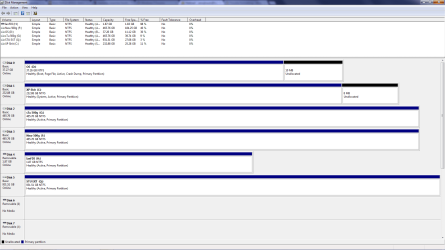
I don't wanna format my games drive. Just wanna get rid of the system files off of it.
 

My Computer

OS
Windows 7 Ultimate x32
This whole thread is about formatting a drive. Did you get that done ? :focus:
 

My Computer

Computer type
PC/Desktop
Computer Manufacturer/Model Number
Skylake Special #666
OS
Windows 10 Pro x64
CPU
Intel Core i7 6700K
Motherboard
Asus Sabertooth Z170 Mark 1
Memory
GSkill TridentZ RGB 16GB 3600 16-16-16-36
Graphics Card(s)
EVGA GTX 980 Ti SC x2
Sound Card
Realtek High Definition
Monitor(s) Displays
AOC G2460PG
Screen Resolution
1920 x 1080 144Hz
Hard Drives
Samsung 860 Pro 256GB, Seagate Barracuda 4TB x2
PSU
EVGA 1000 P2, EVGA White Custom Braided Cables
Case
Corsair Vengeance C70 Gunmetal Black
Cooling
Corsair H100i v2, Corsair ML120 x2, Thermal Grizzly Kryonaut
Keyboard
Logitech G910 Orion Spectrum
Mouse
Logitech G700s
Internet Speed
Verizon Fios Quantum Gateway 75/75
Antivirus
Windows Defender, Malwarebytes Free 3.8.3
Browser
Chrome
Other Info
Corsair SP120 x4, LG Blu-ray Drive, Durabrand HT-395 100 Watt Dolby Digital Amp, Corsair H2100 Wireless 7.1 Headset
Back
Top