Trouble setting up DualView

TheMonk

New member
Local time
4:17 AM
Messages
10
Hey folks,

my problem regards the DualView in Win7 Ultimate x64.
I currently have one of my screens (both LG Flatron Wide 20") connected to one of my GeForce 8800 GT's DVI-slots (got two of those slots).

Now i want to connect the second screen too, but as i do so, the second one keeps black though it seems to be recognized by Win7. I already tried changing several settings regarding resolution, update rate and driver versions and also checked for the hardware, which is completely intact.
I switched the cables between the monitors - no change.
I switched the slots the monitors were connected to - same problem, only that the screen previously showing an image now turns black and the other one shows it's designated "second screen view" (no Taskbar, no Gadgets etc.).

As i said, the Slots, cables and Monitors are all intact - i even checked for the pins and ports not to be bent or broken - and changing the drivers between 185.85, 196.21 and 197.13 didn't solve the problem.

Has anyone got an answer how to solve this?
 

My Computer

OS
Windows 7 Ultimate x64
CPU
Intel Core2Quad Q6600 @ 2.4 GHz
Motherboard
MSI P35 Neo-F
Memory
4 GB DDR2
Graphics Card(s)
GeForce 8800 GT
Monitor(s) Displays
2x LG Flatron L204WT 20"
Screen Resolution
up to 1680x1050
Welcome!

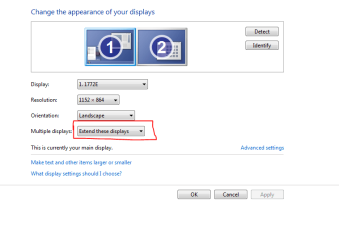
Make sure the second monitor is enabled. Right-click on the desktop and select Screen Resolution
moz-screenshot-2.png
. Then set the setting to Extend these displays.

Capture.PNG
 

My Computer

Computer Manufacturer/Model Number
Custom
OS
Windows 7 Professional x64
CPU
Intel i7 2600K OC'd @ 4620 MHz
Motherboard
Asus P8Z68-V Pro
Memory
16GB GSkill Sniper 2133 Mhz (4x4GB)
Graphics Card(s)
EVGA GeForce GTX 480 SuperClocked+
Sound Card
Realtek High Definition Audio
Monitor(s) Displays
2x Acer S273HLbmii 27"
Screen Resolution
2 x 1920x1080
Hard Drives
64GB Crucial M4 SSD

Storage: Hitachi 1TB 5400RPM, Samsung 1.5TB 5400RPM
PSU
Corsair HW Series 750w (modular)
Case
Cooler Master HAF 932 Advanced Blue Edition
Cooling
CM Hyper 212+ CPU cooler, 3x 230mm + 1x 140mm case fans
Keyboard
Logitech MK320 (wireless)
Mouse
Logitech MK320 (wireless)
Internet Speed
30 Mb/s : 2 Mb/s
Of course i checked that too. Also tried to handle this via the nVidia-System Settings menu, but i couldn't solve the problem there either.
 

My Computer

OS
Windows 7 Ultimate x64
CPU
Intel Core2Quad Q6600 @ 2.4 GHz
Motherboard
MSI P35 Neo-F
Memory
4 GB DDR2
Graphics Card(s)
GeForce 8800 GT
Monitor(s) Displays
2x LG Flatron L204WT 20"
Screen Resolution
up to 1680x1050
Not sure if you tried this, but are you sure the second monitor is working? What happens if you connect it to slot 1, and leave slot 2 empty?

What happens if you plug monitor 1 into slot 2, and leave slot 1 empty?

Do you have onboard graphics also? If so, disable it in the BIOS.
 

My Computer

Computer Manufacturer/Model Number
Custom
OS
Windows 7 Professional x64
CPU
Intel i7 2600K OC'd @ 4620 MHz
Motherboard
Asus P8Z68-V Pro
Memory
16GB GSkill Sniper 2133 Mhz (4x4GB)
Graphics Card(s)
EVGA GeForce GTX 480 SuperClocked+
Sound Card
Realtek High Definition Audio
Monitor(s) Displays
2x Acer S273HLbmii 27"
Screen Resolution
2 x 1920x1080
Hard Drives
64GB Crucial M4 SSD

Storage: Hitachi 1TB 5400RPM, Samsung 1.5TB 5400RPM
PSU
Corsair HW Series 750w (modular)
Case
Cooler Master HAF 932 Advanced Blue Edition
Cooling
CM Hyper 212+ CPU cooler, 3x 230mm + 1x 140mm case fans
Keyboard
Logitech MK320 (wireless)
Mouse
Logitech MK320 (wireless)
Internet Speed
30 Mb/s : 2 Mb/s
The second monitor is definately intact, used it only minutes ago on another pc with the same cable.

When i switch the slots, the second monitor becomes active and shows the screen it is supposed to show as the secondary monitor, but the primary becomes black.

When i put monitor 1 into slot 2 und leave slot 1 empty, the monitor stays black.
Very weird, because there is no optical damage/malfunction on slot 2.

Again, the pins are all intact.

No onboard-graphics.
 

My Computer

OS
Windows 7 Ultimate x64
CPU
Intel Core2Quad Q6600 @ 2.4 GHz
Motherboard
MSI P35 Neo-F
Memory
4 GB DDR2
Graphics Card(s)
GeForce 8800 GT
Monitor(s) Displays
2x LG Flatron L204WT 20"
Screen Resolution
up to 1680x1050
It sounds as if the second port is bad. Have you ever gotten input out of it?
 

My Computer

Computer Manufacturer/Model Number
Custom
OS
Windows 7 Professional x64
CPU
Intel i7 2600K OC'd @ 4620 MHz
Motherboard
Asus P8Z68-V Pro
Memory
16GB GSkill Sniper 2133 Mhz (4x4GB)
Graphics Card(s)
EVGA GeForce GTX 480 SuperClocked+
Sound Card
Realtek High Definition Audio
Monitor(s) Displays
2x Acer S273HLbmii 27"
Screen Resolution
2 x 1920x1080
Hard Drives
64GB Crucial M4 SSD

Storage: Hitachi 1TB 5400RPM, Samsung 1.5TB 5400RPM
PSU
Corsair HW Series 750w (modular)
Case
Cooler Master HAF 932 Advanced Blue Edition
Cooling
CM Hyper 212+ CPU cooler, 3x 230mm + 1x 140mm case fans
Keyboard
Logitech MK320 (wireless)
Mouse
Logitech MK320 (wireless)
Internet Speed
30 Mb/s : 2 Mb/s
I did when i still had WinXP installed (~2 years ago). I've never touched that port since then.

The funny part is, that - as i said - my pc recognizes the second monitor with name and specifications but does not display anything.
I can push programs over the edge to the secondary monitor, just that i can't see them 'cause it's black. Still i can navigate them pressing Windows+Arrow-Keys.

I've read many threads in other forums written by people having similar problems after changing from xp to vista or 7.
 

My Computer

OS
Windows 7 Ultimate x64
CPU
Intel Core2Quad Q6600 @ 2.4 GHz
Motherboard
MSI P35 Neo-F
Memory
4 GB DDR2
Graphics Card(s)
GeForce 8800 GT
Monitor(s) Displays
2x LG Flatron L204WT 20"
Screen Resolution
up to 1680x1050
It is possible that it is a driver issue, but I do suspect a bad card. :(

Try uninstalling your card in Device Manager and reboot. Then let Windows automatically install the drivers.
 

My Computer

Computer Manufacturer/Model Number
Custom
OS
Windows 7 Professional x64
CPU
Intel i7 2600K OC'd @ 4620 MHz
Motherboard
Asus P8Z68-V Pro
Memory
16GB GSkill Sniper 2133 Mhz (4x4GB)
Graphics Card(s)
EVGA GeForce GTX 480 SuperClocked+
Sound Card
Realtek High Definition Audio
Monitor(s) Displays
2x Acer S273HLbmii 27"
Screen Resolution
2 x 1920x1080
Hard Drives
64GB Crucial M4 SSD

Storage: Hitachi 1TB 5400RPM, Samsung 1.5TB 5400RPM
PSU
Corsair HW Series 750w (modular)
Case
Cooler Master HAF 932 Advanced Blue Edition
Cooling
CM Hyper 212+ CPU cooler, 3x 230mm + 1x 140mm case fans
Keyboard
Logitech MK320 (wireless)
Mouse
Logitech MK320 (wireless)
Internet Speed
30 Mb/s : 2 Mb/s
Still doesn't work.
But i wonder why it did back with WinXP and why so many other people seem to have similar problems...
 

My Computer

OS
Windows 7 Ultimate x64
CPU
Intel Core2Quad Q6600 @ 2.4 GHz
Motherboard
MSI P35 Neo-F
Memory
4 GB DDR2
Graphics Card(s)
GeForce 8800 GT
Monitor(s) Displays
2x LG Flatron L204WT 20"
Screen Resolution
up to 1680x1050
Hi Monk im also having a similar problem.

It sounds like a refresh rate problem.

If i try and extend my display to my 2nd monitor which is the exact same monitor! They both go black and say out of range.

One thing im going to try is to add my hdtv up to pc also, giving me three displays, that I should be able to resolve the issue because I will be able to see my screens on my HDTV.

Hope that helps in some way
 

My Computer

Computer type
PC/Desktop
OS
Windows 7 Ultimate x64
CPU
i7 4770
Motherboard
MSI Z87 Mpower
Memory
16GB corsair vengenance
Graphics Card(s)
Palit GT640
Sound Card
MOTU Ultralite mk3 hybrid
Monitor(s) Displays
AOC
Screen Resolution
1024x768
Hard Drives
1) 1tb
PSU
850w
Keyboard
Microsoft Fingerprint Keyboard
Internet Speed
10MBs
Other Info
COMPTIA A+ Certified
Tried altering the refresh rate too, didn't change anything.

I can even point my mouse over to the secondary, just i can't see it.
 

My Computer

OS
Windows 7 Ultimate x64
CPU
Intel Core2Quad Q6600 @ 2.4 GHz
Motherboard
MSI P35 Neo-F
Memory
4 GB DDR2
Graphics Card(s)
GeForce 8800 GT
Monitor(s) Displays
2x LG Flatron L204WT 20"
Screen Resolution
up to 1680x1050
same here mate.

I can run both displays on XP and Vista no probs, but just windows 7 my displays seem to have issues with.

I love windows 7, but at times like this, the "your pc made simple" quote does not apply lol.

And with the amount of people on here no one can offer a solution, except the obvious ones.

If any one can figure this out I would be very grateful.

My displays are Advent X19W's and graphics card Gigabyte GTS250
 

My Computer

Computer type
PC/Desktop
OS
Windows 7 Ultimate x64
CPU
i7 4770
Motherboard
MSI Z87 Mpower
Memory
16GB corsair vengenance
Graphics Card(s)
Palit GT640
Sound Card
MOTU Ultralite mk3 hybrid
Monitor(s) Displays
AOC
Screen Resolution
1024x768
Hard Drives
1) 1tb
PSU
850w
Keyboard
Microsoft Fingerprint Keyboard
Internet Speed
10MBs
Other Info
COMPTIA A+ Certified
Can you try testing your video card in another system?
 

My Computer

Computer Manufacturer/Model Number
Custom
OS
Windows 7 Professional x64
CPU
Intel i7 2600K OC'd @ 4620 MHz
Motherboard
Asus P8Z68-V Pro
Memory
16GB GSkill Sniper 2133 Mhz (4x4GB)
Graphics Card(s)
EVGA GeForce GTX 480 SuperClocked+
Sound Card
Realtek High Definition Audio
Monitor(s) Displays
2x Acer S273HLbmii 27"
Screen Resolution
2 x 1920x1080
Hard Drives
64GB Crucial M4 SSD

Storage: Hitachi 1TB 5400RPM, Samsung 1.5TB 5400RPM
PSU
Corsair HW Series 750w (modular)
Case
Cooler Master HAF 932 Advanced Blue Edition
Cooling
CM Hyper 212+ CPU cooler, 3x 230mm + 1x 140mm case fans
Keyboard
Logitech MK320 (wireless)
Mouse
Logitech MK320 (wireless)
Internet Speed
30 Mb/s : 2 Mb/s
Not really, i only have this one at my disposal.

But my brother has got the 8800 GTS with 2 DVI-slots and he has no problems, if that is of any help.
 

My Computer

OS
Windows 7 Ultimate x64
CPU
Intel Core2Quad Q6600 @ 2.4 GHz
Motherboard
MSI P35 Neo-F
Memory
4 GB DDR2
Graphics Card(s)
GeForce 8800 GT
Monitor(s) Displays
2x LG Flatron L204WT 20"
Screen Resolution
up to 1680x1050
Yeah, we really need to find our whether your card is defective though. Any given piece of hardware can fail.
 

My Computer

Computer Manufacturer/Model Number
Custom
OS
Windows 7 Professional x64
CPU
Intel i7 2600K OC'd @ 4620 MHz
Motherboard
Asus P8Z68-V Pro
Memory
16GB GSkill Sniper 2133 Mhz (4x4GB)
Graphics Card(s)
EVGA GeForce GTX 480 SuperClocked+
Sound Card
Realtek High Definition Audio
Monitor(s) Displays
2x Acer S273HLbmii 27"
Screen Resolution
2 x 1920x1080
Hard Drives
64GB Crucial M4 SSD

Storage: Hitachi 1TB 5400RPM, Samsung 1.5TB 5400RPM
PSU
Corsair HW Series 750w (modular)
Case
Cooler Master HAF 932 Advanced Blue Edition
Cooling
CM Hyper 212+ CPU cooler, 3x 230mm + 1x 140mm case fans
Keyboard
Logitech MK320 (wireless)
Mouse
Logitech MK320 (wireless)
Internet Speed
30 Mb/s : 2 Mb/s
I can just repeat myself: The last time i used the 2nd slot, it worked flawlessly.
 

My Computer

OS
Windows 7 Ultimate x64
CPU
Intel Core2Quad Q6600 @ 2.4 GHz
Motherboard
MSI P35 Neo-F
Memory
4 GB DDR2
Graphics Card(s)
GeForce 8800 GT
Monitor(s) Displays
2x LG Flatron L204WT 20"
Screen Resolution
up to 1680x1050
I can just repeat myself: The last time i used the 2nd slot, it worked flawlessly.


I am just passing through but because it worked last time doesn't mean it will this time. You obviously have some sort of hardware problem.

ken
 

My Computer

Computer Manufacturer/Model Number
HP Pavillion dv-7 1005 Tx
OS
Win 8 Release candidate 8400
CPU
[email protected]
Memory
4 gigs
Graphics Card(s)
Nvidia 9600M
Sound Card
HD built-in
Monitor(s) Displays
17" Wxga
Screen Resolution
1440x900
Cooling
none
Internet Speed
45Mb down 5Mb up
I don't think so, because i didn't physically alter anything since the last time the slot worked.
But after hours of continued searching, i think i found out that it seems to be a driver problem caused by the currently available versions of nVidia's drivers for this series.

At nVidia forums, i found many people who have exactly the same problems with their graphic cards although they have different types or even different series. But they all have in common that this problem only appears on Win7 or WinVista, but not on XP.
Regrettably the nVidia team didn't come up with any solutions or updates, though this problem was already recognized fall 2009.

Some people seem to have solved it by using older drivers or drivers for Vista but after many tries, that doesn't work for me either.

My brother will be visiting tomorrow and he's bringing his pc along so we can try if it's really the graphics card or Win7 that is causing the problem.
 

My Computer

OS
Windows 7 Ultimate x64
CPU
Intel Core2Quad Q6600 @ 2.4 GHz
Motherboard
MSI P35 Neo-F
Memory
4 GB DDR2
Graphics Card(s)
GeForce 8800 GT
Monitor(s) Displays
2x LG Flatron L204WT 20"
Screen Resolution
up to 1680x1050
Ok now THIS is really strange:

I plugged a DVI-to-VGA converter to the 2nd DVI slot and connected the 2nd monitor with a VGA cable and voilá! Dualview works as intended.

Yet the 2nd DVI-cable can't be broken because it worked on the 1st monitor.

Very weird.
 

My Computer

OS
Windows 7 Ultimate x64
CPU
Intel Core2Quad Q6600 @ 2.4 GHz
Motherboard
MSI P35 Neo-F
Memory
4 GB DDR2
Graphics Card(s)
GeForce 8800 GT
Monitor(s) Displays
2x LG Flatron L204WT 20"
Screen Resolution
up to 1680x1050
Back
Top