Trouble sharing between 7 and XP?

2KXJ

New member
Local time
2:29 PM
Messages
21
Lately I've been trying to share my internet with my dads computer via crossover cable. My computer runs Windows 7, his XP.

I've got both computers setup to the point that they can see each other under network place.

On my computer, it shows his computer has a connection, and "has" internet access. His computer says nothing about having internet access, and doesn't have internet. Meanwhile my computer is telling me his connection is an "Unidentified Network" and therefore I can't change any of its settings. Something I am missing?

Once the computers can see eachother, about 10 minutes later it tells me his connection has gone from "internet access" to "no network access"

When both computers were setup to ip assign IP's automatically they would never see eachother. I have them setup to use 192.168.1.7 and 192.168.1.8 and they use subnet mask 255.255.255.0 with a gateway of 192.168.1.1.

Any input is appreciated, as the second computer is really useless without internet :(
 

My Computer

OS
windows 7 7100
Also, none of the other ICS threads, unidentified network threads, any threads at all really have helped me. Before someone suggests searching :P
 

My Computer

OS
windows 7 7100
I'm not actually sure which of the computers is connected to the internet. However, in the PC which is connected, you need to enable "Internet Connection Sharing" on the actual internet connection (Modem connection). When you do this, Windows will allocate the IP address 192.168.0.1 to the "Local Area Connection" with which you're connecting to the other computer via the "crossover" cable. The "Client" PC gets its IP address automatically by DHCP from the Host PC. Don't change this IP addressing setup.
 

My Computer

OS
Windows 7 & 8 64-bit, Mac OSX 10.8.2
Why does everyone assume its that simple? I've tried all of this. Sharings been on the entire time. I literally UNPLUGGED my XBOX and plugged his computer in. The Xbox shared the internet just fine as soon as I plugged it in and allowed sharing.

Theres something actually WRONG here which i can't seem to get across to anyone. I've posted on 4 different forums now and never get anything more than "turn sharing on" and "let it obtain IP's automatically."

If it was that easy it would work already.

The computers dont obtain anything automatically, I had to assign IPs myself to get ANY progress. The computers can see eachother on the network, but only for a short period of time, then it defaults back to "no network access" for his computer. While it says his access is "internet" he has no internet, but I can view files on his computer from mine.
 

My Computer

OS
windows 7 7100
And when I have it set to let DHCP assign IP's, the assigned IP for the LAN is 169.254.51.203 subnet 255.255.0.0.

According to ipconfig /all
 

My Computer

OS
windows 7 7100
Enable ICS on the actual internet connection in the Host PC and then check that the network adapter that you're connecting to the "client" device with does have the address 192.168.0.1 (allocated by Windows). This is essential. If that has happened, then run ipconfig /all in a Command Prompt window and check that it says "IP Routing Enabled...Yes".

Why does everyone assume its that simple?
Because it really should be that simple. While allocating IP addresses yourself may get the computers "talking", ICS isn't going to work that way.
 

My Computer

OS
Windows 7 & 8 64-bit, Mac OSX 10.8.2
And when I have it set to let DHCP assign IP's, the assigned IP for the LAN is 169.254.51.203 subnet 255.255.0.0.

According to ipconfig /all

You're missing the point. Windows allocates the Host PC's IP address when you enable ICS. It is a fixed IP address of 192.168.0.1 with Subnet Mask 255.255.255.0 - there are no Default Gateway or DNS Server addresses, because that connection is not connecting to the internet. The Client PC does get its addresses by DHCP from the Host PC.
 

My Computer

OS
Windows 7 & 8 64-bit, Mac OSX 10.8.2
K both PC's are set to automatic IP assignment now. Once I set them back to that, the ICS box unchecked and now I can't re-check it.

It gives me

"An error occurred while internet connection sharing was being enabled

(null)"

So now I'm even further back than I was?

Ontop of the fact I have to disable the LAN connection or I lose internet on my computer now.

It seems everytime I change a setting, it screws up 10 other things.
 

My Computer

OS
windows 7 7100
Doesnt even pick up on the XBOX anymore....another "unidentified network"

I'm going to kill Bill Gates.
 

My Computer

OS
windows 7 7100
Lately I've been trying to share my internet with my dads computer via crossover cable.
Hello 2KXJ;

I understand your frustration. This may be a really dumb question to ask, but the "crossover cable" you are using, is it a USB cable or a network cable?

I have never been successful setting up ICS (Internet Connection Sharing). Too frustrating for me. Please may I suggest to you a used wired router can be had for a few bucks (like $25 USD) and makes sharing Internet access on a home network a breeze compared to ICS?

Cheers!
Robert
 

My Computer

OS
...
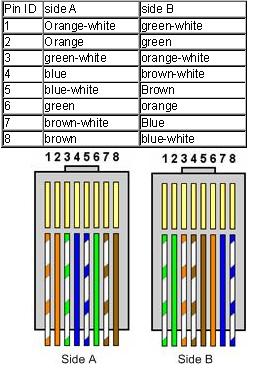
It was a 100' ethernet cable which I recrimped one end to "B" spec:

crossover-cable.jpg
 

My Computer

OS
windows 7 7100
Too bad I just cant make it work now :(

From everything I'd read it was as simple as modifying the cable, plugging it in and "sharing my internet."

If I knew it was going to turn into this crap, I would have gone the other way.

Routers = firewalls, blocked ports and slower internet. One direct cable would just be too nice I guess.
 

My Computer

OS
windows 7 7100
Too bad I just cant make it work now :(
Well ... Diagostics / troubleshooting is a methodical, step by step process starting with the simple and obvious so nothing is left out. Skipping around trying this and that can sometimes waste a great deal of time and produce no results.

If you object to the simple router solution ... I would suggest to you to start from the beginning, unplug the xbox and xp computer, maybe even temporarily the Internet access, reboot the computer and follow Microsoft's tutorial on how to set up Internet Connection Sharing, step by step. When you have ICS setup, and you have Internet access, then connect the XP computer and configure it to use ICS for XP for its Internet access. Step by step.

If anyone can do it, I would say you are the one.

Cheers!
Robert
 

My Computer

OS
...
Hi 2KXJ,

A couple more things for you to tick off the "Yes I've done that" list.
  • On the Host connection properties, ensure that 'Client for Microsoft Networks' is installed and ticked.
  • In the IPv4 properties, check the alternate configuration and advanced button and ensure that there is no residual infomation in DNS, gateway or wins. Also check on your Dad's PC that the default gateway has the automatic metric ticked.
  • Try to disable IPv6 and test with just IPv4 (noet that Wins should be set to default for this).
  • I've attached a checklist for basic file sharing it might be worth just checking it over for anythng useful.
  • If your Dad's PC has more than one NIC, disable all except the one with the crossover cable
  • Try temporarily dissabling firewalls on both to rule out a firewall issue.
  • Ensure both PC's are in the same workgroup and have different computer names

As an after thought, there should probably be only one DCHP server on the network (i.e. the host with ICS enabled).I would turn off DHCP on your modem/router/server if you haven't already and set the IPaddress on the host manually (static) on the NIC that connects to the default gateway. Ensure that there are no IPaddress conflicts but put the gateway-NIC in the same subnet (unless you are bridging).

There's a vista guide here that might help too Step by step Internet Connection Sharing (ICS) setup in Vista | Windows Reference
 

Attachments

My Computer

Computer Manufacturer/Model Number
Custom Hack job
OS
Windows 7 Ultimate 64 bit
CPU
Intel(R) Core(TM)2 Quad CPU Q8200 @ 2.33GHz
Motherboard
GigaByte EP45-UD3
Memory
8 GB Kingston
Graphics Card(s)
Nvidia GeForce 9600GT
Sound Card
Soundblaster Audigy
Monitor(s) Displays
AOC x2 22"
Hard Drives
2 x Samsung 500GB (RAID)
2 x Samsung 2TB
1 x WD Green 2TB
1 x Seagate 1TB
1 x Samsung 500GB
PSU
Thermaltake QFan 750W
Case
CM Scout Gaming
Cooling
Coolermaster V10
Keyboard
Microsoft Wireless Keyboard 1000
Mouse
Microsoft Wireless Optical 2000
Internet Speed
320
Other Info
Winfast PVR2000CP
LG DVD-RAM DVD/RW/DL Super Multi
Linksys WMP300Nx2 Wireless Adapter
I've uninstalled/reinstalled both NIC card's drivers. Diagnostics tells me theres nothings wrong.

There are no residual numbers in the properties and Client is there and checked. I have tried unchecking ipv6(also did just now) with no results. How do I confirm W7 is set to default to ipv4? His PC only has one onboard NIC and I actually have Firewall very disabled on both computers through admin. tools > services.

To be honest the IP setup confuses the hell out of me. The only setup I've gotten ANY results from is the one in my first post. Youre saying I can leave the XP machine set to auto and only define IP's on mine? If both machines are set to auto, would that mean they're both trying to run DHCP servers? Instead of one defaulting to 'incoming' so to speak?
 

My Computer

OS
windows 7 7100
FA311 driver issue with Vista - NETGEAR Forums

I have the fa311 also and mine is constantly sending and never receiving too. I read that Windows 7 does not accept a whole lot of Windows XP drivers? The only drivers available for the fa311 are from XP.

Perhaps upgrading to a newer card?
 

My Computer

OS
windows 7 7100
I've uninstalled/reinstalled both NIC card's drivers. Diagnostics tells me theres nothings wrong.

There are no residual numbers in the properties and Client is there and checked. I have tried unchecking ipv6(also did just now) with no results. How do I confirm W7 is set to default to ipv4? His PC only has one onboard NIC and I actually have Firewall very disabled on both computers through admin. tools > services.
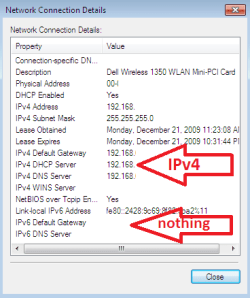
In your Windows 7 computer open your Network ans sharing center and click on your local area connection to something like this:

network_details_01.png

Notice only IPv4 has addresses, IPv6 is not being used.

To be honest the IP setup confuses the hell out of me. The only setup I've gotten ANY results from is the one in my first post. Youre saying I can leave the XP machine set to auto and only define IP's on mine? If both machines are set to auto, would that mean they're both trying to run DHCP servers? Instead of one defaulting to 'incoming' so to speak?
Here is a brief I hope will help ... a router receives your ISPs Internet IP address, so to the Internet your router becomes your computer (WAN). Then the router gives each computer on your network a unique "local" IP address (192.168.x.x is only used for networking, never as an Internet address) and keeps track of each computers Internet traffic (LAN). ICS is the software equivalent of what the router (hardware) does, one of your computers connects to the Internet and becomes the router so other computers can share the connection. Configuration is the same.

FA311 driver issue with Vista - NETGEAR Forums

I have the fa311 also and mine is constantly sending and never receiving too. I read that Windows 7 does not accept a whole lot of Windows XP drivers? The only drivers available for the fa311 are from XP.

Perhaps upgrading to a newer card?
Ethernet cards are very cheap ($5 to $10 USD) so a newer card, one from the Windows 7 compatibility web site, would definitely be a plus! Intel, 3Com, and Realtek are popular name brands.

Cheers!
Robert
 

My Computer

OS
...
In regards to having two DHCP on the network, I'm not 100% when it comes to ICS. It's been at least 4 years since I last set one up with a crossover cable and I'm pretty sure I used bridged networks then so that it wouldn't be an issue. A DHCP device issues the ipadresses, on a basic home network DHCP is usually issued by the modem.

If you uncheck IPv6, open CMD prompt and
IPCONFIG /RELEASE
IPCONFIG /FLUSHDNS
arp -d
IPCONFIG /RENEW
this should reset your network to your latest settings (i.e. no IPv6)

You said - "Youre saying I can leave the XP machine set to auto and only define IP's on mine?" Yes I am saying that.
You Said - "To be honest the IP setup confuses the hell out of me" - The only way to learn is to dive in... and sink... then swim. :)
You Said - "If both machines are set to auto, would that mean they're both trying to run DHCP servers?" - Only if you checked the 'Allow other users to connect through this computers internet connection' box. This should only be ticked on the NIC that connects to the network on your PC (not on any of the crossover cable NIC's). however I theorise that if your Modem is also issuing DHCP and your computer is issuing DHCP and they are issuing in the same address range and subnet, then there are two DHCP devices on the network (this theory would need to be tested though).

Also this might help you
Gyre Technology - How to share a broadband internet connection
 

My Computer

Computer Manufacturer/Model Number
Custom Hack job
OS
Windows 7 Ultimate 64 bit
CPU
Intel(R) Core(TM)2 Quad CPU Q8200 @ 2.33GHz
Motherboard
GigaByte EP45-UD3
Memory
8 GB Kingston
Graphics Card(s)
Nvidia GeForce 9600GT
Sound Card
Soundblaster Audigy
Monitor(s) Displays
AOC x2 22"
Hard Drives
2 x Samsung 500GB (RAID)
2 x Samsung 2TB
1 x WD Green 2TB
1 x Seagate 1TB
1 x Samsung 500GB
PSU
Thermaltake QFan 750W
Case
CM Scout Gaming
Cooling
Coolermaster V10
Keyboard
Microsoft Wireless Keyboard 1000
Mouse
Microsoft Wireless Optical 2000
Internet Speed
320
Other Info
Winfast PVR2000CP
LG DVD-RAM DVD/RW/DL Super Multi
Linksys WMP300Nx2 Wireless Adapter

My Computer

Computer Manufacturer/Model Number
Custom Hack job
OS
Windows 7 Ultimate 64 bit
CPU
Intel(R) Core(TM)2 Quad CPU Q8200 @ 2.33GHz
Motherboard
GigaByte EP45-UD3
Memory
8 GB Kingston
Graphics Card(s)
Nvidia GeForce 9600GT
Sound Card
Soundblaster Audigy
Monitor(s) Displays
AOC x2 22"
Hard Drives
2 x Samsung 500GB (RAID)
2 x Samsung 2TB
1 x WD Green 2TB
1 x Seagate 1TB
1 x Samsung 500GB
PSU
Thermaltake QFan 750W
Case
CM Scout Gaming
Cooling
Coolermaster V10
Keyboard
Microsoft Wireless Keyboard 1000
Mouse
Microsoft Wireless Optical 2000
Internet Speed
320
Other Info
Winfast PVR2000CP
LG DVD-RAM DVD/RW/DL Super Multi
Linksys WMP300Nx2 Wireless Adapter
Back
Top