Trouble sharing between 7 and XP?

Still nada guys. WTF am I doing wrong? Even got a new NIC card thats W7 compatible.

Can still only get the computers to talk when I manually assign IP's.

I've got the computers connected and seeing eachother, but there is no internet being shared, although it is 'shared.' Still comes up on my computer as unidentified network.
 

My Computer

OS
windows 7 7100
In the PC that connects to the internet, enable ICS on the network adapter that actually has the internet connection. Then run ipconfig /all in a Command prompt window, right click in the window, "Select All" and press Enter. This will copy the "ipconfig" details to the clipboard. Paste that into a forum reply here, which might give an indication of what the problem is.
 

My Computer

OS
Windows 7 & 8 64-bit, Mac OSX 10.8.2
In the PC that connects to the internet, enable ICS on the network adapter that actually has the internet connection. Then run ipconfig /all in a Command prompt window, right click in the window, "Select All" and press Enter. This will copy the "ipconfig" details to the clipboard. Paste that into a forum reply here, which might give an indication of what the problem is.

Good idea! We could do with seeing this.

You can also type IPCONFIG /ALL >>C:\mytestfile.txt to send it directly to a text file.
 

My Computer

Computer Manufacturer/Model Number
Custom Hack job
OS
Windows 7 Ultimate 64 bit
CPU
Intel(R) Core(TM)2 Quad CPU Q8200 @ 2.33GHz
Motherboard
GigaByte EP45-UD3
Memory
8 GB Kingston
Graphics Card(s)
Nvidia GeForce 9600GT
Sound Card
Soundblaster Audigy
Monitor(s) Displays
AOC x2 22"
Hard Drives
2 x Samsung 500GB (RAID)
2 x Samsung 2TB
1 x WD Green 2TB
1 x Seagate 1TB
1 x Samsung 500GB
PSU
Thermaltake QFan 750W
Case
CM Scout Gaming
Cooling
Coolermaster V10
Keyboard
Microsoft Wireless Keyboard 1000
Mouse
Microsoft Wireless Optical 2000
Internet Speed
320
Other Info
Winfast PVR2000CP
LG DVD-RAM DVD/RW/DL Super Multi
Linksys WMP300Nx2 Wireless Adapter
Have you tried bridging the two connections (from w7)?

Xp machine and w7 machine to auto detect Ip and just connect to your w7 via cross over.
 

My Computer

Computer Manufacturer/Model Number
Lenovo ThinkPad T60
OS
Windows 7 Ultimate 64Bit
CPU
GenuineIntel Intel(R) Core(TM) DuoCore T2400 @ 1.83GHz
Motherboard
Intel(R) 82801G (ICH7 Family)
Memory
2.00 GB
Graphics Card(s)
Mobile Intel(R) 945 Express Chipset
Sound Card
SoundMAX Integrated Digital HD Audio
Monitor(s) Displays
ThinkPad Display
Screen Resolution
1400x1050
Hard Drives
100Gb SATA
Keyboard
Standard Keyboard
Mouse
HID-compliant Mouse
Internet Speed
Cable Broadband - 54Mbps
Other Info
Intel(R) PRO/1000 PL Network Connection
11a/b/g Wireless LAN Mini PCI Express Adapter
Hello 2kxj,
i agree with iseeuu, maybe you must change your way to share your internet...

regards,
Fauzi

Nothing wrong with sharing via cross-over cable.

I just tested what i said two posts ago and both machines are able to gain net access. Very Simple.
 

My Computer

Computer Manufacturer/Model Number
Lenovo ThinkPad T60
OS
Windows 7 Ultimate 64Bit
CPU
GenuineIntel Intel(R) Core(TM) DuoCore T2400 @ 1.83GHz
Motherboard
Intel(R) 82801G (ICH7 Family)
Memory
2.00 GB
Graphics Card(s)
Mobile Intel(R) 945 Express Chipset
Sound Card
SoundMAX Integrated Digital HD Audio
Monitor(s) Displays
ThinkPad Display
Screen Resolution
1400x1050
Hard Drives
100Gb SATA
Keyboard
Standard Keyboard
Mouse
HID-compliant Mouse
Internet Speed
Cable Broadband - 54Mbps
Other Info
Intel(R) PRO/1000 PL Network Connection
11a/b/g Wireless LAN Mini PCI Express Adapter
When I bridge the two computers together I lose internet completely.

Will say it again, the computers DO NOT SEE EACHOTHER when they're both set to assign IP's automatically. I have to assign them myself. 192.168.1.1 and 192.168.1.2. Once I do this, they're connected and can access eachother, but no internet is being shared and it STILL comes up unidentified network.

Whenever I open Vuze it always pops up with an error saying "127.0.0.1:62876 port isnt allowing incoming connections." Could this mean anything?

Vuze has a built in TCP checking thing...and I get this when I do it

Testing port 62876 ...
NAT Error - Connection to 99.237.53.174:62876 (your computer) refused.​
 

My Computer

OS
windows 7 7100
What exactly did you bridge, did u bridge from w7 or xp (and was w7 internet'ed)?

Post screenshot.
 

My Computer

Computer Manufacturer/Model Number
Lenovo ThinkPad T60
OS
Windows 7 Ultimate 64Bit
CPU
GenuineIntel Intel(R) Core(TM) DuoCore T2400 @ 1.83GHz
Motherboard
Intel(R) 82801G (ICH7 Family)
Memory
2.00 GB
Graphics Card(s)
Mobile Intel(R) 945 Express Chipset
Sound Card
SoundMAX Integrated Digital HD Audio
Monitor(s) Displays
ThinkPad Display
Screen Resolution
1400x1050
Hard Drives
100Gb SATA
Keyboard
Standard Keyboard
Mouse
HID-compliant Mouse
Internet Speed
Cable Broadband - 54Mbps
Other Info
Intel(R) PRO/1000 PL Network Connection
11a/b/g Wireless LAN Mini PCI Express Adapter
Maybe I'm dumb but I dont understand your question...

I can ONLY bridge my computer with my dads XP machine. There aren't two connections on his computer to bridge, and my computer only has two connections itself also. Internet and LAN. When I bridge the two, nothing works at all.
 

My Computer

OS
windows 7 7100
the computers DO NOT SEE EACHOTHER when they're both set to assign IP's automatically

lol.. yep you have mentioned this a bit, but it's better for a question to be re-asked than not asked at all. :D

The guys are right in that your Dad's PC should get an automatic IP address as long as DHCP is running on your PC.
Well it has me thinking anyway, on your Dad's PC set the default gateway manually to be the address of your PC (this is in the TCP/IP properties, Advanced /IPsettings tab).

In regards to Bridging. If you bridge the two adapters on your PC the static routes will be automatically calculated by windows. Meaning that a connection on one network Yours<->Dad's is automatically routed to the other network internet<->yours. So you can have two different ipaddress ranges and have no problem with 2 DHCP servers running on the network and issuing out conflicting IPaddress.

The connections either need to be bridged OR all in the same subnet (i.e. all begin with the same first 3 numbers in their ipaddress) to communicate with each other.

In all honesty though, if it's not working, consider buying a cheap switch or recycle an old router/multi-port modem as one and loose the crossover cable. This is much easier and less stress.
 

My Computer

Computer Manufacturer/Model Number
Custom Hack job
OS
Windows 7 Ultimate 64 bit
CPU
Intel(R) Core(TM)2 Quad CPU Q8200 @ 2.33GHz
Motherboard
GigaByte EP45-UD3
Memory
8 GB Kingston
Graphics Card(s)
Nvidia GeForce 9600GT
Sound Card
Soundblaster Audigy
Monitor(s) Displays
AOC x2 22"
Hard Drives
2 x Samsung 500GB (RAID)
2 x Samsung 2TB
1 x WD Green 2TB
1 x Seagate 1TB
1 x Samsung 500GB
PSU
Thermaltake QFan 750W
Case
CM Scout Gaming
Cooling
Coolermaster V10
Keyboard
Microsoft Wireless Keyboard 1000
Mouse
Microsoft Wireless Optical 2000
Internet Speed
320
Other Info
Winfast PVR2000CP
LG DVD-RAM DVD/RW/DL Super Multi
Linksys WMP300Nx2 Wireless Adapter
Actually I gained access to a D-link switch today. I've got it hooked up and running. I've also read you can run a switch without a router as long as theres a gateway defined on the switch. The switch is PnP though, and there are no settings/drivers for it. Where do I define it's gateway?

I hooked my modem to the switch, and then my computer to the switch, and my internet came back on instantly. I connect my Dad's computer and it still does nothing but see the network.

Again, the computers both SEE eachother, but thats as far as it goes.
 

My Computer

OS
windows 7 7100
If I plug my modem directly into my secondary pci-e NIC (it's always been plugged into my onboard NIC) my internet also comes up as "unidentified network" and there is no internet access.

I dont think that is right either...
 

My Computer

OS
windows 7 7100
I can ONLY bridge my computer with my dads XP machine. There aren't two connections on his computer to bridge, and my computer only has two connections itself also. Internet and LAN. When I bridge the two, nothing works at all.

From your w7 you have a LAN or wireless connection which is internet connected, right?

and when you plug the cross-over cable from your non internet'd Xp machine to your w7, another LAN interface is now available on w7. You may see it as unidentifed network after failing to acquire IP.

On w7, you select these two interfaces, right click and bridge.

Is that what u did (on w7 machine)?
 

My Computer

Computer Manufacturer/Model Number
Lenovo ThinkPad T60
OS
Windows 7 Ultimate 64Bit
CPU
GenuineIntel Intel(R) Core(TM) DuoCore T2400 @ 1.83GHz
Motherboard
Intel(R) 82801G (ICH7 Family)
Memory
2.00 GB
Graphics Card(s)
Mobile Intel(R) 945 Express Chipset
Sound Card
SoundMAX Integrated Digital HD Audio
Monitor(s) Displays
ThinkPad Display
Screen Resolution
1400x1050
Hard Drives
100Gb SATA
Keyboard
Standard Keyboard
Mouse
HID-compliant Mouse
Internet Speed
Cable Broadband - 54Mbps
Other Info
Intel(R) PRO/1000 PL Network Connection
11a/b/g Wireless LAN Mini PCI Express Adapter
My 7 machine has the internet and I'm trying to share to the XP machine.

My Internet connection is cable, and shows on my computer AS a LAN connection. When I connect the XP machine it tells me I have two LANs.

I installed vista on a second hard drive and its doing the exact same thing too.
 

My Computer

OS
windows 7 7100
W7
LAN1 = Intenet Access
LAN2 = No Internet Access (this is the LAN to your XP via cross-over cable)

Select these two and bridge.

Make sure all your Ips are set to auto detect and no manual input of IP anyway.
 

My Computer

Computer Manufacturer/Model Number
Lenovo ThinkPad T60
OS
Windows 7 Ultimate 64Bit
CPU
GenuineIntel Intel(R) Core(TM) DuoCore T2400 @ 1.83GHz
Motherboard
Intel(R) 82801G (ICH7 Family)
Memory
2.00 GB
Graphics Card(s)
Mobile Intel(R) 945 Express Chipset
Sound Card
SoundMAX Integrated Digital HD Audio
Monitor(s) Displays
ThinkPad Display
Screen Resolution
1400x1050
Hard Drives
100Gb SATA
Keyboard
Standard Keyboard
Mouse
HID-compliant Mouse
Internet Speed
Cable Broadband - 54Mbps
Other Info
Intel(R) PRO/1000 PL Network Connection
11a/b/g Wireless LAN Mini PCI Express Adapter
networkr.jpg
http://img13.imageshack.us/i/networkr.jpg/

I've done that, and did it again for this picture. The Entire network becomes unknown and I lose internet completely.

LAN4 = connection to XP machine
 

My Computer

OS
windows 7 7100
Ok let see you LANs one by one.

Delete the bridging and provide your ipconfig /all details (on w7).
 

My Computer

Computer Manufacturer/Model Number
Lenovo ThinkPad T60
OS
Windows 7 Ultimate 64Bit
CPU
GenuineIntel Intel(R) Core(TM) DuoCore T2400 @ 1.83GHz
Motherboard
Intel(R) 82801G (ICH7 Family)
Memory
2.00 GB
Graphics Card(s)
Mobile Intel(R) 945 Express Chipset
Sound Card
SoundMAX Integrated Digital HD Audio
Monitor(s) Displays
ThinkPad Display
Screen Resolution
1400x1050
Hard Drives
100Gb SATA
Keyboard
Standard Keyboard
Mouse
HID-compliant Mouse
Internet Speed
Cable Broadband - 54Mbps
Other Info
Intel(R) PRO/1000 PL Network Connection
11a/b/g Wireless LAN Mini PCI Express Adapter
Microsoft Windows [Version 6.1.7600]
Copyright (c) 2009 Microsoft Corporation. All rights reserved.
C:\Users\Ryan>ipconfig /all
Windows IP Configuration
Host Name . . . . . . . . . . . . : Ryan-PC
Primary Dns Suffix . . . . . . . :
Node Type . . . . . . . . . . . . : Hybrid
IP Routing Enabled. . . . . . . . : No
WINS Proxy Enabled. . . . . . . . : No
DNS Suffix Search List. . . . . . : phub.net.cable.rogers.com
Ethernet adapter Network Bridge:
Media State . . . . . . . . . . . : Media disconnected
Connection-specific DNS Suffix . :
Description . . . . . . . . . . . : MAC Bridge Miniport
Physical Address. . . . . . . . . : 02-1A-4D-4E-F3-55
DHCP Enabled. . . . . . . . . . . : Yes
Autoconfiguration Enabled . . . . : Yes
Ethernet adapter Local Area Connection 4:
Connection-specific DNS Suffix . :
Description . . . . . . . . . . . : Intel(R) Gigabit CT Desktop Adapter
Physical Address. . . . . . . . . : 00-1B-21-4E-88-D9
DHCP Enabled. . . . . . . . . . . : Yes
Autoconfiguration Enabled . . . . : Yes
Link-local IPv6 Address . . . . . : fe80::95fc:1f6:dca9:1ac%17(Preferred)
Autoconfiguration IPv4 Address. . : 169.254.1.172(Preferred)
Subnet Mask . . . . . . . . . . . : 255.255.0.0
Default Gateway . . . . . . . . . :
DHCPv6 IAID . . . . . . . . . . . : 402660129
DHCPv6 Client DUID. . . . . . . . : 00-01-00-01-12-BF-4C-76-00-1A-4D-4E-F3-55
DNS Servers . . . . . . . . . . . : fec0:0:0:ffff::1%1
fec0:0:0:ffff::2%1
fec0:0:0:ffff::3%1
NetBIOS over Tcpip. . . . . . . . : Enabled
Ethernet adapter Local Area Connection:
Connection-specific DNS Suffix . : phub.net.cable.rogers.com
Description . . . . . . . . . . . : Realtek RTL8168B/8111B Family PCI-E Gigab
it Ethernet NIC (NDIS 6.20)
Physical Address. . . . . . . . . : 00-1A-4D-4E-F3-55
DHCP Enabled. . . . . . . . . . . : Yes
Autoconfiguration Enabled . . . . : Yes
Link-local IPv6 Address . . . . . : fe80::e0a2:9192:c877:b8d6%11(Preferred)
IPv4 Address. . . . . . . . . . . : 99.237.53.174(Preferred)
Subnet Mask . . . . . . . . . . . : 255.255.254.0
Lease Obtained. . . . . . . . . . : Wednesday, December 23, 2009 10:53:04 PM
Lease Expires . . . . . . . . . . : Wednesday, December 30, 2009 10:48:38 PM
Default Gateway . . . . . . . . . : 99.237.52.1
DHCP Server . . . . . . . . . . . : 99.237.44.1
DHCPv6 IAID . . . . . . . . . . . : 234887757
DHCPv6 Client DUID. . . . . . . . : 00-01-00-01-12-BF-4C-76-00-1A-4D-4E-F3-55
DNS Servers . . . . . . . . . . . : 64.71.255.198
NetBIOS over Tcpip. . . . . . . . : Enabled
Tunnel adapter isatap.phub.net.cable.rogers.com:
Media State . . . . . . . . . . . : Media disconnected
Connection-specific DNS Suffix . :
Description . . . . . . . . . . . : Microsoft ISATAP Adapter
Physical Address. . . . . . . . . : 00-00-00-00-00-00-00-E0
DHCP Enabled. . . . . . . . . . . : No
Autoconfiguration Enabled . . . . : Yes
Tunnel adapter 6TO4 Adapter:
Media State . . . . . . . . . . . : Media disconnected
Connection-specific DNS Suffix . :
Description . . . . . . . . . . . : Microsoft 6to4 Adapter
Physical Address. . . . . . . . . : 00-00-00-00-00-00-00-E0
DHCP Enabled. . . . . . . . . . . : No
Autoconfiguration Enabled . . . . : Yes
Tunnel adapter Local Area Connection* 11:
Media State . . . . . . . . . . . : Media disconnected
Connection-specific DNS Suffix . :
Description . . . . . . . . . . . : Teredo Tunneling Pseudo-Interface
Physical Address. . . . . . . . . : 00-00-00-00-00-00-00-E0
DHCP Enabled. . . . . . . . . . . : No
Autoconfiguration Enabled . . . . : Yes
Tunnel adapter Local Area Connection* 9:
Media State . . . . . . . . . . . : Media disconnected
Connection-specific DNS Suffix . :
Description . . . . . . . . . . . : Microsoft 6to4 Adapter #3
Physical Address. . . . . . . . . : 00-00-00-00-00-00-00-E0
DHCP Enabled. . . . . . . . . . . : No
Autoconfiguration Enabled . . . . : Yes
Tunnel adapter Reusable Microsoft 6To4 Adapter:
Media State . . . . . . . . . . . : Media disconnected
Connection-specific DNS Suffix . :
Description . . . . . . . . . . . : Microsoft 6to4 Adapter #2
Physical Address. . . . . . . . . : 00-00-00-00-00-00-00-E0
DHCP Enabled. . . . . . . . . . . : No
Autoconfiguration Enabled . . . . : Yes
Tunnel adapter isatap.{7BC1FD44-8482-425F-88E4-BA5CAC73AEB1}:
Media State . . . . . . . . . . . : Media disconnected
Connection-specific DNS Suffix . :
Description . . . . . . . . . . . : Microsoft ISATAP Adapter #3
Physical Address. . . . . . . . . : 00-00-00-00-00-00-00-E0
DHCP Enabled. . . . . . . . . . . : No
Autoconfiguration Enabled . . . . : Yes
Tunnel adapter isatap.{79CF4A51-A796-4346-B9E6-F1EB71654CEE}:
Media State . . . . . . . . . . . : Media disconnected
Connection-specific DNS Suffix . :
Description . . . . . . . . . . . : Microsoft ISATAP Adapter #4
Physical Address. . . . . . . . . : 00-00-00-00-00-00-00-E0
DHCP Enabled. . . . . . . . . . . : No
Autoconfiguration Enabled . . . . : Yes
Tunnel adapter Local Area Connection* 12:
Media State . . . . . . . . . . . : Media disconnected
Connection-specific DNS Suffix . :
Description . . . . . . . . . . . : Microsoft 6to4 Adapter #4
Physical Address. . . . . . . . . : 00-00-00-00-00-00-00-E0
DHCP Enabled. . . . . . . . . . . : No
Autoconfiguration Enabled . . . . : Yes
Tunnel adapter Local Area Connection* 13:
Connection-specific DNS Suffix . : phub.net.cable.rogers.com
Description . . . . . . . . . . . : Microsoft 6to4 Adapter #5
Physical Address. . . . . . . . . : 00-00-00-00-00-00-00-E0
DHCP Enabled. . . . . . . . . . . : No
Autoconfiguration Enabled . . . . : Yes
IPv6 Address. . . . . . . . . . . : 2002:63ed:35ae::63ed:35ae(Preferred)
Default Gateway . . . . . . . . . : 2002:c058:6301::
DNS Servers . . . . . . . . . . . : 64.71.255.198
NetBIOS over Tcpip. . . . . . . . : Disabled
C:\Users\Ryan>

This is with everything on default settings and IP's set to auto assign.
 

My Computer

OS
windows 7 7100
Ethernet adapter Local Area Connection:
Connection-specific DNS Suffix . : phub.net.cable.rogers.com
Description . . . . . . . . . . . : Realtek RTL8168B/8111B Family PCI-E Gigab
it Ethernet NIC (NDIS 6.20)
Physical Address. . . . . . . . . : 00-1A-4D-4E-F3-55
DHCP Enabled. . . . . . . . . . . : Yes
Autoconfiguration Enabled . . . . : Yes
Link-local IPv6 Address . . . . . : fe80::e0a2:9192:c877:b8d6%11(Preferred)
IPv4 Address. . . . . . . . . . . : 99.237.53.174(Preferred)
Subnet Mask . . . . . . . . . . . : 255.255.254.0
Lease Obtained. . . . . . . . . . : Wednesday, December 23, 2009 10:53:04 PM
Lease Expires . . . . . . . . . . : Wednesday, December 30, 2009 10:48:38 PM
Default Gateway . . . . . . . . . : 99.237.52.1
DHCP Server . . . . . . . . . . . : 99.237.44.1
DHCPv6 IAID . . . . . . . . . . . : 234887757
DHCPv6 Client DUID. . . . . . . . : 00-01-00-01-12-BF-4C-76-00-1A-4D-4E-F3-55
DNS Servers . . . . . . . . . . . : 64.71.255.198
NetBIOS over Tcpip. . . . . . . . : Enabled

looks full and i assume this is the one that is net connected.

ok lets try this.

disconnect the cable to your Xp.

Manually put in an Ip, subnet, default gateway. then connect the cable and see if you can ping from your w7 to the Xp.

Note: for me i have a linksys router so i picked 192.168.1.6 (6 is just a number)
192.168.1.1 (default gateway)
255.255.255.0 (subnet).

Do not fill out DNS.

Test that you are able to ping from w7 to Xp, when success, untick manual ip and set it to auto. And try pinging Xp.

Give it all abit of time in betweens.
 

My Computer

Computer Manufacturer/Model Number
Lenovo ThinkPad T60
OS
Windows 7 Ultimate 64Bit
CPU
GenuineIntel Intel(R) Core(TM) DuoCore T2400 @ 1.83GHz
Motherboard
Intel(R) 82801G (ICH7 Family)
Memory
2.00 GB
Graphics Card(s)
Mobile Intel(R) 945 Express Chipset
Sound Card
SoundMAX Integrated Digital HD Audio
Monitor(s) Displays
ThinkPad Display
Screen Resolution
1400x1050
Hard Drives
100Gb SATA
Keyboard
Standard Keyboard
Mouse
HID-compliant Mouse
Internet Speed
Cable Broadband - 54Mbps
Other Info
Intel(R) PRO/1000 PL Network Connection
11a/b/g Wireless LAN Mini PCI Express Adapter
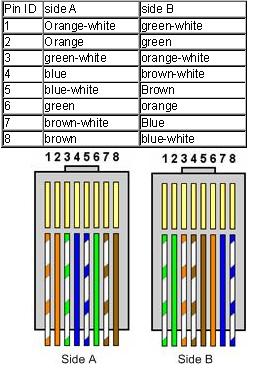
Are both ends wired the same?

It was a 100' ethernet cable which I recrimped one end to "B" spec:

crossover-cable.jpg

Silly Question Time:

Did you re-crimp the other end to the "B" spec as well?

If not the 100' cable will never work since BOTH sides have to be wired the same way. if not the reason it is not working is that the Rx and Tx line (3 and 6 I believe) are not matching up, therefore you have an electrical connection but not a logical since only one end was re-wired.

Hope this helps

Ciao
 

My Computer

OS
Windows 7 Professional x64
Back
Top