trouble with hdmi that's plugged in my computer to tv

10alpla1

New member
Local time
6:54 AM
Messages
4
Hello, I plugged in my hdmi cord into my computer that goes to tv, but all I get is: "no signal". How can I get it to work on windows 7 Ultimate 64 bit.
 

My Computer My Computer

At a glance

Windows 7 Ultimate x64Intel Core i5 650DDR3 Dual Channel: 4096/ NB Frequency: 2400.3...NVIDIA GeForce 9600 GT
Computer Manufacturer/Model Number
Gigabyte Technology Co., Ltd/ H55M-S2H
OS
Windows 7 Ultimate x64
CPU
Intel Core i5 650
Motherboard
Gigabyte Technology Co., Ltd
Memory
DDR3 Dual Channel: 4096/ NB Frequency: 2400.3 MHz
Graphics Card(s)
NVIDIA GeForce 9600 GT
Sound Card
High Definition Audio Device
Monitor(s) Displays
CALYPSO CLP-32LC1 TV
Hard Drives
- Maxtor 6E030L0 [Hard drive] (30.75 GB) -- drive 0, s/n E190ADSE, rev NAR61590, SMART Status: Healthy
- ST3320613AS [Hard drive] (320.07 GB) -- drive 1, s/n 9SZ6PJV8, rev CC2J, SMART Status: Healthy
PSU
550
Case
not sure
Cooling
Intel cooling fan
First make sure your display is outputting to your TV, especially if you have another connection to the card already. Next, make sure you have the TV in the correct mode to receive from your computer, generally called PC mode.
 

My Computer My Computer

At a glance

Windows 7 Ultimate x64Intel i7-860Corsair Dominator 1600Mhz, 8-8-8-24 1.65v 2x2GBATI Radeon 5770 HD
Computer Manufacturer/Model Number
Zen Productions
OS
Windows 7 Ultimate x64
CPU
Intel i7-860
Motherboard
Gigabyte GA-P55A-UD4P
Memory
Corsair Dominator 1600Mhz, 8-8-8-24 1.65v 2x2GB
Graphics Card(s)
ATI Radeon 5770 HD
Sound Card
Intel High Definition Sound
Monitor(s) Displays
Samsung P2570HD
Screen Resolution
1920x1080
Hard Drives
Western Digital Caviar Black 500gb
PSU
Corsair CMPSU-750HX 750W
Case
Antec p183
Cooling
Corsair H50 Water Cooler
Keyboard
Logitech G110
Mouse
Logitech MX Revolution
Internet Speed
768 mb/s
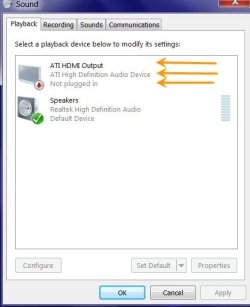
Right click on the Speaker icon in the System Tray, Click on the Playback devices and check whether HDMI output is selected as the default device in the Playback tab.

6-12-2011 10-06-29 PM.jpg

Of course you have to select the correct HDMI input on the TV.

i am not familiar with Intel processors and nvidia graphics, but generally if you are not using the onboard/on processor graphics, you may have to enter the bios and change to PCI/PCIe graphics.
 
Last edited:

My Computer My Computer

At a glance

Windows 7 Ultimate 32bitAMD Phenom II X3 720 ProcessorTranscend DDR2 (PC2 6400) 4 X 1GBIntegrated + ATI Radeon 4550
Computer Manufacturer/Model Number
self-assembled
OS
Windows 7 Ultimate 32bit
CPU
AMD Phenom II X3 720 Processor
Motherboard
Gigabyte GA-MA78GM-S2H Revision 1.0
Memory
Transcend DDR2 (PC2 6400) 4 X 1GB
Graphics Card(s)
Integrated + ATI Radeon 4550
Sound Card
Integrated Realtek ALC 889A
Monitor(s) Displays
DELL 1704 FPT
Screen Resolution
1280 x 1024
Hard Drives
Western Digital Caviar SE16 250 GB x2 in RAID 0
PSU
Coolermaster 400 W
Case
Zebronics Cube
Cooling
stock
Keyboard
Microsoft - wired
Mouse
Microsoft - wired
Internet Speed
ADSL 256-512Kbps
all I have on my sound in control panel is:

Speakers
Realtek High Defininition Audio
Default Device

Realtek Digital Output
Realtek High Definition Audio
Ready
 

My Computer My Computer

At a glance

Windows 7 Ultimate x64Intel Core i5 650DDR3 Dual Channel: 4096/ NB Frequency: 2400.3...NVIDIA GeForce 9600 GT
Computer Manufacturer/Model Number
Gigabyte Technology Co., Ltd/ H55M-S2H
OS
Windows 7 Ultimate x64
CPU
Intel Core i5 650
Motherboard
Gigabyte Technology Co., Ltd
Memory
DDR3 Dual Channel: 4096/ NB Frequency: 2400.3 MHz
Graphics Card(s)
NVIDIA GeForce 9600 GT
Sound Card
High Definition Audio Device
Monitor(s) Displays
CALYPSO CLP-32LC1 TV
Hard Drives
- Maxtor 6E030L0 [Hard drive] (30.75 GB) -- drive 0, s/n E190ADSE, rev NAR61590, SMART Status: Healthy
- ST3320613AS [Hard drive] (320.07 GB) -- drive 1, s/n 9SZ6PJV8, rev CC2J, SMART Status: Healthy
PSU
550
Case
not sure
Cooling
Intel cooling fan
Graphics Card NVIDIA GeForce 9600 GT

9600 GT doesn't pass through the audio, you'll need an optical cable.
 

My Computer My Computer

At a glance

7 Ultimate x64i5-2500k8GB G.Skill Ripjaws X F3-12800CL7D-8GBXH 1866...EVGA GTX 570 SC
OS
7 Ultimate x64
CPU
i5-2500k
Motherboard
Asus P8P67 Pro
Memory
8GB G.Skill Ripjaws X F3-12800CL7D-8GBXH 1866MHz 8-9-8-24
Graphics Card(s)
EVGA GTX 570 SC
Sound Card
X-Fi Titanium Fatality
Monitor(s) Displays
Samsung S27A550H 27" LED
Screen Resolution
1920x1080
Hard Drives
OCZ Vertex 3 120GB.
1TB Samsung F3.
2TB Samsung F4.
PSU
PC Power & Cooling Silencer 760
Case
Lian Li Lancool K62
Cooling
Thermalright Venomous X Black/Scythe S-Flex/Shin-Etsu X23
Keyboard
MS Natural Elite 4000 Ergonomic
Mouse
Logitech G500
Internet Speed
6MB/768
Other Info
Logitech Z-5500 505 watts.
D-Link DGL-4500.
Tripp-Lite Smart Pro 1500.
the hdmi cable is plugged into the mother board
 

My Computer My Computer

At a glance

Windows 7 Ultimate x64Intel Core i5 650DDR3 Dual Channel: 4096/ NB Frequency: 2400.3...NVIDIA GeForce 9600 GT
Computer Manufacturer/Model Number
Gigabyte Technology Co., Ltd/ H55M-S2H
OS
Windows 7 Ultimate x64
CPU
Intel Core i5 650
Motherboard
Gigabyte Technology Co., Ltd
Memory
DDR3 Dual Channel: 4096/ NB Frequency: 2400.3 MHz
Graphics Card(s)
NVIDIA GeForce 9600 GT
Sound Card
High Definition Audio Device
Monitor(s) Displays
CALYPSO CLP-32LC1 TV
Hard Drives
- Maxtor 6E030L0 [Hard drive] (30.75 GB) -- drive 0, s/n E190ADSE, rev NAR61590, SMART Status: Healthy
- ST3320613AS [Hard drive] (320.07 GB) -- drive 1, s/n 9SZ6PJV8, rev CC2J, SMART Status: Healthy
PSU
550
Case
not sure
Cooling
Intel cooling fan
the hdmi cable is plugged into the mother board
Did you enable the onboard graphics in the bios? If not, there's your problem.

You can either use the onboard graphics chip, or you can use your graphics card; but you can't use a mix and match of both. If you want to use the onboard video, then you'll have to enable it in the bios. If you want to use your graphics card, then you'll have to also use an optical cable, which you attach right below your hdmi port.

http://www.gigabyte.com/fileupload/product/2/3310/1361.jpg
 

My Computer My Computer

At a glance

7 Ultimate x64i5-2500k8GB G.Skill Ripjaws X F3-12800CL7D-8GBXH 1866...EVGA GTX 570 SC
OS
7 Ultimate x64
CPU
i5-2500k
Motherboard
Asus P8P67 Pro
Memory
8GB G.Skill Ripjaws X F3-12800CL7D-8GBXH 1866MHz 8-9-8-24
Graphics Card(s)
EVGA GTX 570 SC
Sound Card
X-Fi Titanium Fatality
Monitor(s) Displays
Samsung S27A550H 27" LED
Screen Resolution
1920x1080
Hard Drives
OCZ Vertex 3 120GB.
1TB Samsung F3.
2TB Samsung F4.
PSU
PC Power & Cooling Silencer 760
Case
Lian Li Lancool K62
Cooling
Thermalright Venomous X Black/Scythe S-Flex/Shin-Etsu X23
Keyboard
MS Natural Elite 4000 Ergonomic
Mouse
Logitech G500
Internet Speed
6MB/768
Other Info
Logitech Z-5500 505 watts.
D-Link DGL-4500.
Tripp-Lite Smart Pro 1500.
Usually in the BIOS the onboard graphics will be the default selection.

There may also be a setting in the bios to select VGA/DVI or HDMI out. Check your motherboard manual and set the bios correctly and I prexume your problem will be resolved.

If you need more help please let us know the exact Gigabyte motherboard (Is it GA-H55M-S2H? ) and also whether you are using the on-board HDMI out or the graphics card HDMI output. Then someone using that board, processor and graphics card can give you specific instructions on setting up the video and audio correctly.
 

My Computer My Computer

At a glance

Windows 7 Ultimate 32bitAMD Phenom II X3 720 ProcessorTranscend DDR2 (PC2 6400) 4 X 1GBIntegrated + ATI Radeon 4550
Computer Manufacturer/Model Number
self-assembled
OS
Windows 7 Ultimate 32bit
CPU
AMD Phenom II X3 720 Processor
Motherboard
Gigabyte GA-MA78GM-S2H Revision 1.0
Memory
Transcend DDR2 (PC2 6400) 4 X 1GB
Graphics Card(s)
Integrated + ATI Radeon 4550
Sound Card
Integrated Realtek ALC 889A
Monitor(s) Displays
DELL 1704 FPT
Screen Resolution
1280 x 1024
Hard Drives
Western Digital Caviar SE16 250 GB x2 in RAID 0
PSU
Coolermaster 400 W
Case
Zebronics Cube
Cooling
stock
Keyboard
Microsoft - wired
Mouse
Microsoft - wired
Internet Speed
ADSL 256-512Kbps
I have the gigabyte mother board: GA-H55M-S2H, and I am trying to use on-board HDMI out. In the bios I have video set to onboard, and that didn't work. Also, I went to the gigabyte website to download the drive that includes hdmi, and it still didn't work.
 

My Computer My Computer

At a glance

Windows 7 Ultimate x64Intel Core i5 650DDR3 Dual Channel: 4096/ NB Frequency: 2400.3...NVIDIA GeForce 9600 GT
Computer Manufacturer/Model Number
Gigabyte Technology Co., Ltd/ H55M-S2H
OS
Windows 7 Ultimate x64
CPU
Intel Core i5 650
Motherboard
Gigabyte Technology Co., Ltd
Memory
DDR3 Dual Channel: 4096/ NB Frequency: 2400.3 MHz
Graphics Card(s)
NVIDIA GeForce 9600 GT
Sound Card
High Definition Audio Device
Monitor(s) Displays
CALYPSO CLP-32LC1 TV
Hard Drives
- Maxtor 6E030L0 [Hard drive] (30.75 GB) -- drive 0, s/n E190ADSE, rev NAR61590, SMART Status: Healthy
- ST3320613AS [Hard drive] (320.07 GB) -- drive 1, s/n 9SZ6PJV8, rev CC2J, SMART Status: Healthy
PSU
550
Case
not sure
Cooling
Intel cooling fan
Just to clarify, you enabled onboard video in the bios, then booted to Windows and installed the corresponding video drivers... right? Get it working on the machine first, then we'll get it to work on your TV.
 

My Computer My Computer

At a glance

7 Ultimate x64i5-2500k8GB G.Skill Ripjaws X F3-12800CL7D-8GBXH 1866...EVGA GTX 570 SC
OS
7 Ultimate x64
CPU
i5-2500k
Motherboard
Asus P8P67 Pro
Memory
8GB G.Skill Ripjaws X F3-12800CL7D-8GBXH 1866MHz 8-9-8-24
Graphics Card(s)
EVGA GTX 570 SC
Sound Card
X-Fi Titanium Fatality
Monitor(s) Displays
Samsung S27A550H 27" LED
Screen Resolution
1920x1080
Hard Drives
OCZ Vertex 3 120GB.
1TB Samsung F3.
2TB Samsung F4.
PSU
PC Power & Cooling Silencer 760
Case
Lian Li Lancool K62
Cooling
Thermalright Venomous X Black/Scythe S-Flex/Shin-Etsu X23
Keyboard
MS Natural Elite 4000 Ergonomic
Mouse
Logitech G500
Internet Speed
6MB/768
Other Info
Logitech Z-5500 505 watts.
D-Link DGL-4500.
Tripp-Lite Smart Pro 1500.
Did you set "Init Display First" to "onboard"? This setting is just above the "Onboard VGA" setting.

(Just now confirmed that there is no D-sub/DVI or HDMI setting)
 

My Computer My Computer

At a glance

Windows 7 Ultimate 32bitAMD Phenom II X3 720 ProcessorTranscend DDR2 (PC2 6400) 4 X 1GBIntegrated + ATI Radeon 4550
Computer Manufacturer/Model Number
self-assembled
OS
Windows 7 Ultimate 32bit
CPU
AMD Phenom II X3 720 Processor
Motherboard
Gigabyte GA-MA78GM-S2H Revision 1.0
Memory
Transcend DDR2 (PC2 6400) 4 X 1GB
Graphics Card(s)
Integrated + ATI Radeon 4550
Sound Card
Integrated Realtek ALC 889A
Monitor(s) Displays
DELL 1704 FPT
Screen Resolution
1280 x 1024
Hard Drives
Western Digital Caviar SE16 250 GB x2 in RAID 0
PSU
Coolermaster 400 W
Case
Zebronics Cube
Cooling
stock
Keyboard
Microsoft - wired
Mouse
Microsoft - wired
Internet Speed
ADSL 256-512Kbps
Back
Top