Trouble with second monitor.

VonWebb

New member
Local time
6:33 PM
Messages
8
Location
Birmingham
Hey guys,

To begin with, my specs are as follows -
NQYGJUQ.png


I have a AMD Radeon HD 7800 series for my graphics driver.

Since I got my PC i've had trouble connecting 2 monitors, when I first loaded it up, it wouldn't connect through the VGA port or HDMI port that was connected to the motherboard. However, when I connected my HDMI to my Samsung television through the HDMI port on my graphics card it worked just fine, recently i've tried connecting a second 'Aquos' tv through both HDMI and VGA which are connected to the motherboard, (not the graphics card as there isn't enough ports on the graphics) but have been unsuccessful, this makes me think that it's an issue with the VGA and HDMI ports on the motherboard, however my keyboard is connected to my PS/2 port on my motherboard so it's not all faulty. Any help would be hugely appreciated, thanks.
 
Last edited:

My Computer My Computer

At a glance

Windows 7 Professional x64Intel i5-34708192MB RAMXFX Radeon HD 7870
Computer type
PC/Desktop
Computer Manufacturer/Model Number
Custom Build
OS
Windows 7 Professional x64
CPU
Intel i5-3470
Motherboard
MSI Z77A-G43
Memory
8192MB RAM
Graphics Card(s)
XFX Radeon HD 7870
Antivirus
AVG
Browser
Google
VonWebb, welcome to the Seven Forums.

First thing is to go into the bios and look for a setting called "IGD Multi-monitor", and make sure it is set to enabled. That is the setting that allows you to use the Intel graphics at the same time as a video card.
 

My Computer My Computer

At a glance

Win 7 Ultimate x64FX-8350 @ 4.6 GHz so farADATA XPG V1 Series Black 8GB DDR3 1600Sapphire R9 270x Dual-X
Computer type
PC/Desktop
Computer Manufacturer/Model Number
Me
OS
Win 7 Ultimate x64
CPU
FX-8350 @ 4.6 GHz so far
Motherboard
Asus M5A97 EVO
Memory
ADATA XPG V1 Series Black 8GB DDR3 1600
Graphics Card(s)
Sapphire R9 270x Dual-X
Sound Card
Xonar DGX w/ Corsair Vengence 1300
Monitor(s) Displays
Acer S232HL Abid
Screen Resolution
1920x1080
Hard Drives
120 GB OCZ Vertex 3
500 GB Seagate 7200.12
PSU
Antec Earthwatts 650W Green
Case
Antec Three Hundred
Cooling
Cooler Master 212 EVO
Keyboard
Logitech G510
Mouse
Logitech G500s
Internet Speed
35000/3000
@Stormy13 thanks and thanks, i'll have a look now.
 
Last edited:

My Computer My Computer

At a glance

Windows 7 Professional x64Intel i5-34708192MB RAMXFX Radeon HD 7870
Computer type
PC/Desktop
Computer Manufacturer/Model Number
Custom Build
OS
Windows 7 Professional x64
CPU
Intel i5-3470
Motherboard
MSI Z77A-G43
Memory
8192MB RAM
Graphics Card(s)
XFX Radeon HD 7870
Antivirus
AVG
Browser
Google
VonWebb, welcome to the Seven Forums.

First thing is to go into the bios and look for a setting called "IGD Multi-monitor", and make sure it is set to enabled. That is the setting that allows you to use the Intel graphics at the same time as a video card.

okay that's done, but it's still not being detected yet, or are there other paths I have to take?

edit: still not working, i've enabled it yet no detection for my monitor and TV, getting very frustrating now haha.
 
Last edited:

My Computer My Computer

At a glance

Windows 7 Professional x64Intel i5-34708192MB RAMXFX Radeon HD 7870
Computer type
PC/Desktop
Computer Manufacturer/Model Number
Custom Build
OS
Windows 7 Professional x64
CPU
Intel i5-3470
Motherboard
MSI Z77A-G43
Memory
8192MB RAM
Graphics Card(s)
XFX Radeon HD 7870
Antivirus
AVG
Browser
Google
Next step I would do is to pull the video card and make sure that the onboard video is working.
 

My Computer My Computer

At a glance

Win 7 Ultimate x64FX-8350 @ 4.6 GHz so farADATA XPG V1 Series Black 8GB DDR3 1600Sapphire R9 270x Dual-X
Computer type
PC/Desktop
Computer Manufacturer/Model Number
Me
OS
Win 7 Ultimate x64
CPU
FX-8350 @ 4.6 GHz so far
Motherboard
Asus M5A97 EVO
Memory
ADATA XPG V1 Series Black 8GB DDR3 1600
Graphics Card(s)
Sapphire R9 270x Dual-X
Sound Card
Xonar DGX w/ Corsair Vengence 1300
Monitor(s) Displays
Acer S232HL Abid
Screen Resolution
1920x1080
Hard Drives
120 GB OCZ Vertex 3
500 GB Seagate 7200.12
PSU
Antec Earthwatts 650W Green
Case
Antec Three Hundred
Cooling
Cooler Master 212 EVO
Keyboard
Logitech G510
Mouse
Logitech G500s
Internet Speed
35000/3000
Next step I would do is to pull the video card and make sure that the onboard video is working.

sorry dude, haven't a clue how to do that i'm a tech noob!
 

My Computer My Computer

At a glance

Windows 7 Professional x64Intel i5-34708192MB RAMXFX Radeon HD 7870
Computer type
PC/Desktop
Computer Manufacturer/Model Number
Custom Build
OS
Windows 7 Professional x64
CPU
Intel i5-3470
Motherboard
MSI Z77A-G43
Memory
8192MB RAM
Graphics Card(s)
XFX Radeon HD 7870
Antivirus
AVG
Browser
Google
Okay so I did that, and yeah the video works for both the graphics card and the onboard video is working, I'm still absolutely stumped on how to get this to work. halp
 

My Computer My Computer

At a glance

Windows 7 Professional x64Intel i5-34708192MB RAMXFX Radeon HD 7870
Computer type
PC/Desktop
Computer Manufacturer/Model Number
Custom Build
OS
Windows 7 Professional x64
CPU
Intel i5-3470
Motherboard
MSI Z77A-G43
Memory
8192MB RAM
Graphics Card(s)
XFX Radeon HD 7870
Antivirus
AVG
Browser
Google
Why aren`t you running both monitors off the video card ? That`s really how you should be doing it. :)

That card should have at least 4 ports , correct ?
 
Last edited:

My Computer My Computer

At a glance

Windows 10 Pro x64Intel Core i7 6700KGSkill TridentZ RGB 16GB 3600 16-16-16-36EVGA GTX 980 Ti SC x2
Computer type
PC/Desktop
Computer Manufacturer/Model Number
Skylake Special #666
OS
Windows 10 Pro x64
CPU
Intel Core i7 6700K
Motherboard
Asus Sabertooth Z170 Mark 1
Memory
GSkill TridentZ RGB 16GB 3600 16-16-16-36
Graphics Card(s)
EVGA GTX 980 Ti SC x2
Sound Card
Realtek High Definition
Monitor(s) Displays
AOC G2460PG
Screen Resolution
1920 x 1080 144Hz
Hard Drives
Samsung 860 Pro 256GB, Seagate Barracuda 4TB x2
PSU
EVGA 1000 P2, EVGA White Custom Braided Cables
Case
Corsair Vengeance C70 Gunmetal Black
Cooling
Corsair H100i v2, Corsair ML120 x2, Thermal Grizzly Kryonaut
Keyboard
Logitech G910 Orion Spectrum
Mouse
Logitech G700s
Internet Speed
Verizon Fios Quantum Gateway 75/75
Antivirus
Windows Defender, Malwarebytes Free 3.8.3
Browser
Chrome
Other Info
Corsair SP120 x4, LG Blu-ray Drive, Durabrand HT-395 100 Watt Dolby Digital Amp, Corsair H2100 Wireless 7.1 Headset
Why aren`t you running both monitors off the video card ? That`s really how you should be doing it. :)

You don`t have at least 2 ports on the card ?

Only 1 HDMI and 2 other ports which looks like:

62lBstb.png


but i dont have a connecting cable for it and there is nowhere for that go into my tv :/

edit: yeah it looks like the one you posted but i don't have cables for the 2 ports on the right.
 

My Computer My Computer

At a glance

Windows 7 Professional x64Intel i5-34708192MB RAMXFX Radeon HD 7870
Computer type
PC/Desktop
Computer Manufacturer/Model Number
Custom Build
OS
Windows 7 Professional x64
CPU
Intel i5-3470
Motherboard
MSI Z77A-G43
Memory
8192MB RAM
Graphics Card(s)
XFX Radeon HD 7870
Antivirus
AVG
Browser
Google
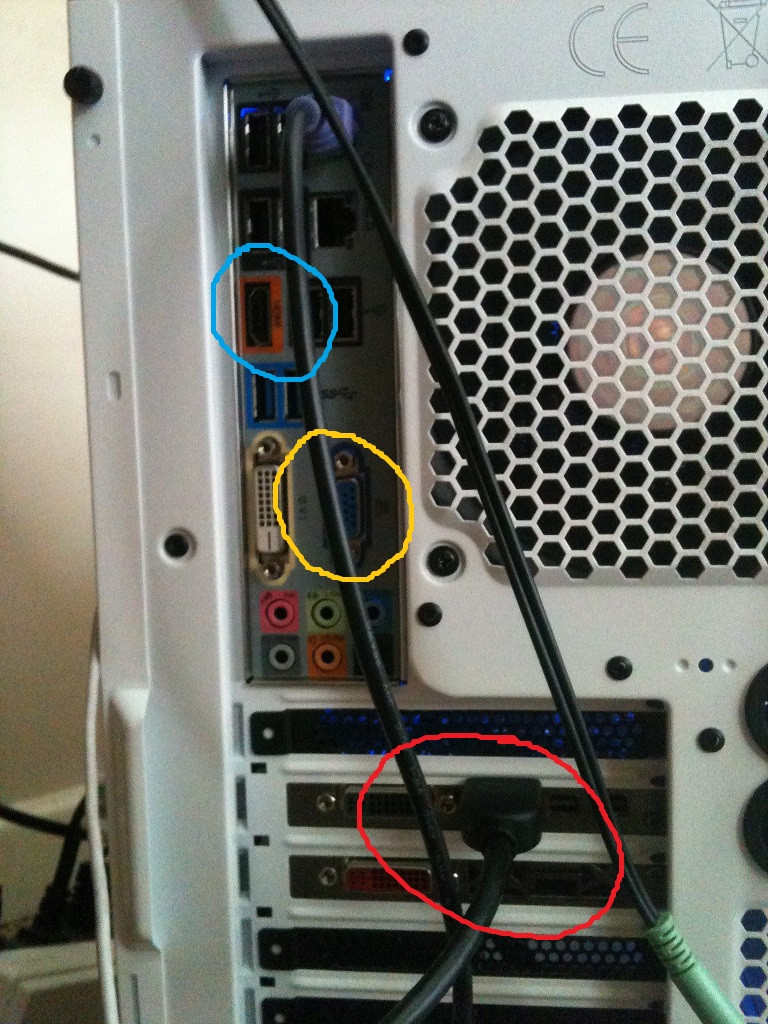
Ok so here's the deal, the photo below is my pc, the red circle is HDMI plugged into graphics card (which i'm sure you'll know) which is connected to my TV and working fine, whereas the blue and yellow circles are the 2 which i want to use or am able to use, which aren't working.

sVil2xA.jpg
 

My Computer My Computer

At a glance

Windows 7 Professional x64Intel i5-34708192MB RAMXFX Radeon HD 7870
Computer type
PC/Desktop
Computer Manufacturer/Model Number
Custom Build
OS
Windows 7 Professional x64
CPU
Intel i5-3470
Motherboard
MSI Z77A-G43
Memory
8192MB RAM
Graphics Card(s)
XFX Radeon HD 7870
Antivirus
AVG
Browser
Google
I`ve always read that when you use a graphics card, you can`t use the motherboard graphics at the same time.

If your pc monitor has a dvi port, then you`ll just have to go out and get a dvi cable. :)

I wish I could hand you one, I have dozens of em. They are cheap.
 

My Computer My Computer

At a glance

Windows 10 Pro x64Intel Core i7 6700KGSkill TridentZ RGB 16GB 3600 16-16-16-36EVGA GTX 980 Ti SC x2
Computer type
PC/Desktop
Computer Manufacturer/Model Number
Skylake Special #666
OS
Windows 10 Pro x64
CPU
Intel Core i7 6700K
Motherboard
Asus Sabertooth Z170 Mark 1
Memory
GSkill TridentZ RGB 16GB 3600 16-16-16-36
Graphics Card(s)
EVGA GTX 980 Ti SC x2
Sound Card
Realtek High Definition
Monitor(s) Displays
AOC G2460PG
Screen Resolution
1920 x 1080 144Hz
Hard Drives
Samsung 860 Pro 256GB, Seagate Barracuda 4TB x2
PSU
EVGA 1000 P2, EVGA White Custom Braided Cables
Case
Corsair Vengeance C70 Gunmetal Black
Cooling
Corsair H100i v2, Corsair ML120 x2, Thermal Grizzly Kryonaut
Keyboard
Logitech G910 Orion Spectrum
Mouse
Logitech G700s
Internet Speed
Verizon Fios Quantum Gateway 75/75
Antivirus
Windows Defender, Malwarebytes Free 3.8.3
Browser
Chrome
Other Info
Corsair SP120 x4, LG Blu-ray Drive, Durabrand HT-395 100 Watt Dolby Digital Amp, Corsair H2100 Wireless 7.1 Headset
I`ve always read that when you use a graphics card, you can`t use the motherboard graphics at the same time.

If your pc monitor has a dvi port, then you`ll just have to go out and get a dvi cable. :)

I wish I could hand you one, I have dozens of em. They are cheap.

ah ok. that sucks haha, cheers for the help though man, much appreciated, if anyone has any additional ideas, again they would be appreciated.
 

My Computer My Computer

At a glance

Windows 7 Professional x64Intel i5-34708192MB RAMXFX Radeon HD 7870
Computer type
PC/Desktop
Computer Manufacturer/Model Number
Custom Build
OS
Windows 7 Professional x64
CPU
Intel i5-3470
Motherboard
MSI Z77A-G43
Memory
8192MB RAM
Graphics Card(s)
XFX Radeon HD 7870
Antivirus
AVG
Browser
Google
Back
Top