
Solved Trusted Installer gobbling up my processor usage

spotify95

New member
Member
Local time
8:11 AM
Messages
73
Hi,

This problem has happened quite a few times (though not every day) so thought I'd ask you about it.

I have an Acer Aspire 5742 running Windows 7 Home Premium. Normally, whilst under minimal load, the fans are quite quiet, and temperatures are 50-60'C (normal for this laptop). Under intense load, the fans speed up and the temperatures go up. Which is expected. However....

Some days, the temperatures will always remain quite high, and the CPU usage also is quite high, even when "idling". Opening Task Manager (under admin) reveals there is a program called "Trusted Installer" (trustedinstaller.exe) which gobbles up up to 25% of my processor, and will not back down. This results in the laptop getting very hot (the 5742s have a heating issue) and could result in shutdown if you don't keep an eye on things.

Killing the process via Task Manager is often of little help, because it starts itself back up and continues to gobble up my CPU.

Other times, it has also be known for SVCHost (whatever that is) to do the same thing - and killing that via TM can sometimes require a whole reboot of the laptop.

Since I mentioned (in another thread) that this laptop runs quite hot, is there any way of trying to sort this issue out? Ideally getting rid of this [un]trusted installer but stopping it from gobbling CPU power is also helpful. That process is the last thing I would want to run on my laptop!

Thanks.
 

My Computer My Computer

At a glance

Windows 7 Professional, 64 bitIntel Core i7-4510U @ 2.00GHz16GB DDR3Intel HD 4400 (integrated)
Computer type
Laptop
Computer Manufacturer/Model Number
HP 15-ac153sa
OS
Windows 7 Professional, 64 bit
CPU
Intel Core i7-4510U @ 2.00GHz
Memory
16GB DDR3
Graphics Card(s)
Intel HD 4400 (integrated)
Monitor(s) Displays
Inbuilt 15.6 inch HD display
Screen Resolution
1366x768
Hard Drives
2TB HDD, partitioned as 1TB (Windows 7) and 1TB (Windows 10)
2TB external HDD (portable)
Cooling
1x built in laptop fan
Keyboard
HP Slimline Wired Keyboard
Mouse
HP Optical Wired Mouse
Internet Speed
Virgin Media 250Mbps
Antivirus
Microsoft Windows Defender
Browser
Chrome, Firefox
Other Info
Laptop is set up as dual boot with Windows 7 Professional and Windows 10 Home. Windows 7 preferred.
Try stopping Windows Update service as a test and set startup type to "disabled"

After a reboot check to see if you have the same issue. If not - then it means that you have a problem with windows updates and it might not but easy to fix. Personally I would go with a full repair of windows updates but it's not easy.
 

My Computer My Computer

At a glance

Microsoft Windows 7 Home Premium 64-bit 7601 ...AMD C-60 APU with Radeon(tm) HD Graphics4.00 GBAMD Radeon HD 6290 Graphics
Computer type
Laptop
Computer Manufacturer/Model Number
ASUS
OS
Microsoft Windows 7 Home Premium 64-bit 7601 Multiprocessor Free Service Pack 1
CPU
AMD C-60 APU with Radeon(tm) HD Graphics
Motherboard
ASUSTeK COMPUTER INC. X501U
Memory
4.00 GB
Graphics Card(s)
AMD Radeon HD 6290 Graphics
Sound Card
(1) AMD High Definition Audio Device (2) Realtek High Defi
Screen Resolution
1366 x 768 x 32 bits (4294967296 colors) @ 60 Hz
Hard Drives
Hitachi HTS545050A7E380 SATA Disk Device
Antivirus
Comodo CIS & FW, SecureAplus App Whitelisting, Threatfire
Browser
Cyberfox 64bit, Opera 64bit, Airfox
Other Info
Spy-The-Spy, HitmanPro.Alert, Norton Connect Safe, MJRegWatcher, BitDefender TrafficLight, Voodoo Shield, Zemana AntiMalware
And... Untrusted Installer (I would never trust that thing on my PC) done it's weird thing with the processor again today!

I will have to have a look a bit later on this evening and follow the steps, and report back to you about what happens.

Thanks for your help :)
 

My Computer My Computer

At a glance

Windows 7 Professional, 64 bitIntel Core i7-4510U @ 2.00GHz16GB DDR3Intel HD 4400 (integrated)
Computer type
Laptop
Computer Manufacturer/Model Number
HP 15-ac153sa
OS
Windows 7 Professional, 64 bit
CPU
Intel Core i7-4510U @ 2.00GHz
Memory
16GB DDR3
Graphics Card(s)
Intel HD 4400 (integrated)
Monitor(s) Displays
Inbuilt 15.6 inch HD display
Screen Resolution
1366x768
Hard Drives
2TB HDD, partitioned as 1TB (Windows 7) and 1TB (Windows 10)
2TB external HDD (portable)
Cooling
1x built in laptop fan
Keyboard
HP Slimline Wired Keyboard
Mouse
HP Optical Wired Mouse
Internet Speed
Virgin Media 250Mbps
Antivirus
Microsoft Windows Defender
Browser
Chrome, Firefox
Other Info
Laptop is set up as dual boot with Windows 7 Professional and Windows 10 Home. Windows 7 preferred.
Try stopping Windows Update service as a test and set startup type to "disabled"

After a reboot check to see if you have the same issue. If not - then it means that you have a problem with windows updates and it might not but easy to fix. Personally I would go with a full repair of windows updates but it's not easy.

Hi,

Windows Update is listed as a process, and so I have decided to end it, however under the "startup" tab Windows Update cannot be turned off at boot. I have decided to look into it again after (Un)Trusted Installer started its nonsense again.

Edit: Turned off Windows update and there is no intensive CPU usage from trusted installer. Should I turn windows update back on? If it happens again, have I got a problem with Windows Update?

Thanks.
 
Last edited:

My Computer My Computer

At a glance

Windows 7 Professional, 64 bitIntel Core i7-4510U @ 2.00GHz16GB DDR3Intel HD 4400 (integrated)
Computer type
Laptop
Computer Manufacturer/Model Number
HP 15-ac153sa
OS
Windows 7 Professional, 64 bit
CPU
Intel Core i7-4510U @ 2.00GHz
Memory
16GB DDR3
Graphics Card(s)
Intel HD 4400 (integrated)
Monitor(s) Displays
Inbuilt 15.6 inch HD display
Screen Resolution
1366x768
Hard Drives
2TB HDD, partitioned as 1TB (Windows 7) and 1TB (Windows 10)
2TB external HDD (portable)
Cooling
1x built in laptop fan
Keyboard
HP Slimline Wired Keyboard
Mouse
HP Optical Wired Mouse
Internet Speed
Virgin Media 250Mbps
Antivirus
Microsoft Windows Defender
Browser
Chrome, Firefox
Other Info
Laptop is set up as dual boot with Windows 7 Professional and Windows 10 Home. Windows 7 preferred.
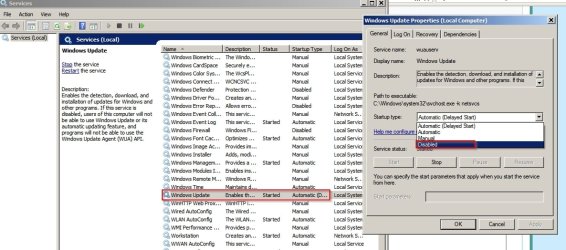
What startup tab?

Start> Run

then type

services.msc

Press Enter

Right click Windows Update service and set to disabled. Reboot.

Note: It's not supposed to be permanently disabled. It's okay to disable it for test purposes.

Services.jpg
 

My Computer My Computer

At a glance

Microsoft Windows 7 Home Premium 64-bit 7601 ...AMD C-60 APU with Radeon(tm) HD Graphics4.00 GBAMD Radeon HD 6290 Graphics
Computer type
Laptop
Computer Manufacturer/Model Number
ASUS
OS
Microsoft Windows 7 Home Premium 64-bit 7601 Multiprocessor Free Service Pack 1
CPU
AMD C-60 APU with Radeon(tm) HD Graphics
Motherboard
ASUSTeK COMPUTER INC. X501U
Memory
4.00 GB
Graphics Card(s)
AMD Radeon HD 6290 Graphics
Sound Card
(1) AMD High Definition Audio Device (2) Realtek High Defi
Screen Resolution
1366 x 768 x 32 bits (4294967296 colors) @ 60 Hz
Hard Drives
Hitachi HTS545050A7E380 SATA Disk Device
Antivirus
Comodo CIS & FW, SecureAplus App Whitelisting, Threatfire
Browser
Cyberfox 64bit, Opera 64bit, Airfox
Other Info
Spy-The-Spy, HitmanPro.Alert, Norton Connect Safe, MJRegWatcher, BitDefender TrafficLight, Voodoo Shield, Zemana AntiMalware
Edit: Turned off Windows update and there is no intensive CPU usage from trusted installer. Should I turn windows update back on? If it happens again, have I got a problem with Windows Update?

Well re-enable Windows Update and start the service or reboot. (it's not clear to me how you disabled it) - setting service type to disabled is the best way. Then run a manual check for updates and watch CPU/ RAM usage.

If the same problem occurs - I'd say that you have a problem with Windows Updates.
 

My Computer My Computer

At a glance

Microsoft Windows 7 Home Premium 64-bit 7601 ...AMD C-60 APU with Radeon(tm) HD Graphics4.00 GBAMD Radeon HD 6290 Graphics
Computer type
Laptop
Computer Manufacturer/Model Number
ASUS
OS
Microsoft Windows 7 Home Premium 64-bit 7601 Multiprocessor Free Service Pack 1
CPU
AMD C-60 APU with Radeon(tm) HD Graphics
Motherboard
ASUSTeK COMPUTER INC. X501U
Memory
4.00 GB
Graphics Card(s)
AMD Radeon HD 6290 Graphics
Sound Card
(1) AMD High Definition Audio Device (2) Realtek High Defi
Screen Resolution
1366 x 768 x 32 bits (4294967296 colors) @ 60 Hz
Hard Drives
Hitachi HTS545050A7E380 SATA Disk Device
Antivirus
Comodo CIS & FW, SecureAplus App Whitelisting, Threatfire
Browser
Cyberfox 64bit, Opera 64bit, Airfox
Other Info
Spy-The-Spy, HitmanPro.Alert, Norton Connect Safe, MJRegWatcher, BitDefender TrafficLight, Voodoo Shield, Zemana AntiMalware
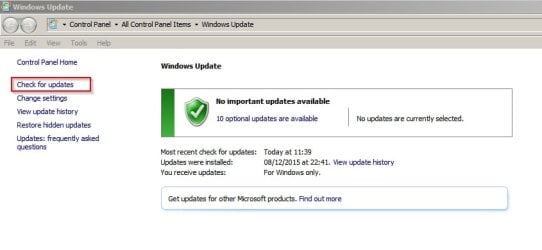
Manual Windows Update check:

Start> All Programs> Windows Update

Windows Update Check.jpg

Configure settings like this and review updates before downloading and installing them:

Change settings.jpg
 

My Computer My Computer

At a glance

Microsoft Windows 7 Home Premium 64-bit 7601 ...AMD C-60 APU with Radeon(tm) HD Graphics4.00 GBAMD Radeon HD 6290 Graphics
Computer type
Laptop
Computer Manufacturer/Model Number
ASUS
OS
Microsoft Windows 7 Home Premium 64-bit 7601 Multiprocessor Free Service Pack 1
CPU
AMD C-60 APU with Radeon(tm) HD Graphics
Motherboard
ASUSTeK COMPUTER INC. X501U
Memory
4.00 GB
Graphics Card(s)
AMD Radeon HD 6290 Graphics
Sound Card
(1) AMD High Definition Audio Device (2) Realtek High Defi
Screen Resolution
1366 x 768 x 32 bits (4294967296 colors) @ 60 Hz
Hard Drives
Hitachi HTS545050A7E380 SATA Disk Device
Antivirus
Comodo CIS & FW, SecureAplus App Whitelisting, Threatfire
Browser
Cyberfox 64bit, Opera 64bit, Airfox
Other Info
Spy-The-Spy, HitmanPro.Alert, Norton Connect Safe, MJRegWatcher, BitDefender TrafficLight, Voodoo Shield, Zemana AntiMalware
What startup tab?

Start> Run

then type

services.msc

Press Enter

Right click Windows Update service and set to disabled. Reboot.

Note: It's not supposed to be permanently disabled. It's okay to disable it for test purposes.

Hi, thanks for clarifying here.

What I done was went to msconfig and tried turning off windows updates that way. Rebooted the laptop. Just now, I have clicked on the prompt that came up, about windows updates being turned off (that white flag thing in the notification bar) and un-trusted whatever-it-is started eating CPU again. Manually killed it from task manager and everything is ok now.

Next time, if it does it again, I'll go into services.msc and see if disabling it that way helps - chances are there is an issue with windows update...
 

My Computer My Computer

At a glance

Windows 7 Professional, 64 bitIntel Core i7-4510U @ 2.00GHz16GB DDR3Intel HD 4400 (integrated)
Computer type
Laptop
Computer Manufacturer/Model Number
HP 15-ac153sa
OS
Windows 7 Professional, 64 bit
CPU
Intel Core i7-4510U @ 2.00GHz
Memory
16GB DDR3
Graphics Card(s)
Intel HD 4400 (integrated)
Monitor(s) Displays
Inbuilt 15.6 inch HD display
Screen Resolution
1366x768
Hard Drives
2TB HDD, partitioned as 1TB (Windows 7) and 1TB (Windows 10)
2TB external HDD (portable)
Cooling
1x built in laptop fan
Keyboard
HP Slimline Wired Keyboard
Mouse
HP Optical Wired Mouse
Internet Speed
Virgin Media 250Mbps
Antivirus
Microsoft Windows Defender
Browser
Chrome, Firefox
Other Info
Laptop is set up as dual boot with Windows 7 Professional and Windows 10 Home. Windows 7 preferred.

My Computer My Computer

At a glance

Microsoft Windows 7 Home Premium 64-bit 7601 ...AMD C-60 APU with Radeon(tm) HD Graphics4.00 GBAMD Radeon HD 6290 Graphics
Computer type
Laptop
Computer Manufacturer/Model Number
ASUS
OS
Microsoft Windows 7 Home Premium 64-bit 7601 Multiprocessor Free Service Pack 1
CPU
AMD C-60 APU with Radeon(tm) HD Graphics
Motherboard
ASUSTeK COMPUTER INC. X501U
Memory
4.00 GB
Graphics Card(s)
AMD Radeon HD 6290 Graphics
Sound Card
(1) AMD High Definition Audio Device (2) Realtek High Defi
Screen Resolution
1366 x 768 x 32 bits (4294967296 colors) @ 60 Hz
Hard Drives
Hitachi HTS545050A7E380 SATA Disk Device
Antivirus
Comodo CIS & FW, SecureAplus App Whitelisting, Threatfire
Browser
Cyberfox 64bit, Opera 64bit, Airfox
Other Info
Spy-The-Spy, HitmanPro.Alert, Norton Connect Safe, MJRegWatcher, BitDefender TrafficLight, Voodoo Shield, Zemana AntiMalware
If the problem persists it might be worth running Brink's script to reset Windows Updates. Option 3.1 in the tutorial here:

http://www.sevenforums.com/tutorials/91738-windows-update-reset.html

If that doesn't fix it then the fix could be tricky.

Hi,

Thanks for the information, I'll definitely have a look tomorrow if it does it again. Hopefully this will fix it.

Btw, when you say the fix could be "tricky", what do you mean - could it be as bad as having to back up everything, and reinstall Windows? As I don't have any windows discs whatsoever.

If it came down to a Windows re-install then I'd probably retire the laptop and pay my university computer shop to dual boot my new HP with windows 7 and 10 (I made a thread about this on the Ten Forums) - or just put up with the intermittent issue of having to force close Trustedinstaller ever few seconds....

Also, out of interest, is there a program that is like the Windows Task Manager, that can sense a certain task appearing and killing the task automatically on sight?
 

My Computer My Computer

At a glance

Windows 7 Professional, 64 bitIntel Core i7-4510U @ 2.00GHz16GB DDR3Intel HD 4400 (integrated)
Computer type
Laptop
Computer Manufacturer/Model Number
HP 15-ac153sa
OS
Windows 7 Professional, 64 bit
CPU
Intel Core i7-4510U @ 2.00GHz
Memory
16GB DDR3
Graphics Card(s)
Intel HD 4400 (integrated)
Monitor(s) Displays
Inbuilt 15.6 inch HD display
Screen Resolution
1366x768
Hard Drives
2TB HDD, partitioned as 1TB (Windows 7) and 1TB (Windows 10)
2TB external HDD (portable)
Cooling
1x built in laptop fan
Keyboard
HP Slimline Wired Keyboard
Mouse
HP Optical Wired Mouse
Internet Speed
Virgin Media 250Mbps
Antivirus
Microsoft Windows Defender
Browser
Chrome, Firefox
Other Info
Laptop is set up as dual boot with Windows 7 Professional and Windows 10 Home. Windows 7 preferred.
Edit: Turned off Windows update and there is no intensive CPU usage from trusted installer. Should I turn windows update back on? If it happens again, have I got a problem with Windows Update?

Well re-enable Windows Update and start the service or reboot. (it's not clear to me how you disabled it) - setting service type to disabled is the best way. Then run a manual check for updates and watch CPU/ RAM usage.

If the same problem occurs - I'd say that you have a problem with Windows Updates.
Hi,

After having yet another CPU issue with that wacky program, I followed your advice by going into services.msc and disabling Windows Update on automatic start. Trustedinstaller has now stopped its crazy CPU thing again.

If I restart the laptop and then turn it back on via the method you suggested, and not automatically download/install updates, then that should fix it?

edit: Oh dear, I spoke too soon... :mad:
 

My Computer My Computer

At a glance

Windows 7 Professional, 64 bitIntel Core i7-4510U @ 2.00GHz16GB DDR3Intel HD 4400 (integrated)
Computer type
Laptop
Computer Manufacturer/Model Number
HP 15-ac153sa
OS
Windows 7 Professional, 64 bit
CPU
Intel Core i7-4510U @ 2.00GHz
Memory
16GB DDR3
Graphics Card(s)
Intel HD 4400 (integrated)
Monitor(s) Displays
Inbuilt 15.6 inch HD display
Screen Resolution
1366x768
Hard Drives
2TB HDD, partitioned as 1TB (Windows 7) and 1TB (Windows 10)
2TB external HDD (portable)
Cooling
1x built in laptop fan
Keyboard
HP Slimline Wired Keyboard
Mouse
HP Optical Wired Mouse
Internet Speed
Virgin Media 250Mbps
Antivirus
Microsoft Windows Defender
Browser
Chrome, Firefox
Other Info
Laptop is set up as dual boot with Windows 7 Professional and Windows 10 Home. Windows 7 preferred.
Manual Windows Update check:

Start> All Programs> Windows Update


Configure settings like this and review updates before downloading and installing them:


Okay, I've done that. However that crazy thing still wants up to 25% of my CPU even when I haven't started the service. Grrr. It's also sending my core temps high. Looks like option 3.1 may be the way to go.
 

My Computer My Computer

At a glance

Windows 7 Professional, 64 bitIntel Core i7-4510U @ 2.00GHz16GB DDR3Intel HD 4400 (integrated)
Computer type
Laptop
Computer Manufacturer/Model Number
HP 15-ac153sa
OS
Windows 7 Professional, 64 bit
CPU
Intel Core i7-4510U @ 2.00GHz
Memory
16GB DDR3
Graphics Card(s)
Intel HD 4400 (integrated)
Monitor(s) Displays
Inbuilt 15.6 inch HD display
Screen Resolution
1366x768
Hard Drives
2TB HDD, partitioned as 1TB (Windows 7) and 1TB (Windows 10)
2TB external HDD (portable)
Cooling
1x built in laptop fan
Keyboard
HP Slimline Wired Keyboard
Mouse
HP Optical Wired Mouse
Internet Speed
Virgin Media 250Mbps
Antivirus
Microsoft Windows Defender
Browser
Chrome, Firefox
Other Info
Laptop is set up as dual boot with Windows 7 Professional and Windows 10 Home. Windows 7 preferred.
Btw, when you say the fix could be "tricky", what do you mean - could it be as bad as having to back up everything, and reinstall Windows? As I don't have any windows discs whatsoever.

I meant that if the problem was with Windows Updates then it can be hard to fix but mot impossible.

Also, out of interest, is there a program that is like the Windows Task Manager, that can sense a certain task appearing and killing the task automatically on sight?

Yes there are programs that can kill a process if found running but that's not a fix. In any case trustedinstaller.exe does need to run as part of Windows Updates.

Is there any chance of posting a screenshot of task manager when the problem happens with processes sorted by memory usage - highest at the top?

[EDIT]

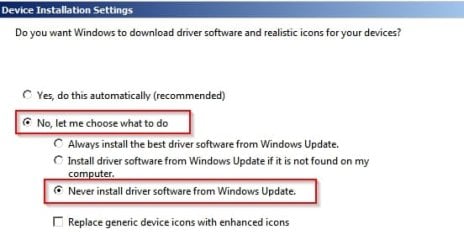
It might also be worth trying to disable windows update drivers search.

Start> Right click Computer

Choose "Properties"

On the left side choose "Advanced System Settings"

On the Hardware tab choose "Device Installation Settings"

Set it like this:

Device Installation Settings.jpg
 
Last edited:

My Computer My Computer

At a glance

Microsoft Windows 7 Home Premium 64-bit 7601 ...AMD C-60 APU with Radeon(tm) HD Graphics4.00 GBAMD Radeon HD 6290 Graphics
Computer type
Laptop
Computer Manufacturer/Model Number
ASUS
OS
Microsoft Windows 7 Home Premium 64-bit 7601 Multiprocessor Free Service Pack 1
CPU
AMD C-60 APU with Radeon(tm) HD Graphics
Motherboard
ASUSTeK COMPUTER INC. X501U
Memory
4.00 GB
Graphics Card(s)
AMD Radeon HD 6290 Graphics
Sound Card
(1) AMD High Definition Audio Device (2) Realtek High Defi
Screen Resolution
1366 x 768 x 32 bits (4294967296 colors) @ 60 Hz
Hard Drives
Hitachi HTS545050A7E380 SATA Disk Device
Antivirus
Comodo CIS & FW, SecureAplus App Whitelisting, Threatfire
Browser
Cyberfox 64bit, Opera 64bit, Airfox
Other Info
Spy-The-Spy, HitmanPro.Alert, Norton Connect Safe, MJRegWatcher, BitDefender TrafficLight, Voodoo Shield, Zemana AntiMalware
Hi,

Updating this thread as I still haven't managed to completely cure the issue.

TrustedInstaller no longer gobbles up my CPU usage; however, a process called "svchost.exe" does the same thing as what TrustedInstaller used to do; i.e. gobble up 25% of my CPU power whilst doing nothing to my computer.

Disabling the Windows Update process fixes it, which I have to do every day as Windows Update gets stuck on "checking for updates"; it doesn't actually do anything.

Also, this is now happening on both my Windows 7 PCs, not just the one that it used to affect...
 

My Computer My Computer

At a glance

Windows 7 Professional, 64 bitIntel Core i7-4510U @ 2.00GHz16GB DDR3Intel HD 4400 (integrated)
Computer type
Laptop
Computer Manufacturer/Model Number
HP 15-ac153sa
OS
Windows 7 Professional, 64 bit
CPU
Intel Core i7-4510U @ 2.00GHz
Memory
16GB DDR3
Graphics Card(s)
Intel HD 4400 (integrated)
Monitor(s) Displays
Inbuilt 15.6 inch HD display
Screen Resolution
1366x768
Hard Drives
2TB HDD, partitioned as 1TB (Windows 7) and 1TB (Windows 10)
2TB external HDD (portable)
Cooling
1x built in laptop fan
Keyboard
HP Slimline Wired Keyboard
Mouse
HP Optical Wired Mouse
Internet Speed
Virgin Media 250Mbps
Antivirus
Microsoft Windows Defender
Browser
Chrome, Firefox
Other Info
Laptop is set up as dual boot with Windows 7 Professional and Windows 10 Home. Windows 7 preferred.
Join the club, there's a lot of threads about Windows Updates issues posted on SF and elsewhere.
If you want, disable Windows Update service and see if that helps.
Or, let it run and do it's thing, just be patient and wait.

If you use MS Sysinternals Process Explorer and hover over a process, it shows the services - see screen print.
I'm sure you could also find this info in Task Manager / Resource Monitor.

WU_Svc.png
 

My Computer My Computer

At a glance

Multi-Boot W7_Pro_x64 W8.1_Pro_x64 W10_Pro_x6...AMD Athlon II x4 6206GB GSkill DDR2 800AMD 4670 GPU + AMD 4200 IGP
Computer type
PC/Desktop
Computer Manufacturer/Model Number
home built
OS
Multi-Boot W7_Pro_x64 W8.1_Pro_x64 W10_Pro_x64 +Linux_VMs +Chromium_VM
CPU
AMD Athlon II x4 620
Motherboard
Gigabyte GA-MA785G-UD3H
Memory
6GB GSkill DDR2 800
Graphics Card(s)
AMD 4670 GPU + AMD 4200 IGP
Sound Card
on board Realtek ALC889A
Monitor(s) Displays
RCA 40" LCD TV, Insignia 32" LCD TV, HP 15" LCD monitor
Screen Resolution
1680 x 1050
Hard Drives
OCZ Vertex 3 120GB,
Samsung F3 1TB (3),
Several others - WD, Seagate, Hitachi, ...
PSU
Corsair 500 W
Case
Rosewill mid tower
Cooling
CM 90mm rifle
Keyboard
Gyration wireless, Logitech wireless, Dell USB wired
Mouse
Gyration wireless, Logitech wireless, V7 USB wired
Internet Speed
Spectrum - 100Mbps D / 10Mbps U
Antivirus
Avast, MBAM3, EMET, WinPatrol
Browser
Pale Moon, Firefox, IE
Other Info
2 multi-boot PC's
Mainly HTPC/Office/Gen purpose (no gaming).
Trendnet USB KVM.
LG DVD burner/Blue Ray Player.
Tray system for removable SATA backup drives.

Not currently OCd, under-volted.
I use Hybrid sleep, rarely re-boot or shutdown.

Hauppauge HD-PVR, Avermedia PCIe TV Tuner, Hauppauge PCI TV Tuner.
Also if you are missing this update download and install it. Stop Windows Update Service before installing.

http://www.sevenforums.com/news/397...june-14th-2016-a-post3257844.html#post3257844

Get the update - Security Update for Windows 7 for x64-based Systems (KB3161664)

from the following link using Internet Explorer:

https://catalog.update.microsoft.com/v7/site/Search.aspx?q=KB3161664

Save the download to your desktop.

Then Start> Run

type services.msc

Scroll down to windows update service and stop it.

Install the update by double clicking the file you downloaded. Once installed - reboot and wait a few minutes before running an windows update check.

See if that works any better.

If not:

Open an Elevated Command Prompt. When the prompt appears type Powershell then press Enter

Wait for the PS prompt to appear then copy and paste the following. In order to copy and paste you need to enable Quick Edit Mode. If you can't copy and paste you'll just have to type exactly what is shown in the box below.

Code:
get-hotfix -id KB2990214,KB305026,KB3065987,KB3075851,KB3083324,KB3083710,KB3102810,KB3112343,KB3135445,KB3138612

That should return a list of installed and previously installed Windows Update Clients. It might take a minute or two before results are displayed. Post a screenshot of the results.
 

My Computer My Computer

At a glance

Microsoft Windows 7 Home Premium 64-bit 7601 ...AMD C-60 APU with Radeon(tm) HD Graphics4.00 GBAMD Radeon HD 6290 Graphics
Computer type
Laptop
Computer Manufacturer/Model Number
ASUS
OS
Microsoft Windows 7 Home Premium 64-bit 7601 Multiprocessor Free Service Pack 1
CPU
AMD C-60 APU with Radeon(tm) HD Graphics
Motherboard
ASUSTeK COMPUTER INC. X501U
Memory
4.00 GB
Graphics Card(s)
AMD Radeon HD 6290 Graphics
Sound Card
(1) AMD High Definition Audio Device (2) Realtek High Defi
Screen Resolution
1366 x 768 x 32 bits (4294967296 colors) @ 60 Hz
Hard Drives
Hitachi HTS545050A7E380 SATA Disk Device
Antivirus
Comodo CIS & FW, SecureAplus App Whitelisting, Threatfire
Browser
Cyberfox 64bit, Opera 64bit, Airfox
Other Info
Spy-The-Spy, HitmanPro.Alert, Norton Connect Safe, MJRegWatcher, BitDefender TrafficLight, Voodoo Shield, Zemana AntiMalware
Hi,

Updating this thread as I still haven't managed to completely cure the issue.

TrustedInstaller no longer gobbles up my CPU usage; however, a process called "svchost.exe" does the same thing as what TrustedInstaller used to do; i.e. gobble up 25% of my CPU power whilst doing nothing to my computer.

Disabling the Windows Update process fixes it, which I have to do every day as Windows Update gets stuck on "checking for updates"; it doesn't actually do anything.

Also, this is now happening on both my Windows 7 PCs, not just the one that it used to affect...

Hi yep trusted installer will do that after installing updates

svchost well that one happens if the windows update search hangs
The post Callender points to should help,
This is a newer update client for June brds posted about yesterday that also might help
But yes you need to switch to Never check for updates and restart the machine before installing it
https://support.microsoft.com/en-us/kb/3161647
Main download page,
https://support.microsoft.com/en-us/kb/3161608

Win-7 32bit
https://www.microsoft.com/en-us/download/details.aspx?id=52976
Win-7 64bit
https://www.microsoft.com/en-us/download/details.aspx?id=52974
 

My Computer My Computer

At a glance

Win-7-Pro64bit 7-H-Prem-64biti7-5930K 2nd i9-9940x both water blocked VRM'...Trident-z 3200C14 2nd Trident-z 3600C16EVGA 1080ti ftw3 2nd Titan Xp both water blocked
Computer type
PC/Desktop
Computer Manufacturer/Model Number
Custom assembled by me :}
OS
Win-7-Pro64bit 7-H-Prem-64bit
CPU
i7-5930K 2nd i9-9940x both water blocked VRM's too
Motherboard
ASUS SABERTOOTH X99 2nd ASUS x299 Apex
Memory
Trident-z 3200C14 2nd Trident-z 3600C16
Graphics Card(s)
EVGA 1080ti ftw3 2nd Titan Xp both water blocked
Sound Card
Built-in Realtek
Monitor(s) Displays
1-AOC G2460PG 24"G-Sync 144Hz/ 2nd 1-ASUS VG248QE 24" 144Hz
Screen Resolution
1920 x 1080 144Hz
Hard Drives
2-Samsung M.2 Evo & Evo Plus
2-Samsung 850 EVO 500GB SSD's/ 3-2.5 W.D. Black 1tb-&3-1tb/3-3.5 WD Black 1tb hdd's
PSU
EVGA SuperNOVA 1000-P2 2nd 1200-P2
Case
2-Corsair Obsidian Series 450D Black ATX Mid Tower
Cooling
Custom water loops
Keyboard
Logitech G710+/ 2nd Logitech G910
Mouse
2-RedDragon M901 Perdition 16400 dpi Gaming mouse = wired
Internet Speed
Comcast Ping 19ms 89.31mbps download speed 6.12mbps upload
Antivirus
Malwarebytes Pro/ Superantispyware Pro
Browser
FireFox & Pale moon
Other Info
2nd ASUS X299 Apex/Intel i9-9940x with Custom water loop/7H-Prem-x64/Corsair 450D case/Ram Trident-z 3600C16 4x8gb / Samsung970Evo plus 500gb SSD/Dual ssd EZ swap evo/PSU EVGA SuperNova 1200w-P2 80+Platinum/GPU Titan Xp /8-ML-140 on push-pull on 2-280GTX rads

My Computer My Computer

At a glance

Windows 7 Professional, 64 bitIntel Core i7-4510U @ 2.00GHz16GB DDR3Intel HD 4400 (integrated)
Computer type
Laptop
Computer Manufacturer/Model Number
HP 15-ac153sa
OS
Windows 7 Professional, 64 bit
CPU
Intel Core i7-4510U @ 2.00GHz
Memory
16GB DDR3
Graphics Card(s)
Intel HD 4400 (integrated)
Monitor(s) Displays
Inbuilt 15.6 inch HD display
Screen Resolution
1366x768
Hard Drives
2TB HDD, partitioned as 1TB (Windows 7) and 1TB (Windows 10)
2TB external HDD (portable)
Cooling
1x built in laptop fan
Keyboard
HP Slimline Wired Keyboard
Mouse
HP Optical Wired Mouse
Internet Speed
Virgin Media 250Mbps
Antivirus
Microsoft Windows Defender
Browser
Chrome, Firefox
Other Info
Laptop is set up as dual boot with Windows 7 Professional and Windows 10 Home. Windows 7 preferred.
Hi,
Well that has been known since July if you had returned earlier :p
 

My Computer My Computer

At a glance

Win-7-Pro64bit 7-H-Prem-64biti7-5930K 2nd i9-9940x both water blocked VRM'...Trident-z 3200C14 2nd Trident-z 3600C16EVGA 1080ti ftw3 2nd Titan Xp both water blocked
Computer type
PC/Desktop
Computer Manufacturer/Model Number
Custom assembled by me :}
OS
Win-7-Pro64bit 7-H-Prem-64bit
CPU
i7-5930K 2nd i9-9940x both water blocked VRM's too
Motherboard
ASUS SABERTOOTH X99 2nd ASUS x299 Apex
Memory
Trident-z 3200C14 2nd Trident-z 3600C16
Graphics Card(s)
EVGA 1080ti ftw3 2nd Titan Xp both water blocked
Sound Card
Built-in Realtek
Monitor(s) Displays
1-AOC G2460PG 24"G-Sync 144Hz/ 2nd 1-ASUS VG248QE 24" 144Hz
Screen Resolution
1920 x 1080 144Hz
Hard Drives
2-Samsung M.2 Evo & Evo Plus
2-Samsung 850 EVO 500GB SSD's/ 3-2.5 W.D. Black 1tb-&3-1tb/3-3.5 WD Black 1tb hdd's
PSU
EVGA SuperNOVA 1000-P2 2nd 1200-P2
Case
2-Corsair Obsidian Series 450D Black ATX Mid Tower
Cooling
Custom water loops
Keyboard
Logitech G710+/ 2nd Logitech G910
Mouse
2-RedDragon M901 Perdition 16400 dpi Gaming mouse = wired
Internet Speed
Comcast Ping 19ms 89.31mbps download speed 6.12mbps upload
Antivirus
Malwarebytes Pro/ Superantispyware Pro
Browser
FireFox & Pale moon
Other Info
2nd ASUS X299 Apex/Intel i9-9940x with Custom water loop/7H-Prem-x64/Corsair 450D case/Ram Trident-z 3600C16 4x8gb / Samsung970Evo plus 500gb SSD/Dual ssd EZ swap evo/PSU EVGA SuperNova 1200w-P2 80+Platinum/GPU Titan Xp /8-ML-140 on push-pull on 2-280GTX rads
Back
Top