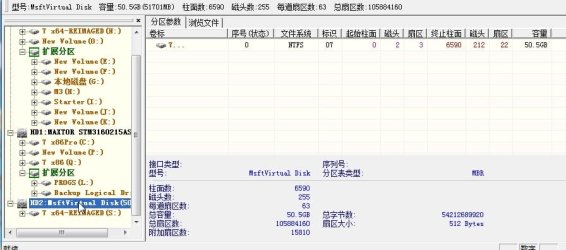
Trying to Re Image my computer with problems

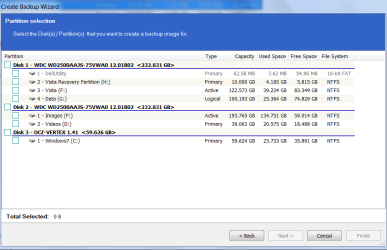
You mounted the image in Disk Mgmt to a lettered virtual partition? When I do this the mounted drives don't show in Paragon backup drives.

I don't know if this is the "fancy Paragon app" you're referring to which itself offers mounting, but I don't see it. Can you help me out?

Edit: OK the mounted drives just showed up in Paragon's P2V copy function so I added them to a MS Virtual Machine, correct? They are now available to image. Very cool.
 
In Disk Mgmt Action>Attach vhd - browse to it.

That's all.

How did you do it?
 

My Computers My Computers

  • At a glance

    7 X64i5 84002x8gb 3200mhz
    Computer type
    PC/Desktop
    OS
    7 X64
    CPU
    i5 8400
    Motherboard
    gigabyte b365m ds3h
    Memory
    2x8gb 3200mhz
    Hard Drives
    various
    PSU
    pure power 11 400w cm
    Case
    Coolermaster
    Cooling
    cryorig m9i
  • At a glance

    7x64g54008gb ddr4 2400
    Computer type
    PC/Desktop
    OS
    7x64
    CPU
    g5400
    Motherboard
    ga b365m ds3h
    Memory
    8gb ddr4 2400
    PSU
    xfx pro 450w
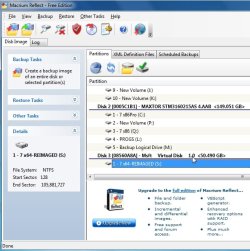
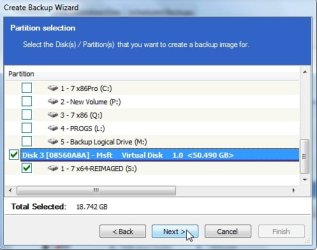
My VHD is "Q" - but in Macrium it does not show up.
 

Attachments

  • 2011-05-11_2302.png
    2011-05-11_2302.png
    49.1 KB · Views: 9
  • 2011-05-11_2301.png
    2011-05-11_2301.png
    23.3 KB · Views: 11

My Computer My Computer

At a glance

Vista, Windows7, Mint Mate, Zorin, Windows 8from 1.6GHz Duo to i7
Computer Manufacturer/Model Number
HP, Dell, Gateway, Toshiba - 4 laptops and 2 desktops
OS
Vista, Windows7, Mint Mate, Zorin, Windows 8
CPU
from 1.6GHz Duo to i7
Monitor(s) Displays
2x HP w2207
Hard Drives
5x HDD, 7x SSD, 12x Externals
Keyboard
with trackball - no mices
Mouse
Trackball mice
Internet Speed
DSL 6000
It is the free B&R11 - Just mount the vhd in disk mgmt as described above.

Open Paragon B&R11 - the mounted vhd will be right there - see Disk Map- you may need to grab the top edge of the disk map and drag it up - it will be the last drive listed.
 

My Computers My Computers

  • At a glance

    7 X64i5 84002x8gb 3200mhz
    Computer type
    PC/Desktop
    OS
    7 X64
    CPU
    i5 8400
    Motherboard
    gigabyte b365m ds3h
    Memory
    2x8gb 3200mhz
    Hard Drives
    various
    PSU
    pure power 11 400w cm
    Case
    Coolermaster
    Cooling
    cryorig m9i
  • At a glance

    7x64g54008gb ddr4 2400
    Computer type
    PC/Desktop
    OS
    7x64
    CPU
    g5400
    Motherboard
    ga b365m ds3h
    Memory
    8gb ddr4 2400
    PSU
    xfx pro 450w
I think you boys might need to reinstall something - windows itself perhaps. :devil:

MAC-VHD.jpg

MAC2-VHD.jpg
 

My Computers My Computers

  • At a glance

    7 X64i5 84002x8gb 3200mhz
    Computer type
    PC/Desktop
    OS
    7 X64
    CPU
    i5 8400
    Motherboard
    gigabyte b365m ds3h
    Memory
    2x8gb 3200mhz
    Hard Drives
    various
    PSU
    pure power 11 400w cm
    Case
    Coolermaster
    Cooling
    cryorig m9i
  • At a glance

    7x64g54008gb ddr4 2400
    Computer type
    PC/Desktop
    OS
    7x64
    CPU
    g5400
    Motherboard
    ga b365m ds3h
    Memory
    8gb ddr4 2400
    PSU
    xfx pro 450w
Edit: OK the mounted drives just showed up in Paragon's P2V copy function so I added them to a MS Virtual Machine, correct? They are now available to image. Very cool.

That will work - but you shouldn't need to do it.

Mounted vhd should show like any other drive.

I don't have a vm.

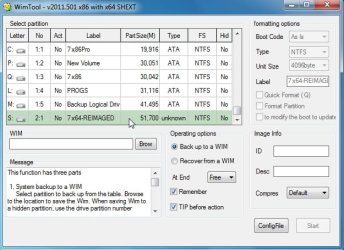
All my apps. see it , here's another couple

wimtool-vhd.jpg

p-vhd.jpg
 

My Computers My Computers

  • At a glance

    7 X64i5 84002x8gb 3200mhz
    Computer type
    PC/Desktop
    OS
    7 X64
    CPU
    i5 8400
    Motherboard
    gigabyte b365m ds3h
    Memory
    2x8gb 3200mhz
    Hard Drives
    various
    PSU
    pure power 11 400w cm
    Case
    Coolermaster
    Cooling
    cryorig m9i
  • At a glance

    7x64g54008gb ddr4 2400
    Computer type
    PC/Desktop
    OS
    7x64
    CPU
    g5400
    Motherboard
    ga b365m ds3h
    Memory
    8gb ddr4 2400
    PSU
    xfx pro 450w
Greg,

If you can't see the iscsi disk in other apps, there is a fair chance it is being obscured by something else - one reason I avoid Acronis is the snapman has a habit of doing that kind of thing.
 

My Computers My Computers

  • At a glance

    7 X64i5 84002x8gb 3200mhz
    Computer type
    PC/Desktop
    OS
    7 X64
    CPU
    i5 8400
    Motherboard
    gigabyte b365m ds3h
    Memory
    2x8gb 3200mhz
    Hard Drives
    various
    PSU
    pure power 11 400w cm
    Case
    Coolermaster
    Cooling
    cryorig m9i
  • At a glance

    7x64g54008gb ddr4 2400
    Computer type
    PC/Desktop
    OS
    7x64
    CPU
    g5400
    Motherboard
    ga b365m ds3h
    Memory
    8gb ddr4 2400
    PSU
    xfx pro 450w

My Computer My Computer

At a glance

Windows 7x64 Home Premium SP1Intel i7 2600kG.Skill Ripjaws (DDR3-1600) 2x4GBNvidia GeForce GTS 450; Intel HD Graphics 300...
Computer type
PC/Desktop
Computer Manufacturer/Model Number
Own build
OS
Windows 7x64 Home Premium SP1
CPU
Intel i7 2600k
Motherboard
ASUS P8Z68 Deluxe
Memory
G.Skill Ripjaws (DDR3-1600) 2x4GB
Graphics Card(s)
Nvidia GeForce GTS 450; Intel HD Graphics 3000(GT2+)
Monitor(s) Displays
Dell Ultrasharp IPS panel U2311H, Samsung SyncMaster P2350
Screen Resolution
1920x1080
Hard Drives
Samsung 850 Pro SSD 256GB, Samsung SSD 840 120GB, Seagates 1TB Barracuda ST31000528AS x2
PSU
Seasonic M12II 520W
Case
Lian Li Lancool PC-K60
Cooling
Case: 1x120mm, 3x140mm CPU: Hyper 212+
Keyboard
Logitech MK520 (wireless)
Mouse
Logitech MK520
Internet Speed
6-7 Mbps
Antivirus
Norton Security Premium, Malwarebytes on 2 (MSE on 3rd PC)
Browser
FireFox
Other Info
Audio: Logitech Z523 2.1
That's the thread I was recalling, Michael, when I first posted here..

See there, Si, my memory's not so bad after all. :p I remember most of what you teach me which is a lot. :geek:

Possibly another reason to uninstall Acronis when not needed for imaging, or use the boot disk only. It normally lasts only a few days before I toss it out again.

What could the prob with Macrium be?
 
I don't know why it isn't showing in whs macrium - something interfering, perhaps.
 

My Computers My Computers

  • At a glance

    7 X64i5 84002x8gb 3200mhz
    Computer type
    PC/Desktop
    OS
    7 X64
    CPU
    i5 8400
    Motherboard
    gigabyte b365m ds3h
    Memory
    2x8gb 3200mhz
    Hard Drives
    various
    PSU
    pure power 11 400w cm
    Case
    Coolermaster
    Cooling
    cryorig m9i
  • At a glance

    7x64g54008gb ddr4 2400
    Computer type
    PC/Desktop
    OS
    7x64
    CPU
    g5400
    Motherboard
    ga b365m ds3h
    Memory
    8gb ddr4 2400
    PSU
    xfx pro 450w

My Computer My Computer

At a glance

Vista, Windows7, Mint Mate, Zorin, Windows 8from 1.6GHz Duo to i7
Computer Manufacturer/Model Number
HP, Dell, Gateway, Toshiba - 4 laptops and 2 desktops
OS
Vista, Windows7, Mint Mate, Zorin, Windows 8
CPU
from 1.6GHz Duo to i7
Monitor(s) Displays
2x HP w2207
Hard Drives
5x HDD, 7x SSD, 12x Externals
Keyboard
with trackball - no mices
Mouse
Trackball mice
Internet Speed
DSL 6000
There you go whs.

Greg
See there, Si, my memory's not so bad after all

Yep not too bad - thought you meant This or several earlier similar posts
 

My Computers My Computers

  • At a glance

    7 X64i5 84002x8gb 3200mhz
    Computer type
    PC/Desktop
    OS
    7 X64
    CPU
    i5 8400
    Motherboard
    gigabyte b365m ds3h
    Memory
    2x8gb 3200mhz
    Hard Drives
    various
    PSU
    pure power 11 400w cm
    Case
    Coolermaster
    Cooling
    cryorig m9i
  • At a glance

    7x64g54008gb ddr4 2400
    Computer type
    PC/Desktop
    OS
    7x64
    CPU
    g5400
    Motherboard
    ga b365m ds3h
    Memory
    8gb ddr4 2400
    PSU
    xfx pro 450w
  • Like
Reactions: whs

My Computer My Computer

At a glance

Vista, Windows7, Mint Mate, Zorin, Windows 8from 1.6GHz Duo to i7
Computer Manufacturer/Model Number
HP, Dell, Gateway, Toshiba - 4 laptops and 2 desktops
OS
Vista, Windows7, Mint Mate, Zorin, Windows 8
CPU
from 1.6GHz Duo to i7
Monitor(s) Displays
2x HP w2207
Hard Drives
5x HDD, 7x SSD, 12x Externals
Keyboard
with trackball - no mices
Mouse
Trackball mice
Internet Speed
DSL 6000
when i made the backup of the VHD using that WD version of what ever, i looked at its file size, the VHD was the normal 289GB and then the WD version of the program was only 209GB so i thought, What ever i will try it and restore using that program

so i mounted the newly made backup from into the WD program and set it to recover it onto my main C:

after some prepairing it re started then when it loaded up it finished the re imaging.


but when the computer tried to restart it wouldnt work which is what i was expecting to happen, dont know why the file size is smaller even though i asked it to do a full system image.

also since my old setup doesnt have RAID and my new one does. if i do manage to restore the backup would the OS bug out due to no raid drivers or what?
 

My Computer My Computer

At a glance

windows 7 64 bit home premiumphenom II x4 3.46gb5870 1gb
OS
windows 7 64 bit home premium
CPU
phenom II x4 3.4
Memory
6gb
Graphics Card(s)
5870 1gb
Monitor(s) Displays
26'
You would need the appropriate raid drivers in the o/s you restored.

Otherwise it is unlikely to boot up.
 

My Computers My Computers

  • At a glance

    7 X64i5 84002x8gb 3200mhz
    Computer type
    PC/Desktop
    OS
    7 X64
    CPU
    i5 8400
    Motherboard
    gigabyte b365m ds3h
    Memory
    2x8gb 3200mhz
    Hard Drives
    various
    PSU
    pure power 11 400w cm
    Case
    Coolermaster
    Cooling
    cryorig m9i
  • At a glance

    7x64g54008gb ddr4 2400
    Computer type
    PC/Desktop
    OS
    7x64
    CPU
    g5400
    Motherboard
    ga b365m ds3h
    Memory
    8gb ddr4 2400
    PSU
    xfx pro 450w
You would need the appropriate raid drivers in the o/s you restored.

Otherwise it is unlikely to boot up.

so to do that do i mount the VHD drive then where do i put the RAID drivers?
 

My Computer My Computer

At a glance

windows 7 64 bit home premiumphenom II x4 3.46gb5870 1gb
OS
windows 7 64 bit home premium
CPU
phenom II x4 3.4
Memory
6gb
Graphics Card(s)
5870 1gb
Monitor(s) Displays
26'
Was the originally created image from a RAID0 configured Win7 install?

If not you need to break the RAID and install to a single HD.

If so your RAID drivers should be in the image.

There is no real performance advantage to having RAID0 array, it is not redundant and you lose everything if you lose one HD. Best to use a second HD for image and file backup.
 
Was the originally created image from a RAID0 configured Win7 install?

If not you need to break the RAID and install to a single HD.

If so your RAID drivers should be in the image.

There is no real performance advantage to having RAID0 array, it is not redundant and you lose everything if you lose one HD. Best to use a second HD for image and file backup.


Hey the original did not have raid it was just a single drive,

i know i can loose all the data is one fails but im fine with that, its a high end gaming PC so i want as small load times as possible.

do you know if there is a way to get around it? like when i installed that 209gb backup the computer worked until the Windows 7 loading screen come up then it blue screens, so im just guessing that is because of no raid drivers maby.

any way to install them???? and if so where would i put the install files
 

My Computer My Computer

At a glance

windows 7 64 bit home premiumphenom II x4 3.46gb5870 1gb
OS
windows 7 64 bit home premium
CPU
phenom II x4 3.4
Memory
6gb
Graphics Card(s)
5870 1gb
Monitor(s) Displays
26'
so if i was to remove my raid 0 then install the backup onto one of the drives, then once fully installed and loaded i then install the RAID drivers then i run another Disk backup and then reformat with the newly created backup with RAID 0, would that work??
 

My Computer My Computer

At a glance

windows 7 64 bit home premiumphenom II x4 3.46gb5870 1gb
OS
windows 7 64 bit home premium
CPU
phenom II x4 3.4
Memory
6gb
Graphics Card(s)
5870 1gb
Monitor(s) Displays
26'
Yes, it should work that way - a bit long winded.
 

My Computers My Computers

  • At a glance

    7 X64i5 84002x8gb 3200mhz
    Computer type
    PC/Desktop
    OS
    7 X64
    CPU
    i5 8400
    Motherboard
    gigabyte b365m ds3h
    Memory
    2x8gb 3200mhz
    Hard Drives
    various
    PSU
    pure power 11 400w cm
    Case
    Coolermaster
    Cooling
    cryorig m9i
  • At a glance

    7x64g54008gb ddr4 2400
    Computer type
    PC/Desktop
    OS
    7x64
    CPU
    g5400
    Motherboard
    ga b365m ds3h
    Memory
    8gb ddr4 2400
    PSU
    xfx pro 450w
Back
Top