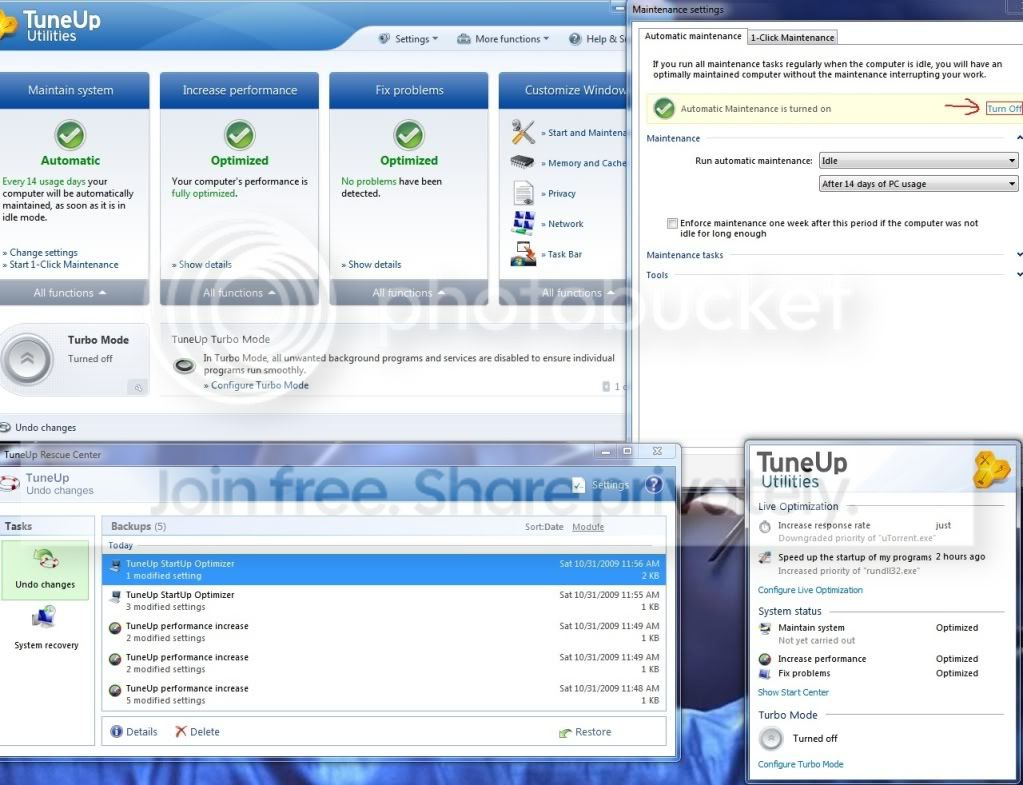
TuneUp Utilities 2010 Available.

Dark Nova Gamer

Resident OS X Expert
Guru
Local time
10:21 PM
Messages
3,639
Location
Pembroke

My Computer

Computer Manufacturer/Model Number
Custom | Whitebox
OS
Windows 7 Ultimate, OS X 10.7, Ubuntu 11.04
CPU
Intel E6750 @ 3.80GHz
Motherboard
Gigabyte GA-EP45-UD3L (Revision 1.1)
Memory
2x2GB & 2x1GB (6GB) OCZ Reaper 1066MHz @ 1080MHz
Graphics Card(s)
EVGA nVidia GTX 260 896mb (216 Core) FTW Edition
Sound Card
Realtek ALC888
Monitor(s) Displays
21" VIZIO TV
Screen Resolution
1680x1050 @ 60Hz
Hard Drives
Western Digital WD6401AALS - 640GB
Hitachi HDP725016GLA380 - 160GB
PSU
Corsair 750W
Case
NZXT Nemesis Elite
Cooling
Thermaltake SpinQ
Keyboard
Logitech Wireless S520
Mouse
Logitech Wireless S520 - Microsoft Wireless Arc Mouse
Internet Speed
Download: 20mbps, Upload: 3mbps
Was playing around with it. Pretty nice complement to Yamicsoft W7 Manager, imo.
 

My Computer

Computer Manufacturer/Model Number
HP DV8t quad
OS
Windows 7 Ultimate x64 (Retail)
CPU
i7-Q 720
Motherboard
Motherboard Chipset Intel Ibex Peak-M PM55, Intel Lynnfield
Memory
6 GB
Graphics Card(s)
nVidia GeForce GT 230M (1GB)
Sound Card
IDT High Definition Audio CODEC
Monitor(s) Displays
18.4 inch HP Infinity FHD (Samsung 184HT03-001)
Screen Resolution
1920 x 1080
Hard Drives
Hitachi 500GB 7200 rpm (x2)
Seagate FreeAgent 1.5 TB External USB (x2)
Thermaltake BlacX eSATA/USB 2.0 3.5/2.5 HD dock
Cooling
Zalman NC-2000 notebook cooling pad
Keyboard
laptop
Mouse
Logitech VX Revolution
Other Info
Backup Unit: Lenovo T61p
Was playing around with it. Pretty nice complement to Yamicsoft W7 Manager, imo.

Never used any of these things. :p I just report things as I see them. ;)
 

My Computer

Computer Manufacturer/Model Number
Custom | Whitebox
OS
Windows 7 Ultimate, OS X 10.7, Ubuntu 11.04
CPU
Intel E6750 @ 3.80GHz
Motherboard
Gigabyte GA-EP45-UD3L (Revision 1.1)
Memory
2x2GB & 2x1GB (6GB) OCZ Reaper 1066MHz @ 1080MHz
Graphics Card(s)
EVGA nVidia GTX 260 896mb (216 Core) FTW Edition
Sound Card
Realtek ALC888
Monitor(s) Displays
21" VIZIO TV
Screen Resolution
1680x1050 @ 60Hz
Hard Drives
Western Digital WD6401AALS - 640GB
Hitachi HDP725016GLA380 - 160GB
PSU
Corsair 750W
Case
NZXT Nemesis Elite
Cooling
Thermaltake SpinQ
Keyboard
Logitech Wireless S520
Mouse
Logitech Wireless S520 - Microsoft Wireless Arc Mouse
Internet Speed
Download: 20mbps, Upload: 3mbps
is this good software?
 

My Computer

Computer type
PC/Desktop
Computer Manufacturer/Model Number
Custom Build
OS
Windows 8.1 PRO
CPU
Intel Core i7 - 4770k
Motherboard
Asus Z87 - PRO LGA 1150
Memory
8 GB Corsair
Graphics Card(s)
EVGA GTX - 760 SC 4GB
Screen Resolution
1440x900
Hard Drives
Samsung PRO 128GB
PSU
Seasonic G - Series 650 Watts
Case
Cooler Master Storm Trooper
Cooling
Corsair H105
is this good software?

I couldn't say, I've never used it, nor intend to use it.

I'm sure someone will give their opinion on it though. :)
 

My Computer

Computer Manufacturer/Model Number
Custom | Whitebox
OS
Windows 7 Ultimate, OS X 10.7, Ubuntu 11.04
CPU
Intel E6750 @ 3.80GHz
Motherboard
Gigabyte GA-EP45-UD3L (Revision 1.1)
Memory
2x2GB & 2x1GB (6GB) OCZ Reaper 1066MHz @ 1080MHz
Graphics Card(s)
EVGA nVidia GTX 260 896mb (216 Core) FTW Edition
Sound Card
Realtek ALC888
Monitor(s) Displays
21" VIZIO TV
Screen Resolution
1680x1050 @ 60Hz
Hard Drives
Western Digital WD6401AALS - 640GB
Hitachi HDP725016GLA380 - 160GB
PSU
Corsair 750W
Case
NZXT Nemesis Elite
Cooling
Thermaltake SpinQ
Keyboard
Logitech Wireless S520
Mouse
Logitech Wireless S520 - Microsoft Wireless Arc Mouse
Internet Speed
Download: 20mbps, Upload: 3mbps

My Computer

Computer type
PC/Desktop
Computer Manufacturer/Model Number
Custom Build
OS
Windows 8.1 PRO
CPU
Intel Core i7 - 4770k
Motherboard
Asus Z87 - PRO LGA 1150
Memory
8 GB Corsair
Graphics Card(s)
EVGA GTX - 760 SC 4GB
Screen Resolution
1440x900
Hard Drives
Samsung PRO 128GB
PSU
Seasonic G - Series 650 Watts
Case
Cooler Master Storm Trooper
Cooling
Corsair H105
i used it a lot in the past in my long xp and brief vista days, and there were some handy features.

these days i just use windows 7 manager (as i was given a free copy by the author for bug and translation reports :)) - although i must say tune-up maybe does a bit more, and looks more polished.

downloading trial now - website doesn't seem to say anything about 7 compatability - let's see...
 

My Computer

Computer Manufacturer/Model Number
mickey megabyte 1234
OS
ultimate 64 sp1
CPU
i5 2500K [email protected]
Motherboard
MSI P67A-GD53
Memory
8 gigs GSkill Ripjaws 1600
Graphics Card(s)
amd hd6950
Sound Card
creative x-fi gamer
Monitor(s) Displays
samsung 24"
Screen Resolution
1920x1080
Hard Drives
ocz vertex 2e 60 gig, samsung f3 1tb, buffalo 2tb ext
PSU
antec 550
Case
antec three hundred
Cooling
i'm a cooling fan
Keyboard
saitek eclipse ii
Mouse
logitech g3
Internet Speed
about 4 Mbps
Other Info
i love win7
Is it just me or does it no longer support changing of visual styles without patched dlls? I can't seem to find the option in this new version :eek:
 

My Computer

Computer Manufacturer/Model Number
eMachines W3622
OS
Windows 7 Ultimate 86x
CPU
Intel Celeron
Motherboard
W3622
Memory
1.5 G DDR2
Screen Resolution
1024x768
Internet Speed
1.5 Meg
If you are refering to what is called "Tuneup Styler", it's located under the All Functions folder under the Tuneup Utilities folder from the All Programs. You can also get there from the Main Program by clicking the All Functions tab under Customize Windows on the right-hand side.
 

My Computer

OS
Windows 7 RTM
Anyone else having trouble ending the tuneup utilities process?
 

My Computer

Computer Manufacturer/Model Number
Started out as an AST180
OS
Windows 7 Ultimate x64 | Windows XP Pro x86 | Windows Vista Ultimate x86
CPU
AMD Athlon 64 X2 Dual Core 5200 2.7 GHz
Motherboard
Acer EM61SM/EM61PM
Memory
3G RAM
Graphics Card(s)
ATI HD Radeon 4670
Screen Resolution
1280x1024
Hard Drives
Western Digital Caviar Black WD1001FALS 1TB 7200 RPM 32MB Cache, 160 GB Seagate
PSU
Corsair 450VX 450W
Keyboard
Microsoft Media Pro 3000
Mouse
Logitech MX310
If you are refering to what is called "Tuneup Styler", it's located under the All Functions folder under the Tuneup Utilities folder from the All Programs. You can also get there from the Main Program by clicking the All Functions tab under Customize Windows on the right-hand side.

I found the Styler but it seems they took out the option to change visual styles. I use TU2009 on my vista laptop for that sole purpose because I didn't have any luck with the patches or other alternatives.
 

My Computer

Computer Manufacturer/Model Number
eMachines W3622
OS
Windows 7 Ultimate 86x
CPU
Intel Celeron
Motherboard
W3622
Memory
1.5 G DDR2
Screen Resolution
1024x768
Internet Speed
1.5 Meg
Anyone else having trouble ending the tuneup utilities process?

hmm, it just sits there in the notification area, with no obvious quit nor function...

have to manually kill process in task manager.

poor show -1

can't really recommend software, the only feature i actually used was styler, changing some mapped drive icons...
 

My Computer

Computer Manufacturer/Model Number
mickey megabyte 1234
OS
ultimate 64 sp1
CPU
i5 2500K [email protected]
Motherboard
MSI P67A-GD53
Memory
8 gigs GSkill Ripjaws 1600
Graphics Card(s)
amd hd6950
Sound Card
creative x-fi gamer
Monitor(s) Displays
samsung 24"
Screen Resolution
1920x1080
Hard Drives
ocz vertex 2e 60 gig, samsung f3 1tb, buffalo 2tb ext
PSU
antec 550
Case
antec three hundred
Cooling
i'm a cooling fan
Keyboard
saitek eclipse ii
Mouse
logitech g3
Internet Speed
about 4 Mbps
Other Info
i love win7
Anyone else having trouble ending the tuneup utilities process?

hmm, it just sits there in the notification area, with no obvious quit nor function...

have to manually kill process in task manager.

poor show -1

can't really recommend software, the only feature i actually used was styler, changing some mapped drive icons...


hmm is there any error for this software?
 

My Computer

Computer type
PC/Desktop
Computer Manufacturer/Model Number
Custom Build
OS
Windows 8.1 PRO
CPU
Intel Core i7 - 4770k
Motherboard
Asus Z87 - PRO LGA 1150
Memory
8 GB Corsair
Graphics Card(s)
EVGA GTX - 760 SC 4GB
Screen Resolution
1440x900
Hard Drives
Samsung PRO 128GB
PSU
Seasonic G - Series 650 Watts
Case
Cooler Master Storm Trooper
Cooling
Corsair H105
Anyone else having trouble ending the tuneup utilities process?

hmm, it just sits there in the notification area, with no obvious quit nor function...

have to manually kill process in task manager.

poor show -1

can't really recommend software, the only feature i actually used was styler, changing some mapped drive icons...


hmm is there any error for this software?

no..it is 100% compatible with 7...and it is a great software
http://download.tune-up.com/TUU2010/TU2010TrialEN-US.exe
 

My Computer

Computer Manufacturer/Model Number
Compaq Presario CQ40 502AU
OS
windows 7 professional x64 bit RTM
Motherboard
Compal 30FE
Memory
4G
Graphics Card(s)
ATI radeon HD 3200
Screen Resolution
1280 x 800
If you are refering to what is called "Tuneup Styler", it's located under the All Functions folder under the Tuneup Utilities folder from the All Programs. You can also get there from the Main Program by clicking the All Functions tab under Customize Windows on the right-hand side.

I found the Styler but it seems they took out the option to change visual styles. I use TU2009 on my vista laptop for that sole purpose because I didn't have any luck with the patches or other alternatives.
I will have a tut up tommorrow that doesn't require patching files...

Be on the lookout for it
 

My Computer

Computer Manufacturer/Model Number
Compal JFT02 (Custom Build Laptop)
OS
Windows 7 Home Premium x64 - Mac OS X 10.6.4 x64
CPU
Intel Core 2 Duo T9300 2.5 GHz
Motherboard
JFT02
Memory
4GB Kingston DDR2-800
Graphics Card(s)
NVIDIA Geforce 8600M GT (512MB Model)
Sound Card
Realtek HD Audio
Monitor(s) Displays
WUXGA Standard Laptop Display
Screen Resolution
1680*1050
Hard Drives
Toshiba 320GB 5400RPM Laptop HD
PSU
Standard Laptop Power Supply
Case
Standard Laptop Case
Cooling
Standard Laptop Cooling
Keyboard
Standard Laptop 105 Key-Keyboard
Mouse
Synaptics Touchpad
Internet Speed
Verizion Online DSL 3360/864 kbs (dl/up)
Anyone else having trouble ending the tuneup utilities process?

hmm, it just sits there in the notification area, with no obvious quit nor function...

have to manually kill process in task manager.

poor show -1

can't really recommend software, the only feature i actually used was styler, changing some mapped drive icons...
It is supposed to remain up...it gives you live status of the system...

If you want it to go away than click the program icon->change notification settings

2010 is quite a step up over 2009...I noticed quite a performance boost (alot of it in websurfing) after browsing the optimizations it recommended...

One of the recommendations it mentioned was turning Windows Remote Registry off...I was surprised this is turned on by default...it is a dangerous feature
 

My Computer

Computer Manufacturer/Model Number
Compal JFT02 (Custom Build Laptop)
OS
Windows 7 Home Premium x64 - Mac OS X 10.6.4 x64
CPU
Intel Core 2 Duo T9300 2.5 GHz
Motherboard
JFT02
Memory
4GB Kingston DDR2-800
Graphics Card(s)
NVIDIA Geforce 8600M GT (512MB Model)
Sound Card
Realtek HD Audio
Monitor(s) Displays
WUXGA Standard Laptop Display
Screen Resolution
1680*1050
Hard Drives
Toshiba 320GB 5400RPM Laptop HD
PSU
Standard Laptop Power Supply
Case
Standard Laptop Case
Cooling
Standard Laptop Cooling
Keyboard
Standard Laptop 105 Key-Keyboard
Mouse
Synaptics Touchpad
Internet Speed
Verizion Online DSL 3360/864 kbs (dl/up)
OMFG finally! time to uninstall tune up 2009 ,CCleaner and install tuneup2010 baby :D!

and wow at turbo mode... good for gamers ;O!
 

My Computer

OS
Windows 7 32bit RTM
Anyone else having trouble ending the tuneup utilities process?

hmm, it just sits there in the notification area, with no obvious quit nor function...

have to manually kill process in task manager.

poor show -1

can't really recommend software, the only feature i actually used was styler, changing some mapped drive icons...

That's why i uninstalled it promptly when i was trying out the beta. A software that has no other way of exiting than killing the process is a no go in my book.
 

My Computer

OS
Windows 7 64
CPU
AMD Phenom II X4 Black Edition 940
Motherboard
Gigabyte GA-MA790X-UD3P
Memory
8 GB
Graphics Card(s)
Nvidia 8800GTS
Monitor(s) Displays
Benq G2420HDBL
Screen Resolution
1920x1080
Case
Lian-Li
Internet Speed
10/10 mb/s
Eugh, i don't like it at all, its too controlling, as soon as you install it, it starts setting schedules to defragment, scan my registry and such, nope, not something youll find on my PC im affraid..
 

My Computer

Computer Manufacturer/Model Number
Custom Build
OS
W7 RTM Ultimate x64
CPU
Intel Q8400 @ 2.66GHZ
Motherboard
Gigabyte GA-EG45M-UD2H
Memory
4GB DDR2-800
Graphics Card(s)
Gainward GTS 450 GLH 1GB Edition
Sound Card
Integrated 8 Channel
Monitor(s) Displays
AOC 23.6 Inch Widescreen LCD
Screen Resolution
1920x1080
Hard Drives
Seagate 500GB Internal
Western Digital 1TB Internal

Hitachi 1TB External
PSU
Apevia Java Power 500W
Case
Cooler Master HAF 922 Black
Cooling
Stock Intel CPU Fan
Keyboard
HP SK-2960 Multimedia Keyboard
Mouse
Logitech M350 Wireless Gaming Mouse
Internet Speed
1.5MB
The schedules can very easily be disable with no more than 4 clicks, but i dont see why somebody would want that...it does the job for you ;)

It's a great piece of software, it can really make your system run much smoother and increase your internet up/down speed. It it also very easy to use and has a very friendly user interface.

There are alot of processes or windows default actions that you dont know about and are started or enabled, tuneup will show them and also recommend an immediate actions.
All the settings and changes can easily be reverted with the help of it's integrated backup solution.

The new "Live Optimization" feature automatically prevents background programs from using too much RAM if it's not necesary and relocates it to others that need it.

I guess it shows that i really like it, i recommend it to anybody who wants a clean, fast and stable system.

tuneup.jpg


p.s. - if u downloaded the trial version and need some "help for it", just give a PM
 
Last edited:

My Computer

Computer type
PC/Desktop
Computer Manufacturer/Model Number
2015 Home Made with Great Performance
OS
Windows 8.1 x64 Enterprise
CPU
i5 4690K
Motherboard
Gigabyte GA-Z87X-UD5H
Memory
Corsair 16 GB DDR3 2000Mhz
Graphics Card(s)
Asus GTX760 2GB 256bit
Sound Card
Realtek OnBoard
Monitor(s) Displays
Samsung SyncMaster SA350 + LG 42LA660S
Screen Resolution
1920x1080 Full HD
Hard Drives
1x 640GB Western Digital SATA
1x 4TB Western Digital Green SATA
3x 2TB Western Digital Caviar Green RS SATA
1x 3TB Western Digital Caviar Green SATA
1x 128GB Corsair Force Red SSD
PSU
Corsair CX 600W
Case
Nexus Prominent 5
Cooling
CPU: Artic Cooler Freezer 13 + 5x120mm Case Fans @ 700RPM
Keyboard
Microsoft Wired Keyboard 600
Mouse
Microsoft Wireless Mobile Mouse 1000
Internet Speed
FO 1 Gbit/s
Antivirus
ESET / Malwarebytes
Browser
Opera / Chrome
Other Info
- Fan Controller Aerocool X-Vision 5
- 1x 1TB Hitachi DeskPlus External USB
- 1x 1TB Western Digital Passport External USB3
Back
Top