Solved Turn back on Microsoft products update?

Robwan

New member
Member
VIP
Local time
1:06 AM
Messages
124
sorry if this is a really dumb question but i cannot for the life of me figure how to turn this back on.

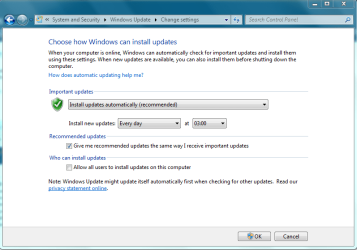
I accidentally unchecked the 'Give me updates for Microsoft products and check for new optional Microsoft software when I update Windows'

I've searched all over the net but no luck

Thanks
 

My Computer

Computer type
PC/Desktop
Computer Manufacturer/Model Number
Custom
OS
Windows 7 Professional 64-bit SP1
CPU
i7 920 Factory OC 3.4ghz
Motherboard
Gigabyte EX58-UD3R
Memory
6GB 1600mhz Triple-Channel DDR3
Graphics Card(s)
1535MB GeForce GTX 580
Sound Card
onboard
Monitor(s) Displays
BenQ GL2460
Screen Resolution
1920x1080@60Hz
Hard Drives
466GB Seagate ST3500418AS ATA Device (SATA)
PSU
corsair tx650w
Case
Antec 300
Cooling
Akasa Nero AK-967
Keyboard
Cheap asda keyboard
Mouse
Gigabyte M6900
Antivirus
MSE
Browser
Chrome
Hello Robwan and welcome to the forums :party:

There is no such thing as a dumb question, if you learn something from it then it's quite the opposite :)

You'll be glad to hear it does have a simple solution though. Open Windows Update and in the panel on the left you will see a few links, click on Change settings. Tick the box that is second from the bottom :)

Tom
 

My Computer

Computer type
PC/Desktop
Computer Manufacturer/Model Number
Build #1
OS
Windows 8.1 Pro x64
CPU
Intel i7 3770K @4.5GHz
Motherboard
ASUS P8Z77-V PRO
Memory
Corsair Vengeance 2x4GB DDR3 1600MHz Low Profile (White)
Graphics Card(s)
Gigabyte Radeon HD 7850 (2GB GDDR5)
Sound Card
Integrated on motherboard
Monitor(s) Displays
23" LG LCD/LED IPS
Screen Resolution
1920*1080
Hard Drives
Samsung EVO 128GB SSD
Seagate Barracuda 2GB 7200rpm
2x Seagate FreeAgent [500gb]
PSU
Corsair TX650W V2 (80+ Bronze)
Case
NZXT Phantom 410 White
Cooling
Corsair H100 Water Cooler
Keyboard
Microsoft Desktop 2000 Wireless Keyboard
Mouse
Microsoft Desktop 2000 Wireless Mouse
Internet Speed
95 Mb/s Download 70 Mb/s Upload
Antivirus
MSE + MBAM Pro
Browser
Firefox
Hi, thanks for speedy reply :D

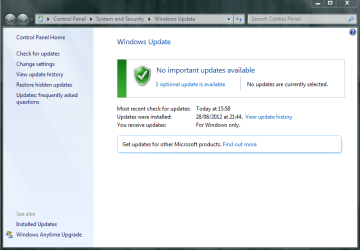
I have posted some images of what i get when attempting this.

Image 1 shows that the option is completely missing, it was there before i opt out.

And on image 2, if i click 'find out more' it just links me to this Microsoft Update

basically telling me how to do normal updates.


I think i had this problem about a year ago, however the 'find out more' actually worked then. you think they've possibly changed something?

Thanks for your help again
 

Attachments

  • 1.PNG
    1.PNG
    24.8 KB · Views: 19
  • 2.PNG
    2.PNG
    35.3 KB · Views: 14

My Computer

Computer type
PC/Desktop
Computer Manufacturer/Model Number
Custom
OS
Windows 7 Professional 64-bit SP1
CPU
i7 920 Factory OC 3.4ghz
Motherboard
Gigabyte EX58-UD3R
Memory
6GB 1600mhz Triple-Channel DDR3
Graphics Card(s)
1535MB GeForce GTX 580
Sound Card
onboard
Monitor(s) Displays
BenQ GL2460
Screen Resolution
1920x1080@60Hz
Hard Drives
466GB Seagate ST3500418AS ATA Device (SATA)
PSU
corsair tx650w
Case
Antec 300
Cooling
Akasa Nero AK-967
Keyboard
Cheap asda keyboard
Mouse
Gigabyte M6900
Antivirus
MSE
Browser
Chrome

My Computer

Computer type
PC/Desktop
Computer Manufacturer/Model Number
Self built custom
OS
64-bit Windows 11 Pro for Workstations
CPU
Intel i7-8700K OC'd to 5 GHz
Motherboard
ASUS ROG Maximus XI Formula Z390
Memory
64 GB (4x16GB) G.SKILL TridentZ RGB DDR4 3600 MHz
Graphics Card(s)
ASUS ROG-STRIX-GTX1080TI-O11G-GAMING
Sound Card
Integrated
Monitor(s) Displays
2 x Samsung Odyssey G7 27"
Screen Resolution
2560x1440
Hard Drives
1TB Samsung 990 PRO M.2,
4TB Samsung 990 PRO PRO M.2,
TerraMaster F8 SSD Plus NAS
PSU
Seasonic Prime Titanium 850W
Case
Thermaltake Core P3
Cooling
Corsair Hydro H115i
Keyboard
Logitech wireless K800
Mouse
Logitech MX Master 4
Internet Speed
2 Gb/s Download and 100 Mb/s Upload
Antivirus
Malwarebyte Anti-Malware Premium
Browser
Google Chrome
Other Info
Logitech Z625 speaker system,
Logitech BRIO 4K Pro webcam,
HP Color LaserJet Pro MFP M477fdn,
APC SMART-UPS RT 1000 XL - SURT1000XLI,
Galaxy S23 Plus phone
Hi Shawn, thanks for the reply.

I checked my features and Internet Explorer 9 is on, i unchecked and rechecked it, but still no luck :-/
 

My Computer

Computer type
PC/Desktop
Computer Manufacturer/Model Number
Custom
OS
Windows 7 Professional 64-bit SP1
CPU
i7 920 Factory OC 3.4ghz
Motherboard
Gigabyte EX58-UD3R
Memory
6GB 1600mhz Triple-Channel DDR3
Graphics Card(s)
1535MB GeForce GTX 580
Sound Card
onboard
Monitor(s) Displays
BenQ GL2460
Screen Resolution
1920x1080@60Hz
Hard Drives
466GB Seagate ST3500418AS ATA Device (SATA)
PSU
corsair tx650w
Case
Antec 300
Cooling
Akasa Nero AK-967
Keyboard
Cheap asda keyboard
Mouse
Gigabyte M6900
Antivirus
MSE
Browser
Chrome
Rob,

When you click on the Find out more link in Windows Update and it takes you to the Microsoft site, does it allow you to check the I ageee box and click on Install?
 

My Computer

Computer type
PC/Desktop
Computer Manufacturer/Model Number
Self built custom
OS
64-bit Windows 11 Pro for Workstations
CPU
Intel i7-8700K OC'd to 5 GHz
Motherboard
ASUS ROG Maximus XI Formula Z390
Memory
64 GB (4x16GB) G.SKILL TridentZ RGB DDR4 3600 MHz
Graphics Card(s)
ASUS ROG-STRIX-GTX1080TI-O11G-GAMING
Sound Card
Integrated
Monitor(s) Displays
2 x Samsung Odyssey G7 27"
Screen Resolution
2560x1440
Hard Drives
1TB Samsung 990 PRO M.2,
4TB Samsung 990 PRO PRO M.2,
TerraMaster F8 SSD Plus NAS
PSU
Seasonic Prime Titanium 850W
Case
Thermaltake Core P3
Cooling
Corsair Hydro H115i
Keyboard
Logitech wireless K800
Mouse
Logitech MX Master 4
Internet Speed
2 Gb/s Download and 100 Mb/s Upload
Antivirus
Malwarebyte Anti-Malware Premium
Browser
Google Chrome
Other Info
Logitech Z625 speaker system,
Logitech BRIO 4K Pro webcam,
HP Color LaserJet Pro MFP M477fdn,
APC SMART-UPS RT 1000 XL - SURT1000XLI,
Galaxy S23 Plus phone
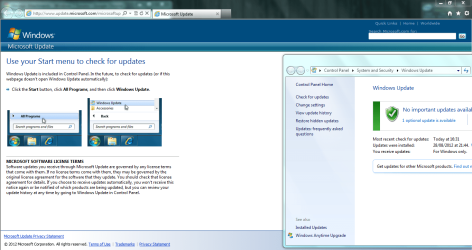
That's the part which i'm not getting, it just looks like this.

it opens in internet explorer then shoves the normal Windows update window in front of me as if it wants me to try and update. I don't get any prompts from explorer asking me to download or unblock anything either.

this is what its linking me to Microsoft Update

Thanks
 

Attachments

  • Capture.PNG
    Capture.PNG
    90.1 KB · Views: 12

My Computer

Computer type
PC/Desktop
Computer Manufacturer/Model Number
Custom
OS
Windows 7 Professional 64-bit SP1
CPU
i7 920 Factory OC 3.4ghz
Motherboard
Gigabyte EX58-UD3R
Memory
6GB 1600mhz Triple-Channel DDR3
Graphics Card(s)
1535MB GeForce GTX 580
Sound Card
onboard
Monitor(s) Displays
BenQ GL2460
Screen Resolution
1920x1080@60Hz
Hard Drives
466GB Seagate ST3500418AS ATA Device (SATA)
PSU
corsair tx650w
Case
Antec 300
Cooling
Akasa Nero AK-967
Keyboard
Cheap asda keyboard
Mouse
Gigabyte M6900
Antivirus
MSE
Browser
Chrome
Odd. Do you have cookies enabled? You usually see that MS site when it's already installed.

What happens when you close Windows Updates, reopen it, and click on "Change settings". Do you have the "Microsoft Update" option available then?


If not, then you might consider using OPTION THREE in the tutorial below to reset Windows Update completely, and try again.

http://www.sevenforums.com/tutorials/91738-windows-update-reset.html
 

My Computer

Computer type
PC/Desktop
Computer Manufacturer/Model Number
Self built custom
OS
64-bit Windows 11 Pro for Workstations
CPU
Intel i7-8700K OC'd to 5 GHz
Motherboard
ASUS ROG Maximus XI Formula Z390
Memory
64 GB (4x16GB) G.SKILL TridentZ RGB DDR4 3600 MHz
Graphics Card(s)
ASUS ROG-STRIX-GTX1080TI-O11G-GAMING
Sound Card
Integrated
Monitor(s) Displays
2 x Samsung Odyssey G7 27"
Screen Resolution
2560x1440
Hard Drives
1TB Samsung 990 PRO M.2,
4TB Samsung 990 PRO PRO M.2,
TerraMaster F8 SSD Plus NAS
PSU
Seasonic Prime Titanium 850W
Case
Thermaltake Core P3
Cooling
Corsair Hydro H115i
Keyboard
Logitech wireless K800
Mouse
Logitech MX Master 4
Internet Speed
2 Gb/s Download and 100 Mb/s Upload
Antivirus
Malwarebyte Anti-Malware Premium
Browser
Google Chrome
Other Info
Logitech Z625 speaker system,
Logitech BRIO 4K Pro webcam,
HP Color LaserJet Pro MFP M477fdn,
APC SMART-UPS RT 1000 XL - SURT1000XLI,
Galaxy S23 Plus phone
Finally, i got it!

i went to microsoft.com and manually searched for 'microsoft update' i ended up at this page Windows Update - Windows 7 features - Microsoft Windows

installed silverlight and it asked me to turn on microsoft updates and bingo.

slightly odd that i had go out my way and do it like that but it gave me all the options back again :)

This solution may come in handy if anyone else experiences the same problem.

Thanks for all your help guys!
 

My Computer

Computer type
PC/Desktop
Computer Manufacturer/Model Number
Custom
OS
Windows 7 Professional 64-bit SP1
CPU
i7 920 Factory OC 3.4ghz
Motherboard
Gigabyte EX58-UD3R
Memory
6GB 1600mhz Triple-Channel DDR3
Graphics Card(s)
1535MB GeForce GTX 580
Sound Card
onboard
Monitor(s) Displays
BenQ GL2460
Screen Resolution
1920x1080@60Hz
Hard Drives
466GB Seagate ST3500418AS ATA Device (SATA)
PSU
corsair tx650w
Case
Antec 300
Cooling
Akasa Nero AK-967
Keyboard
Cheap asda keyboard
Mouse
Gigabyte M6900
Antivirus
MSE
Browser
Chrome
Odd, but I'm happy to hear you got it sorted. Thank you for posting back with your results and solution. :)
 

My Computer

Computer type
PC/Desktop
Computer Manufacturer/Model Number
Self built custom
OS
64-bit Windows 11 Pro for Workstations
CPU
Intel i7-8700K OC'd to 5 GHz
Motherboard
ASUS ROG Maximus XI Formula Z390
Memory
64 GB (4x16GB) G.SKILL TridentZ RGB DDR4 3600 MHz
Graphics Card(s)
ASUS ROG-STRIX-GTX1080TI-O11G-GAMING
Sound Card
Integrated
Monitor(s) Displays
2 x Samsung Odyssey G7 27"
Screen Resolution
2560x1440
Hard Drives
1TB Samsung 990 PRO M.2,
4TB Samsung 990 PRO PRO M.2,
TerraMaster F8 SSD Plus NAS
PSU
Seasonic Prime Titanium 850W
Case
Thermaltake Core P3
Cooling
Corsair Hydro H115i
Keyboard
Logitech wireless K800
Mouse
Logitech MX Master 4
Internet Speed
2 Gb/s Download and 100 Mb/s Upload
Antivirus
Malwarebyte Anti-Malware Premium
Browser
Google Chrome
Other Info
Logitech Z625 speaker system,
Logitech BRIO 4K Pro webcam,
HP Color LaserJet Pro MFP M477fdn,
APC SMART-UPS RT 1000 XL - SURT1000XLI,
Galaxy S23 Plus phone
Finally, i got it!

i went to microsoft.com and manually searched for 'microsoft update' i ended up at this page Windows Update - Windows 7 features - Microsoft Windows

installed silverlight and it asked me to turn on microsoft updates and bingo.

slightly odd that i had go out my way and do it like that but it gave me all the options back again :)

This solution may come in handy if anyone else experiences the same problem.

Thanks for all your help guys!


Thanks. installed silverlight and updates enabled.
 

My Computer

OS
Windows 7
CPU
Intel E8400
Motherboard
Asus Maximus Formula
Memory
4x1GB OCZ Flex PC 9200
Graphics Card(s)
XFX GTX 260
Sound Card
SupremeFX II
Monitor(s) Displays
Samsung T220
Screen Resolution
1680x1050
Hard Drives
SataII Seagate 160Gb + Seagate Maxtor 500GB 32mb Cache
PSU
Asus 450W
Cooling
Thermalright Ultra-120 Extreme
Keyboard
Genius Slimstar 330 Keyboard
Mouse
Logitech G5 Laser Mouse
Internet Speed
1mb/sec
Back
Top