'Turn off the display' resets itself to 20 minutes instead of Never!

CiaraJansonFan

New member
Member
Local time
5:31 PM
Messages
31
Hi all,

I've had Windows 7 Home Premium installed for less than 2 weeks now and this is already getting on my nerves! I do NOT want my monitor to turn off if I leave my PC idle, so in the Power Options I have chosen 'Never' for 'Turn off the display'. However it keeps resetting itself to 20 minutes and turning off the monitor after that amount of time anyway!

I first of all set this for the Balanced plan and I have also created my own power plan called 'Always on' and made sure the options are set to Never - but in both cases Windows is overriding my settings I have chosen - why?

I also don't want my PC to lock when I resume from hibernation, so in the advanced settings I have changed 'Require a password on wakeup' to 'No', but that keeps resetting itself to Yes as well!

Why won't Windows 7 remember the settings I've chosen?!!? :mad:


Please can someone tell me why this is happening and how to fix it.

P.S. It's a standalone PC so no group policy or similar is in effect.

Thanks in advance
Steven
 

My Computer My Computer

At a glance

Windows 7 Home Premium 32-bitAMD Phenom II X4 955 Black 3.2GHzGEIL 4GB DDR3 Black DragonATI Radeon HD 4250
Computer Manufacturer/Model Number
Home built
OS
Windows 7 Home Premium 32-bit
CPU
AMD Phenom II X4 955 Black 3.2GHz
Motherboard
Asus M4A88TD-M EVO/USB3
Memory
GEIL 4GB DDR3 Black Dragon
Graphics Card(s)
ATI Radeon HD 4250
Hello, I am having the similar problem but the other way around tho.

I set my display to turn off after 45 min (default is 20 min) and put the computer to sleep after 2 hours (default is Never). Yeah, I did saved it but often the power plan changed itself back to default (display off 20 min and never go to sleep).

I am still looking for the fix. If I can find the fix it probably fix your as well since we both having a hard time to keep the power plan to where we saved it at.
 

My Computer My Computer

At a glance

Windows 7 Pro 64bitAMD Phenom II X6 1090T at 4013MHz8GB A-DATA 1600GTX460
Computer Manufacturer/Model Number
Homebrew
OS
Windows 7 Pro 64bit
CPU
AMD Phenom II X6 1090T at 4013MHz
Motherboard
ASUS M4A87TD/USB 3.0
Memory
8GB A-DATA 1600
Graphics Card(s)
GTX460
Sound Card
On-board
Monitor(s) Displays
ACER H233H and ACER X203H
Hard Drives
2x Crucial C300-64GB RAID 0
2x WD 1TB BLACK RAID 0
1x WD 1TB BLACK
1x WD 1TB GREEN
PSU
750 WATTS
Case
Antec Three Hundred
Cooling
Zalman CNPS10X Performa (Push/Pull)
Keyboard
M$
Mouse
M$
Internet Speed
Verizon FiOS 20/20
SOLVED

I found a solution here at this forum "Disable Power Management on Windows 7 or Vista - How-To Geek"

I had to click on the "V" symbol that is below and to the right of the "power saver" option to get the "High Performance" option to show up. Then I was able to make it work by choosing this option and selecting "NEVER", instead of trying to use the "balanced" option.
 

My Computer My Computer

At a glance

Windows 7 Ultimate 64 bit
OS
Windows 7 Ultimate 64 bit
I've been struggling with this issue for at least half a year now, and so far I found a reason: HD Tune
That's right, a program that has nothing to do with power settings, it only tests hard drives... but every time it starts a test (any kind) it resets current power plan to default.
So from now on I create a new power plan before start that program, and let it reset it...

Weird bug.

P.S.
HD Tach doesn't have this problem.
 

My Computer My Computer

At a glance

Windows 7 Ultimate x64Intel 2600K
OS
Windows 7 Ultimate x64
CPU
Intel 2600K
I'm having this problem as well, I tried resipsaloquitur's suggestion and I'm still having this problem whenever my machine is restarted or shutdown.

My system absolutely barebones. No software installed other than essential drivers that are required to detect all hardware on and attached to the motherboard.

I am running a Gigabyte H67MA-USB3-B3 with Core i3 2100, no video card, using onboard sound and sandy bridge video.

Only program I have installed is Auto Power-on & Shut-down 2.10.
 

My Computer My Computer

At a glance

Windows 7 Ultimate x64 SP1Core i7 2600k (4.6GHz)16GB G.SKILL Ares 1600MHzMSI R6970 Lightning
Computer type
PC/Desktop
Computer Manufacturer/Model Number
Less is more
OS
Windows 7 Ultimate x64 SP1
CPU
Core i7 2600k (4.6GHz)
Motherboard
ASUS P8Z68 Deluxe (3603)
Memory
16GB G.SKILL Ares 1600MHz
Graphics Card(s)
MSI R6970 Lightning
Sound Card
Asus Xonar Essence ST (UNi drivers 1.41)
Monitor(s) Displays
Samsung P2570, CrossOver 27Q LED-P
Screen Resolution
1920*1080, 2560*1440
Hard Drives
256GB OCZ Vector, 2x Hitachi 4TB (7K4000), Hitachi 3TB (7K3000 & 5K3000)
PSU
Seasonic X750
Case
Lian-Li PC-P80N
Cooling
NZXT HAVIK 140 (2x GELID Wing12PL Push/Pull)
Keyboard
CM Storm Trigger (Brown Switch)
Mouse
Logitech G400
Internet Speed
55Mbps/10Mbps
Other Info
Speakers - Klipsch ProMedia 2.1
Headphones - Sennheiser HD595
Router - ASUS RT-N66U
Webcam - Logitech C910
I've been struggling with this issue for at least half a year now, and so far I found a reason: HD Tune
That's right, a program that has nothing to do with power settings, it only tests hard drives... but every time it starts a test (any kind) it resets current power plan to default.
So from now on I create a new power plan before start that program, and let it reset it...

Weird bug.

P.S.
HD Tach doesn't have this problem.

:thumbsup:

thank you!! this has been driving me nuts since I started using windows 7! I was convinced it happened every time I connected a drive via esata. I also use HDtune and fire it up every time I connect a esata drive to check the health. never thought for a second hdtune could have caused this.

I found this thread a while ago before your post and found it again tonight. sure enough as soon as I start hdtune my monitor settings go back to 20 mins instead of never. hate I didn't find a fix but at least I know why it happens.
 

My Computer My Computer

At a glance

Windows 7 Ultimate x64
OS
Windows 7 Ultimate x64
I've been struggling with this issue for at least half a year now, and so far I found a reason: HD Tune
That's right, a program that has nothing to do with power settings, it only tests hard drives... but every time it starts a test (any kind) it resets current power plan to default.
So from now on I create a new power plan before start that program, and let it reset it...

Weird bug.

P.S.
HD Tach doesn't have this problem.

Wow nice find, this stupid setting was really annoying me. I figured my windows installation was bugged from all the time i spent overclocking and BSOD's. Did a clean install (after trying a bunch of other crap) and sure enough still kept doing it. Followed your advise and actually watched the setting change back in real time as launching an HD Tune performance test. After googling i found HD Tune version 4.50 added 'Added option to change power settings during performance tests'- i wonder if this is the culprit. Either way, Thanks!
 

My Computer My Computer

At a glance

7 64 bit
OS
7 64 bit
I found this site while searching for the same problem. Windows mysteriously kept setting the monitor sleep mode to 20 min. I had kinda figured it might be HDTune cause it started happening on both my Windows 7 and my windows Vista machines about the time I installed HDTune to track down a bad disk. Since it was not the only tool (and there were some inconvenient updates from Microsoft) I couldn't be sure. After reading this thread I confirmed that HDTune was indeed setting the sleep to 20 min.

Here it is 2014 and they still have not fixed this behavior so I decided to do so. I created a batch file that would run HDTune.exe and then run powercfg.exe (a Microsoft program) to reset the monitor time to (in my case) never.

==========================================
REM Run this bat file instead of the HDTune.exe file
REM a simple batch file to correct a very annoying problem with HDTune and
REM it's insistance on changing the sleep time for the monitor to 20 min.


"C:\Program Files (x86)\HD Tune\HDTune.exe"

powercfg -Change -monitor-timeout-ac 0
=========================================
I then saved the above file (without the ===='s) as HDTune.bat

If you want a different time you can run powercfg /help to get a description of how to choose other times.

I right clicked on the HDTune shortcut in the start menu and changed the "target" string from (in my case) "C:\Program Files (x86)\HD Tune\HDTune.exe" to "C:\Program Files (x86)\HD Tune\HDTune.bat" and set the program to run minimized to keep the cmd window from popping up.

Finally I moved the HDTune.bat file into the directory that has HDTune.exe

The above solution solved my problem except while HDTune is running. It will insist on the 20min sleep. But at least when you are finished the batch file will put the value back to the one you wanted.

A fancier solution would read and store what ever value was already there and put that one back. Which is what HDTune should have done.
 

My Computer My Computer

At a glance

WIndows 7 home 64 bit.
Computer type
PC/Desktop
OS
WIndows 7 home 64 bit.
I'm sorry to inform you, but you wasted time going through all that.

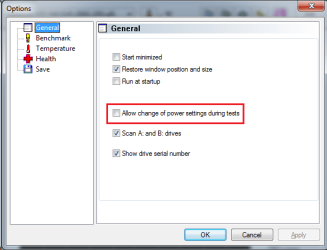
HD Tune Pro had an option for this since 2010
22th May 2010: HD Tune Pro 4.50 released.

Changes:

  • Added autosave screenshot function with extensive filter possibilities
  • Error Scan
    • added speed map
    • added option to set scanning range
  • Erase: added verify function
  • Added option to change power settings during performance tests
  • Added support for USB 3.0 devices
  • Fixed negative CPU usage display with quadcore CPUs
  • Fixed incompatibility issue with nVidida drivers under Windows 7 64-bit
  • Fixed incompatibility issue with certain USB sticks
  • Fixed incorrect position with Erase function with sector sizes larger than 512 bytes
HD Tune Pro.png
 

My Computer My Computer

At a glance

Windows 7 Ultimate x64Intel 2600K
OS
Windows 7 Ultimate x64
CPU
Intel 2600K
I've been struggling with this issue for at least half a year now, and so far I found a reason: HD Tune
That's right, a program that has nothing to do with power settings, it only tests hard drives... but every time it starts a test (any kind) it resets current power plan to default.
So from now on I create a new power plan before start that program, and let it reset it...

Weird bug.

P.S.
HD Tach doesn't have this problem.

Awesome find.

This has been bugging me for a while now, but disabling that setting in HD Tune options fixed my problem.
Thanks
 

My Computer My Computer

At a glance

Windows 7 Ultimate x64
Computer type
PC/Desktop
OS
Windows 7 Ultimate x64
Thanks! I have wondered what makes "Turn off display" setting randomly change to 20min (mine is set to 'never'). Just happened again today. Googling and reading this topic, i found out that HD Tune does that. I just run HD Tune's Error Scan after some time. And again, reading this topic convinced me that the culprit really is HD Tune. I have version 2.55. It does not have the option to disable this power setting. I guess it's ON by build.
 

My Computer My Computer

At a glance

Windows 7 Home Premium
Computer type
PC/Desktop
Computer Manufacturer/Model Number
HP Desktop sirca 2010
OS
Windows 7 Home Premium
Back
Top