Solved Twinmos Pendrive not detected-win 7

Kamrul08

New member
Local time
8:19 PM
Messages
29
Location
Bangladesh
I have a Twinmos X2 Premium 4GB Pendrive. It works fine on XP. But Win 7 can’t detect it. When I insert it, Windows shows notification in taskbar without Drive letter or name. I added some screenshot below.


My-Computer.jpg


My Computer


Taskbar-Notification.jpg


Taskbar notification


Deivice-Manager.jpg


Device Manager


Disk-Management.jpg


Disk Management​
 

My Computer My Computer

Computer type
PC/Desktop
Computer Manufacturer/Model Number
Gigabyte g41 Combo
OS
Windows 8.1 x64 Enterprise & Windows 7 x86 Ultimate Dual boot.
CPU
Core™2 Duo E8400
Motherboard
Gigabyte g41m combo
Memory
4GB
Graphics Card(s)
built in
Sound Card
built in
Monitor(s) Displays
Samsung syncmaster 794mg
Screen Resolution
1024x768
Hard Drives
WD-500GB
Antivirus
MSE
Browser
Firefox and chrome.
Hello Kamrul,

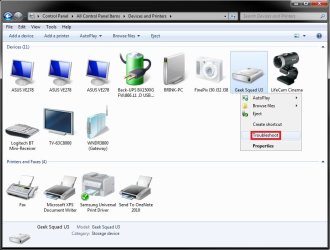
With the USB flash drive connected, you might open Devices and Printers to see if the USB flash drive may be displayed here. If so, right click on it, and click on Troubleshoot. Follow the instructions it gives you. If it finds a solution (ex: to install a driver), it may ask you to approve before it will.

USB.jpg

Hopefully this may help,
Shawn
 

My Computer My Computer

Computer type
PC/Desktop
Computer Manufacturer/Model Number
Self built custom
OS
64-bit Windows 11 Pro for Workstations
CPU
Intel i7-8700K OC'd to 5 GHz
Motherboard
ASUS ROG Maximus XI Formula Z390
Memory
64 GB (4x16GB) G.SKILL TridentZ RGB DDR4 3600 MHz
Graphics Card(s)
ASUS ROG-STRIX-GTX1080TI-O11G-GAMING
Sound Card
Integrated
Monitor(s) Displays
2 x Samsung Odyssey G7 27"
Screen Resolution
2560x1440
Hard Drives
1TB Samsung 990 PRO M.2,
4TB Samsung 990 PRO PRO M.2,
TerraMaster F8 SSD Plus NAS
PSU
Seasonic Prime Titanium 850W
Case
Thermaltake Core P3
Cooling
Corsair Hydro H115i
Keyboard
Logitech wireless K800
Mouse
Logitech MX Master 4
Internet Speed
2 Gb/s Download and 100 Mb/s Upload
Antivirus
Malwarebyte Anti-Malware Premium
Browser
Google Chrome
Other Info
Logitech Z625 speaker system,
Logitech BRIO 4K Pro webcam,
HP Color LaserJet Pro MFP M477fdn,
APC SMART-UPS RT 1000 XL - SURT1000XLI,
Galaxy S23 Plus phone
Hello Kamrul,

With the USB flash drive connected, you might open Devices and Printers to see if the USB flash drive may be displayed here. If so, right click on it, and click on Troubleshoot. Follow the instructions it gives you. If it finds a solution (ex: to install a driver), it may ask you to approve before it will.

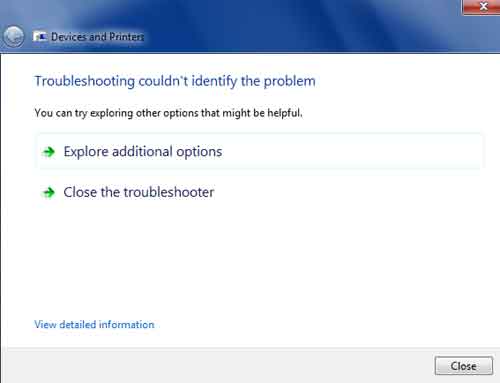
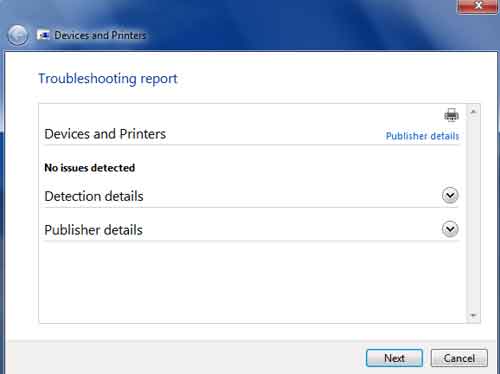
I tried it before. Now I tried again and included screenshot.

1.jpg

2.jpg
 

My Computer My Computer

Computer type
PC/Desktop
Computer Manufacturer/Model Number
Gigabyte g41 Combo
OS
Windows 8.1 x64 Enterprise & Windows 7 x86 Ultimate Dual boot.
CPU
Core™2 Duo E8400
Motherboard
Gigabyte g41m combo
Memory
4GB
Graphics Card(s)
built in
Sound Card
built in
Monitor(s) Displays
Samsung syncmaster 794mg
Screen Resolution
1024x768
Hard Drives
WD-500GB
Antivirus
MSE
Browser
Firefox and chrome.
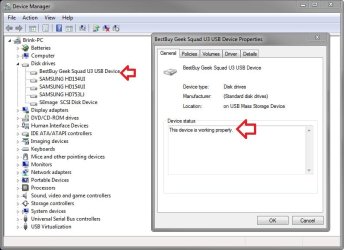
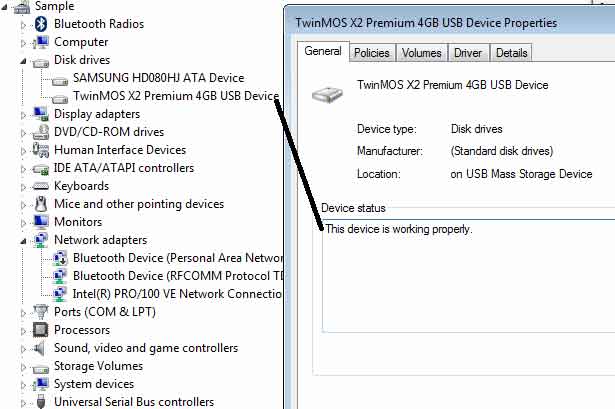
Does it show any errors under "Device status" for the USB drive in Device Manager?

Device_Manager.jpg
 

My Computer My Computer

Computer type
PC/Desktop
Computer Manufacturer/Model Number
Self built custom
OS
64-bit Windows 11 Pro for Workstations
CPU
Intel i7-8700K OC'd to 5 GHz
Motherboard
ASUS ROG Maximus XI Formula Z390
Memory
64 GB (4x16GB) G.SKILL TridentZ RGB DDR4 3600 MHz
Graphics Card(s)
ASUS ROG-STRIX-GTX1080TI-O11G-GAMING
Sound Card
Integrated
Monitor(s) Displays
2 x Samsung Odyssey G7 27"
Screen Resolution
2560x1440
Hard Drives
1TB Samsung 990 PRO M.2,
4TB Samsung 990 PRO PRO M.2,
TerraMaster F8 SSD Plus NAS
PSU
Seasonic Prime Titanium 850W
Case
Thermaltake Core P3
Cooling
Corsair Hydro H115i
Keyboard
Logitech wireless K800
Mouse
Logitech MX Master 4
Internet Speed
2 Gb/s Download and 100 Mb/s Upload
Antivirus
Malwarebyte Anti-Malware Premium
Browser
Google Chrome
Other Info
Logitech Z625 speaker system,
Logitech BRIO 4K Pro webcam,
HP Color LaserJet Pro MFP M477fdn,
APC SMART-UPS RT 1000 XL - SURT1000XLI,
Galaxy S23 Plus phone
Does it show any errors under "Device status" for the USB drive in Device Manager?

Yes, It shows- The device is working properly. I tried to update driver but windows tell- Driver is update.
usb.jpg
 

My Computer My Computer

Computer type
PC/Desktop
Computer Manufacturer/Model Number
Gigabyte g41 Combo
OS
Windows 8.1 x64 Enterprise & Windows 7 x86 Ultimate Dual boot.
CPU
Core™2 Duo E8400
Motherboard
Gigabyte g41m combo
Memory
4GB
Graphics Card(s)
built in
Sound Card
built in
Monitor(s) Displays
Samsung syncmaster 794mg
Screen Resolution
1024x768
Hard Drives
WD-500GB
Antivirus
MSE
Browser
Firefox and chrome.
While in XP, you may need to backup what's on the USB, run a clean command on the USB, format it as NTFS or FAT32 again, see if you have access to it now in Windows 7, then copy the data back if so.
 

My Computer My Computer

Computer type
PC/Desktop
Computer Manufacturer/Model Number
Self built custom
OS
64-bit Windows 11 Pro for Workstations
CPU
Intel i7-8700K OC'd to 5 GHz
Motherboard
ASUS ROG Maximus XI Formula Z390
Memory
64 GB (4x16GB) G.SKILL TridentZ RGB DDR4 3600 MHz
Graphics Card(s)
ASUS ROG-STRIX-GTX1080TI-O11G-GAMING
Sound Card
Integrated
Monitor(s) Displays
2 x Samsung Odyssey G7 27"
Screen Resolution
2560x1440
Hard Drives
1TB Samsung 990 PRO M.2,
4TB Samsung 990 PRO PRO M.2,
TerraMaster F8 SSD Plus NAS
PSU
Seasonic Prime Titanium 850W
Case
Thermaltake Core P3
Cooling
Corsair Hydro H115i
Keyboard
Logitech wireless K800
Mouse
Logitech MX Master 4
Internet Speed
2 Gb/s Download and 100 Mb/s Upload
Antivirus
Malwarebyte Anti-Malware Premium
Browser
Google Chrome
Other Info
Logitech Z625 speaker system,
Logitech BRIO 4K Pro webcam,
HP Color LaserJet Pro MFP M477fdn,
APC SMART-UPS RT 1000 XL - SURT1000XLI,
Galaxy S23 Plus phone
While in XP, you may need to backup what's on the USB, run a clean command on the USB, format it as NTFS or FAT32 again, see if you have access to it now in Windows 7, then copy the data back if so.

I would like to Thank you Brink. Your post is very important and informative. I didn’t apply clean command ever before. I decided to follow your most important advises. Result below.

My Disk is in Online position.


Disk-Online.jpg


I applied clean command but it shows error like below.
Clean-Problem.jpg


I got the system event log like below.
Error-log.jpg


[FONT=&quot]After Clean command my disk shows [/FONT]unallocated[FONT=&quot]. Then I created new volume and tried to format it. But Windows 7 can’t perform format process. Then I formatted it in XP.[/FONT]
 

My Computer My Computer

Computer type
PC/Desktop
Computer Manufacturer/Model Number
Gigabyte g41 Combo
OS
Windows 8.1 x64 Enterprise & Windows 7 x86 Ultimate Dual boot.
CPU
Core™2 Duo E8400
Motherboard
Gigabyte g41m combo
Memory
4GB
Graphics Card(s)
built in
Sound Card
built in
Monitor(s) Displays
Samsung syncmaster 794mg
Screen Resolution
1024x768
Hard Drives
WD-500GB
Antivirus
MSE
Browser
Firefox and chrome.
You're most welcome Kamrul.

Does Windows 7 see and have access to it now?
 

My Computer My Computer

Computer type
PC/Desktop
Computer Manufacturer/Model Number
Self built custom
OS
64-bit Windows 11 Pro for Workstations
CPU
Intel i7-8700K OC'd to 5 GHz
Motherboard
ASUS ROG Maximus XI Formula Z390
Memory
64 GB (4x16GB) G.SKILL TridentZ RGB DDR4 3600 MHz
Graphics Card(s)
ASUS ROG-STRIX-GTX1080TI-O11G-GAMING
Sound Card
Integrated
Monitor(s) Displays
2 x Samsung Odyssey G7 27"
Screen Resolution
2560x1440
Hard Drives
1TB Samsung 990 PRO M.2,
4TB Samsung 990 PRO PRO M.2,
TerraMaster F8 SSD Plus NAS
PSU
Seasonic Prime Titanium 850W
Case
Thermaltake Core P3
Cooling
Corsair Hydro H115i
Keyboard
Logitech wireless K800
Mouse
Logitech MX Master 4
Internet Speed
2 Gb/s Download and 100 Mb/s Upload
Antivirus
Malwarebyte Anti-Malware Premium
Browser
Google Chrome
Other Info
Logitech Z625 speaker system,
Logitech BRIO 4K Pro webcam,
HP Color LaserJet Pro MFP M477fdn,
APC SMART-UPS RT 1000 XL - SURT1000XLI,
Galaxy S23 Plus phone
Does Windows 7 see and have access to it now?


No. Same result in my Desktop PC.

[FONT=&quot]I tested this Pendrive in a Laptop (running Win7). No problem there and the pendrive works fine. Then I performed Clean command in this PC without no problem as your advices. I think this the fault of my Pendrive. So let the topics finish. I thank you very much for very helpful and informative instruction.[/FONT] I am pleased on your advices.
 

My Computer My Computer

Computer type
PC/Desktop
Computer Manufacturer/Model Number
Gigabyte g41 Combo
OS
Windows 8.1 x64 Enterprise & Windows 7 x86 Ultimate Dual boot.
CPU
Core™2 Duo E8400
Motherboard
Gigabyte g41m combo
Memory
4GB
Graphics Card(s)
built in
Sound Card
built in
Monitor(s) Displays
Samsung syncmaster 794mg
Screen Resolution
1024x768
Hard Drives
WD-500GB
Antivirus
MSE
Browser
Firefox and chrome.
You might run chkdsk on the USB flash drive to test it for bad sectors just to be safe.

Looking at the USB flash drive's website, it appeared to have security features that may have been the cause, but using the "clean" command should of wiped all that out.
 

My Computer My Computer

Computer type
PC/Desktop
Computer Manufacturer/Model Number
Self built custom
OS
64-bit Windows 11 Pro for Workstations
CPU
Intel i7-8700K OC'd to 5 GHz
Motherboard
ASUS ROG Maximus XI Formula Z390
Memory
64 GB (4x16GB) G.SKILL TridentZ RGB DDR4 3600 MHz
Graphics Card(s)
ASUS ROG-STRIX-GTX1080TI-O11G-GAMING
Sound Card
Integrated
Monitor(s) Displays
2 x Samsung Odyssey G7 27"
Screen Resolution
2560x1440
Hard Drives
1TB Samsung 990 PRO M.2,
4TB Samsung 990 PRO PRO M.2,
TerraMaster F8 SSD Plus NAS
PSU
Seasonic Prime Titanium 850W
Case
Thermaltake Core P3
Cooling
Corsair Hydro H115i
Keyboard
Logitech wireless K800
Mouse
Logitech MX Master 4
Internet Speed
2 Gb/s Download and 100 Mb/s Upload
Antivirus
Malwarebyte Anti-Malware Premium
Browser
Google Chrome
Other Info
Logitech Z625 speaker system,
Logitech BRIO 4K Pro webcam,
HP Color LaserJet Pro MFP M477fdn,
APC SMART-UPS RT 1000 XL - SURT1000XLI,
Galaxy S23 Plus phone
You might run chkdsk on the USB flash drive to test it for bad sectors just to be safe.

Looking at the USB flash drive's website, it appeared to have security features that may have been the cause, but using the "clean" command should of wiped all that out.

Yes, Brink. I ran chkdsk command many times before and after clean command in xp.

At last I applied clean command in a laptop and it worked successfully. Then I inserted in my desktop PC again. Same result. I used alll usb ports for this pendrive in my PC. I am using Win7 Ultimate (SP1) with Intel original Motherboard.
 

My Computer My Computer

Computer type
PC/Desktop
Computer Manufacturer/Model Number
Gigabyte g41 Combo
OS
Windows 8.1 x64 Enterprise & Windows 7 x86 Ultimate Dual boot.
CPU
Core™2 Duo E8400
Motherboard
Gigabyte g41m combo
Memory
4GB
Graphics Card(s)
built in
Sound Card
built in
Monitor(s) Displays
Samsung syncmaster 794mg
Screen Resolution
1024x768
Hard Drives
WD-500GB
Antivirus
MSE
Browser
Firefox and chrome.
Do you have the same issue with any other USB devices?
 

My Computer My Computer

Computer type
PC/Desktop
Computer Manufacturer/Model Number
Self built custom
OS
64-bit Windows 11 Pro for Workstations
CPU
Intel i7-8700K OC'd to 5 GHz
Motherboard
ASUS ROG Maximus XI Formula Z390
Memory
64 GB (4x16GB) G.SKILL TridentZ RGB DDR4 3600 MHz
Graphics Card(s)
ASUS ROG-STRIX-GTX1080TI-O11G-GAMING
Sound Card
Integrated
Monitor(s) Displays
2 x Samsung Odyssey G7 27"
Screen Resolution
2560x1440
Hard Drives
1TB Samsung 990 PRO M.2,
4TB Samsung 990 PRO PRO M.2,
TerraMaster F8 SSD Plus NAS
PSU
Seasonic Prime Titanium 850W
Case
Thermaltake Core P3
Cooling
Corsair Hydro H115i
Keyboard
Logitech wireless K800
Mouse
Logitech MX Master 4
Internet Speed
2 Gb/s Download and 100 Mb/s Upload
Antivirus
Malwarebyte Anti-Malware Premium
Browser
Google Chrome
Other Info
Logitech Z625 speaker system,
Logitech BRIO 4K Pro webcam,
HP Color LaserJet Pro MFP M477fdn,
APC SMART-UPS RT 1000 XL - SURT1000XLI,
Galaxy S23 Plus phone
Do you have the same issue with any other USB devices?

No. All works fine. I have another 3 pendrive (Apacer). I also use other pendrive. No problem I could find but Twinmos.

I bought another one Twinmos in 2010. After 1 year and 13days It stoped working. So it placed in dustbin. Then I bought it in January 2011. It also made me crazy.

My friend gave me same one Pendrive (Twinmos X2 Premium) yesterday. It cann't be formatted. I tried clean, chkdsk command. I used HP USB Format Tool, Twinmos format tools. but I couldn't success. So I understood Twinmos life is 1year.
 

My Computer My Computer

Computer type
PC/Desktop
Computer Manufacturer/Model Number
Gigabyte g41 Combo
OS
Windows 8.1 x64 Enterprise & Windows 7 x86 Ultimate Dual boot.
CPU
Core™2 Duo E8400
Motherboard
Gigabyte g41m combo
Memory
4GB
Graphics Card(s)
built in
Sound Card
built in
Monitor(s) Displays
Samsung syncmaster 794mg
Screen Resolution
1024x768
Hard Drives
WD-500GB
Antivirus
MSE
Browser
Firefox and chrome.
I'm not sure what it is, but there appears to be either some issue with that brand of USB flash drive, or they have some type of proprietary feature preventing it from working unless you do something. Did you install of the required software for the USB from their site? For example, "Applauncher" and "UFDutility".
 

My Computer My Computer

Computer type
PC/Desktop
Computer Manufacturer/Model Number
Self built custom
OS
64-bit Windows 11 Pro for Workstations
CPU
Intel i7-8700K OC'd to 5 GHz
Motherboard
ASUS ROG Maximus XI Formula Z390
Memory
64 GB (4x16GB) G.SKILL TridentZ RGB DDR4 3600 MHz
Graphics Card(s)
ASUS ROG-STRIX-GTX1080TI-O11G-GAMING
Sound Card
Integrated
Monitor(s) Displays
2 x Samsung Odyssey G7 27"
Screen Resolution
2560x1440
Hard Drives
1TB Samsung 990 PRO M.2,
4TB Samsung 990 PRO PRO M.2,
TerraMaster F8 SSD Plus NAS
PSU
Seasonic Prime Titanium 850W
Case
Thermaltake Core P3
Cooling
Corsair Hydro H115i
Keyboard
Logitech wireless K800
Mouse
Logitech MX Master 4
Internet Speed
2 Gb/s Download and 100 Mb/s Upload
Antivirus
Malwarebyte Anti-Malware Premium
Browser
Google Chrome
Other Info
Logitech Z625 speaker system,
Logitech BRIO 4K Pro webcam,
HP Color LaserJet Pro MFP M477fdn,
APC SMART-UPS RT 1000 XL - SURT1000XLI,
Galaxy S23 Plus phone
I'm not sure what it is, but there appears to be either some issue with that brand of USB flash drive, or they have some type of proprietary feature preventing it from working unless you do something. Did you install of the required software for the USB from their site? For example, "Applauncher" and "UFDutility".

I tried it. These tools tell, The device is not plug-in. But my pendrive is connected.
OK brinks. Thanks a lot to help. You are very helpful. I don't hope to get it back. Let the topic finish.
 

My Computer My Computer

Computer type
PC/Desktop
Computer Manufacturer/Model Number
Gigabyte g41 Combo
OS
Windows 8.1 x64 Enterprise & Windows 7 x86 Ultimate Dual boot.
CPU
Core™2 Duo E8400
Motherboard
Gigabyte g41m combo
Memory
4GB
Graphics Card(s)
built in
Sound Card
built in
Monitor(s) Displays
Samsung syncmaster 794mg
Screen Resolution
1024x768
Hard Drives
WD-500GB
Antivirus
MSE
Browser
Firefox and chrome.
Back
Top